
Bing Rank Tracker: How to Check Your Bing Keyword Ranks
Bing is mainly seen as Microsoft’s hopeless attempt at making a search engine and the distant runner-up to Google.
We’ve previously thought: “Bing will never overtake Google.” So what’s the point?
The reality is that Microsoft has poured millions upon millions of dollars into Bing over more than a decade of competition with Google. They’ve done all that for a reason.
It may not be the top dog in the search world, but it’s PROFITABLE.
Ultimately, it doesn’t matter that Bing doesn’t lead the charts. It is consistently helping businesses make MONEY, and it can help yours, too.
This article will show you how to track your Bing ranks so you can get more traffic from search… and ChatGPT!
We’ll cover:
- Why You Shouldn’t Ignore Bing
- How to Use ProRankTracker to Tap Into Bing’s SEO Potential
- Who Uses Bing (and Why)?
- FAQ
Why You Shouldn’t Ignore Bing
You will occasionally hear that it isn’t worth it to do Bing SERP tracking or exert any effort on Bing, but we disagree.
Bing can become one of your best traffic sources if you play your cards right!
Here are 4 reasons why you CAN’T afford to ignore Bing in your SEO.
ChatGPT Uses Bing (Because It’s Owned by Microsoft)
With the advent and popularization of ChatGPT, Bing is more important than ever.
Why?
Because Microsoft owns both ChatGPT AND Bing.
So guess which search engine ChatGPT uses to power its generative AI responses?
You got it: Bing.
Since ChatGPT has over 123 MILLION daily users, Bing’s SERPs have become a lot more important.
Here’s how it works:
When you search on Bing, it searches the internet for knowledge about that topic (this is a bit simplified but sufficient for the current explanation). For example, I asked ChatGPT to “Research websites about rank-tracking strategies.”
In response, it gave me a list of essential websites and sources for where it got the information it passed on to me.
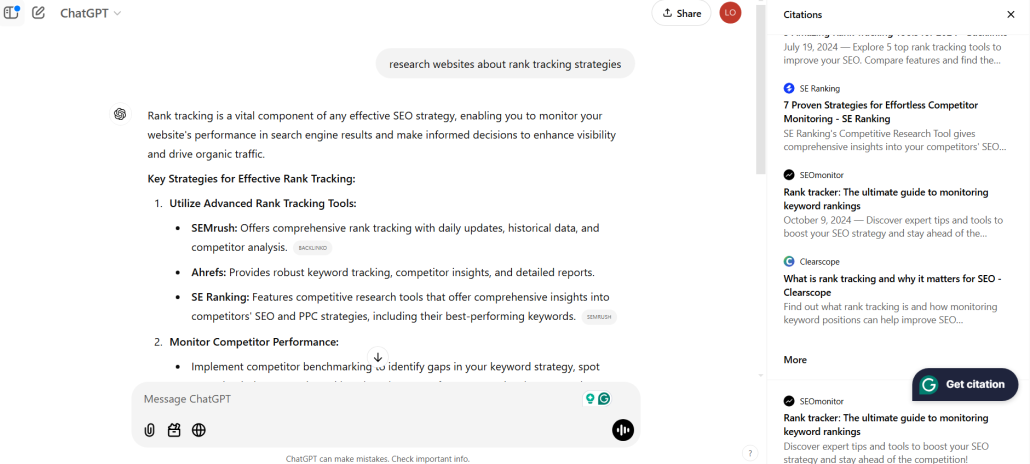
ChatGPT gets those sources from the top-ranking pages on BING!
That means that the higher you rank on Bing, the more likely you are to appear in someone’s ChatGPT “citations” list!
Bing Is Bigger Than You Think
So, how much revenue does Microsoft see from Bing?
Surprisingly, a lot.
Bing generated $6.24 billion in ad revenue for Microsoft in 2022. Contrary to popular opinion, Bing’s revenue is INCREASING every year.
To understand why Bing is successful, let’s look at the current worldwide desktop search engine market share of the top 4 companies:
- Google is at the top with a whopping 80.35%
- Bing with 11.55%
- Yahoo with 2.79%
- Yandex with 2.62%
11.55% seems like a tiny fraction of what you could be getting on Google, but Bing only had around 6% of the market share just a few years ago!
That means that the increased usage of ChatGPT and other factors have increased Bing’s market share of worldwide searches by over 60%!
Anyone who tells you that Bing isn’t worth it hasn’t done their research! With around 900 million searches a day, Bing could be a HUGE traffic source for your business after some targeted SEO (more on that later).
If your primary target audience is in the US and UK, you should start caring about Bing SEO even more. Bing’s market share is MUCH more prominent in those 2 countries than worldwide.
Access a Different Audience
The average user on Google is much younger than the average user on Bing (discussed more below), which means you can split your campaigns up and target 2 utterly different age groups.
On Google, you can use keywords that focus on young searchers.
On Bing, however, you can use keywords that focus on older searchers. Structuring your keyword strategy like this allows you to take full advantage of the Bing demographic – and with a good Bing Rank Tracker this is easy!
Ultimately, this different audience helps your business grow across multiple groups instead of just with Google’s audience.
Extra Traffic
As a business owner, I would never turn away an extra few visits to my site. After all, every visit is a potential sale.
So why do so many business owners turn away the opportunity to bring in extra traffic on Bing? Many people focus on the lower search volume on Bing, but they forget that even a smaller number of visitors is still incredible!
If you saw a $100 bill on the street, you would pick it up and take it (after trying to return it to its owner, of course). Even though it’s not enough to pay your rent, it’ll help!
Think of Bing like that $100 bill. It’s not a ton of traffic, but it’s enough to make a difference in your business’s future!
Easier SEO Opportunities
Finally, Bing SEO doesn’t take as much effort as Google SEO. You can get a larger slice of the Bing pie without NEARLY as much competition as Google.
Why is that?
It’s simple. Most businesses don’t think of targeting Bing-specific keywords, so they rank poorly.
If you spend a reasonable amount of time researching Bing keywords and targeting them, you can rank in the top 3 much more frequently than on Google.
We’ll also show you some great tips for finding great Bing keywords later, which will make your Bing SEO even easier.
How to Use ProRankTracker to Tap Into Bing’s SEO Potential
So, you decided you’re doing some Bing SEO in addition to Google.
That’s great!
Regardless of your strategy, the first step is knowing your current rank. After all, you can’t measure your progress or make strategic decisions if you don’t know where you stand now.
This is where ProRankTracker comes into play!
ProRankTracker can track any Bing rank with 100% accuracy (in addition to Google and other search engines). It offers several key features that will help you increase your Bing ranks:
- Keyword discovery tools
- Detailed breakdowns of your current ranks
- Historical rank reports to help you understand your progress
Let’s look at how to use ProRankTracker as a Bing rank tracker online and quickly improve your traffic!
Step 1: Research Bing-Specific Keywords
What if you don’t have many keywords to track on Bing? Should you just make some up?
That’s probably a bad idea. Instead, try using ProRankTracker’s Keyword Suggestions tool.
The Keyword Suggestions tool takes the keywords you’re already tracking and helps you identify new keywords.
However, it doesn’t just pair random words together. It uses AI that looks at the specific language, original context, and niche to help you find keywords that are relevant and that people are searching for.
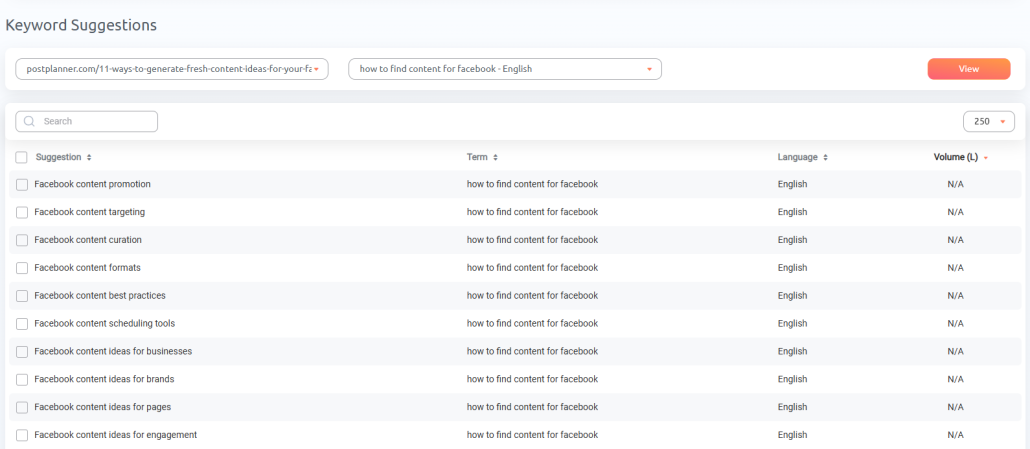
Just select the keywords you want and add them for tracking.
If you want to do more research on these keywords and what their SERPs look like on Bing, the Insta-Check tool is a great place to start.
Just input the keywords you found from the Keyword Suggestions tool, select Bing as the search engine, specify your location, and click “Save.”
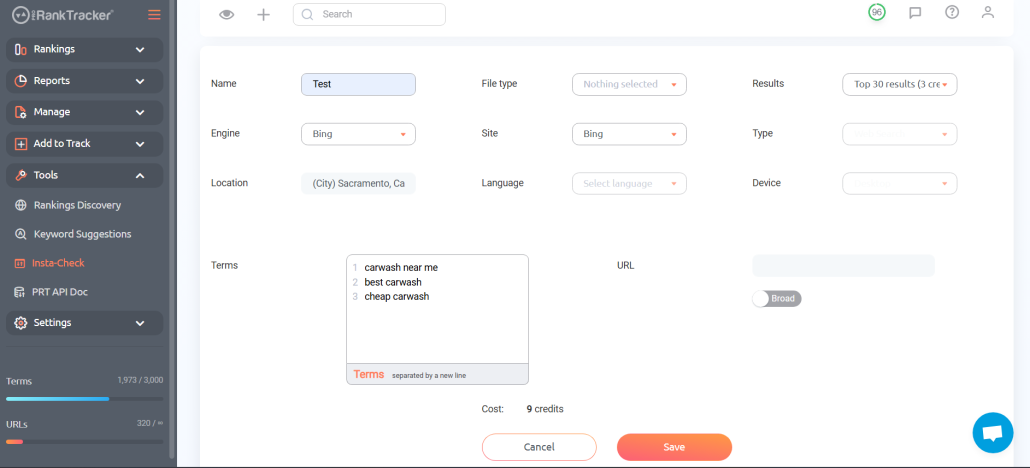
ProRankTracker will instantly generate a view of Bing’s SERP for the keywords you selected, allowing you to gauge the search intent and competitiveness of the keywords you discovered.
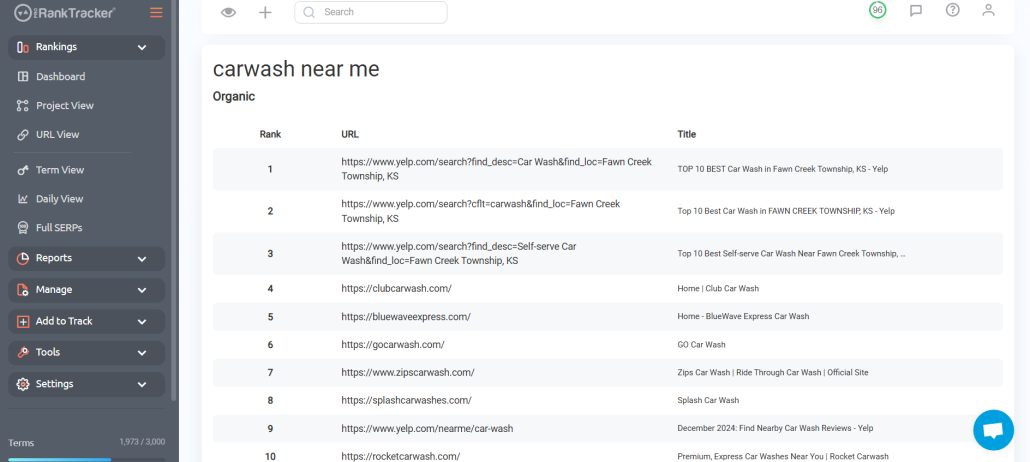
One of the best parts about Insta-Check is that you don’t have to increase your ProRankTracker plan to add more keywords.
You only have to pay for the Insta-Check credits you think you’ll need, so you won’t waste your precious tracking slots on keywords you might not even use.
If you follow this strategy, you will quickly see your list of tracked Bing keywords growing!
Step 2: Add Bing Keywords and URLs to Your Tracking List
Before you do anything else, you’ll need to ensure that ProRankTracker tracks all of your Bing keywords.
The fastest way to input your keywords is to use the Add Wizard on the left-side toolbar.
- Type in your URL
- Fill out the box with your keywords (separated by lines)
- Select where you want to track your keywords (remember to select Bing!)
- Click “Save.”
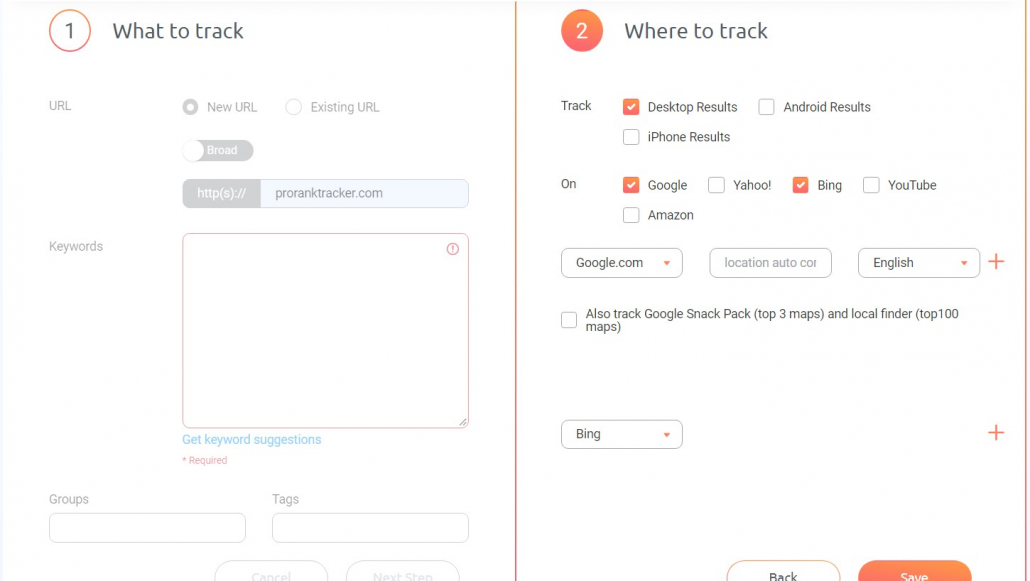
Repeat this process if you have multiple URLs until they’re all uploaded.
Your rankings views will now show you data points for your Bing keywords.
If you want more control over your added keywords/URLs and the ability to add them in bulk, you can use the Advanced Add tool. It works very similarly to the Add Wizard, but with added customizability (perfect for transferring a large number of keyword/URL combos from another rank-tracking tool via Excel file or CSV).
Step 3: Create Bing-Specific Projects
The core organizational feature of ProRankTracker is the Project.
Projects allow you to group URLs and keywords into a single entity, making it easy to find specific aspects of your ranking strategy in the future. For example:
- Separate each client into their own Project
- Divide your ranking strategy into locations, then create Projects for each location
- Separate keyword campaigns into Projects for easy analysis
- Put Google keywords in one project, Bing in another, Yahoo in another, etc…
The point is that Projects are INCREDIBLY flexible and important. A well-organized Project system makes it much easier to keep track of your ranks and understand how different aspects of your ranking strategy are working (or not working).
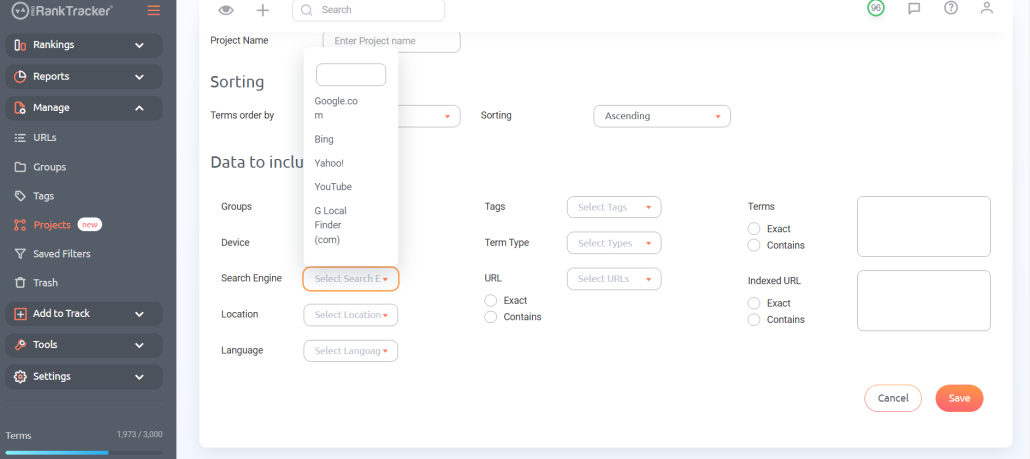
To create a Project, go to the “Manage” tab, then click “Projects.” Click “Add New Project” and fill out the details to create the Projects that help you organize your ranks.
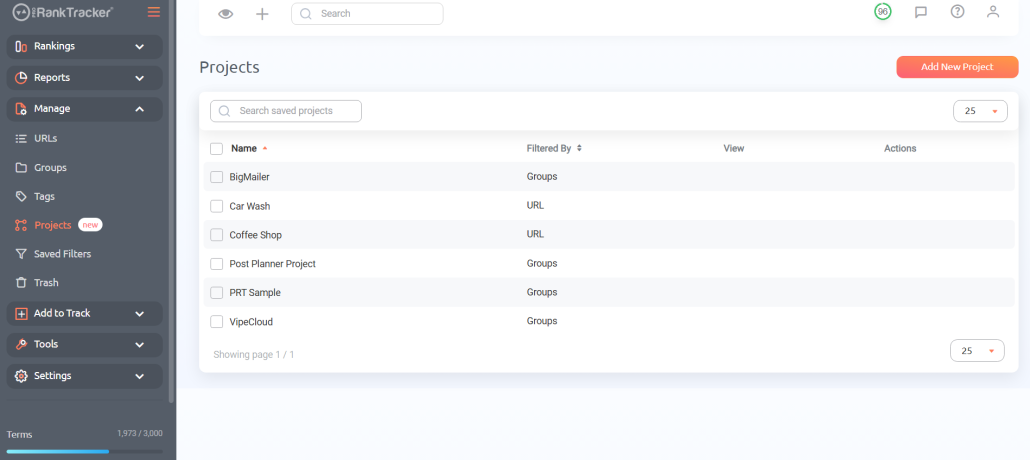
In this case, we’ll create a Bing-specific project to easily monitor how our ranking strategies improve our visibility on Bing.
Step 4: Check Your Bing Rankings
Now that you’ve got a solid list of keywords, you can use ProRankTracker’s Bing keyword tracking tools to help you understand your ranks (and improve them).
In ProRankTracker, you will track your ranks in the Rankings Views. These views are designed to give you different perspectives on your ranks and help you understand your URLs’ movements up and down the SERPs.
There are 6 Rankings Views:
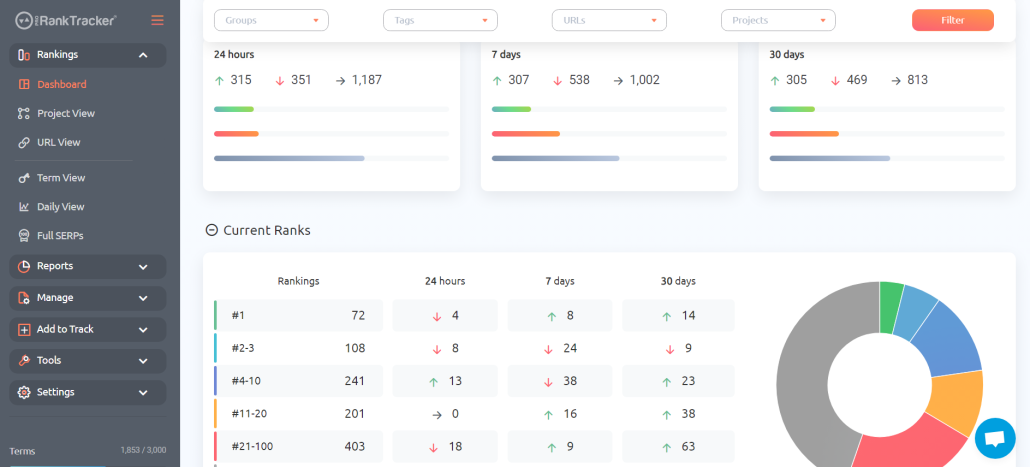
- The Dashboard gives you a general overview of all your current tracked URL/keyword combinations.
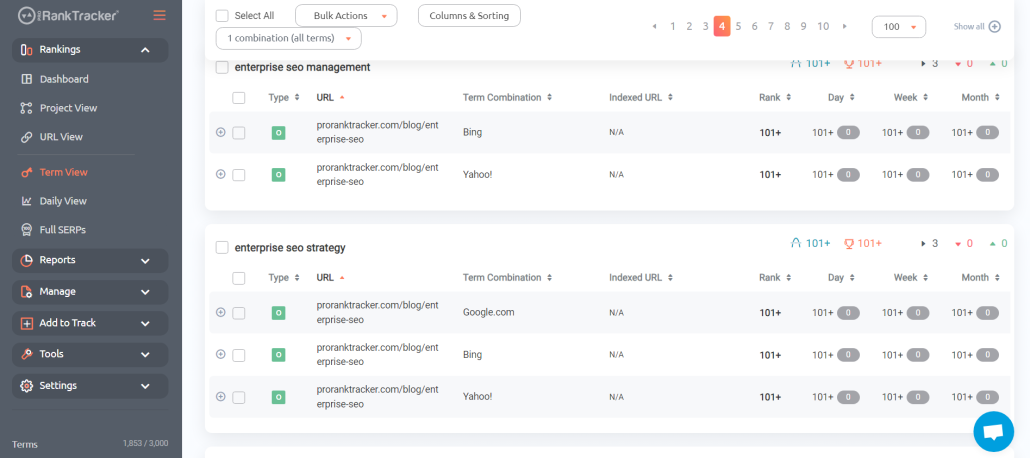
- Term view lets you see all your tracked terms and which URLs are associated with each.
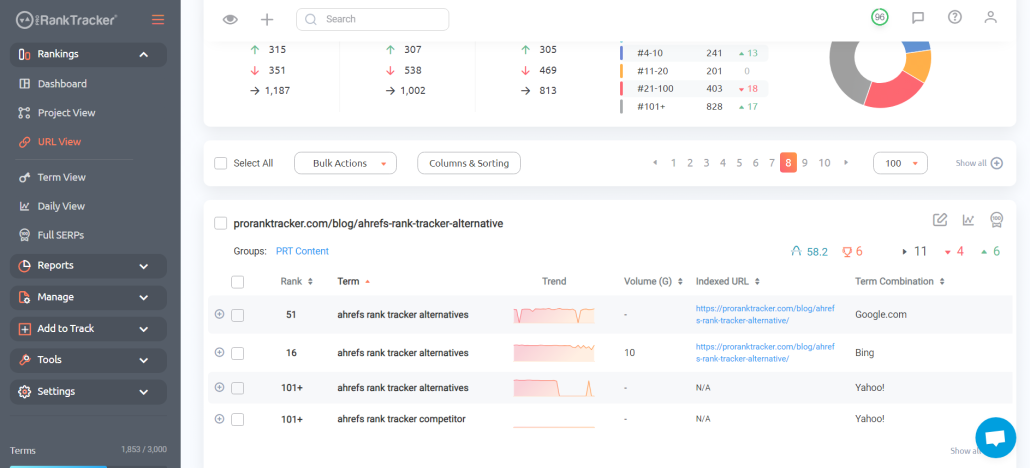
- URL view lets you see all your tracked URLs and which keywords are associated with each.
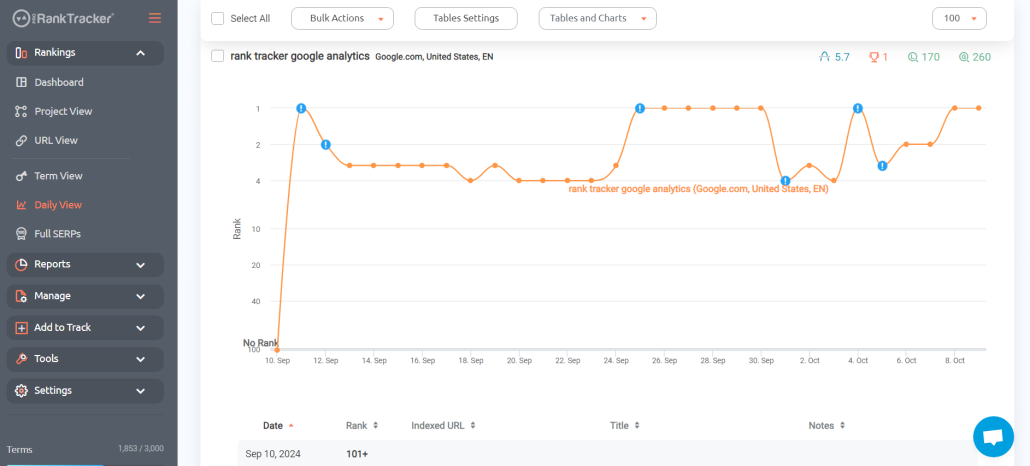
- Daily View gives you a daily breakdown of how your keyword/URL ranks have changed over time, making it easy to see trends and changes.
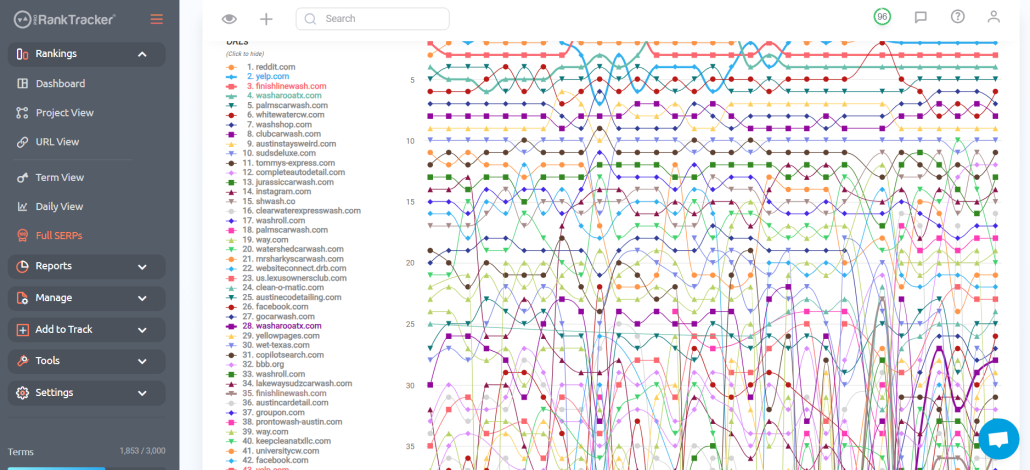
- The Full SERPs view shows you the SERP (and you can select the Google or Bing SERP depending on your needs) for your chosen keyword and gives you critical data on each ranked page. It also has a chart view showing a graphical representation of EVERY page’s movement over a selected period.
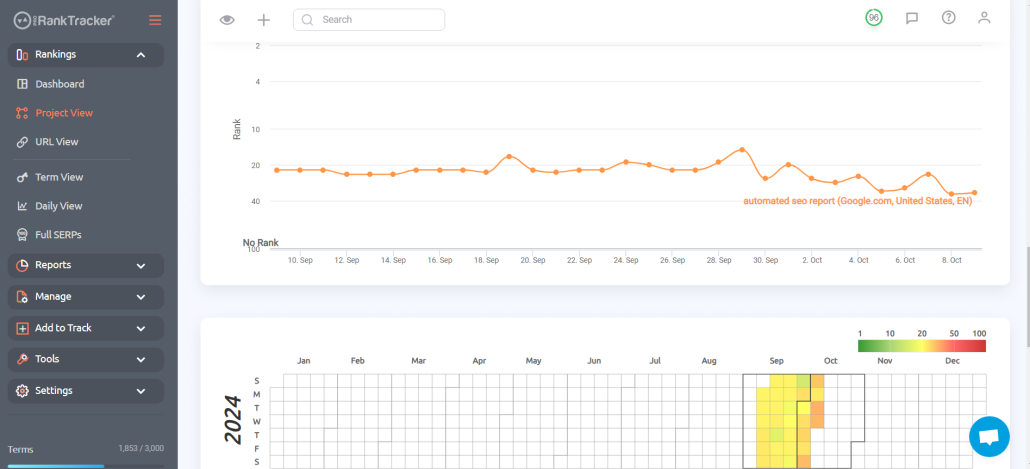
- Project View allows you to view your Projects and gives you key data, such as a daily view, a yearly heat map, and a general overview. This is the perfect place to see how your ranks on a particular search engine like Bing are doing (or whatever other information you’re using Projects to prioritize).
In each Ranking View, powerful filtering options make finding exactly what you’re looking for easier. For example, you could pull up the URL view and filter all your current URLs by which ones you’re tracking on Bing. Then, you could filter even further to specify keywords being tracked on Bing AND in a specific location.
Use all 6 Rankings Views regularly to understand your ranks well!
Step 5: Generate Bing SEO Reports
Reports are an automated system that allows you to gather data about your Bing ranking (or any other search engine) without lifting a finger. ProRankTracker offers more than 20 premade rank tracker reports.
Let’s delve into a few key reports that can help boost your position in Bing search results.
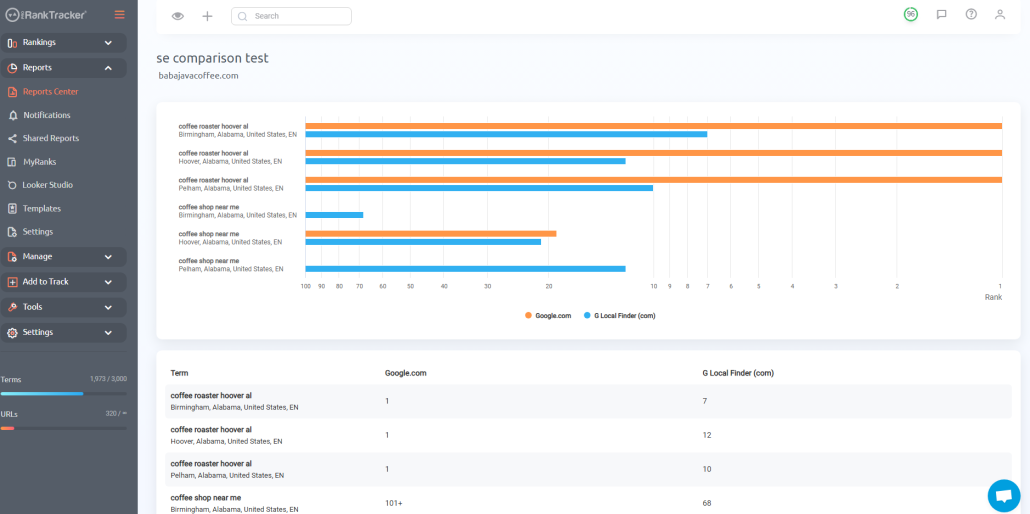
One valuable tool is the “Different Search Engines” report, which lets you see how a specific keyword and URL rank in multiple search engines. For example, you might want to see where your URL and keyword rank on Google compared to how they rank on Bing. This knowledge could help you determine where to exert most of your effort.
Another great report is the Shared Report.
Shared Reports use a live link that agency users can share with their clients, meaning the report is continuously updated with new data daily. After generating the report, you can return to the link and view the updated data anytime.
For example, let’s say you’ve established a Project (as discussed above) that collects a single client’s data in one place. You could then generate a Shared Report that allowed them to see how their ranks are progressing. They could even compare their Bing and Google results and see other important details.

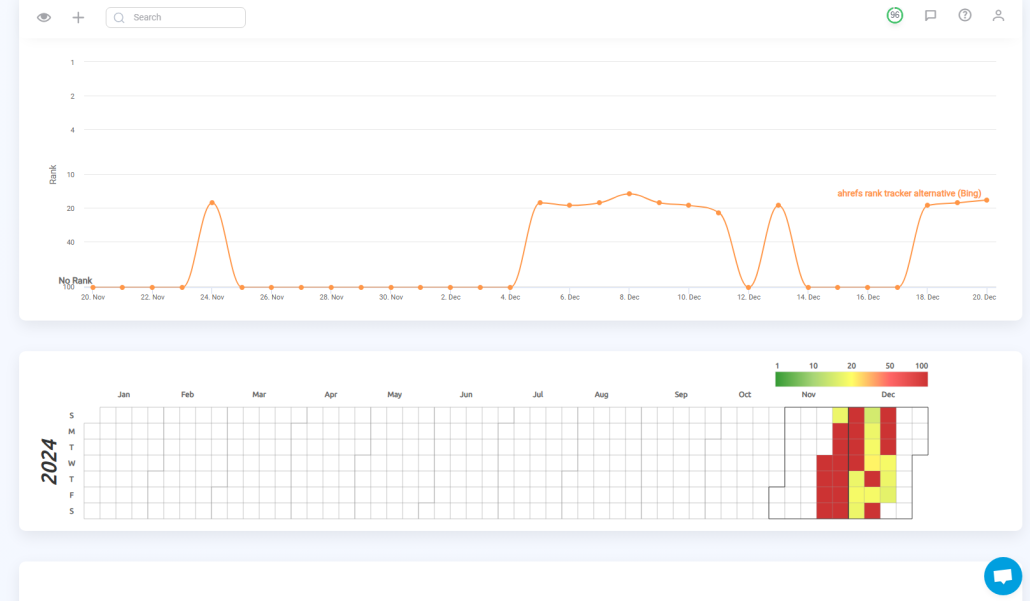
A third extremely valuable report for Bing SEO is the Projects Summary report, which lets you see selected Projects at a glance. If you’ve divided your Google and Bing data into separate projects, the Projects Summary report can give you a detailed look at JUST your Bing data.
Project Summaries include:
- A daily view of your URL/keyword combo’s movement
- A heatmap of your average rank
- Ranking overview for all terms in that Project
- Well-organized data, allowing you to quickly see how each term and URL is performing
There are many other types of reports and notifications that you can generate using ProRankTracker’s Reports Center. These are just some of the highest-yield reports for Bing rank tracking.
Sign up for a free trial and explore the Reports Center for a better idea of how much you can accomplish with automated reports!
Step 6: Perfect Your Bing Keyword Strategy
Did you know that you might already be ranking for some search terms on Bing without even realizing it?
Stranger things have happened.
Some underlying SEO properties for both Google and Bing are identical, meaning you might rank well on Bing even without actively promoting it. And best of all, there’s an easy way to find out.
ProRankTracker’s Ranking Discovery Tool lets you see keywords that you’re already ranking for on Bing. Pretty neat, right?
Just click on the Rankings Discovery tool on the left-side toolbar, then select the URL you want to work with from the dropdown menu. ProRankTracker will pull up a list of all the keywords you’re ranking for but are not yet tracking.
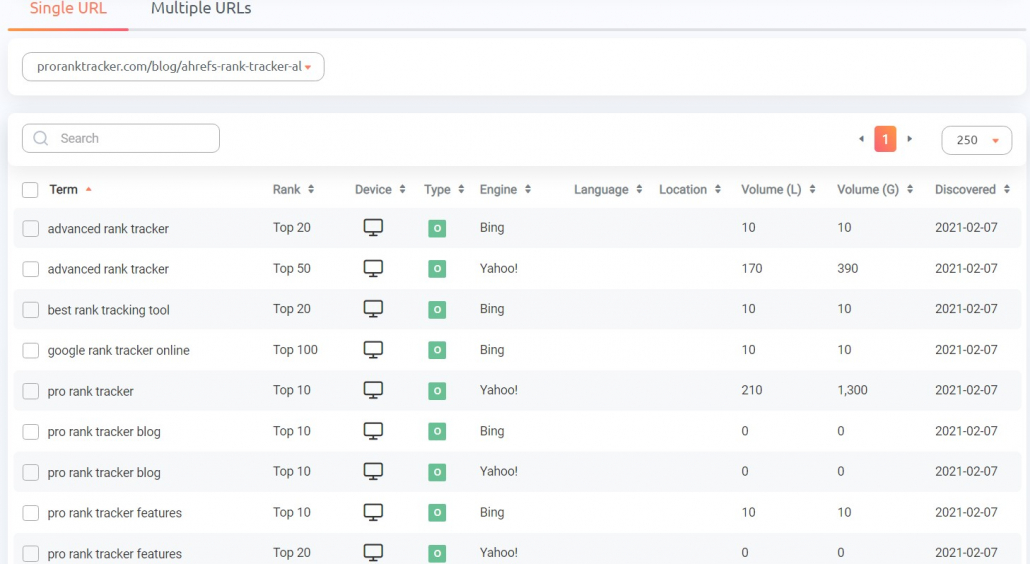
Discovering your ranked keywords is half the battle to improve them. Once you know what you’re working with, you can start targeting those keywords on Bing to push your ranks even higher.
After you’ve been working on your Bing SEO for a while, it’s good to occasionally check back with the Rankings Discovery tool, Keyword Suggestions tool, and Insta-Check tool (discussed above) to perfect your Bing keyword strategy and shore up any gaps.
Who Uses Bing (and Why)?
To start using Bing in your business, you need to know WHO uses the search engine. Otherwise, you won’t get very far.
For example, you could target the wrong demographic with your keyword strategy.
Without carefully considering the Bing audience, your Bing keyword tracking will all go to waste.
Let’s look at Bing’s user demographics and one of the primary reasons we see those users on Bing.
The Demographics of Bing
As you might imagine, Bing users are typically less tech-savvy than Google users.
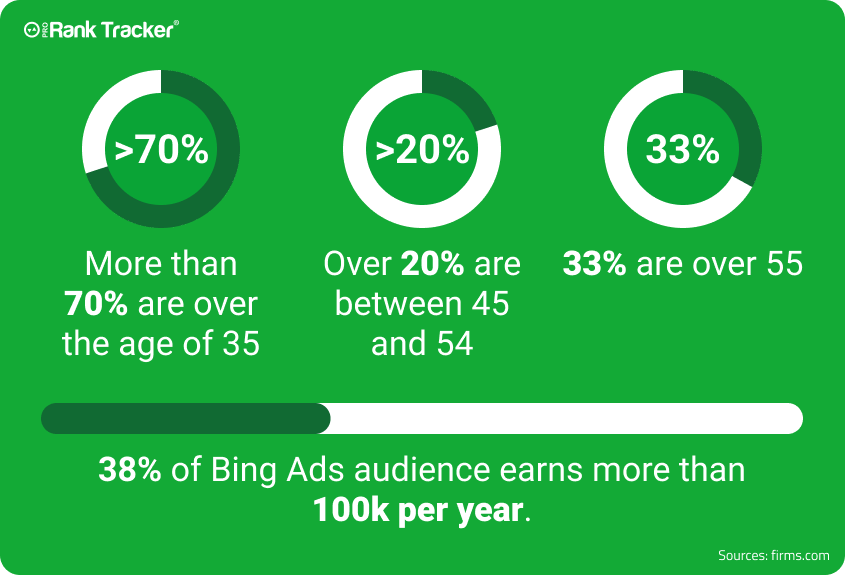
But that’s not all there is to the Bing audience:
- Bing users are older than Google users (more than 70% are over 35!).
- Bing’s audience is wealthier, with around 38% having a household income of more than $100,000!
Bing’s audience may be older, but they’re also wealthier. Ignore this audience at your own risk!
The Power of the Default Browser
The majority of the computers in the world run Microsoft Windows.
Can you guess what search engine Windows runs by default?
You guessed it – it’s Bing!
Bing is running on more than 1.5 billion devices! Many people who get a computer use the default browser without thinking about changing it.
In other words, many Bing users are on the platform simply because they haven’t taken the time (or don’t know how) to change their search engine to Google.
In other words, the fact that Bing is the default browser on most computers in the world means you CAN’T afford to ignore this search engine!
FAQ
Is Bing good for SEO?
YES!
For some businesses, Bing can dramatically increase their traffic and revenue. The key is to ensure that you’re targeting the Bing audience correctly.
For example, even though Bing’s audience is smaller, they’re more willing to click and make purchases. Don’t believe me? The CTR for ads on Bing is 45% HIGHER than on Google!
Is it easy to rank on Bing?
Fortunately, Bing is easier to rank on than Google, meaning it could be easier to break into Bing SEO than Google, allowing you to build your revenue without competing on difficult keywords.
Is Google better than Bing for SEO?
Google is bigger than Bing, but that doesn’t mean it’s better for SEO. If your target demographic is older and wealthier, Bing could be a BETTER SEO target than Google. Check above for more information about who uses Bing and how that should impact your decision to rank on Bing.
Conclusion
People often talk about Bing as if it were a search engine of the past because it’s so much smaller than Google. However, it has a lot to offer businesses looking to boost their web traffic.
The fact that Microsoft owns both Bing and ChatGPT should be all the proof you need to know that Bing is worth your investment! Ignoring the impact of AI on search results is likely a mistake akin to ignoring the development of the internet and its impact on marketing in the 90s.
Signing up for ProRankTracker’s free 30-day trial is a great place to take advantage of Bing SEO!
Happy tracking!









Trackbacks & Pingbacks
[…] Is Bing really a failure? Should you even track your Bing ranks? […]
[…] Is Bing really a failure? Should you even track your Bing ranks? […]
[…] Is Bing really a failure? Should you even track your Bing ranks? […]
[…] Is Bing really a failure? Should you even track your Bing ranks? […]
[…] Is Bing really a failure? Should you even track your Bing ranks? […]
Leave a Reply
Want to join the discussion?Feel free to contribute!