
What Your Keyword Ranking Position Means for Your Web Page
There are so many factors when it comes to SEO:
- Technical SEO
- On-page SEO
- Keywords
- Backlinks
- Content
And that’s just a tiny fraction of everything SEO strategists have to think about when doing their jobs.
Even though there are many different factors, SEO boils down to one simple factor:
your ranking position.
Your position on the SERP is the most critical indicator of your SEO strategy’s success. It shows you what works and (maybe more importantly) what doesn’t. It also plays several other vital roles in your business’s success:
- Determines website traffic (which has a massive effect on your income).
- Gives you feedback on the quality of your web pages, allowing you to improve them if necessary.
- Helps you determine if your pages’ content matches your audience’s search intent.
This article will discuss what your keyword ranking position tells you about your web page and how to improve it.
Let’s get started!
I’ll cover:
- What Every Ranking Position Means About Your Page
- Why You Have a Low Ranking Position + How to Adjust Your Strategy
- How to Use ProRankTracker to Boost Your Ranking Position
- FAQ
What Every Ranking Position Means About Your Page
Your ranking position matters for your business and website. However, it can also tell what your searchers think about your site.
For example, if you have 2 pages on your site and one ranks on page 1 and the second on page 2, you know that searchers like the one more.
So what does each ranking position mean about how your page is doing? How much can you tell about your searchers based only on your URLs’ ranking positions?
In this section, I’ll go into more detail on what specific ranks mean for your page. I performed a sample search for “movie streaming services” and will discuss why each page ranks where it does for this keyword.
Use this information as a guideline to help you understand where you need to work on your site’s SEO and keyword strategies.
Ranks 1-3
If you’re ranking in the top 3 slots, your page and content likely satisfy search intent. In other words, you’re matching what your searchers are looking for when they search for the keywords you’re targeting.
The top 3 positions get over 50% of all Google clicks, so you’re in good shape if you’re in one of these spots.
In our “movie streaming services” example, the top result was a Reddit thread asking which movie streaming services people use. This likely indicates that the search intent for this keyword is for people to discover a list of widely used services (as opposed to looking for a specific service).
The second result is a website that sells a product that allows people to combine multiple streaming services into one place, and the third website is an article from PCMag ranking the top streaming services.
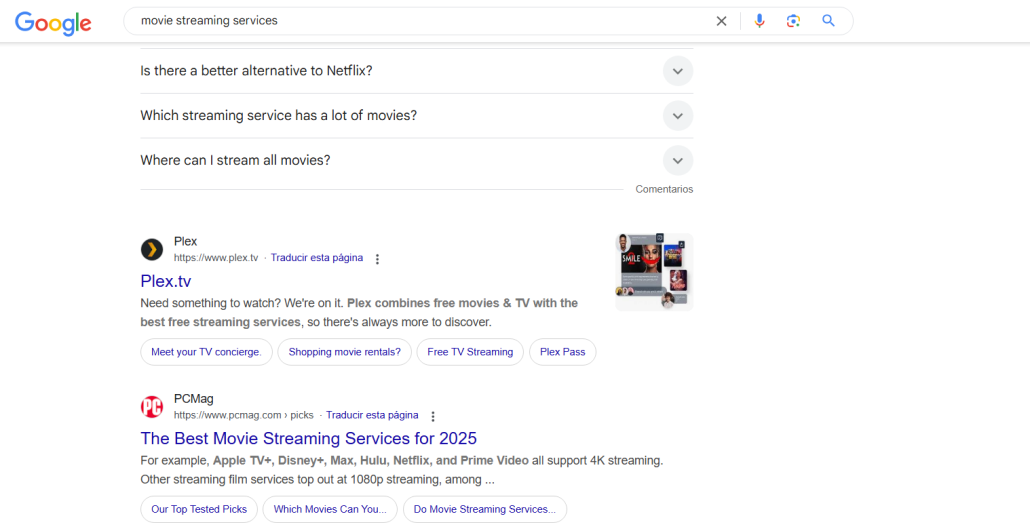
It’s important to note that all three of these pages closely match the search intent of people looking for multiple streaming services.
Results from streaming giants like Netflix and Amazon Prime aren’t appearing because that’s not what people are looking for with this search. All 3 top websites are highly recognized with topical authority in the streaming space.
Ranks 4-6
If you’re in ranks 4-6, your content gets close to what your searchers want. You aren’t in the top 3, but you still get clicks because you provide value (even if it isn’t as much as the top 3).
If you want to move past these ranks, narrow your keyword strategy and improve and update your content. Read all your competitors’ pages and ensure you’re providing higher quality content than they are.
In our example, ranks 4-6 are still occupied by pages with good topical authority that match search intent – although slightly less than the top 3 spots do.
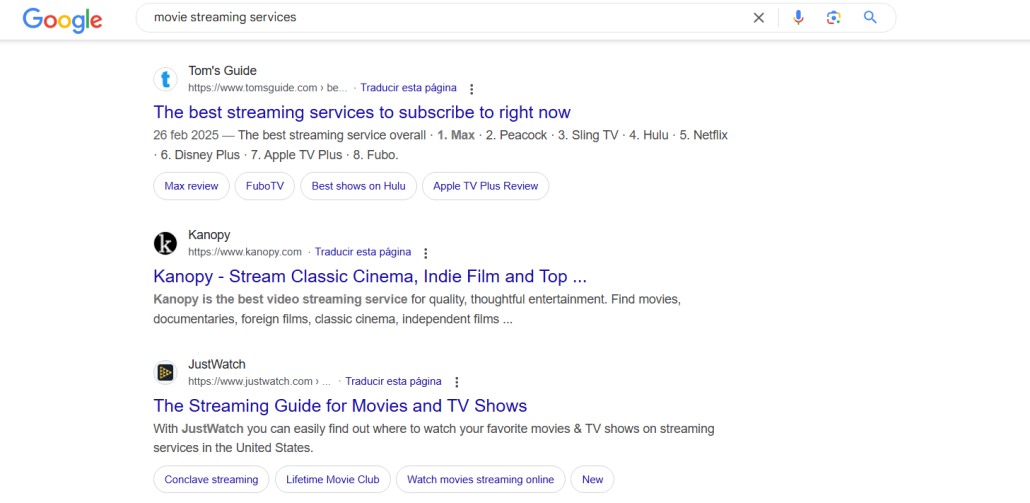
You can see here that starting with rank 5, the pages stray a bit from discussing MULTIPLE streaming services to discussing just one streaming service. This is close to the search intent of this keyword but far enough away to pull these pages farther down the SERP.
Ranks 7-10
Ranks 7-10 are still on the first page of Google, but you’ll start to see a significant drop in CTR in these positions. These 4 positions see less than 15% of all clicks.
If ranking in these spots, you should modify your content to match search intent. Make sure that your content is all value and no fluff.
Higher value usually results in a higher rank, so rework your content with a fine-toothed comb to make sure everything is incredibly high value.
Returning to our example, you can see that ranks 7-10 revolve around a different search intent than the results at the top of the page.
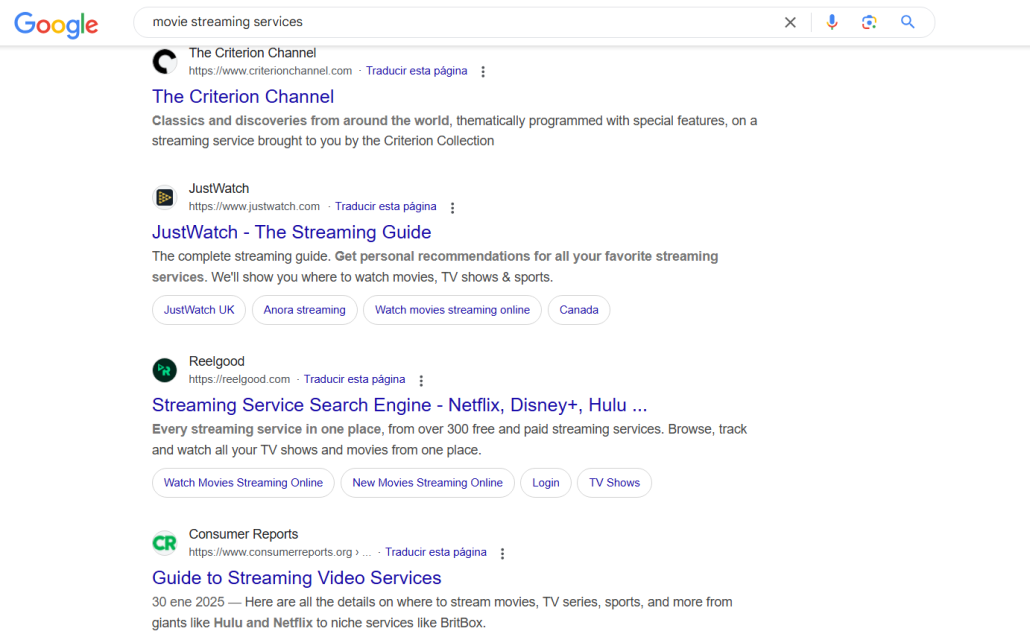
These results show articles discussing streaming guides, streaming service search engines, and similar topics.
While this is a closely related discussion, it’s easy to see how it’s different enough to cause these pages to fall to the bottom of the first page (costing them significant traffic from this keyword!).
2nd Page and Below
The second page and below get hardly any clicks. That means your page will not contribute much to your income if it falls to the second page or worse.
Being on the second page means that Google is starting to test your content in the SERPs. However, it hasn’t earned enough positive signals to rank on the 1st page.
In other words, your website is good enough for Google to include it on the SERPs but not good enough to think people will find much value there.
Interestingly, on the second page of our example, we FINALLY find big streaming service names like Netflix and Max.
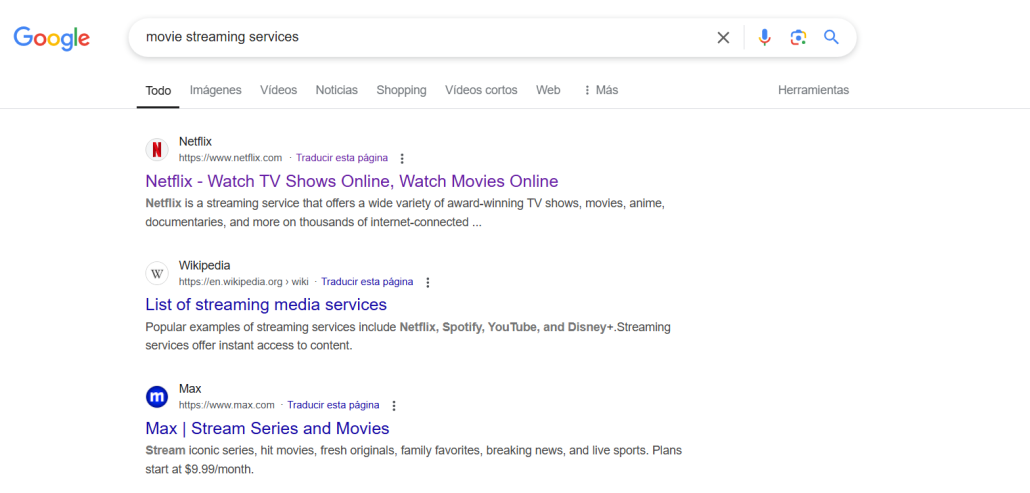
Why are they so much lower than some relatively unknown websites?
Because when people search for “movie streaming services,” they aren’t looking for a specific service – they’re looking for lists of the best ones, opinions on what people use for specific types of content, and services to help them manage multiple streaming services from a single platform.
This is a PERFECT example of how closely matching search intent for a long-tail keyword can help you beat businesses 100 times bigger than you on the SERP!
Why You Have a Low Ranking Position + How to Adjust Your Strategy
Now that you know what each ranking position category means, let’s talk about WHY you aren’t ranking as high as you want to.
In this section, we’ll examine 7 reasons you have a low rank. For each of those reasons, we’ll ask (and answer) 3 questions:
- What is the problem?
- How does the problem affect your SEO?
- How can you fix it?
Your Keyword Strategy Is Weak
One of the most common problems in SEO (especially with beginners) is that their keyword strategy isn’t specific enough.
Many people target high-volume, high-competition, broad keywords instead of specific ones.
For example, people target keywords like “monthly planner” instead of “monthly planner for law students.”
Targeting high-competition keywords can cause you to lose traffic because you can’t compete with the giant companies on those keywords.
To fix this issue, target longer-tail keywords with less volume. It’ll be easier to rank, and there’s usually more purchase intent with long-tail keywords.
You Aren’t Beating Your Competitors
The most common issue for most businesses on the SERP is that they can’t keep up with their competitors.
What causes someone to lose to their competitors?
They have better content. It’s:
- More informational
- More visual
- Easier to read
- Better written
So, how do you fix this issue?
The simple answer is to create better content, but there’s more than one way to do that.
- Update outdated content
- Rework content to match search intent
- Include better visuals like infographics, images, and graphs
- Learn about how to structure content with headings, paragraphs, and sections
- Write posts in direct competition to your opponents’ posts
You Don’t Have Enough Topical Authority
Let’s say you run a successful website about collecting old books. You regularly rank in the top 3 for the search terms you target.
But you also have a lot to say about investing, so you use all your successful SEO knowledge from your previous experience to craft high-quality articles on investing.
Crickets. They don’t produce any traffic.
Why?
Because your website is about books!
When Google sees your new article on investing, it scours your website to see what else you’ve posted about this topic. When it comes back empty-handed, it determines that you don’t have enough authority to post about the topic.
This is the phenomenon of topical authority.
It’s when Google (or another search engine) analyzes your website’s content, internal links, and backlinks (among other things) to determine how much experience, knowledge, and authority you have on that topic.
The only way to improve your topical authority is to post more on that topic and use internal linking between those posts. As you do, Google will recrawl your pages to find increased authority and adjust your ranks accordingly.
You Can’t Adapt Quickly Enough to Rank Changes
Have you ever started losing traffic and sales and couldn’t identify the root cause?
This happens to people all the time. One of the leading causes is that they’re dropping on the SERP and don’t know it.
When you don’t know what your ranks are doing, adjusting your strategy appropriately is impossible. Everything you do will just be a guess.
The fix here is obvious: just keep track of what your ranks are doing on the SERP. Track ranks more closely with a rank tracker, so you’re never left wondering what is happening to your SEO.
You Aren’t Targeting Local Searches
If you’re a local business, you might not be ranking for all the local searches you should rank for.
For example, you might not be appearing on:
- Google Maps searches
- Google Snack Pack
- Local Finder
- “Near Me” searches
If you’re missing out on those searches, you could be missing HUGE quantities of traffic.
To fix this issue, use a rank tracker to adjust your Keyword strategy to include local searches. Additionally, set up your Google Business profile. Make sure it’s fully complete and up-to-date with:
- Name
- Address
- Phone number
- The locations you serve
Your User Experience is Lacking
Have you ever been to a website that’s just miserable to use? There are many issues that may contribute to that:
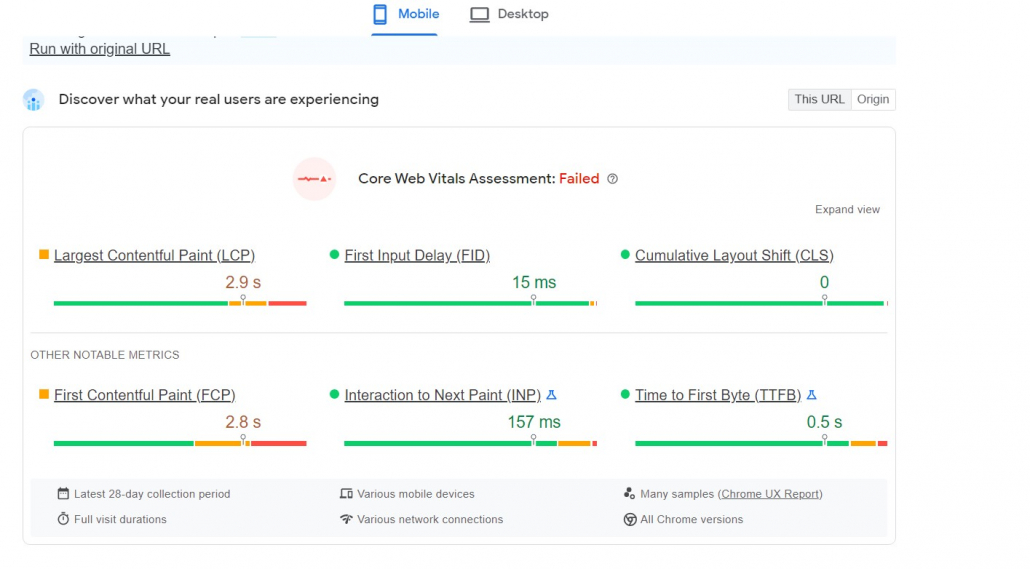
- It loads slow
- Messy design (especially on mobile)
- Hard to navigate
- Buttons that don’t lead to anything
If you have those problems, Google will not rank your site as high as others with better design. Google wants to rank sites with the most value, and nobody enjoys websites with a poor user experience.
If that problem describes your website, speed it up by trying the following strategies:
- Compress images
- Find better hosting
- Have your site professionally redesigned for SEO
- Use Google PageSpeed Insights to diagnose the problem
- Add anchor links in a table of contents on your blog posts
- Have a clean linking structure/navigation
- Use good, concise copy that’s easy to read
You don’t have enough high-quality backlinks
Backlinks are one of the most misunderstood parts of SEO. Getting backlinks can almost seem like a mystical process.
Backlinks are hard to get. However, it’s harder to rank for more significant keywords if you don’t have them.
Having a lot of high-quality backlinks indicates to Google that your site is worth visiting because sites around the internet are linking to you.
The best way to get backlinks is to create better content. So, make sure your content is worth earning a backlink.
If you want to speed up the process, reach out to websites in your industry and set up a backlink agreement with them.
How to Use ProRankTracker to Boost Your Ranking Position
ProRankTracker is a highly specialized rank-tracking tool that can help you improve your ranking position using industry-leading tools.
The best thing about using a rank tracking tool like ProRankTracker is that you can get insights that are impossible to get without them.
For example, you can generate unlimited Full SERPs showing exactly how your URLs (and your competitors’ URLs) ranks have changed recently.
Let’s look at how to use ProRankTracker to push your ranks to the next level.
Step 1: Add Keywords/URLs
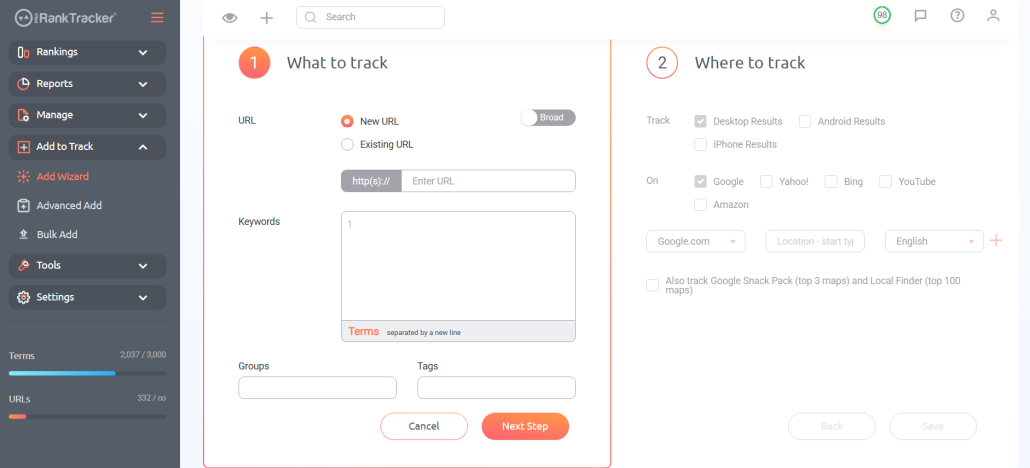
Before you can do anything useful in ProRankTracker, add your URLs and keywords to your tracking list. You can use the Add Wizard, Advanced Add, or Bulk Add tools.
If you have a lot of keywords/URLs to add at once, the Bulk Add or Advanced Add tools are faster as they allow you to upload multiple keyword/URL combos simultaneously.
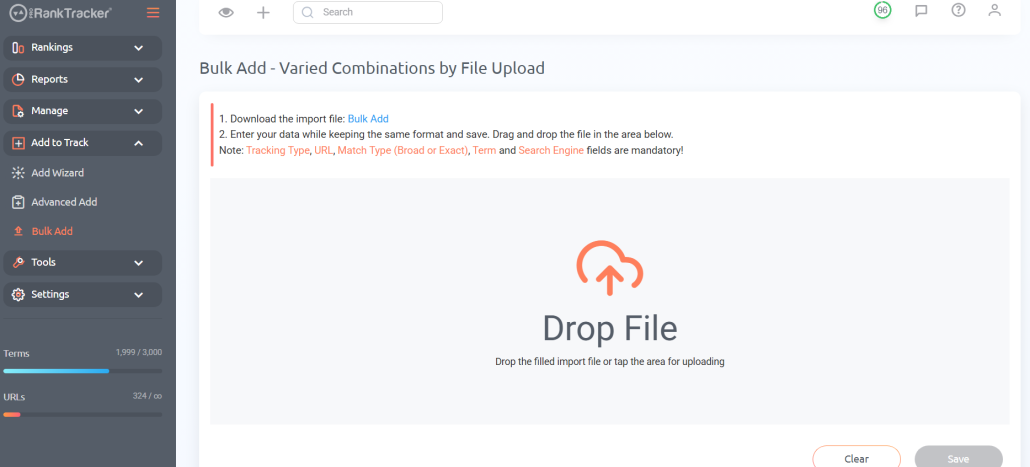
If you’re starting from scratch, the Add Wizard is the quickest way to add a few URLs/keywords.
Step 2: Organize Your Data
After you’ve added your keywords and URLs, it’s best to organize them to get the most use out of them.
ProRankTracker’s most important organizational tool is the Project, which allows you to divide your data into manageable chunks. Doing so makes it easier to find the data you need, create targeted reports, and manage multiple clients simultaneously.
Go to the Projects menu under the “Manage” tab and select “Add New Project.”
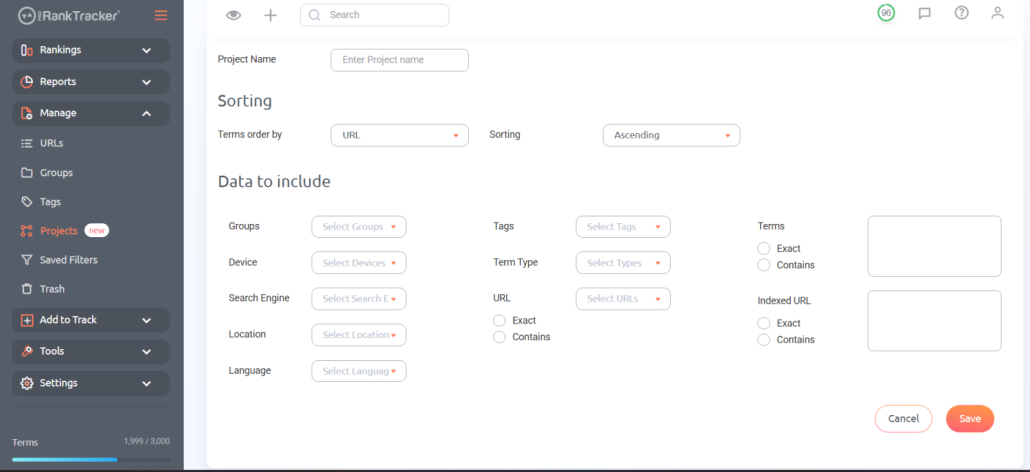
Here, you’ll select which tags, groups, URLs, and keywords to put in the Project.
When making a Project, consider your goals.
- Trying to separate clients’ data from each other? Make a Project per client
- Trying to split up your SEO campaign by location? Make a Project for each location.
- Want to understand how mobile and desktop results vary? Make a mobile Project and a desktop Project.
The point is to make the Project that fits your needs (there’s no limit to how many you can make), so use your creativity to drive you here!
Another great, timesaving organizational feature is the star feature. When looking at your ranks in the URL View, Project View, or Term View (discussed below), select the star next to your most important ranks.
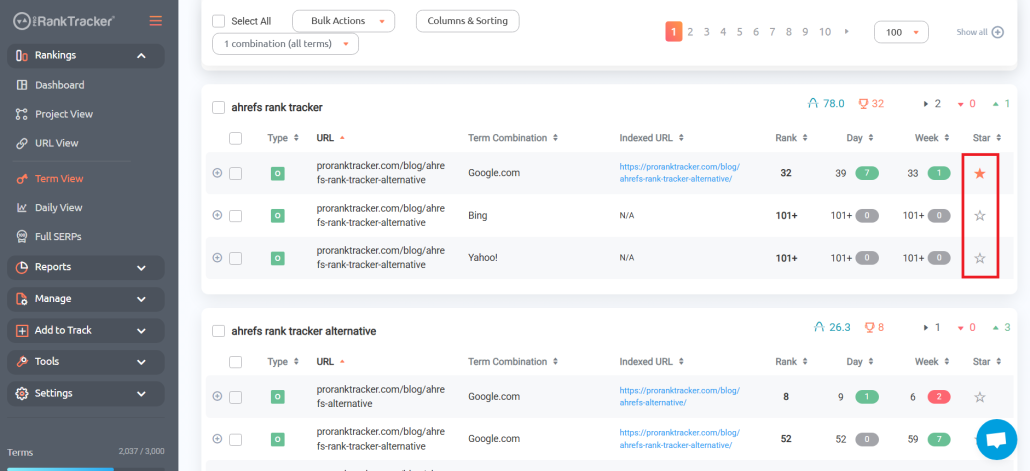
This will allow you to filter and sort by starred items in future reports and rankings views, helping you access your most essential data faster.
Step 3: Use Rankings Views to Track Ranks
ProRankTracker offers 6 Rankings Views that help you know precisely how your URLs perform on the SERP.
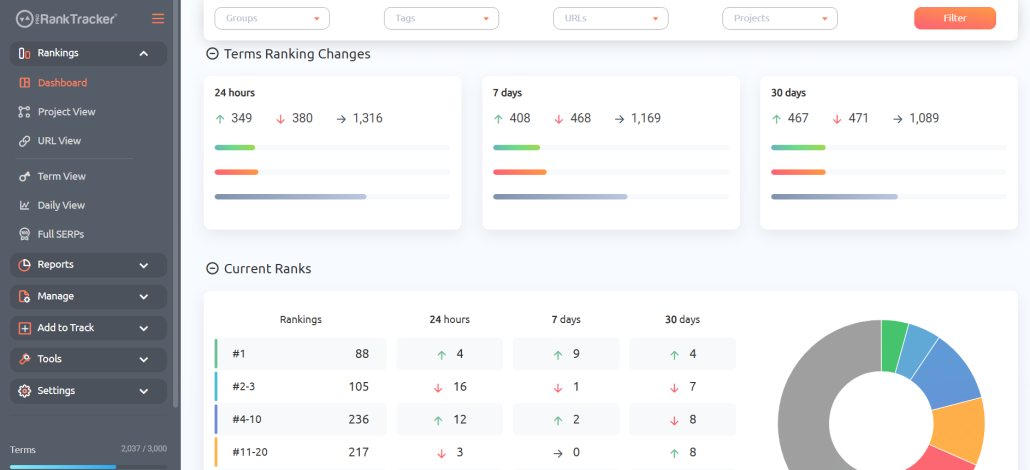
- The Dashboard gives you an overview of ALL your ranks in one place.
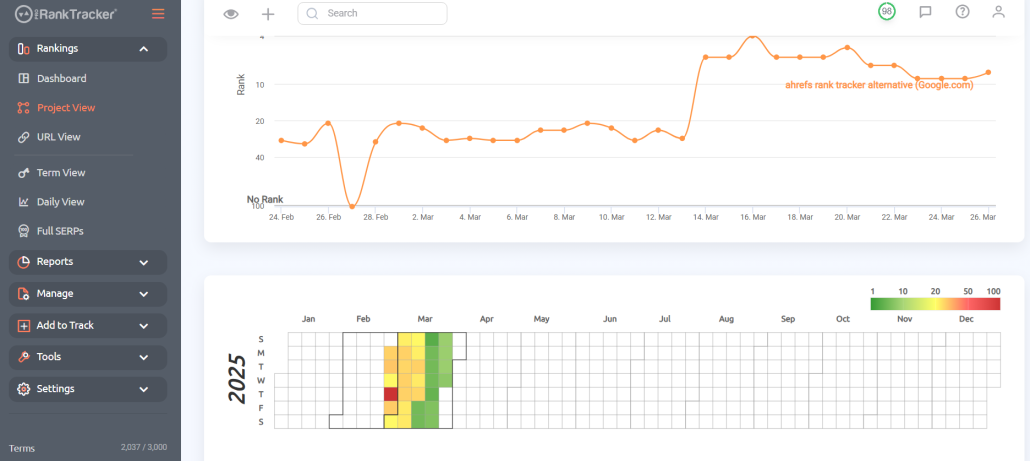
- The Project View shows you a breakdown of all the keywords and URLs being tracked in the selected Project. You can also see a daily view for any of the Project’s URLs and a yearly heatmap for a quick visual understanding of your rank’s long-term progress.
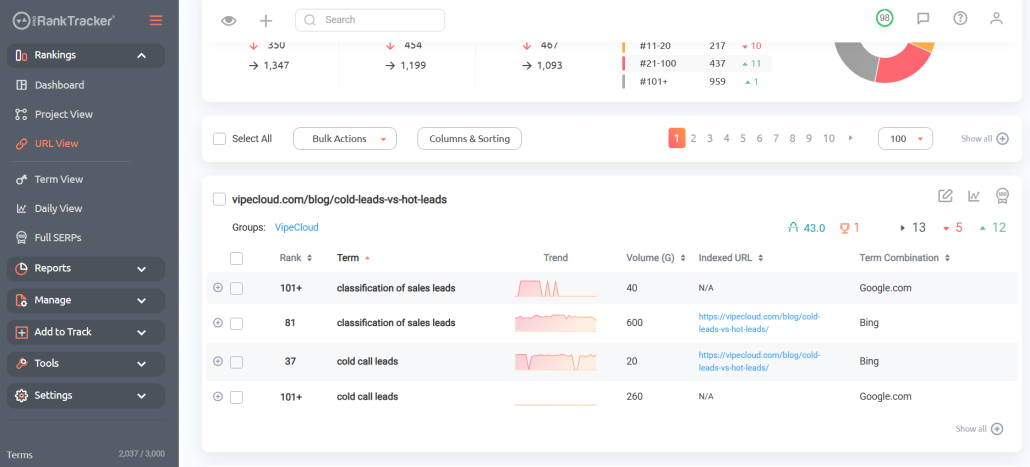
- URL View shows you how the tracked terms for each URL are doing. In other words, it organizes all your tracked keywords by the URL for which you track them. You can see pertinent information about how each URL’s keywords perform in one place.
- Term View is just like the URL View, but it organizes your URLs by which terms you track. For example, it shows you all the URLs targeting the same keyword.
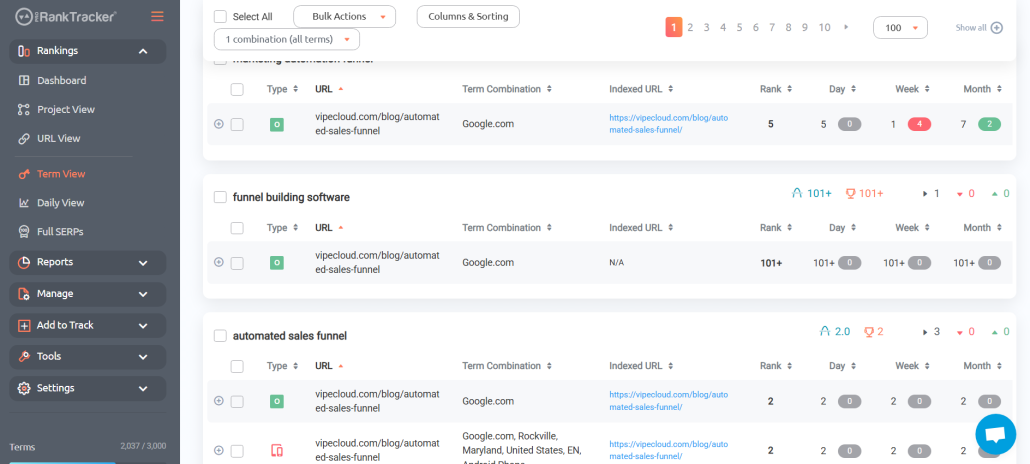
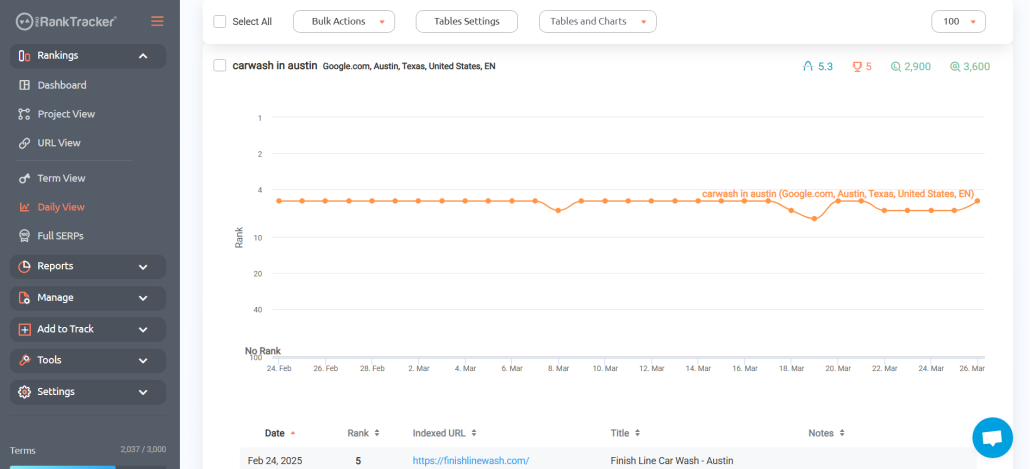
- Daily View shows how your ranks have changed daily over a selected period. The graphic view makes it easier to understand and visualize.
- The Full SERPs view shows you the entire SERP for a given search term. You can also display the SERP in a graphical view to track movement over a selected period.
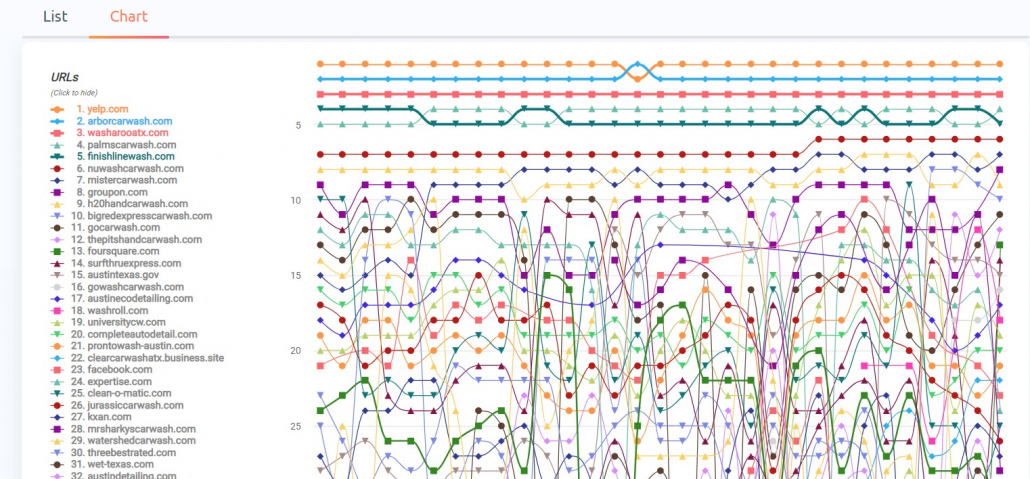
All of these Rankings Views help you keep track of your ranks with eagle-eyed precision. Knowing where your ranks stand is the key to improving your strategy using the tips above.
Step 4: Set Up Reports and Notifications
ProRankTracker offers more than 20 types of reports and notifications to keep you (or your white-label clients) updated.
These reports and notifications allow you to get regular updates on your ranking progress – even without opening ProRankTracker. They are sent directly to your email to help you stay constantly updated.
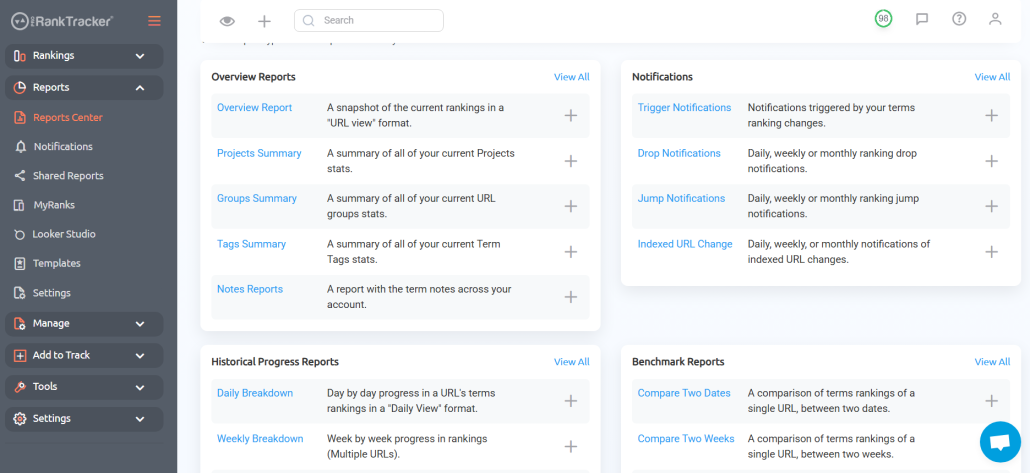
For example, let’s say you have a few competitors on the SERPs, and you’ve separated each into their own Project on ProRankTracker. Using reports, you could set up a Project Summary report to automatically send at the beginning of every week.
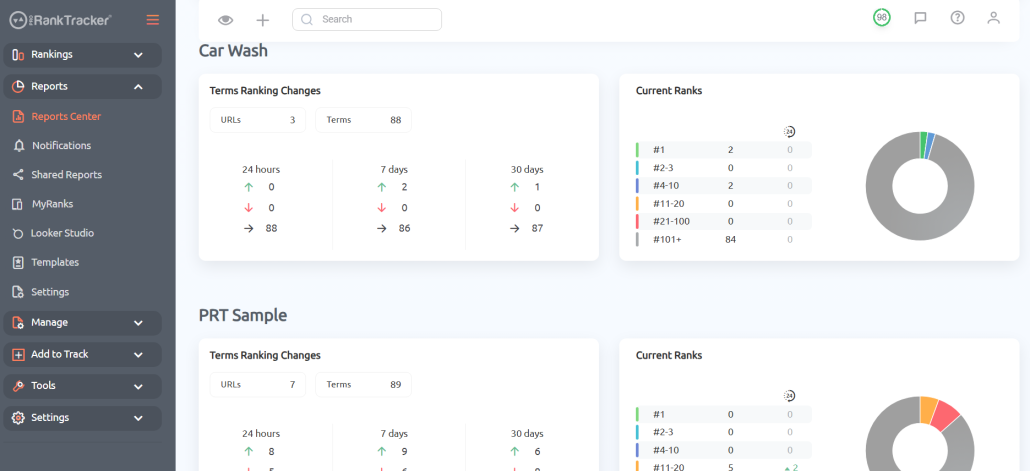
Setting up this Project Summary report would give you a brief bird’s eye overview of how your ranks stacked up against your competitors this week.
Regularly scheduled reports can help you stay on top of your ranking progress from ALL angles, giving you the information you need to improve your strategy.
Step 5: Improve Your Keyword Strategy
After reading this article, you may have discovered that your keyword strategy is weak.
ProRankTracker can help you with that.
Rankings Discovery shows you all the keywords your URLs already rank so you can start tracking them. This is also useful for discovering new keywords from your competitors’ strategies.
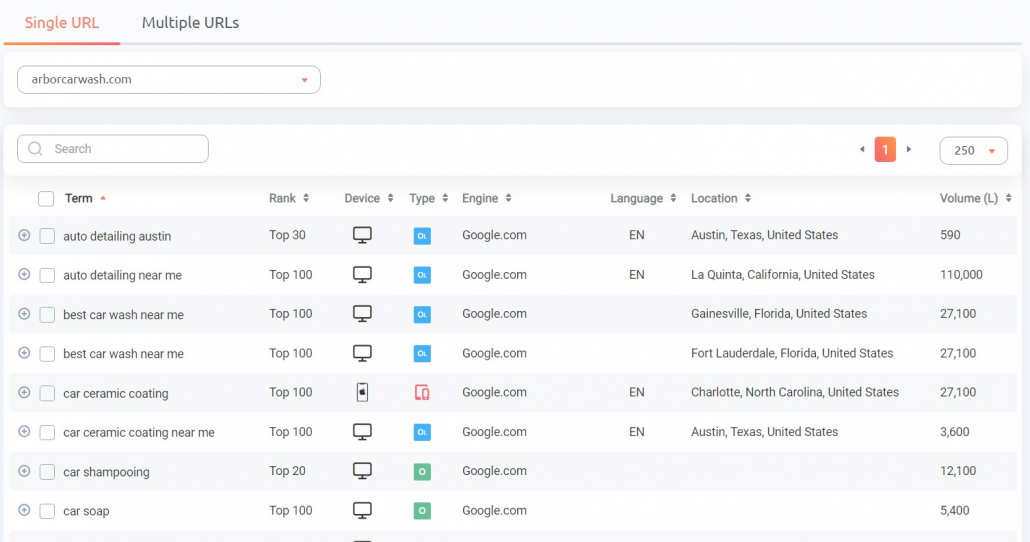
After using Ranking Discovery to grow your strategy, head over to Keyword Suggestions to discover highly specific, long-tail keywords to add to your plan.
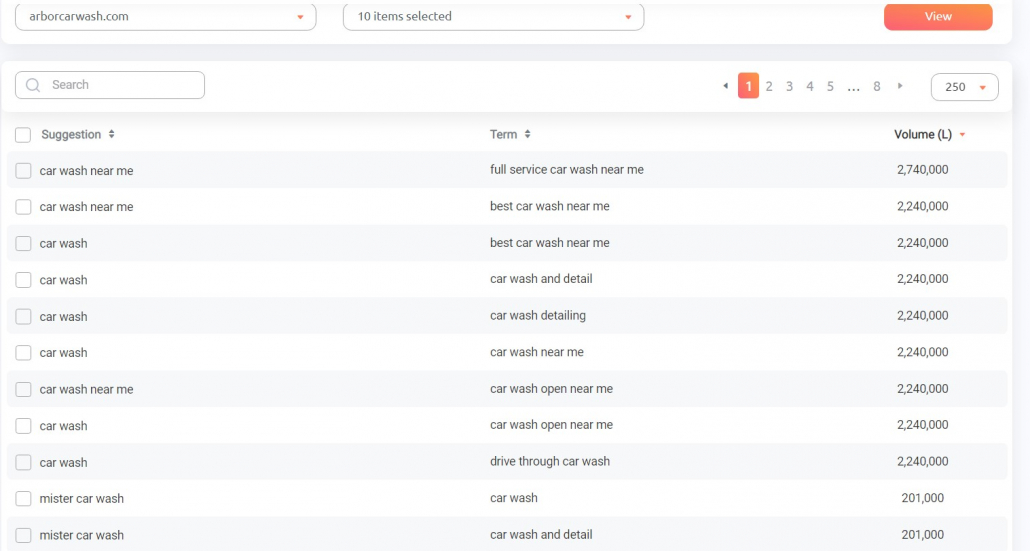
Prioritize finding long-tail keywords that closely match buyer intent to get higher on the SERP and get more clicks.
Third, you can use the Insta-Check tool to do a quick SERP check on ANY keyword/URL – even without adding it to your long-term tracking list.
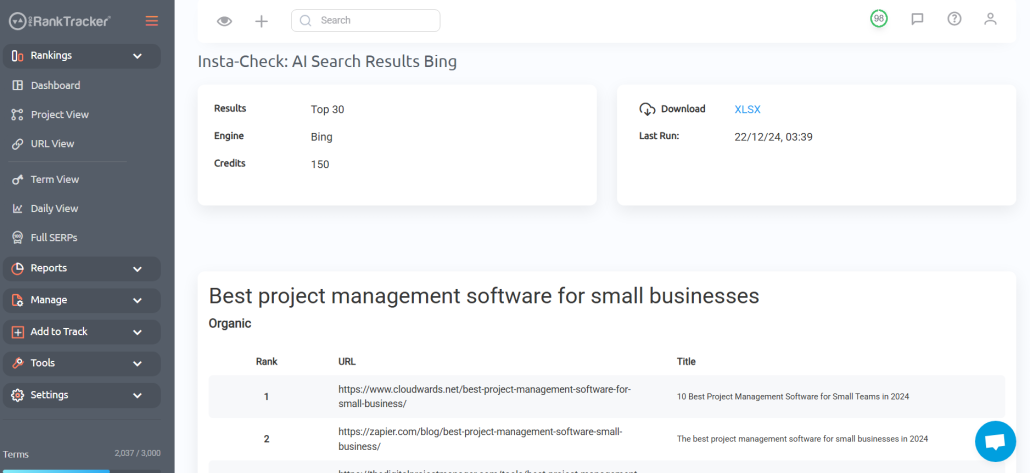
Insta-Check works on a credit-based system, so you only pay for the checks you need. This is perfect for doing background research on new keywords to see the competitor landscape and determine if they’re worth adding to your long-term strategy.
Step 6: Rinse, Repeat, and Watch Your Ranks Climb
Now that you know the basics of ProRankTracker, you should be ready to start closely monitoring your keyword ranking position.
Over time, you will see your ranks fluctuate (if you keep up with your reports), giving you valuable information about where to bolster your efforts.
Using the keyword tools to find and assess new keywords will help you strengthen and improve your ranks.
Then, repeat that process and watch your ranks climb up the SERP!
FAQ
What is a keyword ranking?
A keyword ranking tells where your specific URL appears on your targeted keyword’s SERP (search engine results page). In other words, if you write a piece for your blog, your keyword ranking tells you how high on the SERP your post appears for your targeted keywords.
How to check your keyword ranking position?
You can manually check your keyword position simply by searching for your specific keyword. However, this is a slow and inaccurate method because it doesn’t allow you to consider your rank from multiple locations.
A better method is to use a dedicated rank-tracking tool like ProRankTracker that can track your ranks from multiple locations and give you advanced tracking features like reports, notifications, and keyword development tools.
What is a good keyword ranking position?
Ideally, you want your pages to appear in the top 3 ranking positions for your targeted keywords. If you need help getting there, read the advice above!
Ready to Stay on Top of Your Rankings?
Your ranking position has more power to harm your website than any other factor in SEO, so staying updated is essential.
If you follow the tips in this article, you should quickly be able to keep track of your ranks to improve your strategy.
We highly recommend signing up for ProRankTracker’s 14-day free trial so you can follow the steps above and see how much it can help you improve your ranks.