

Google Maps Rank Tracker: How to Check Local Rankings
Looking for a Google Maps rank checker?
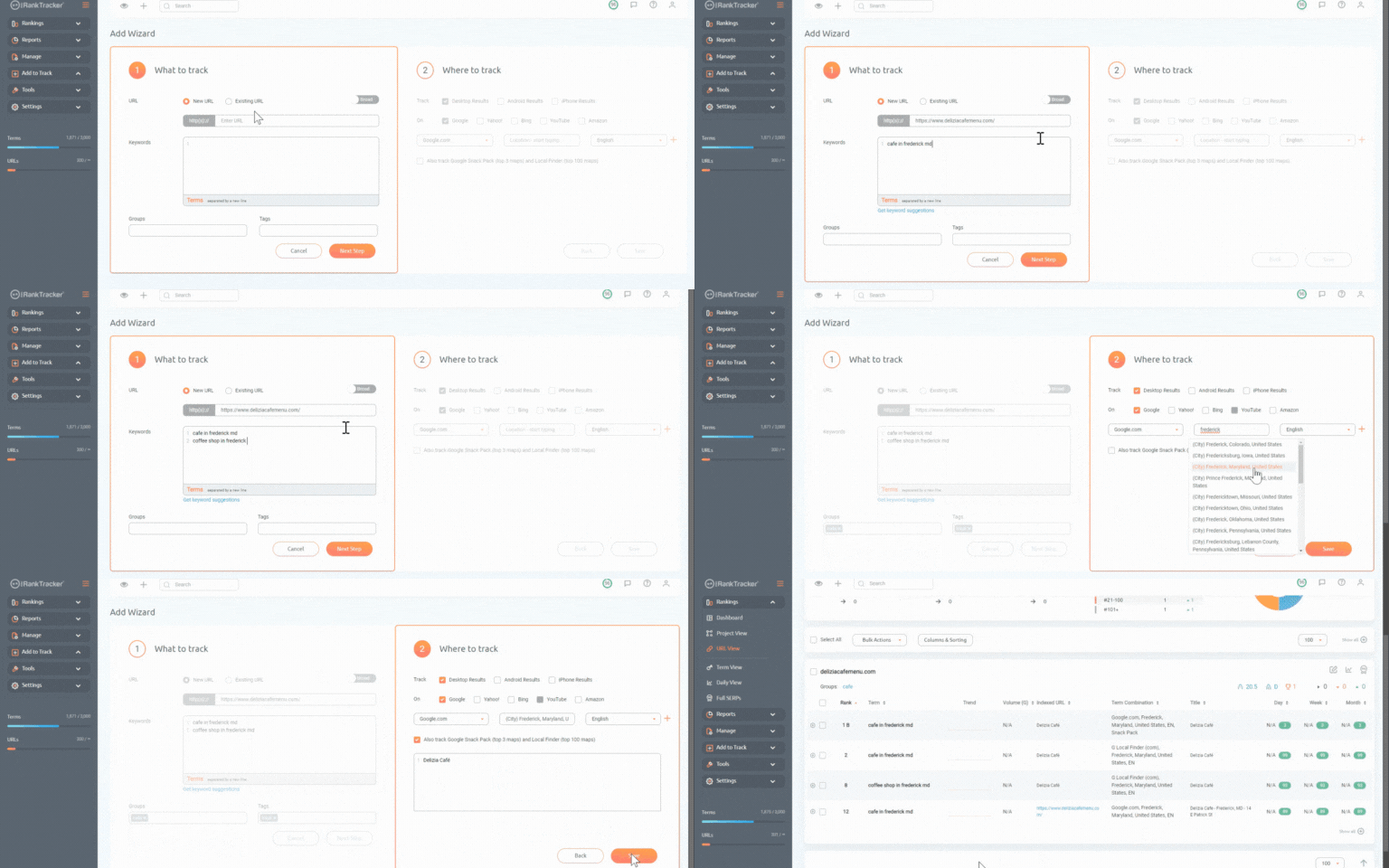
Try ProRankTracker for FREE today.
NOTHING is more disappointing in SEO than ranking high on the SERP for a location far from your store.
In other words, your website is going crazy with visitors… but they’re all located 1,000 miles away from your store.
When that happens, you did everything right but targeted the wrong location.
How do you fix this serious problem?
It all starts with tracking your local rankings.
Search trends vary widely by location, so working on your local ranking with Google Maps SEO is imperative to your shop’s success.
This article will show you how to demolish the competition in local SEO by tracking local SERPs on Google Maps.
We’ll cover:
- How to Check Google Maps Rankings Manually
- How to Track (and Improve) Your Google Ranking with ProRankTracker
- How to Optimize Your Google Business Profile for Ranking
- What Is Google Local Rank Tracking?
- Frequently Asked Questions About Tracking Your Ranks on Google Maps
- How’s Your Google Maps Ranking?
How to Check Google Maps Rankings Manually
There are 2 ways to track your Google Maps rankings:
- Manually
- With a tool
The first option–manual rank tracking–is incredibly time-consuming, but it can work if you only target a few keywords for local search queries.
To manually track your rank for those keywords, search them on Google, then scroll down until you find your business (hopefully, you won’t have to scroll for very long!).
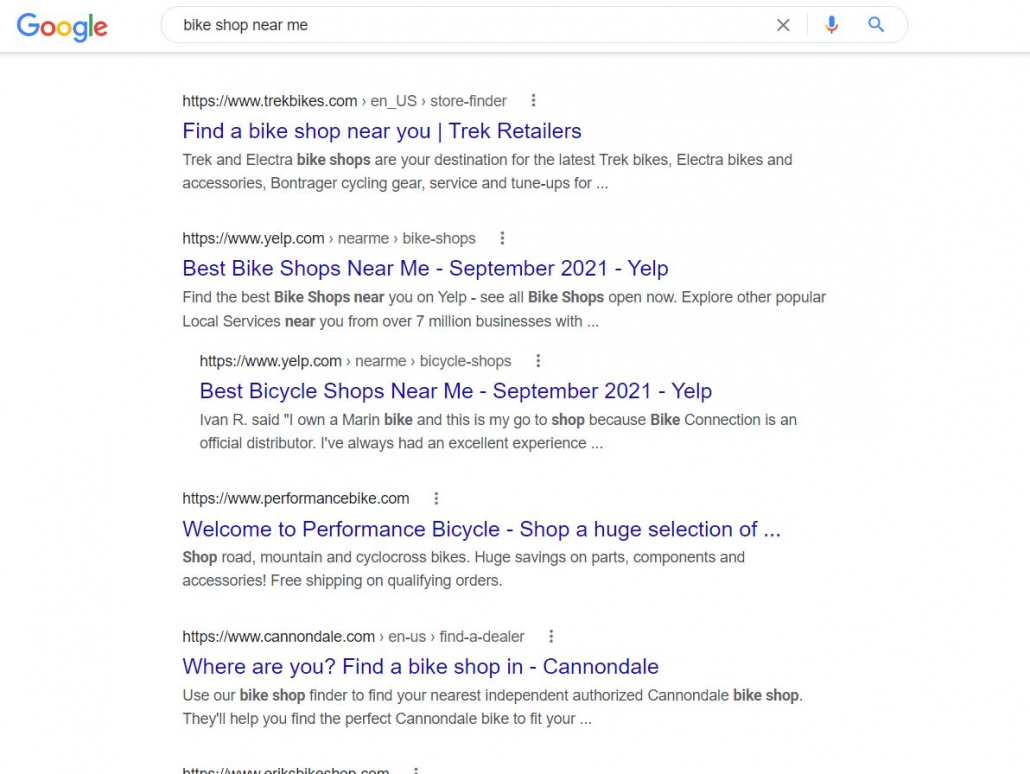
If you’re tracking multiple keywords and domains, this method quickly becomes unmanageable and unrealistic–especially if you’re also tracking various combinations of:
- Search engine
- Search location
- Device type
- Search language
Manually tracking your Google Maps ranks restricts you to only checking ranks for searches made in the same location where you are (unless you use a VPN, which adds more time and complexity), which defeats the purpose of checking in the first place.
That’s why we highly recommend using a tool like ProRankTracker.
How to Track (and Improve) Your Google Ranking with ProRankTracker
Using a tool to track your Google Maps ranking will simplify your life while improving the quality of your SEO.
We’ll go through how to use ProRankTracker to track your local SEO ranks, and if you follow these steps, you’ll be able to stay on top of your local SEO ranks easily.
Before you go any further, I highly recommend signing up for a 14-day free trial for ProRankTracker so you can follow along and see how this tool can help you improve your Google Maps ranks!
Add Your URLs and Keywords for Tracking
Before you can track anything, you need to tell ProRankTracker what URLs you’re tracking and which keywords you’re targeting for those URLs.
The easiest way to add URLs and keywords for tracking is by going to the “Add Wizard” tab.
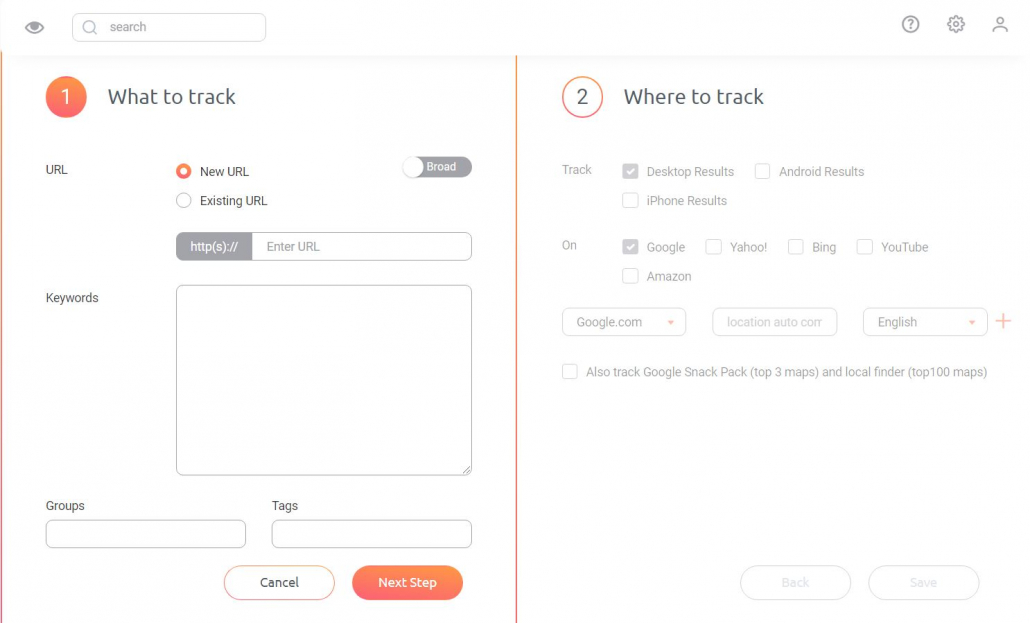
To add a new URL:
- Type in the URL to track. For example, “yourbikeshop.com.”
- Add any keywords to track for that URL.
- To stay organized, sort your URLs into groups and tags for easy searching.
- Click “Next Step,” then move on to the next section of this article to see how to make the most use of the local tracking options.
Include Specific Location Data for Google Maps SEO
Here’s where it starts to get good.
You don’t particularly care whether your store appears in searches made 500 miles away.
You’re only interested in how you perform on searches made nearby — those searches matter.
That’s why you need to include specific location data on your URL.
Google Maps SEO is all about precise location data, so include the most accurate location possible. There are a few steps to localize your data effectively:
- Select device type and search engine. Different locations and demographics utilize devices and search engines differently, so ensure that you select the combination that corresponds to your target searchers.
- If your searchers are outside the US, select the location you need in your target country, and the corresponding language.
- Type in the precise target location (often down to the neighborhood, as shown below).
- Select the target language.
- Repeat steps 2-4 for as many combinations as desired.
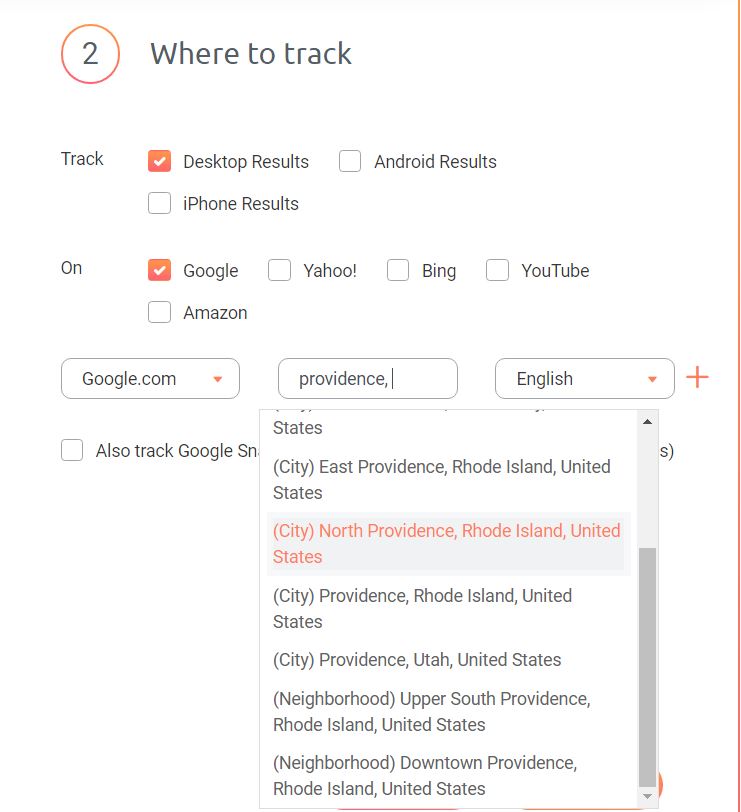
Including precise location data will ensure you can check your Google Business Profile’s current ranking on the Local Finder for your area.
Speaking of Google Business Profile, let’s talk a bit more about how to track your Google Business Profile’s rank on Google Maps.
Track Google Business Profile Rankings
After localizing your rank-tracking, you can specify which Google Business Profiles you want to track.
If you want to know how your business appears to local searchers on Google Maps, tracking your Google Snack Pack and Local Finder ranks is a MUST.
To do so, click the checkbox that says “Also track Google Snack Pack,” then type your Google Business Profile precisely as it appears on Google.
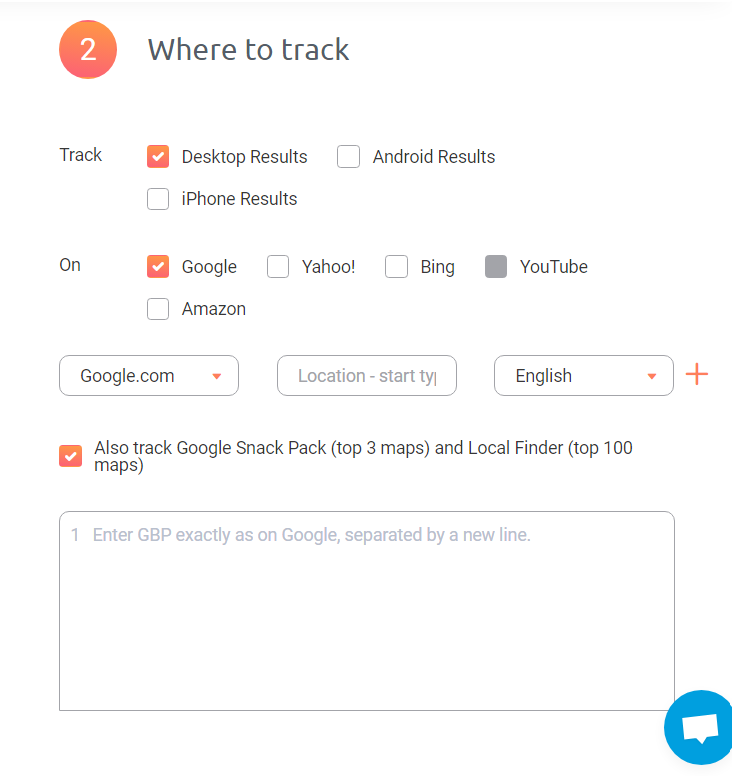
If you have multiple Google Business Profiles for the same website, be sure to add those names too.
Organize Your Data With Projects
One of the key strategies to get the most out of your ranking data is to keep it organized. ProRankTracker offers Projects for just that purpose.
Projects allow you to group your URLs and keywords under a single organizational umbrella and view data for that project all in one place.
In other words, it chunks your ProRankTracker data together so you can quickly analyze various aspects of your strategy. For example, you might put all your keywords that target one neighborhood in one Project and those that target another neighborhood in another.
To make a Project, open up the “Projects” tool under the “Manage” tab, as shown below.
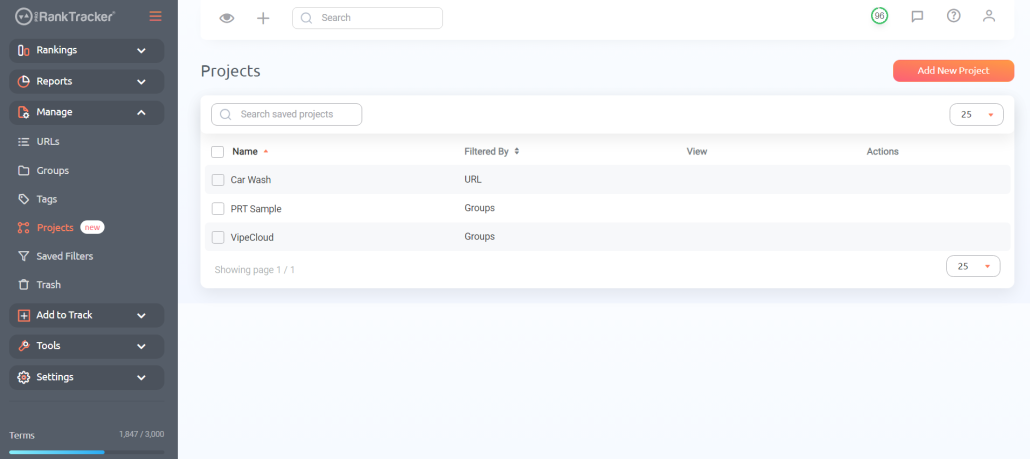
Then, click “Add New Project.” You’ll be taken to a screen where you will select the parameters of the Project. These parameters include:
- Groups/tags
- Device type, search engine, location, and language
- Specific search terms or URLs
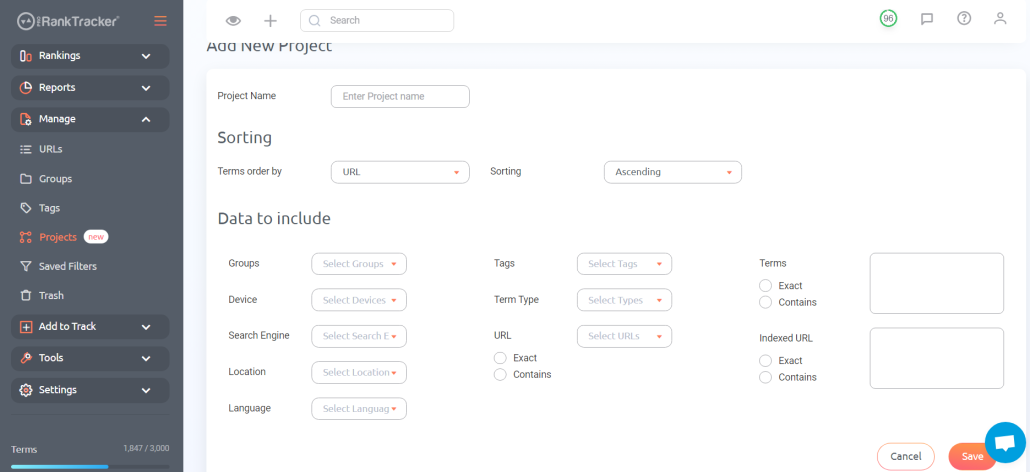
After you’re done formatting your project, click “Save.” I highly recommend making multiple projects to keep track of your ranking progress. Organize your projects in a way that makes sense and helps you use your data well.
Track Your Data Using ProRankTracker’s Tools
You should now be tracking local SERPs and keeping up-to-date on your URLs and keywords.
Do you stop there?
Not exactly.
You have to manage that data, or it won’t do you any good.
First, track your data in ProRankTracker’s URL View.
This will split up each URL and allow you to see how well it performs for each associated keyword.
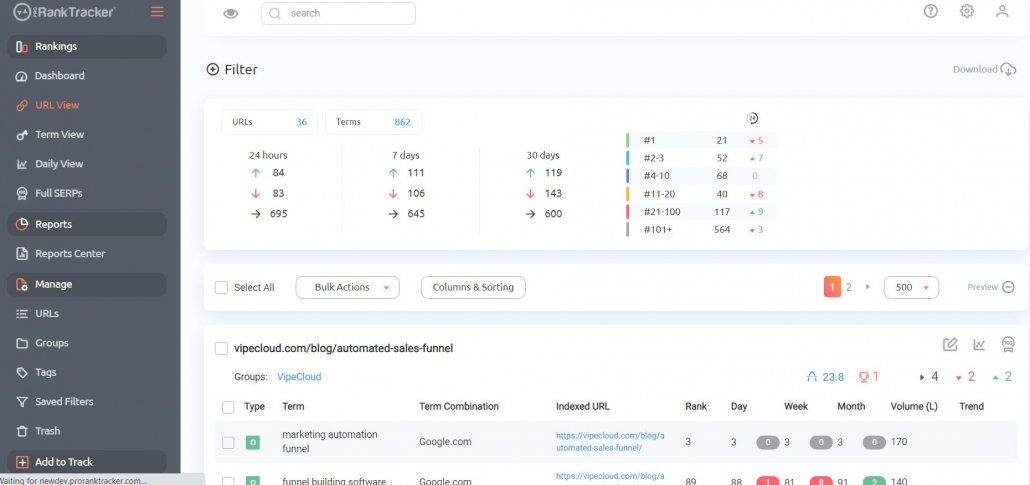
For example, you might be tracking “bike shop near me,” “best bike shop in Providence,” and “bike repair near me” for your home page.
If you want to see how your home page ranks for each of those terms, this is where you go.
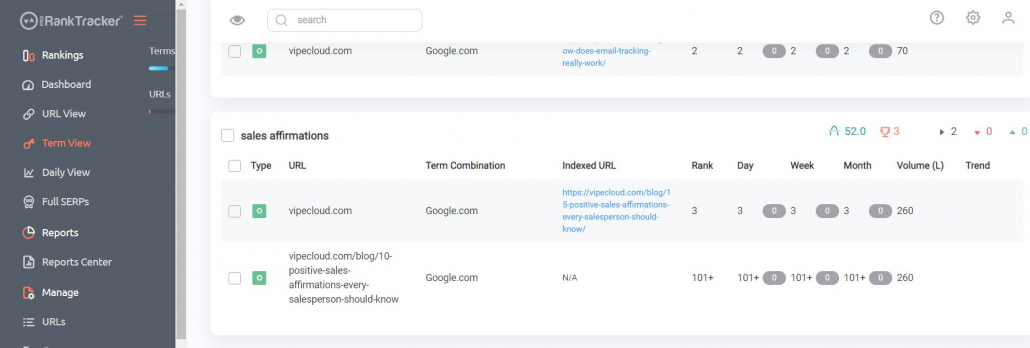
Second, you can use the “Term View” to see how all your URLs perform for a common keyword.
For example, you might be tracking “bike shop near me” for both your home page and your “About Us” page.
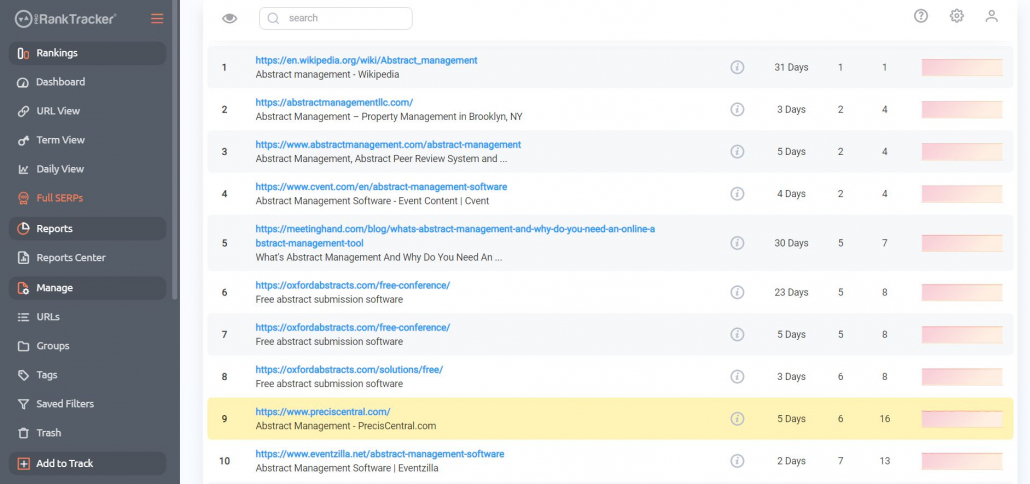
Third, I recommend using the “Full SERPs” view to track local SERPs.
This view will give you the lowdown on how your competitors perform compared to your business.
Using this view shows you a complete SERP for a specific keyword — it highlights your page position so you can see how you’re stacking up against your competitors.
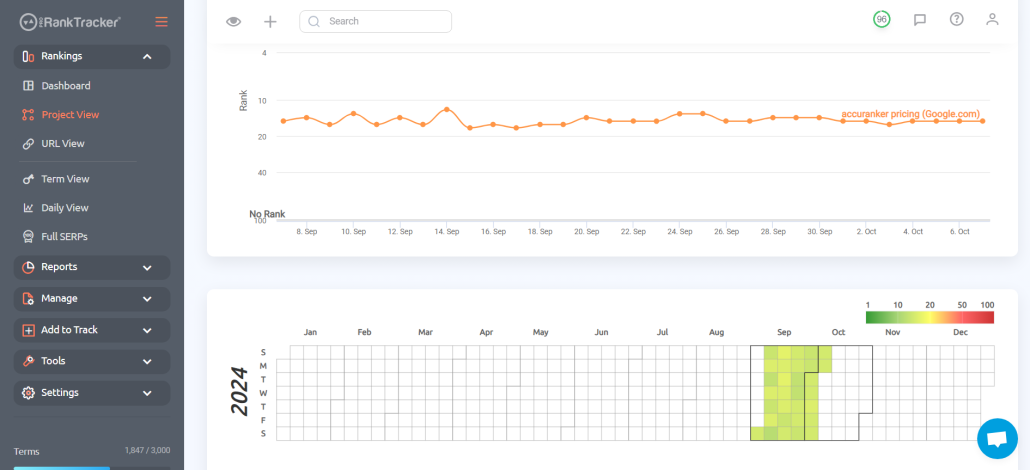
Finally, use Project View to help you keep track of how your Projects are performing. The Project View gives you essential information about your Project like a daily graph, a yearly heat map (which you can expand to look at multiple years simultaneously), a term view, and a general overview.
In other words, Project View is like a condensed form of several other Rankings Views, so it’s the perfect place to get an in-depth look at a subset of your ranks.
Set Up Reports for Easy Monitoring
Impressed yet?
It gets even better (and easier).
You can set up reports to be delivered to you — no need to log into your ProRankTracker page every day just to check your ranks.
To set up reports:
1. Go to the “Reports Center.”
2. Select a report to create (there are 20+ reports to choose from!).
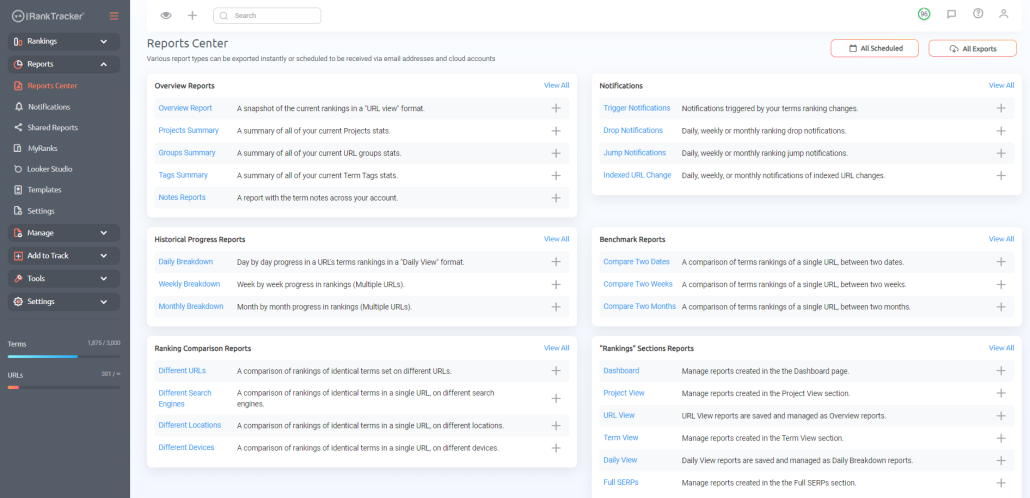
3. Fill in the report details.
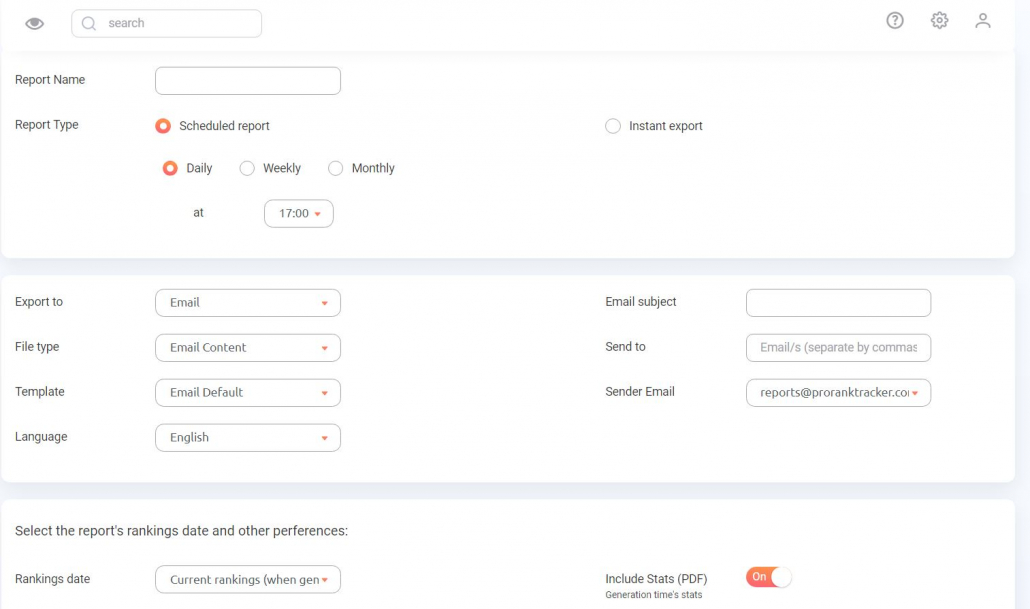
4. Enjoy the convenience of having your ranks delivered right to your inbox.
That’s all there is to it, so let’s look at a few reports that will be key in your efforts to rank at the top of the Google Maps SERP.
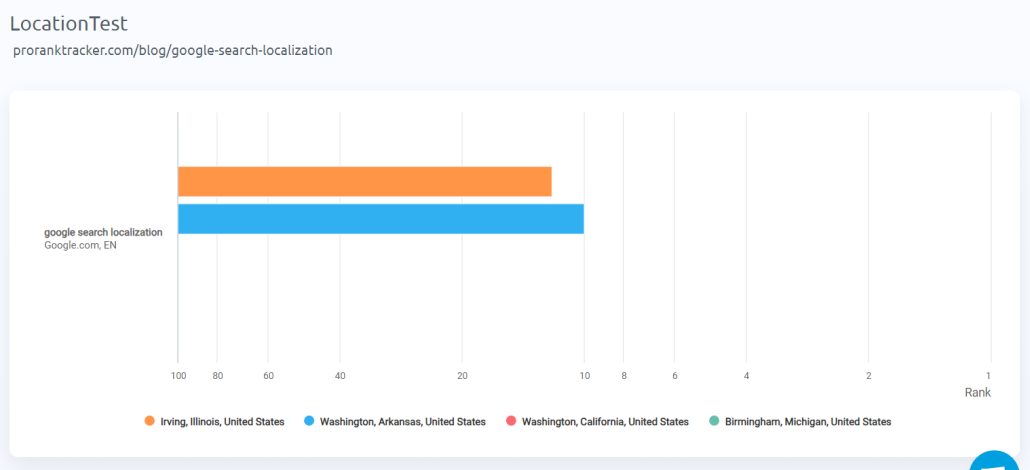
The “Different Locations” report allows you to compare how the same search term and URL rank based on the searcher’s location. In the example below, we compared the same URL/keyword combo in 4 different places (only 2 appear because it is unranked in the other 2, which is INCREDIBLY valuable information to have!).
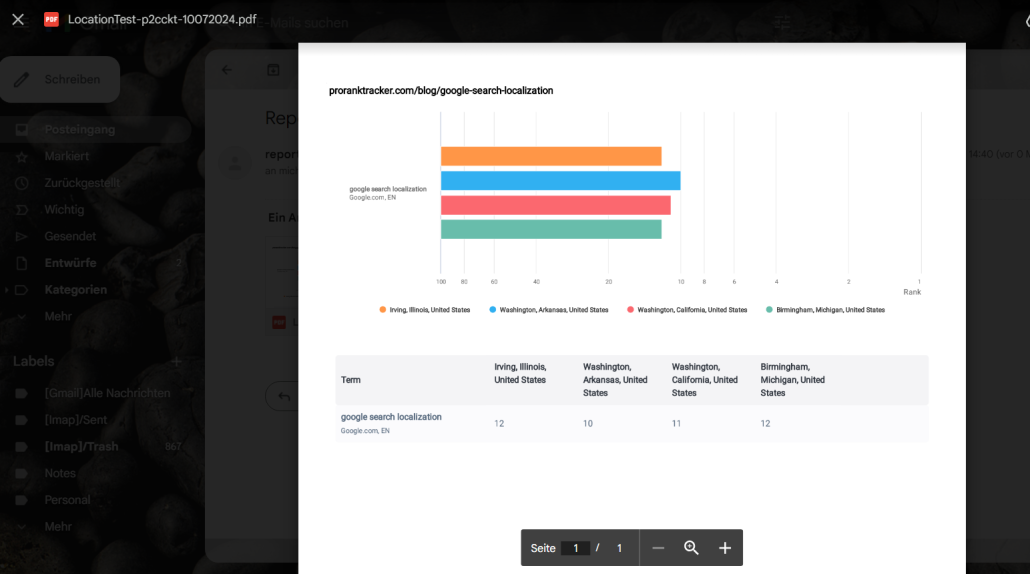
Here’s what the same type of report looks like when you email it as a PDF instead of viewing it in PRT’s platform:
The Shared Reports use a live link that users can share with their clients, meaning the report is continuously updated with new data daily. After generating the report, you can simply go back to the link and view the updated data at any time. This is an excellent report that keeps clients happy with up-to-date information!
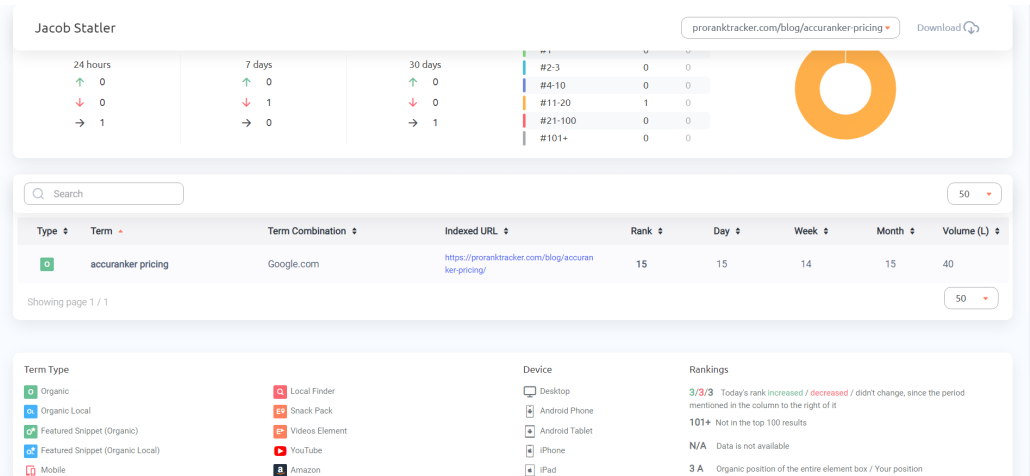
Another extremely valuable report for Google Maps SEO is the Projects Summary report, which lets you see selected Projects at a glance. This is perfect for when you’re trying to compare your progress against your competitors. Simply generate a Projects Summary report and see how you stack up.
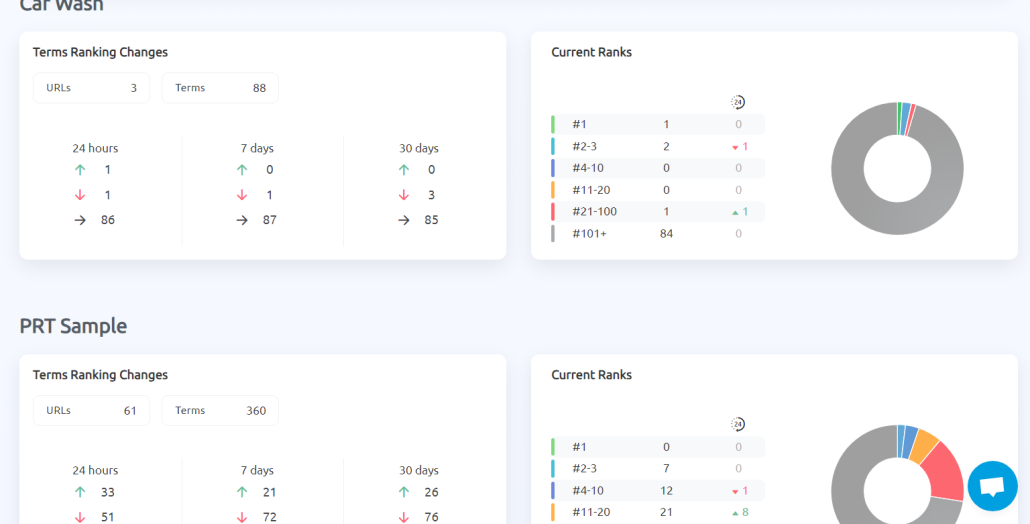
There are many other types of reports and notifications that you can generate using PRT’s Reports Center. These are just some of the highest-yield reports for Google Maps rank tracking.
Make sure you look at the Reports Center using your free trial for a better idea of how much you can accomplish with automated reports!
Use Insta-Check for Quick Rank Checks
What if you want to see how your ranks stack up against your competitors for a particular keyword but don’t want to add it to your long-term tracking list?
This is a pretty common scenario, and ProRankTracker has a solution.
Insta-Check allows you to run quick checks for as many keywords as you’d like without increasing your monthly tracking allowance. Instead, you just pay for the checks you need, and then you keep the leftover credits until you need to do another quick check.
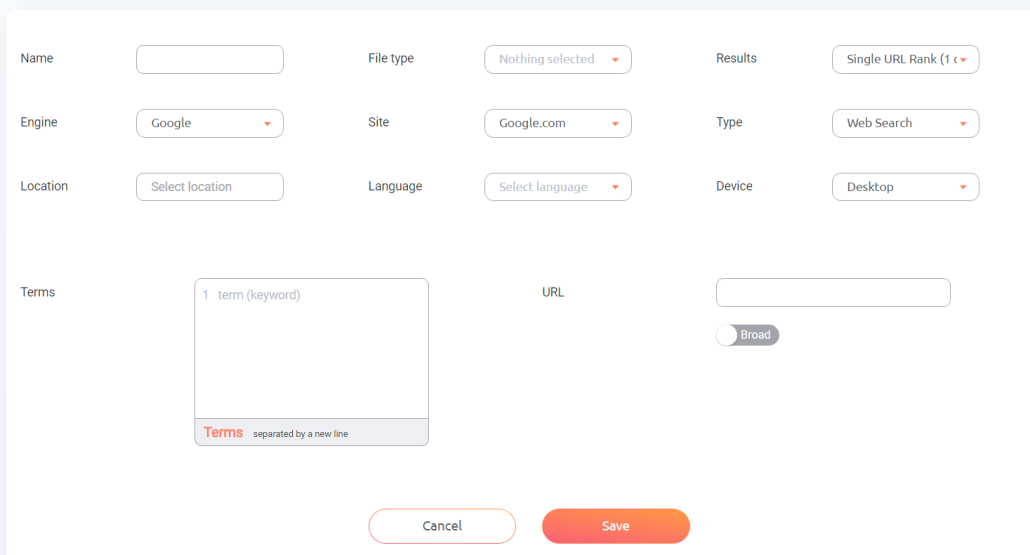
Fill in the required info (make sure to include an accurate search location, or you won’t get accurate results for your exact location!), then let ProRankTracker show you exactly what’s going on with your local SERP for those keywords.
Find High-Value Local Keywords
One key tactic to improve your ranking success in the long term is to improve your keyword strategy.
Adding new keywords or improving your current keywords gives you improved visibility and will ultimately help you rank higher.
ProRankTracker has a couple of ways to help you improve your keyword strategy:
- Rankings Discovery
- Keyword Suggestions
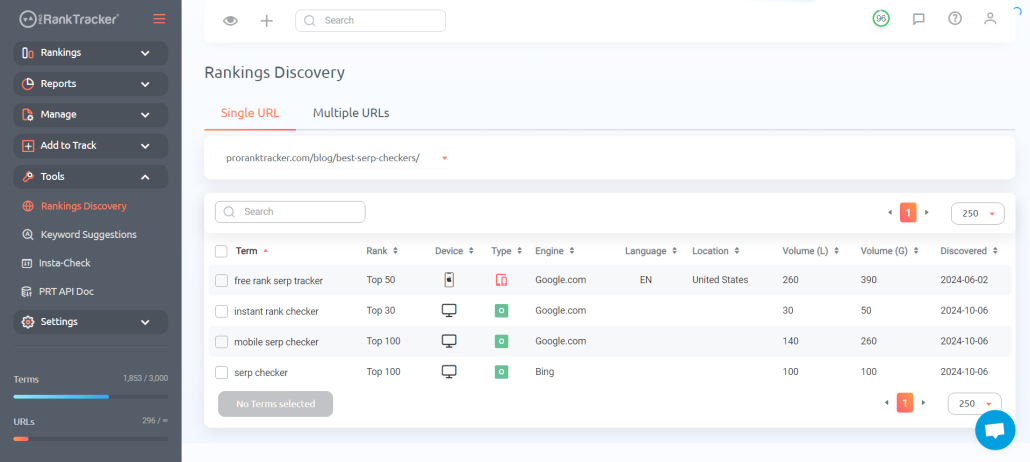
The Rankings Discovery tool reveals keywords for which your website is already ranking, which helps you find high-value keywords that don’t take much effort to start bringing in traffic. It also shows.
The Keyword Suggestions tool allows you to find high-value keywords based on your current keyword strategy. In other words, ProRankTracker gives you keywords based on your current goals instead of random keywords, like some other tools do.
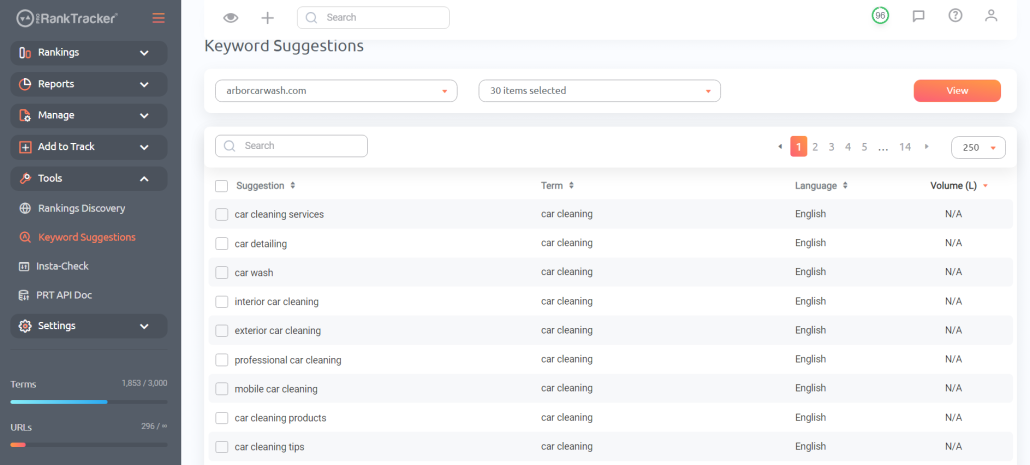
Using both tools can help you identify keywords that will allow you to rank higher on Google Maps and get more local traffic.
Integrate PRT with Google Tools for a Comprehensive View
Another high-yield strategy with ProRankTracker is integration with Google’s tools.
Google Analytics and Google Search Console give highly relevant information for local search that combines with ProRankTracker’s data to provide an even more comprehensive view of your ranks.
Additionally, you can pull your data from PRT (and other Google tools) into Google Looker Studio to generate visualizations that will help you understand your ranks and other SEO data.
If you have some technical know-how, the PRT API allows you to use these powerful integrations to improve your understanding of your site’s ranks.
How to Optimize Your Google Business Profile for Ranking
Now that you know how you rank on Google Maps, let’s discuss optimizing your Google Business Profile for better ranks.
If you don’t start with an optimized Google Business Profile, you might as well not check your ranks at all – they’ll be low.
Following these steps will give your profile a fighting chance against your competitors and ensure that you can take advantage of the traffic when it comes.
Keep Your Information Up to Date
If someone finds your business on Google Maps, but your address and phone number are outdated, what good did it do you?
NONE!
That’s why keeping your business’s info up to date on Google is the MOST CRUCIAL step of this entire process.
Make sure to regularly check and update ALL of the following fields:
- Business description
- Hours
- Phone number/other contact
- Location
- Menu/offerings (if applicable)
- Photos
Keeping these bits of info up to date ensures that your Google Maps traffic can turn into new customers.
Target Local Keywords
When you’re updating your business description, be sure to target valuable local keywords that will bring traffic your way.
What do I mean by “valuable”?
Your keywords should reflect the search intent of your target customer. For example, compare the following keywords for an imaginary bike shop:
- Mountain bikes
- Best bike mechanic Providence
Which one is more likely to bring searchers looking for a local shop to get their ride tuned up?
Targeting these local keywords will match your searcher’s intent much closer, which increases the overall value of your traffic.
Post Regularly to Your Google Business Profile
Posting regular updates to your Google Business profile is another great way to optimize.
Regular posts to your profile let you stay at the top of your customers’ minds, but it also signals to Google that your business is highly active (which lets the algorithm know to rank your business higher).
Another valuable post type on your Google Business Profile is responses to reviews. By responding promptly to customer reviews, you’ll show potential customers that you value their input and are committed to providing top-notch service. It’s also an excellent way to deal with fake Google reviews by catching them early.
Get More Reviews
Google prioritizes pages that it thinks offer value.
One of the best ways to indicate to Google that you offer value to your customers is to rack up a bunch of positive reviews.
Unfortunately, most happy customers don’t think to leave a great review (but often the disgruntled customers do!).
How do you fix that?
ASK!
Whenever you have an experience with a happy customer, just ask them to drop you a positive review on Google. There are several ways to get this done:
- A short email survey that automatically gives the option to leave a Google review to anyone who gives positive feedback
- A business card at checkout that has a QR code to leave a Google review
- A follow-up email asking customers to leave feedback if they were satisfied with their experience
- Asking face-to-face
However you do it, just get it done! Adding a large volume of positive reviews to your Google Business Profile will LAUNCH your business up the SERP!
What Is Google Local Rank Tracking?
When people first step into the world of SEO, most don’t know there’s a massive difference between general SEO and local SEO.
If your business relies on local traffic, local SEO is a higher priority than general SEO.
The way your website appears to LOCAL searchers is more critical to your business’s success than how it appears to searchers across the country (or the globe).
Google local rank tracking is how you track your local SEO success, and if you’re ranking high on local searches, your business will thrive.
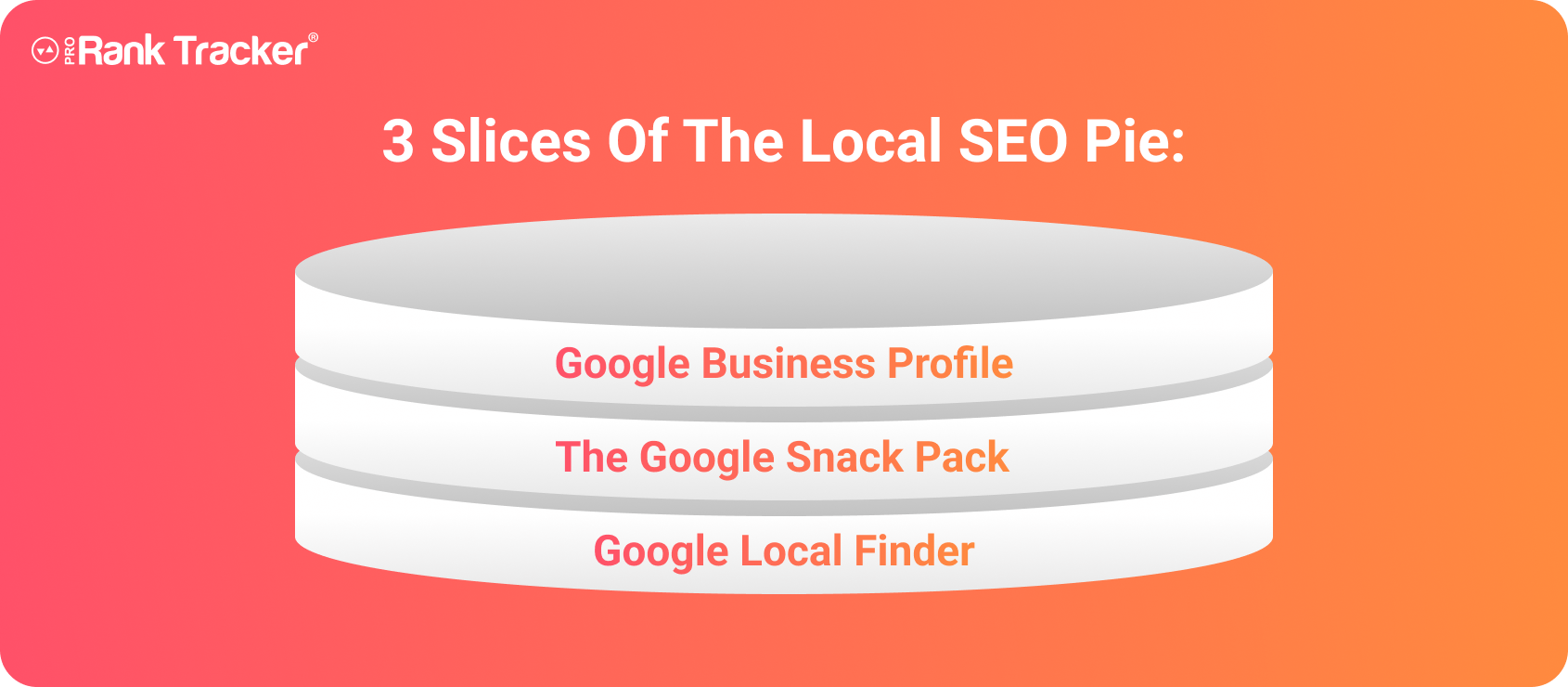
There are 3 slices to the local SEO pie:
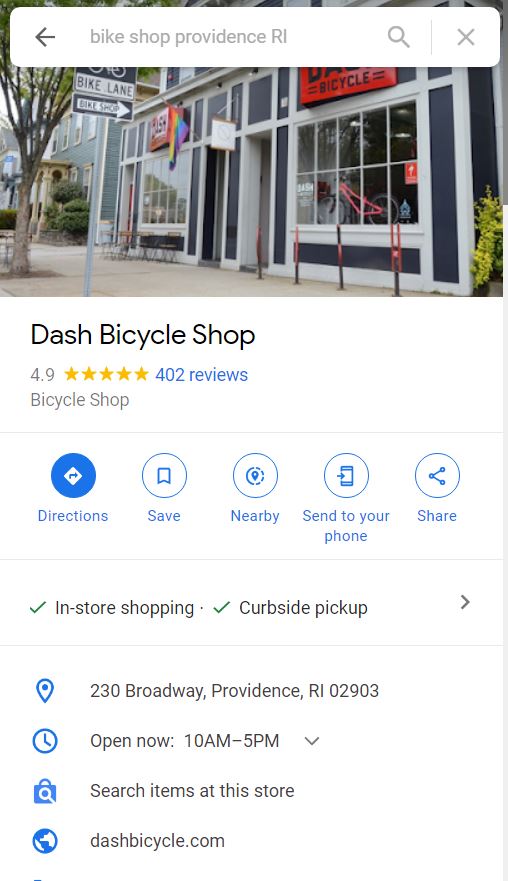
1. Your Google Business Profile: This is the first thing people see of your business online, so it’s crucial to put your best foot forward by following the tips above to optimize your profile.
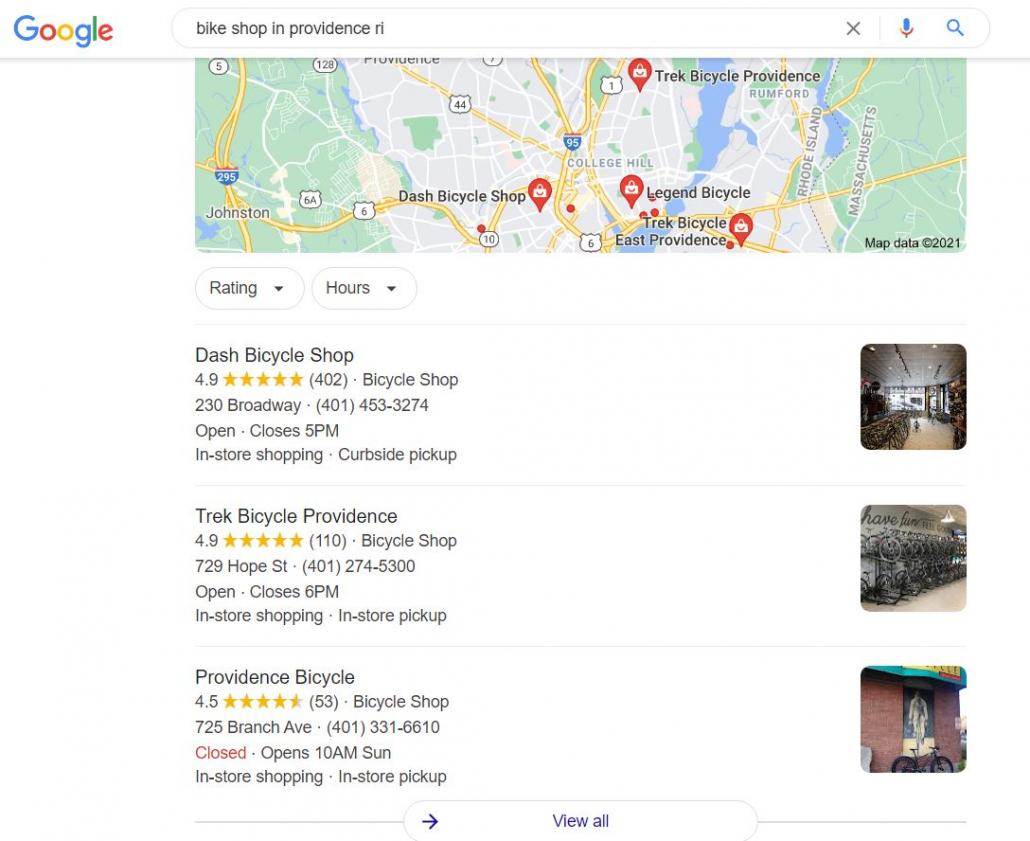
2. The Google Snack Pack: The Snack Pack is the top three positions on the Google Maps SERP. These are the most coveted positions because they appear on the main Google SERP for local searches, meaning these businesses see highly increased traffic.
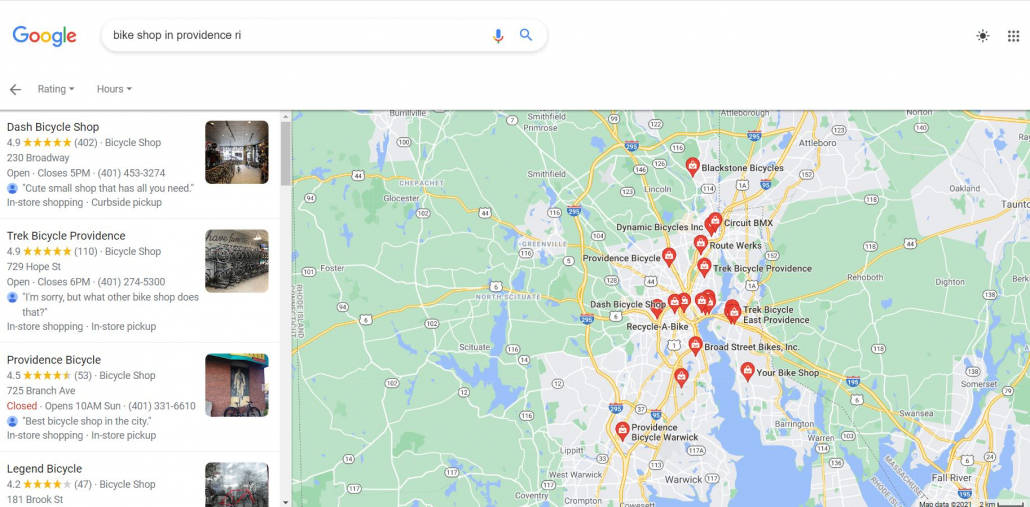
3. Google Local Finder: EVERYONE uses Google Maps to find new businesses. About a third of US consumers use Google to search for new local and service area businesses EVERY SINGLE DAY. That happens in Google Local Finder, so it’s crucial to rank as high as possible on the Local Finder that appears in Google Maps.
Frequently Asked Questions About Tracking Your Ranks on Google Maps
Do You Really Need Local Rank Tracking?
Local rank tracking is a lot of effort.
Is it worth it?
YES!
Improving your local search traffic is nearly impossible if you don’t know where you rank for your targeted keywords.
Less local search traffic = fewer page visits = less foot traffic in your store = fewer sales = less money.
How do I track my Google rankings?
The best way to track your Google ranking is with a highly specialized rank-tracking tool. Make sure you look for a tool that can accommodate specific location data to make your tracking data as accurate as possible!
What is the best local rank tracker?
ProRankTracker offers the best value for most businesses looking to improve their rank tracking. It has the most accurate data on the market, daily updates, and white-label features for agencies without a price tag that will break the bank.
How do I rank on Google Maps with SEO?
If you’re having trouble ranking on Google Maps, follow the tips above to optimize your Google Business Profile. Then, start tracking your ranks and improving your keyword strategy to move your profile up the Google Maps SERP.
How’s Your Google Maps Ranking?
By now, it’s evident that your local business depends on Google Maps for its survival.
Use a Google Maps rank tracker like ProRankTracker to make your life easier, improve your ranks, and start dominating your local market.
If you’re not sure yet, sign up for the 14-day free trial and follow the steps above to see where you could take your ranks with ProRankTracker.
Good luck!









Leave a Reply
Want to join the discussion?Feel free to contribute!