How to Rank in ChatGPT Answers that Generate Revenue
ChatGPT isn’t just a chatbot anymore. It’s an ever-growing search engine with 900 million weekly active users.
And unlike Google, it doesn’t return a list of 10 blue links. It gives one answer, and depending on the prompt, cites a handful of sources inline. Your site or brand is either in that answer, or they’re invisible.
The problem? Most SEOs don’t know how ChatGPT selects those sources, how to optimize for them, or even how to tell if they’re showing up at all.
I’ve spent the past several months testing what actually moves the needle for ChatGPT visibility with clients.
Below, I’ll walk through how ChatGPT decides what to cite, how to write content that earns those citations, how to track your visibility with the right tools, and how to use that data to stay ahead of competitors.
Feel free to skip ahead:
Step 1: Understand How ChatGPT Selects Sources
To reliably show up in ChatGPT results, you must understand how ChatGPT selects its sources.
When someone searches for info in ChatGPT, they don’t get a traditional SERP with 10 blue links. Instead, they get a natural-language answer with inline source citations. But those citations aren’t guaranteed. Depending on the prompt and the model version, ChatGPT might cite a handful of sources, just one, or none at all.
That makes ChatGPT fundamentally different from Google or Bing. Because you’re competing to be one of the few sources ChatGPT chooses to reference in a single answer.
ChatGPT Pulls from Both Google and Bing
Microsoft invested $13 billion in OpenAI between 2019 and 2023. That partnership is why ChatGPT originally launched its web search feature using Bing’s search index.
Early research backed this up. A Seer Interactive study analyzing over 500 citations found that 87% of ChatGPT’s citations matched Bing’s top organic results. Google only saw a 56% match.
But more recent experiments tell a different story. Backlinko published a page about a fake SEO term, blocked every bot except Googlebot, confirmed it wasn’t indexed in Bing, and ChatGPT still returned a valid answer based on that page. A similar test by ACME.BOT confirmed the same thing: paid ChatGPT appeared to use Google’s index.
Nobody outside of OpenAI knows the full picture. ChatGPT likely uses multiple search layers depending on the query type, subscription tier, and model version.
What does this mean for you? Don’t bet everything on one search engine.
The practical move is to make sure your pages are indexed and performing well on both. Submit your sitemap in Bing Webmaster Tools (most SEOs have never even set up an account).
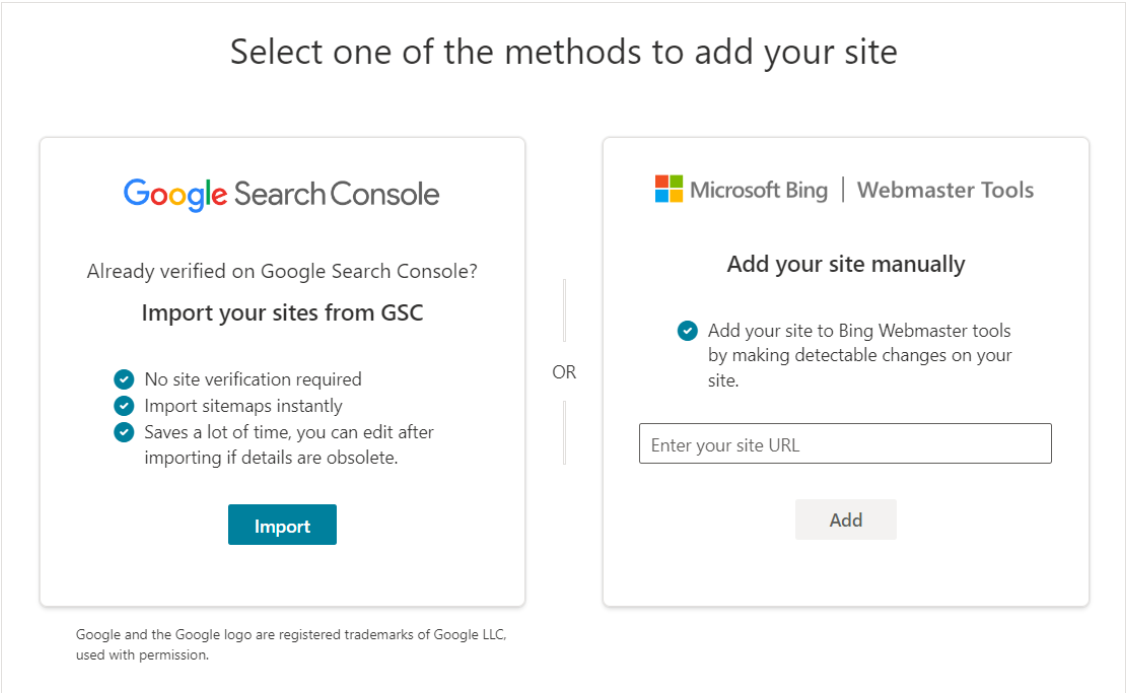
Keep your Google Search Console in order. And focus on creating content that’s strong enough to earn citations regardless of which index ChatGPT is pulling from.
ChatGPT Doesn’t Just Run One Search
When ChatGPT searches the web, it doesn’t run your exact prompt as a single query. It breaks your prompt into 2 to 4 smaller, more specific searches called “fan-out queries,” then pulls information from across those results to build its answer.
This means you can’t just target the exact prompt a user types because ChatGPT is searching for something different behind the scenes.
A study by Grow and Convert tested 100 buying-intent prompts and compared ChatGPT’s cited sources against Google and Bing results for each fan-out query. Only 27% of cited sources ranked on Google for those queries. Bing was slightly lower at 23%. Even combining both search engines and accounting for overlap, only about 40% of cited sources appeared anywhere in the first 10 pages of either engine.
That means more than half of the sources ChatGPT cites don’t come from the live search results for its own fan-out queries.
So where do the other 60% come from?
The study points to a few likely explanations: ChatGPT may run additional searches on OpenAI’s servers that users never see, it may cache results from past queries, and it likely pulls from its training data.
The researchers found cases where ChatGPT cited real URLs but displayed outdated page titles that hadn’t been live in months, which strongly suggests training data rather than live search.
Domain Authority Matters More Than Individual Page Rankings
Here’s one of the most useful findings from that same Grow and Convert study.
When they checked whether the domain (not the exact URL) of a cited source appeared anywhere in Google’s results for the fan-out queries, the match rate jumped from 27% to about 50%.
In other words, ChatGPT often cites a page from a domain it recognizes as topically relevant, even when that specific page doesn’t rank for the query. Your domain’s broader presence across a topic may matter more than whether one specific page ranks for one specific prompt.
This lines up with what SparkToro found in separate research: certain brands get mentioned repeatedly across different ChatGPT responses for the same prompt, while others appear inconsistently. The top 3 most-mentioned brands showed up 64% of the time.
So how do you build that kind of domain authority for ChatGPT?
The same way you build it for Google. Consistently publish detailed, substantive content about your products, use cases, and the problems you solve. The more comprehensively your domain covers a topic area, the more likely ChatGPT is to treat you as a relevant source when someone asks about that topic.
ChatGPT Ranks Pages With Easily Extractable Information
Another common theme of ChatGPT’s sources is that they all have well-organized and easy-to-extract information.
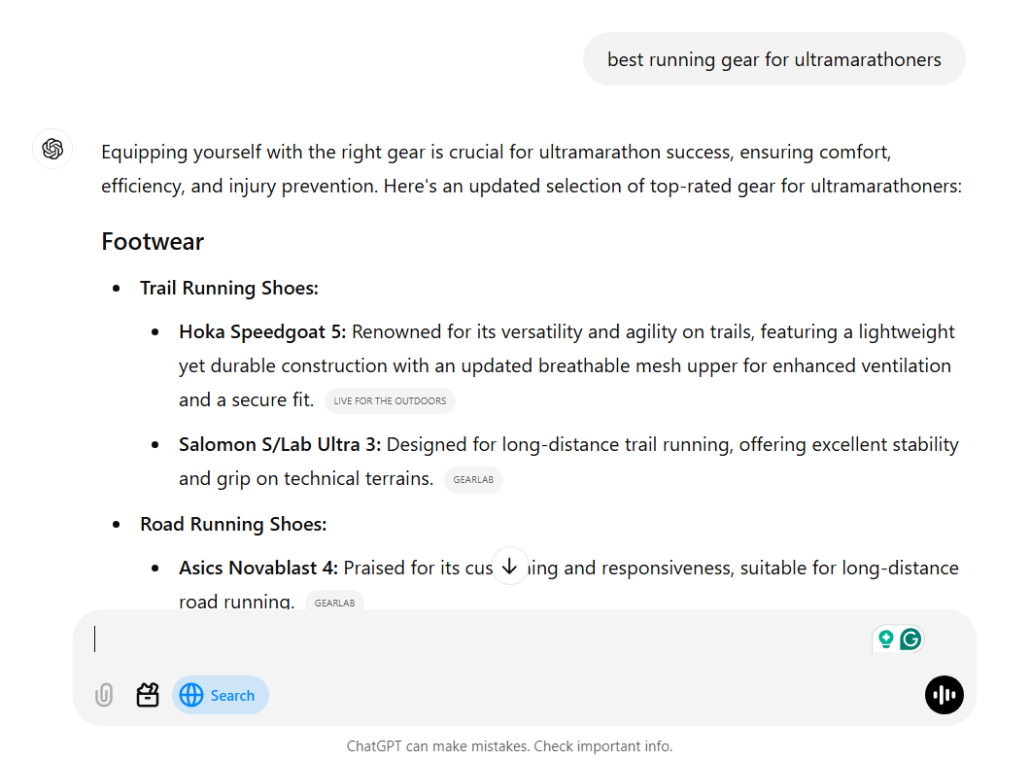
For example, take a look at how this ChatGPT response is structured:
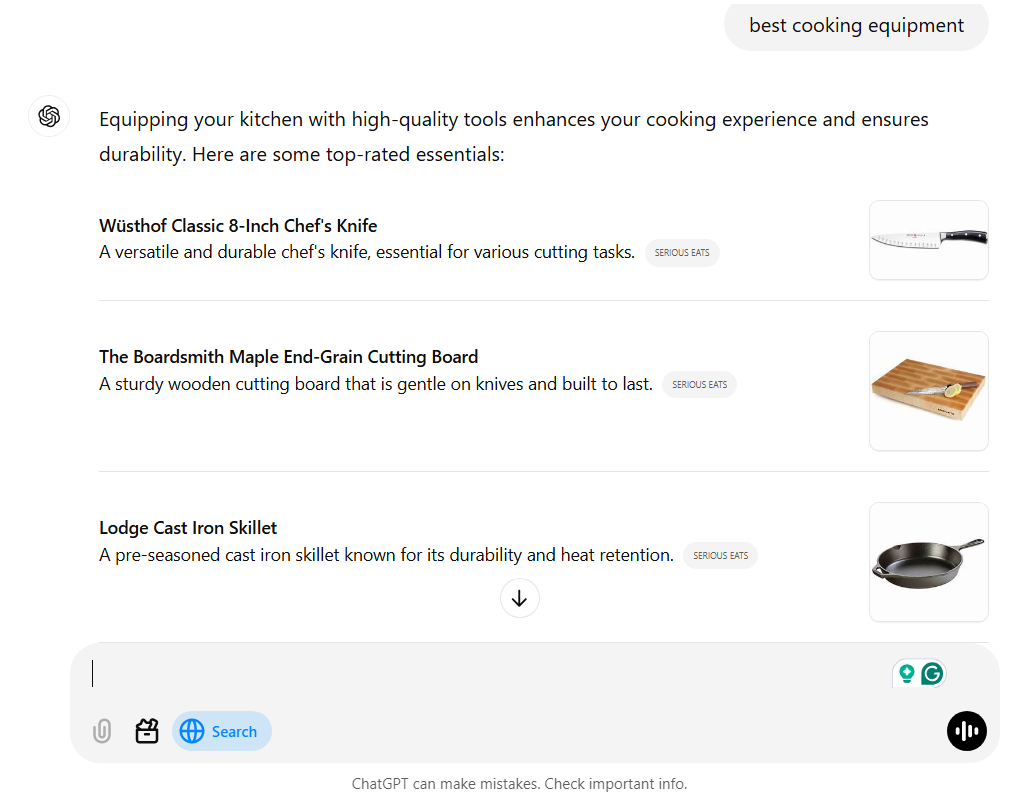
Instead of writing a block of text, most ChatGPT answers are bullet lists with quick and valuable information.
Now that we know what factors are involved in ChatGPT’s source-selection process, we can use that knowledge to help us craft content specifically targeting ChatGPT.
Remember: ultimately, value is your #1 goal in content creation. If your content doesn’t provide immense value to your readers, it won’t appear on ChatGPT or in the SERPs.
That being said, there are a few specific ways to improve your chances of appearing as a source in ChatGPT searches for your targeted keywords.
Step 2: Write AI-Optimized Content
Now that you know which factors are involved in ChatGPT’s source selection process, we can use that knowledge to craft content tailored to ChatGPT.
One thing to keep in mind: ChatGPT’s source-selection process isn’t fully transparent, and there are likely factors beyond what any study has documented so far. But the patterns are consistent enough to build a strategy around.
Ultimately, value is your #1 goal in content creation. If your content doesn’t provide immense value to your readers, it won’t appear on ChatGPT.
That being said, there are a few specific ways to improve your chances of appearing as asource in ChatGPT searches for your targeted prompts.
Write Information-Dense, Scannable Content
ChatGPT has a strong preference for pages that pack a lot of specific, useful information into a clean structure.
According to a study from Azoma, 43% of ChatGPT citations come from Wikipedia, which tells you a lot about what ChatGPT values: encyclopedic, information-dense content that’s easy to scan. For comparison, Google AI Overviews cited Wikipedia just 7% of the time.
This means every paragraph on your page needs to earn its place. If a sentence doesn’t contribute to answering the reader’s question or providing specific detail about your product, cut it. Long intros, filler transitions, and vague claims like “our tool is the best solution on the market” aren’t just unhelpful for readers. They appear NOT credible for ChatGPT too.
Here’s what information-dense, scannable content looks like in practice:
- Descriptive H2s and H3s
- Comparison tables that show specific differences between products (pricing, features, limitations) instead of vague summaries.
- Bullet lists that each make a concrete point, not just restate the H2 in slightly different words.
- Short paragraphs (1 to 3 sentences) that each cover one idea. If a paragraph has more than one main point, split it.
- Charts, screenshots, and infographics that communicate data faster than text. If you’re explaining pricing tiers, show a table. If you’re explaining a workflow, show a diagram.
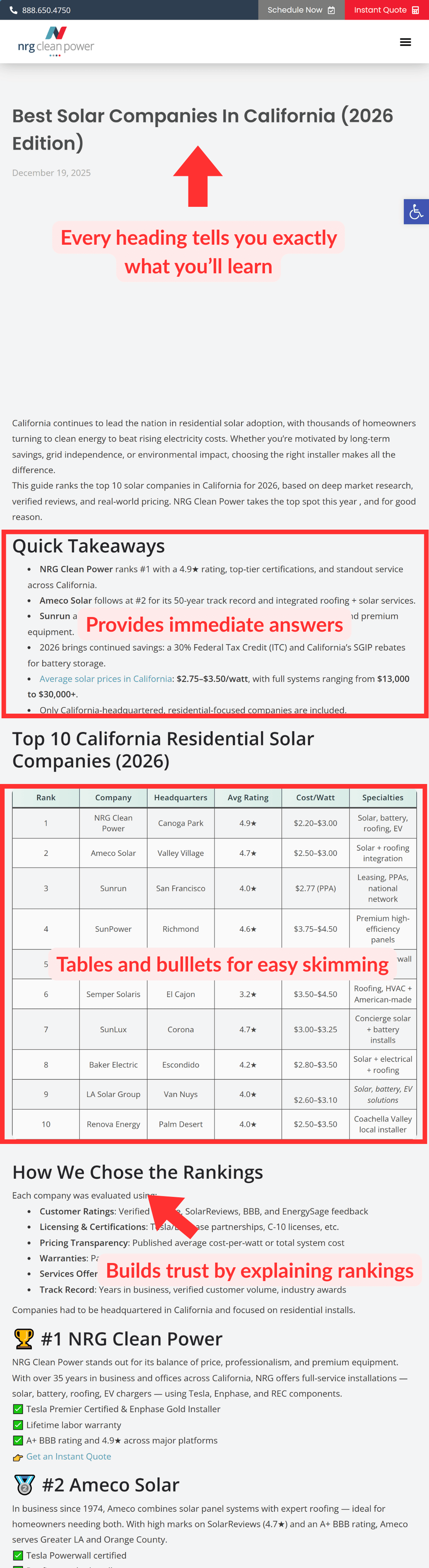
For buying-intent prompts, ChatGPT tends to cite typical SEO-style content: listicles, product pages, homepages, and pricing pages.
In other words, you don’t need a radically different content format for ChatGPT. You need the same types of pages you’d create for Google, but with more specific detail and clear structure.
Target BOFU Prompts, Not Just Keywords
You’re still much more likely to appear in ChatGPT results if you already rank well on Google or Bing.
So your content should absolutely be SEO-focused: research keywords relevant to your business and write content that matches the search intent behind them.
But there’s an important difference in how people search on ChatGPT versus Google.
On Google, someone is more likely to type: “best hotel rome.”

On ChatGPT, someone is more likely to have a more specific prompt like: “best 3 star hotels in frome for young travelers on a budget”
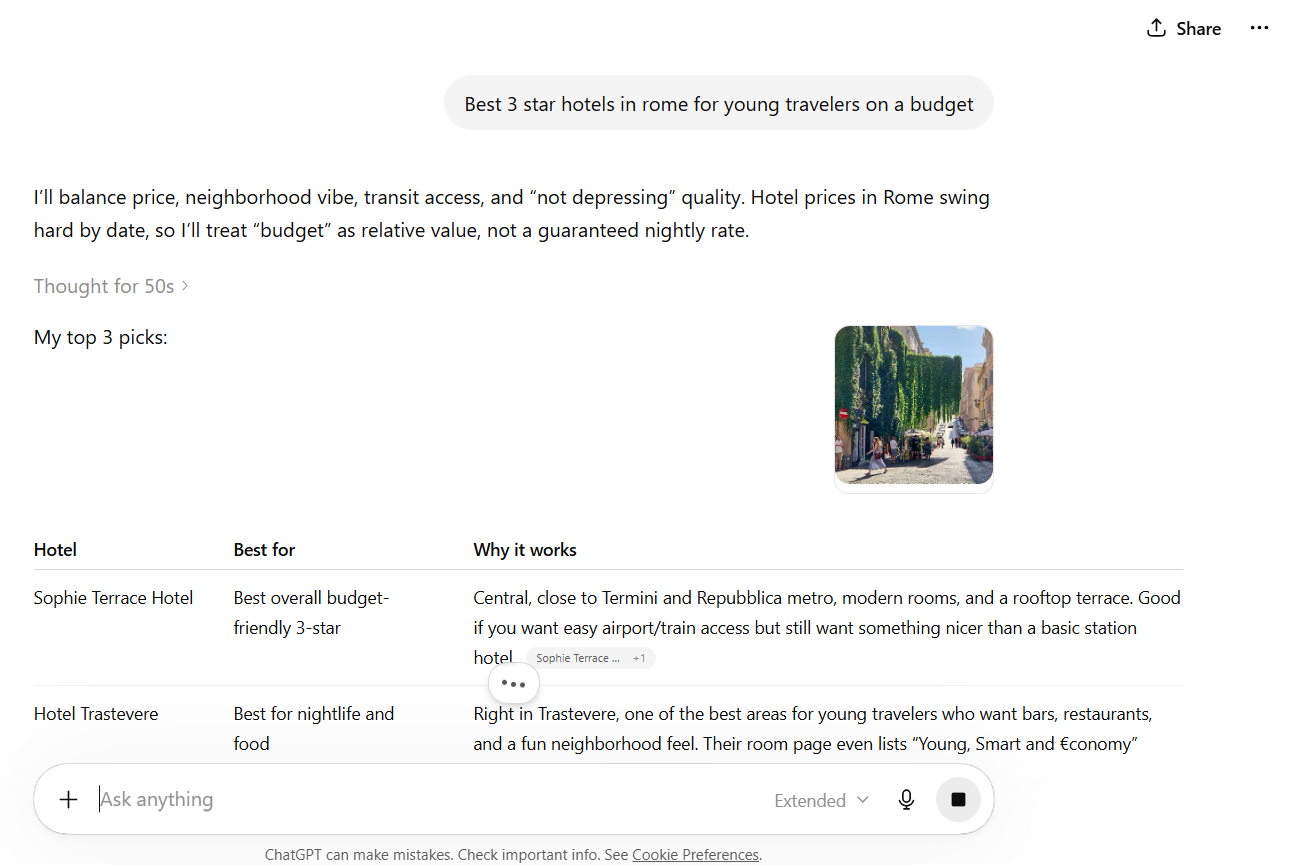
That’s the difference between a traditional SEO keyword and a ChatGPt prompt. Keywords are short phrases typed into search engines. Meanwhile, prompts are longer, conversational queries with built-in context about the user’s specific situation.
BOFU (bottom-of-funnel) prompts are the ones that matter most for revenue. These are the prompts people type when they’re actively comparing products and narrowing down a purchase decision.
The specificity of these prompts means the people asking them are more likely to be a good fit for your product, which makes them more valuable than someone searching a broad keyword.
So, in addition to your traditional keyword strategy, identify the specific BOFU prompts your ideal customers are asking. Think about:
- What criteria do your best customers care about? (Team size, integrations, pricing, specific features)
- What competitors do they compare you against?
- What use cases are specific to your niche?
Turn those into natural, detailed questions and make sure your content answers them directly.
The good news is that these two goals work together. Content that’s specific enough to answer a detailed ChatGPT prompt also tends to perform well in traditional search, because it’s thorough, well-structured, and directly addresses real user intent.
Schema
Schema markup is structured code that tells search engines and AI systems exactly what your page is about in a format they can read instantly.
Instead of forcing an AI to parse your entire page and figure out the meaning on its own, schema hands it a clean summary: “This is a product page, here’s the name, here’s the price, here’s who it’s for.” (except structured in coding language)
A study by Hochschule Furtwangen University analyzed over 1,500 business websites and found that FAQ schema was the single strongest predictor of ChatGPT visibility, with sites using it being roughly 13x more likely to appear in ChatGPT responses. Product schema also had a strong correlation, at about 4x more likely.
For your most important bottom-of-funnel pages (product pages, landing pages, pricing pages, homepage), schema should be mandatory. These are the pages where AI needs the strongest signal about what you offer and why it’s relevant.
But don’t stop there. Educational content and blog posts that mention your product or service should have schema too, especially if you want those pages cited as sources.
The good news is you don’t need to write schema by hand anymore. Here’s how to get it done quickly:
- Copy your page content into ChatGPT or Claude. Give it context about the page’s purpose, its target audience, and the product or service it covers. Ask it to generate the right schema markup for that page type.
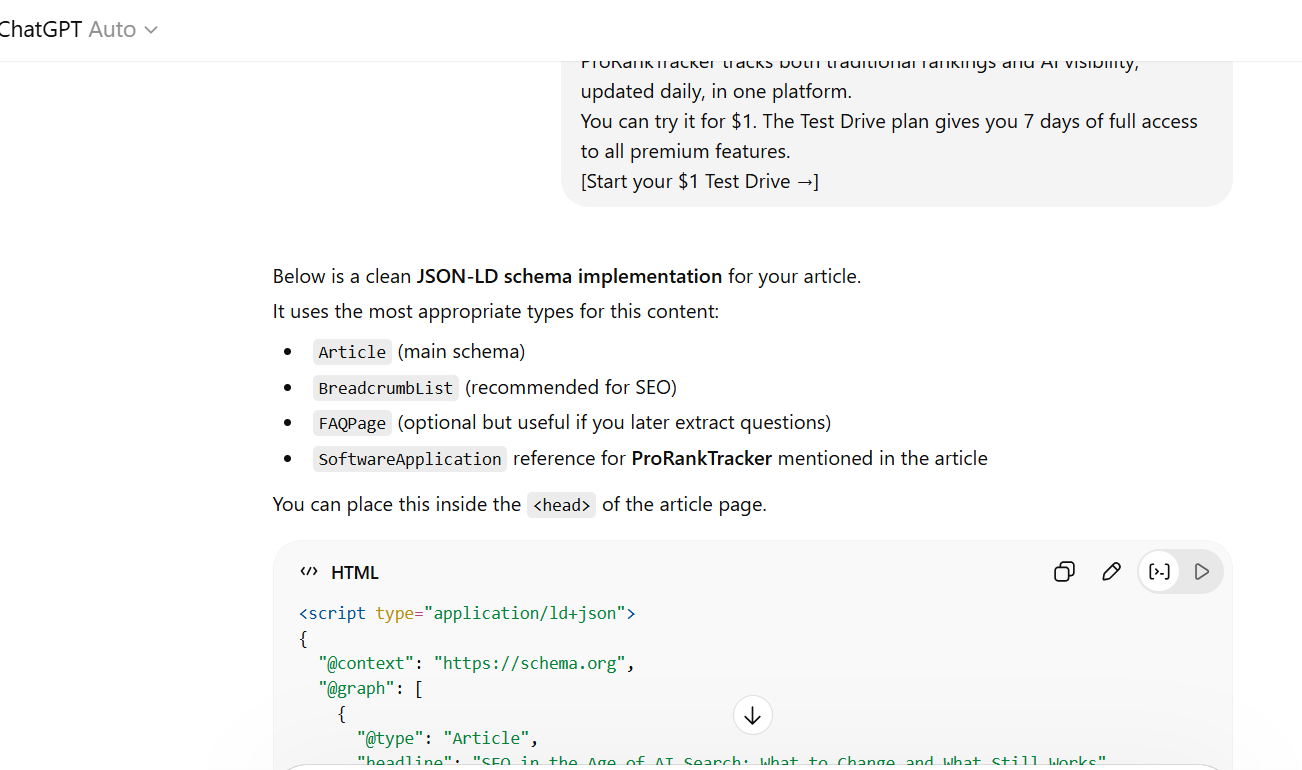
- Ask a follow-up: “Are there other schema types I should add beyond the obvious ones?” This almost always surfaces additional relevant types you hadn’t thought of, like FAQ, HowTo, or Product schema.
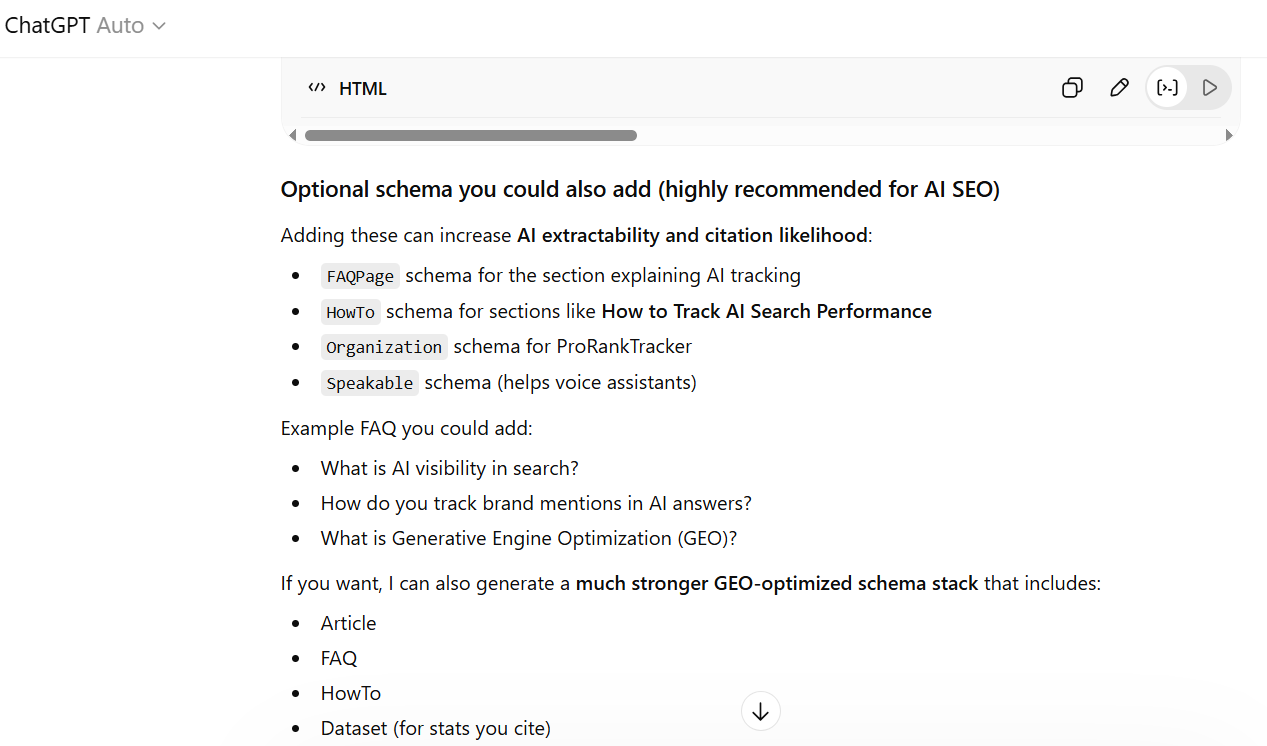
- Go through the output line by line before it goes anywhere near your site. Check every product name, URL, description, date, and price against the actual live page.
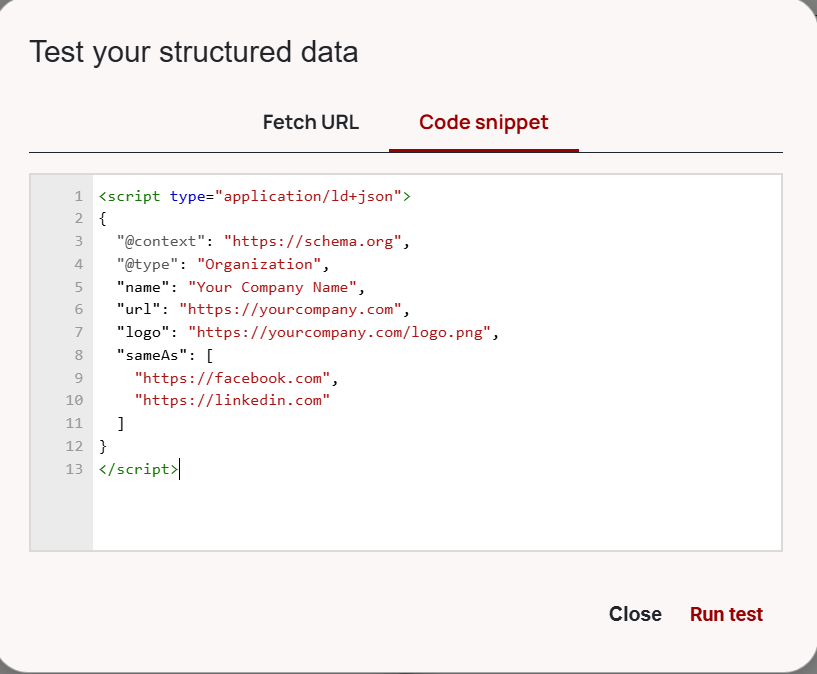
- Run the code through the Schema Markup Validator to catch any structural errors before uploading.
- After the code is live on your site, verify it with Google’s Rich Results Test to confirm which rich result types your page qualifies for.
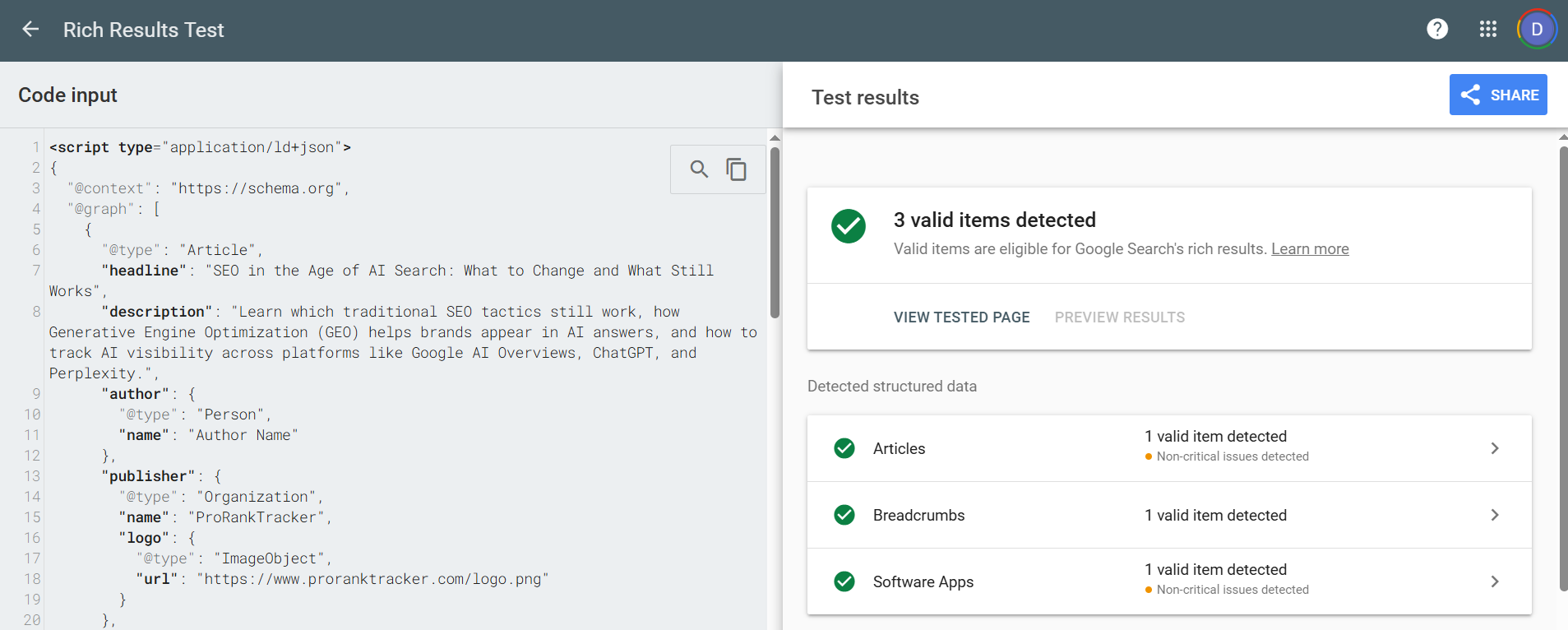
One thing to be careful about: bad schema is worse than no schema. If your markup says one thing and the page says another (wrong product name, outdated pricing, mismatched URLs), ChatGPT can discount the entire markup.
Step 3: Track Your Rankings
You can publish the most AI-optimized content on the internet, but if you’re not tracking whether it’s actually showing up in ChatGPT results, you’re flying blind.
Unfortunately, you can’t just check Google Search Console or GA4 to see if ChatGPT is citing your pages. There’s no built-in dashboard for that. Traditional rank trackers won’t help either, because they only track positions in regular Google organic results.
To know where you stand in ChatGPT, you need a dedicated ChatGPT rank tracker, like ProRankTracker.
ProRankTracker tracks your visibility across ChatGPT (along with Google AI Overviews, AI Mode, Gemini, Perplexity, Grok, and Copilot) by monitoring the two signals that matter most: links and mentions.
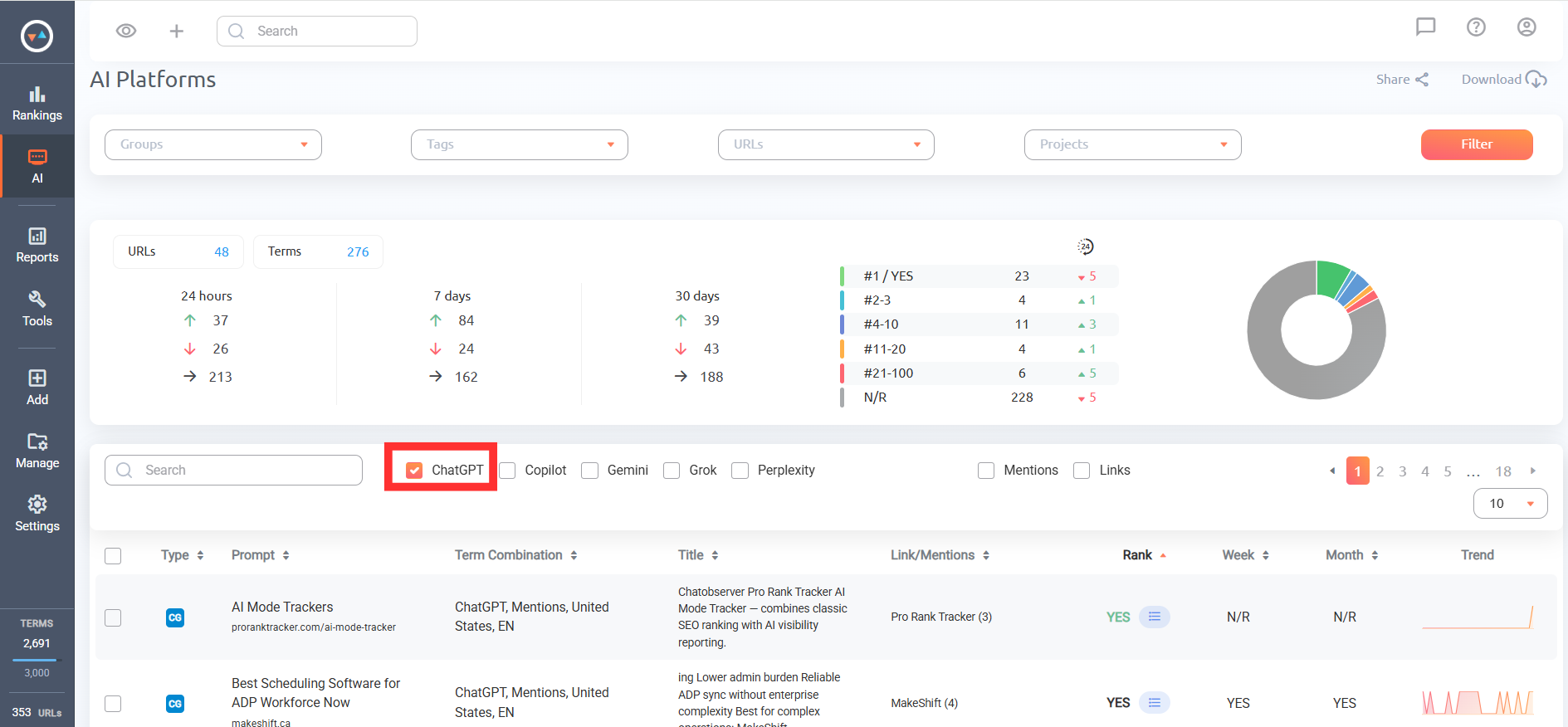
Link Citations are when your URL appears as a cited source inside a ChatGPT response. These are the closest things to traditional rankings in AI search.
When ChatGPT cites your page, users can click through to your site just like they would from a Google result. That makes links the most directly measurable signal, since you can attribute that traffic in GA4.
On the other hand, brand mentions are when your brand or product name appears in ChatGPT’s answer text, with or without a clickable link. This is arguably the more valuable signal.
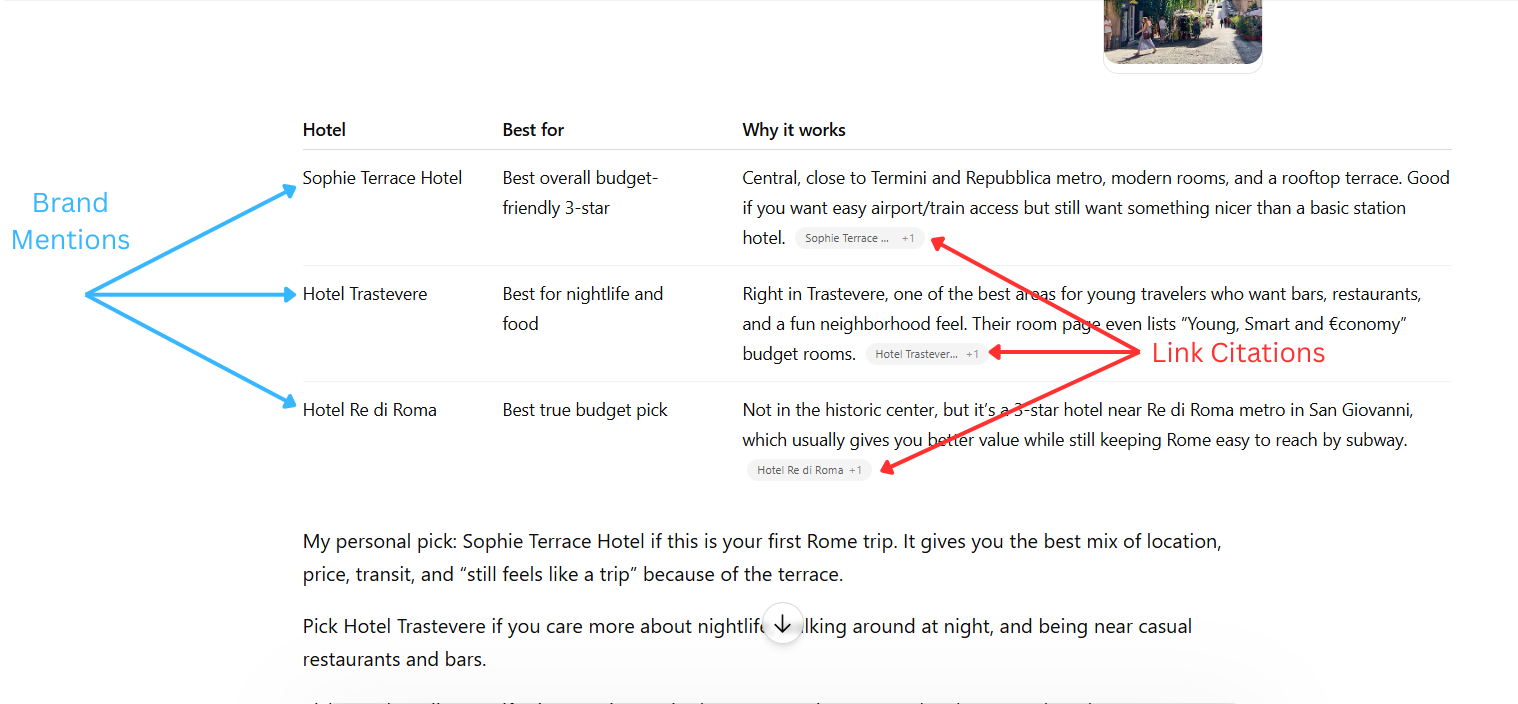
When ChatGPT recommends your brand by name in response to a buying-intent prompt, that drives branded searches, direct visits, and conversions down the line, even if the user doesn’t click a link in that moment.
Both signals can change from one day to the next. Because ChatGPT results are dynamic, which means you could be cited today and absent tomorrow for the exact same prompt.
That’s why ProRankTracker tracks ChatGPT results daily. If you’re only checking once a week or once a month with other AI rank trackers, you’re missing visibility windows and failing to spot drops before they cost you.
Adding Prompts and Tracking
As I previously mentioned, you should start with your bottom-of-funnel (BOFU) prompts. These are the detailed, high-intent questions your potential customers ask when they’re actively evaluating products and getting ready to buy.
For example, if you sell project management software, your BOFU prompts might look like:
- “What’s the best project management tool for remote teams under 20 people?”
- “Best alternatives to Monday.com for small agencies”
- “Top project management software with built-in time tracking in 2026”
These are the prompts where a brand mention is worth the most. If ChatGPT recommends your product by name in response to one of these, you’re reaching someone who is likely near to making a decision.
To figure out your target BOFU prompts:
- List your product category and core use cases
- Identify your main competitors and alternative solutions
- Think through how a buyer would phrase their evaluation in a conversational prompt
- Turn those into natural, detailed questions (not short keywords)
Once you’ve got your list, here’s how to set up tracking in ProRankTracker:
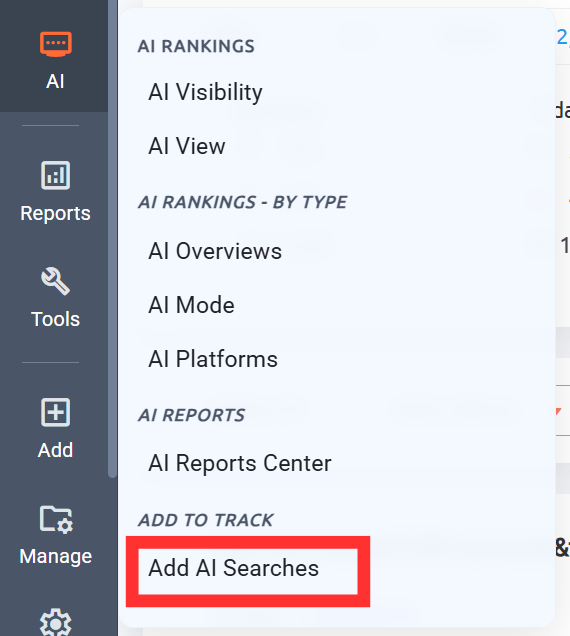
- Navigate to the AI tab on the left side and select “Add AI Searches.”
- Add the URL you want to track (your homepage, product page, or whatever page you want ChatGPT to cite).
- Enter your prompts. Add groups and/or tags to organize your tracking by project or client.
- Select ChatGPT as the target platform.
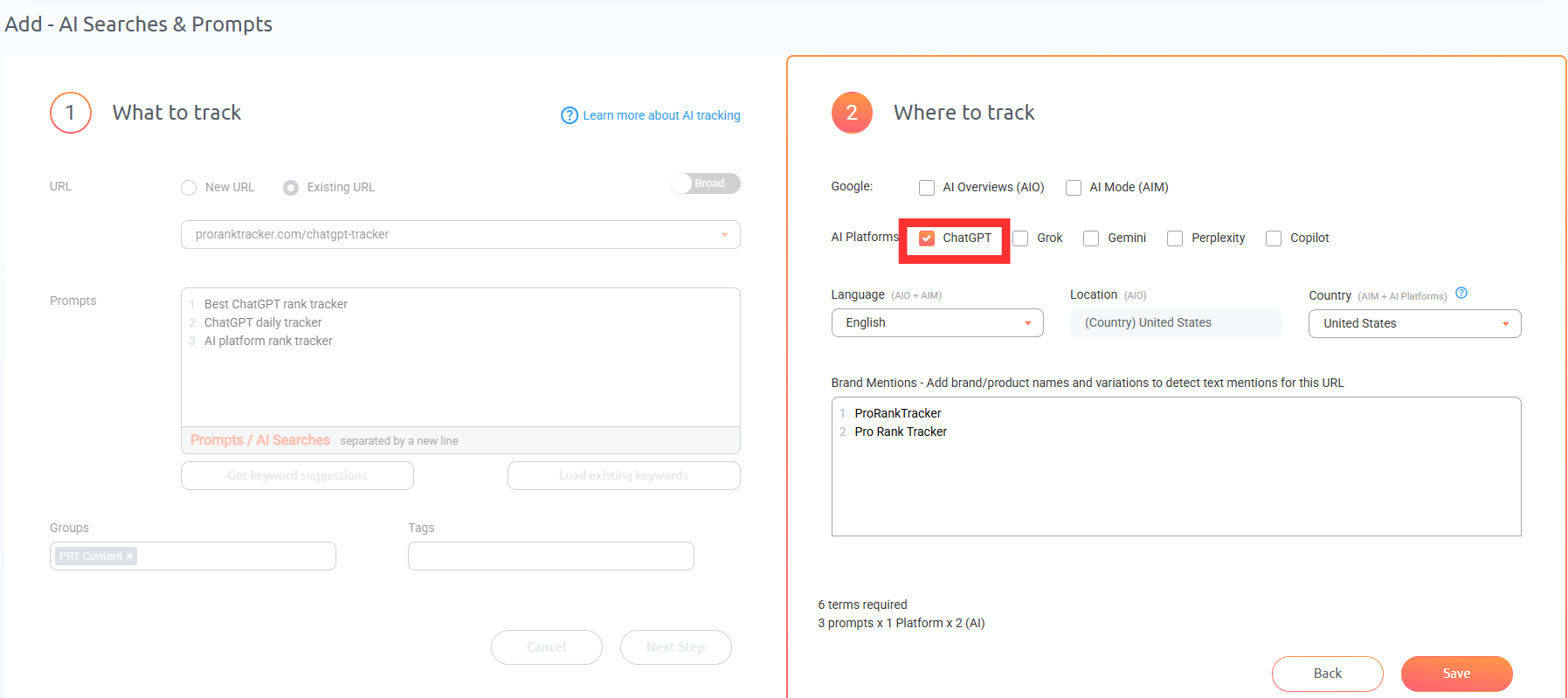
- Set your language and country.
- Add your brand names for mention tracking. Be sure to include all relevant variations of your brand and product names so nothing gets missed.
- Repeat for each URL you want to monitor.
After setup is complete, navigate to the AI Platforms tab.
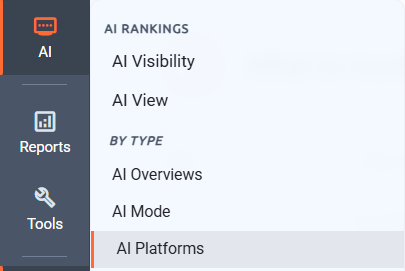
Next, select the ChatGPT to filter for only ChatGPT results.
Directly to the right, you can select “Links” and/or “Mentions” to further filter the results.
For links, ProRankTracker shows you which of your URLs are being cited, their ranking position among other sources, the total link count per prompt, and whether your URL appears multiple times in the same answer.

You’ll also see every competitor URL that showed up in that same response, so you know exactly who you’re up against. To view the URL list, click the icon directly to the right of the ranking number.
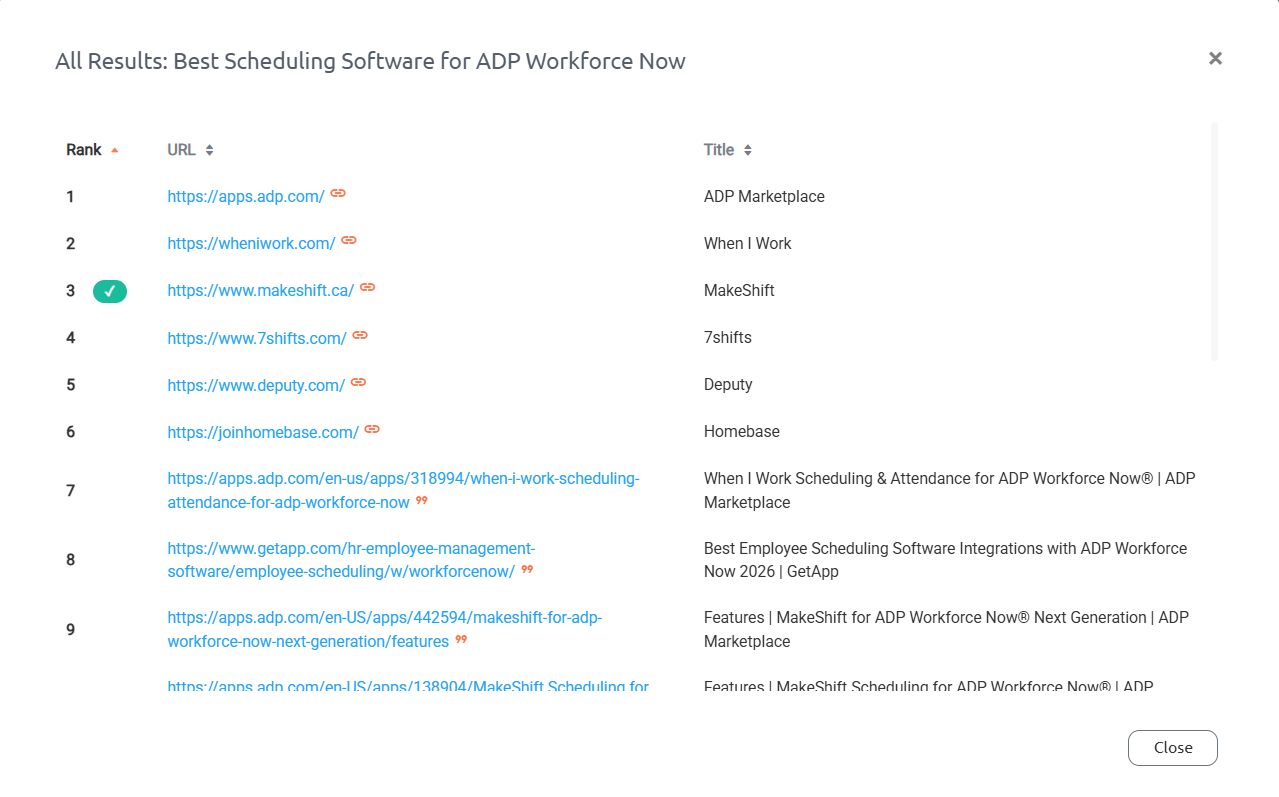
For mentions, you can see whether your brand was mentioned or not, how many times it was mentioned per prompt, and the actual sentence context of how ChatGPT referenced you.

ChatGPT results shift constantly, so review your data regularly and pay close attention to patterns.
If you’re consistently showing up for some prompts but disappearing from others, that tells you exactly where to focus your optimization efforts.
Generate Automated Reports & Notifications
Tracking your ChatGPT visibility is only useful if you can communicate it clearly. Whether you’re reporting to a client, a leadership team, or just keeping yourself organized, you need a way to turn that data into something people can actually understand and act on.
ProRankTracker gives you several ways to do that.
AI Reports
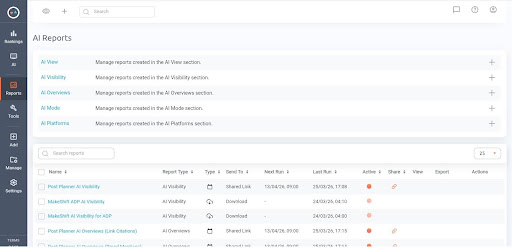
To generate a report, head to the AI Reports Center from the AI tab and select “AI Platforms,” or click the download button in the top right corner of your AI Platform dashboard view.
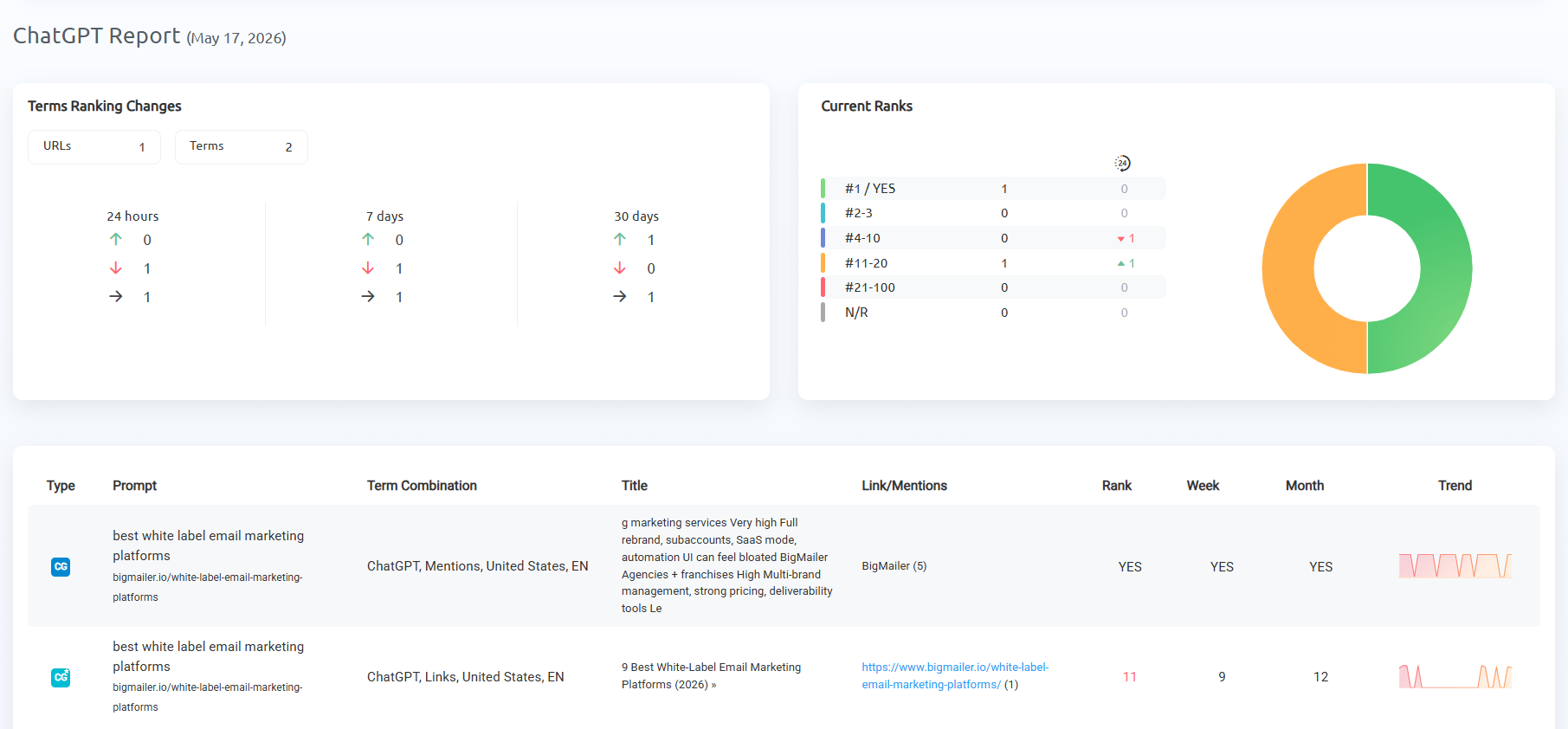
Each report breaks down your performance across your tracked prompts, showing links, mentions, or both combined, along with trends and visibility changes over time.
When generating a report, you can make it a one-time instant report or set it on a recurring schedule (daily, weekly, or monthly).
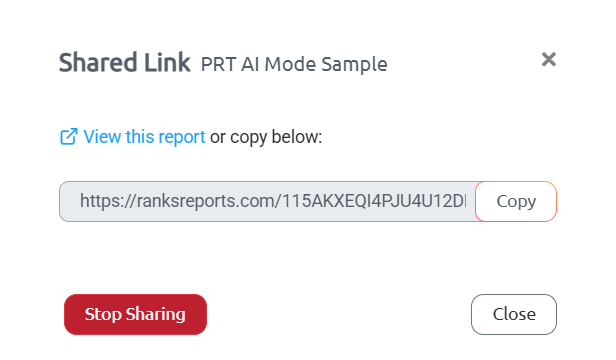
Export options include PDF, XLSX, CSV, email delivery to any address, Google Sheets, or a shareable URL (my favorite for sharing with clients).
Selecting an AI Platform report will include all platforms by default, so be sure to select ChatGPT as the term type if you want to include only that information.
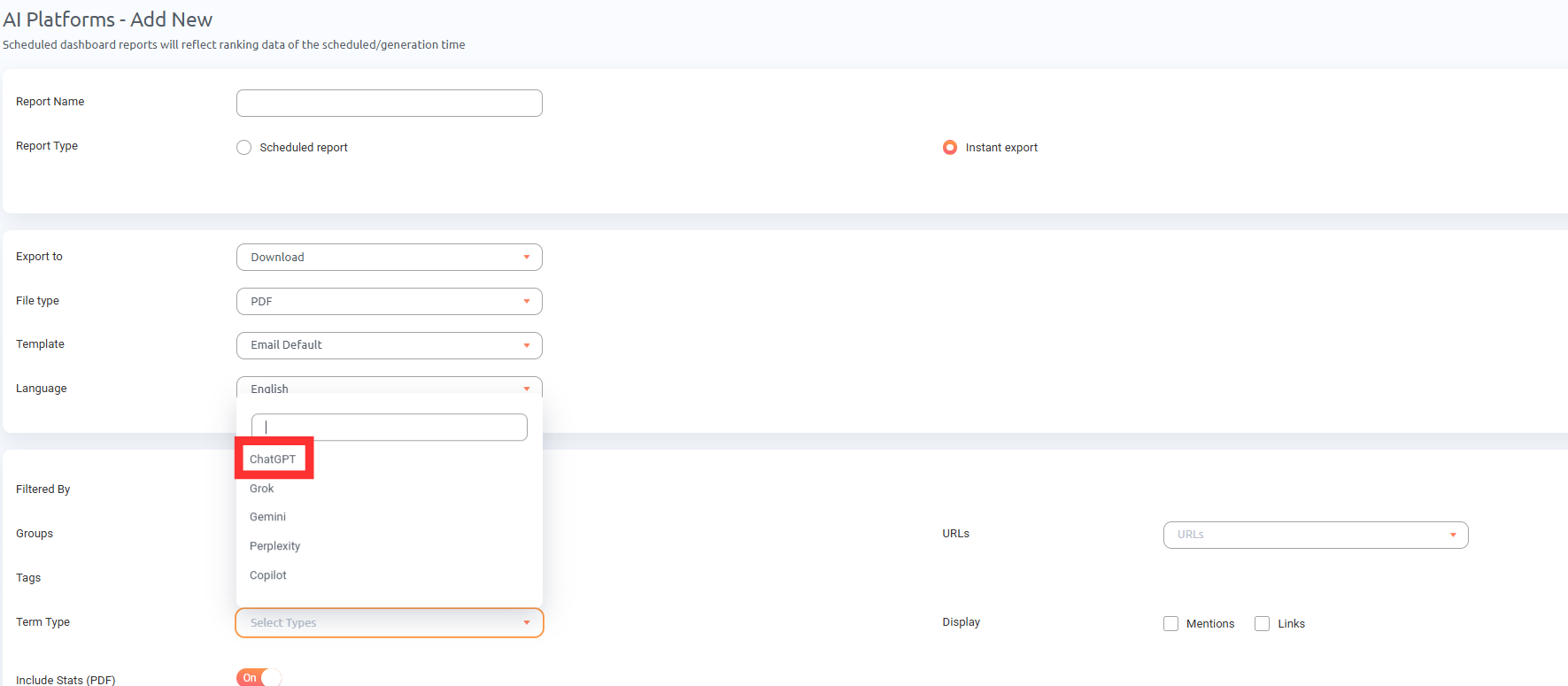
To keep reports focused, filter by Project, Group, Tags, or URLs. This makes it easy to create reports for specific clients, campaigns, or goals.
You can also choose to include just mentions, just links, or both, depending on what the recipient cares about most.
I recommend generating 2 reports for ChatGPT: one for links and one for mentions so you can analyze both separately.
Notifications
While reports give you the big picture, notifications make sure you don’t miss the day-to-day changes that matter.
ProRankTracker lets you set up automated email alerts that fire when specific visibility changes happen. You can configure:
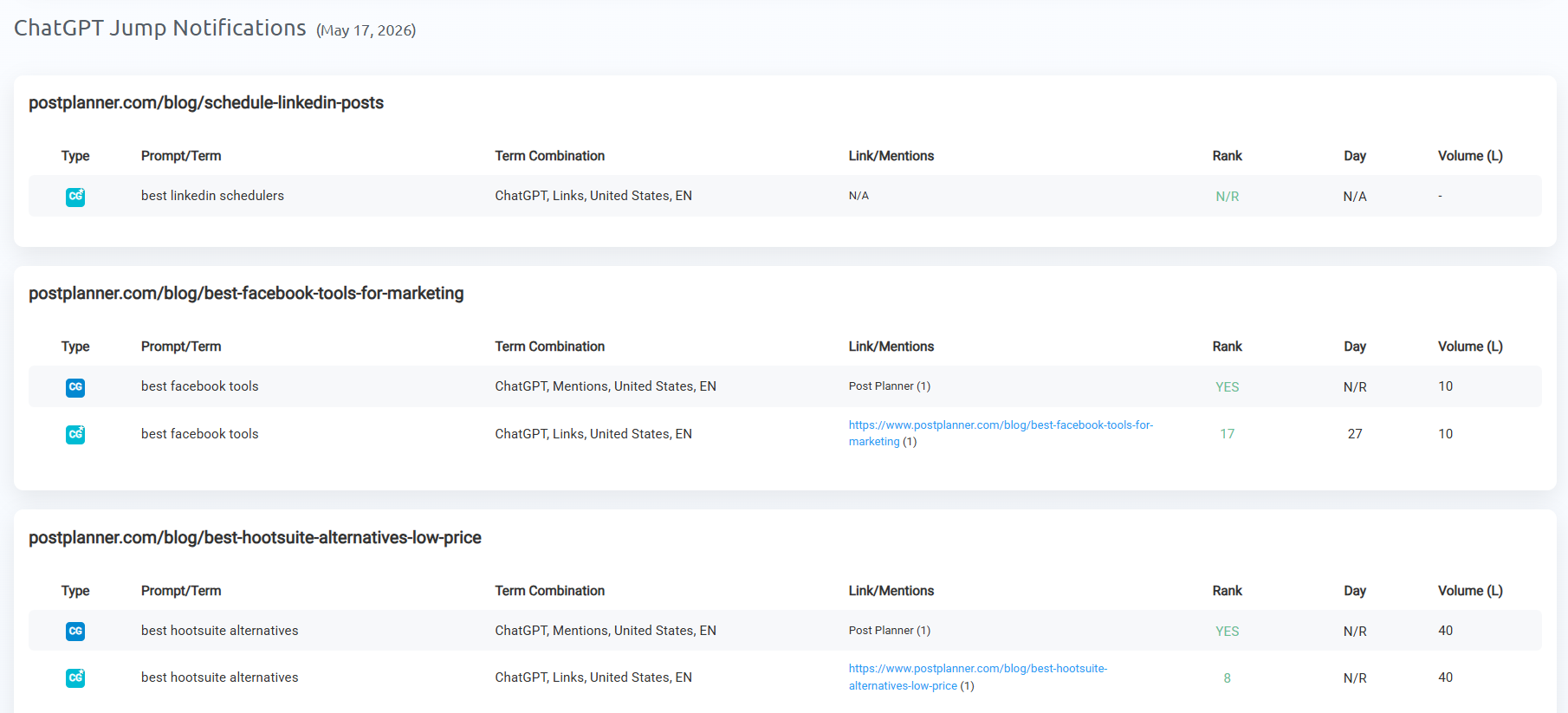
- Jump Notifications to flag ranking increases, perfect for sending quick wins to clients
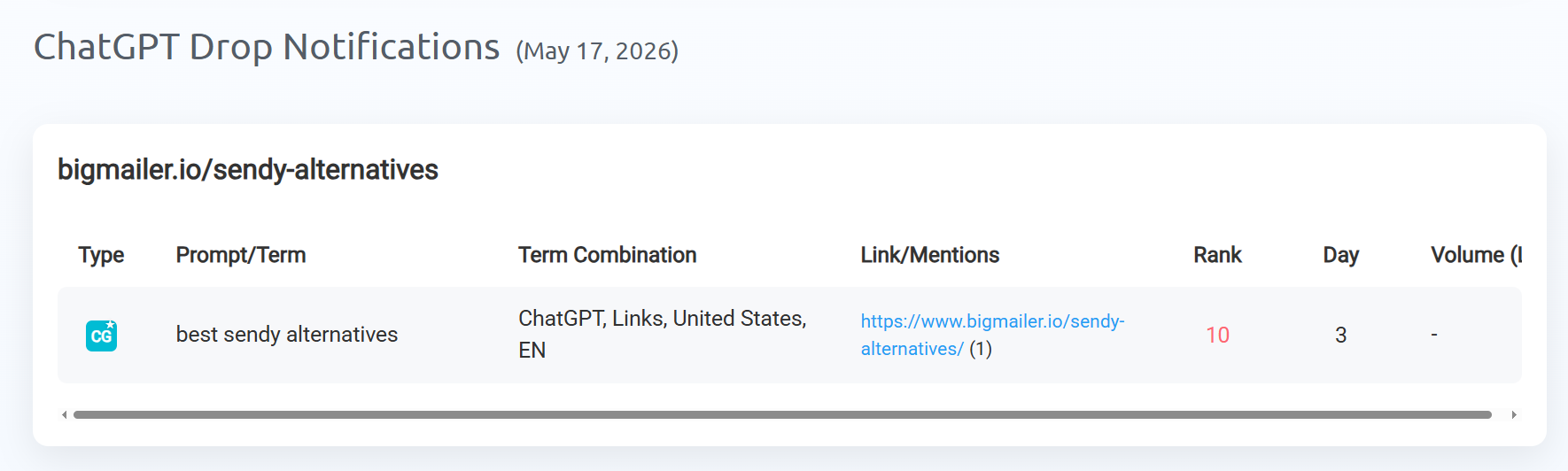
- Drop Notifications to alert you when visibility dips so you can respond before it becomes a trend
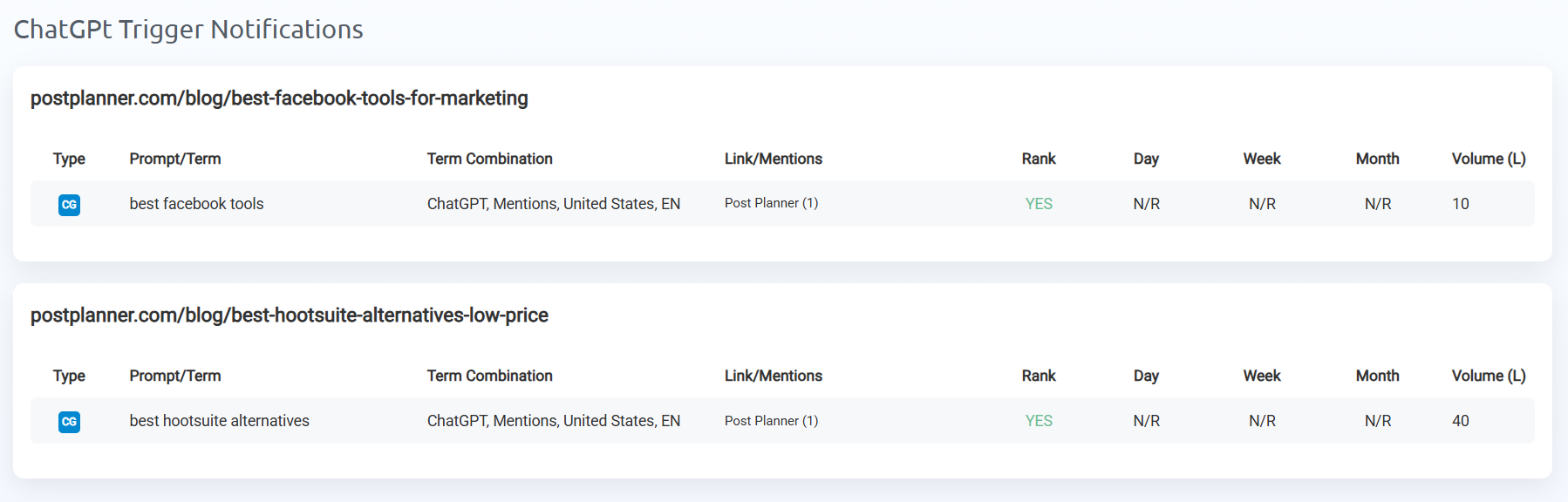
- Trigger Notifications to let you know when a specific ranking goal is reached
- Indexed URL Change Notifications to alert you when a different page from your domain starts appearing for a prompt you’re tracking
To set up notifications specifically for ChatGPT, adjust the filter settings to set the search engine to ChatGPT.
Shared Reports
If you want to give clients or stakeholders ongoing access to their data without sending a new report every time, Shared Reports are the way to go.
You set it up once, generate a link, and share it. Anyone with the link can view the latest data at any time, no login required. You can also password-protect the report, customize the template, cloak the URL with your own domain, and set an expiration date.
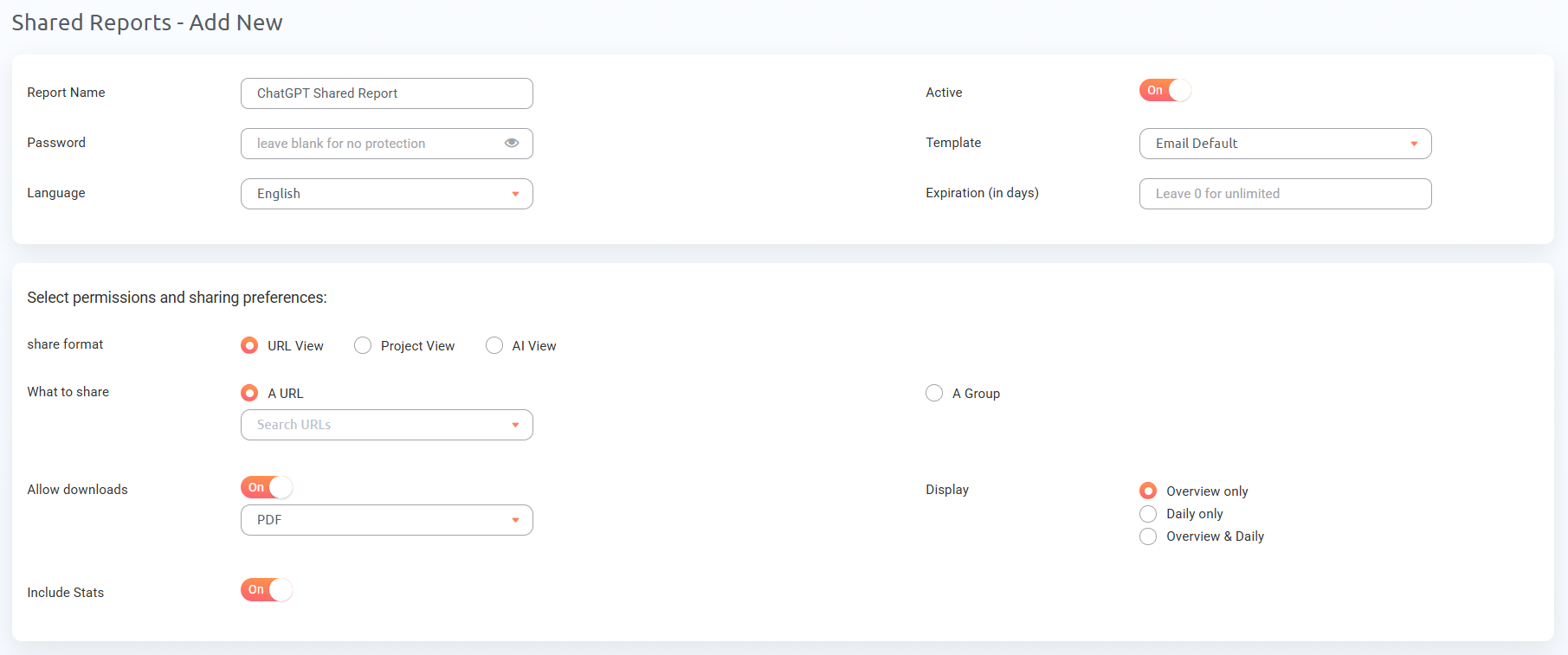
I recommend creating a Shared Report for each client or campaign. Clients appreciate being able to check their own visibility on their own time, and it cuts down on “how are we doing?” emails.
White Label Reporting
Every report type in ProRankTracker can be white-labeled.
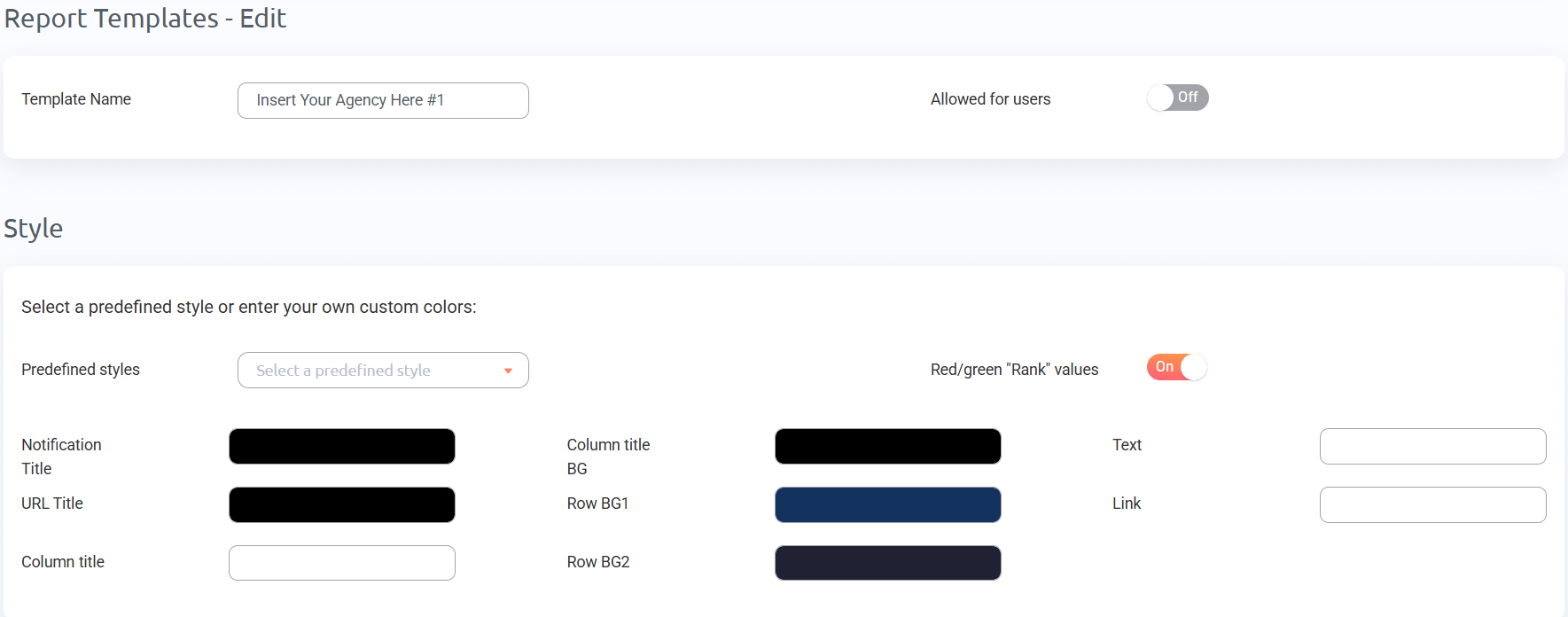
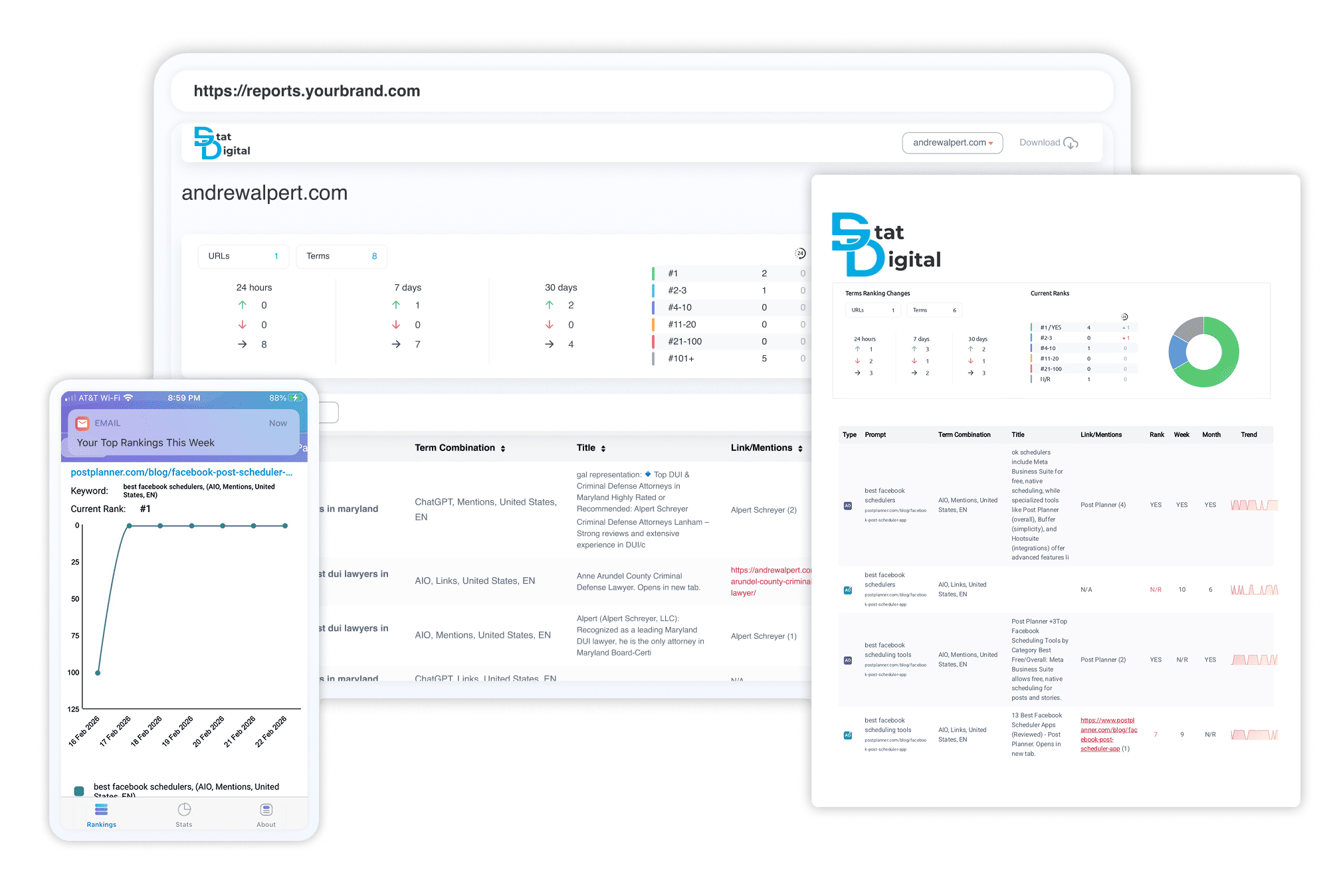
That means you can replace ProRankTracker’s branding with your own logo, color scheme, custom email address, and even your own domain for shared report links.
When a client opens a report, they see your brand, which makes it appear as in-house software. For agencies, this makes a real difference in how professional your deliverables look.
Step 4: Adjust Your Strategy as Needed
By now, you should have content optimized for ChatGPT, and your rank tracker should be set up.
But here’s the thing about tracking your ranks: it doesn’t do you any good if you don’t do anything with the data you get from your rank tracker.
In this final section, I’ll discuss what you should do with your rank-tracking data to turn your ProRankTracker data into real strategic improvements.
Find Higher-Value Prompts
There are always more prompts worth tracking than the ones you started with. The hard part is finding them.
ProRankTracker has two AI-specific tools that make this a lot easier: AI Prompt Suggestions and AI Rankings Discovery.
AI Prompt Suggestions helps you expand your prompt list based on what you’re already tracking. You give it a URL and a base prompt, and it generates related prompts you might not have thought of.
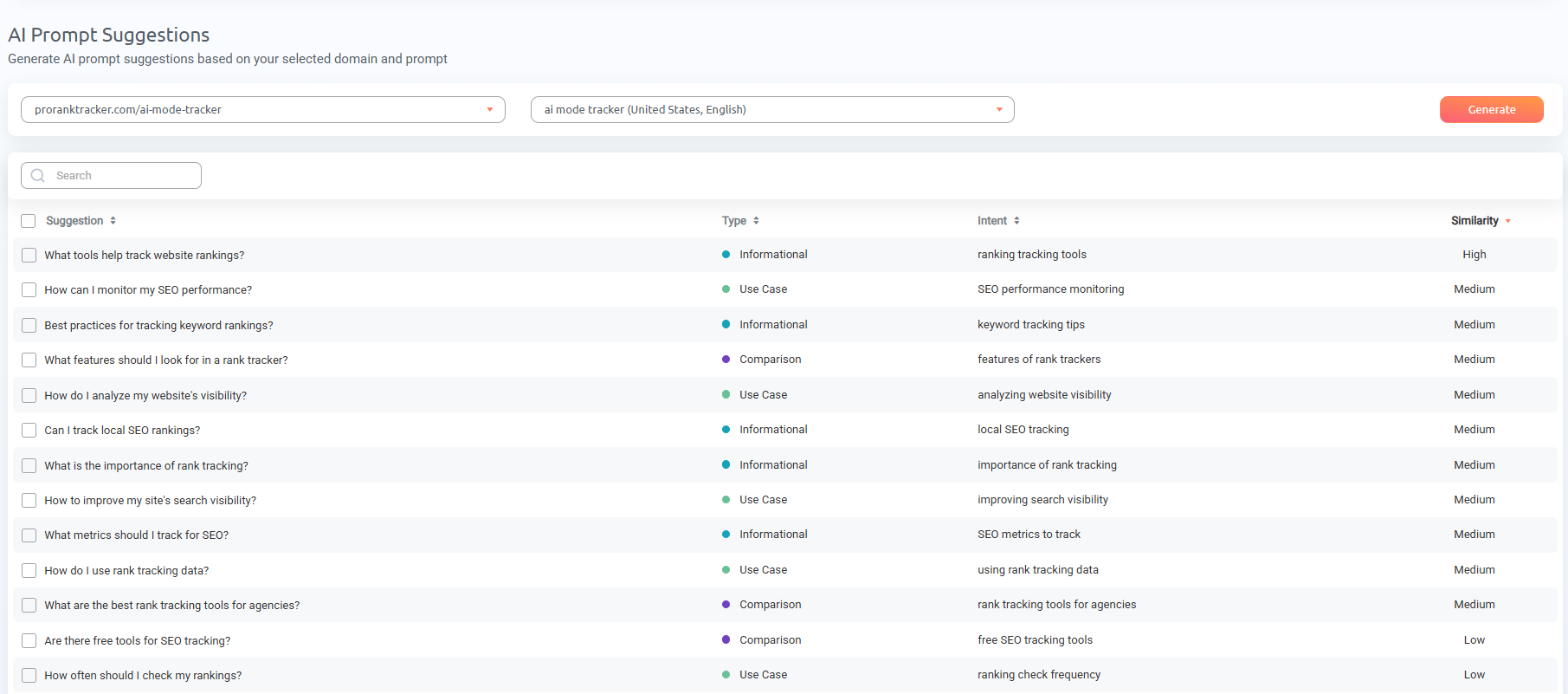
Each suggestion is categorized by type and relevance, so you can quickly prioritize the ones that match your goals.
It also works for URLs you haven’t started tracking for AI yet. If you already have organic keywords set up in ProRankTracker, the tool can use those to suggest AI prompts worth monitoring.
That makes it a fast way to bridge your existing SEO strategy into AI tracking without starting from scratch.
AI Rankings Discovery works in the opposite direction. Instead of suggesting new prompts to track, it finds prompts where your site is already appearing in AI results, even if you aren’t tracking them yet.

This is where you’ll find some of your biggest quick wins. If you’re already showing up for a prompt you didn’t know about, that’s a signal that your content is close to (or already at) a strong position.
You can add that prompt to your tracking, monitor it daily, and focus your optimization efforts on maintaining or improving that visibility.
As the discovery database grows over time, it surfaces more of these opportunities automatically, so it’s worth checking back regularly.
Between these two tools, you’re covering both sides: finding new prompts you should be targeting, and uncovering existing visibility you didn’t know you had. Both feed directly into a stronger ChatGPT optimization strategy.
Focus on Your Competitors
If you’re not showing up in ChatGPT results for a prompt, it means SOMEONE else is.
Knowing who that someone is, and how often they appear, gives you a clear picture of where you stand and where to focus.
The good news is that ProRankTracker already shows you competitor data for link rankings without any extra setup.
When you click the list icon on any tracked prompt in the ChatGPT view, you’ll see the full list of URLs that appeared in that response, including competitor domains. You can see exactly who’s being cited, how many links they have, and where they rank among the other sources.
If you want to track your competitors’ brand mentions long-term, you’ll need to add their URL and brand names separately to ProRankTracker. I recommend creating a separate group or tag for competitor mentions so you can keep that data organized and easy to filter in reports.
But what if you just want to generate a competitor report WITHOUT adding it to your long-term tracking list?
Use ProRankTracker’s AI Competitors Comparison tool to see how your visibility stacks up side by side.
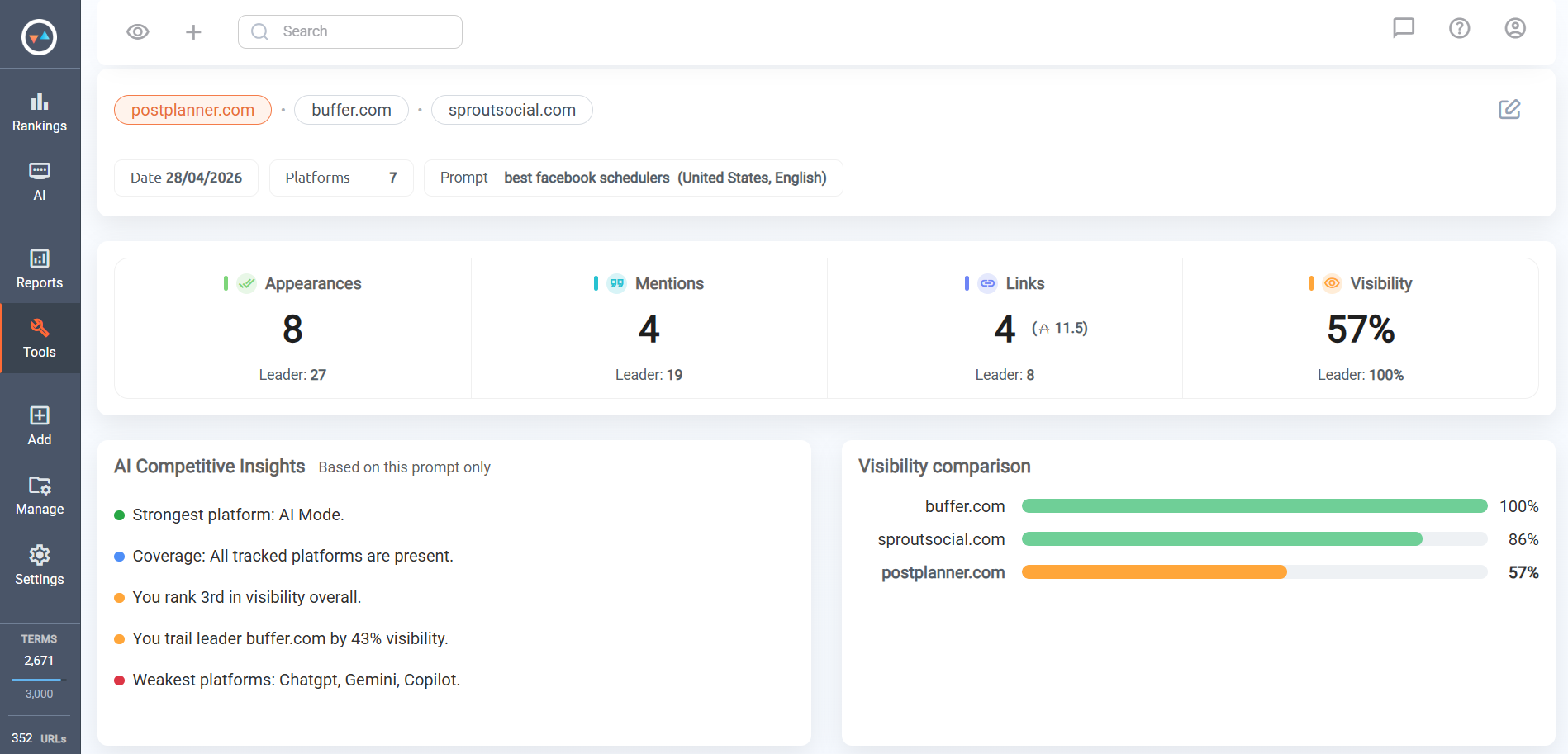
This tool gives you a direct comparison of your AI presence against specific competitors across the prompts you’re tracking.
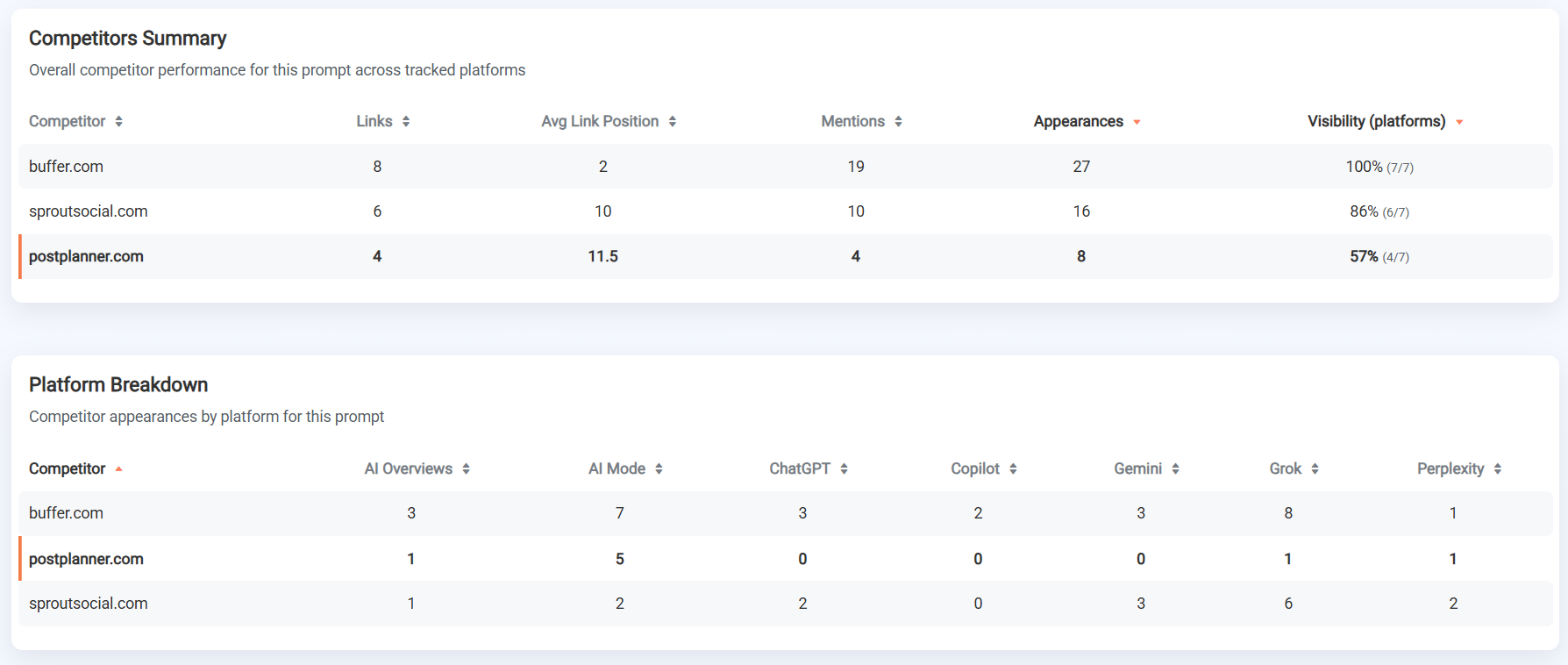
You can see where competitors are appearing and you’re not, where you’re outperforming them, and where new tracking opportunities exist. It even breaks down appearances by specific platform, so you can isolate just your ChatGPT results.
That competitor data can turn your tracking into an actual strategy in competitive industries.
If a competitor is consistently showing up for a high-intent prompt where you’re absent, that tells you exactly which content to create or improve next.
Update Outdated Content
When someone asks ChatGPT a question, they expect a current answer. And ChatGPT knows that. It’s not going to cite an article from 2019 with outdated stats and discontinued products when there’s a freshly updated page covering the same topic.
One study found that content updated within the last 30 days receives citations 3.2x more frequently than older material.
That means “publish and forget” doesn’t work anymore. If your content goes stale, it’ll drop out of consideration for both AI results and traditional SERPs.
But updating content doesn’t mean slapping a new date on an old post and calling it done. Every update should have a clear purpose. Here’s what to focus on:
- Replace outdated statistics with current data. If you’re citing a study from 2022 and a newer one exists, swap it in. AI systems and readers both notice when numbers feel old.
- Remove or revise references to tools, features, or products that have changed. If a software you recommended now has a completely different pricing model or has been discontinued, that damages your credibility as a source.
- Add new information that didn’t exist when the article was originally published. New research, new industry developments, new tactics you’ve tested. This is what turns a content refresh into something genuinely more valuable than the original.
- Update screenshots, examples, and step-by-step instructions so they reflect how things actually look and work today.
The goal isn’t to make a page appear more recent by updating the published date. It’s making sure your content is still the most accurate, complete answer available for the topic it covers.
This also compounds across your entire site. A regularly updated content library signals to both search engines and AI systems that your site is actively maintained and trustworthy.
Got it. Here’s the revised pro tip:
Pro tip: Set up Drop Notifications in ProRankTracker for your top-performing pages. Instead of waiting for a quarterly manual review to notice a ranking slide, you’ll get an automated email alert the day visibility dips.
FAQ
How can I get traffic from ChatGPT?
The best way to get traffic from ChatGPT is to create authoritative, valuable content that ranks high on Bing and Google. Read the 4 steps outlined above to become a master at creating content that appears on ChatGPT!
How much traffic does ChatGPT have?
As of February 2026, ChatGPT has over 900 million active weekly users! That means that getting your content to appear on ChatGPT web search could significantly boost your traffic.
Ready to Track ChatGPT Results?
If you’re not tracking your ChatGPT visibility, you don’t know whether your optimization efforts are working, which competitors are beating you, or where your biggest opportunities are.
ProRankTracker gives you daily tracking of your ChatGPT links and mentions, AI Prompt Suggestions to find new prompts worth targeting, AI Rankings Discovery to uncover visibility you didn’t know you had, and competitor comparison tools to see exactly where you stand.
Take it for a Test Drive for 7 days to get full access to all premium features for just $5.