How to Rank in Google AI Overviews that Drive Sales
Google AI Overviews are now the #1 organic result for a growing number of searches.
So, if your brand isn’t showing up inside them, your competitors are capturing the high-intent traffic that could be driving your sales.
But not all AI Overview visibility is equal.
Showing up for informational queries is very different from showing up where someone is actively comparing products and getting ready to buy.
The first builds awareness. The second drives revenue.
I’ve spent the past year researching and testing AI Overview strategies with my SEO clients.
Below, I’ll break down exactly how to earn AI Overview placements that actually influence purchase decisions and how to track whether they’re working.
I’ll cover:
- Prompts are the New Keywords
- Brand Mentions and Link Citations Are the New Rankings
- 8 Steps to Appear in AI Overviews
- How to Track AI Overview Results
Prompts are the New Keywords
While a keyword is a short phrase typed into Google, a prompt is usually a full question or scenario someone asks, expecting a direct answer.
This leads to “prompts” that trigger AI Overviews being much longer than the “keywords” we’ve been used to in the SEO world. In fact, NP Digital found that AI Overviews appeared in 36.1% of queries that were 6-10 words long, compared to just 12.4% for 1-2 word searches.
Here’s why that matters: when an AI Overview shows up, it’s essentially the #1 organic result. Meanwhile, the real “#1 organic result” click-through rate is dropping by 58%.
So if you want to continue to drive sales from SEO in the future, you need to be showing up inside the AI Overview, and it starts by targeting these longer prompts.
As a secondary benefit, these longer, more specific queries triggering AI Overviews give you a chance to reach more qualified leads.
For example, instead of someone just searching “project management software,” and getting 10 generic results, they can get a hyper-relevant answer by searching a prompt like “what’s the best project management software for agencies that handle client approvals?”
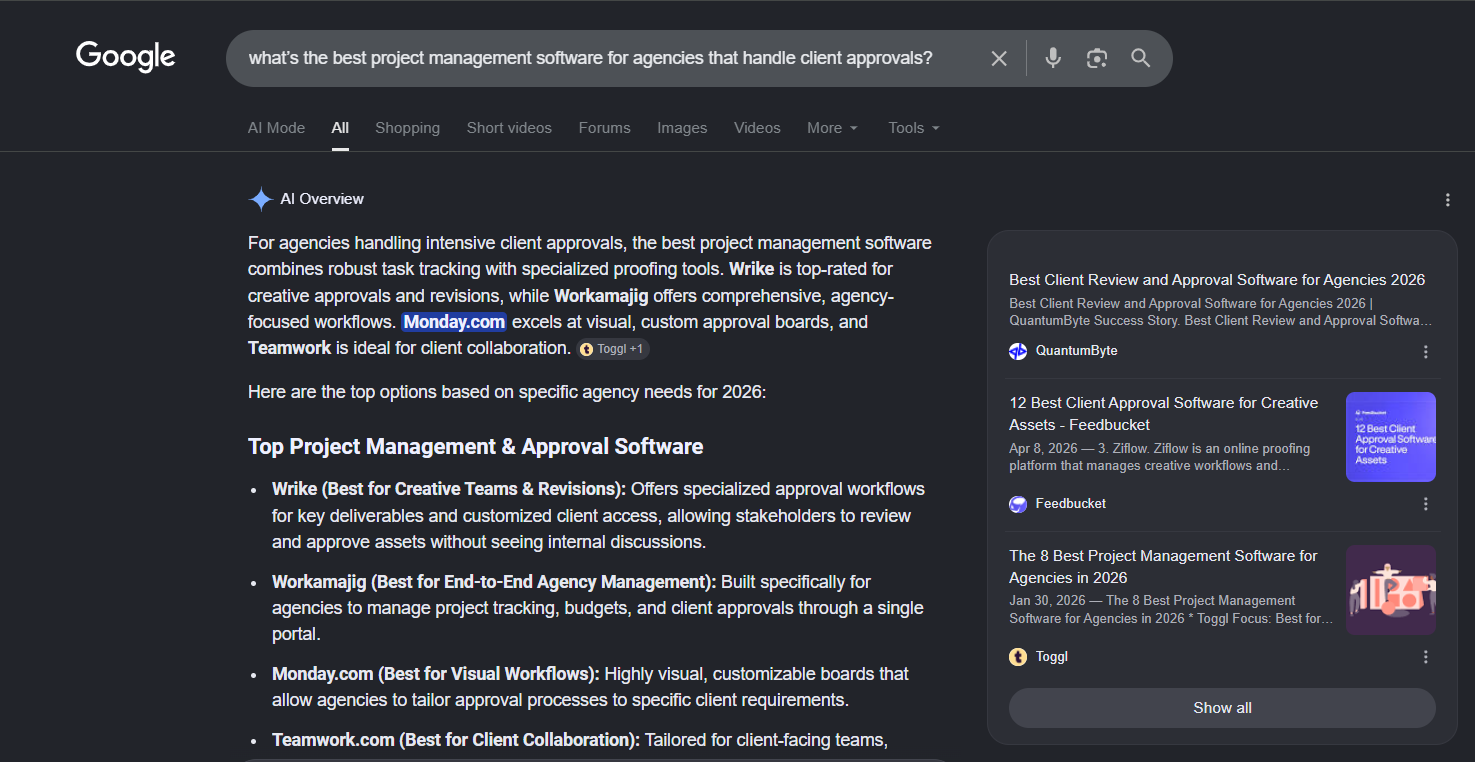
Google will actually use its AI to provide a more relevant answer with context in mind.
Ranking for broad keywords still has value, but if you want to appear in AI Overviews for queries that lead to purchases, you need to adjust your strategy to consider more specific prompts.
Brand Mentions and Links Citations Are The New Rankings
With traditional SEO rankings, you either show up on page 1 or you don’t. In AI Overviews, there is no page 1.
Google’s AI Overviews generates an answer from multiple sources and offers 2 types of visibility for brands:
1) Link citations, where your URL is referenced directly inside the AI Overview
and…
2) Brand mentions, where your brand name appears in the answer text.
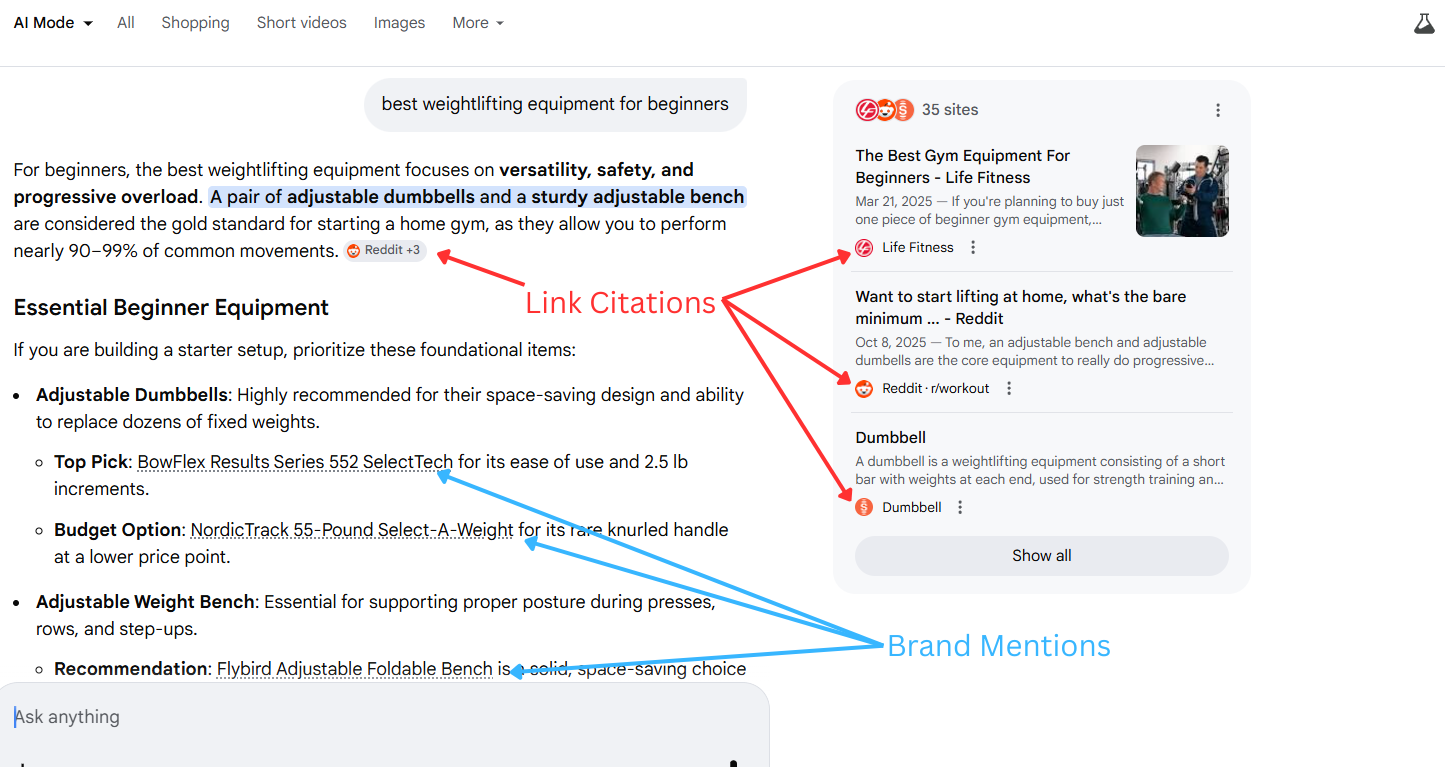
Both matter, and neither is equivalent to a traditional organic ranking (the 10 blue links).
Why?
Because AI Overview visibility is becoming decoupled from organic rankings. In July 2025, roughly 76% of pages cited in AI Overviews also ranked in the top 10 organic results for the same query. By early 2026, that figure had dropped to around 38%, according to an Ahrefs study.
Organic ranking still matters (and I’ll touch on that more later), but it no longer guarantees AI Overview visibility the way it used to.
Meanwhile, links cited in AI Overviews earn 35% more organic clicks than those that aren’t (which can still lead to attributable clicks and revenue).
But brand mentions are where it gets interesting for sales. Unlike link citations, which can appear in every type of AI Overview, brand mentions most often surface in answers where Google is actively recommending products or services. Think queries like “best accounting software for small businesses” or “top CRM tools for agencies.”
This makes earning brand mentions the top way to drive sales from AI Overviews.
The problem is that only 8% of searches with an AI Overview result in a click. Which means the majority of people reading an AI Overview that mentions your brand won’t click through to your site.
However, many of them will search your brand name next, visit your site directly, or remember you when they’re ready to pull the trigger.
8 Steps to Appear in AI Overviews
So, how do you appear and rank highly in AI Overviews to build a future-proof SEO strategy?
There’s no single ranking factor to optimize for.
But after researching and testing these strategies with clients, I’ve found 8 steps that consistently move the needle:
Step #1: Prompt Selection
Prompt selection is the foundation of this entire strategy.
Because every step that follows pays off only if you’re targeting prompts that drive sales for your business.
Start with Bottom-of-Funnel Prompts
Bottom-of-funnel (BOFU) prompts are where the money is. These are high-intent queries where someone has already identified their problem and is now evaluating solutions.
Let’s say you’re an accounting software company. You’d want to target high-intent prompts like:
- “Best accounting software for small businesses with payroll”
- “QuickBooks alternatives for freelancers”
- “What accounting software is best for a two-person ecommerce business?”
These will convert traffic to sales at a much higher rate than low-intent prompts like “what is accounting software” or “how to manage business finances.”
To find your own BOFU prompts:
- List your core product categories and the specific use cases each one solves
- Identify the competitors and alternatives buyers typically consider alongside you
- Think about how a buyer would phrase the questions they ask during the decision-making process
- Write those out as natural, conversational sentences
Expand into Supporting MOFU Prompts
A study from Omniscient found that LLMs like Google’s AI Overview mention brands 28% of the time when users are simply problem-aware, but not yet exploring solutions.
That means middle-of-funnel (MOFU) prompts can still drive conversions, just at a lower rate than BOFU. They also build familiarity with your brand before the decision moment arrives, making it more likely you’ll be considered when the user is evaluating solutions.
MOFU prompts typically fall into 2 categories:
- Problem-based — For example: “Why do my books never balance at the end of the month?” or “How do I know if I’m categorizing business expenses correctly?”
- How-to — For example: “How to set up a chart of accounts for a small business” or “How to reconcile bank statements in accounting software”
Tracking Your Prompts
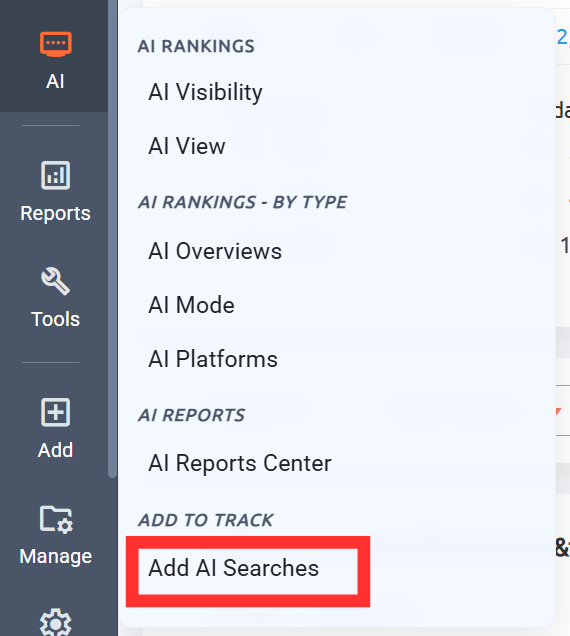
Once you have your prompt list built, the next step is tracking them. In ProRankTracker, you can add your prompts by clicking “Add AI Searches.”
Enter your target prompts, add the URLs and brand/product names you want to monitor, then select AI Overviews as your platform.
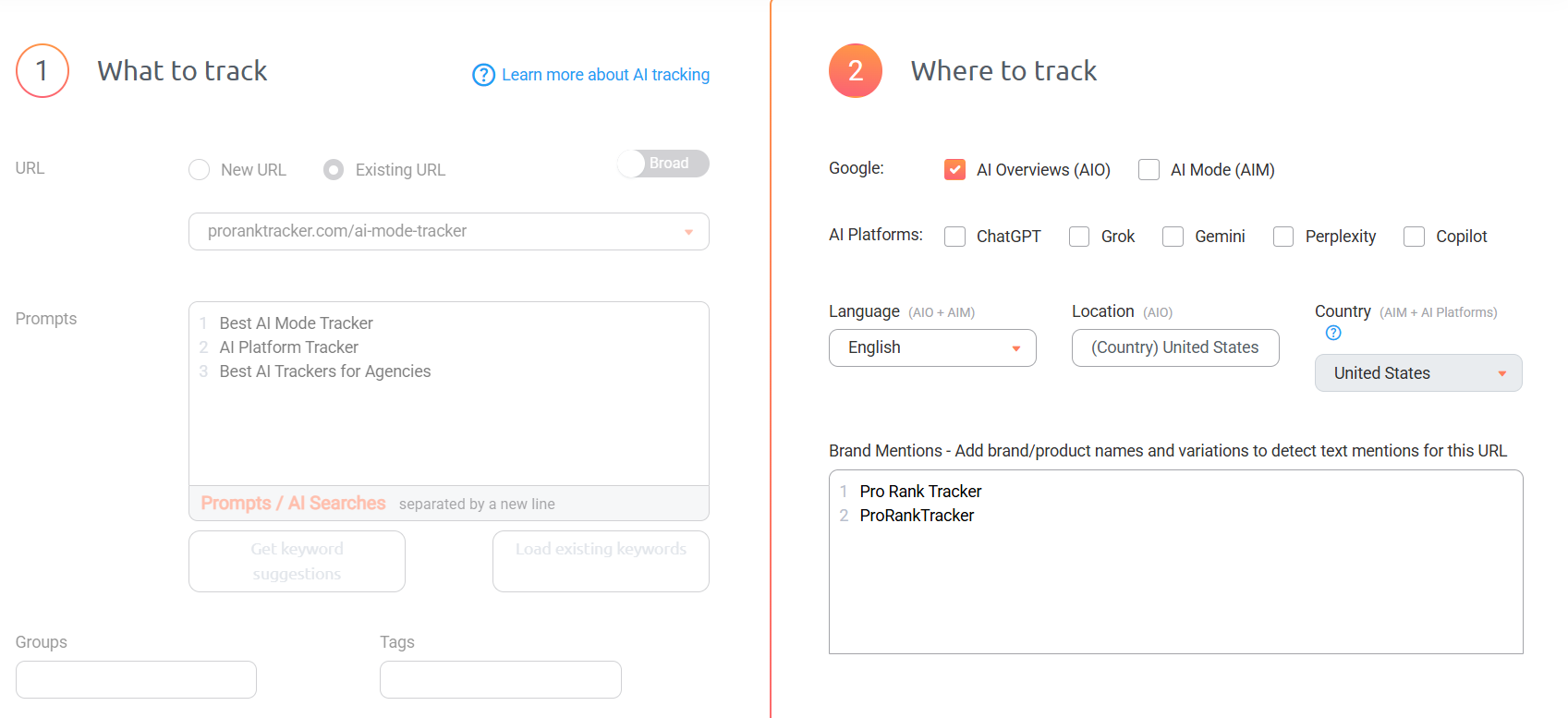
From there, ProRankTracker tracks both your link citations and brand mentions daily, so you can see exactly where you’re showing up and for which prompts.
You can also use ProRankTracker’s AI Prompt Suggestions to discover additional prompts based on a URL and a prompt you’re already tracking.
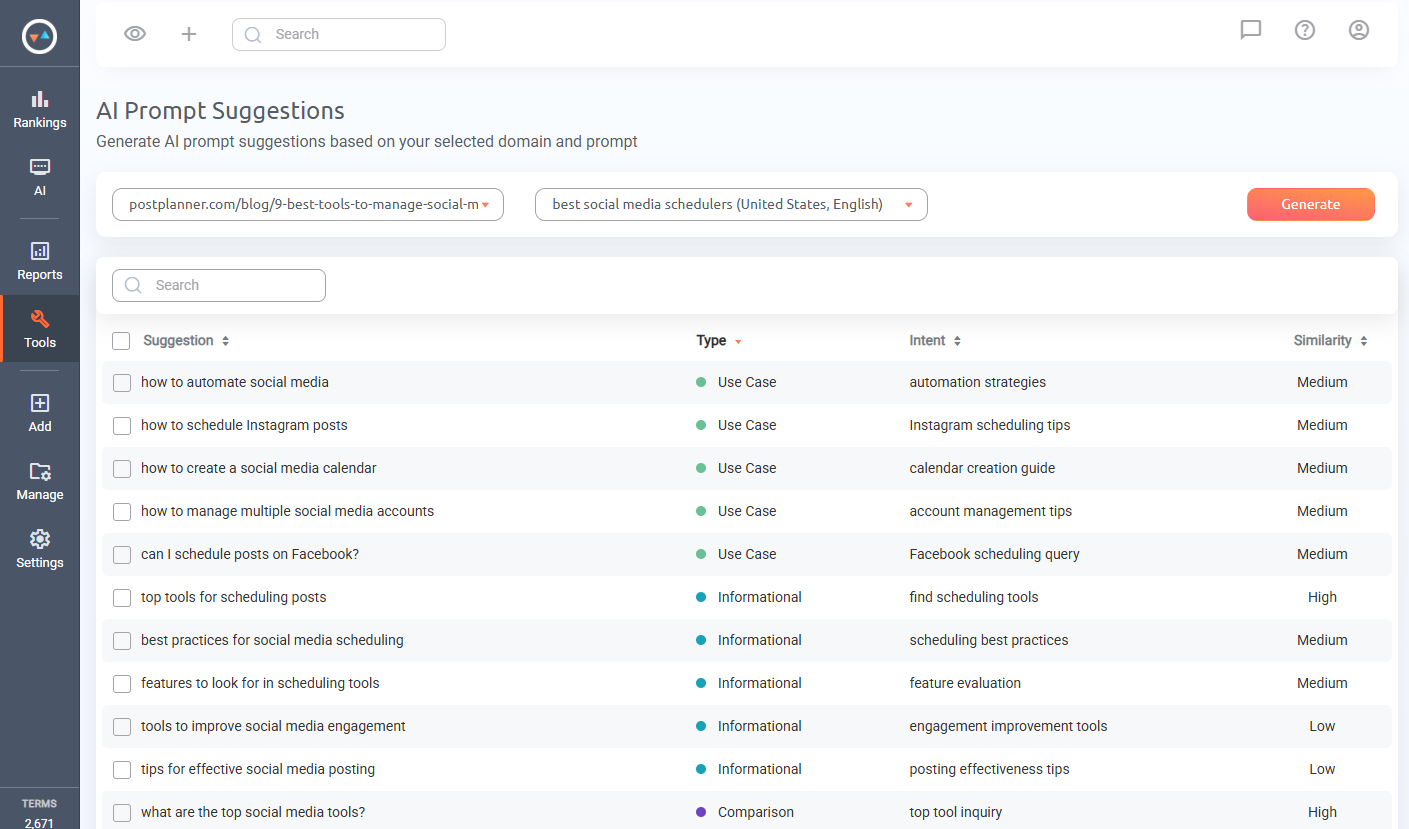
It’ll suggest related prompts you may not have considered to uncover overlooked opportunities.
Pro tip: When building your prompt list, organize by intent from the start using Groups and Tags so you can generate more focused reports later.
Step #2: Rank in Traditional SERPs
I know… I already said that organic rankings no longer guarantee AI Overview visibility the way they once did. That’s true.
But there’s still a strong correlation between traditional rankings and AI Overview citations.
A page ranked #1 has a 53% chance of being featured in an AI Overview, while a page ranked tenth still has a 36.9% chance.
In practical terms, traditional SEO remains your foundation. Ranking highly for your target prompts increases your likelihood of being cited, builds the authority signals that Google uses to evaluate trustworthiness, and ensures your content is considered for AI Overviews.
This means you need to continue tracking your organic Google rankings with a tool like ProRankTracker.
ProRankTracker tracks your organic rankings daily across Google desktop and mobile for any location and language.
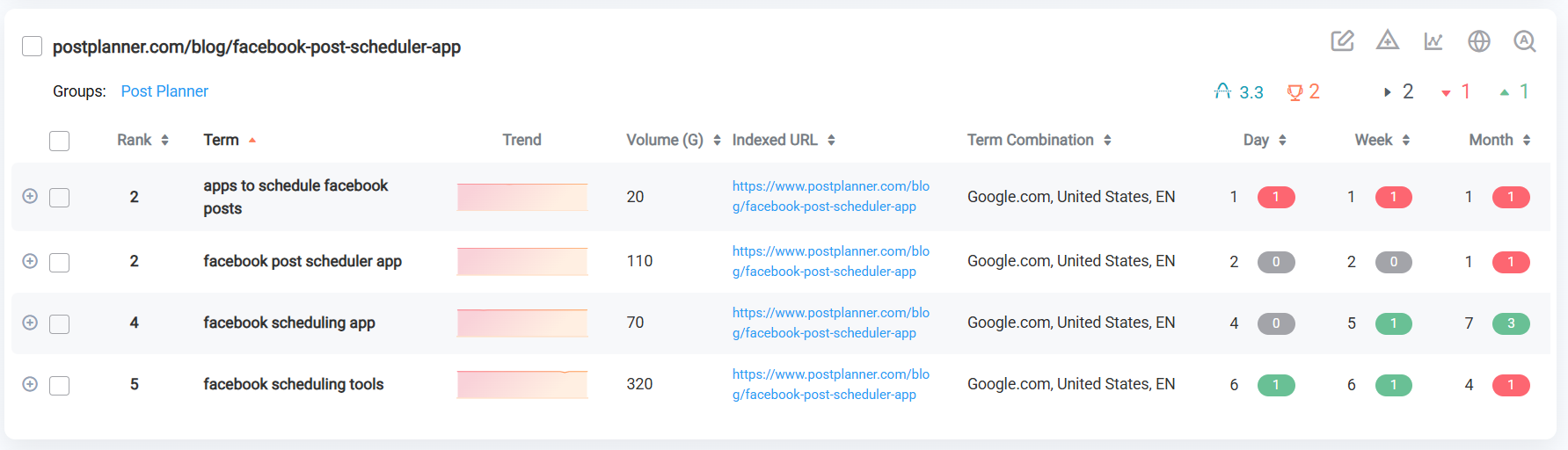
I recommend adding the same URLs you’re monitoring for AI Overviews so you can see how your organic positions correlate with your AI visibility over time.
The rest of the steps in this guide are the difference between ranking in traditional SERPs and appearing in AI Overviews.
Step #3: Win Brand Mentions on Third-Party Content
If you want your brand to be mentioned in AI Overviews, you have to be “mentioned” across the internet in content about your product category.
Just like link building, the most effective way is through third-party content outreach.
But specifically, what type of content?
According to Josh Blyskal and Profound’s analysis of 250 million AI responses, blogs and opinion pieces are the most cited content category in AI answers at 34.2%, with comparative listicles and “best of” articles close behind at 27.3%.
Together, those two content types account for nearly two-thirds of all AI citations. That means getting your brand mentioned in those formats, on other sites, is arguably the highest-leverage action you can take to build AI Overview visibility.
Here’s how to execute it:
1) Start with your BOFU prompts from Step 1. For each prompt, add “best” or “top” as a modifier and scrape the top 100 Google results. You’re looking specifically for third-party listicles, comparison articles, and blog posts. ProRankTracker’s Insta-Check lets you pull and download these results in bulk for specific countries and languages (which matters if your target audience is in a specific market).
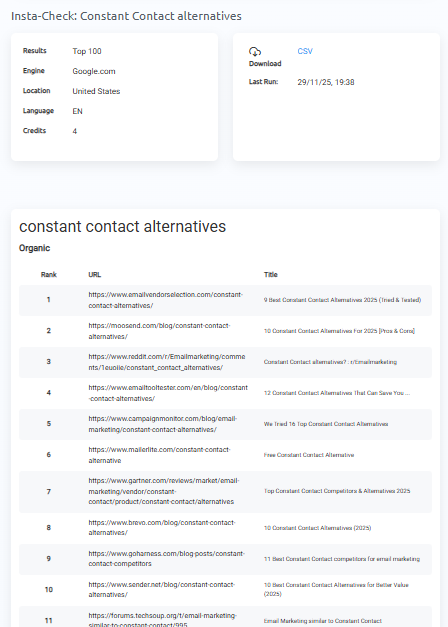
2) Filter your list. Remove anything that isn’t a listicle or comparison article. Product landing pages and homepages almost never mention competitors, so they’re not worth pursuing.
3) Prioritize the top 20 ranking pages for each prompt. These pages have the most influence on what AI Overviews surface, so they deserve your best outreach. Don’t mass-email these contacts. Each pitch should be personalized and one-to-one.
4) Reach out to the person behind each page. Find the owner, editor, or content lead and pitch them directly. Reference the specific article, explain why your product fits their list, and make it easy to say yes. Offer something in return where it makes sense, whether that’s a reciprocal mention, a free account to review your product, or an affiliate deal.
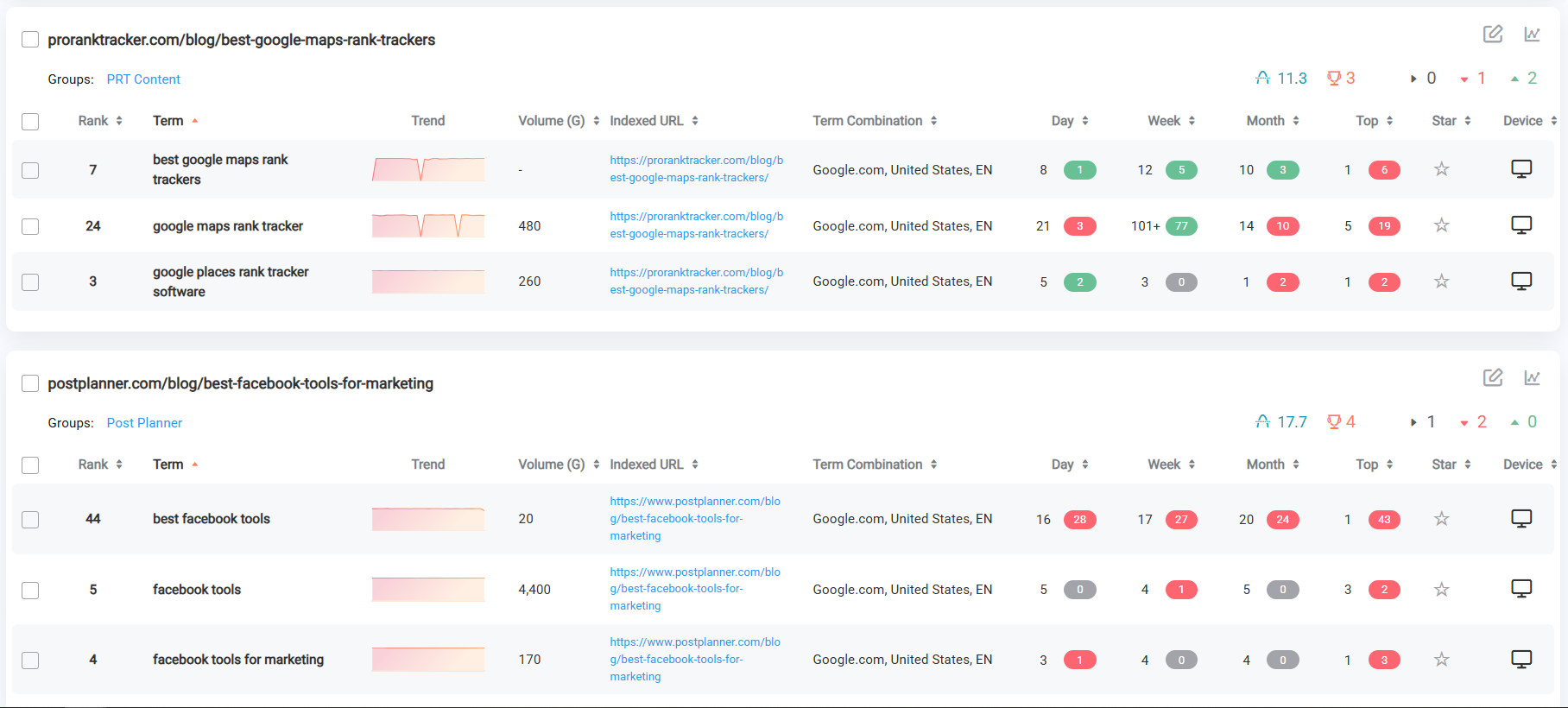
5) Track where your placements are ranking. After you earn a brand mention in a listicle, add that URL to ProRankTracker. Then, based on how high that listicle ranks over time, you can decide how much effort to put into negotiating a higher placement within the article.
Step #4: Create Unique Content Based on REAL Experience
AI can now produce a clear explanation of almost any concept in seconds. That means the baseline for what counts as great content keeps rising.
The simplest filter for whether a piece of content is worth publishing: does it contain something that only you could have written?
Here’s what that looks like in practice:
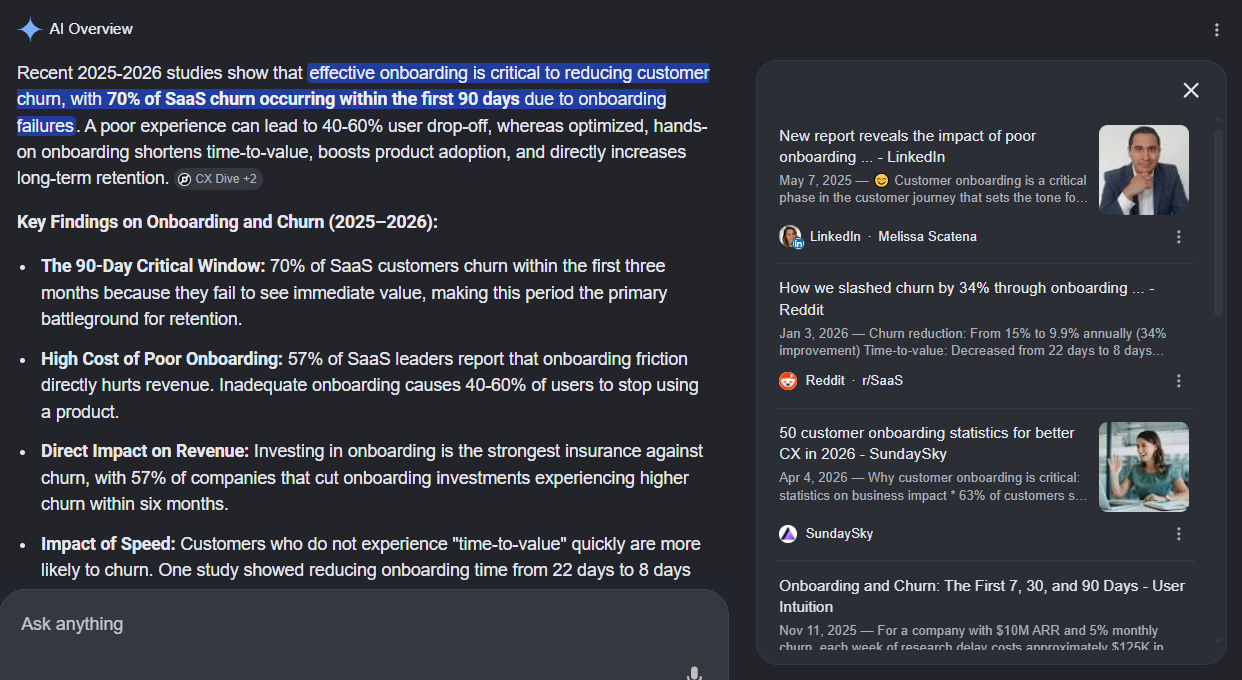
Publish research from your own data. If your business generates data from customer behavior, campaign results, or platform usage, there’s a study in there that nobody else can replicate. A post like “we analyzed 1,000 customer accounts and found that users who complete onboarding in under 10 minutes have 40% lower churn” gives AI something concrete to cite that doesn’t exist anywhere else.
Document real client outcomes with full context. The most citable case studies include the specific situation, the reasoning behind each decision, and the exact result. An accounting software company writing about how a client reduced month-end close time from 4 days to 1 using a specific workflow is far more citable than a vague success story.
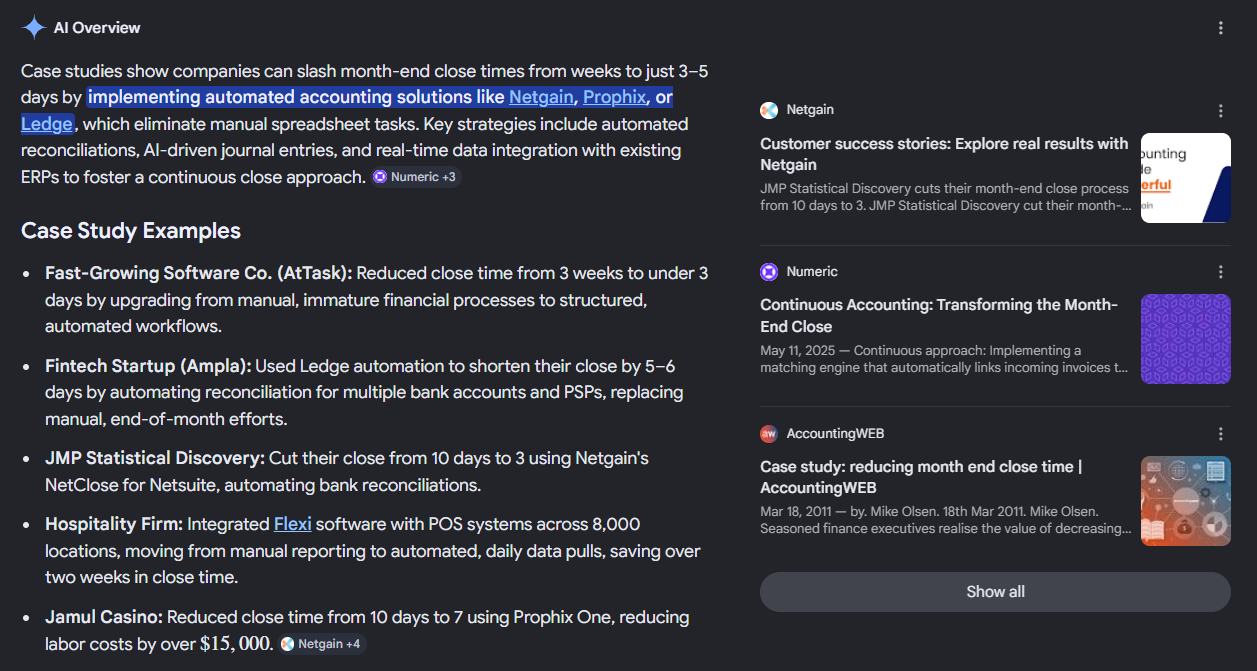
Write from direct, hands-on experience. What you discovered by actually doing something carries a perspective no AI tool can replicate. A post about what changed after running 200 client audits, or what you learned from a campaign that initially failed, has credibility that generic guides don’t. The specific details, especially the things that didn’t work, are often the most valuable part.
Create product-specific content that only you can credibly publish. Walkthroughs, comparisons, and use case breakdowns grounded in your actual product give readers something they can’t get from a third-party overview. A competitor can’t authentically publish your product tutorials, and Google recognizes the difference.
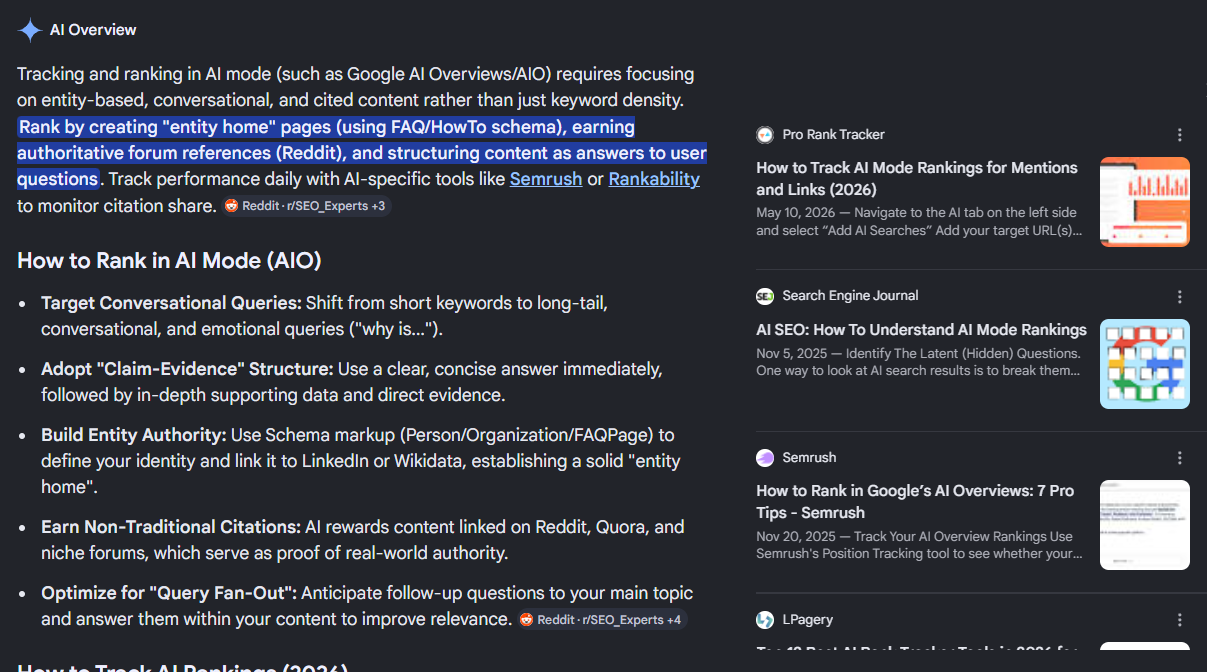
Don’t want to spend time collecting original data?
A survey of your existing customers, a breakdown of patterns across your last 20 client projects, or an analysis of your own platform’s usage data all produce genuinely citable content.
Step #5: Make it Easy to Extract Info from Your Content
Google’s AI reads content in a similar way to people. It skims for answers that are easy to extract. So the more well-organized your content is, the better.
It’s all about making your answers as clear and accessible as possible.
In practice, that means organizing your pages with:
- Direct answers near the top of each section, before any supporting explanation. Answer the question first, then elaborate.
- Clear subheadings that describe exactly what the section covers. If someone can scan your headers and understand the full picture of your page, your structure is working.
- Bulleted lists for steps, grouped information, or options. Lists are far easier for AI to extract than the same information written as flowing prose.
- Tables for comparisons, pricing breakdowns, or feature-by-feature analysis. These are especially valuable for BOFU content where buyers are evaluating options side by side.
- FAQ sections at the end of key pages, written in natural question-and-answer format that mirrors how buyers actually phrase their searches.
- Short summaries or TL;DRs at the top of longer articles that give Google an easy entry point into the page’s core answer.
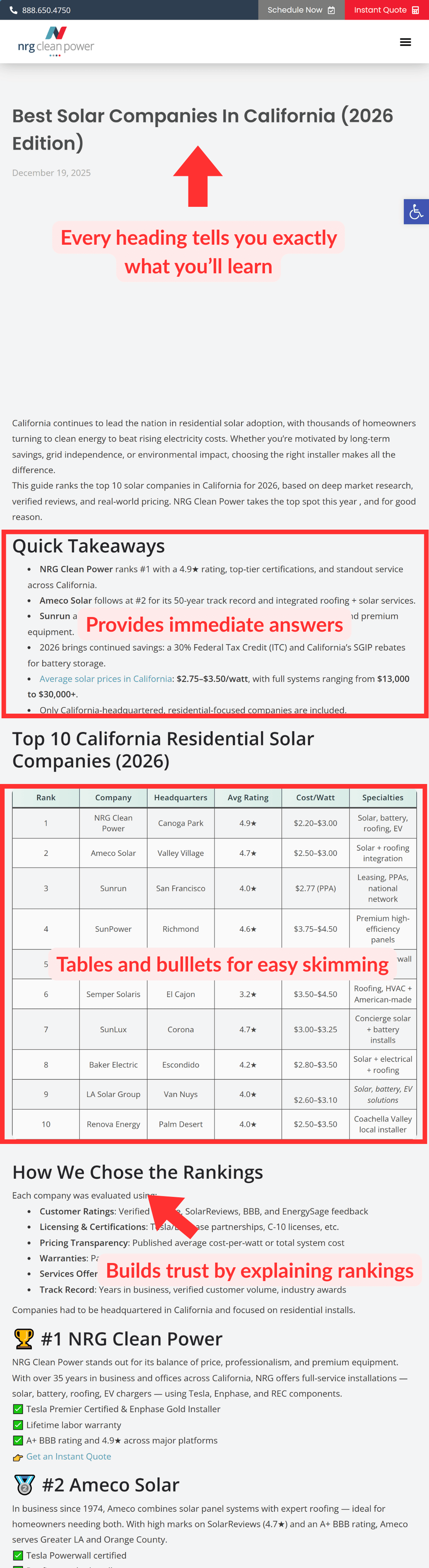
Start by updating the structure of your highest-priority BOFU pages and work through them in order of importance to your business.
Step #6: Schema
Schema markup gives Google’s AI a structured, machine-readable summary of the key points from your page.
For any BOFU page on your website — like your homepage, landing pages, pricing page, and other BOFU blog posts — schema is a MUST.
These are the pages where Google needs the clearest possible signal about what you offer.
Educational content is worth adding schema to too, especially pages that mention your product.
The good news is that writing schema no longer requires deep technical knowledge, thanks to AI.
Start by feeding your page content into ChatGPT or Claude along with context about what the page is for, who it targets, and what product or service it describes. Ask it to generate the appropriate schema markup for that page type.
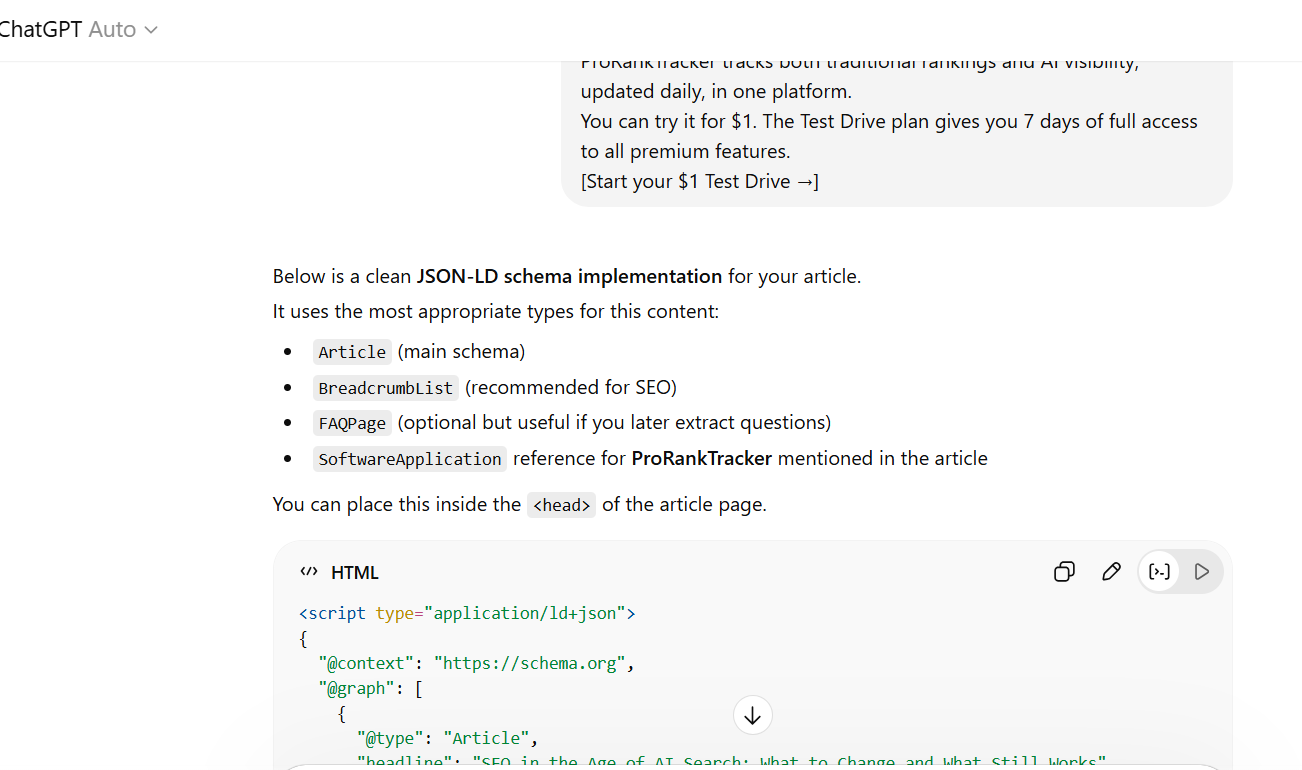
Then ask a follow-up question: Are there additional schema types worth adding beyond the obvious ones? You’ll often surface missing relevant schema that the AI had not initially considered.
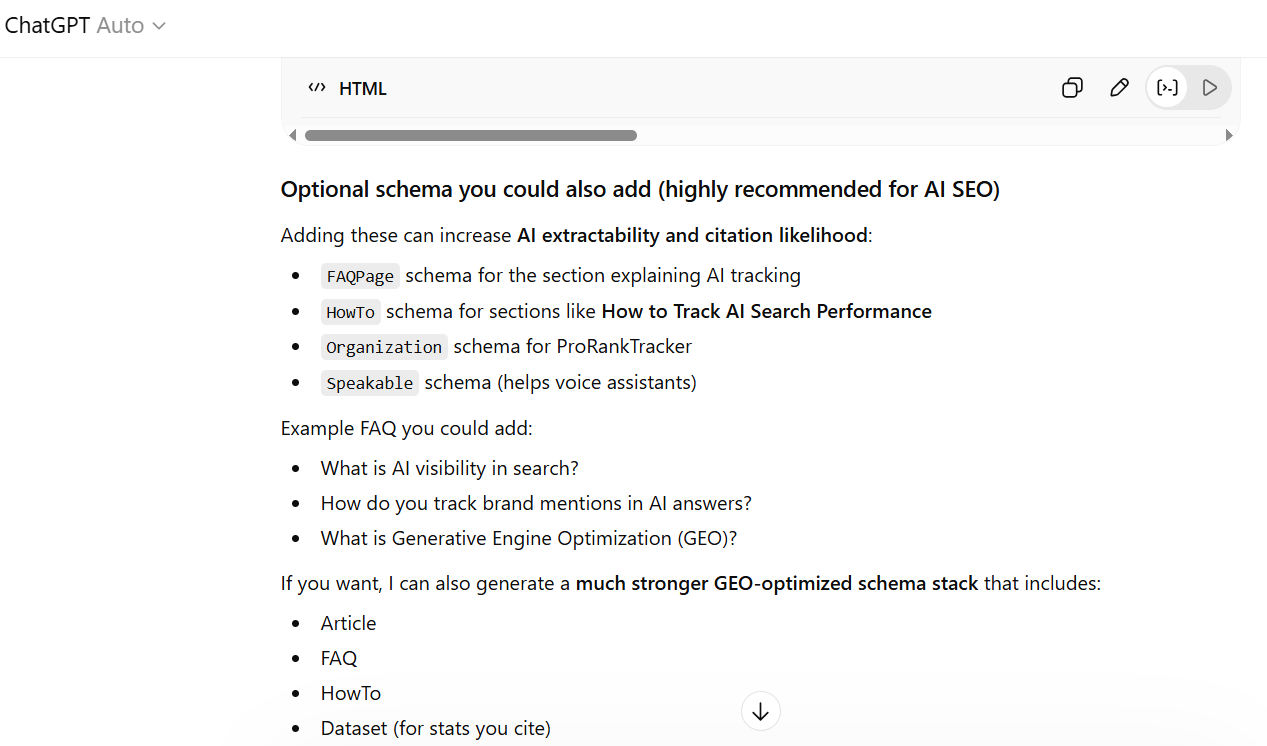
Once you have the output, fact-check it carefully before touching your website. Check every name, URL, description, and referenced file against the actual page content. Then, validate it using these 2 tools:
- Schema Markup Validator catches structural errors in the code itself before you publish anything.
- Rich Results Test checks your structured data and shows which rich result types your page qualifies for, including a preview of how they would appear in search.
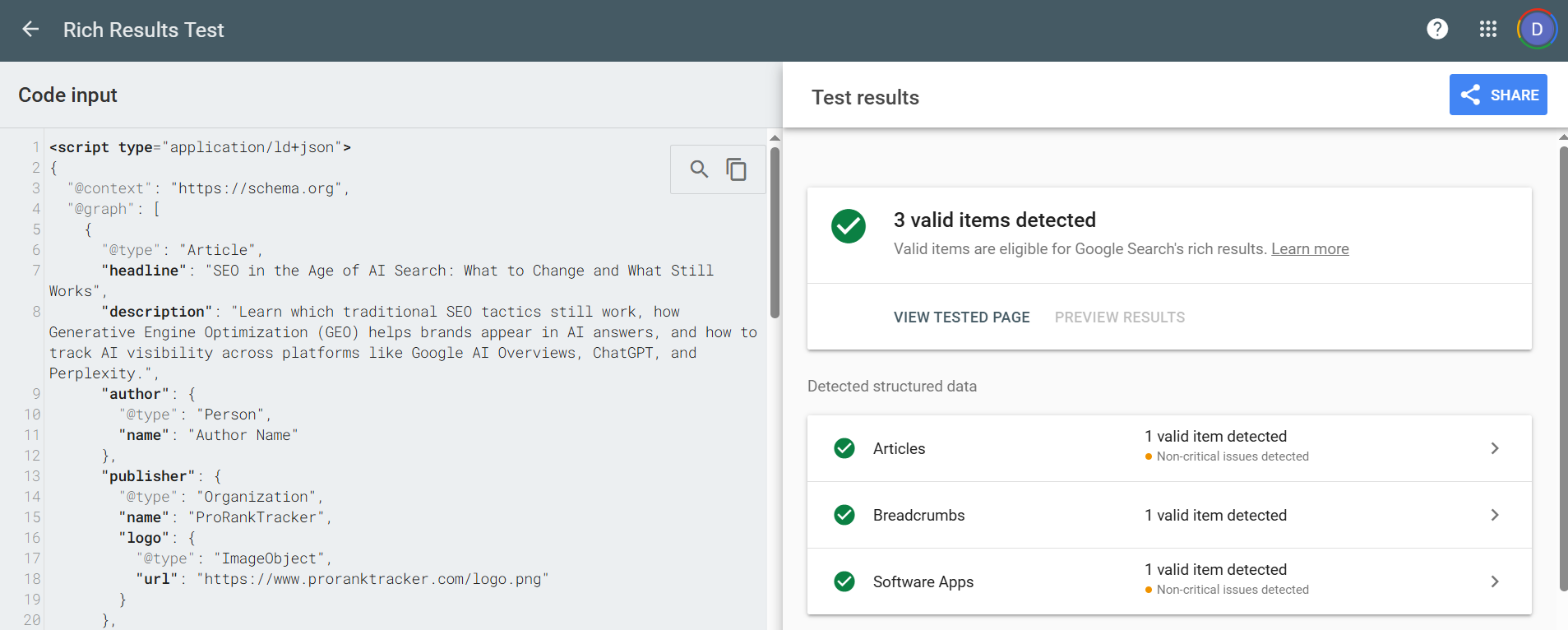
Run the Schema Markup Validator first, then verify the live implementation using the Rich Results Test after uploading.
Warning: Inaccurate schema can do more harm than no schema at all. If the markup contradicts what is on the page, such as a mismatched product name, wrong URL, or incorrect pricing, Google may discount the entire markup. Always cross-reference the generated code against the live page before publishing, not just the draft you used to generate it.
Step #7: Publish Off-site Content
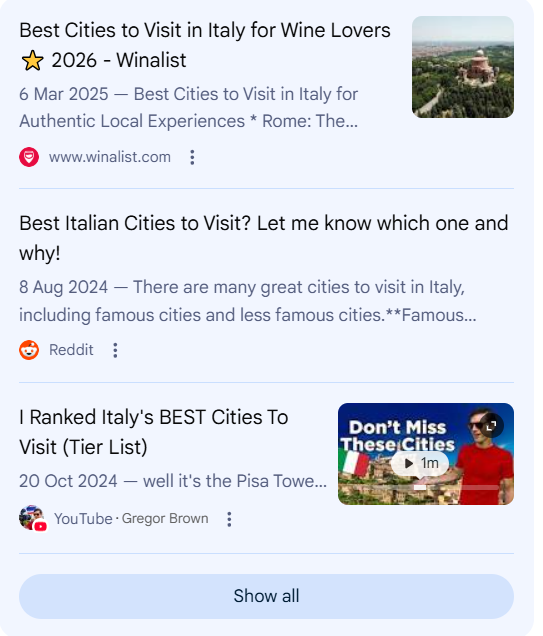
Your website is one source. But Google’s AI Overviews pull from many, including social media.
An analysis of 36 million AI Overviews and 46 million citations breaks down where those citations come from:
- YouTube accounts for roughly 23% of all citations, making it the most frequently cited domain.
- For SEO-related queries specifically, LinkedIn accounts for roughly 17% (a common theme in B2B industries).
- Reddit and other community platforms are contributing a growing share too.
That sounds like a lot more platforms to create content for, right?
Here’s my trick: The most efficient way to build off-site presence is to repurpose content you’ve ALREADY created rather than starting from scratch on each platform.
A detailed blog post can become a LinkedIn article, a Medium post, and a script for a YouTube video.
Use AI to help with the heavy lifting. Feed your existing post into ChatGPT or Claude, tell it which platform you’re adapting for, and ask it to rewrite the content to fit that format and tone. The output will still need editing to sound like you, but it cuts the time investment significantly.
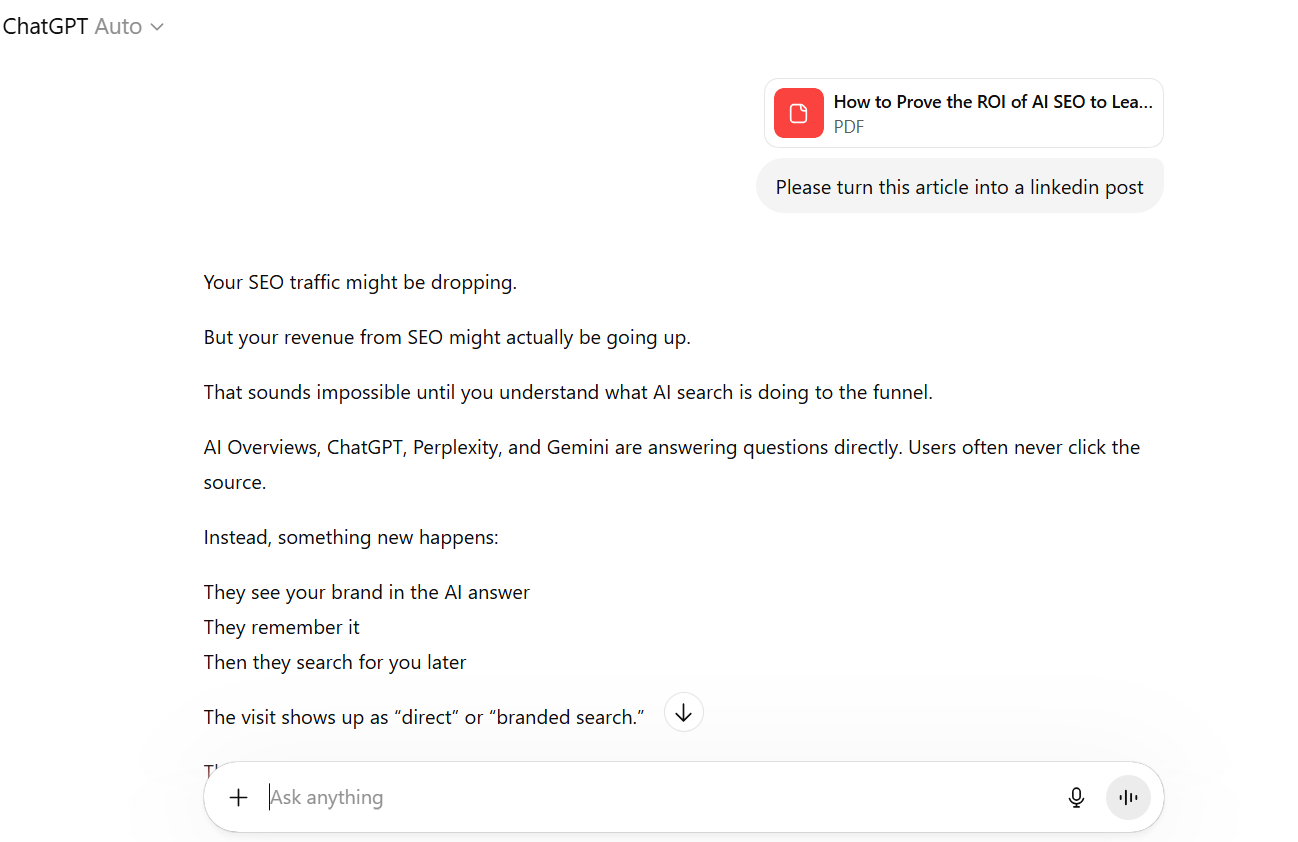
I recommend creating dedicated ChatGPT or Claude Projects for each type of content you’re repurposing. Add perfect examples and a step-by-step SOP for the AI to follow.
Step #8: Refresh Outdated Content
Updating existing content has always been a reliable way to recover or improve organic rankings.
Those benefits still hold in the AI era.
An analysis of 17 million citations found that AI assistants cited content that was on average 25.7% fresher than competing pages.
So essentially, AI Overviews are more likely to cite content that was recently updates so it can provide a more relevant answer for users.
My main rule for refreshing old content: make sure it’s more valuable than what’s already ranking in the SERPs and in the AI Overviews citations. Remember, we’re all competing for those top spots.
A practical starting point is asking for each page: does this genuinely help the reader solve a problem or make a decision better than what’s already out there?
If the answer is no, the page needs work before it will perform in AI search.
Review each piece of content that’s ranking higher than you, then note:
- Do you need to answer the search intent sooner?
- Do you need to expand sections to be more in-depth?
- Does your content need to be more actionable?
- Do you need to delete sections that are no longer relevant?
- Do you need more real examples and stories woven in?
And of course, be sure to replace outdated statistics, screenshots, and product info. Check for broken links. Then, consider updating your meta title and meta description to increase your content’s click-through rate.
Pro tip: You don’t need to audit every page manually to know when something needs attention.
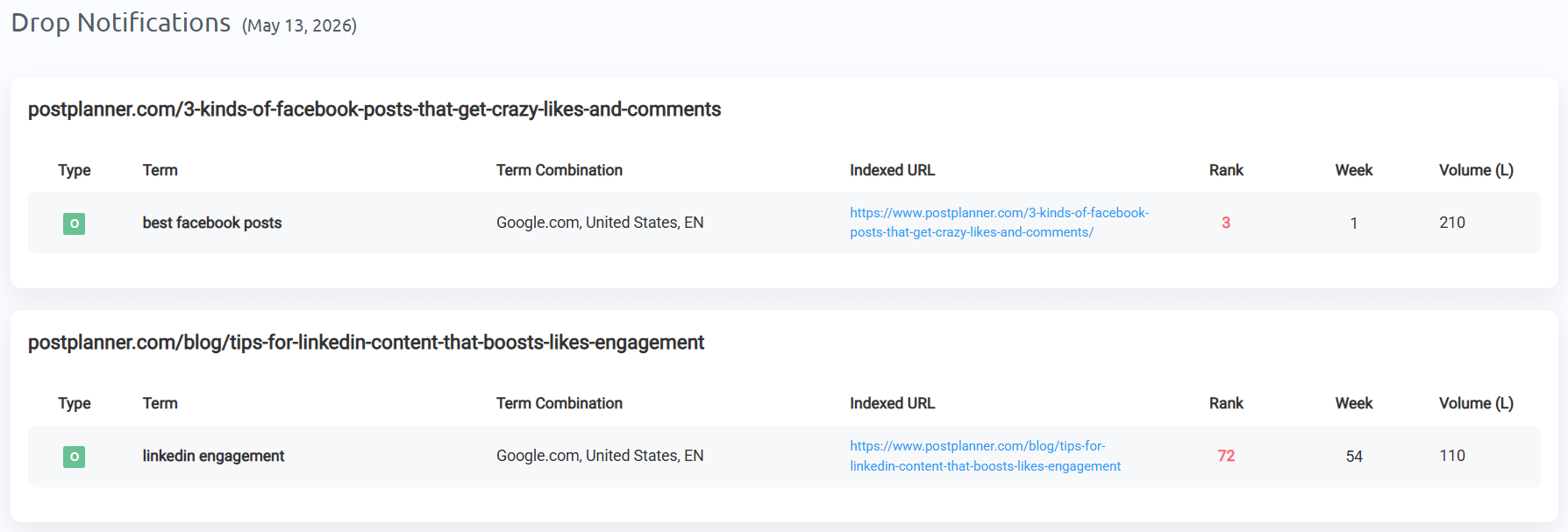
ProRankTracker’s Drop Notifications send you an alert when a page drops in rankings (on Google SERPs and AI Overviews), so you can act on a slip before it compounds.
How to Track AI Overview Results
You won’t know if you’re actually improving your AI Overview visibility if you’re not consistently tracking results.
The best way to do this is with an AI Overviews rank tracker.
In addition to standard Google rank tracking, ProRankTracker tracks brand mentions and link citations in AI Overviews (and the other AI platforms like AI Mode, ChatGPT, Gemini, Perplexity, Grok, and Copilot).
Unlike other rank trackers, ProRankTracker updates its data daily so you can get a full picture of your AI Overview presence. Plus, it comes with 20+ reports that you can automate, white-label, and share with clients.
Setting Up Your Tracking
To get started, navigate to the AI tab in the left menu and select “Add AI Searches.”
Enter the URLs you want to monitor, add your target prompts, select Google AI Overviews as your platform, and set your language and location.
You can also add your brand and product names here to track mentions.
Once tracking is live, ProRankTracker monitors two things for each prompt:
- Where your URL ranks as a linked source inside the AI Overview
- Whether your brand name is being mentioned in the answer text, along with the context of how it’s mentioned
Both are tracked daily, which matters because AI Overview results can shift significantly overnight.
Monitoring Your Visibility over Time
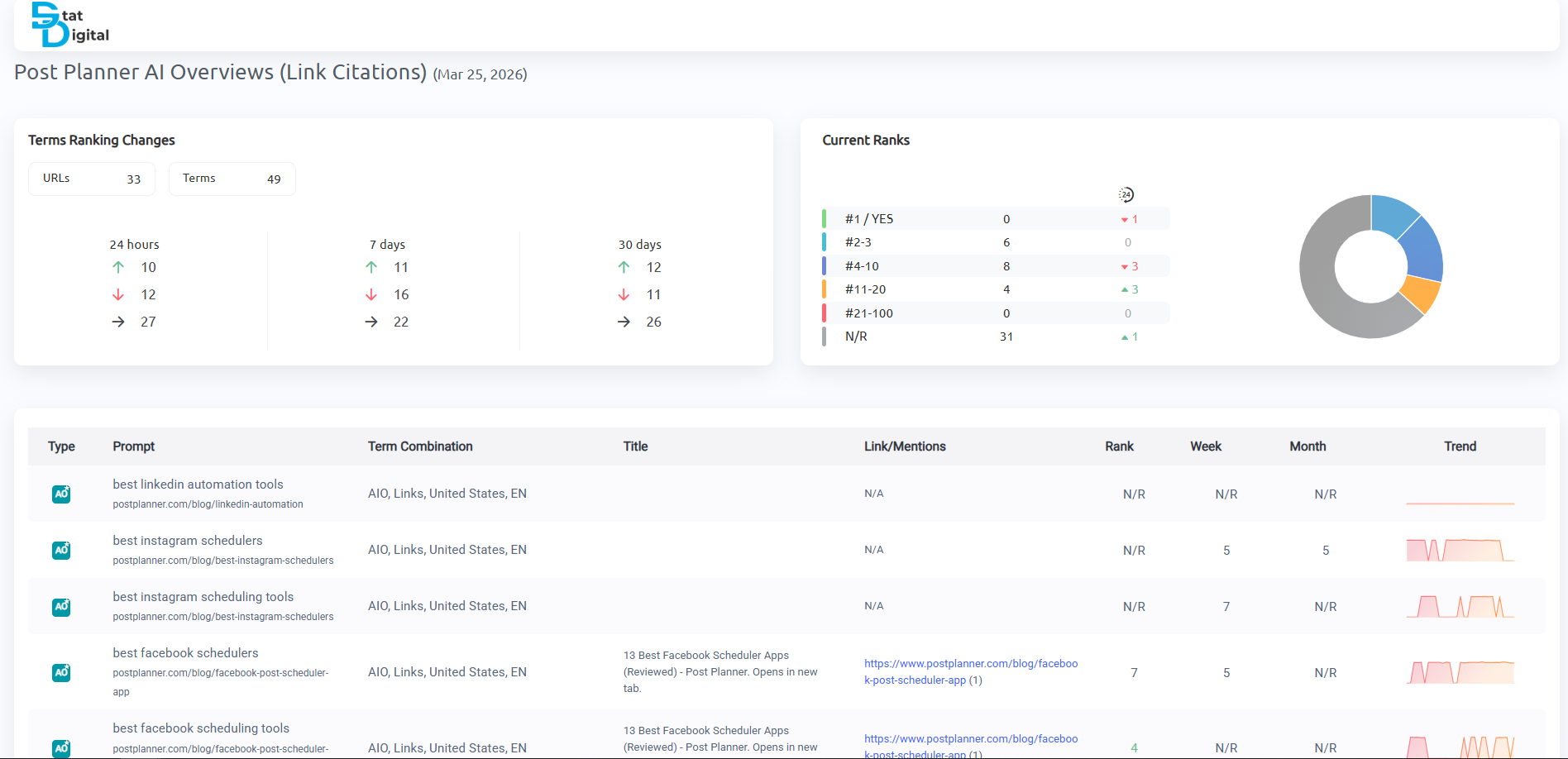
Inside the AI Overviews dashboard, you can see a full list of your tracked prompts, along with their associated links and mentions. Trend data shows changes over the past 24 hours, 7 days, and 30 days.
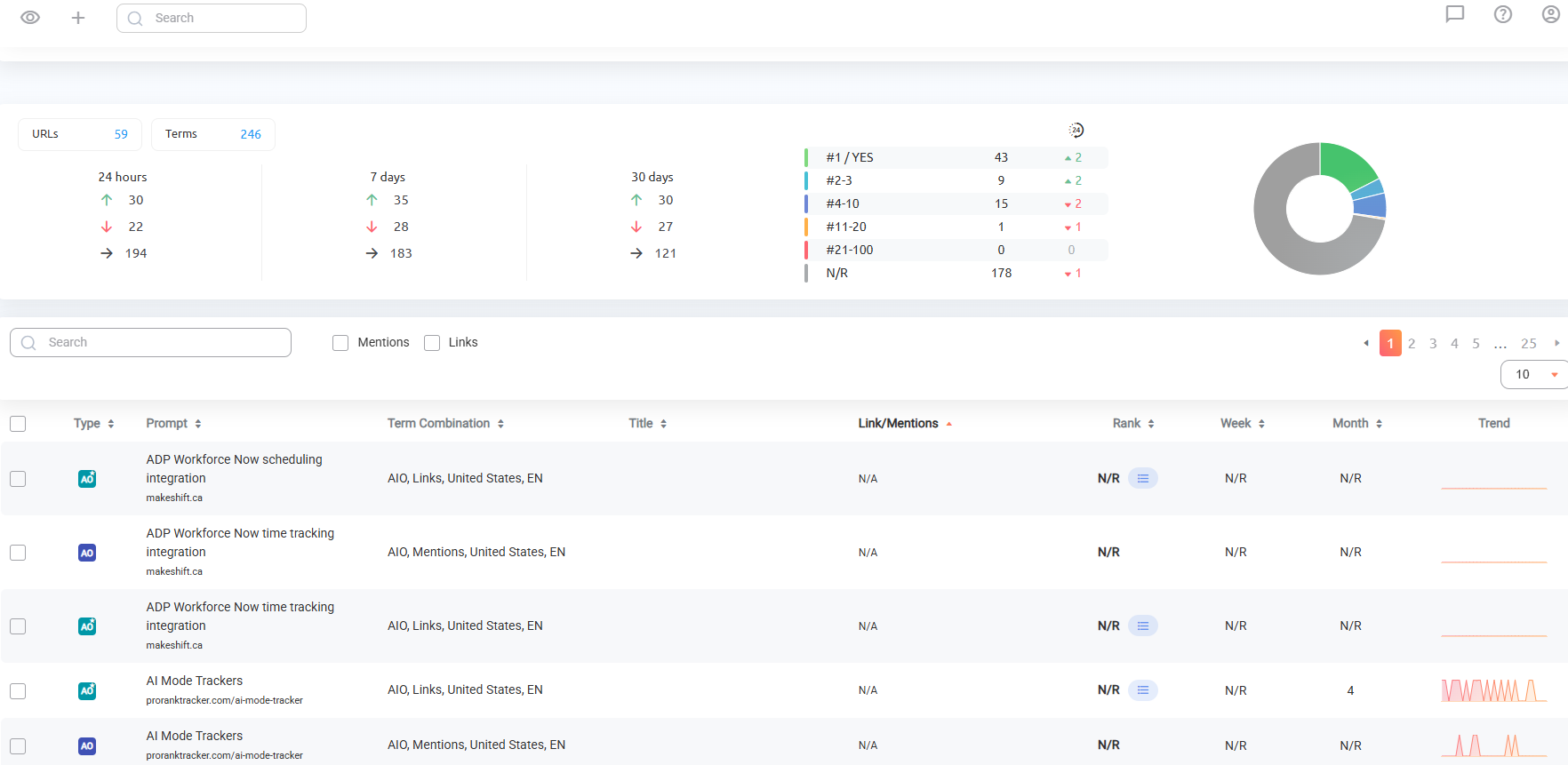
Each individual prompt has a graph showing daily ranking changes, so you can spot drops or gains quickly rather than noticing them weeks later.
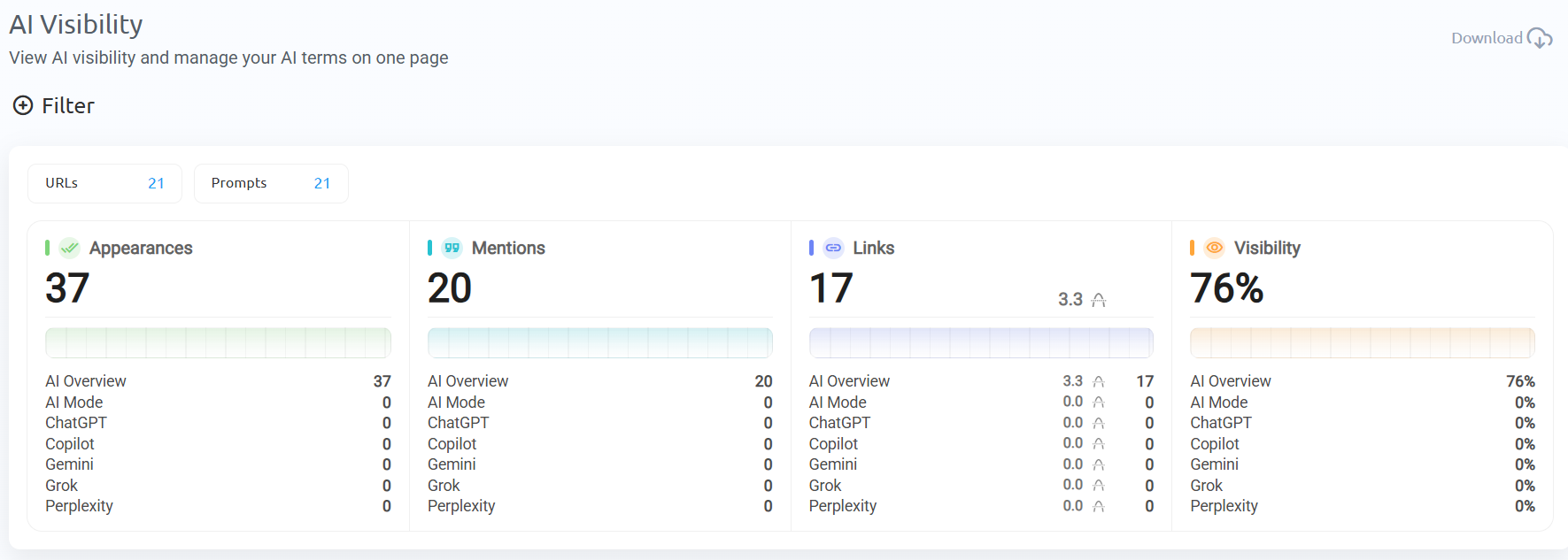
For a higher-level view, the AI Visibility section gives you an overview of your entire project’s AI presence, showing total appearances, mentions, links, and an overall AI Visibility score, each with a 30-day trend.
Tracking Competitors
When you click into any tracked prompt, ProRankTracker shows you the full list of URLs that appeared in that AI Overview response, including competitor domains.
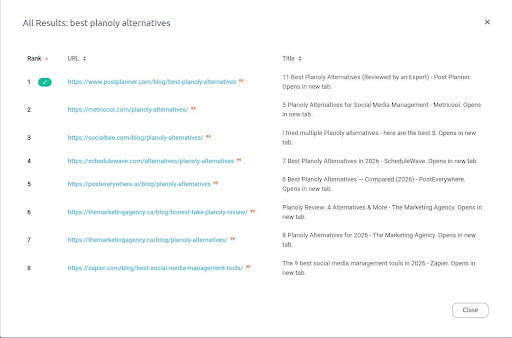
To track competitor brand mentions, add their brand names the same way you added your own, and group or tag them separately so their data stays separate in reports.
Want to generate an AI rankings report of just you versus your competitors?
ProRankTracker also has an AI Competitors Comparison tool that shows you exactly where competitors appear, where you don’t, and where new opportunities might exist.
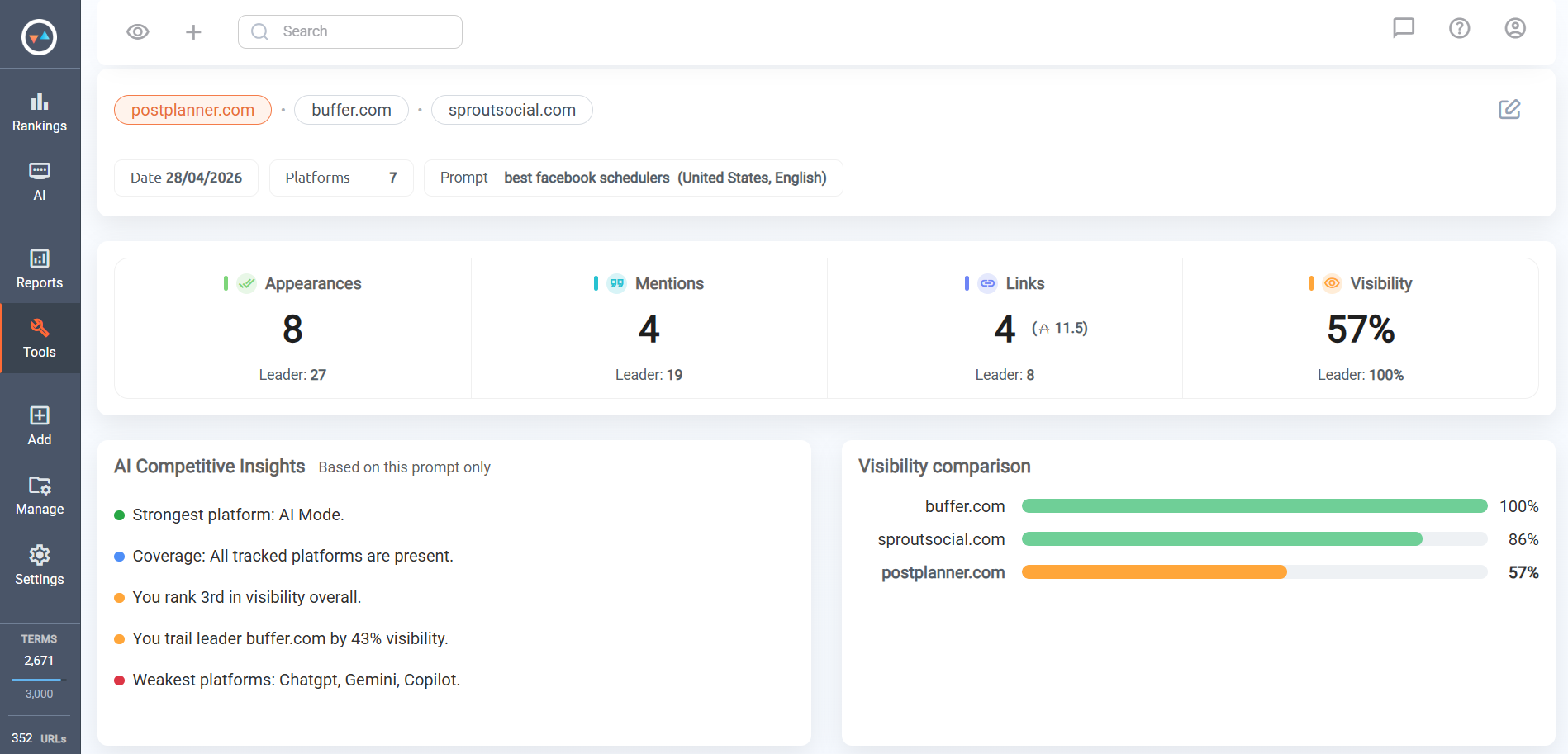
It’s a faster way to identify gaps in your AI visibility without manually clicking through each prompt.
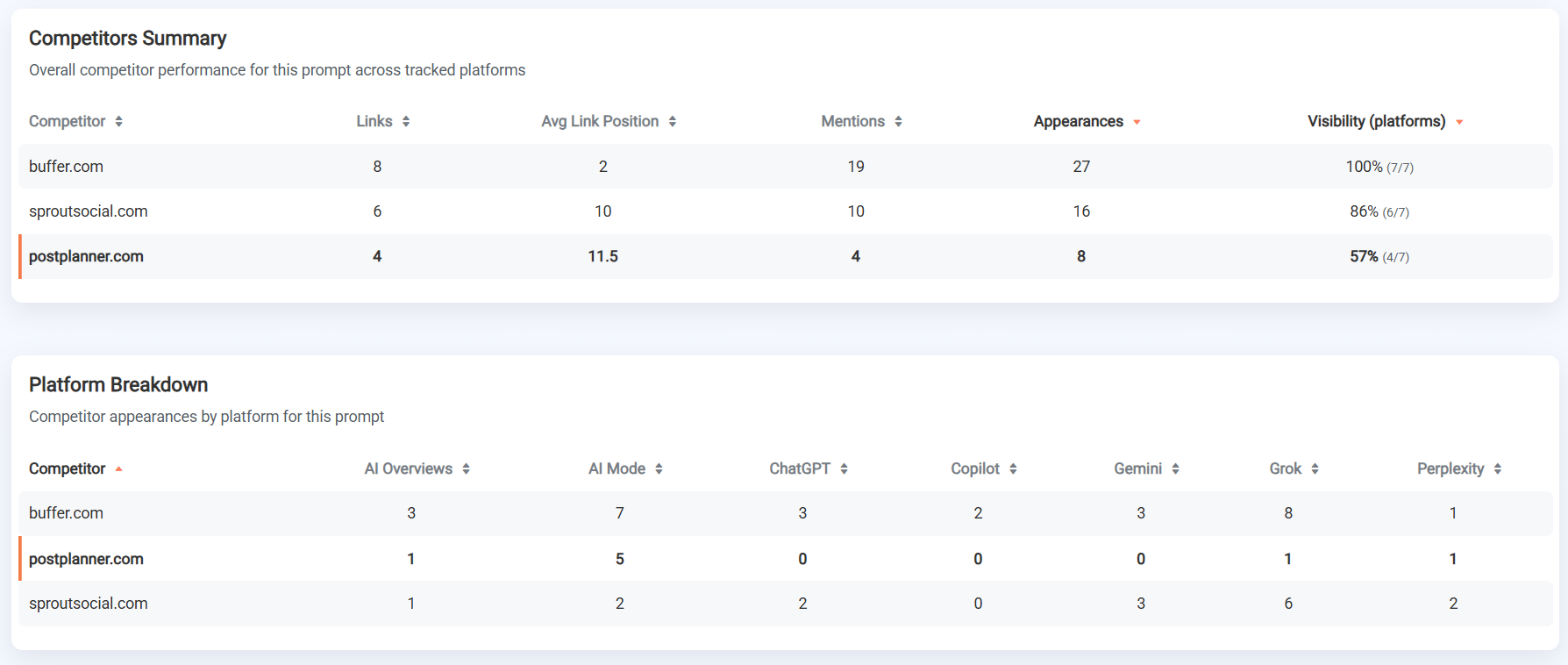
Reporting
ProRankTracker has many different report types you can use for AI Overview data.
Each report can be filtered by URL, group, or project, and exported as PDF, XLSX, or CSV.
You can also schedule reports to send automatically via email, so you’re not pulling data manually each week.
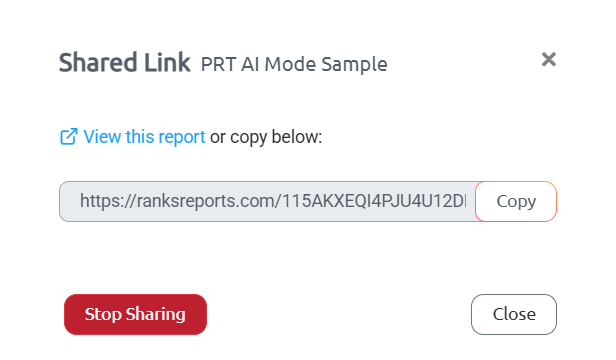
For agencies, shared report links let clients view their live AI Overview visibility data on demand without logging into your account.
Every report type can also be white-labeled with your own logo, color scheme, and domain, so the reports look like they were made entirely in-house.
FAQ
How are AI Overviews different from featured snippets?
Featured snippets pull a single passage from one page and display it above organic results. While AI Overviews synthesize information from multiple sources and generate a new response, often combining insights from several pages into a single answer.
Featured snippets link directly to the source page. While AI Overviews may cite multiple sources as links, mention brands without linking, or include no links at all.
Featured snippets also tend to be more predictable and stable. While AI Overview content is more dynamic, changes more frequently, and is influenced by a wider range of signals beyond page content alone.
What types of searches trigger an AI Overview?
AI Overviews appear most often for longer, more specific queries. Single-word and short-tail searches rarely trigger them.
They’re most common for question-based queries, comparison searches, how-to requests, and queries where the user is clearly looking for a synthesized answer rather than a list of links.
Commercial and research-oriented queries tend to trigger AI Overviews more frequently than navigational searches, where the user is simply trying to reach a specific website.
How often do AI Overview results change?
More often than most people realize. An Ahrefs analysis of over 43,000 keywords found that AI Overviews have a 70% chance of changing from one observation to the next, with the typical AI Overview updating roughly every two days.
That level of volatility means a weekly check of your AI Overview visibility will miss a significant amount of movement. Daily tracking is the only reliable way to know whether your brand is appearing consistently, gaining ground, or losing visibility for the prompts that matter.
Start Driving Revenue with AI Overviews
Your competitors are likely getting mentioned in AI Overviews for your most important buying prompts, and you’re not. That gap is costing you revenue right now. And it’s only going to widen.
ProRankTracker tracks your AI Overview brand mentions and link citations daily, alongside your traditional organic rankings, all in one platform.
Spot visibility changes as they happen, compare your AI visibility and rankings against competitors, and generate reports your clients or leadership can actually use.
Try it for $5 to see exactly where your brand stands in AI Overviews today.