11 Best Rank Tracker Tools (Reviewed)
If you’ve been working on your website’s SEO for a long time, you know that tracking your ranks is one of the crucial steps. Without knowing WHERE you rank, SEO becomes mostly guesswork.
One small problem:
A quick Google search yields dozens of rank-tracking tools that all promise significant results.
How are you supposed to know which ones work?
Because the truth is, not all rank trackers are created equal. Some of them provide you with inaccurate data. Others are too expensive. Others don’t have enough features to help you accomplish what you need.
So how do you decide which tool is the best fit for your use case? Here are 12 factors to keep in mind when looking for a rank tracker:
- Depth of Tracking – After Google’s September 2025 update, you can no longer see 100 search results per page. This presents a challenge for rank tracker tools, because what could previously be checked in a single query will become more expensive (as much as 10x) to extract. Many rank trackers no longer offer frequent daily updates or top-100 results.
- Accuracy & Frequency – Rank data changes daily, so without precise and frequent updates, every SEO decision becomes guesswork.
- Global + Local Tracking – Visibility differs by region and city, so tracking both ensures you capture every market opportunity.
- Multi-Engine Coverage – Google isn’t the only search engine. YouTube and Bing rankings also drive traffic and conversions.
- Reporting & White-Labeling – Clear, customizable reports save agencies hours and make client communication effortless.
- Device & SERP Views – Mobile and desktop rankings often differ. Knowing both reveals your real search visibility.
- Keyword Discovery & Insta-Check – Quickly testing and validating new keywords keeps your strategy agile with each algorithm update
- Integrations & API Access – Rank data should connect easily to dashboards and analytics workflows for real-time insights.
- Pricing & Scalability – As projects grow, your tracker should scale without exploding your budget.
- Ease of Use & Support – A powerful tool is only valuable if your team can master it quickly and get help when needed.
- Agency Readiness – Multi-client dashboards, grouping, and white-label reporting are non-negotiable for agency workflows.
- LLM & AI Search Visibility – As AI-driven search (e.g., Google AI Overviews, ChatGPT results) expands, tracking your brand’s presence across these platforms gives you a head start on the next SEO frontier.
I reviewed 11 of the best rank trackers to help you understand the critical differences and find the best one for your needs.
Let’s get started!
-
- 1. Best Overall: ProRankTracker
- 2. Best All-in-One Tool: Semrush
- 3. Best Free Tool: Google Search Console
- 4. Best for Integrations: Accuranker
- 5. Best for Keyword Research: Ahrefs
- 6. Best for Competitor Analysis: Similarweb
- 7. Best for Local SEO: Local Falcon
- 8. Best for AI Overviews: AIclicks
- 9. Best for Visualizations: Nozzle
- 10. Best for Low-Volume Keyword Tracking: Mangools
- 11. Best Budget All-in-One: SE Ranking
- FAQs
1. Best Overall: ProRankTracker
ProRankTracker is a highly specialized rank-tracking tool, making it the perfect choice for businesses focused on understanding their SERP performance.
It offers comprehensive tracking capabilities globally or locally for any search engine where you’re trying to rank, with daily checks. Unlike most competitors, ProRankTracker still offers top 100 results.
ProRankTracker is well known for its detailed and customizable white-label reporting, allowing users to track keyword performance with precision and keep their clients happy.
Let’s talk about how ProRankTracker can help you get your website in front of your potential customers across the globe.
Pros
- Accurate and daily-updated ranking data on EVERY plan
- Tracks rankings on a global scale or down to a single neighborhood
- Supports all major search engines (including Bing and YouTube)
- Shows Global and Local (country level) search volume for each term and engine
- Supports tracking in multiple languages
- White-label reporting for client presentations
- Comprehensive mobile and desktop ranking insights
- Best pricing available for a rank tracking tool
- Low-risk trial to track 100 terms across 7 days for just $4.
Cons
- Some users note a learning curve when starting out (but users have access to help articles and top-notch customer support)
- Limited integration options compared to some competitors
Features
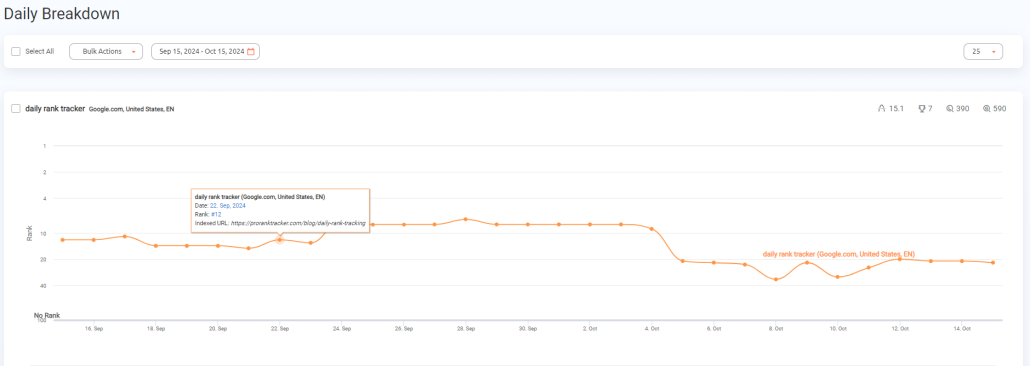
- Daily rank tracking and updates – Provides precise, daily insights into keyword rankings for up to the top-100 results.
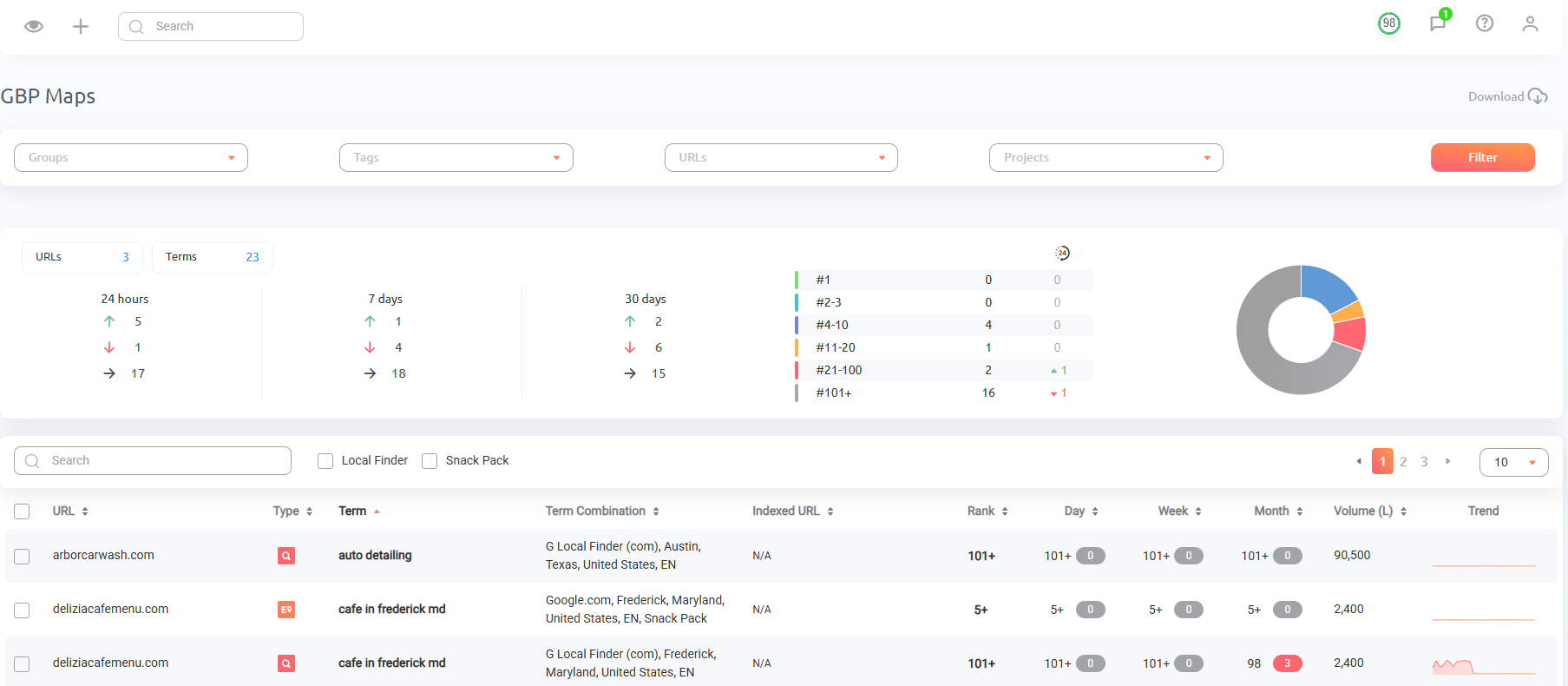
- Rankings types – Track rankings across organic (desktop), mobile, SERP features, Google Maps, YouTube, and more (AI Overviews, AI Mode, and multi-location coming soon)!
- Local rank tracking – Monitors keyword rankings for specific locations (down to neighborhood-level specificity) on normal SERPs and Google Maps.
- Detailed and customizable reports – More than 20 types of reports and notifications (including white-label reports). You can customize your reports to include only the data that your clients want to see.
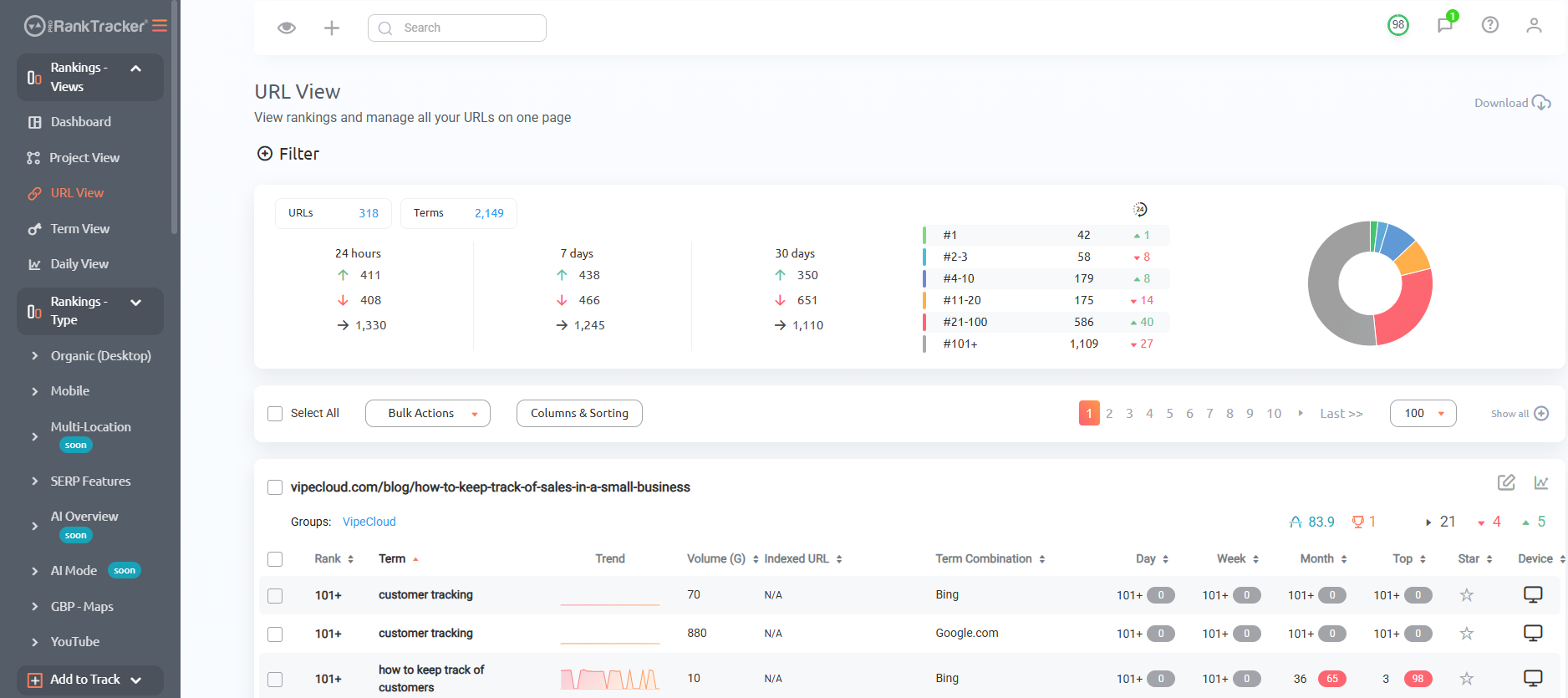
- Rankings Views – 5 different Rankings Views give you a varied and complete understanding of your ranking progress, including the ability to split your ranks into various groups, tags, and projects.
- Insta-Check – Quickly check on potential keywords using a credit-based SERP checker that doesn’t count toward your overall tracking limit. This is perfect for when you’re doing preliminary keyword research or competitor research.
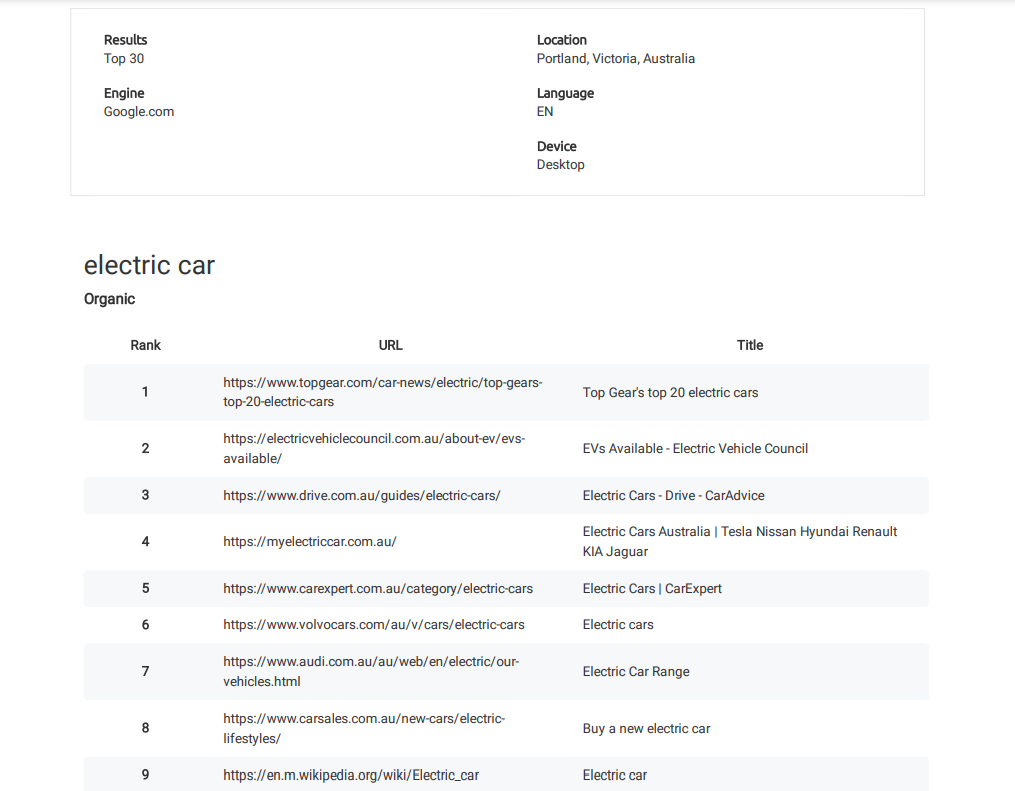
- Keyword Discovery – Helps identify relevant keywords for your business that you’re already ranking for but might not be aware of.
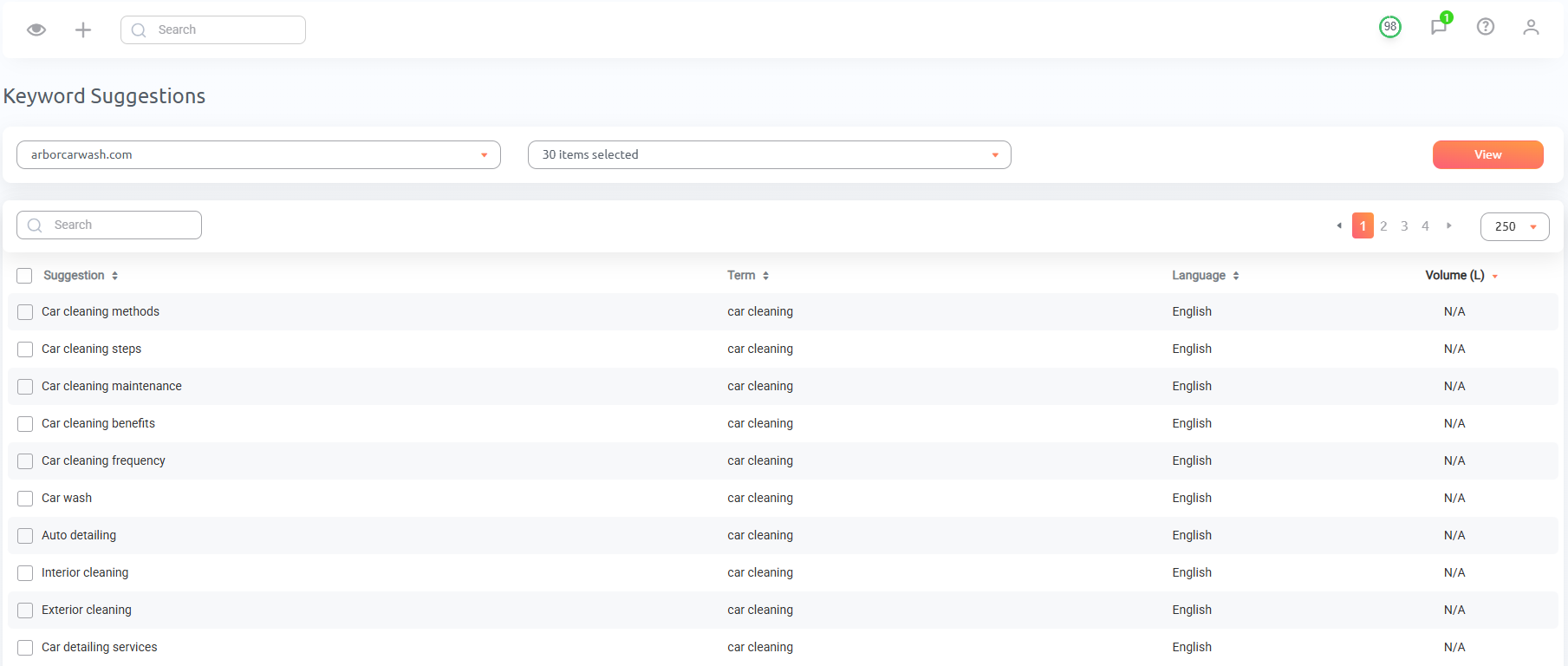
- Keyword Suggestions – Pick up to 30 terms, and ProRankTracker will return a list of relevant keyword suggestions you can target.
- Multi-user management – Add users to your account with flexible permissions, plus replace the ProRankTracker logo with your brand’s logo.
- Mobile apps – Check your rankings from the PRT Mobile app and give clients access to the MyRanks App, branded with your logo.
- Integrations and API – Connect your rank data to Google Looker Studio or to other platforms via its API.
Overall Score
Based on the factors we’ve talked about, ProRankTracker scores 10/11. The only missing component is LLM visibility, which will be added in the near future.
Pricing
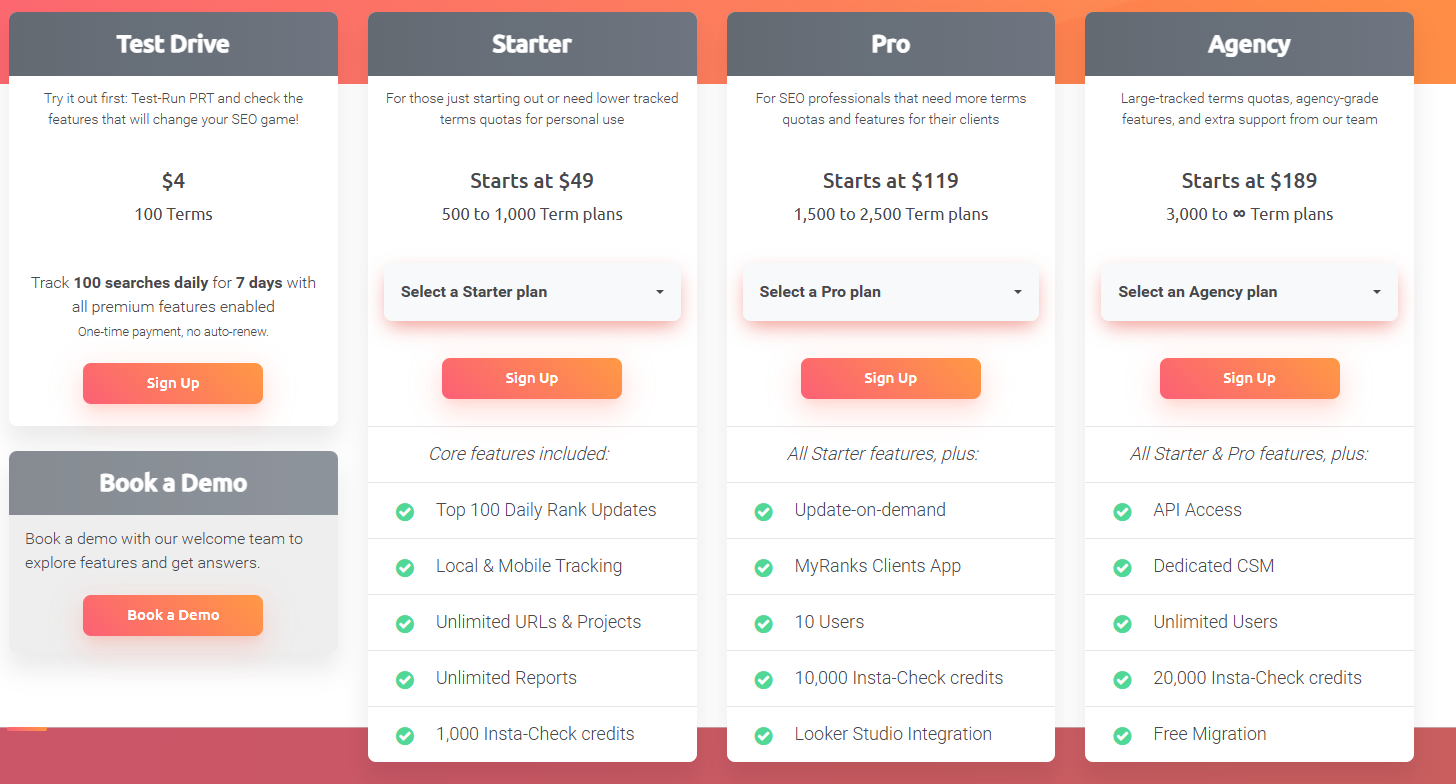
ProRankTracker offers some of the most competitive pricing in the industry. You have 4 pricing tiers available to you:
- Test Drive Plan – Includes 100 tracked terms daily for 7 days for $4.
- Starter Plan – Starts at $49/month for 500 tracked terms
- Pro Plan – Starts at $119/month for 1,500 tracked terms
- Agency Plan – Starts at $189/month for 3,000 tracked terms.
Note: The pricing above is for monthly billing. You’ll get a 10% lower rate when you pay annually.
Reviews
ProRankTracker consistently gets almost exclusively 5-star reviews (4.6 average on G2). The most common positive comments include accuracy, ease of use, and customer service.
Here’s what Bryan R. had to say about his experience with PRT:
What do you like best about Pro Rank Tracker?
“Pro Rank Tracker has been an invaluable tool for tracking our local Google rankings. It’s incredibly user-friendly, making it easy to add new keywords and URLs to monitor. The insights provided are detailed and accurate, which has significantly helped us optimize our SEO strategies.
One standout feature is the API, which we utilize for in-depth monitoring, pushing rankings to a Google Sheet. It integrates seamlessly into our workflow and provides comprehensive data that helps us stay ahead of the competition.
Pro Rank Tracker is a top-tier tool I highly recommend for anyone serious about tracking their SEO performance.”
What do you dislike about Pro Rank Tracker?
“I can’t think of anything at the moment.”
What problems is Pro Rank Tracker solving and how is that benefiting you?
“We work with local service businesses, so it solves the problem of accurately tracking local search rankings.”
2. Best All-in-One Tool: Semrush
Semrush is an all-in-one SEO and digital marketing tool known for being extremely comprehensive, which also offers a rank tracker.
If you’re looking for a rank-tracking SEO tool that also offers a little bit of everything, Semrush might be the perfect tool.
However, be warned that Semrush can get extremely expensive and will probably be outside many smaller businesses’ price range.
Let’s examine Semrush in more detail to help you decide if it belongs in your toolbox.
Pros
- Semrush is an all-in-one tool with features covering all aspects of SEO.
- User-friendly interface with clear dashboards
- Strong competitor analysis tools
- A robust global feature set gives you the ability to analyze keywords and data from different locales around the world.
- High-quality education resources to help you get the most out of the broad toolset.
Cons
- It can be overwhelming due to the sheer number of features.
- High cost, especially for smaller businesses
- Many businesses will not need all the tools offered by Semrush, meaning you’re paying extra for a tool you might not use.
Features
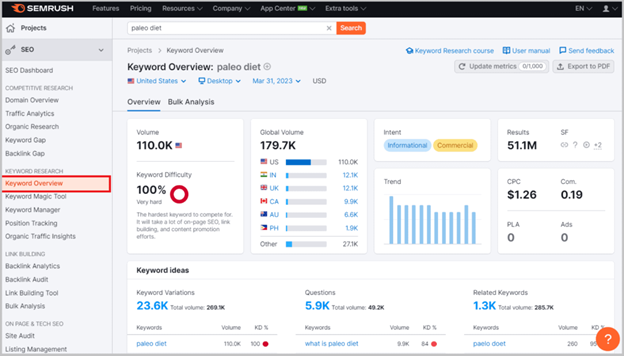
- Keyword research and tracking – Discover and monitor keywords to grow your keyword strategy and improve your visibility in multiple search locations.
- Site audits and technical SEO analysis – Identify and fix technical issues affecting your site performance.
- Link-building tools – Analyze your backlink profile and use Semrush’s tools to acquire new links.
- Competitor analysis – Use Semrush’s tools to uncover and copy your competitors’ strategies.
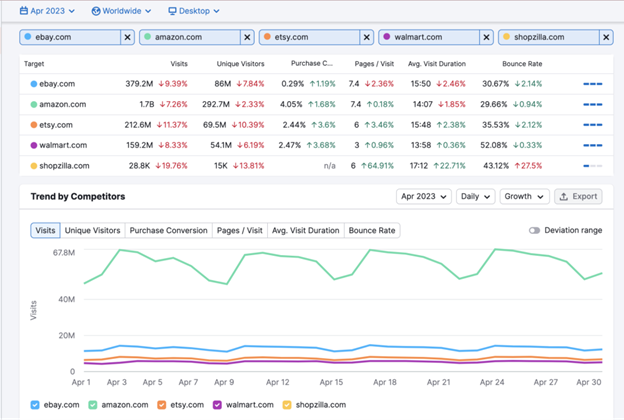
- Content marketing – Developing higher-quality content targeting your ideal customer to improve your ranks on the SERPs.
- Rank tracking – Track your ranks according to location and other parameters to help you establish a presence on the 1st page of the SERP (no matter where your customers are searching from).
- Non-SEO features like market research, advertising, and social media tools offer a turnkey marketing solution.
Overall Score
Based on the factors we’ve talked about, Semrush scores 9.5/11. It’s a great all-in-one tool, but too expensive for pure rank tracking and less accurate for local insights.
Pricing
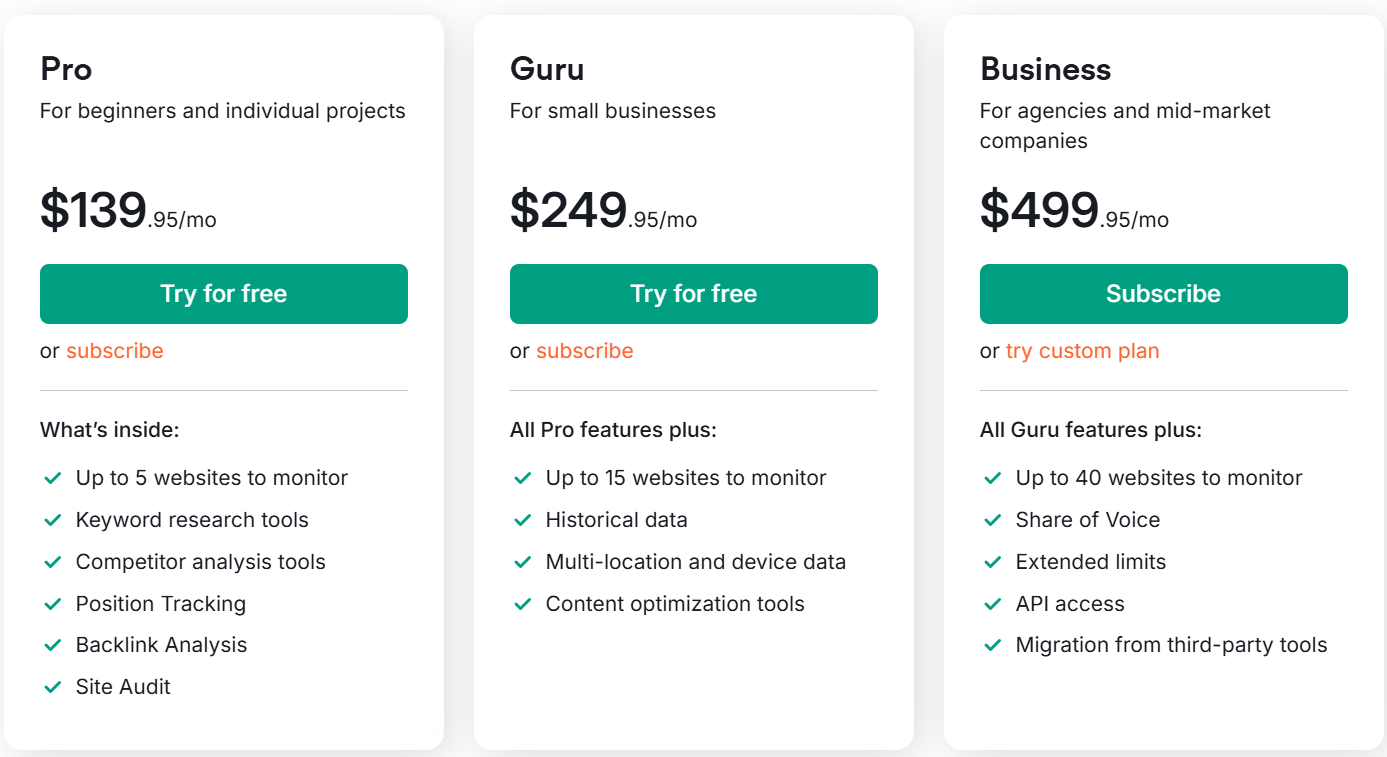
Semrush is a great tool, but its prices may be beyond what many businesses can handle. Here are the pricing plans they offer:
- Pro – $139.95 monthly and includes up to 5 websites to monitor, 500 keywords, and 10,000 results per report.
- Guru – $249.95 monthly and includes up to 15 websites to monitor, 1,500 keywords, and 30,000 results per report.
- Business – $499.95 monthly and includes up to 40 websites to monitor, 5,000 keywords, and 50,000 results per report.
*Note: A 17% discount is available if you pay for a whole year in advance.
Reviews
Semrush is one of the biggest tools in the SEO world for a reason. People love using it. It averages 4.5 stars, and customers frequently praise Semrush’s easy user experience, helpful customer service, and keyword research tools. Negative comments normally focus on the high price.
Here’s what Alberto F. has to say about Semrush:
What do you like best about Semrush?
“Overall, Semrush is a very complete and reliable tool, that has everything I need to support our SEO and content efforts. I mostly use Semrush for SEO related tasks, such as keywords research, keywords tracking, organic research and, lately, LLM performance tracking. I’m also considering using it for the Content Toolkit to speed up content production. Initial tests are promising, but we’re not very familiar with them yet.”
What do you dislike about Semrush?
“They add a lot of new features, but many of them require buying an additional add-on. I understand that developing new features has a cost, but it’s frustrating that to make the best out of the tool you need to pay more and more every time. Also, I would appreciate more transparency or visibility on how certain features work (e.g. the new LLM mentions and citations).”
What problems is Semrush solving and how is that benefiting you?
“It mainly helps us find new ideas for content creation, analyzing our competitors’ organic performance, and understanding our positioning on organic search engines and LLMs (e.g. ChatGPT).”
3. Best Free Tool: Google Search Console
Another wildly popular tool to help you track your ranks is Google Search Console, which is focused on helping you make your website more visible on the Google SERP.
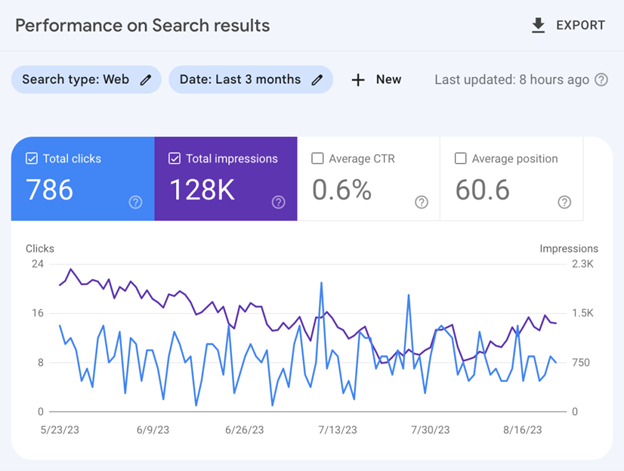
While it’s not a full-fledged rank tracker, GSC offers valuable visibility into metrics like average ranking position, impressions, and click-through rates, helping you understand how your content performs in Google’s search results.
It’s best used as a no-cost way to monitor their SEO performance, troubleshoot indexing issues, and uncover the queries driving traffic. GSC is also a must-have for diagnosing technical problems and ensuring your site stays healthy in Google’s eyes.
However, it’s not ideal for precise, multi-engine tracking or automated client reporting. The learning curve can be steep, and the ranking data only reflects averages—not real-time rank positions.
Pros
- Free Google tool (that means data comes directly from Google!)
- Essential for diagnosing technical SEO issues
- Analyze what search queries bring people to your website.
- Provides insights into website performance and search traffic.
- Alerts for security issues and Google penalties
Cons
- No search engines other than Google are supported (for that, you’ll need a dedicated rank tracker like ProRankTracker)!
- Steep learning curve
- Some features require technical knowledge to get the most out of them.
Features
- Search analytics – See exactly what search queries bring users to your site. You can further break this information down by search location, helping you understand what types of content users from different places are looking for.
- Website performance analytics – See how many visitors come to your page, what ranks your pages currently occupy, and how many impressions and clicks you get.
- SEO issue notifications – GSC automatically notifies you of issues on your site that are affecting your rankings. You’ll get a notification to fix the issue, whether it’s broken links, inaccurate sitemaps, or Google penalties.
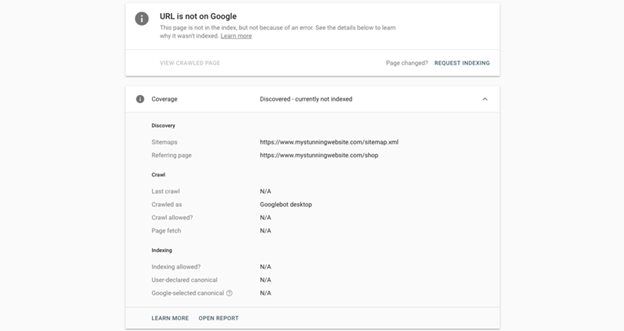
- URL inspection tool – Submit sitemaps or individual URLs to be crawled and indexed by Google (and make sure Google has your URL, avoiding the dreaded screen shown below), ensuring Google has the most recent view of your site (this can help you improve your ranks quickly if you’ve recently made significant changes!)
- Rich snippets management – Manage your rich snippets within GSC’s platform to ensure they appear appropriately on the Google SERP.
- Core Web Vitals report – This report assesses the overall health of your URLs and gives each one a score (Poor, Needs Improvement, or Good), allowing you to focus your efforts where they’re most needed.
Overall Score
Based on the factors we’ve talked about, Google Search Console scores 3.5/11. It’s a free tool that can come in handy for preliminary search, but if you’re looking for a full-featured rank tracker, you’d be better off with a tool like ProRankTracker.
Pricing
Google Search Console is FREE! That’s why nearly every major business uses it in their global SEO software tech stack.
Reviews
GSC has an average of 4.7 stars, meaning it’s one of the most highly-rated SEO tools available. Users frequently mention the accuracy of the data and how much they can improve their SEO using GSC’s recommendations. More negative comments focus on GSC’s limitations and the steep learning curve required for optimal usage.
Here’s what Nitesh K. had to say about using GSC:
What do you like best about Google Search Console?
“Google search console one of the best tools to analyze the website technicals like, Why pages aren’t indexed, reason and source of pages aren’t indexed. and the pages that aren’t indexed can’t be served on Google, crawled – currently not indexed, Google systems, alternate page with proper canonical tag, not found (404), Not Started, soft 404, etc. and It helps track keyword rankings, click-through rates (CTR), impressions, and indexing status—all in one place”
What do you dislike about Google Search Console?
“Personaly I dislike about Google Search Console is that the data is sometimes delayed by up to 2-3 days, which can be frustrating when trying to make real-time SEO decisions. Some advanced filtering or data segmentation options are also limited compared to third-party SEO tools.”
What problems is Google Search Console solving and how is that benefiting you?
“Google Search Console (GSC) solves several critical website performance problems
Indexing & Crawling Issues
Search Performance Tracking
Mobile Usability & Core Web Vitals
Security & Manual Actions”
4. Best for Integrations: Accuranker
Accuranker is another popular dedicated rank-tracking tool. It provides daily updates on ranking data, meaning you can ensure that your data is always fresh.
Similar to ProRankTracker, Accuranker is focused exclusively on helping you track and improve your ranks.
However, be aware that the lowest pricing options on Accuranker are MUCH higher than the smallest plans offered by PRT, making this a difficult option for small or medium-sized businesses.
Let’s take a look at Accuranker and see whether it’s the right tool for you.
Pros
- Fast, accurate rank updates
- Robust integration with Google tools and other platforms
- Customizable reports and dashboards
- User-friendly interface
- Ability to monitor keywords by device and location
- Google Grump and Live SERP tools are free to use
Cons
- Higher pricing compared to other rank-tracking tools like PRT
- Offers some additional SEO tools, but not enough to satisfy many other SEO needs
- Accuranker tracks the top 30 search results daily, but only tracks the top 100 every other week
- It only allows SERP analysis for the top 10 results
Features
- Data segmentation – Filtering options allow you to quickly and easily manipulate large data sets and chunk them into usable sizes.
- Daily updates – All your keyword ranks are updated daily, and you can request on-demand updates.
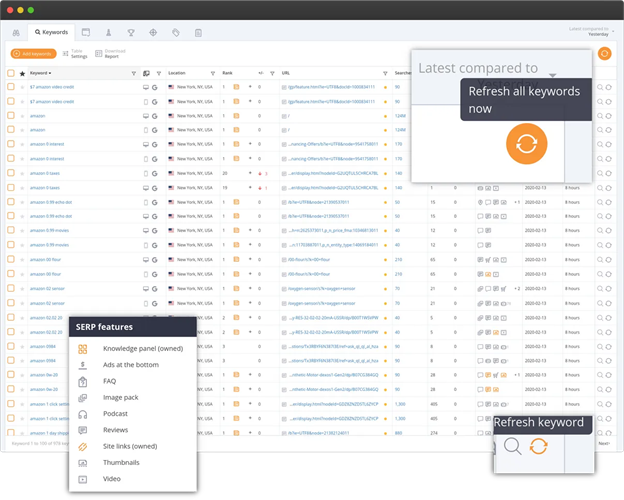
- Keyword management – Get a deeper understanding of the keywords you’re targeting with information like CTR, share of voice, and traffic value.
- SERP analysis – Gain insights into keyword trends and how rankings change over time.
- Site overview – Accuranker uses visual displays to show you how your site and individual subpages rank across your entire keyword strategy.
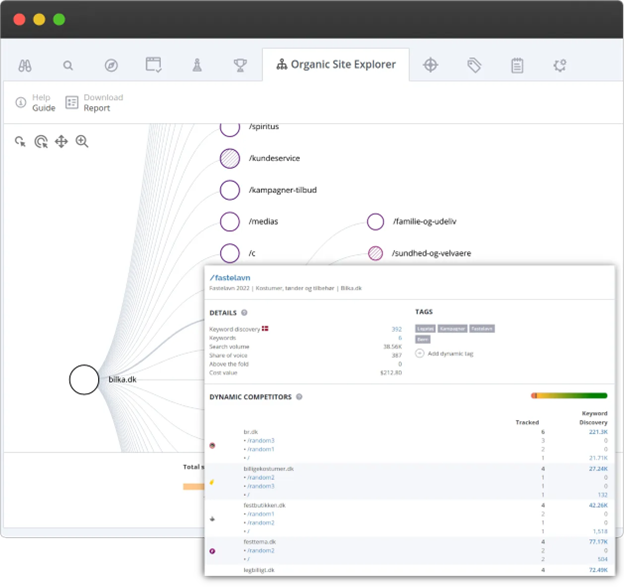
- Competitor research – Gain deep insights into your competitors for every keyword in your strategy.
- SERP analysis – Understand your SERP rankings better, including SERP features, historical insights, and other SERP elements.
- Integrations – Accuranker allows you to combine its power with Google tools, Adobe Analytics, and other powerful tools to help you get more value out of your data.
- Free Google Grump rating – Accuranker’s Google Grump rating highlights unrest in Google’s algorithm, letting you know the reason behind fluctuating rankings and when an algorithm update might be taking place.
Overall Score
Based on the factors we’ve talked about, Accuranker scores 9.5/11. It has excellent accuracy as a rank tracker with a rich host of integrations, but high cost limits accessibility.
Pricing
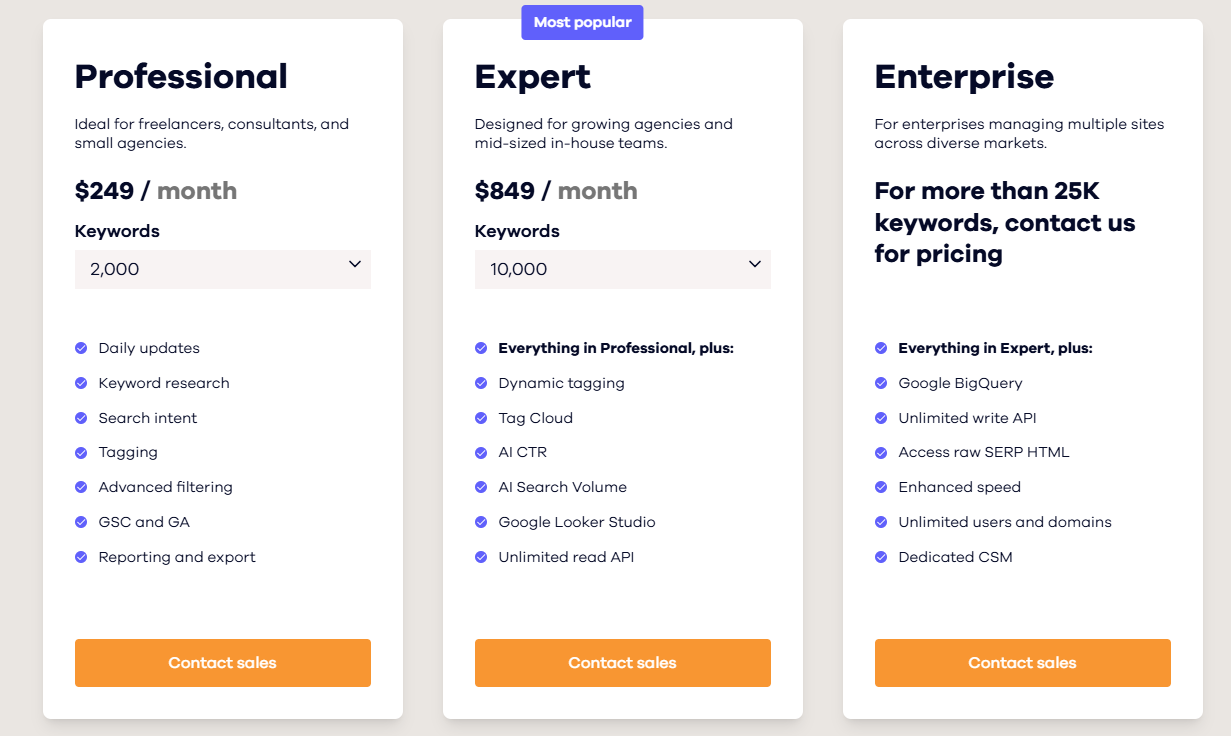
For SERP visibility, Accuranker provides 3 main pricing tiers:
- Professional – Includes 2,000 keywords starting from $249/month.
- Expert – Includes 10,000 keywords starting from $849/month.
- Enterprise – Includes >25,000 keywords for custom pricing with access to raw SERP HTML, unlimited users and domains, among other features.
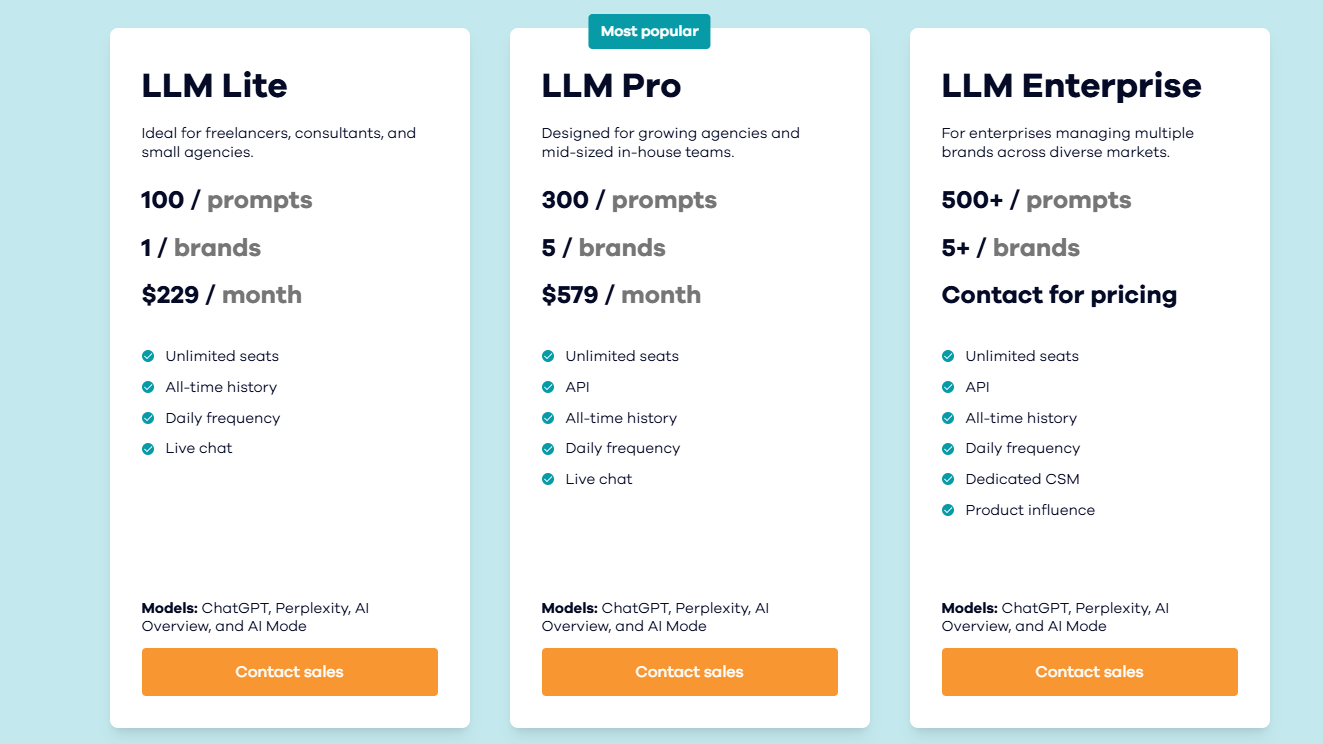
For LLM visibility, Accuranker provides 3 pricing tiers as well:
- LLM Lite – Includes 100 prompts for 1 brand at $229/month.
- LLM Pro – Includes 300 prompts for 5 brands at $579/month.
- LLM Enterprise – Includes 500+ prompts for >5 brands at a custom price.
Reviews
Here’s what Kovai L. had to say about using Accuranker for his business:
What do you like best about AccuRanker?
“AccuRanker is the fastest, accurate and determined rank tracking program that issues a precise and reliable keyword ranking. The program has trustworthy and verifiable metrics on the performance of the ranking. AccuRanker provides a dynamic and powerful update or report on the SEO performance and the impacts it has to the clients. The software coordinates efficiently with platforms such as Data Studio, Google Search Console, Adobe Analytics, among many. We obtain comprehensive SERP insights, with capabilities such as competitors comparison, local packs, snippets, among others”
What do you dislike about AccuRanker?
“AccuRanker has limited keyword search measures, which requires extra updates. The cost of running AccuRanker is hefty, and this finds most freelancers on the edge of running the app”
What problems is AccuRanker solving and how is that benefiting you?
“AccuRanker brings an automatic rank tracking capabilities, which monitors all keywords and their performance. The program offers professional SEO reports that brings a solid communication experience. We closely monitor our competitors, learn from their experiences and strategies for better results. The decisions we make are geared by SEO results and this makes it reliable to mark the trends.”
5. Best for Keyword Research: Ahrefs
Ahrefs is one of the most popular SEO tools, and it shines in keyword research.
This tool provides valuable information for businesses looking to find keywords for global or local SEO.
Let’s talk about whether Ahrefs is right for your business.
Pros
- Extensive global keyword database
- Keyword competitiveness index makes choosing keywords easier.
- Offers a well-organized UX, especially for the quantity of data presented.
- One of the largest and most used tools on the market, which means online tutorials and tips are easy to come by.
Cons
- Updates only every week by default. If you’d like daily updates, you’ll have to opt for a Project Boost add-on, which increases the price by $200/month per project.
- Can be expensive for small businesses or freelancers
- Highly technical features have a steep learning curve for maximum benefit.
- Rank-tracking features are not as in-depth as a dedicated tool like PRT.
Features
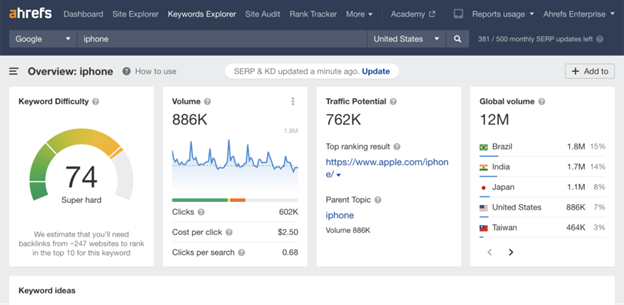
- Keywords Explorer – Delivers in-depth keyword analysis to identify opportunities. Ahrefs gives you location-specific data to help you determine which keywords are more useful in specific locations.
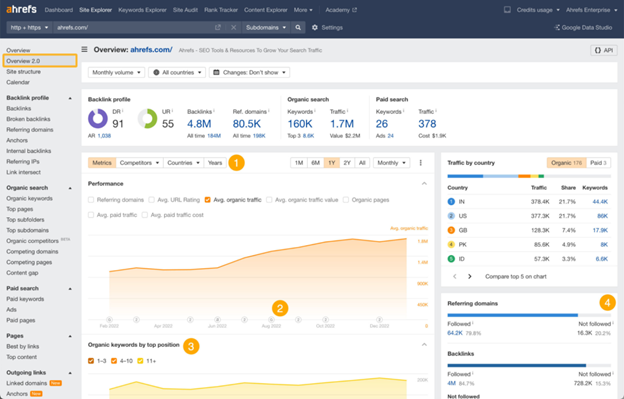
- Site Explorer – Get detailed insights into your (or your competitors’) organic and paid SEO strategies all in a single page.
- Site Audit – Perform thorough checks on your website’s health and get actionable tips to improve your SEO.
- Content Explorer – Identifies top-performing content across the web to help you improve your content strategy or find high-quality external links.
- Rank Tracking – Monitors keyword rankings across the globe. You can determine which countries you want to track your ranks in, and Ahrefs will show you your data for that country.
Overall Score
Based on the factors we’ve talked about, Ahrefs scores 7.5/11. It’s a powerful tool for keyword research, but not as a specialized tool for rank tracking.
Pricing
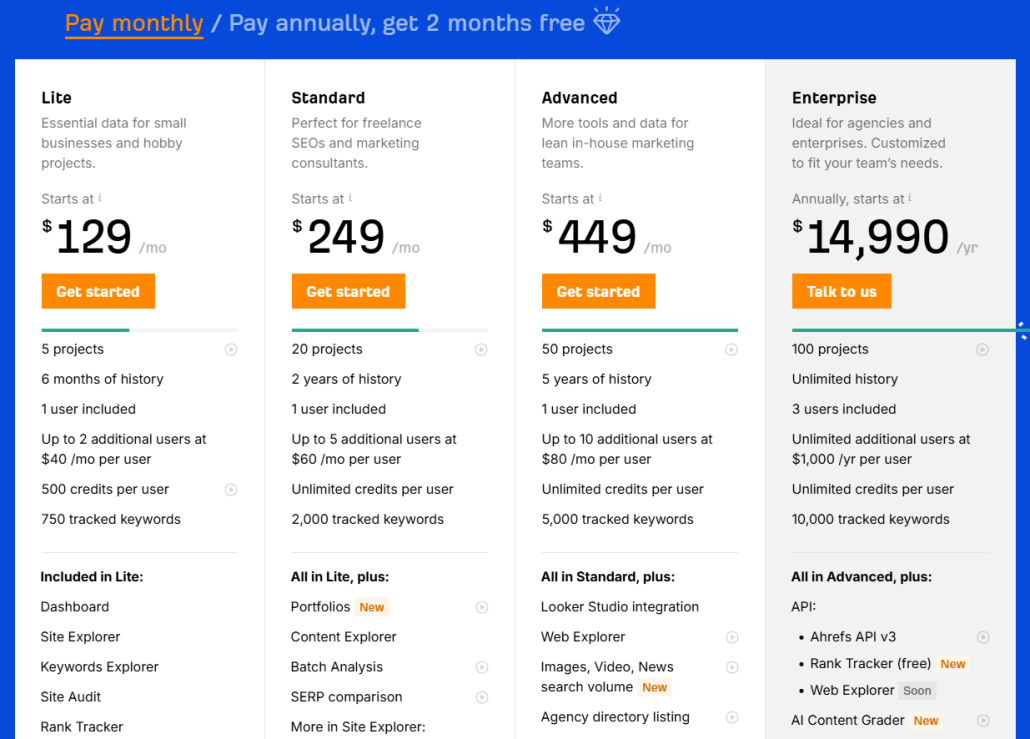
Unfortunately, Ahrefs prices can get extremely high–especially for small businesses or individuals with limited budgets. Here are your options:
- Lite – Starts at $129/month and includes up to 5 projects with 6 months of history. It includes 1 user with 500 credits.
- Standard – Starts at $249/month and includes up to 20 projects with 2 years of history. It allows 1 user with unlimited credits.
- Advanced – Starts at $449/month and includes up to 50 projects with 5 years of history. It allows 1 user with unlimited credits.
- Enterprise – Starts at $14,990/year and includes up to 100 projects with unlimited history. It allows 3 users with unlimited credits.
*Note: Customers can get 2 months free on any plan (other than Enterprise plans) by switching to an annual plan.
Reviews
Ahrefs averages 4.5 stars, and many users comment on the accuracy, competitor analysis tools, and keyword research tools. The more negative comments often focus on price.
Here’s what Bhavishya J. had to say about using Ahrefs:
What do you like best about Ahrefs?
“Ahrefs has the most comprehensive backlink database I’ve used. The Site Explorer gives deep insights into competitors’ link profiles, organic keywords, and traffic estimations. I also like the Content Explorer, which helps me discover trending topics and identify link-building opportunities. The UI is clean, and the data feels more accurate compared to many other SEO tools. This is easy to use tool.”
What do you dislike about Ahrefs?
“The pricing is quite high for freelancers or small businesses, and many features are locked behind higher plans. The learning curve can also be steep for beginners, as the platform is very data-heavy. Reporting could be more customizable for client deliverables.”
What problems is Ahrefs solving and how is that benefiting you?
“Ahrefs helps me analyze competitors, track keyword rankings, find content gaps, and build effective link strategies. It has consolidated multiple SEO tasks into one tool, saving me time and improving the accuracy of my SEO campaigns. Most importantly, its backlink data has helped me make smarter link-building decisions that improved rankings and organic traffic.”
6. Best for Competitor Analysis: Similarweb
Similarweb is a market intelligence for online businesses, meaning it’s not just for SEO.
When it comes to SEO, Similarweb offers tools to help businesses track ranks, perform keyword research, improve technical SEO, and more.
Let’s look closer to help you determine whether Similarweb might be the tool for you.
Pros
- Extensive customization options for reports
- In-depth SERP feature tracking, providing more data points
- Strong integration with analytics platforms
- Detailed competitor analysis
- Regular updates and new features for more accurate data tracking
Cons
- Interface can be complex for new users.
- Limited backlink analysis and keyword research tools
- Limited historical data on smaller plans
- Higher price range compared to some alternatives.
Features
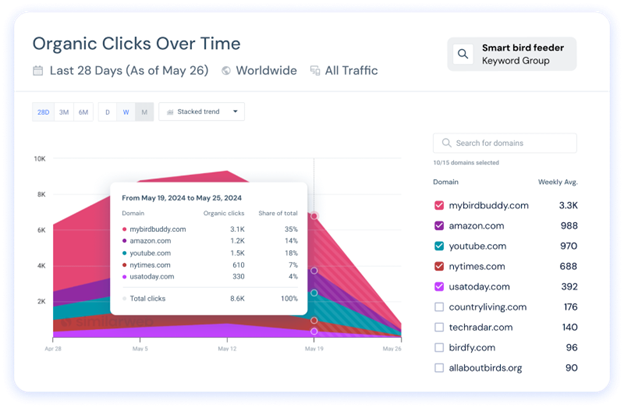
- Daily keyword tracking – Track rankings daily to stay up-to-date on keyword performance changes.
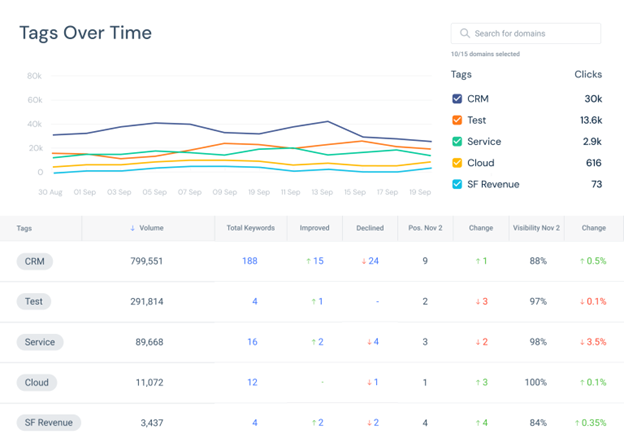
- Customizable rank insights – Adjust rank tracking to focus on specific metrics, devices, and locations.
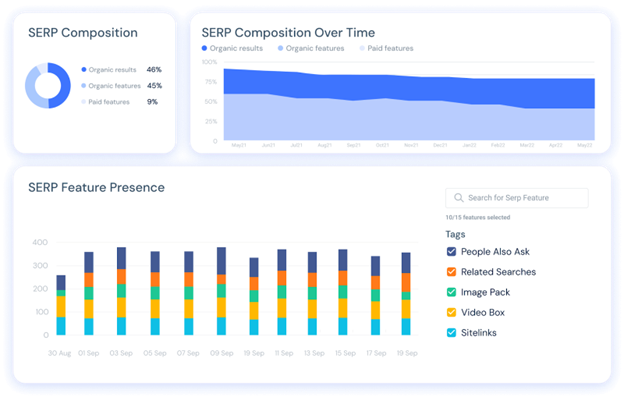
- Comprehensive SERP feature tracking – Monitor various SERP features like snippets, image packs, and local packs to understand keyword visibility.
- White-label reporting – Create fully customizable, branded reports for clients or stakeholders.
- Integration with Google Analytics, Search Console, and Adobe Analytics – Syncs seamlessly with analytics platforms to enrich SEO data with website traffic insights.
- Competitive insights – Track multiple domains and subdomains in-depth to monitor competitors’ rankings and strategies.
Overall Score
Based on the factors we’ve talked about, Similarweb scores 7.5/11. It is a great tool for competitor insights, but it lacks keyword granularity and flexibility.
Pricing
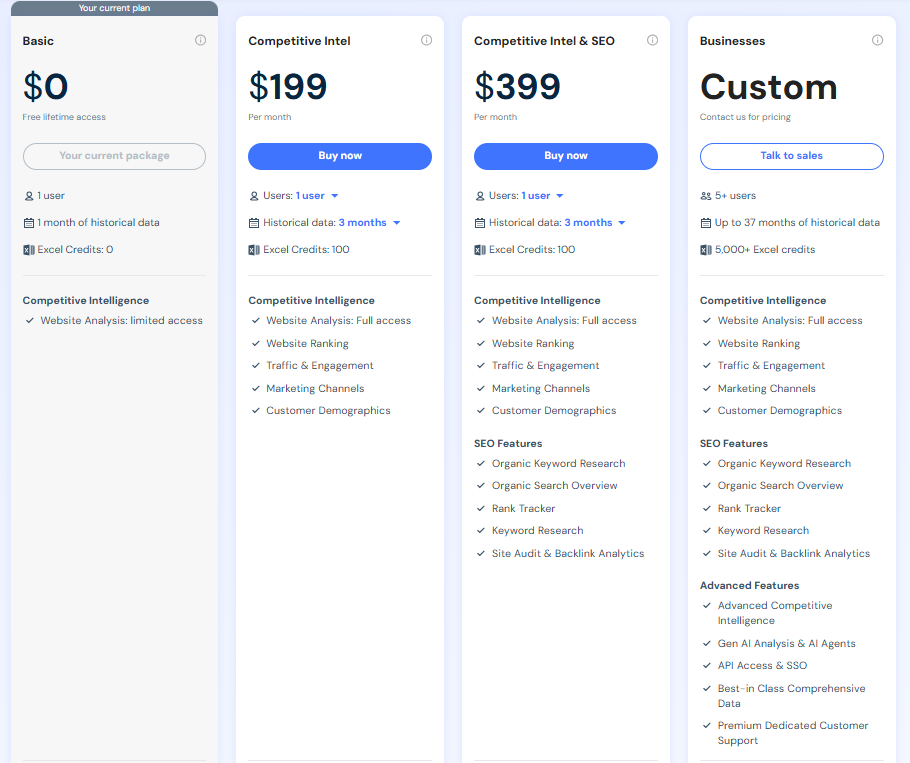
Similarweb is a large tool that comes with a large price tag. There are 4 main pricing plans for its web intelligence product:
- Basic – Includes 1 month of historical data, 0 Excel credits for 1 user with free lifetime access.
- Competitive Intel – Includes 3-15 months of historical data, 100 Excel credits for 1-5 users, starting from $199/month.
- Competitive Intel and SEO – Includes 3-15 months of historical data, 100 Excel credits for 1-5 users, starting from $399/month with additional SEO features like its rank tracker.
- Businesses – Includes up to 37 months of historical data, 5,000+ Excel credits for 5+ users, with advanced features that include Gen AI Analysis and API Access (pricing available after contacting the sales team).
Other features, such as SSO and dedicated customer support, are only available on the larger plans.
Reviews
Similarweb is a popular tool, and its reviews reflect that fact. It averages 4.5 stars.
Some of the most frequent positive comments focus on the ease of use and the high-quality competitor analysis tools. The more critical reviews often mention data limitations or inaccuracies.
Here’s what Prisca P. had to say about using Similarweb:
What do you like best about Similarweb?
“I use Similarweb every day as part of my SEO tasks, and it has become an essential tool for analyzing the organic traffic of my competitors, identifying their strategic keywords, and spotting positioning or backlink opportunities.
The interface is clear, well-designed, and easy to use, easy to understand, and easy to integrate into my daily work, even for those who are not data experts. What I particularly appreciate is the tool’s ability to provide a quick and actionable overview without having to spend hours cross-referencing data. The customer service is also very responsive: in case of questions or need for assistance, I have always received quick and relevant answers. Similarweb helps me refine my strategies with a more market and competition-oriented approach.”
What do you dislike about Similarweb?
“Even though I use Similarweb regularly and find the tool very useful, it has some limitations to be aware of. The data provided are estimates, and on low-traffic or very specific sites, the figures can be quite far from reality.
The tool is mainly focused on high-volume keywords, which makes it more difficult to perform a detailed analysis of the long tail, which is essential in SEO. Finally, access to advanced features remains expensive, which can be a barrier for freelancers or small businesses, and some data are sometimes limited in niche or non-English-speaking markets.”
What problems is Similarweb solving and how is that benefiting you?
“Similarweb helps me solve a key problem in my SEO work: the lack of visibility on competitors’ strategies and performance. With Similarweb, I can analyze the estimated traffic of any site, understand where this traffic comes from (SEO, SEA, social networks, etc.), and identify the keywords that generate the most visits. This allows me to detect positioning opportunities, discover search trends in my sector, and build a more relevant SEO strategy that is better aligned with the market.”
7. Best for Local SEO: Local Falcon
Local Falcon is built to provide more local visibility to service-area businesses or companies with brick-and-mortar locations. It offers geo-grid rank tracking, heat-map visualizations, and platform-specific mapping data you won’t find in most general rank trackers.
Pros
- Gives a true local-SEO picture by showing how your rankings change across blocks, not just cities.
- Saves time and guesswork with clear visual grids that make SEO performance instantly understandable for clients and teams.
- Helps you see which competitors dominate in specific neighborhoods.
- Ideal for agencies and multi-location brands that need to track dozens of locations without losing geographic precision.
- Built to support modern search visibility, including AI and map-based ranking factors.
Cons
- Only tracks the Top 20 search results.
- Because it uses a grid of geo-points rather than a single generic check, you’ll need to interpret more data.
- While excellent for local SEO, if you’re focusing solely on national organic rankings (non-local), you’d be better off with other full-suite SEO tools.
Features
- Geo-grid rank tracking – Map-based visuals show ranking at multiple points (e.g., neighborhoods, ZIP codes) for your keywords and location. You can also disable unnecessary grid points to optimize credit usage.
- Competitor reports and visualization – You can carry out side-by-side comparison of your ranking vs. competitors across your service area, and discover which competitors dominate specific areas or keywords.
- AI search monitoring – Track your brand’s AI search visibility across Google AI overviews, ChatGPT, Gemini, Grok, and AI mode, and which competitors get recommended to help you optimize your GEO strategy.
- Locally relevant citations – Falcon AI identifies locally relevant citation websites present on the first page of organic search results. You can use this information to come up with a list of places where your business needs to be listed to rank better for that search term.
- Google Business Profile monitoring – Falcon Guard aligns your profile changes, GBP performance metrics, and ranking fluctuations, providing timely insights into which updates impacted your visibility.
- Multi-location management – You can easily track rankings across your entire business footprint, irrespective of whether you manage 10 locations or 10,000. You can also group, organize, and compare reporting across different locations for a more comprehensive view.
- Powerful integrations – Connect your rank-tracking data with tools in your existing workflow, such as Looker Studio and Zapier, to create comprehensive reporting systems.
Overall Score
Based on the factors we’ve talked about, Local Falcon scores 8/11. It’s got outstanding local SEO visibility but is limited outside Google Maps.
Pricing
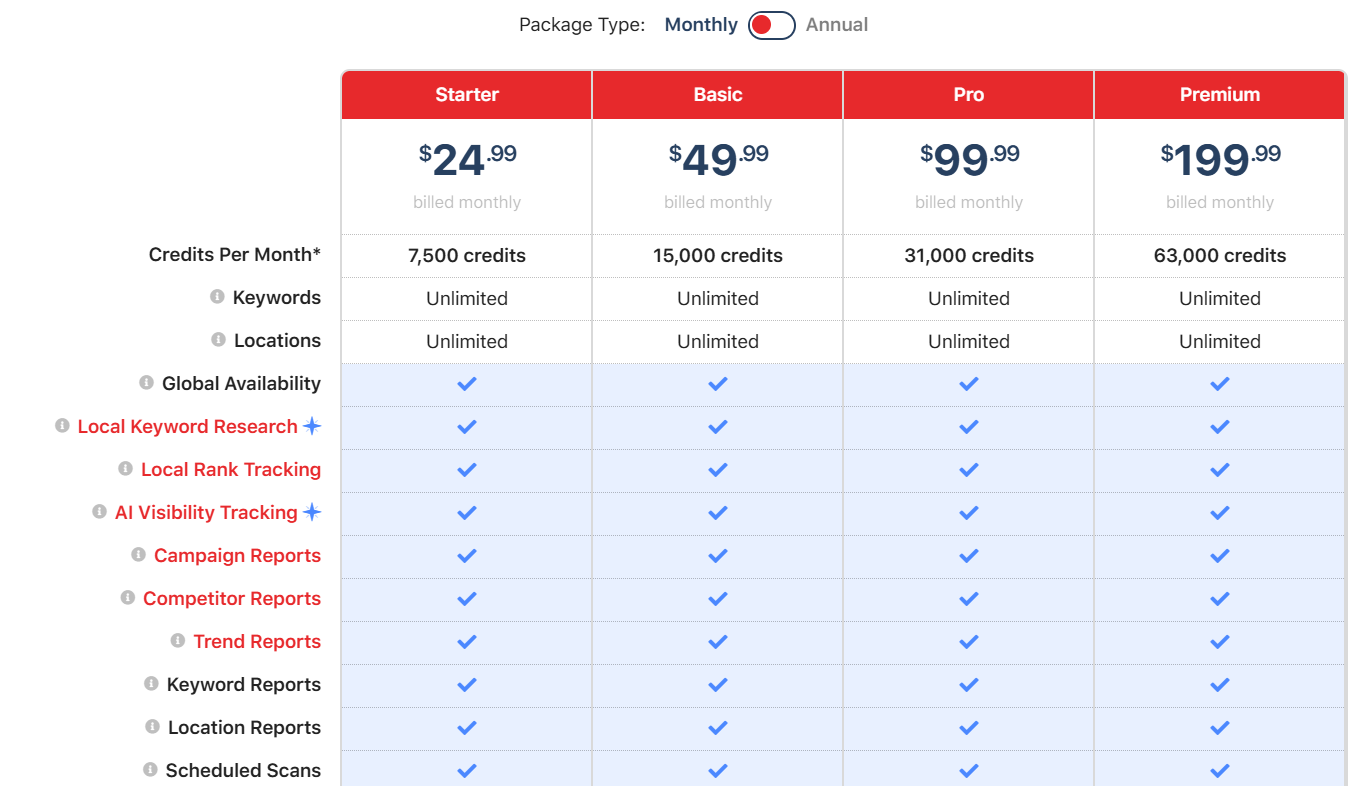
Local Falcon has 4 key credit-based pricing plans, where each grid-point (pin) you scan costs credits:
- Starter – 7,500 credits per month for unlimited keywords and locations priced at $24.99/month.
- Basic – 15,000 credits per month for unlimited keywords and locations priced at $49.99/month.
- Pro – 31,000 credits per month for unlimited keywords and locations priced at $99.99/month.
- Premium – 6,300 credits per month for unlimited keywords and locations priced at $199.99/month.
When you sign up for Local Falcon, you get 100 free credits to get started.
Reviews
Local Falcon averages 4.8 stars on G2.
Some of the most frequent positive comments focus on the ease of use and the customer support. The more critical reviews often mention expensive pricing plans and unintuitive dashboards.
Here’s what John S. had to say about using Local Falcon:
What do you like best about Local Falcon?
“Local Falcon allows me to create geogrid reports and competitor reports that are much more detailed and customizable than other similar tools that I’ve used. These reports really help identify local GBP rankings, and show improvement in a very visual way. Automatic reporting is simple to set up, and the reports look great. I got my most recent client just from showing him his business vs his competitors for a major keyword in a Local Falcon report.”
What do you dislike about Local Falcon?
“It can be a bit tedious to sift through individual reports at times. I would love an interface that’s most keyword and trend focused, whereas currently I’m often just digging through a list of reports and opening each one.”
What problems is Local Falcon solving and how is that benefiting you?
“I run a small local SEO company, and we need to create geogrid reports to track how our clients are doing in local search. Local Falcon provides the best looking and most customizable geogrid reports that I’ve seen. Their reports even helped me land my most recent client.”
8. Best for AI Overviews: AIclicks
AIclicks is an emerging favorite among SEOs exploring the next frontier of visibility. It’s one of the few tools purpose-built to track when and how your brand appears in AI-generated responses across platforms like ChatGPT, Gemini, Claude, and Perplexity.
It’s best for marketers who want to prove AI visibility to clients or executives.
That said, AIclicks isn’t ideal for those needing broad keyword tracking or daily SERP data because it’s not designed to replace a full SEO rank tracker like ProRankTracker. Instead, think of it as the missing layer that shows you how AI engines cite and surface your brand.
Pros
- Designed for forward-thinking marketers who want early insights into how AI engines “see” and recommend their sites.
- Provides early-mover advantage by focusing on AI search rankings that many traditional rank trackers don’t support yet.
- Offers agency-friendly insights to help report on future-proof search visibility to clients or senior stakeholders.
Cons
- Because AI search results evolve frequently, visibility metrics may shift more dynamically than traditional SERPs.
- Still a specialized tool — not a replacement for full-suite SEO rank trackers like ProRankTracker.
Features
- AI visibility map – Visualizes when, where, and how your domain appears across AI platforms and prompts.
- Prompt discovery – Uncovers the exact queries that surface your brand in AI responses, so you can replicate and expand those opportunities.
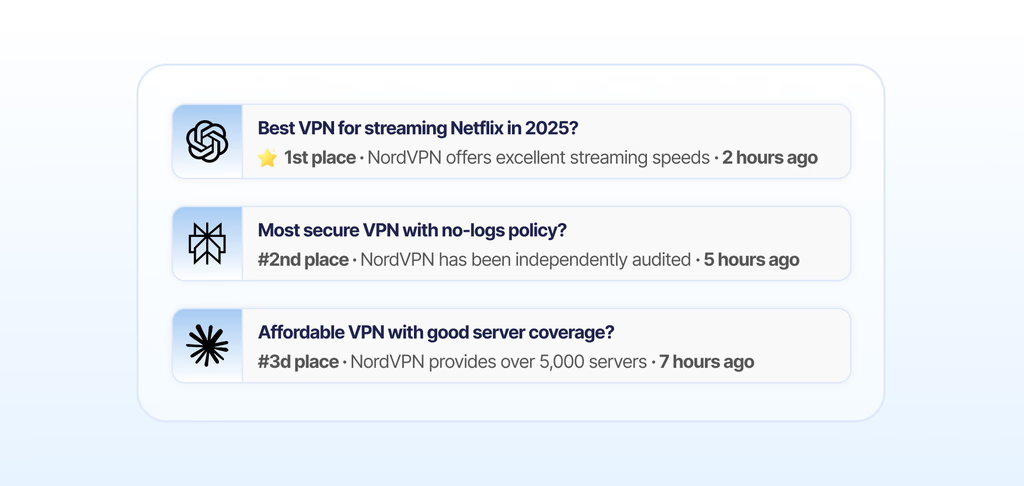
- Visibility audit – Measures your current footprint in AI search, highlighting missing opportunities and keyword gaps.
- Competitor benchmarking – Compares your brand’s AI presence against competitors to reveal who dominates AI recommendations.
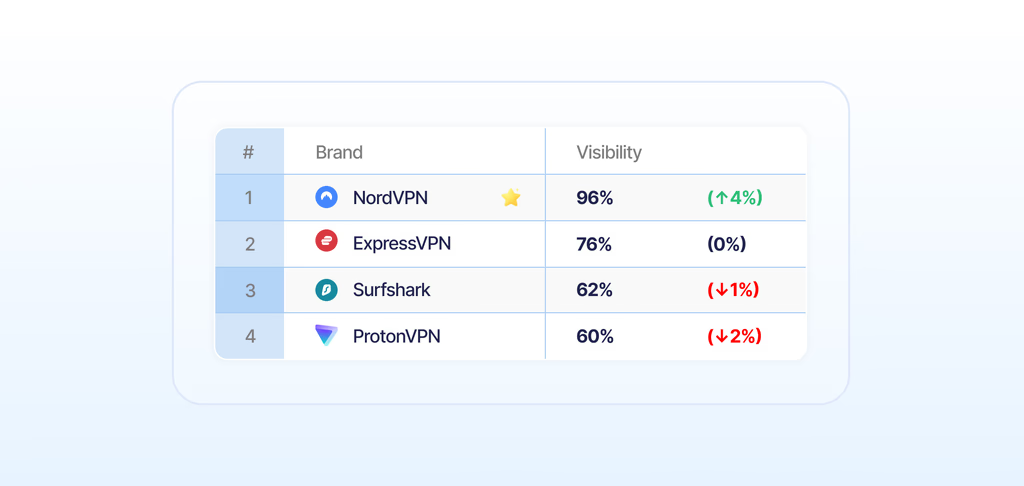
- Actionable Guidance for AI visibility – Provides next steps and optimization guidance based on audit results to improve your AI visibility.
Overall Score
Based on the factors we’ve talked about, AIclicks scores 5.5/11. It’s best for AI visibility, and is a weaker tool for traditional rank tracking and multi-engine coverage compared to the alternatives.
Pricing
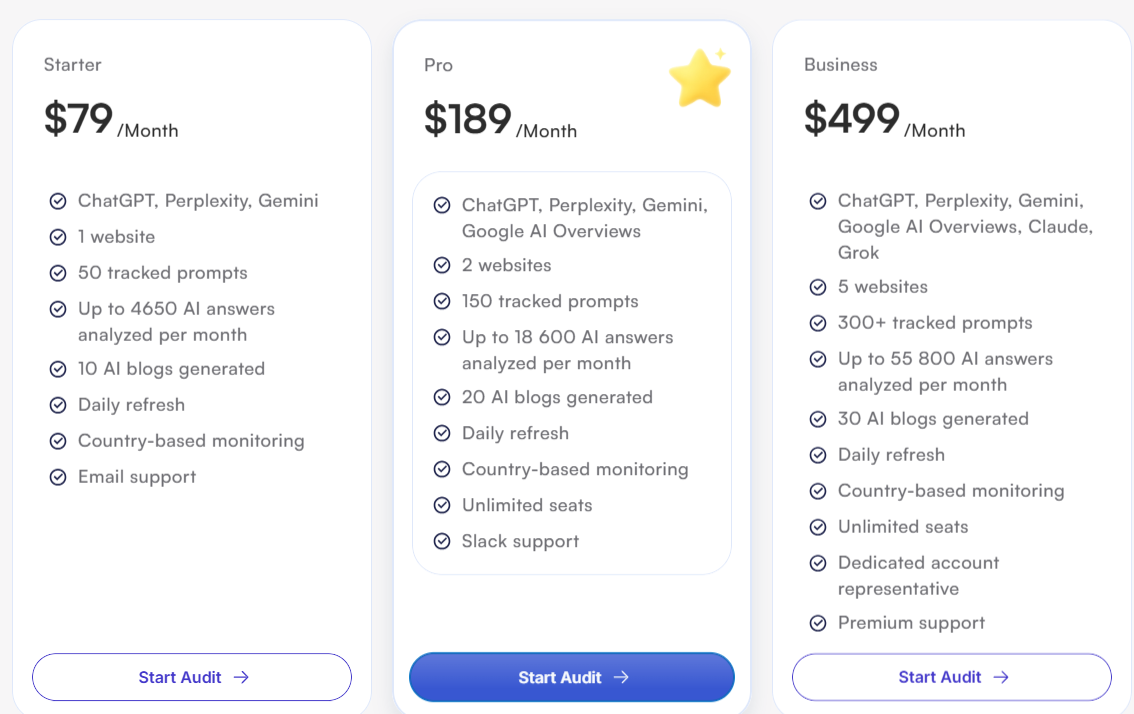
AIclicks provides 3 pricing tiers:
- Starter – Includes 50 tracked prompts for 1 website across ChatGPT, Perplexity, and Gemini for $79/month.
- Pro – Includes 150 tracked prompts for 2 websites across ChatGPT, Perplexity, Gemini, and Google AI Overviews for $189/month.
- Business – Includes 300+ tracked prompts for 5 websites across ChatGPT, Perplexity, Google AI Overviews, Claude, Grok, and Gemini for $499/month.
If you opt for a yearly subscription plan, you get 2 months free.
Reviews
Here’s what Andrius S. had to say about using AIclicks:
What do you like best about AIclicks?
“I have tried several GEO and AI tracking tools, and Aiclicks stood out as the most flexible when it comes to costs and setup. It consistently helps me gather AI responses on a large scale. The dashboard provides useful metrics that make it easy to benchmark against competitors. The founders offer exceptional support—they are approachable and quick to respond. New features are rolled out quickly and with flexibility. I also find it straightforward to interpret all the data and develop a GEO strategy.”
What do you dislike about AIclicks?
“Nothing, community of like minded people would be nice to have.”
What problems is AIclicks solving and how is that benefiting you?
“This tool assists me in appearing in ChatGPT results for both myself and my clients. It also suggests prompts to monitor, provides relevant market data, and recommends actions to enhance brand visibility on AI platforms.”
9. Best for Visualizations: Nozzle
If you care about seeing the SERP the way users do (not just reading a rank number), Nozzle stands out for its rich, visual reporting.
Instead of focusing solely on position numbers, Nozzle helps you see every pixel of the search result, showing which listings and features truly dominate user attention. If you often report on branded visibility, share-of-voice, or need to demonstrate movement visually over time, Nozzle’s “SERP Vision” tools make it simple to tell that story.
However, the platform’s power lies in its depth and data visualization, which can feel overwhelming if you’re not used to analyzing SERP features or pixel metrics.
Pros
- Turns rankings into client-ready visuals with overlayed metrics and side-by-side SERP comparisons, making it easy to explain wins and gaps at a glance.
- Helps prioritize where visibility actually counts using metrics like Pixels From Top and Above-the-Fold percentage.
- Saves time in reviews and reporting by storing SERP history “forever,” so you can compare any two dates and show change visually.
Cons
- Only tracks the top 50 search results.
- The depth of visuals and data can be overkill if you only need a light, basic rank list.
- To get full value, teams should be comfortable interpreting SERP features and presentation metrics (not just positions).
Features
- Nozzle Vision – Visually compare SERP history through a snapshot overlaid with metrics (for every result), with side-by-side comparisons.
- SERP Sentiment View – Assign positive/negative/neutral to each ranking URL and SERP feature, and see a color-coded branded SERP to monitor sentiment performance.
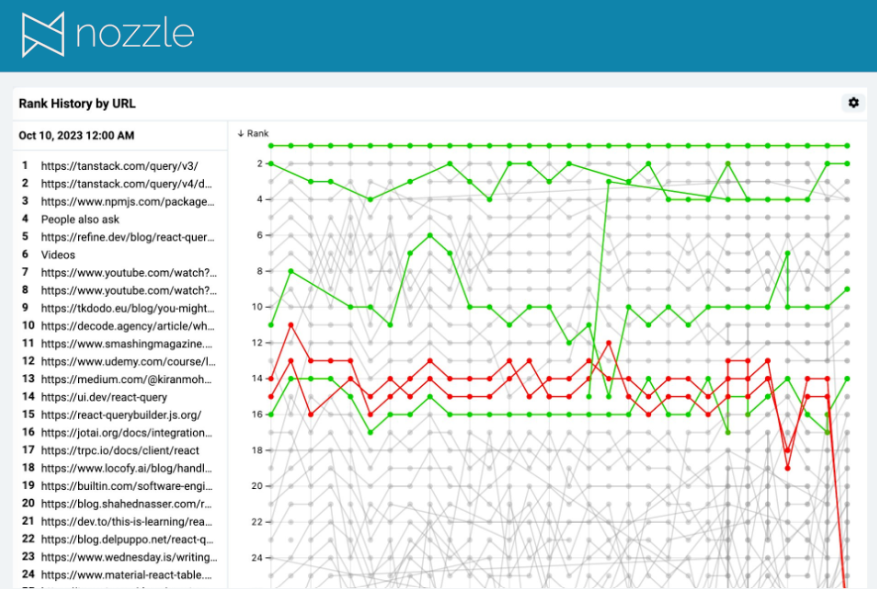
- Compare Branded SERP snapshots – visually compare any two dates to show how the page changed over time.
- Hover and Highlight – Isolate a URL or feature to inspect volatility or stability on branded SERPs.
Overall Score
Based on the factors we’ve talked about, Nozzle scores 7/11. Nozzle is best known for its strong visualization features, but its steep learning curve and cost might be challenging for new users.
Pricing
Nozzle has 4 pricing tiers for SMBs:
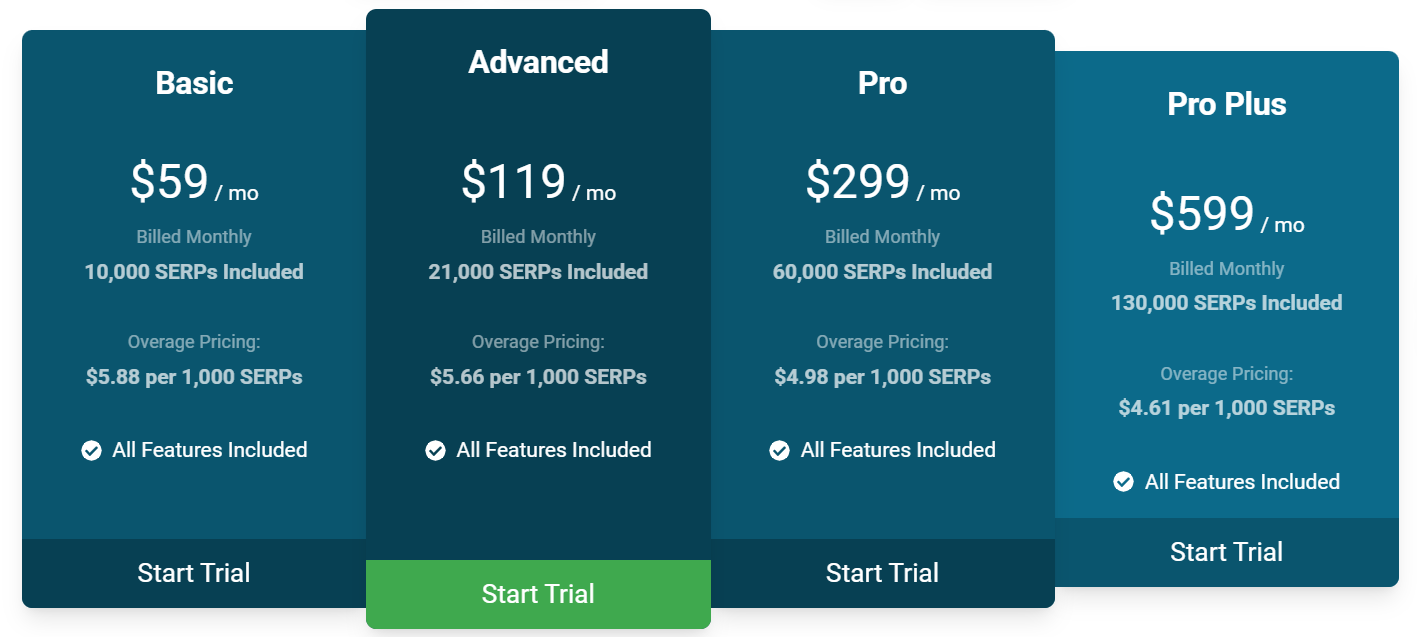
- Basic – Includes 10,000 SERPs for $59/month.
- Advanced – Includes 21,000 SERPs for $119/month.
- Pro – Includes 60,000 SERPs for $299/month.
- Pro Plus – Includes 130,000 SERPs for $599/month.
Nozzle also provides 4 additional tiers for enterprises with higher SERP limits.
Reviews
Nozzle averages 4.6 on G2. While the positive feedback from its users highlights its competitor tracking and comprehensive rank analytics. The drawbacks seem to be centered around its steep learning curve.
Here’s what Mark D. had to say after using Nozzle:
What do you like best about Nozzle?
“It tracks not just my website’s position but also social media profiles, ads, and all domain matches, helping me understand true visibility across the search results page.”
What do you dislike about Nozzle?
“It’s a complicated tool to understand, I’m still getting my head around how to set things up and get the most out of it.”
What problems is Nozzle solving and how is that benefiting you?
“It provides a comprehensive, enterprise-grade tool that not only tracks keyword positions but also measures the actual impact of those rankings in the real search environment.”
10. Best for Low-Volume Keyword Tracking: Mangools
Mangools is best known for its simplicity and accuracy when tracking smaller keyword sets and is ideal for solopreneurs, bloggers, and small teams who’d like reliable daily tracking.
Mangools is best for those who want an affordable, accurate way to monitor a few hundred keywords, discover new opportunities, and track progress over time. It’s ideal if you value simplicity and want fast answers, not data overload.
However, it’s not ideal if you need deep competitor analysis, large-scale tracking, or advanced automation. Its lightweight design and limited scalability mean it shines as a focused keyword and SERP tracker — not an all-in-one SEO suite.
Pros
- Perfect for low-volume keyword tracking, allowing small websites to monitor niche or long-tail terms without overpaying for unused capacity.
- User-friendly dashboard with colorful, digestible data visualization that’s ideal for newcomers or freelancers.
- Affordable monthly plans make it one of the more cost-effective rank trackers for smaller SEO projects.
- Provides fast insights for content optimization and link building without the learning curve of heavier enterprise platforms.
Cons
- Only tracks the top 30 search results daily and the top 100 search results weekly.
- Some advanced SERP and backlink data are lighter than what specialized enterprise tools provide.
- Plans may feel restrictive for agencies or larger teams tracking thousands of keywords.
Features
- KWFinder – Discover low-competition, long-tail keywords with search volumes and difficulty scores—perfect for niche targeting.
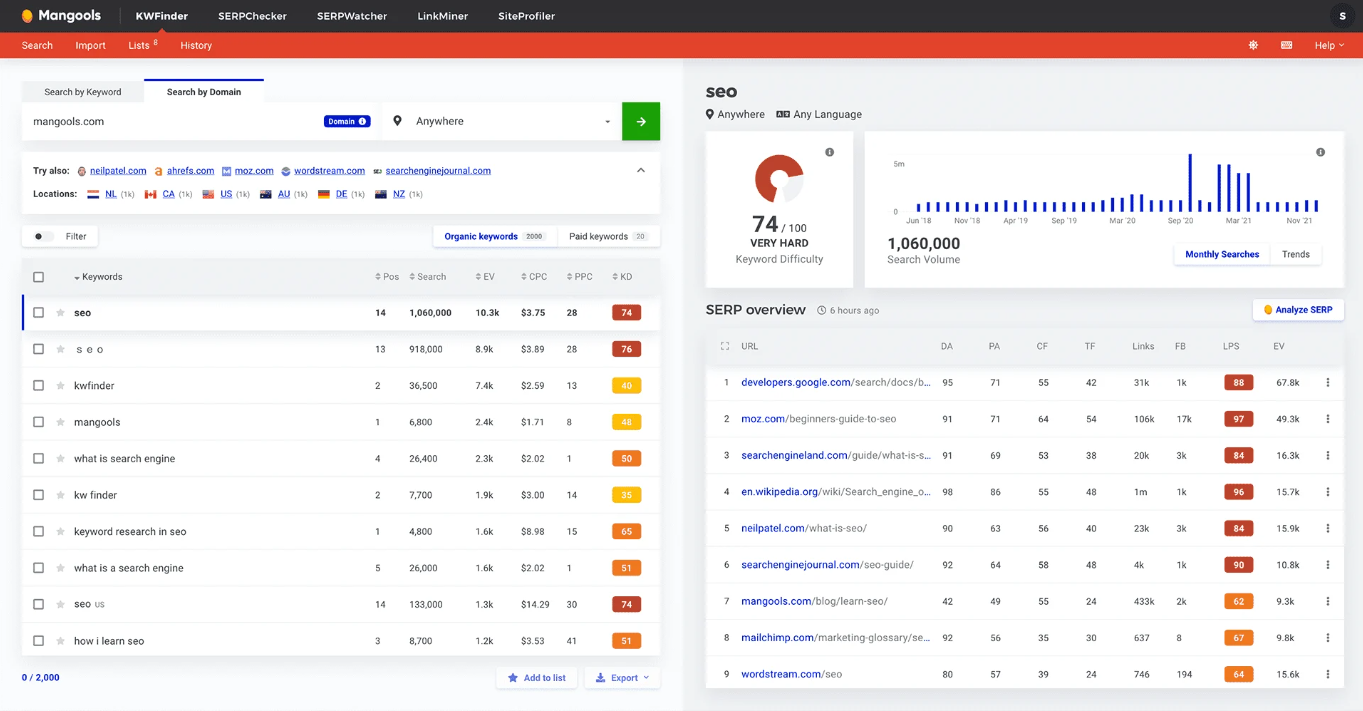
- SERPChecker – Analyze real-time SERPs and competition strength for each keyword with visual SERP previews and authority metrics.
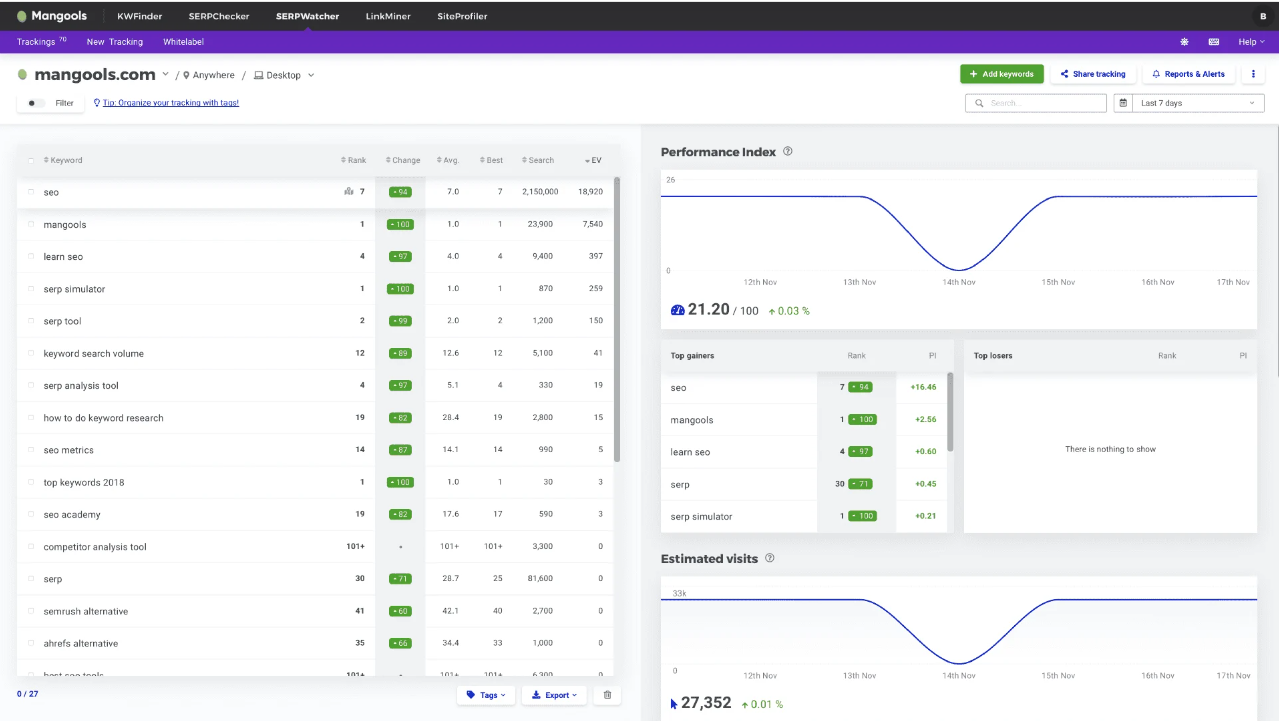
- SERPWatcher – Track daily keyword movements with clear performance indexes, ranking distribution charts, and alerts.
- LinkMiner – Evaluate backlink strength and anchor texts to identify link-building opportunities.
- SiteProfiler – Get instant SEO metrics and domain comparisons, including authority, trust flow, and backlink profiles.
Overall Score
Based on the factors we’ve talked about, Mangools scores 7.5/11. Its simplicity and pricing make it a tool worth checking out, but agencies might find its limited scalability challenging.
Pricing
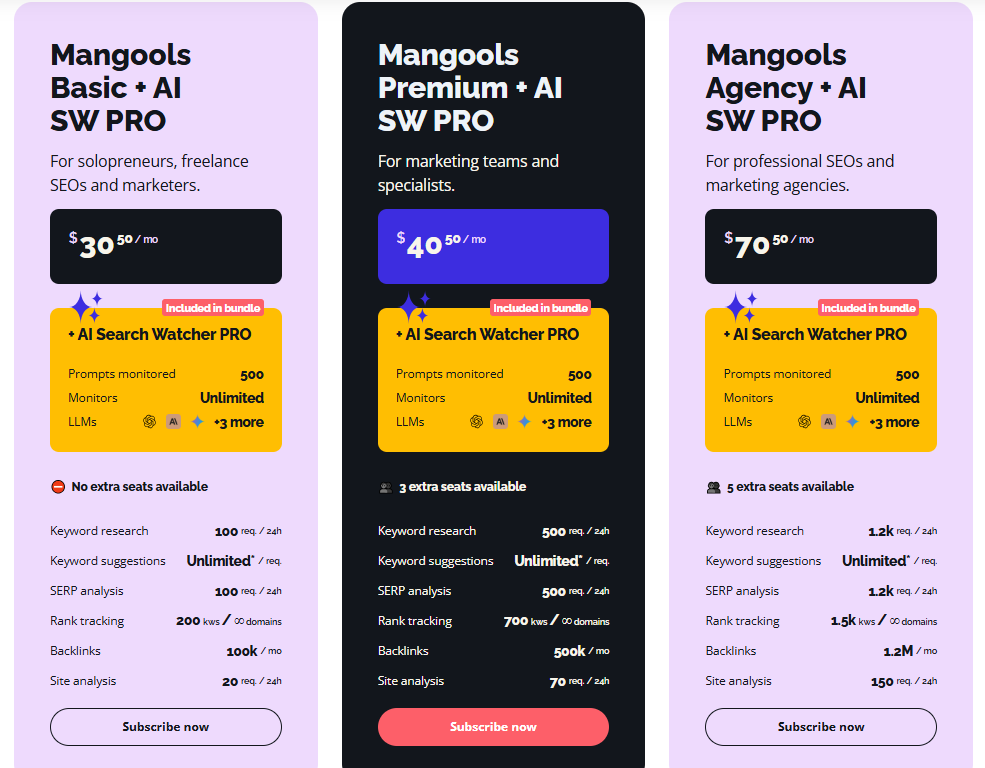
Mangools provides 3 pricing tiers:
- Mangools Basic + AI SW Pro: You get 100 searches in KWFinder every 24 hours and 100 searches in SERPChecker every 24 hours for $30.5/month.
- Mangools Premium + AI SW Pro: You get 500 searches in KWFinder every 24 hours and 500 searches in SERPChecker every 24 hours for $40.5/month.
- Mangools Agency + AI SW Pro: You get 1200 searches in KWFinder every 24 hours and 1,200 searches in SERPChecker every 24 hours for $70.5/month.
Reviews
Mangools is a fairly popular tool, and averages 4.7 on G2. The majority of its users applaud it for its ease of use and user-friendly interface. On the other hand, users feel it might not be as suitable as other competitors like Semrush or Ahrefs for in-depth technical SEO and competitor analyses.
Here’s what Sebastiaan L. had to say after using Mangools:
What do you like best about Mangools?
“Since 2019, Mangools has been my go-to tool for keyword research. In my personal opinion, there’s no more user-friendly tool on the market for analyzing both keywords and long-tail keywords. My usual approach starts with thorough keyword research, followed by keyword mapping. I find Mangools’ Keyword Finder to be more intuitive and accessible than any other tool out there. It provides a clear and user-friendly overview of trends, search volume, CPC, PPC, and KD, along with a detailed SERP analysis. I also rely on the Rank Tracker daily to monitor and optimize rankings for my clients. The ability to search based on language and location is indispensable for me as a Dutch entrepreneur working primarily with Dutch and German-speaking clients. The support team is always available through the chat function, which adds to the overall user experience that I consider to be exceptional.”
What do you dislike about Mangools?
“While Mangools may not be a comprehensive all-in-one SEO tool, I don’t see that as a disadvantage. Its clarity and ease of use allow me to focus on what it does best: keyword research and rank tracking. In fact, I think pricier tools like Semrush and Ahrefs could learn a thing or two from Mangools about designing a platform with the end user in mind. It’s precisely the simplicity and user-friendliness that make Mangools such an invaluable tool for independent entrepreneurs like me.”
What problems is Mangools solving and how is that benefiting you?
“Mangools gives me the tools I need to efficiently enhance my clients’ SEO success. With features like KWFinder and SERPWatcher, I can easily develop targeted strategies that deliver real results, all on a platform that is both intuitive and affordable.”
11. Best Budget All-in-One: SE Ranking
SE Ranking is an SEO tool that is primarily rank-tracking focused, but it also has other valuable SEO tools like technical site auditing, a backlink checker, and a competitor analysis tool.
In addition, SE Ranking is known for its very reasonable prices, making it a good option for small and medium-sized businesses.
Pros
- Full-featured SEO platform at competitive pricing
- User-friendly interface with easy-to-read dashboards
- Comprehensive site audit feature helps identify technical SEO issues.
- Strong competitor analysis and keyword research tools
- Supports local SEO for keyword tracking at the city level
Cons
- Somewhat limited feature set compared to other SEO tools
- Lower-priced plans lack historical data, certain integrations, and other valuable tools.
- White-label reports and other agency features are only available with an additional purchase.
Features
- Keyword tracking and backlink analysis – Track keywords daily and analyze backlinks to monitor your site’s link profile and identify quality backlinks.
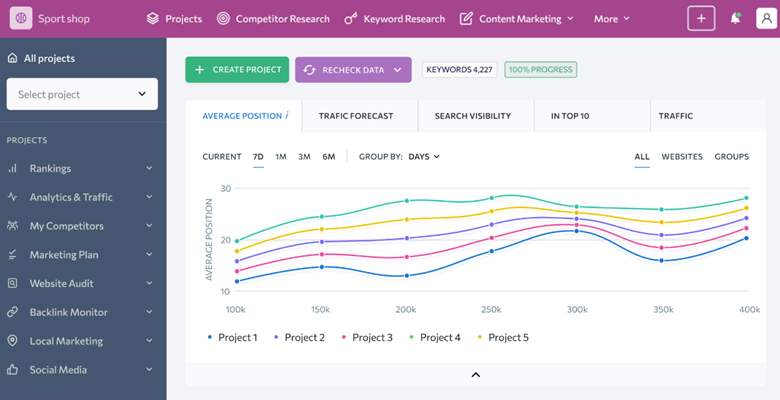
- Website audit – Provides detailed SEO health checks for technical issues like broken links, crawlability, and page speed.
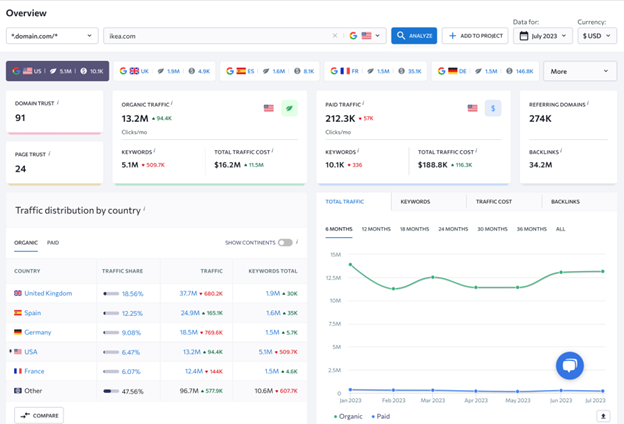
- Keyword research and competitor analysis – Discover new keywords using the Keyword Suggestion Tool, group them for relevance using the Keyword Grouping Tool, and analyze competitors’ performance for those same keywords.
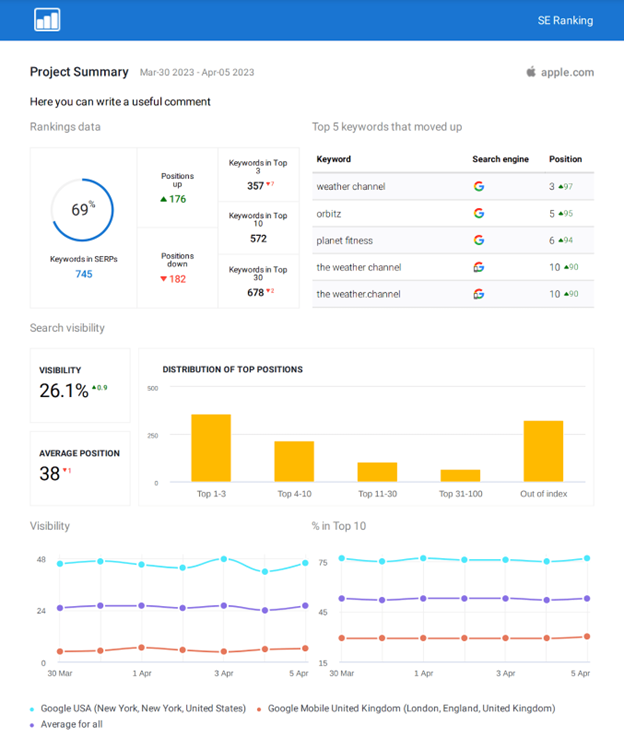
- Agency tools – Allows you to create branded reports and give your clients selective access to their data to help you provide them with the data they need. You can get listed in SE Ranking’s Agency Catalog to attract more potential clients, allowing you to establish your agency as a trusted expert. Agencies can also capture high-quality leads with a customizable on-page SEO checker widget and collect SEO data and insights to help them craft personalized first pitches.
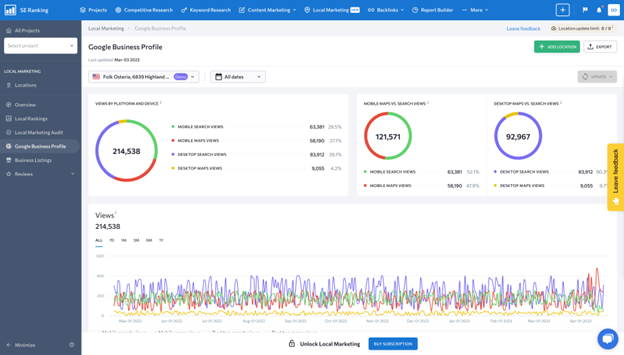
- Local SEO features – Enables tracking by city or region, including Google Business Profile tracking to improve your local ranks.
- AI features – Use AI to write content or track the AI Overviews Google search feature.
Overall Score
Based on the factors we’ve talked about, SE Ranking scores 9/11. It stands out as a balanced entry-level all-in-one rank-tracking tool, but its lack of enterprise depth and white-label flexibility might prompt users to seek alternatives.
Pricing
SE Ranking has 3 pricing plans, and each offers a different level of access to its suite of tools:
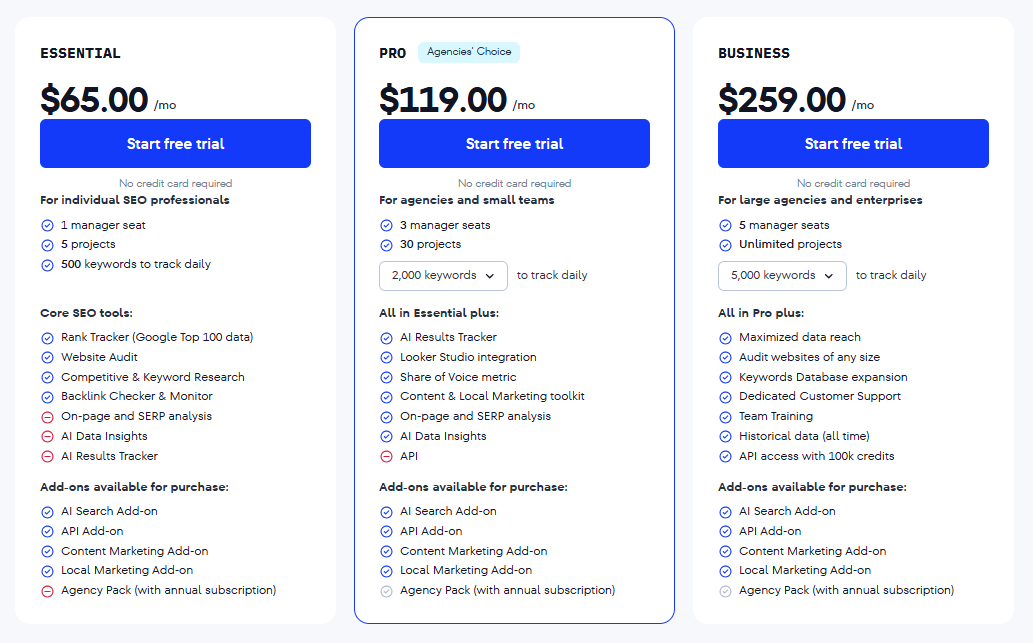
- Essential – For $65/month, you can track 500 keywords and get access to keyword research and backlink analysis.
- Pro – For $119/month, you get 2,000 keywords, plus access to historical data, advanced data insights, and other advanced tools. You can also choose a 3,500-keyword plan at this level, which will increase the cost.
- Business – This plan starts at $259/month for 5,000 keywords and includes all of the benefits of lower tiers, plus access to the API. You can also choose a 10,000/15,000 keyword plan at this level for a cost increase.
*Note: All these plans are eligible for a 20% discount on a yearly plan.
Reviews
Here’s what Rajib D. has to say about using SE Ranking:
What do you like best about SE Ranking?
“SE Ranking stands out with its intuitive interface, deep data insights, and AI-powered features that simplify even the most complex SEO tasks. From comprehensive keyword research and backlink monitoring to accurate rank tracking and competitor analysis, everything feels seamlessly integrated. I especially appreciate the platform’s ability to provide traffic estimates and keyword difficulty scores with impressive accuracy. It’s not just a tool – it’s a strategic partner for building winning SEO campaigns.”
What do you dislike about SE Ranking?
“While SE Ranking offers powerful features and excellent value, some of the data updates can feel a bit slow, especially for rank tracking on lower-tier plans. The backlink database, though improving, still isn’t as extensive as some larger competitors. A more robust reporting customization feature would also be helpful for agencies working with multiple clients. That said, these are minor issues in an otherwise solid platform.”
What problems is SE Ranking solving and how is that benefiting you?
“SE Ranking helps solve key SEO challenges like tracking keyword positions, analyzing competitors, and monitoring backlinks—all in one place. It removes the guesswork by offering accurate traffic forecasts, keyword difficulty scores, and audit tools that highlight technical issues. This has saved me hours of manual work and helped me make data-driven decisions faster. As a result, my campaigns are more strategic, focused, and effective.”
Frequently Asked Questions About Rank Trackers
Which rank checker is best for beginners?
ProRankTracker is the best rank checker for beginners for the following reasons:
- ProRankTracker’s algorithm delivers the most accurate, up-to-date rankings of the top 100 results, which is perfect when you’re just starting your SEO progress.
- You can start tracking keywords in minutes with the setup wizard, get daily updates automatically, and access clear reports without needing to configure complex settings.
- Every plan includes full SERPs, mobile and local tracking, and visual ranking trends with an easy-to-navigate interface.
- You can scale from a small starter plan to professional or agency plans as your needs grow.
Which is the best rank tracking tool to show up in AI Overviews?
To improve visibility inside Google’s AI Overviews, AIclicks is the best rank tracking tool for you. It tracks your brand and keyword presence within AI-generated search results, helping you see when and where you’re mentioned across evolving AI search experiences. Additionally, it also provides share-of-voice metrics and competitor comparisons.
Which is the best keyword rank tracker for local SEO?
For local businesses and agencies focused on map pack rankings, Local Falcon stands out as the top choice. It visualizes keyword performance using a grid-based map, showing exactly how rankings change across neighborhoods or ZIP codes, making it easier for you to fine-tune your local SEO strategy accordingly.
Ready to Start Tracking Your Rankings Across Search?
Hopefully, this data and analysis has helped you make a decision that’ll benefit your business in the long term!
Make sure you check out ProRankTracker’s Test Drive Plan to track up to 100 keywords daily for 7 days at just $4 to see how much it could help your performance on the SERP!
Good luck!