8 Best Rank Tracker APIs for Accurate SEO Reporting
Do you have several SEO or marketing tools you use regularly and wish you could combine their power?
What if I told you that you could not only combine their power but also integrate it with other high-value apps to visualize and act on your SEO data?
Sounding too good to be true?
Actually, that’s just what a rank tracker API can do for you by helping you accomplish 3 key tasks:
- Create powerful integrations with your other tools
- Save time on tracking data and incorporating it across your business strategy
- Increase the usability of your ranking data
With an automated solution like a rank tracking API, it’s easy to take your SEO strategy to the next level with insights that are traditionally hard (or even impossible) to uncover through manual processes.
This blog post will teach you what a rank tracker API does, how to use it, and how it can help your business.
Let’s get started!
We’ll cover:
How Rank Tracker APIs Work
There are 4 basic types of requests you can execute with a rank tracker API that’ll allow you to fully customize your integrations:
- Get
- Post
- Put
- Delete
Every rank tracker has different terminology and some variations on the basic 4 API requests (like an “Archive” request), but these 4 fundamentals cover the basics of what most API work accomplishes, so we’ll stick with them.
Let’s look at the fundamentals of using these requests to integrate your rank tracking data with your favorite apps.
“Get” Requests
“Get” requests allow you to retrieve your rank tracker data from an external app and integrate it into their system WITHOUT logging into your rank tracker and moving things over manually.
In other words, a “get” request is how you retrieve your rank tracker data for use in other apps.
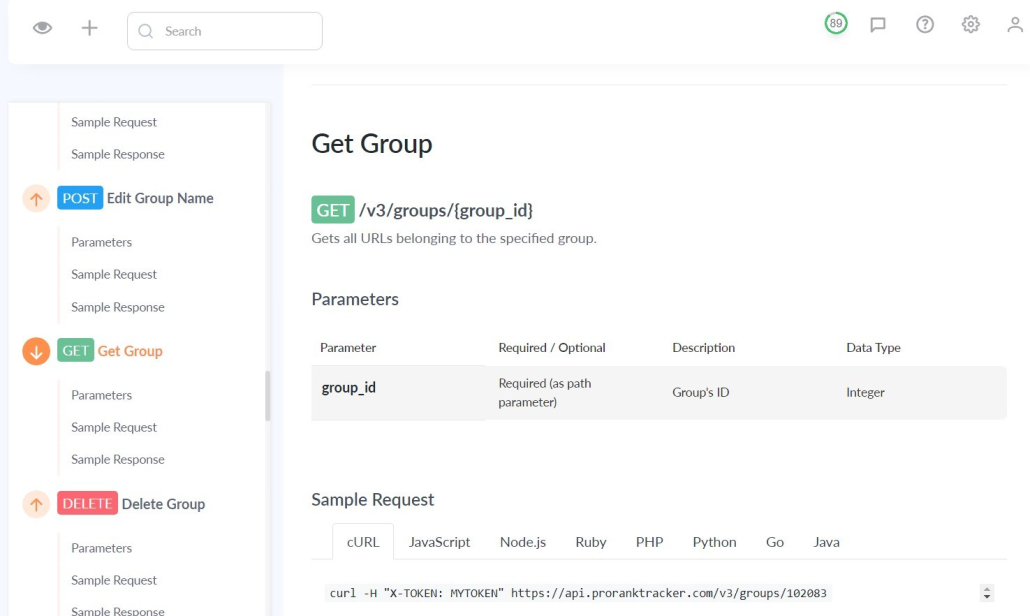
For example, let’s say you’re trying to create a data visualization in Tableau using your rank-tracking data. You want it to compare how your URLs rank in different search engines, locations, and device types.
To accomplish that task, you would use several different “get” requests to pull the correct data from your rank tracker into Tableau.
“Post” Requests
A “post” request is when you use your API to remotely change your ranking data from another app.
For example, let’s say you’re using a competitor research tool and integrated it with your rank tracker using an API. Using a “post” request allows you to instantly add, edit, or otherwise change your ranking data within your rank tracker from your competitor research tool’s dashboard.
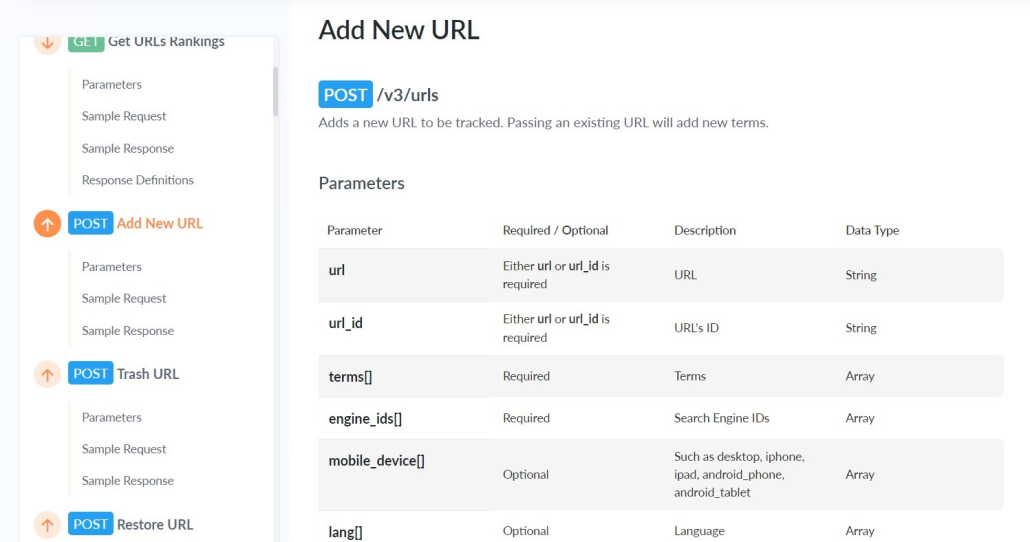
In other words, you can instantly upload your competitor research to your rank tracker as new URL/keyword combos for tracking.
This is a highly effective solution for getting data from another app you want to include in your rank tracking strategy. In addition, it allows you to automatically update your rank tracking list with new keywords and URLs that you discover using other sources.
“Edit” Requests
A third common type of rank tracker API request is the “edit” (also called a “put”) request, which allows users to edit existing data in their rank trackers from an external app.
For example, let’s say you updated an article’s URL and you need to change the URL for 30 different keywords in your rank tracker. That could take FOREVER.
Or, with an API, it could take a few seconds. Just use an “edit” request, to edit the URLs without even logging into your rank tracker account.
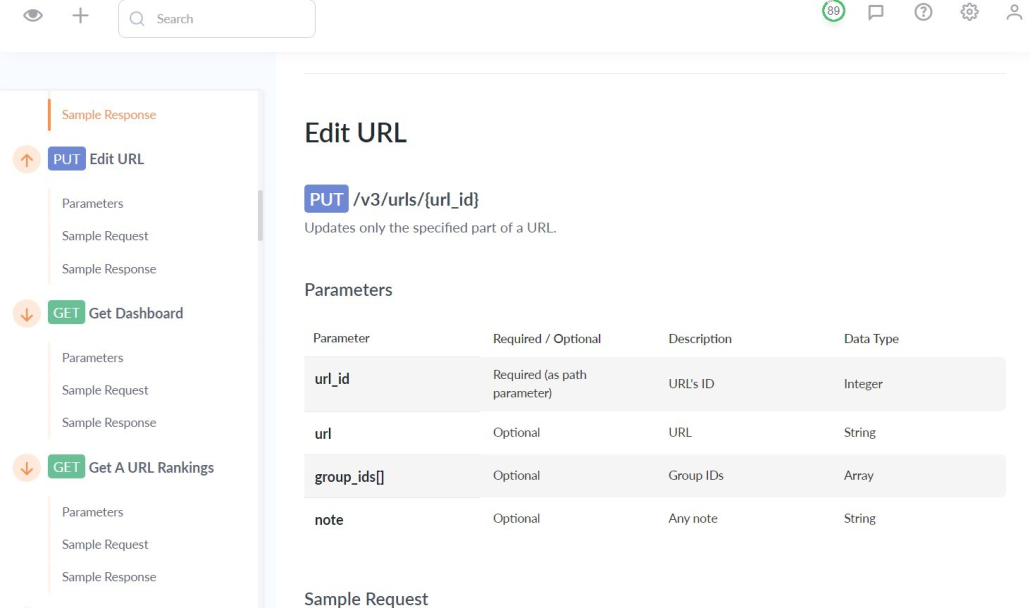
Using an “edit” or “put” request to edit a URL can be a huge time saver for your business. Instead of returning to your rank tracker to edit everything manually, a “put” request through the API makes this process automatic.
“Delete” Requests
Finally, “delete” requests allow you to remove specific items from your tracking lists.
In other words, they allow you to remotely edit how your ranking data is organized and what it includes.
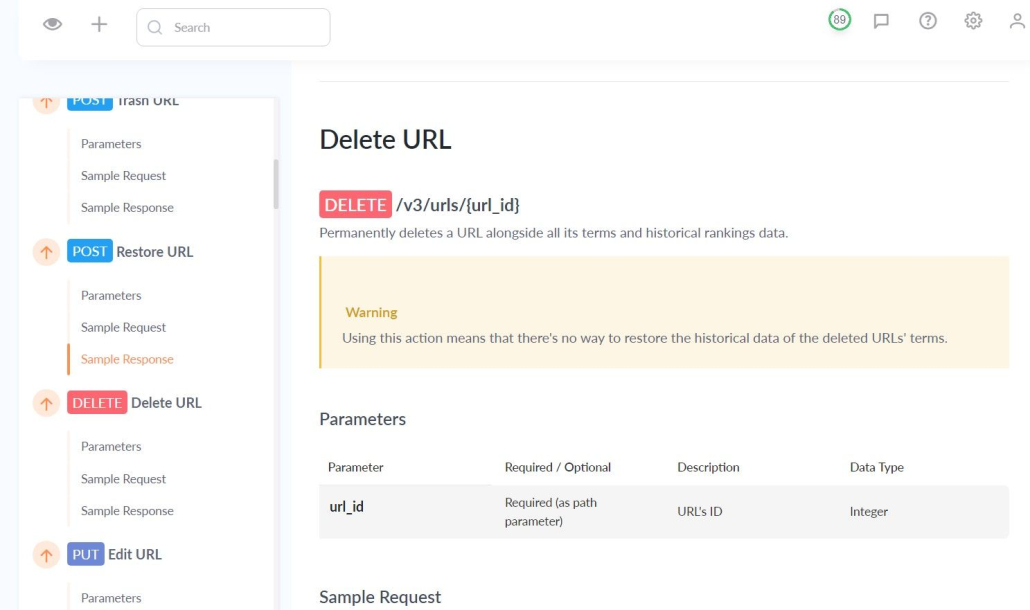
For example, let’s say you’re working with a social media tool like Hootsuite, and you conclude that one of your rank-tracking groups is no longer benefitting your strategy.
Using the “delete” requests on the API allows you to instantly delete the URLs or groups in question directly from your external tool.
These 4 types of requests all come back to one simple point:
Rank tracker APIs give you MASSIVE control over your rank tracking data by allowing you to create custom integrations with other tools. Combining these 4 requests means you can create a system that works perfectly for YOUR needs.
Top 8 Rank Tracker APIs
There are a lot of tools on the market that are all competing for your attention.
Which ones are actually worth your time?
The truth is that there are a lot of tools that aren’t worth it, but there are also plenty of great tools with a ton of satisfied customers available.
In this section, we’ll look at a few of the leading rank trackers with APIs and ask a couple of different questions about each:
- What features does it have?
- How much money do you have to spend to get access to the API?
ProRankTracker
ProRankTracker offers one of the most highly specialized rank tracking solutions on the market. ProRankTracker’s API is designed to be user-friendly and highly customizable, allowing you to fully integrate powerful rank tracking features into your workflow.
When you choose ProRankTracker, you get:
- API access with any ProRankTracker plan (available with all Agency plans. For other plans, customers can add it on here for about $28 USD per month.)
- Instant rank checker
- Daily rankings updates (or update on-demand)
- 20+ Reports (including shareable reports via link)
- Full SERP analysis
- Mobile app for clients
- White-label features
- Rankings discovery tool
- Keyword suggestions tool
- Value pricing that starts as low as about $39 per month (if paid annually)
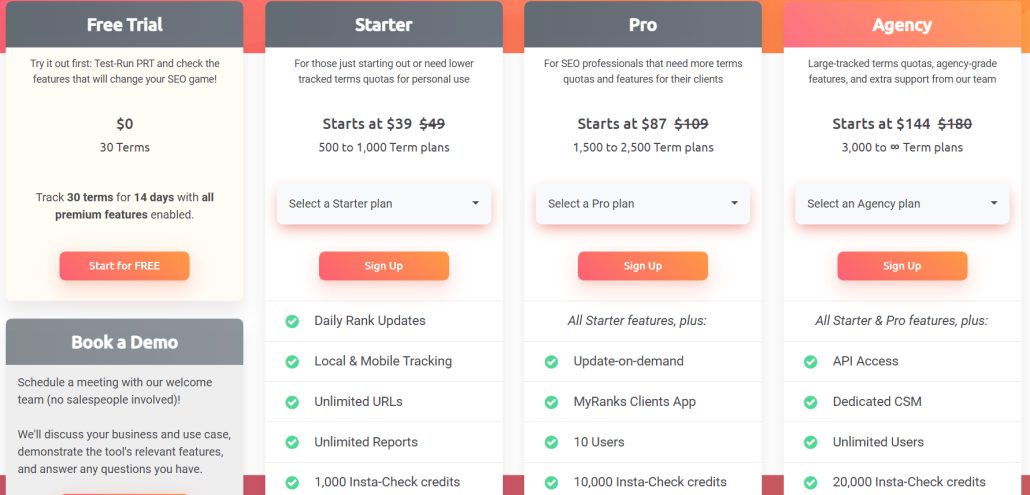
ProRankTracker also includes extensive API documentation to help people (even those with limited developer knowledge) get the most out of the API.
Many of the tools on this list limit API access to businesses with HUGE budgets, but ProRankTracker operates under the assumption that even smaller businesses with modest budgets can benefit from a rank tracker API. Small and medium-sized businesses should definitely give ProRankTracker a close look!
SE Ranking
SE Ranking is a powerful SEO tool that provides users with comprehensive information about their website’s performance and visibility.
What features does it have?
SE Ranking is an all-in-one tool, so it offers features such as:
- Keyword/URL rank tracking
- Website analytics and on-site SEO
- Competitor analysis
- Backlink monitoring
Additionally, SE Ranking provides an API, which allows you to integrate your own applications with the service as shown above. The API level also grants access to all of SE Ranking’s features, so you can create innovative ways to use your data.
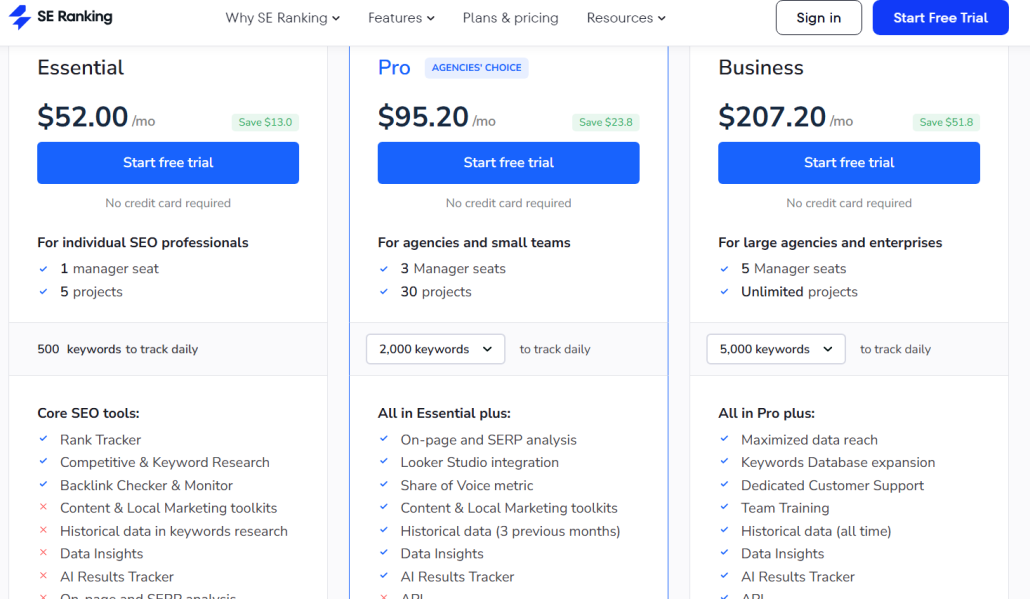
To get access to the API plan, the cost is $207.20/month paid annually.
Accuranker
Accuranker is one of the most popular ranking tools available.
Some of the most noteworthy features are:
- Daily ranking updates with every plan
- Specialized rank tracking tools
- White-label reporting
- SERP feature tracking
- API access on every plan
Accuranker is one of the few tools that offers API access on every plan they have (although they don’t offer any truly low-cost plans for low-budget clients).
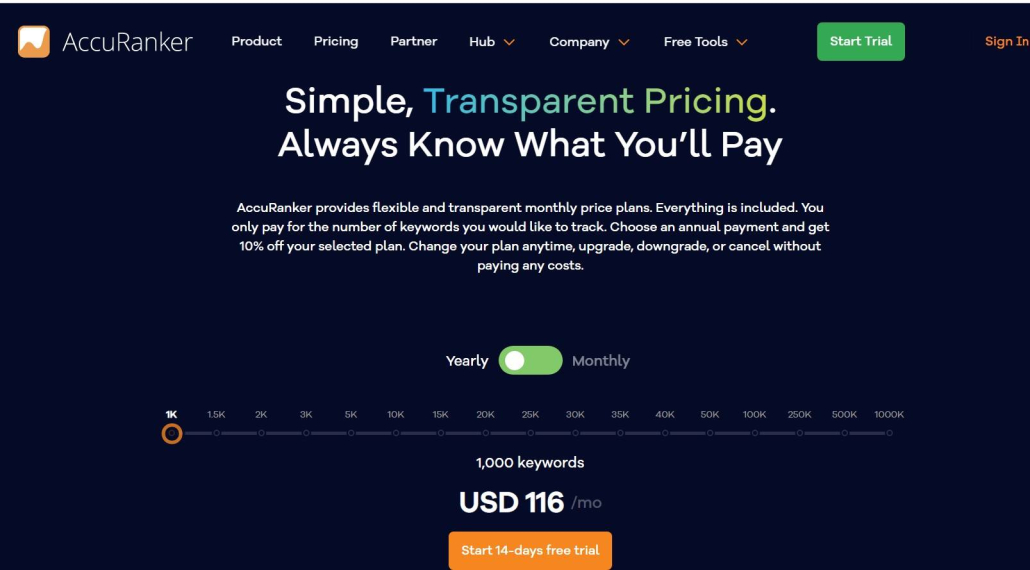
With Accuranker’s API, users can pull their accurate data and use it for any number of custom integrations. You get access to the API starting at $116/month paid yearly.
All of these features make Accuranker an invaluable tool for anyone looking to improve their website’s visibility in search engine results pages.
Semrush
Semrush is a powerful all-in-one SEO tool that allows users to track their website’s performance, uncover insights into competitors’ strategies, and manage campaigns.
Some unique features of Semrush:
- Tools in ALL areas of marketing–SEO, content development, market research, advertising, and social media
- Competitor SEO and keyword analysis
- Analyze PPC ads and launch ideal advertising campaigns
Its API offers customizable solutions for developers, allowing them to integrate Semrush’s data into their own applications. Through the use of the API, developers can access Semrush’s functions such as domain reports, keyword data, backlinks, site audits, and more.
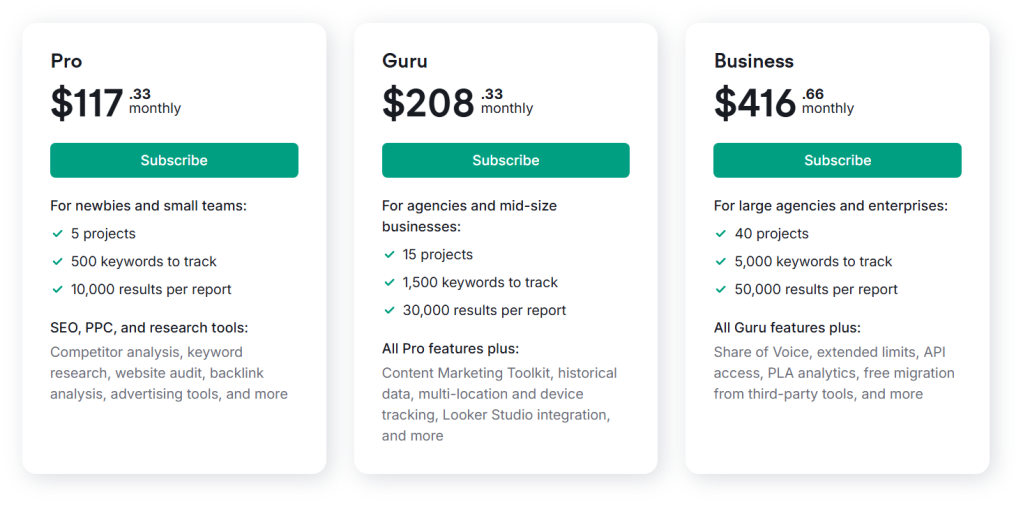
The downside is that you have to pay $416.66/month paid annually to get access to Semrush’s API.
Ahrefs
Ahrefs is a hugely popular all-in-one SEO tool that provides data on backlinks, keyword rankings, and site performance. Ahrefs is the industry standard for SEO research and is one of the most extensive web crawlers available, but it also holds its own as a very capable rank tracker.
Here are some of Ahrefs’ key features:
- Comprehensive backlink analysis with one of the largest databases
- Keyword ranking and SERP tracking
- Competitor research and domain comparison
- Site audit tool for identifying technical SEO issues
Ahrefs’ API allows developers to remotely access data such as backlinks, rankings, traffic, and other critical data points. The API allows for constant access to Ahrefs data, making it a valuable tool for automation and integration with custom SEO tools.
Here’s the downside: Ahrefs API access is only included in the Enterprise plan, which starts at $1499/month with a required annual commitment.
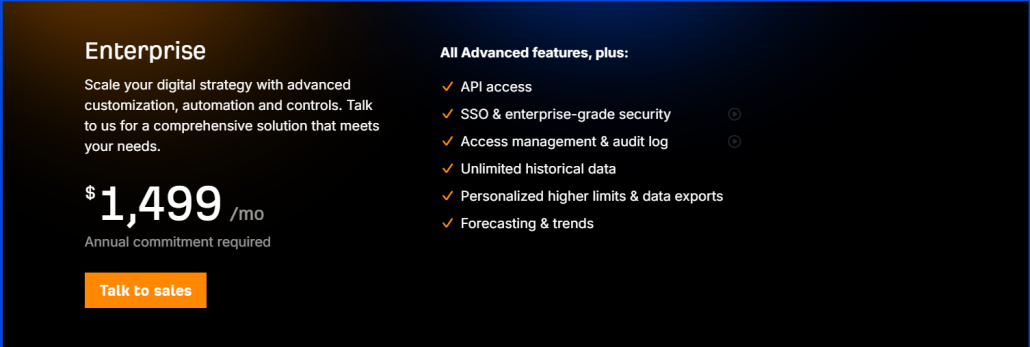
In other words, Ahrefs has an AWESOME tool and API, but it is likely only feasible for large businesses with big budgets. Small and medium-sized businesses should stick to one of the more affordable options.
Similarweb
Similarweb is an advanced web analytics tool that provides insights into site traffic, user behavior, competitor performance, and keyword rankings (among other things). It’s one of the more popular tools for larger businesses looking for a turn-key marketing solution.
Here are some of the key features Similarweb offers:
- Website traffic analysis, including visitor sources and engagement metrics
- Competitor benchmarking and market trends
- Keyword research
- SERP rank tracking and analysis
- Audience insights and market research for digital marketing strategies
Similarweb’s API enables users to manipulate various data types such as Google ad analysis, market research, CRM data points, and keyword rankings. This makes it a powerful tool for big businesses that rely on extensive market analytics.
Similarweb allows API access starting with its business plans, which start at $35,000/year. This price makes Similarweb the most expensive API on this list.
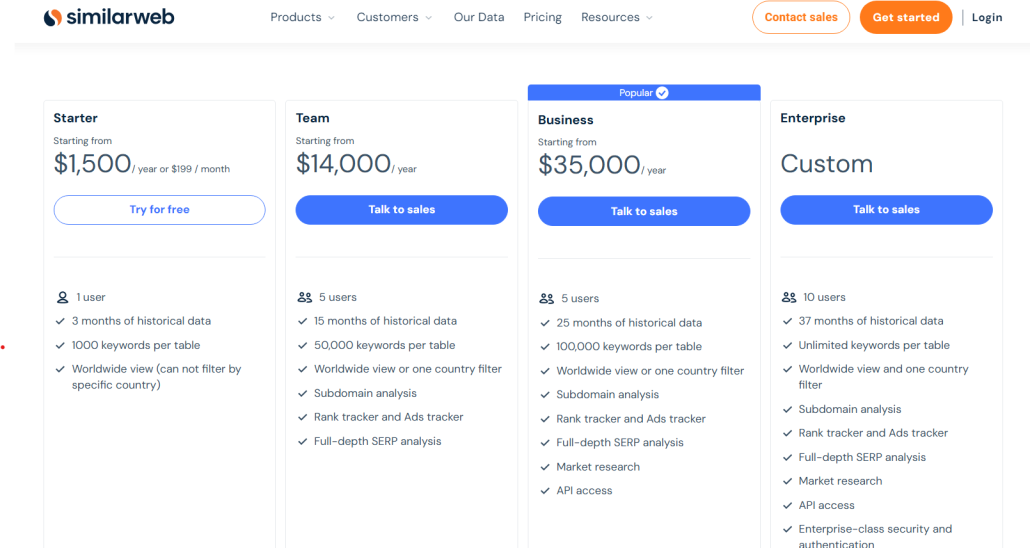
Why is Similarweb so expensive? It aims to be a complete marketing tool, including market research, subdomain analysis, and full-team access. However, most smaller businesses will need to look elsewhere for their rank-tracking API.
Google Search Console
Google Search Console (GSC) is a free SEO tool provided by Google that helps website owners monitor and improve their site’s search performance and technical SEO.
GSC offers high-quality features such as:
- SERP performance reports with rankings and CTR
- Indexing and crawling status updates
- Error and performance tracking (such as broken links and poor load times)
- Site enhancement suggestions directly from Google
GSC provides a free API that allows users to add or retrieve keyword performance data, view and change sitemaps, and test webpages remotely.
While GSC isn’t quite as feature-rich as the other tools on this list, it is completely FREE and the data comes directly from Google, so it’s an excellent option for every business–especially those with lower budgets.
Moz
Moz is famous for its domain authority (DA) metric and comprehensive SEO tools. However, it also provides valuable insights into keyword rankings, backlinks, and site health to help businesses improve their SEO.
Some of Moz’s key features:
- Keyword rank tracking with historical data
- Domain Authority (DA) and Page Authority (PA) scores for measuring website strength
- Link Explorer for backlink analysis and competitor research
- Site audits to identify and fix technical SEO issues
Moz’s API allows developers to incorporate Moz’s robust data with their preexisting systems seamlessly. If you want the power of one of the most popular SEO tools, the Moz API is a great way to get it.
One of the unique features of Moz’s API is that you can buy access to JUST the API even if you don’t want to pay for the full Moz tool. That means you can incorporate the power of Moz data without paying the full Moz price.
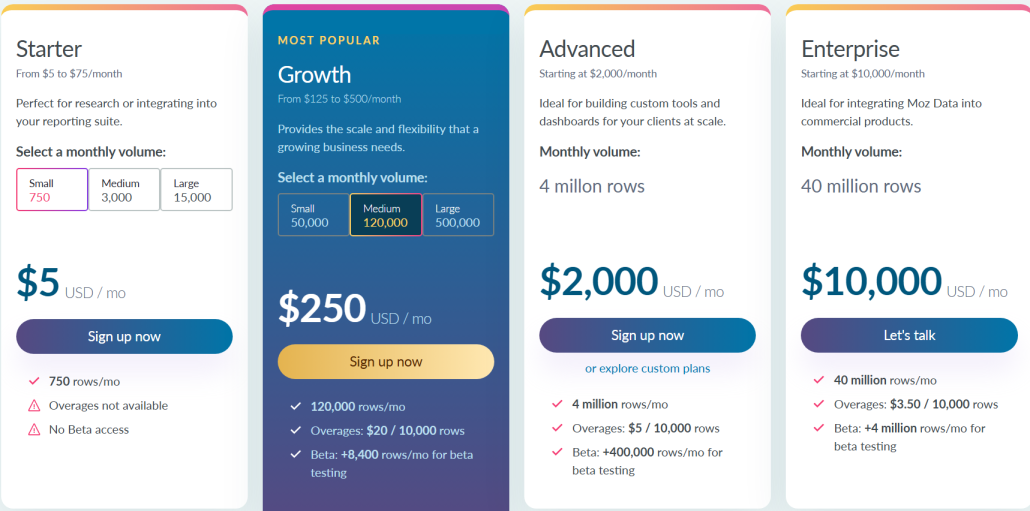
If you have very low data needs (750 rows/month), you can even get Moz API access for just $5/month. Several plans are available, including large plans all the way up to 40 million rows for $10,000/month.
4 Ways to Use a Rank Tracker API
We’ve discussed WHY a rank tracker API is such a powerful tool. Now, let’s look at HOW to use it effectively.
We mentioned some of these strategies in the previous sections, but we’ll look closer in this section at how you can combine your API with other tools to boost your rank tracking efficiency.
It’s important to note that not every business will need to use every one of these strategies. Just pick the ones that work most with your company and use those! These are just some ideas to get you going, but there are plenty of other ways to use a rank tracker API.
Way #1: Create Powerful Visualization Dashboards
Integrating a rank tracker API with tools like Tableau, Power BI, and Google Looker Studio (Google Data Studio) can significantly impact how businesses analyze and report website ranking data.
By visualizing this data in easily digestible graphics, companies can better understand how their online presence impacts their overall performance.
Additionally, you can use these visualization dashboards to report to your white-label clients. By using advanced reports like these, you can form better relationships with your clients and provide them with a better understanding of how you’re helping them.
With this powerful combination of tools, you can identify potential opportunities and areas for improvement, ultimately driving better results and helping to achieve your ranking goals.
Way #2: Focus Your Social Media Strategy
As businesses rely increasingly on social media for marketing and customer engagement, it’s important to understand its impact on search engine rankings.
Integrating a rank tracker API with social media management tools like Hootsuite, Buffer, or Sprout Social can provide invaluable insights into how social media activity affects search rankings.
This information can help you adjust your social media strategy to optimize for search, and ultimately improve online visibility.
By combining social media management tools with rank tracking capabilities through an API, you can also understand your online presence and make data-driven decisions to improve your performance.
Way #3: Do Better Competitor Analysis
In today’s competitive digital landscape, understanding your competitors’ SEO strategy is crucial to staying ahead.
Connecting your rank tracker API to competitor analysis tools like Similarweb, SpyFu, or Moz can uncover valuable insights into your competitors’ keyword rankings and overall SEO performance.
This allows you to identify not only areas where your competitors are excelling but also areas where they may be falling short. For example, your API could pull keywords and URLs from your competitor analysis tool and add them to your rank tracking tool, automating the process of competitor rank analysis.
With this information, you can make informed decisions about your SEO strategy and gain a competitive edge in your industry.
Way #4: Manage Your Rank Tracking Data From Another App
If you run a website or manage its SEO, connecting other apps to your rank tracker using an API can significantly streamline managing your rank tracking data.
For example, let’s say you use 3 different apps for different aspects of your rank tracking strategy. If you have to manually update each app, it can be a pain in the butt.
APIs allow for efficient and automatic communication between different apps, making gathering and analyzing crucial information easier. With your rank tracking data integrated across several apps, tracking your website’s search engine performance becomes a breeze.
FAQ
What is a rank tracker API?
A rank tracker API (Application Programming Interface) allows users to access the data their rank tracker provides from an external tool. In other words, it allows users to use programming to incorporate their rank tracking data into other tools in their system.
Do you need programming experience to use a rank tracker API?
While APIs generally have good documentation, it will be hard to make use of an API without some programming/developer background. Tools like ProRankTracker have specific instructions on how to use their APIs, which can cut down on the experience needed. However, most people with no programming experience will struggle to use an API.
Ready to Start Tracking Your Most Valuable Keyword Ranks?
Using a rank tracker API is one of the best ways to get a completely custom rank tracking experience. It allows you to take complete control over your data and use integrations to expand your ability to use data.
In other words, using an API can take your SEO to the next level, but it starts with finding the right rank tracking API and learning how to use it.
The tools mentioned in this article should be a great place to start you on your way to becoming an API master!
Happy tracking!