How to Check Your Website Ranking (and Improve It) Fast
Your website ranking determines how much traffic and, in turn, conversions you get from search engines.
Ranking high on the SERP (search engine results page) is incredibly important.
How important? The click-through rate (CTR) for results in the first position is 39.8%, whereas the CTR for the second and third positions are 18.7% and 10.2%, respectively.
So the higher your rank, the more traffic and conversions you can get.
Just want to quickly see where a website ranks for keywords? Use a SERP checker tool to check your rankings accurately WHERE it actually matters.
Want to track where a website ranks on an ongoing basis? Use a designated rank tracker (like ProRankTracker) to generate automatic reports for your most important pages and keywords.
I’ll show you how to do both, so feel free to skip ahead:
- How to Check Your Website Ranking Right Now
- How to Track Your Website Rankings Long-Term
- 3 Tips for More Effective Rank Tracking
- Frequently Asked Questions About Checking Your Website Rankings
How to Check Your Website Ranking Right Now
Manually searching to see where your website ranks (and what for) is unreliable, inaccurate, and a huge waste of time.
Why?
Rankings differ based on factors like location, language, device, search engine, and personal search history. Change any of the factors above, and you’ll get an entirely different search result. Which is a problem if you want to know if your target audience is finding your website.
The best way to quickly and accurately see where a website ranks is to use a SERP checker tool like Insta-Check.
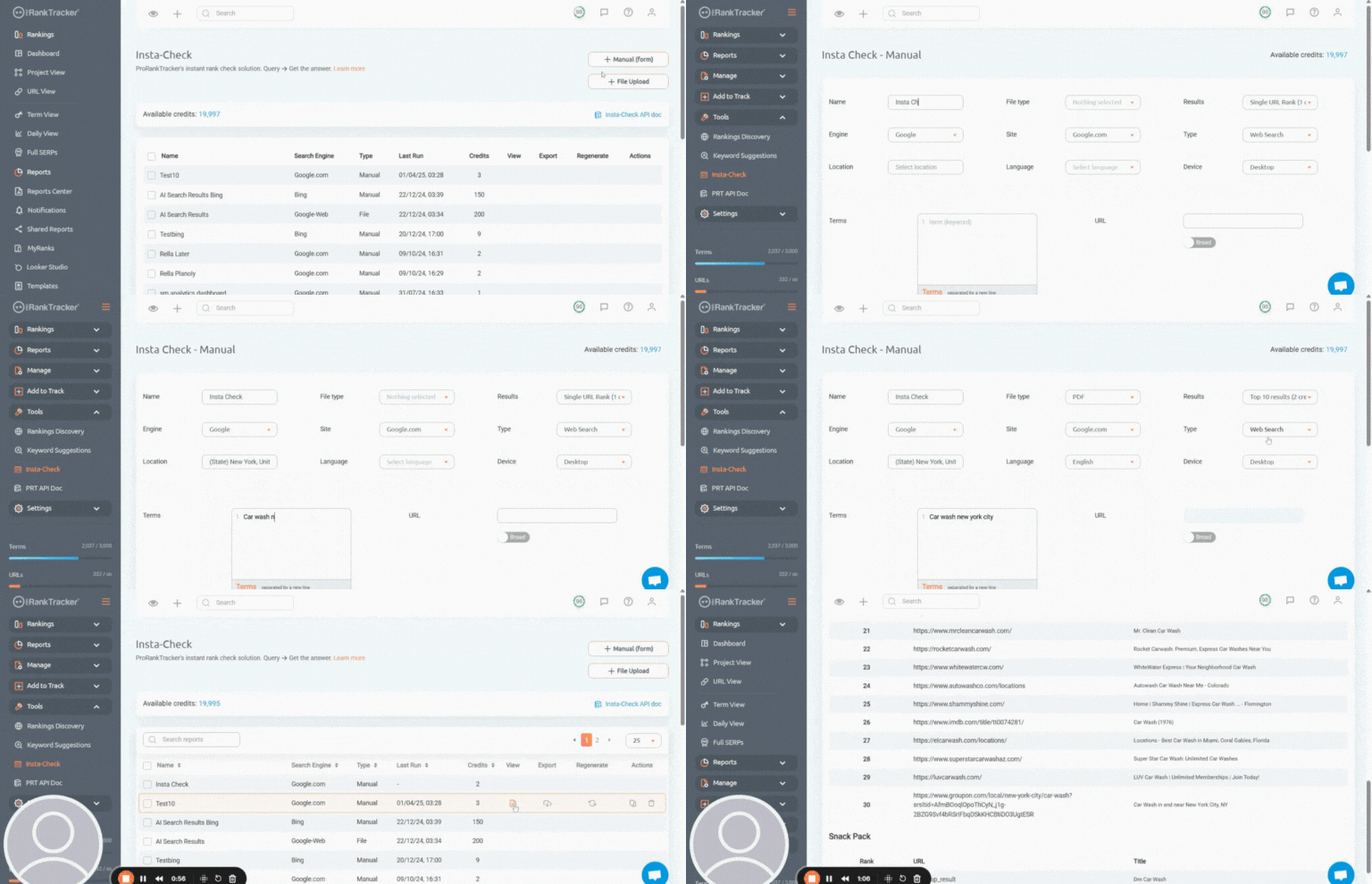
It’s a pay-as-you-go tool that makes it easy to quickly check your ranks (or your competitors’ ranks) without tracking them long-term.
(If you want to consistently monitor your rankings, skip to this section.)
Here’s how to get started:
1) Choose from 4 different Insta-Check reports
- Single URL check (costs 1 credit), which tells you the rank of your URL for a specific combination of keyword, location, device type, search engine, and language.
- Top 10 results (costs 2 credits), which tells you the top 10 ranks for a given combination of keyword, location, device type, search engine, and language. Does not require a URL to generate.
- Top 30 results (costs 3 credits).
- Top 100 results (costs 4 credits).
2) Upload Keywords to Check
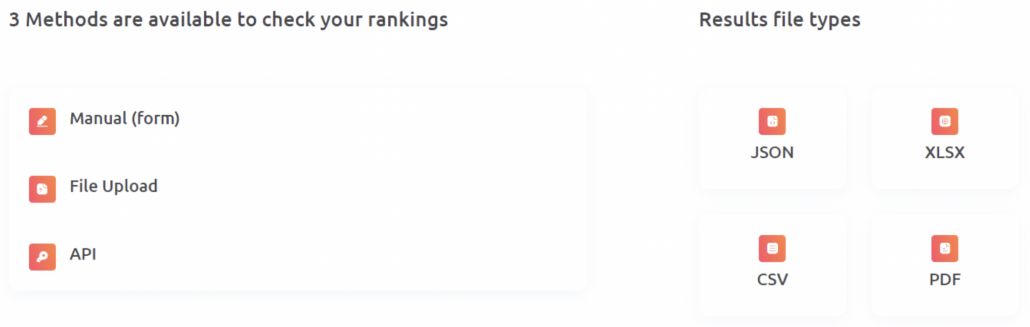
There are 3 ways to upload keywords for checking in the Insta-Check tool:
- Using a form for manual uploading (one at a time)
- File upload for bulk uploading
- API import for automatic uploading
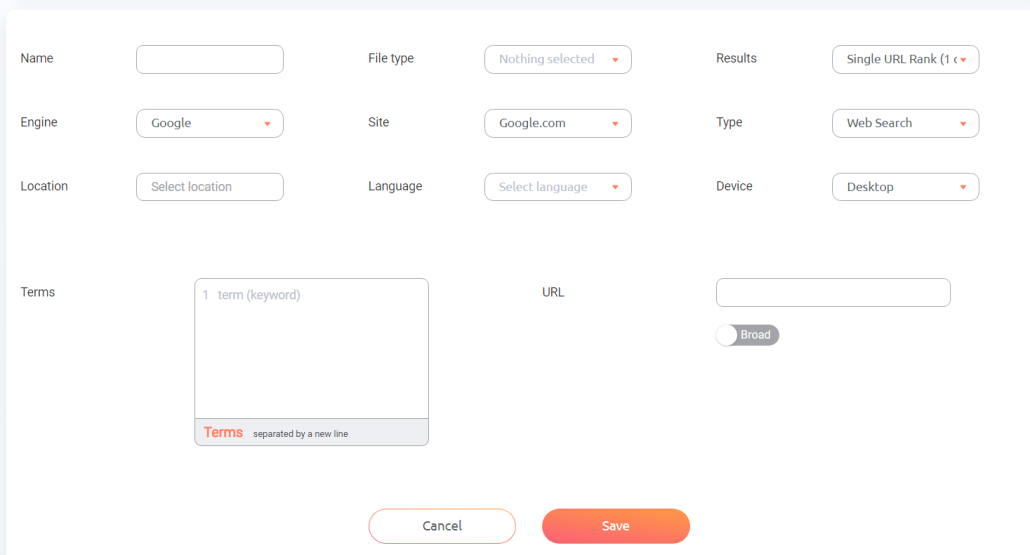
The form is most practical if you don’t have that many keywords to import at a time. This is for when you just need to check a few SERPs or keywords for potential rankings. Just fill out the form details, and you’re good to go.
When you want to upload a long list of keywords or track several URLs in one report, use the file upload feature to quickly import a long list of keywords into the Insta-Check tool.
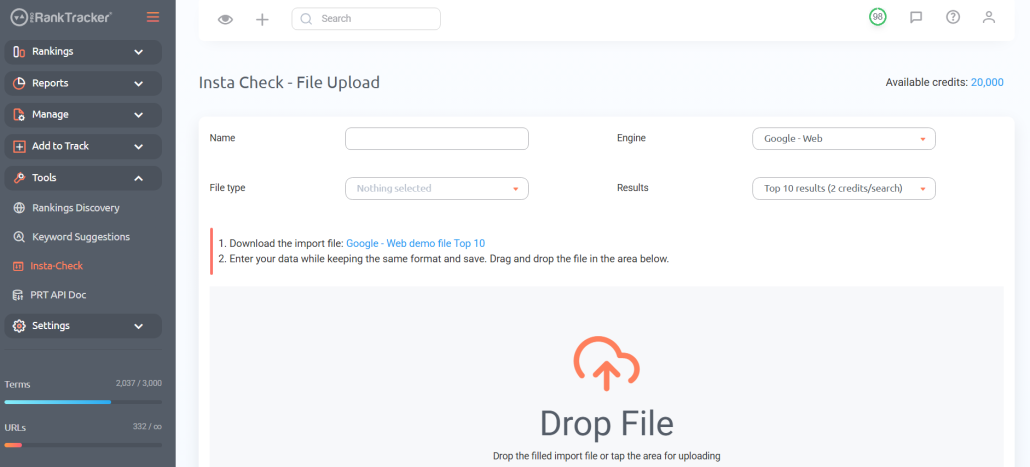
Just download the import file for your selected report type, fill it out, and then upload it!
Side note: If you’re interested in accessing the full flexibility of the Insta-Check tool, you can use the API to integrate your existing tools with ProRankTracker. Click on the API Doc on the Insta-Check page to access the ProRankTracker API.
Analyze Reports
Depending on how many keywords or SERPs you’re analyzing at a time, it could take a few moments for ProRankTracker to collect the data.
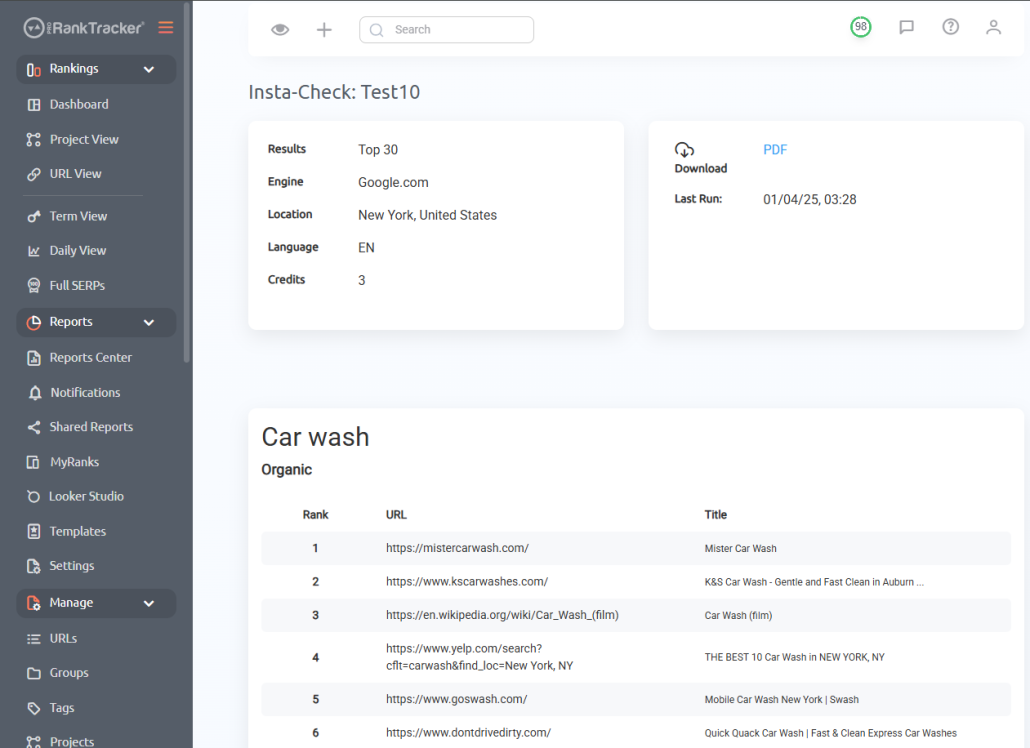
Once it’s done, you can view the data from within ProRankTracker and download the report in the following file types:
- CSV
- XLSX
- JSON
How to Track Your Website Rankings Long-Term
If ranking your website for specific keywords is important to your business, you should be tracking your rankings long-term.
This will enable you to know if you need to adjust your SEO strategy and when.
Below is how you can use ProRankTracker to set up automatic rank tracking reports for your website’s pages and target keywords.
You’ll get 100% accurate daily ranking data for a specific:
- Search engine (Google, Bing, YouTube, and Yahoo)
- Location (down to the zip code or neighborhood)
- Device (desktop, iPhone, or Android)
So you’ll know exactly how visible you are to your target audience in search results.
Add Your Keyword/URL Combos (and Your Competitors’)
Adding your keyword/URL combos and your competitors’ is the first step to using ProRankTracker. The best place to get started with this is the Add Wizard tool.
- Enter your URL
- Enter the keywords you want to track for that URL
- Organize your URL/keyword combo into groups and tags
- Select a search engine (like Google or Bing), device type, location, and language
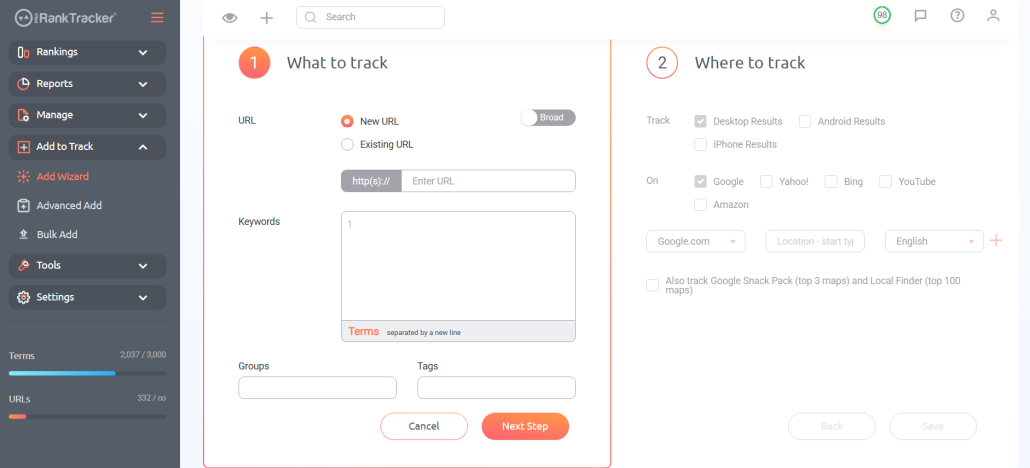
If you want more control over how you add your ranks and the ability to bulk-add, you can use the Advanced Add tool.
Once you have added your URLs and keywords, ProRankTracker will start tracking your search ranking positions and give you daily updates.
Optional: Repeat the same process with your competitors’ URLs and keywords so you can compare their rankings to yours.
Expand Your Keyword Strategy with Keyword Suggestions
The next step is to expand your keyword strategy with the Keyword Suggestions tool.
The Keyword Suggestions tool provides a list of high-value keywords based on the keywords you’re ALREADY tracking. That means you won’t be getting random keywords like other tools provide – they’ll be targeted to the goals of your current keyword strategy.
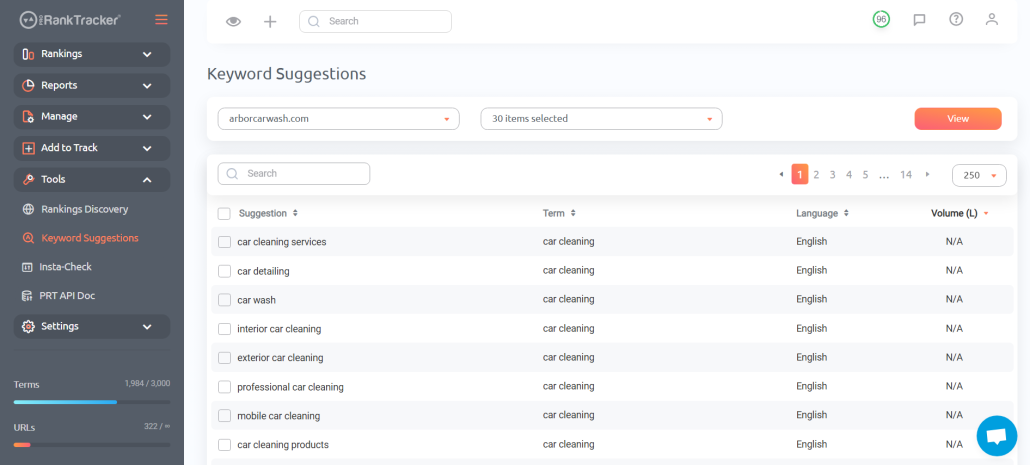
You can select keywords from the list and add them to your tracking list. This will help you expand your strategy and find hidden traffic opportunities.
Find New Keyword Rankings with Rankings Discovery
You’re probably ranking for keywords that are bringing in traffic that you’re not even aware of yet.
Rankings Discovery is a unique feature of ProRankTracker that allows you to find URL/keyword rankings that you may not have known you had.
In other words, this tool highlights keywords that your website is ranking for but not tracking. This helps you identify new opportunities to rank for specific keywords and optimize your content accordingly.
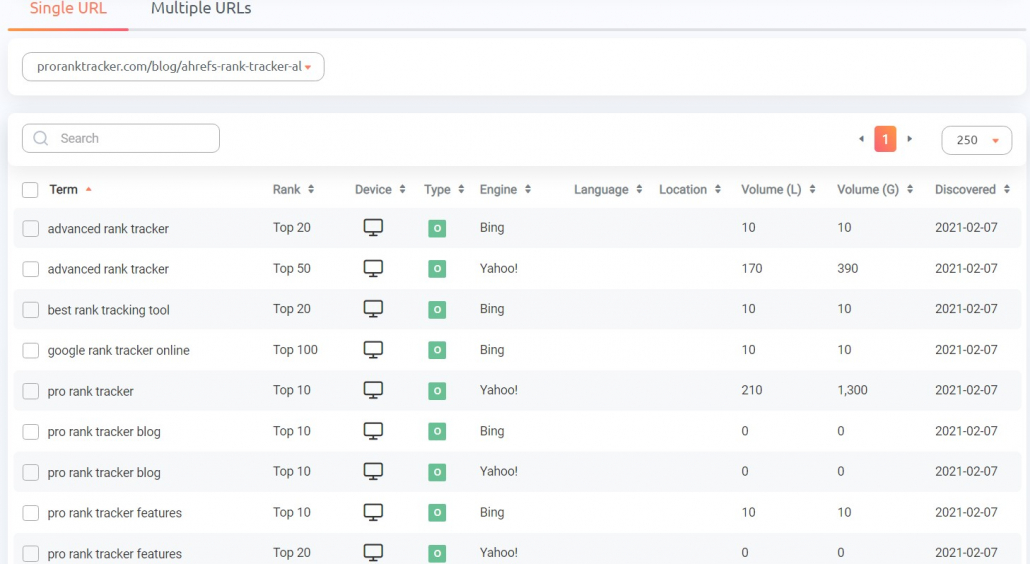
It also gives you critical information about each rank:
- Device type
- Search engine
- Approximate rank
- Language
- Location
- Estimated monthly searches
Check Your Rankings
Once you’ve added the keywords and URLs you want to track, you can start reviewing data and setting up automated reports.
ProRankTracker offers 6 main rank tracking “views” that give you different perspectives on your current ranking strategy:
1) The Dashboard shows you the bird’s-eye view of all your ranks – including your biggest rankings jumps or drops.
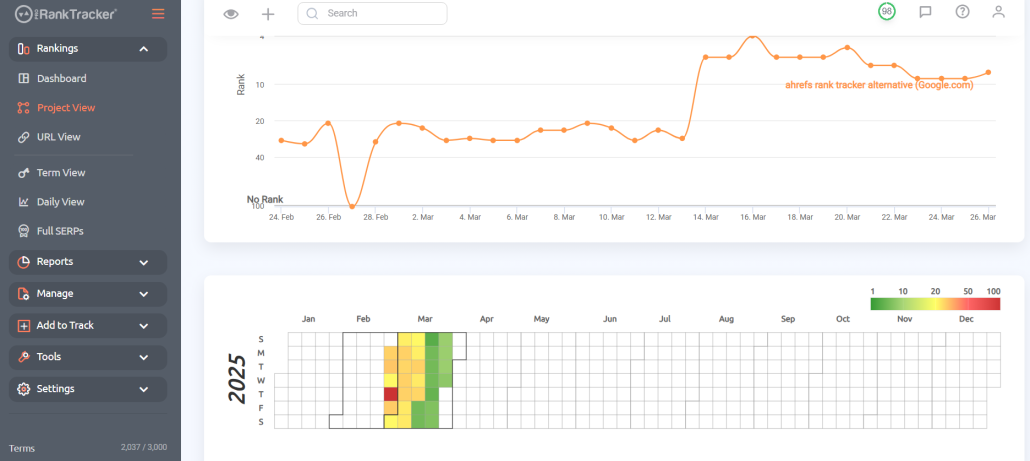
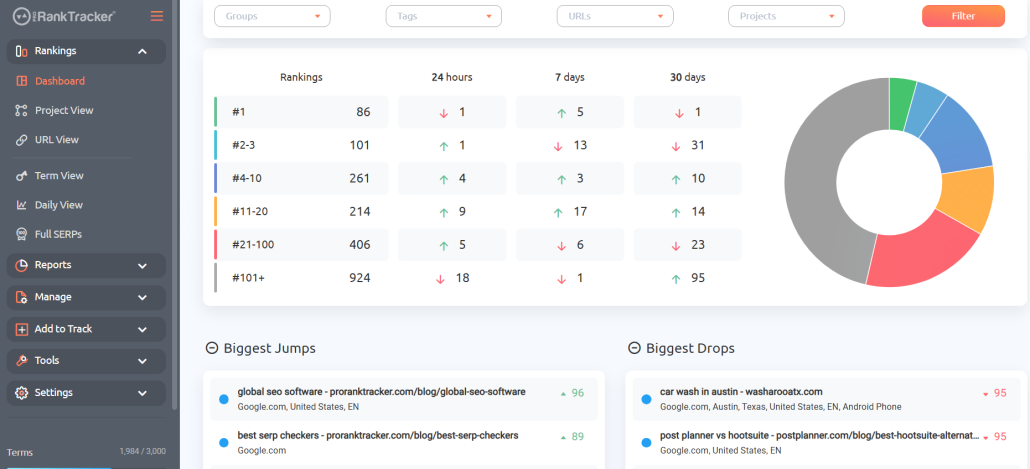 2) The Project View shows you a breakdown of all the keywords and URLs being tracked in a selected Project. You can also see a daily view for any of the Project’s URLs and a yearly heatmap for a quick visual understanding of your rank’s long-term progress.
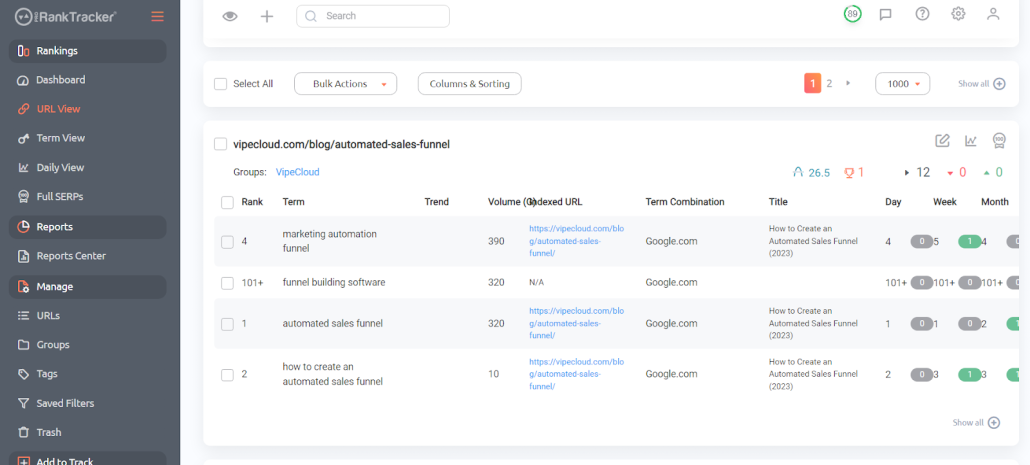
3) The URL View breaks down all your ranks by each specific page URL.
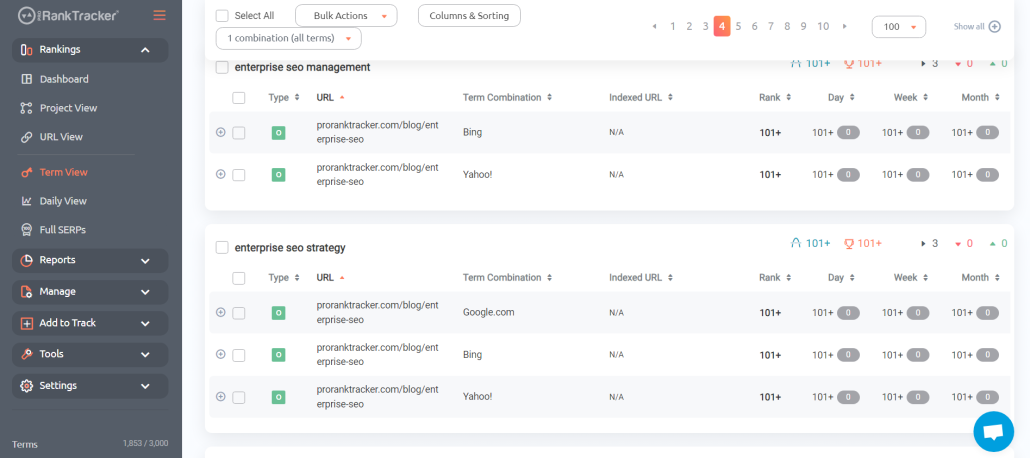
4) The Term View shows you all your ranks based on which keyword they’re targeting.
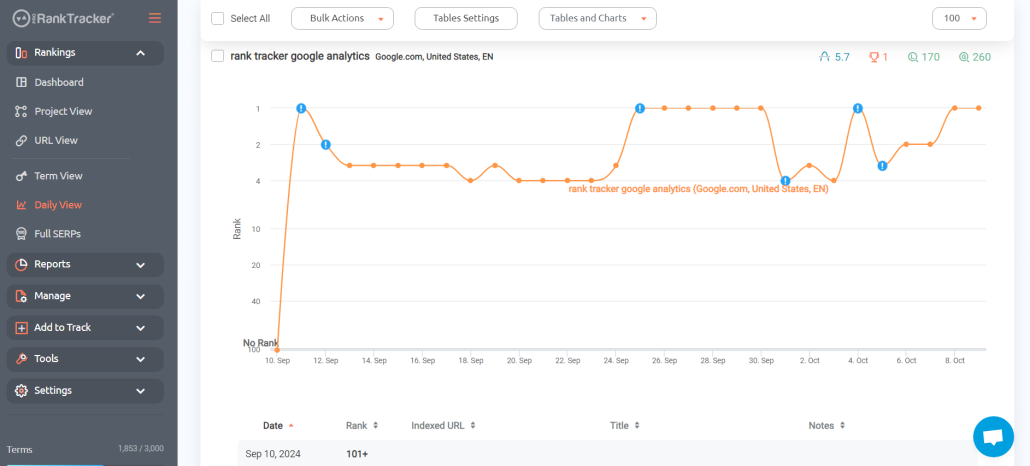
5) Daily View gives you a day-by-day look at how your ranks are changing.
6)Full SERPs show an interactive live SERP (including a historical view of the SERP) that helps you understand where you’re ranking and why.
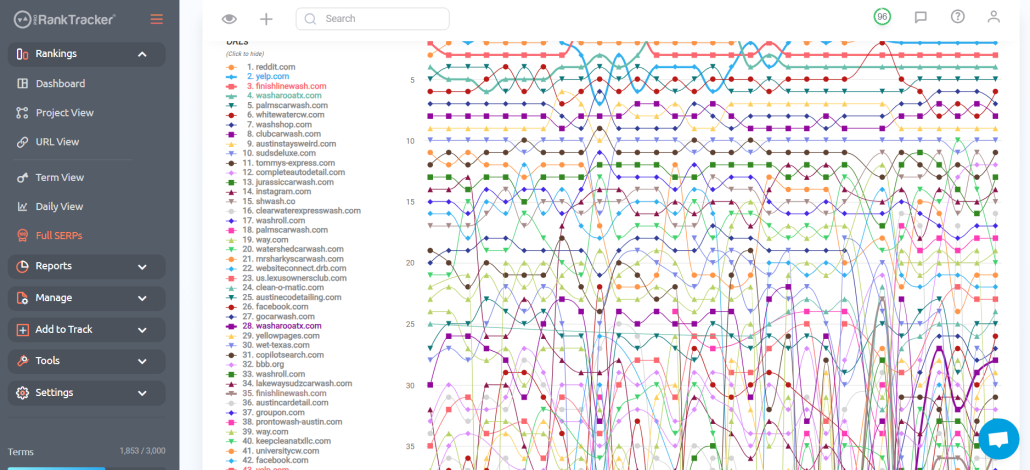
Generate and Automate Reports and Notifications
Finally, ProRankTracker offers 20+ reports and notifications to choose from to help you automate your rank-checking process.
Once you set these up, you won’t even need to log in to your account to check your latest rankings (each report can be set up to automatically send via email)!
If you’re an SEO agency, you can use these reports to help keep your clients happy and informed.
Below are the main types of reports you can set up and what they’re best for:
- Overview Reports give you a snapshot of current rankings by URL and keywords.
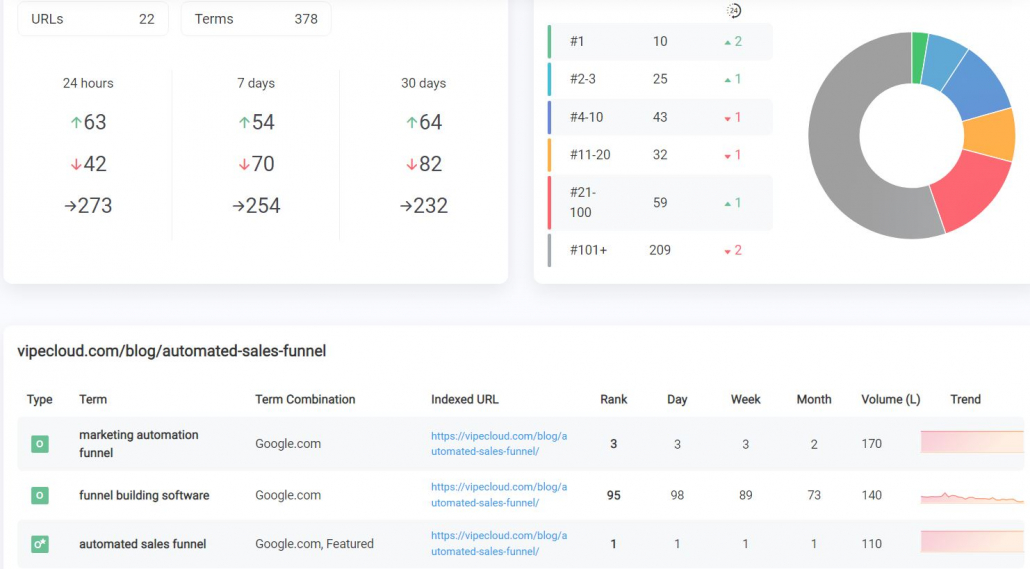
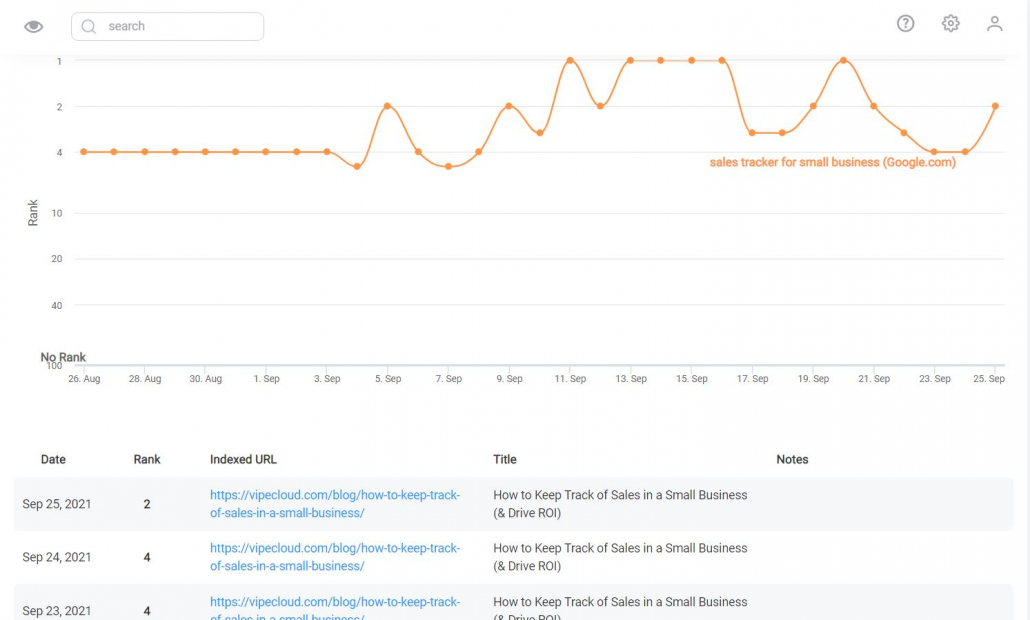
- Historical Progress Reports show ranking data broken down daily, weekly, or monthly so you can spot patterns or prove long-term SEO gains.
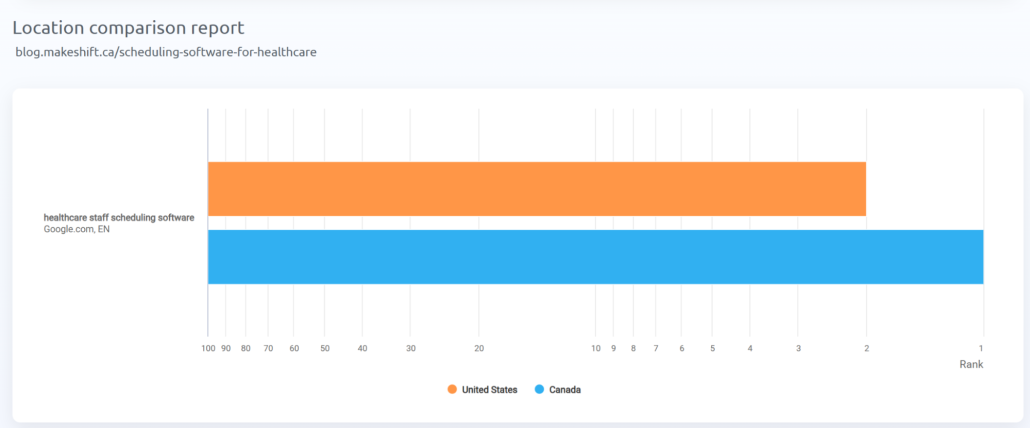
- Ranking Comparison Reports let you compare the same keyword across multiple URLs, devices, locations, or search engines.
- Benchmark Reports compare rankings between two dates, weeks or months — ideal for showing progress after campaigns or audits.
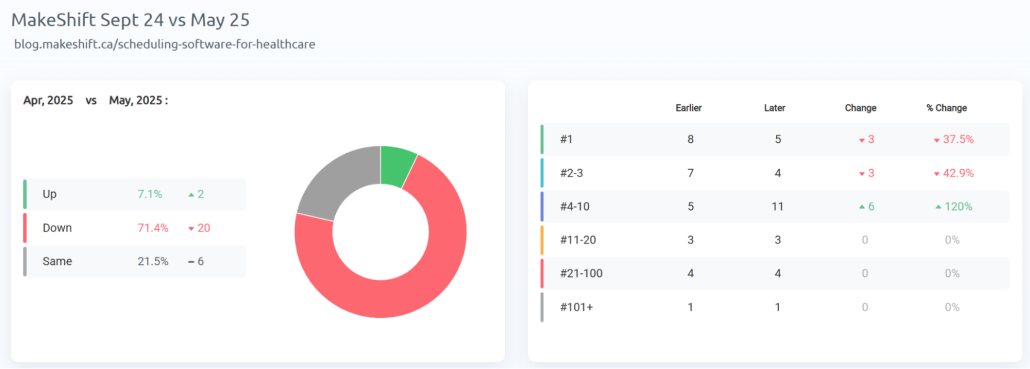
- Rankings Sections Reports export what you see in PRT’s dashboard views (Project View, URL View, Term View, Daily View, and Full SERPs) as scheduled reports.
- Notifications send automatic email alerts when ranks drop, jump, or hit specific milestones.
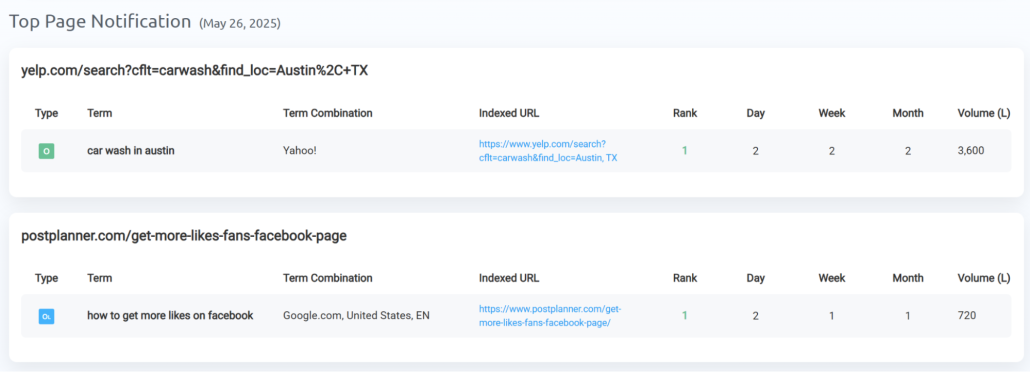
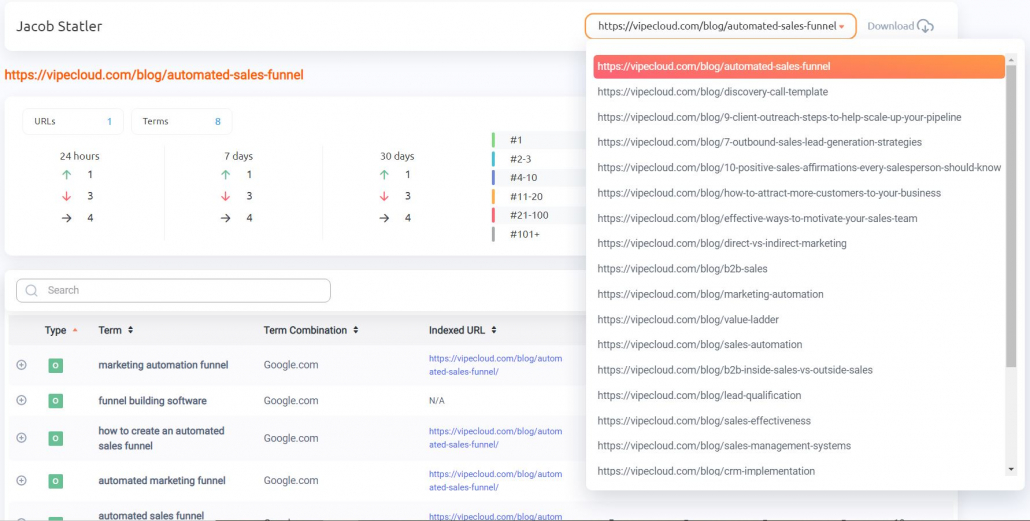
- Shared Reports create live, password-protected URLs your clients or teammates can access anytime for real-time reporting.
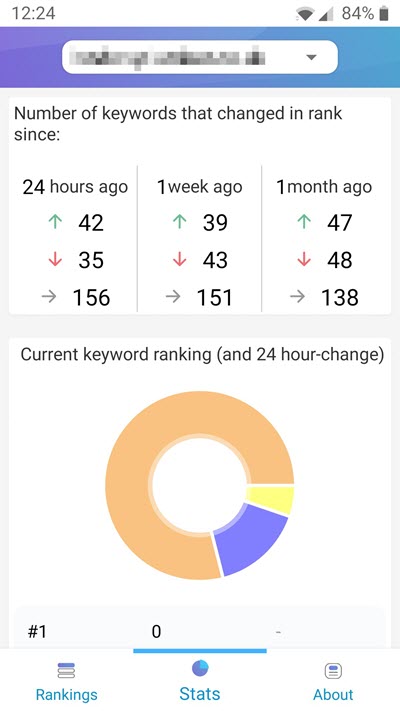
- MyRanks Mobile App gives your clients access to their rankings via a white-labeled app with your logo and branding.
With templates, you can customize almost any part of your reports, including:
- Colors
- Text styles
- Header
- Footer
- Cover letter
You can also push data to Looker Studio to create custom dashboards that sync with your other Google Analytics, Google Search Console, and other marketing data.
3 Tips for More Effective Rank Tracking
If you’re new to SEO and rank tracking, use these tips so you can track the right keywords that’ll directly impact your SEO and business.
Research Relevant High-Value Keywords
Keywords are the backbone of SEO. They determine what searchers find when they type something into Google or another search engine.
That’s why the first step of SERP rank tracking is to research high-value keywords relevant to your website.
There are several tools (both paid and free) available that can help you find high-value keywords:
- Google AdWords Keyword Planner
- Ahrefs or a similar all-in-one SEO tool
- ProRankTracker’s Keyword Suggestions tool
When you find high-value keywords, you can use them to create focused content that’ll earn you a higher spot on the SERP.
Determine Your Target Search Location
Search engines modify search results based on the user’s location, so it’s essential to determine your primary target search location.
What exactly does that mean, and how specific should you be?
You should generally target the areas where most of your searchers live. If you have a shop in Tallahassee, Florida, you should target that location and surrounding areas. You should be as specific as possible for the most accurate results.
There’s a time and place for national SEO (where you rank nationwide), but most websites — especially if they’re connected to a brick-and-mortar store – benefit significantly from precise location-based SEO.
Check Out Your Competition
Analyzing your competitors is an essential part of rank tracking. After all, your competitors are the only thing between you and the top spot on the SERP!
Determine the following about your competitors’ strategies:
- Which keywords are they ranking for?
- Which pages of their website rank higher than yours?
- What kind of content do they have that’s getting attention?
- What are they doing to rank higher than you?
If you can figure out their ranking strategy, you can benefit by stealing the most critical parts and executing them better than the competition..
Frequently Asked Questions About Checking Your Website Rankings
How often should you check your website’s rankings?
The best rank-checking schedule depends on your business size, competition level, and how actively you’re optimizing. Here’s a simple guide to follow:
When to check rankings monthly:
- When your business has low competition
- For keywords that don’t directly affect your sales
When to check rankings weekly:
- When you’re trying to rank in moderately competitive industries
- For keywords that directly affect your sales
When to check rankings daily:
- When you’re in a highly-competitive industry
- When you’re actively trying to recover lost rankings
- Post-algorithm updates
- For keywords that have been fluctuating recently and directly affect your sales
How do you see what keywords a website is ranking for?
One of the easiest ways to check the keywords a website ranks for is by using a rank tracker (like ProRankTracker).
How do I manually check keyword ranking?
Manually checking your website’s ranking is possible, but it’s not recommended for long-term or high-quantity rank tracking – it’s simply too time-consuming.
To do so, just enter your target keyword in Google’s search bar and see where your website ranks. Try to do your search from an incognito window so you can see where you rank without the bias of your search history.
However, it’s essential to remember that the ranking results will vary depending on the searcher’s location, search history, and other personalization factors, which often keeps this method from providing accurate data.
How do I find what keywords rank on a website?
You can use ProRankTracker’s Rankings Discovery tool to find out any of the keywords that your URLs are ranking for, along with an estimate of their current rank.
If you’re looking for new keywords, try the Keyword Suggestions tool to find high-performing keywords based on your current keyword strategy.
Can you see the keywords of a website?
There’s no way to know exactly what keywords your competitors are tracking, but you can get a good idea by seeing where they compete against you on the SERP.
For example, if you’re ranked 3rd for a particular keyword, and they’re ranked 2nd, you can take an educated guess that keyword forms part of their strategy.
You can also use ProRankTracker’s Rankings Discovery tool, by plugging in a competitor’s URL and seeing what keywords they rank for.
How do I check the keyword performance of a website?
Follow the ProRankTracker steps above to see exactly how your website’s URLs and keywords perform on the SERP. You can also follow the same steps for your competitors’ websites to spy on their performance.
Ready to Track Your Most Important SEO Metric?
Checking your website’s rankings is critical to ensuring your website is visible to your target audience. It helps you improve your SEO strategy and boost your website’s visibility on search engines by understanding your current keyword strategy’s success and improving your weaknesses.
One of the best ways to check your website ranking fast is by using the steps outlined above. ProRankTracker is a dedicated keyword rank checker, and it’s the quickest and most affordable way to check your ranks at scale.
So what are you waiting for? Try a free 14-day ProRankTracker trial and see how much time and money it’ll save you.
Happy tracking!