7 Best Local SEO Tools to Climb Your Local SERP
You’re at work, and your stomach starts rumbling.
What do you do?
If you’re like 76% of Google users, you get out your phone (or tablet or laptop) and search for something to eat “near me.” If you’re like them, you’ll visit one of the locations you found within 24 hours.
In other words, getting your business to be one of the locations that pops up on a “near me” search is HUGE!
That’s exactly what local SEO aims to do. It tries to get your business to the top of the page when people around you are looking for somewhere to spend their money.
In this article, we’ll look at 7 local SEO tools that can help you take your page to the top of the local SERP (whether it’s Google Maps or a local SERP).
Let’s take a look!
We’ll cover:
- One Tool to Rule Them All: Google Business Profile
- Best for Keyword Tracking: ProRankTracker
- Best Online Directory Manager: SEMrush Local
- Best for Reputation Management: BrightLocal
- Best Free Tool: Google Search Console
- Best for Data Visualization: Google Looker Studio
- Best for Understanding User Behavior: Google Analytics
- FAQ
One Tool to Rule Them All: Google Business Profile
The MOST crucial tool you can use for local SEO is your Google Business Profile.
Why?
Because there’s no such thing as local SEO without your Google Business Profile!
Local SEO aims to become more visible to local searchers, including on Google Maps, the Snack Pack, and Local Finder.
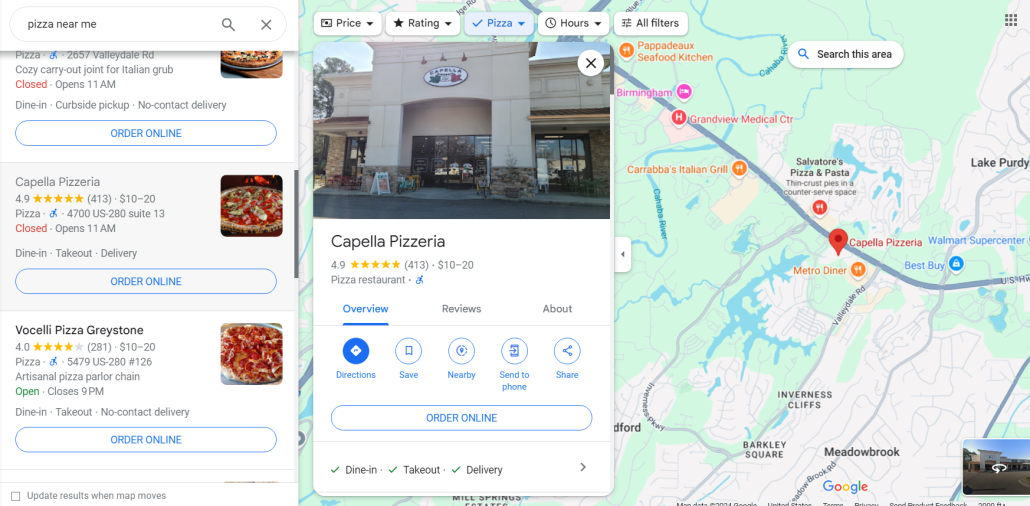
You need a Google Business profile to rank on any of those locations!
A well-maintained Google Business Profile is a “home base” for your local business online. It gives your audience a quick place to check things like:
- Hours
- Menu/offerings
- Photos
- Contact info
- Location
In other words, you CANNOT do local SEO without a Google Business Profile, so create and REGULARLY update your profile for maximum results.
After setting up this first tool, you’re ready to move on to the remaining 6 below.
Best for Keyword Tracking: ProRankTracker
Ever wondered where your business ranked on Google Maps and local searches?
ProRankTracker is one of the most advanced rank-tracking tools available, and it’s the perfect choice for businesses looking to improve their local SEO.
ProRankTracker gives its users access to local SEO tools like Google Business Profile tracking, precise location data, and powerful filtering options to help them pinpoint the location of their choice.
Not only that, but ProRankTracker offers the most accurate data available of any rank tracker currently available (100% accurate data, updated daily), and they offer a no-strings-attached 14-day free trial.
Unlike other general SEO tools that also offer rank tracking, ProRankTracker doesn’t limit you to the number of URLs and projects you can track. Plus, by using a dedicated rank tracker, you can avoid paying for features you don’t need for local SEO.
Let’s look at why ProRankTracker might be the perfect tool for you!
Pros
- Accurate and daily-updated ranking data on EVERY plan
- Tracks rankings on a global scale or down to a single neighborhood
- Supports all major search engines (including Amazon and YouTube)
- Shows Global and Local (country level) search volume for each term and engine
- Supports tracking in multiple search languages
- Track unlimited URLs
- White-label reporting for client presentations
- Comprehensive mobile and desktop ranking insights
- Best pricing available for a rank-tracking tool
- Free trial available
Cons
- Some users note a learning curve when starting (but users have access to help articles and top-notch customer support)
- Limited integration options compared to some competitors
Features
- Daily rank tracking and updates – Provides precise, daily insights into keyword rankings.
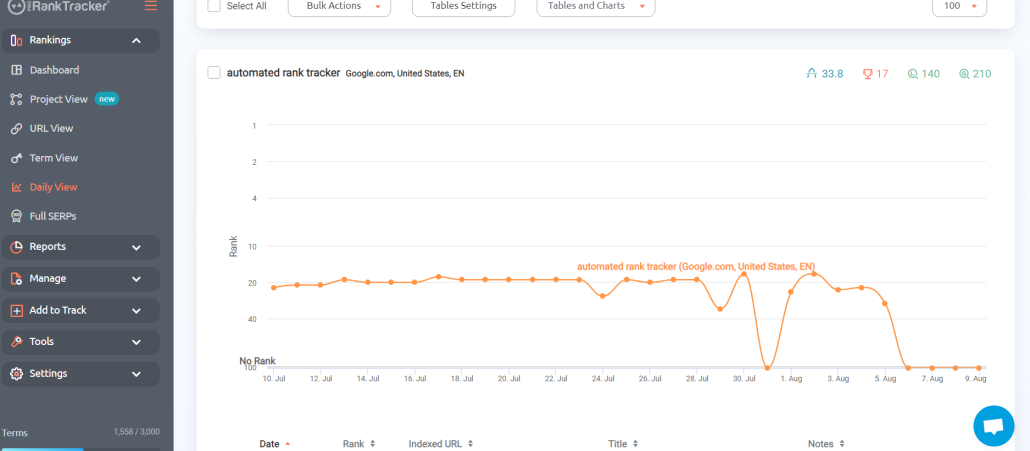
- Local and global rank tracking – Monitors keyword performance in specific locations and across the globe with high specificity (or more generalized if that’s what you need)
- Detailed and customizable reports – More than 20 types of reports and notifications (including local SEO reports). You can customize your reports only to include URLs that target specific locations or Google Business Profiles, making this a perfect feature for local rank tracking.
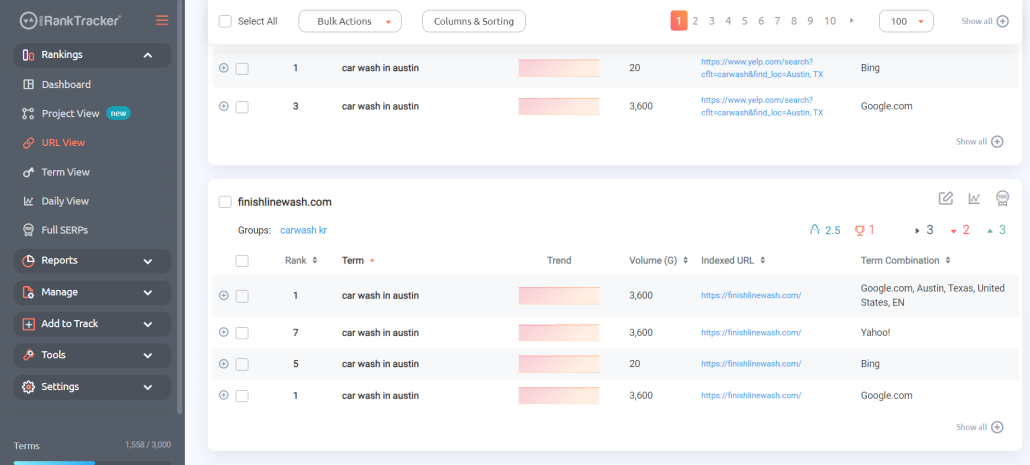
- Rankings Views – 6 different Rankings Views give you a varied and complete understanding of your ranking progress, including the ability to split your ranks into various groups, tags, and projects for easier targeted tracking of different geographic areas.
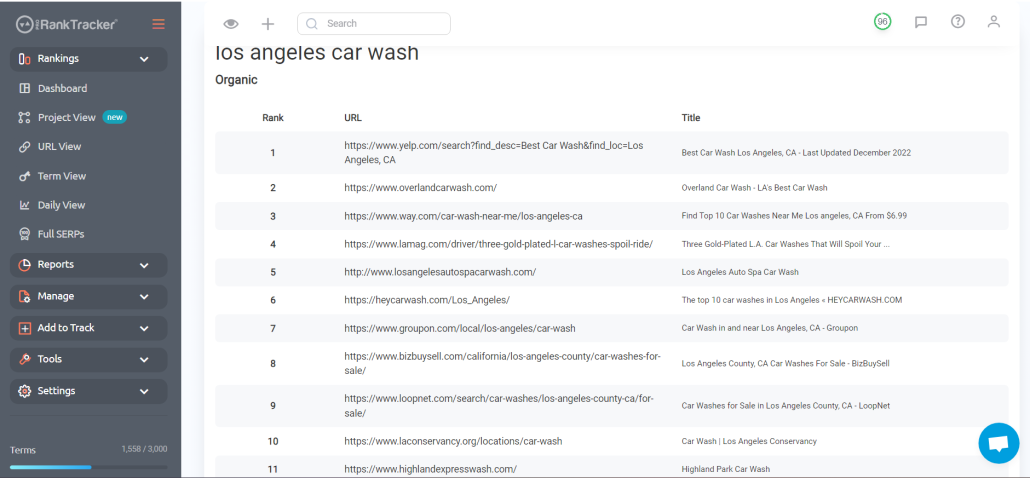
- Insta-Check – Quickly check on potential keywords using a credit-based SERP checker that doesn’t count toward your overall tracking limit. This is perfect for when you’re doing preliminary keyword research or competitor research.
- Keyword discovery and tracking – Helps identify and track relevant keywords for your business.
Pricing
ProRankTracker offers some of the most competitive pricing in the industry. They also offer a 14-day FREE trial with ALL premium features enabled. After finishing your free trial, you have 3 pricing tiers available to you:
- Starter Plan – Starts at $39/month (paid annually) for up to 500 tracked terms
- Pro Plan – Pro Plan – Starts at $87/month (paid annually) for up to 1,500 tracked terms
- Agency Plan – Starts at $144/month (paid annually) for 3,000 tracked terms
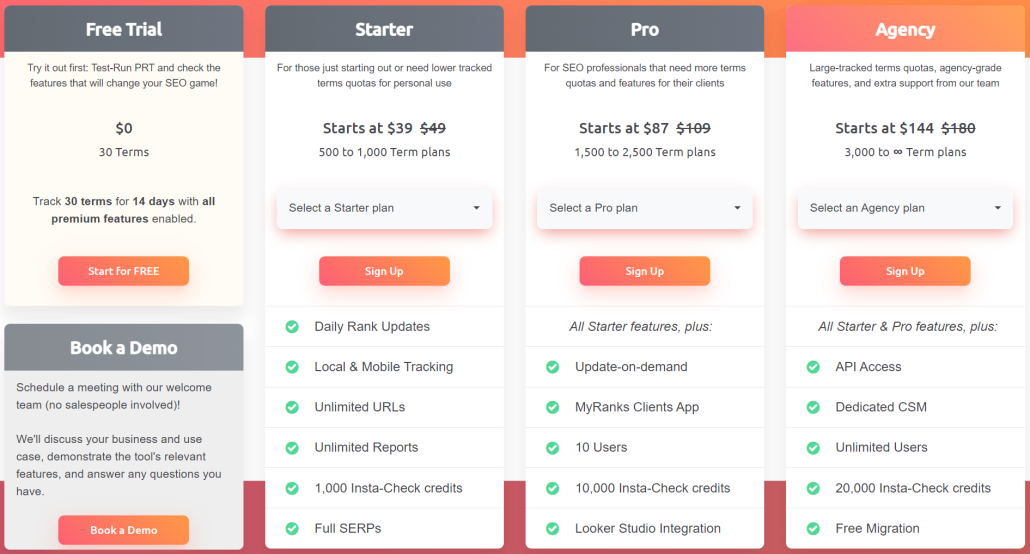
PRT pricing
Reviews
ProRankTracker consistently gets almost exclusively 5-star reviews (4.6 average on G2). The most common positive comments include accuracy, ease of use, and customer service.
Here’s what Bryan R. had to say about his experience with PRT:
What do you like best about Pro Rank Tracker?
“Pro Rank Tracker has been an invaluable tool for tracking our local Google rankings. It’s incredibly user-friendly, making it easy to add new keywords and URLs to monitor. The insights provided are detailed and accurate, which has significantly helped us optimize our SEO strategies.
One standout feature is the API, which we utilize for in-depth monitoring, pushing rankings to a Google Sheet. It integrates seamlessly into our workflow and provides comprehensive data that helps us stay ahead of the competition.
Pro Rank Tracker is a top-tier tool I highly recommend for anyone serious about tracking their SEO performance.””
What do you dislike about Pro Rank Tracker?
“I can’t think of anything at the moment.”
What problems is Pro Rank Tracker solving and how is that benefiting you?
“We work with local service businesses, so it solves the problem of accurately tracking local search rankings.”
Best Online Directory Manager: SEMrush Local
Even though most of the focus is now on online directories like Facebook and Google, many other online directories offer value and visibility.
But they also present some challenges:
- Which directories are worth the time it takes to create a listing?
- How do you develop listings quickly and efficiently?
- How do you edit your listings when something changes?
These are all problems that can be solved using SEMrush Local, a set of tools created by SEMrush that is explicitly designed for local SEO. Please note that you can subscribe to JUST these tools, meaning the cost is significantly lower than for the entire SEMrush toolbox.
Let’s talk about whether this tool might be right for you.
Pros
- Specialized tools to optimize local SEO
- Relatively inexpensive compared to the primary SEMrush tool
- Save time with automation
- Accurate data with daily updates
- Helpful free tools are available with no subscription
Cons
- The Google Maps rank tracker is limited to 100 keywords
- You can only track up to 10 competing domains (unlike ProRankTracker, which is unlimited)
- No tool to help identify high-value keywords
- The tool doesn’t offer much in the way of SEO other than for local use
Features
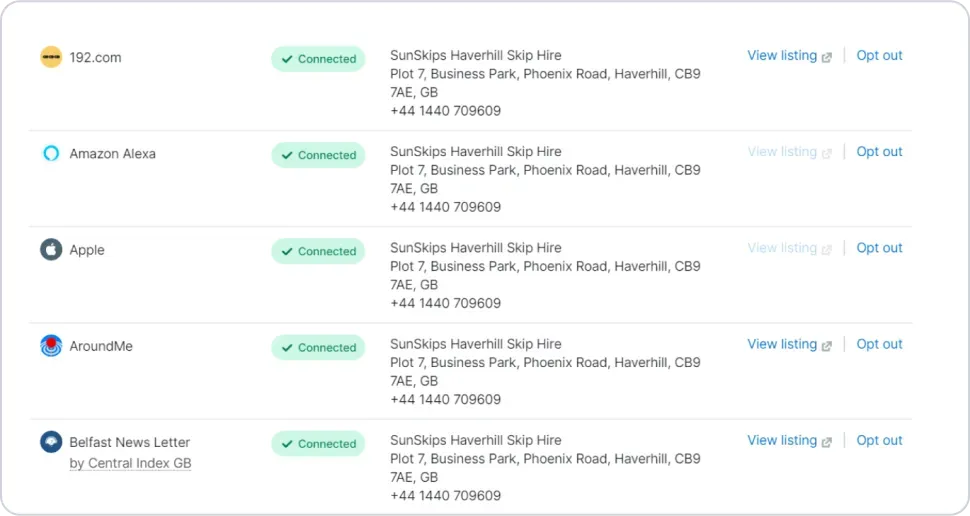
- Listing Management – Control your business listings across various local directories using SEMrush Local as your home base. SEMrush communicates with more than 150 online directories.
- Review Management – Instantly see all your Google reviews from the SEMrush local dashboard. SEMrush sends you notifications when you get negative reviews and allows you to respond to them directly.
- AI Generated Responses – Need help with what to say to your online reviews? SEMrush uses AI to suggest responses to your reviews that will help you sound professional.
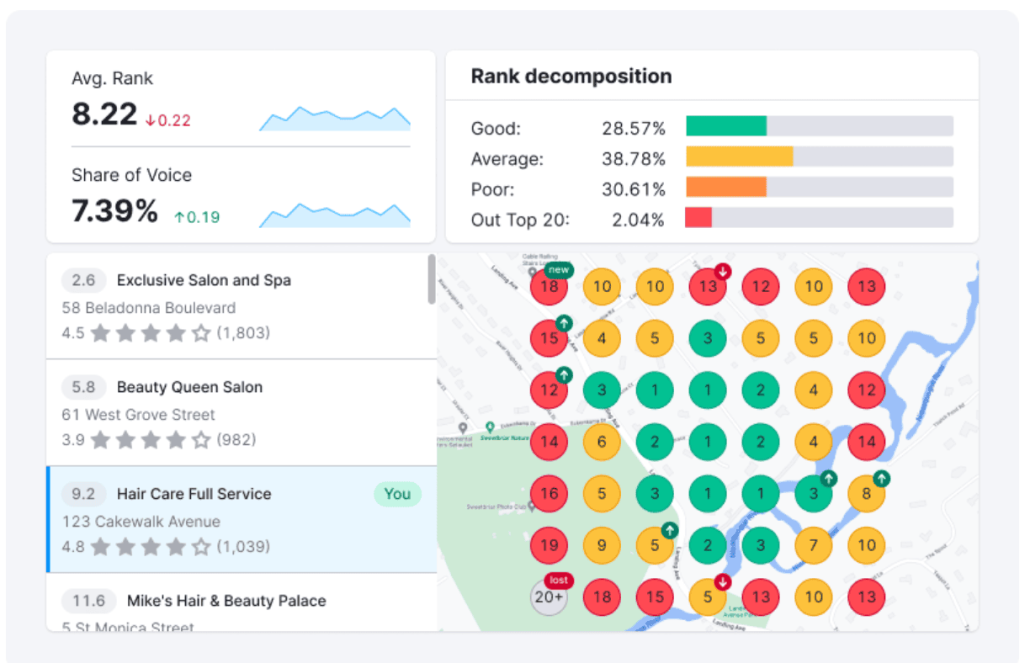
- Map Rank Tracker Heatmap – Track your website’s rankings in local search results, including the ability to see a heatmap of your ranks across multiple locations.
- Google Business Profile Manager – Get detailed insights concerning your Google Business Profile performance and suggestions on how to improve it for increased visibility.
- Description Generator – A free tool that generates an SEO-optimized description of your business based on the details you provide.
- Google Review Link Generator – Just input your business’s name, and SEMrush will generate a free link or QR code that you can share with your clients to make it easier for them to leave reviews.
- Local Marketing Hub – Access a wealth of local SEO and marketing knowledge to improve your understanding of local strategies and help take your SEO to the next level.
Pricing
SEMrush Local is a subset of the main SEMrush software, meaning you don’t have to pay for the all-in-one tool to access the local SEO tools discussed above (which starts at $117.33/month, paid annually).
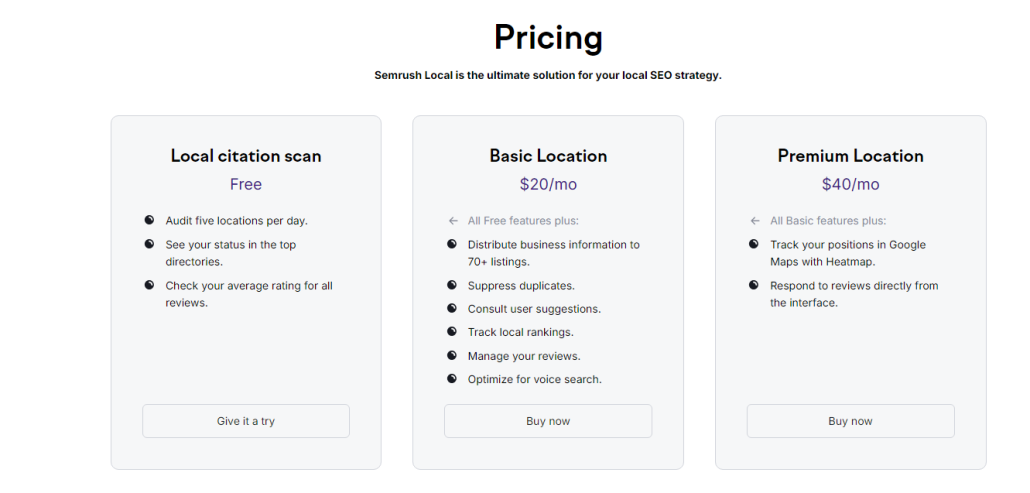
There are 3 pricing tiers available for SEMrush Local:
- The free plan allows you to audit 5 locations daily, check your status in the top directories, and check your average ratings.
- The Basic Location plan costs $20/month and includes listing management for more than 70 sites, local rank tracking, review management, and more.
- The Premium Location plan allows all the Basic features plus the Google Maps heatmap and the ability to respond to reviews directly from SEMrush, as discussed above.
I recommend visiting their sign-up page for more details about SEMrush Local’s pricing options.
Reviews
SEMrush is frequently praised for its extensive tools, and many users mention the powerful local SEO tools mentioned above.
Here’s what Christian B., a real SEMrush Local user, had to say about using the tool:
What do you like best about Semrush?
“Semrush enables me to take care of our websites and listings in different countries from one location. The dashboard gives me key data immediately after logging in. The local listing management system is an easy way to keep everything updated from one location.”
What do you dislike about Semrush?
“The “Domains for monitoring” list does not allow you to change the order of items. The domains monitored are listed according to the order I added them to the list. That is inconvenient as domains from one group are mixed up with other domains I am monitoring.
I use the tool to monitor our own domains and that of competitors. This disorderly list makes analysis more difficult than necessary.”
What problems is Semrush solving and how is that benefiting you?
“Besides using SEMrush for SEO I have started using it for local listing. Previously, I used to do this all manually. That generates a lot of work, you can avoid when using Semrushs local listing management tools. One unique aspect is that it not only tells you it was successful or failed in submitting your data but if something went wrong, it helps you fix the issue. Other tools are simply data pumpers. SEMrush local listing management functionality is intelligent beyond the simple submitting functionality.”
Best for Reputation Management: BrightLocal
One of the main determinants of success in local SEO is what your customers say about your business.
Don’t believe me?
65% of all new business comes through referrals, whether word-of-mouth or online reviews.
That means managing the way people perceive your business is significant.
That’s precisely what BrightLocal helps you do. This reputation management tool ensures that you can keep perceptions of your business positive and push people toward making purchases.
Let’s talk about whether BrightLocal might be right for you.
Pros
- Full suite of local SEO tools to help you manage your online presence
- Reasonable pricing
- Time-saving features like the Citation Builder
- Competitor monitoring features
- Free trial available
Cons
- Only local rank-tracking is included, so no broader rank-tracking features like those offered by ProRankTracker.
- The local rank-tracking is limited to 100 keywords
- No keyword features like those offered by other tools on this list
- Citation builder can cost around $2/listing, so it can get pricey if you’re posting to many different directories
- Some of the great tools are reserved for the higher-tier plans.
Features
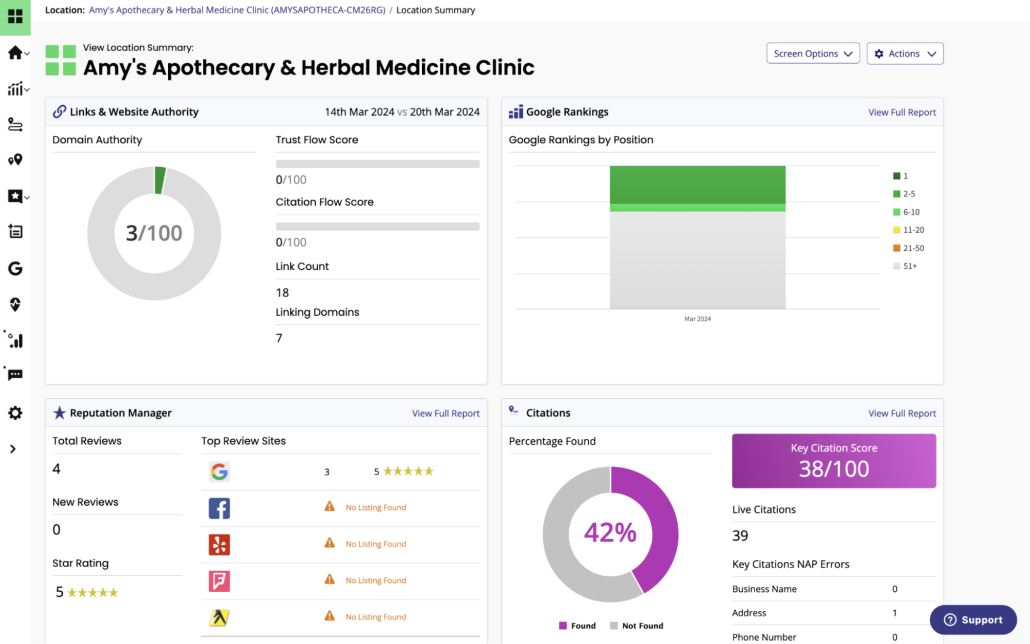
- Local Listing Management – Manage all your online directory listings from a single location, ensuring that your contact info, hours, and other essential details are accurate across all online directories.
- Citation Builder – Expedite the process of creating local business listings within BrightLocal for a flat one-time fee.
- Local Search Audit – Discover the “why” behind your local search rankings by analyzing over 300 data points. BrightLocal will boil down the data for you and tell you how to improve.
- Google Business Profile Audit – BrightLocal will take a look at your GBP and tell you what needs to change for you to improve your online visibility.
- Reputation Management Tools – Analyze and manage customer reviews from various platforms in a single dashboard, facilitating the process of responding to feedback (both positive and negative).
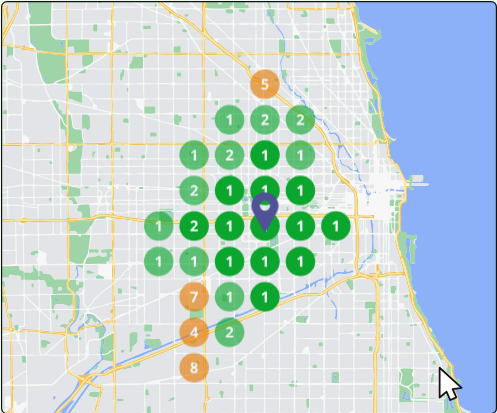
- Local Rank Tracker and Search Grid – Go beyond the typical ranking information and see a grid-style overlay of your local area with where you rank for every locale near you.
Pricing
BrightLocal offers 3 pricing plans:
- The Track plan starts at $29/month (paid annually) for 1 location, and it includes local rank tracking, citation audits, GBP monitoring, and competitor insights.
- The Manage plan starts at $36/month (paid annually) for 1 location, and it includes everything from the Track plan plus BrightLocal’s listings management tools.
- The Grow plan starts at $44/month (paid annually) for 1 location, and it includes everything from the lower tier plans plus BrightLocal’s review management tools.
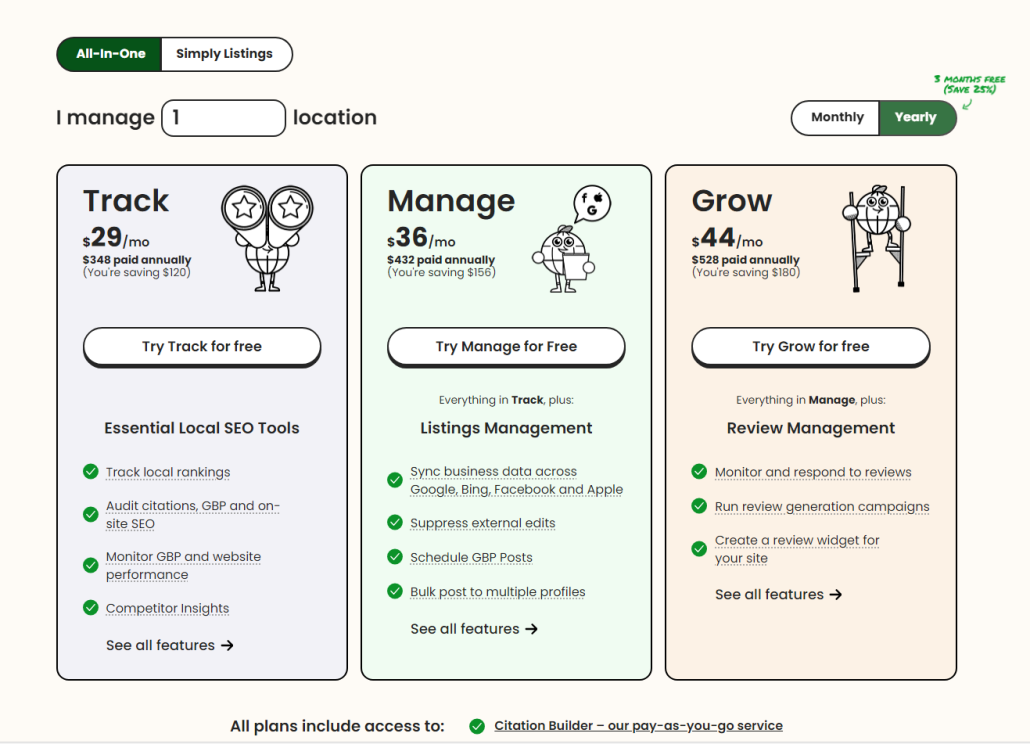
The pricing of each plan increases as you include more locations to manage.
For more details on pricing, check out the BrightLocal pricing page.
Reviews
BrightLocal consistently gets excellent reviews, and many positive comments mention the ease of use and the reputation management tools.
Some of the more negative comments mention the limited tool set and some issues with data accuracy.
Here’s what Joseph M. had to say about using BrightLocal for his business:
What do you like best about BrightLocal?
“For me, using Bright Local is very helpful for those users who need to get reviews and ratings for their work. You can also easily navigate the bright local website based on your frequency of use, and the customer support is also notifying you that they are there to help you if you need it. The bright local has an excellent Ease of Integration.”
What do you dislike about BrightLocal?
“To be honest, there’s nothing yet that I dislike about Bright Local as far as I am using it. Because every time I use it, I can easily get what I need. But there is just one thing that I am experiencing that is not a big deal for me. It is that there’s a time when you are going to search for a client in the bright local search bar and it is not showing up, but when you continuously press the next button, you will see what you are looking for. But again, it’s not a big deal. Only a few normal things happen on every website. If ever other users are also experiencing that situation and request to fix it, I am sure it can be done with the bright local ease of implementation.”
What problems is BrightLocal solving and how is that benefiting you?
“Businesses getting reviews and ratings for our clients helps us get what we need.”
Best Free Tool: Google Search Console
Ready to dive into how your site is performing on Google?
Why not get your data straight from the horse’s mouth using Google Search Console?
Google Search Console helps you see how your website performs on Google’s search results. It gives you critical information to help you determine how you’re ranking locally (and how to improve it):
- Impressions
- CTR
- Ranks
- Website errors that can lead to decreased ranks
As with Google’s other tools, Google Search Console is free for all businesses (which means you should just use it!).
Let’s dig into what Google Search Console offers.
Pros
- Free Google tool (that means data comes directly from Google!)
- Essential for diagnosing technical SEO issues
- Analyze what search queries bring people to your website by geographic location
- Provides insights into website performance and search traffic
- Alerts for security issues and Google penalties
Cons
- No search engines other than Google are supported!
- Steep learning curve
- Some features require technical knowledge to get the most out of them
Features
- Search analytics – See exactly what search queries bring users to your site. You can further break this information down by search location, helping you understand what types of content users from different places are looking for.
- Website performance analytics – See how many visitors come to your page, what ranks your pages currently occupy, and how many impressions and clicks you get.
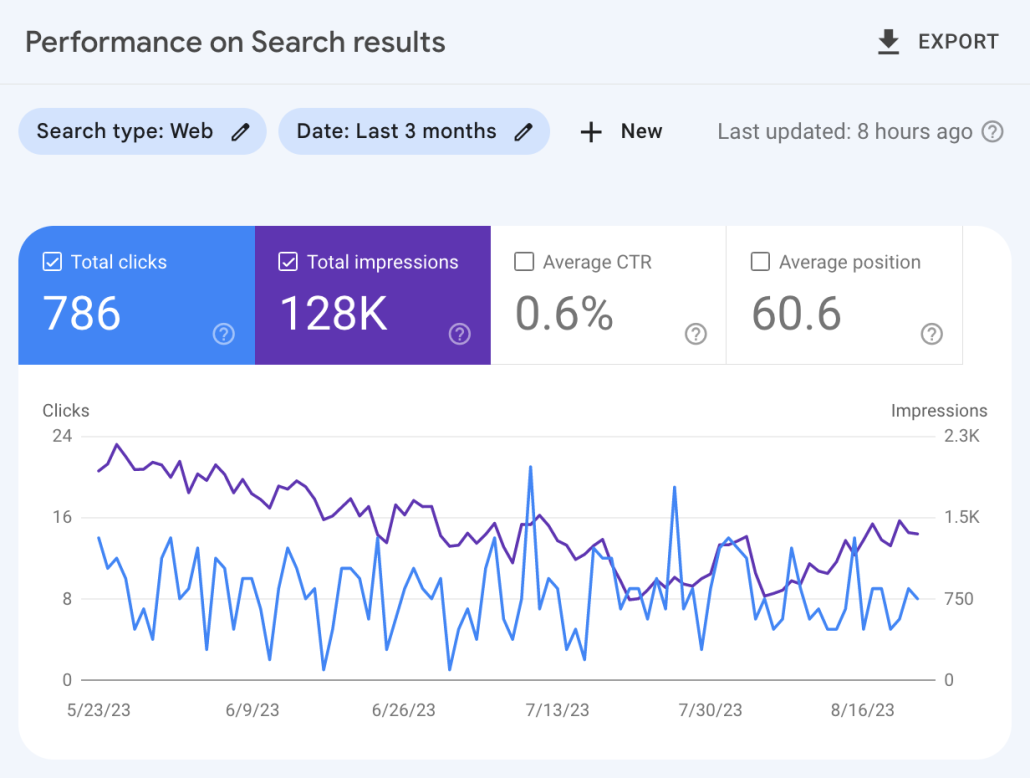
- SEO issue notifications – GSC automatically notifies you if you have issues on your site that are leading to ranking problems. You will get a notification to fix the issue quickly, whether broken links, inaccurate sitemaps, or Google penalties.
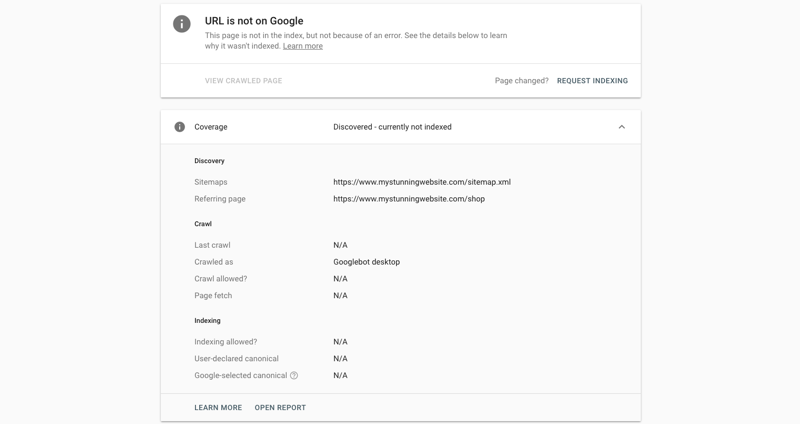
- URL inspection tool – Submit sitemaps or individual URLs to be crawled and indexed by Google (and make sure Google has your URL, avoiding the dreaded screen shown below), ensuring Google has the most recent view of your site (this can help you improve your ranks quickly if you’ve recently made significant changes!)
- Rich snippets management – Manage your rich snippets within GSC’s platform to ensure they appear appropriately on the Google SERP.
- Core Web Vitals report – This report assesses the overall health of your URLs and gives each one a score (Poor, Needs Improvement, or Good), allowing you to focus your efforts where they’re most needed.
Pricing
Google Search Console is FREE! That’s why nearly every major business uses it in their local SEO software tech stack.
Reviews
GSC has an average of 4.7 stars, meaning it’s one of the most highly-rated SEO tools available. Users frequently mention the accuracy of the data and how much they can improve their SEO using GSC’s recommendations. More negative comments focus on GSC’s limitations and the steep learning curve required for optimal usage.
Here’s what Gaurav P. had to say about using GSC:
What do you like best about Google Search Console?
“I liked crawl stats feature of google search console the most, where you can actually see latest pages crawled by Google and are divided in to various types based on status codes, type of pages, type of google crawlers, etc. You can also see various subdomains which are getting crawled and from there it can easily be analyzed how and what type of pages are getting crawled and if they have any crawling issues”
What do you dislike about Google Search Console?
“I dislike mainly the limit on number of pages which can be checked from Google search console, the limit of number of pages in any type of report is 1000 which is very less, especially for those websites which have high number of pages or are getting crawled more frequently. 1000 pages limit if fine for smaller websites with limited crawl frequency”
What problems is Google Search Console solving and how is that benefiting you?
“It helps in identifying most common problems of crawling. As crawling of a website is the first step in SEO, it is if vital importance that the website is perfectly crawlable, as only after crawling Google can determine importance of a webpage/website. If there are problems in crawling then any efforts for optimizing it for search engines is a waste.”
Best for Data Visualization: Google Looker Studio
Google Looker Studio is designed to give users the ability to transform complex data into visual dashboards.
By consolidating data into visually appealing and interactive reports, Looker Studio helps businesses visualize their local SEO performance.
No matter what the data is, Looker Studio allows users to put it into customizable dashboards that put the most relevant local SEO metrics at their fingertips. Its powerful visualization tools make it easier to see trends and opportunities in your local markets.
Best of all?
It’s free!
Let’s look at the key features of Looker Studio to help you decide if it’s the right tool for your local SEO strategy.
Pros
- Comprehensive data visualization tools
- Integration with other software (like PRT and other Google tools)
- FREE!
- Customizable views for white-label agencies
Cons
- Very steep learning curve to maximize your benefit
- Many pre-made views made by third parties cost to access
Features
- Customizable data views – Design your own data visualizations or use third-party dashboards with your data to get a nuanced understanding of your data.
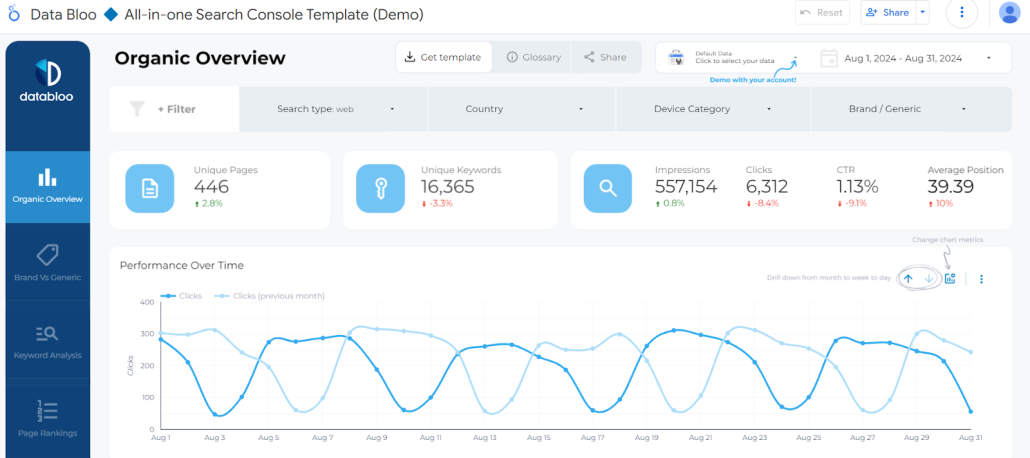
- Multiple data sources – Integrates with various data sources, including Google Analytics, Google Search Console, ProRankTracker, and others.
- Real-time data updates – Google Looker Studio automatically updates your reports as your data sources get updated, so there’s no need to continuously generate new reports.
- Data blends – Combine data from multiple sources into a single report, making it easy to better understand ALL your data (no matter where it comes from).
- Geo Charts – Quickly ascertain important facts about your local audience by looking at a heat map of your local area. This allows you to visualize and analyze SEO performance metrics by country or region, helping to tailor strategies for different markets around you.
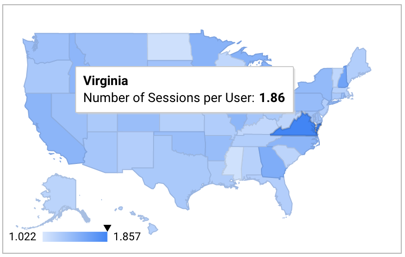
- Automated Reports – Schedule reports in advance to be sent to your email (or your client’s email). Automation allows you to set up regular updates for your clients, keeping everyone informed without lifting a finger.
Pricing
Like Google’s other SEO tools mentioned in this article, Google Looker Studio is free to use!
However, as mentioned above, third parties sell premade Looker dashboards to help you organize your data, but these are unnecessary if you’re willing to spend the time making your own dashboards.
In other words, there is NO REASON not to incorporate Looker Studio into your SEO strategy.
Reviews
All of Google’s tools (Looker Studio included) get consistently great reviews. Looker Studio averages 4.4 stars, and users frequently mention how much benefit they get from the data visualization offered by Google Looker Studio.
The main complaint, as with most of the other tools on this list, is the learning curve.
Let’s look at what Anne K. has to say about using Google Looker Studio:
What do you like best about Looker Studio?
“I love the way you can present data from multiple sources in one report. I also love the ability to blend different tables and show the information in one chart. It is easy to use and the clients love how interactive the online report is allowing them to sort by different columns, change the date range, export data to excel. Very professional reports.”
What do you dislike about Looker Studio?
“Some Google ads data isn’t available in Looker Studio, so I have to extract from Google ads to Google Sheets and then display the Google sheet information.”
What problems is Looker Studio solving and how is that benefiting you?
“Much easier and quicker to generate monthly reports for my clients. The report is also very professional. Looker Studio has some great templates that I have used as a start.”
Best for Understanding User Behavior: Google Analytics
Google Analytics is a cutting-edge tool for businesses aiming to enhance their local SEO (and other critical aspects of their SEO, as discussed below).
Google Analytics’ key value is its ability to provide insights that allow businesses to understand how their content performs across different regions and demographics. For example, GA4 can help you see how users from different areas around you interact with your pages (like what kinds of keywords bring them to your page), helping you optimize your site for local search intent.
GA4 makes it easier to filter data by specific location and can help you track local conversions and sort traffic by location or demographic, giving you a clear picture of your local SEO performance.
Let’s explore how GA4’s features can be a game-changer for your local SEO efforts!
Pros
- Free and widely used tool
- Great for segmenting data based on location
- Extensive documentation for easy learning
- Detailed insights into user behavior and traffic sources
- Customizable reports and dashboards
- Integration with other Google services (Google Ads, Search Console, etc.) and many SEO tools
Cons
- Steep learning curve for new users
- Limited toolset compared to some paid tools
Features
- Real-time analytics and user tracking – Get live data on site visitors and their actions, helping you understand how users interact with your site.
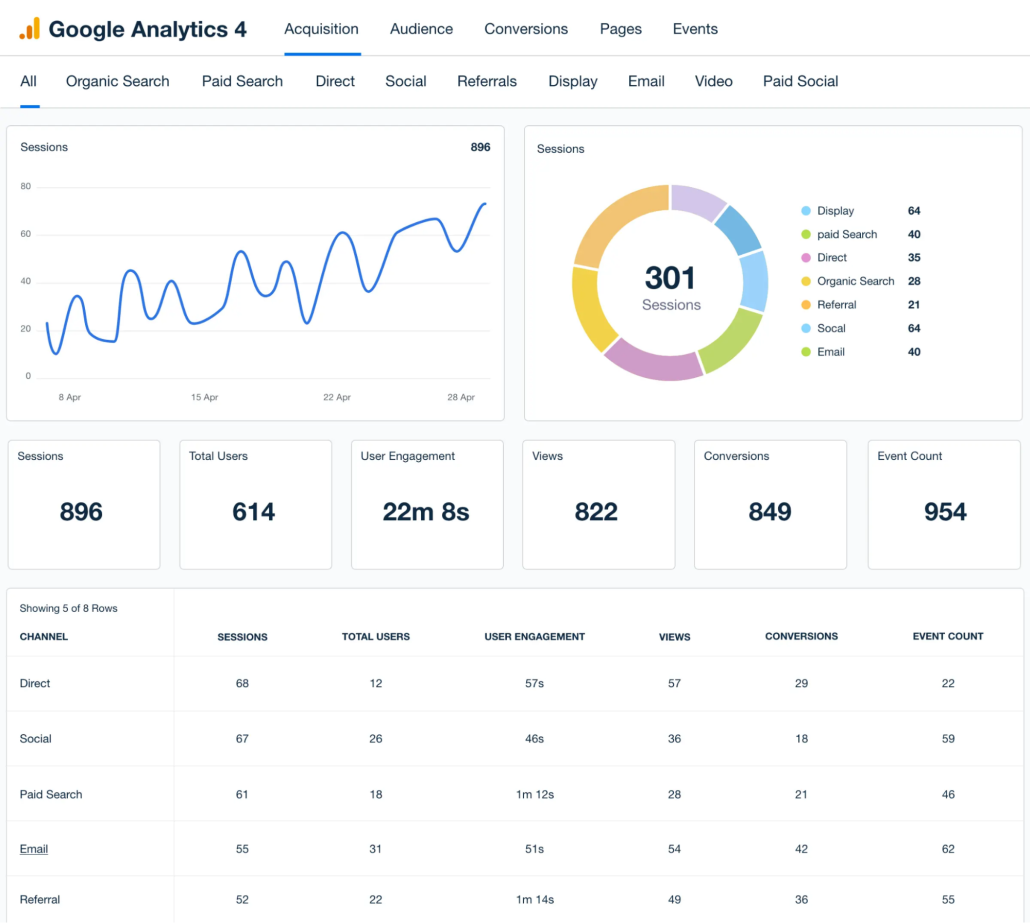
- Global and local audience insights – See how users from different areas of the world interact with your site in various ways to help you optimize it for local use–no matter where your audience is.
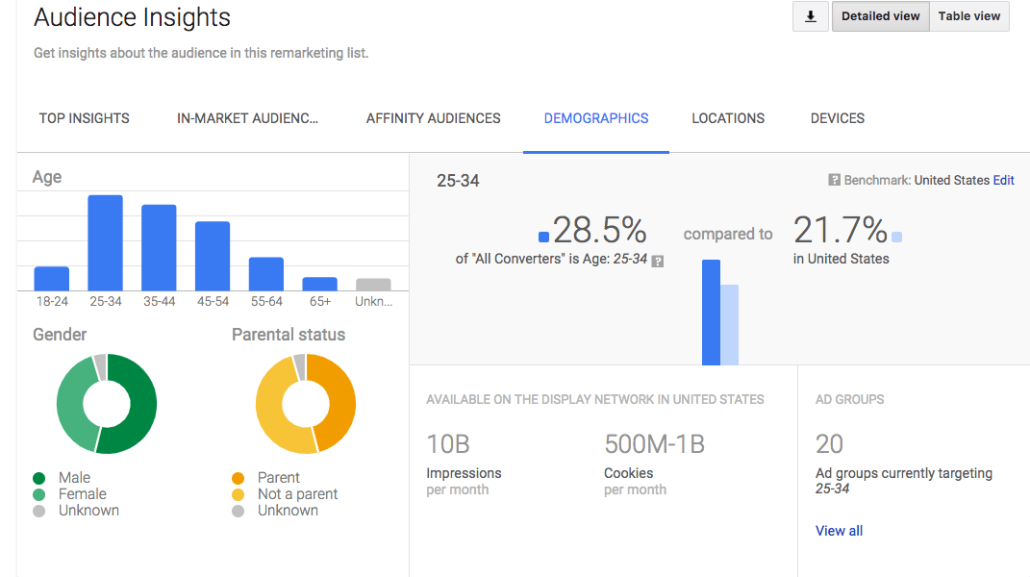
- Automation – GA4 has the power of Google machine learning behind it, meaning you can access powerful predictive AI and natural language modeling.
- API access – Use the GA4 API to connect GA4 to your other tools and augment its capabilities.
- Reporting – Export your GA4 data as reports to help you (and your clients) better understand your engagement and other critical campaign details.
- Powerful integrations – Google tools can be integrated with almost any available tool, meaning you can get MORE out of your Google data by combining it with other tools.
Pricing
Google Analytics is FREE!
That means there’s no reason not to use Google Analytics as a supplemental tool to the other tools in this list!
Reviews
Google Analytics is a HUGE tool used by almost every online business in the world, so it should come as no surprise that people like it.
Many positive comments about GA4 involve its being free, high-quality data, and integrations. Some negative comments discuss the learning curve and the tool’s complexity.
Here’s what Sampath S. says about using GA4
What do you like best about Google Analytics?
“This is one of the powerful tools from Google, That will keep track and reports of website traffic.It helps website owners and marketing person to understand how users interact with their website, providing valuable insights into audience behavior, engagement, and the effectiveness of marketing efforts. To use these features on the site, we need to login and setup the site name with URL. Frequently I am using this tools to track the websites and if we found any difficulties while integrating we can contact to a customer care, so they will provide a solution.”
What do you dislike about Google Analytics?
“It relies on JavaScript for tracking, which means that users with JavaScript disabled or those using ad blockers might not be tracked accurately, leading to incomplete data.”
What problems is Google Analytics solving and how is that benefiting you?
“It provides detailed reports on user behavior, such as page views, time on page, and navigation paths. This helps us to identify popular content, understand user interests, and optimize the user experience to keep visitors engaged.”
FAQ
Is local SEO worth it?
YES! Local SEO is not only worth it, but it is a REQUIREMENT if you want to survive in your local market. Look into the tools above to see how much you can improve your local SEO with a bit of help!
How is local SEO different from SEO?
Local SEO is the same as normal SEO, but it’s focused entirely on improving your ranking in local searches. When people look for something “near me,” they are looking for local businesses on Google. In other words, local SEO is when you try to improve the ranking of your Google Business Profile to make it more visible to nearby searchers.
Is local SEO free?
You can technically do local SEO for free using tools like Google Analytics, Google Search Console, and Google Looker Studio. However, it’s worth spending a few bucks to add more tools to your toolbox and get the added benefit of the extra data and flexibility they provide. Start by looking through the tools above (many offer free trials as well)!
Conclusion
Local SEO is CRUCIAL if you want to survive online, but it also tends to be one of the most confusing aspects of SEO.
Using the 7 tools listed above, you can quickly develop a deep understanding of local SEO and improve your business’s ranking online.
Before long, local customers will be finding your business online like crazy!
Good luck!