6 Best Tools for Global SEO Analytics (2025 Reviews)
It wasn’t long ago when businesses only had to think about finding customers who spoke the same language and lived in the same area as the business owners.
The internet changed that.
Now, businesses that operate in a small town in Ohio might be vying for an Arabic-speaking customer in Cairo or a Chinese speaker from Taiwan – and they have to do that while also keeping up with the customers in their local environment.
If that sounds like a LOT of work, it’s because it is! And as the global nature of business gets more complicated, so does SEO.
Global SEO is optimizing your SEO to make your website more visible to a broad range of potential customers worldwide and in multiple languages.
In this article, we’ll show you the best tools currently available to improve your global SEO by analyzing your data quickly and effectively.
Let’s jump in!
We’ll cover:
- Best Rank Tracker: ProRankTracker
- Best Free SEO Tool: Google Analytics
- Best All-in-One: SEMrush
- Best for Data Visualization: Google Looker Studio
- Best for Local Reputation Management: Moz
- Best for Analyzing Site Performance: Google Search Console
- FAQs
Best Rank Tracker: ProRankTracker
ProRankTracker is one of the most advanced rank-tracking tools available, and it’s the perfect choice for businesses looking to improve their global SEO analytics.
ProRankTracker gives its users access to global tools like multi-language tracking, precise location data, and powerful filtering options to help them pinpoint the location of their choice.
Not only that, but ProRankTracker offers the most accurate data available of any rank tracker currently available (100% accurate data, updated daily) and a no-strings-attached 14-day free trial.
Let’s look at why ProRankTracker is a must-have global SEO analytics tool…
Pros
- Accurate and daily-updated ranking data on EVERY plan
- Tracks rankings on a global scale or down to a single neighborhood
- Supports all major search engines (including Amazon and YouTube)
- Shows Global and Local (country level) search volume for each term and engine
- Supports tracking in multiple search languages
- White-label reporting for client presentations
- Comprehensive mobile and desktop ranking insights
- Best pricing available for a rank-tracking tool
- Free trial available
Cons
- Some users note a learning curve when starting (but users have access to help articles and top-notch customer support)
- Limited integration options compared to some competitors
Features
- Daily rank tracking and updates – Provides precise, daily insights into keyword rankings.
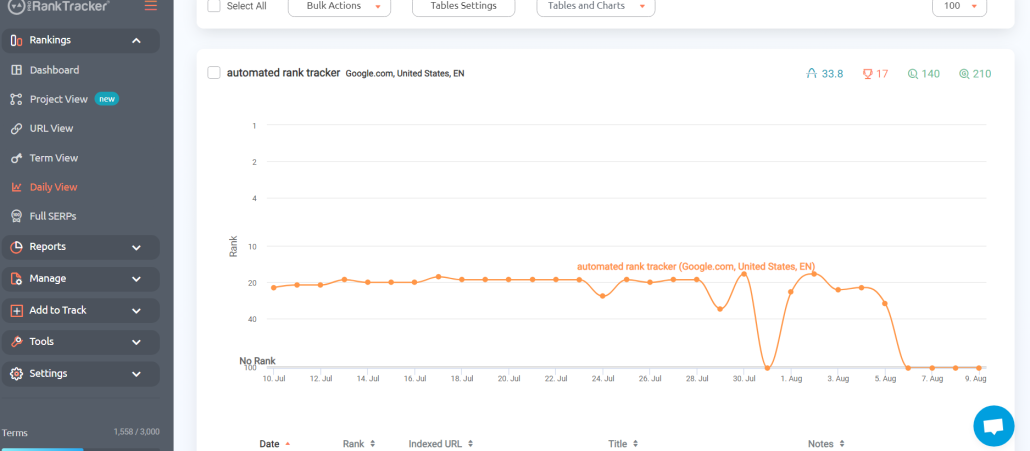
- Local and global rank tracking – Monitors keyword performance in specific locations and across the globe with high specificity (or more generalized if that’s what you need)
- Detailed and customizable reports – More than 20 types of reports and notifications. You can customize your reports only to include URLs that target specific locations and languages, making this a perfect feature for global rank tracking.
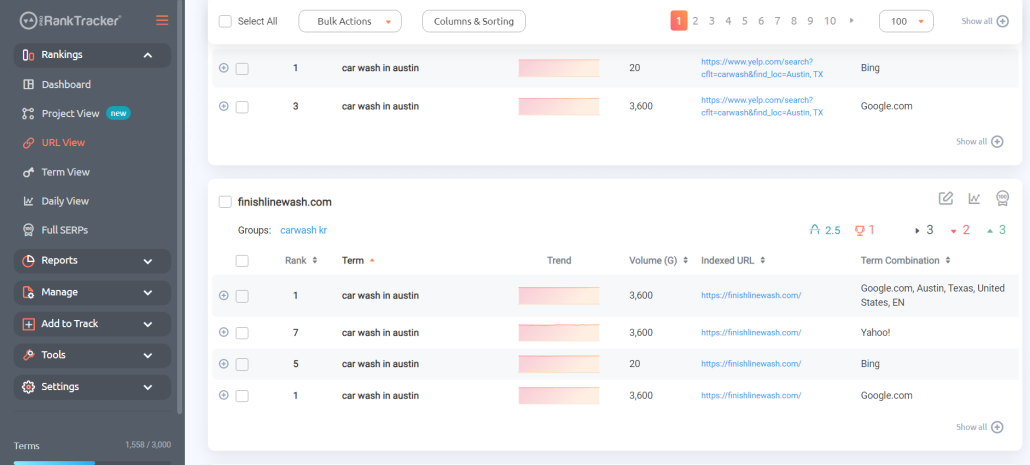
- Rankings Views – 6 different Rankings Views give you a varied and complete understanding of your ranking progress, including the ability to split your ranks into various groups, tags, and projects for easier targeted tracking of different geographic areas.
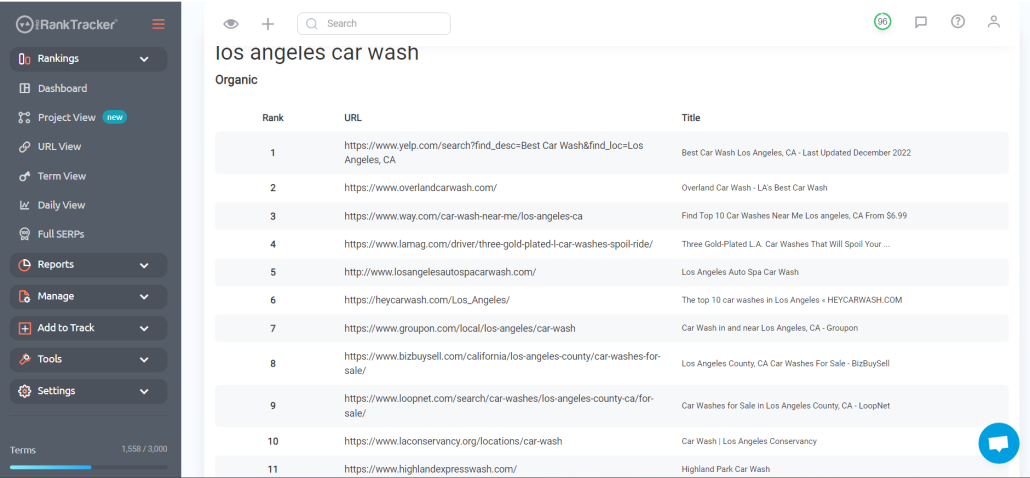
- Insta-Check – Quickly check on potential keywords using a credit-based SERP checker that doesn’t count toward your overall tracking limit. This is perfect for when you’re doing preliminary keyword research or competitor research.
- Keyword discovery and tracking – Helps identify and track relevant keywords for your business.
Pricing
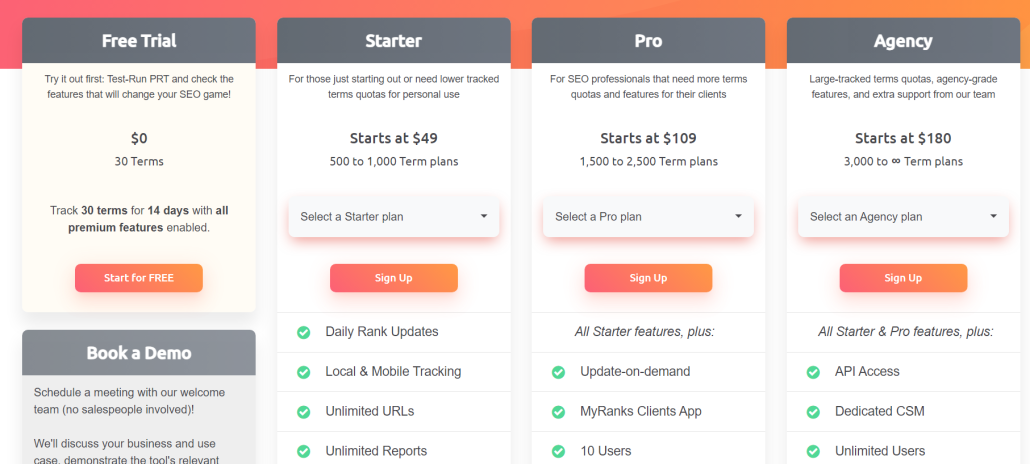
ProRankTracker offers some of the most competitive pricing in the industry. They also offer a 14-day FREE trial with ALL premium features enabled. After finishing your free trial, you have 3 pricing tiers available to you:
- Starter Plan – Starts at $49/month for up to 500 tracked terms
- Pro Plan – Pro Plan – Starts at $109/month for up to 1,500 tracked terms
- Agency Plan – Starts at $180/month for 3,000 tracked terms
Note: The pricing above is for monthly billing. You’ll get a 20% lower rate when you pay annually.
Reviews
ProRankTracker consistently gets almost exclusively 5-star reviews (4.6 average on G2). The most common positive comments include accuracy, ease of use, and customer service.
Here’s what Bryan R. had to say about his experience with PRT:
What do you like best about Pro Rank Tracker?
“Pro Rank Tracker has been an invaluable tool for tracking our local Google rankings. It’s incredibly user-friendly, making it easy to add new keywords and URLs to monitor. The insights provided are detailed and accurate, which has significantly helped us optimize our SEO strategies.
One standout feature is the API, which we utilize for in-depth monitoring, pushing rankings to a Google Sheet. It integrates seamlessly into our workflow and provides comprehensive data that helps us stay ahead of the competition.
Pro Rank Tracker is a top-tier tool I highly recommend for anyone serious about tracking their SEO performance.”
What do you dislike about Pro Rank Tracker?
“I can’t think of anything at the moment.”
What problems is Pro Rank Tracker solving and how is that benefiting you?
“We work with local service businesses, so it solves the problem of accurately tracking local search rankings.”
Best Free SEO Tool: Google Analytics
Google Analytics is a cutting-edge tool for businesses aiming to enhance their global SEO analytics (and other critical aspects of their SEO, as discussed below).
Google Analytics’ key value is its ability to provide insights that allow businesses to understand how their content performs across different regions and demographics. For example, GA4 can help you see how users from other countries interact with your pages, helping you optimize the translated versions of your site.
GA4 makes it easier to filter data by specific country, language, and device, giving you a clear picture of your international SEO performance.
Let’s explore how GA4’s features can be a game-changer for your global SEO efforts!
Pros
- Free and widely used tool
- Extensive documentation for easy learning
- Detailed insights into user behavior and traffic sources
- Customizable reports and dashboards
- Integration with other Google services (Google Ads, Search Console, etc.) and many SEO tools
Cons
- Steep learning curve for new users
- Limited toolset compared to some paid tools
Features
- Real-time analytics and user tracking – Get live data on site visitors and their actions, helping you understand how users interact with your site.
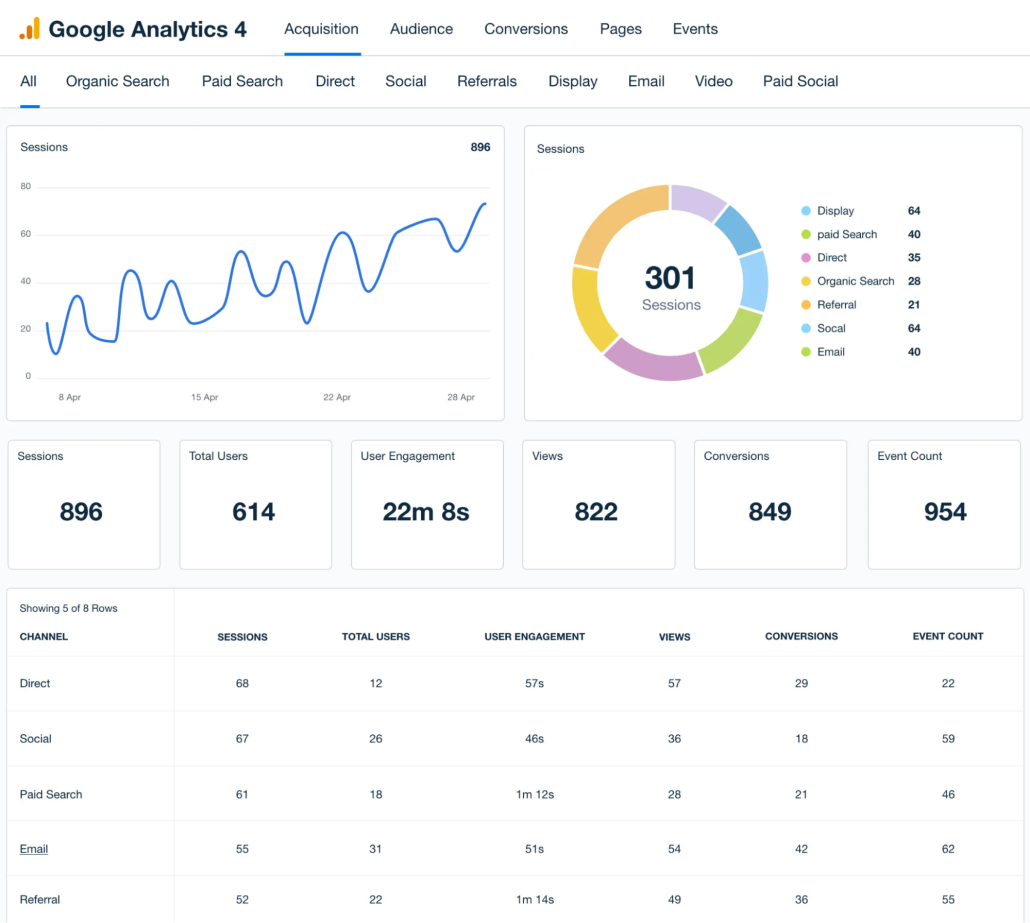
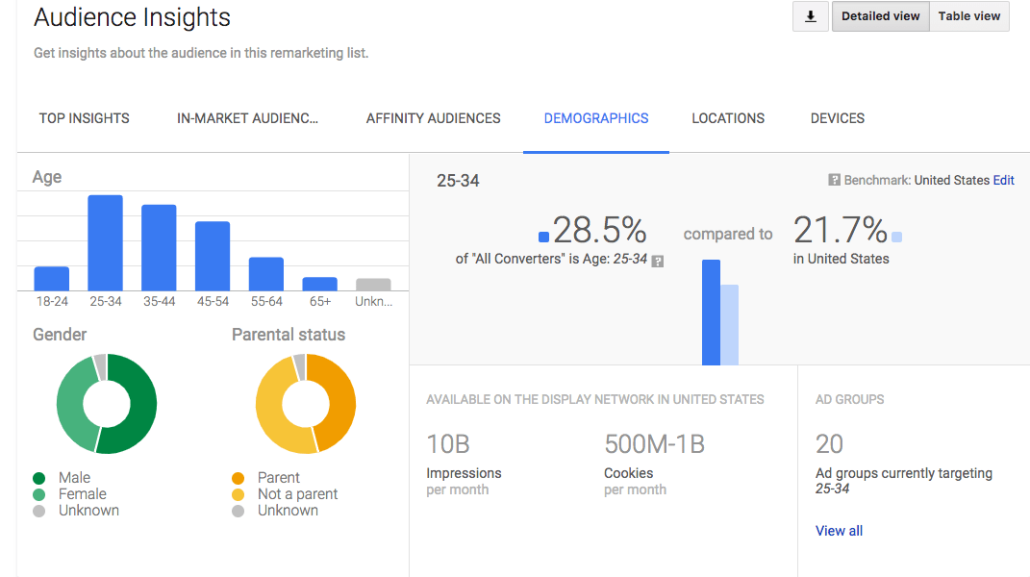
- Global audience insights – See how users from different areas of the world interact with your site in various ways to help you optimize it for local use – no matter where your audience is.
- Automation – GA4 has the power of Google machine learning behind it, meaning you can access powerful predictive AI and natural language modeling.
- API access – Use the GA4 API to connect GA4 to your other tools and augment its capabilities.
- Reporting – Export your GA4 data as reports to help you (and your clients) better understand your engagement and other critical campaign details.
- Powerful integrations – Google tools can be integrated with almost any available tool, meaning you can get MORE out of your Google data by combining it with other tools.
Pricing
Google Analytics is FREE!
That means there’s no reason not to use Google Analytics as a supplemental tool to the other tools in this list!
Reviews
Google Analytics is a HUGE tool used by almost every online business in the world, so it should come as no surprise that people like it.
Many positive comments about GA4 involve its being free, high-quality data, and integrations. Some negative comments discuss the learning curve and the tool’s complexity.
Here’s what Sampath S. says about using GA4
What do you like best about Google Analytics?
“This is one of the powerful tools from Google, That will keep track and reports of website traffic. It helps website owners and marketing persons to understand how users interact with their website, providing valuable insights into audience behavior, engagement, and the effectiveness of marketing efforts. To use these features on the site, we need to log in and set up the site name with the URL. Frequently I am using this tools to track the websites and if we found any difficulties while integrating we can contact to a customer care, so they will provide a solution.”
What do you dislike about Google Analytics?
“It relies on JavaScript for tracking, which means that users with JavaScript disabled or those using ad blockers might not be tracked accurately, leading to incomplete data.”
What problems is Google Analytics solving and how is that benefiting you?
“It provides detailed reports on user behavior, such as page views, time on page, and navigation paths. This helps us to identify popular content, understand user interests, and optimize the user experience to keep visitors engaged.”
Best All-in-One: SEMrush
If you’re running a larger company and need a tool that can deal with EVERY aspect of your SEO, SEMrush might a good fit.
SEMrush is an all-in-one SEO tool, which means it can help you manage:
- Technical SEO
- Online reputation
- Keyword research
- Rank tracking
- Reporting
- Content creation
The downside is that all those great features come at a steep cost, so many users gravitate more toward specialized tools that can manage their most pressing needs.
Pros
- Versatile toolkit with anything you might need
- Comprehensive keyword research capabilities
- Great reporting features with white-label capabilities
Cons
- Limited reports
- Higher pricing than competitors for full access to features
- Interface may be overwhelming for beginners
Features
- Keyword Research – Find keywords with a good mix of search volume and difficulty in different countries and languages, making it helpful for ranking in countries across the globe.
- Competitor Analysis – Use a complete suite of competitor analysis tools to compare SEO strategies like keyword rankings and backlinks of global competitors (and gain an advantage over them).
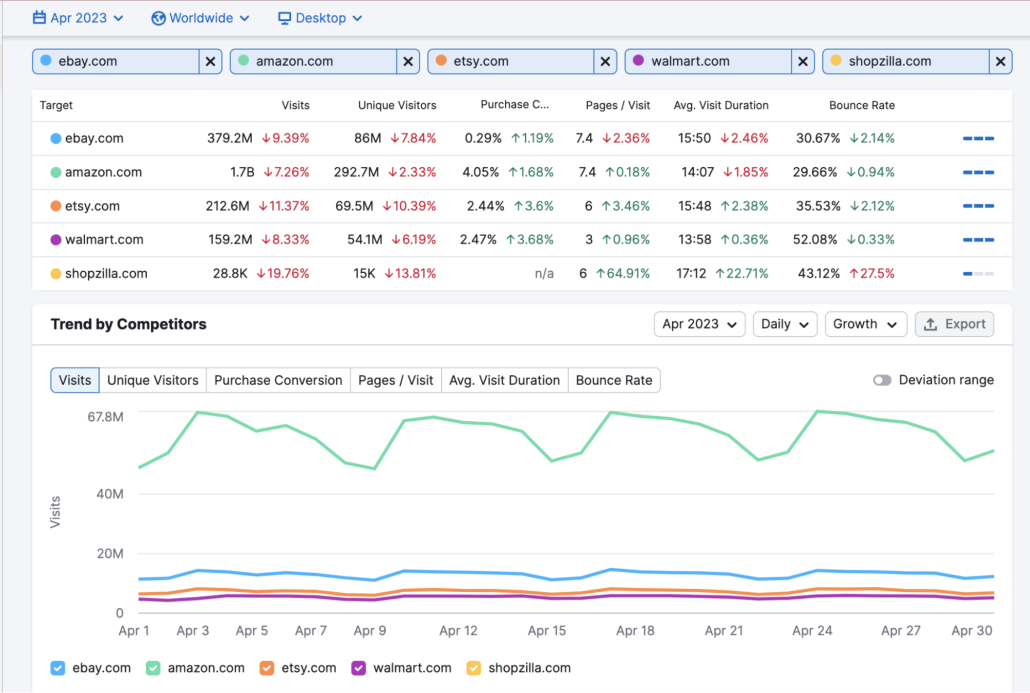
- Backlink Analytics – Analyze your site’s backlinks to determine your site’s health. Find opportunities to improve your backlink profile, thus improving your authority in various countries.
- Site Audit – Check your site for technical SEO issues to ensure it’s optimized for global search engines and country-specific requirements. SEMrush will help you by making recommendations on how to progress and improve your site’s technical SEO.
- International SEO Features – Manage your online presence in multiple regions by analyzing where your traffic comes from and identifying problems in certain regional markets.
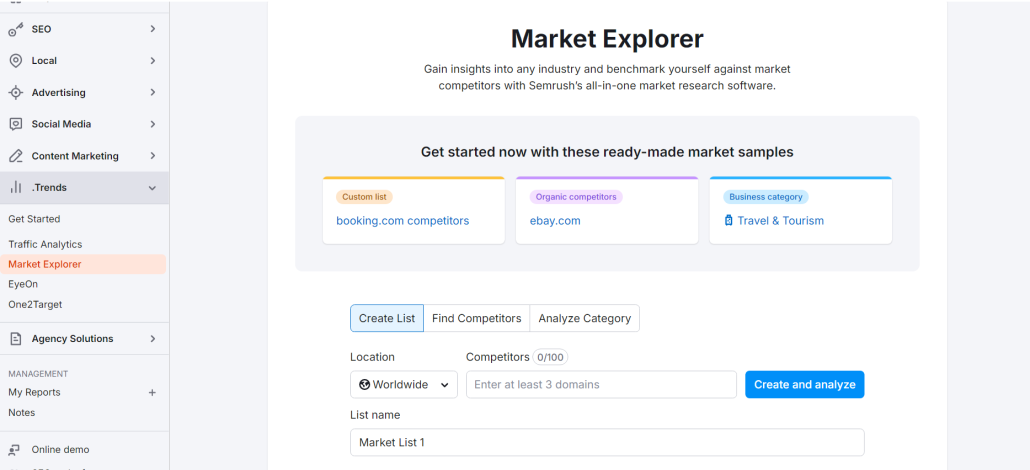
- Market Explorer – Analyze global market trends and competitors in specific industries and regions. Understand which areas have a demand for your service or product, allowing you to tailor your global SEO strategies accordingly.
Pricing
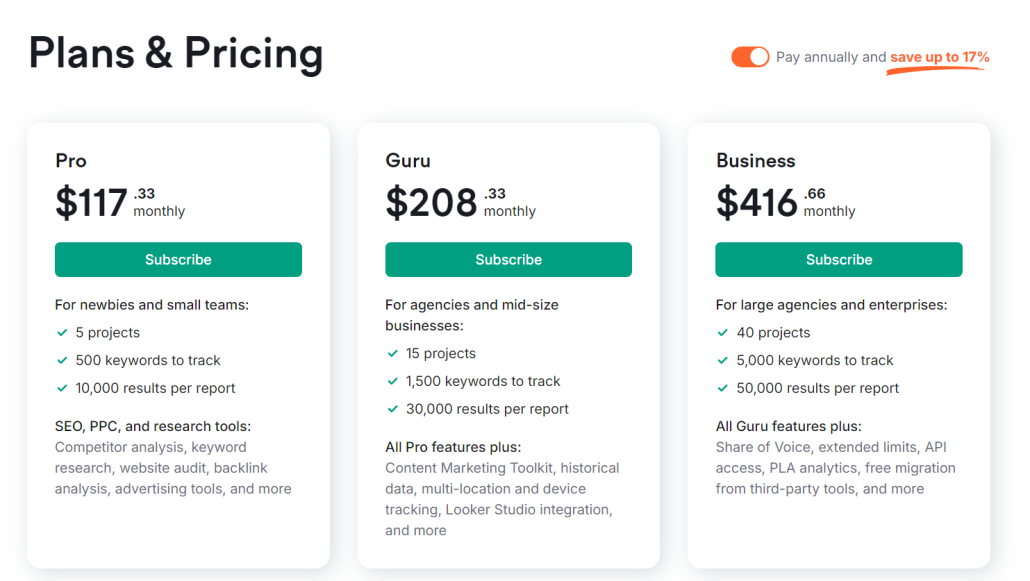
As we said earlier, SEMrush can get a bit pricey. It offers 3 pricing plans:
- Pro – Starts at $117.33/month (paid annually) and offers 5 projects and 500 tracked keywords.
- Guru – Starts at $208.33/month (paid annually) and offers 15 projects and 1500 tracked keywords.
- Business – Starts at $416.66/month (paid annually) and offers 40 projects and 5,000 tracked keywords.
For more information, head over to SEMrush’s pricing page.
Reviews
SEMrush is an incredibly popular tool, and it averages 4.5 stars with over 2,000 reviews.
In general, users love the comprehensive nature of the tool, saying it helps manage their projects in a well-organized way. However, many complain about the high prices.
Here’s what SEMrush user Riccardo L. had to say about using SEMrush:
What do you like best about Semrush?
“Semrush’s clean interface makes navigating and using the software easy, thanks to its excellent features and functionalities grouped in an extremely clear way. Incorporating it into our strategy has brought tremendous benefits. It has helped us improve our advertising efforts and maximize the ROI of our digital initiatives, in addition to giving us a competitive advantage with accurate and detailed data. When it comes to streamlining and improving our marketing activities, it has been an absolute lifesaver.”
What do you dislike about Semrush?
“The expensive price tag may deter smaller businesses seeking more budget-friendly marketing tools, despite the fact that this is an excellent product overall.”
What problems is Semrush solving and how is that benefiting you?
“Our internal digital marketing strategy management has been revolutionized by the comprehensive tool Semrush. The ability to perform in-depth SEO analysis has been a huge boon to us, allowing us to fine-tune our content and climb the search engine rankings like never before. Our campaigns have been fine-tuned, and we’ve stayed ahead of the competition thanks to the detailed information provided by the competitive analysis feature, which is another strength. Tracking keywords, such as client ranking data, in an easy-to-understand graphical style; simple; highly successful; inexpensive.”
Best for Data Visualization: Google Looker Studio
Google Looker Studio is designed to give users the ability to transform complex data into visual dashboards.
By consolidating data into visually appealing and interactive reports, Looker Studio helps businesses visualize their SEO performance on a global scale.
No matter what the data is, Looker Studio allows users to put it into customizable dashboards that put the most relevant global SEO metrics at their fingertips. Its powerful visualization tools make it easier to see trends and opportunities in international markets.
Best of all?
It’s free!
Pros
- Comprehensive data visualization tools
- Integration with other software (like PRT and other Google tools)
- FREE!
- Customizable views for white-label agencies
Cons
- Very steep learning curve to maximize your benefit
- Many pre-made views made by third parties cost to access
Features
- Customizable data views – Design your own data visualizations or use third-party dashboards with your data to get a nuanced understanding of your data.
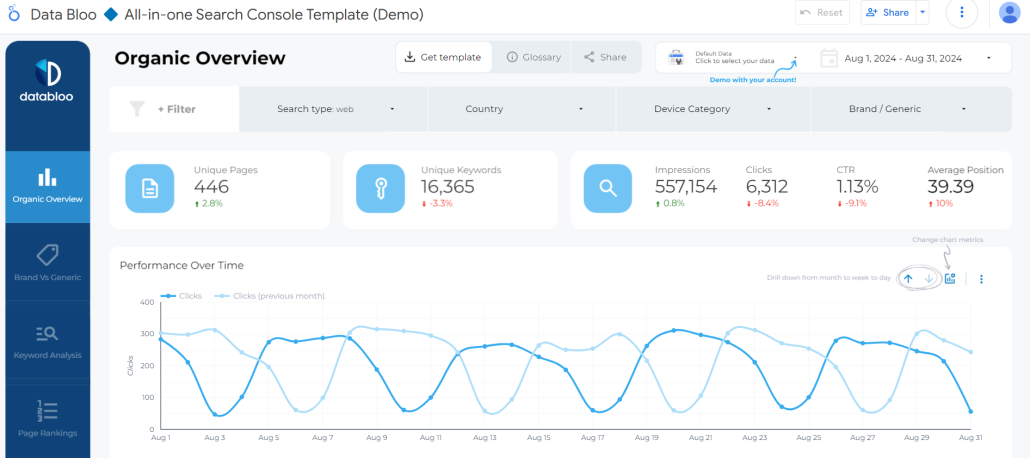
- Multiple data sources – Integrates with various data sources, including Google Analytics, Google Search Console, ProRankTracker, and others.
- Real-time data updates – Google Looker Studio automatically updates your reports as your data sources get updated, so there’s no need to continuously generate new reports.
- Data blends – Combine data from multiple sources into a single report, making it easy to better understand ALL your data (no matter where it comes from).
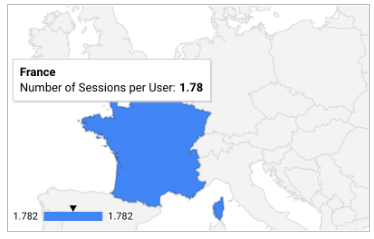
- Geo charts – Quickly ascertain important facts about your global audience by looking at a world heat map. This allows you to visualize and analyze SEO performance metrics by country or region, helping to tailor strategies for different global markets.
- Automated reports – Schedule reports in advance to be sent to your email (or your client’s email). Automation allows you to set up regular updates for your clients, keeping everyone informed without lifting a finger.
Pricing
Like Google’s other SEO tools mentioned in this article, Google Looker Studio is free to use!
However, as mentioned above, third parties sell premade Looker dashboards to help you organize your data, but these are unnecessary if you’re willing to spend the time making your own dashboards.
In other words, there is NO REASON not to incorporate Looker Studio into your SEO strategy.
Reviews
All of Google’s tools (Looker Studio included) get consistently great reviews. Looker Studio averages 4.4 stars, and users frequently mention how much benefit they get from the data visualization offered by Google Looker Studio.
The main complaint, as with most of the other tools on this list, is the learning curve.
Let’s look at what one user of Google Looker Studio has to say about using it:
What do you like best about Looker?
“> Seamless Data Integration: As a digital marketer, I juggle data from various sources – website analytics, social media platforms, ad campaigns. Looker Studio shines here by allowing me to easily connect and unify this data into a single, cohesive view. This saves me tons of time and eliminates the need for manual data manipulation.
> Drag-and-Drop Visualization Wizardry: No coding required! Looker Studio empowers me to create stunning and informative dashboards with its intuitive drag-and-drop interface. Whether it’s bar charts, line graphs, or interactive maps, I can tailor visualizations to effectively communicate campaign performance and audience insights to clients and stakeholders.
> Actionable Insights at Your Fingertips: Looker Studio goes beyond static reports. Its interactive features let me drill down into specific data points to uncover deeper trends and patterns. This real-time analysis empowers me to make data-driven decisions for campaign optimization and budget allocation.
> Collaboration Made Easy: Gone are the days of siloed data access. Looker Studio fosters a collaborative environment by allowing me to share dashboards and reports with colleagues. We can then discuss insights together, leading to more effective marketing strategies.”
What do you dislike about Looker?
“> Learning Curve: While the interface is user-friendly, Looker Studio does have a bit of a learning curve. Mastering advanced features like custom filters and calculations might require some additional training or exploration.
> Limited Free Version: For smaller agencies or individual marketers, the free version of Looker Studio might have limitations in terms of data volume and user access. Upgrading to a paid plan could be necessary for more robust analysis.”
What problems is Looker solving and how is that benefiting you?
“Looker primarily addresses the challenge of data complexity and accessibility for businesses, particularly those in the digital marketing realm.”
Best for Local Reputation Management: Moz
If you want to take your local reputation to the next level, Moz may be the tool for you.
Moz is an SEO tool, but it also specializes in helping businesses monitor and improve their online reputations so they can get more business.
You won’t get far in global SEO without a good reputation, so managing how your audience perceives you online is crucial to success.
However, don’t confuse Moz for a tool that ONLY does reputation management. In reality, they also offer comprehensive SEO tools, as described below.
Pros
- Comprehensive keyword research and SEO toolset
- Powerful reputation management tools
- Industry-standard Domain Authority is only found in Moz
- User-friendly interface (especially considering the size of the software)
- Strong community and resources
Cons
- Moz’s price is higher than many of the other tools on this list
- Metrics like Domain Authority are only updated once a month, and rankings are only updated once per week (!)
Features
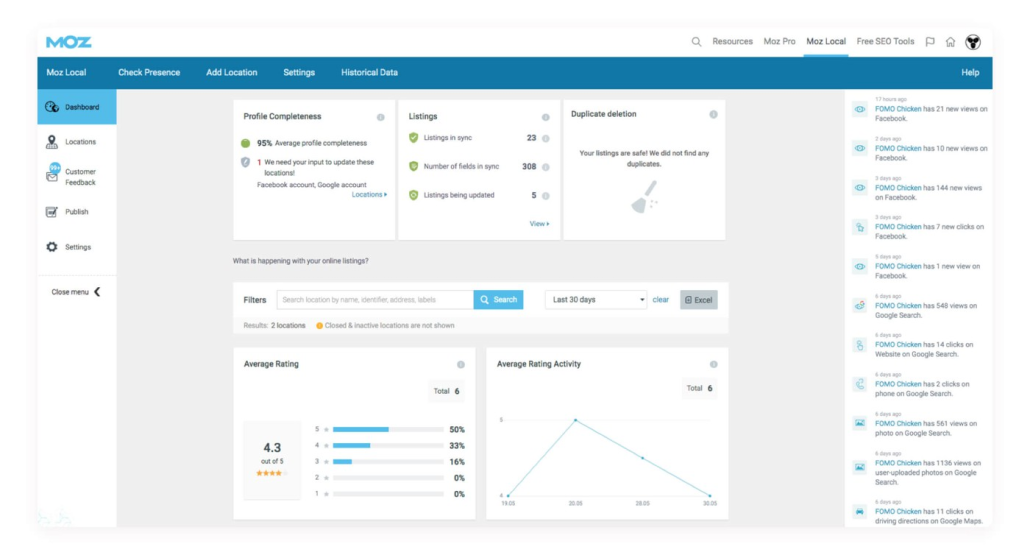
- Local SEO & Listing Management – Manage your local listings to ensure your online information is accurate and up to date.
- SERP Analysis – Analyze the SERPs you’re competing for so you can understand how to optimize your content to rank on them.
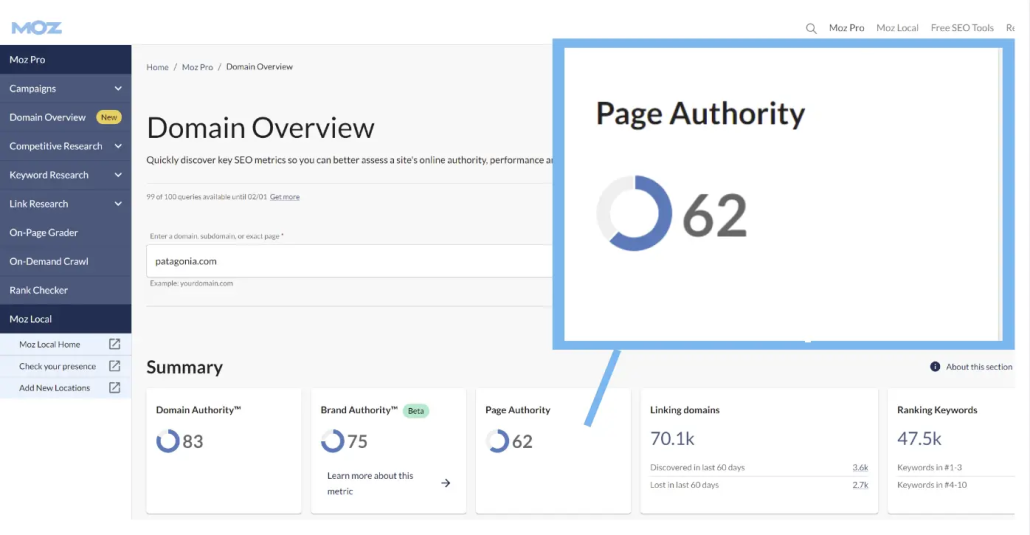
- Domain Authority (DA) – Moz’s DA score measures a site’s overall SEO strength. This widely used metric helps businesses know exactly where they stand compared to their competitors.
- Site Crawl – Detects technical SEO issues such as broken links and missing tags, helping you avoid site-breaking problems and fix minor issues before they become major ones.
- Reputation Management Tools – Moz’s reputation management tools help businesses track online mentions, reviews, and customer sentiment across the web.
- Rank Tracking and Keyword Exploration
- Competitor Analysis
- Reporting and automation
Pricing
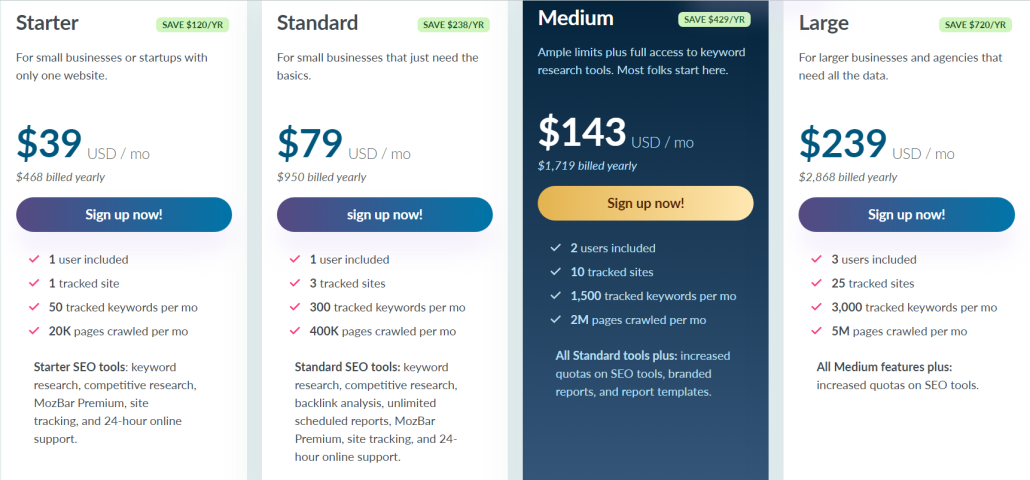
Moz is an excellent tool, but prices are higher than some of the other competitors on this list. It offers 4 main plans (listed prices are if you choose to pay yearly):
- The Starter plan is $39/month and includes 1 tracked site, 50 keywords, and 20,000 crawled pages/month.
- The Standard plan is $79/month and includes 3 tracked sites, 300 tracked keywords, and 400,000 crawled pages/month.
- The Medium plan costs $143/month and includes 10 tracked sites, 1500 keywords, and 2 million crawled pages/month.
- The Large plan is $239/month and includes 25 tracked sites, 3000 tracked keywords, and 5 million crawled pages/month.
For more information about Moz’s pricing plans, I recommend visiting their pricing page.
Reviews
Moz is one of the most popular tools, and its reviews reflect that. It averages 4.3 stars on G2.
Some of the most frequent positive comments center around the ease with which businesses can analyze their website and identify new strategies. The negative comments frequently mention the price and (no surprise) the learning curve.
Here’s what Moz user James N. had to say about his experience with Moz:
What do you like best about Moz Pro?
“Keyword research features, competitor analysis & rank tracking work all very well. Used daily, it’s really effective at managing several websites and campaigns. It’s intuitive and easy to use. The ability to ignore flagged issues in the weekly crawls is really good too.”
What do you dislike about Moz Pro?
“I think the link database is lacking compared to other suppliers, and when you compare date ranges in the rank tracking suite, sometimes the differences in the numbers (up/down) aren’t quite clear enough as to what they mean.
The number of “seats” can be an issue if I’m using multiple devices logged into the same account.
Integrating Analytics was really tricky.
I dislike the range of default PDF reports that it can generate.”
What problems is Moz Pro solving and how is that benefiting you?
“Moz (and our use of it) has moved away from research/competitive analysis tools and more towards management of SEO campaigns, which is fine. The management side of Moz works really well for daily/weekly/monthly monitoring and this has always been a challenge for me as I manage so many sites on a daily basis. The ability to see a snap shot of day to day performance is important to me, and maybe there’s a little way to go still for Moz.
It’d be great to integrate Moz with Search Console data in Looker Studio or similar, but I’m not sure there’s an easy way to make this happen if you aren’t familiar with how to use the various APIs.”
Best for Analyzing Site Performance: Google Search Console
Ready to dive into how your site is performing on Google?
Why not get your data straight from the horse’s mouth by using Google Search Console?
Google Search Console helps you see how your website performs on Google’s search results. It gives you critical information to help you determine how you’re ranking (and how to improve it):
- Impressions
- CTR
- Ranks
- Website errors that can lead to decreased ranks
As with Google’s other tools, Google Search Console is free to use for all businesses (which means you should just use it!).
Pros
- Free Google tool (that means data comes directly from Google!)
- Essential for diagnosing technical SEO issues
- Analyze what search queries bring people to your website by geographic location
- Provides insights into website performance and search traffic
- Alerts for security issues and Google penalties
Cons
- No search engines other than Google are supported!
- Steep learning curve
- Some features require technical knowledge to get the most out of them
Features
- Search analytics – See exactly what search queries bring users to your site. You can further break this information down by search location, helping you understand what types of content users from different places are looking for.
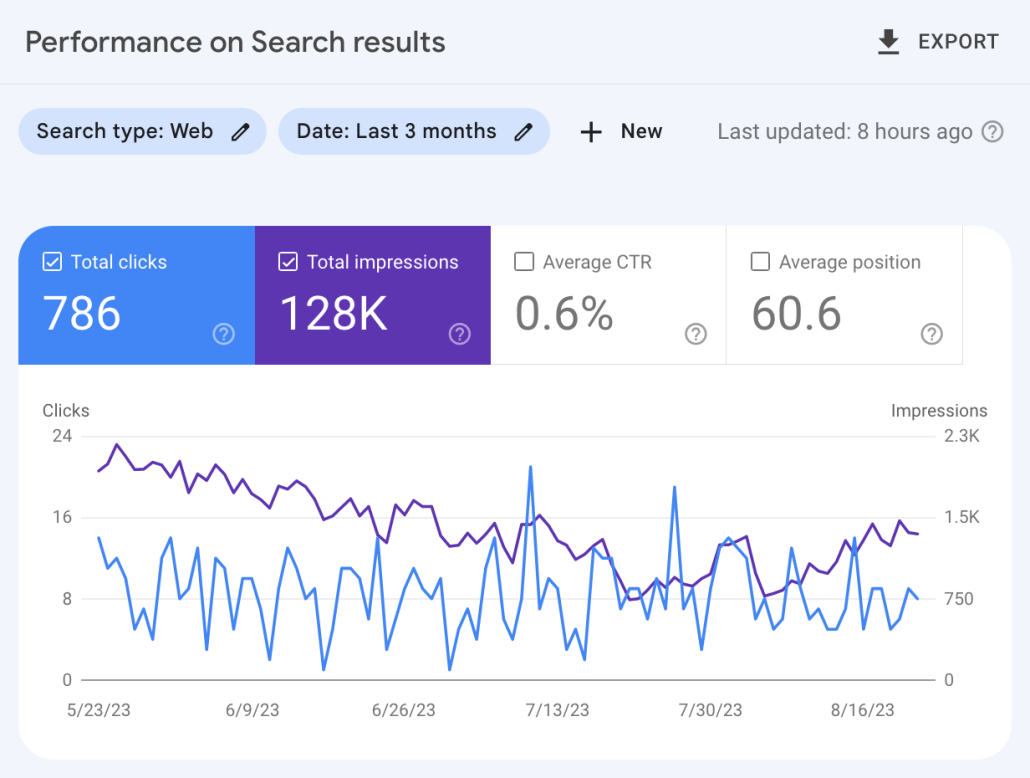
- Website performance analytics – See how many visitors come to your page, what ranks your pages currently occupy, and how many impressions and clicks you get.
- SEO issue notifications – GSC automatically notifies you if you have issues on your site that are leading to ranking problems. You will get a notification to fix the issue quickly, whether it’s broken links, inaccurate sitemaps, or Google penalties.
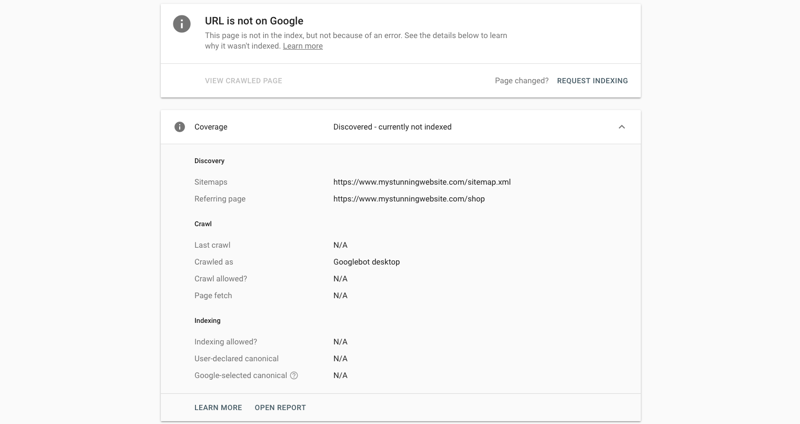
- URL inspection tool – Submit sitemaps or individual URLs to be crawled and indexed by Google (and make sure Google has your URL, avoiding the dreaded screen shown below), ensuring Google has the most recent view of your site (this can help you improve your ranks quickly if you’ve recently made significant changes!)
- Rich snippets management – Manage your rich snippets within GSC’s platform to ensure they appear appropriately on the Google SERP.
- Core Web Vitals report – This report assesses the overall health of your URLs and gives each one a score (Poor, Needs Improvement, or Good), allowing you to focus your efforts where they’re most needed.
Pricing
Google Search Console is FREE! That’s why nearly every major business uses it in their global SEO software tech stack.
Reviews
GSC has an average of 4.7 stars, meaning it’s one of the most highly-rated SEO tools available. Users frequently mention the accuracy of the data and how much they can improve their SEO using GSC’s recommendations. More negative comments focus on GSC’s limitations and the steep learning curve required for optimal usage.
Here’s what Gaurav P. had to say about using GSC:
What do you like best about Google Search Console?
“I liked the crawl stats feature of Google search console the most, where you can actually see the latest pages crawled by Google and are divided into various types based on status codes, type of pages, type of Google crawlers, etc. You can also see various subdomains which are getting crawled, and from there, it can easily be analyzed how and what type of pages are getting crawled and if they have any crawling issues”
What do you dislike about Google Search Console?
“I dislike mainly the limit on number of pages which can be checked from Google search console, the limit of number of pages in any type of report is 1000 which is very less, especially for those websites which have high number of pages or are getting crawled more frequently. 1000 pages limit if fine for smaller websites with limited crawl frequency”
What problems is Google Search Console solving and how is that benefiting you?
“It helps in identifying most common problems of crawling. As crawling of a website is the first step in SEO, it is if vital importance that the website is perfectly crawlable, as only after crawling Google can determine importance of a webpage/website. If there are problems in crawling then any efforts for optimizing it for search engines is a waste.”
FAQs
What is SEO analytics?
SEO analytics is the practice of gathering data and studying it to understand the movement of your pages on the SERPs. SEO analytics is the only way businesses can understand HOW their strategies are affecting their online presence, so it’s incredibly crucial.
What is the difference between global SEO and local SEO?
Global and local SEO are very similar, but global SEO is when businesses try to optimize their site for different countries around the world (and potentially even in other languages). Local SEO is when businesses try to optimize their site for their surrounding area.
Is doing global and local SEO worth it?
YES! Global and local SEO provide HUGE benefits to your business in the form of increased visibility and traffic. Ignoring global or local SEO is a massive mistake.
Conclusion
As global SEO becomes more important, it becomes even more crucial for businesses to develop a toolbox of powerful global SEO tools to help them navigate the new challenges.
The tools listed above will give businesses a fantastic starting point to launch their businesses onto the global stage.
I recommend trying each of these tools by signing up for free trials or demos and seeing how much they can help your business.
Good luck!