
The Ultimate Rank Tracker/Google Analytics Combo
Google Analytics is a fantastic tool, but you might have noticed that it doesn’t allow you to track your ranks natively.
As a well-researched business owner, you know that tracking your ranks helps you develop your strategy, improve your SEO, and get more traffic.
Naturally, you want to find a way to use the power of Google Analytics to help you analyze and improve your ranks.
So, what do you do?
We’ll show you 2 different methods that’ll allow you to get ranking data into Google Analytics and improve your understanding of your ranks.
Let’s get started!
We’ll cover:
- How to Track Ranks in Google Analytics with Search Console
- How to Use ProRankTracker’s API With Google Analytics
- FAQs
How to Track Ranks in Google Analytics with Search Console
The first way to get ranking data into Google Analytics is by pulling it over from Google Search Console.
Google Search Console is the go-to tool for monitoring your website’s search performance, and it has built-in rank-tracking capabilities.
You need to connect Google Search Console to your Google Analytics account to track ranks in Google Analytics. This allows you to view organic search data, including which keywords bring in traffic.
Here’s how you do it:
1. Open your Google Analytics account and go to the Admin panel.
2. Under the “Product Links” section, click on “Search Console Links.”
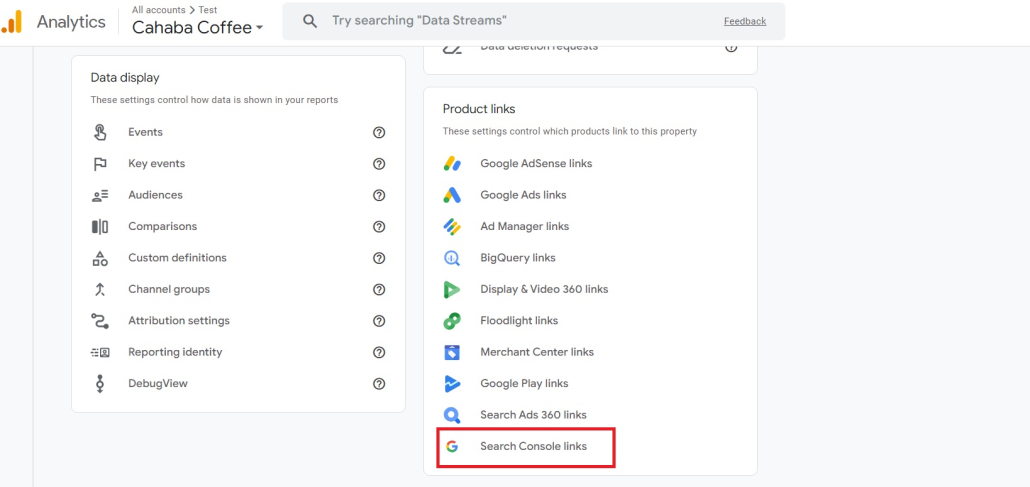
3. Click “Link.”
4. Select the Search Console property you want to connect to your Google Analytics account.
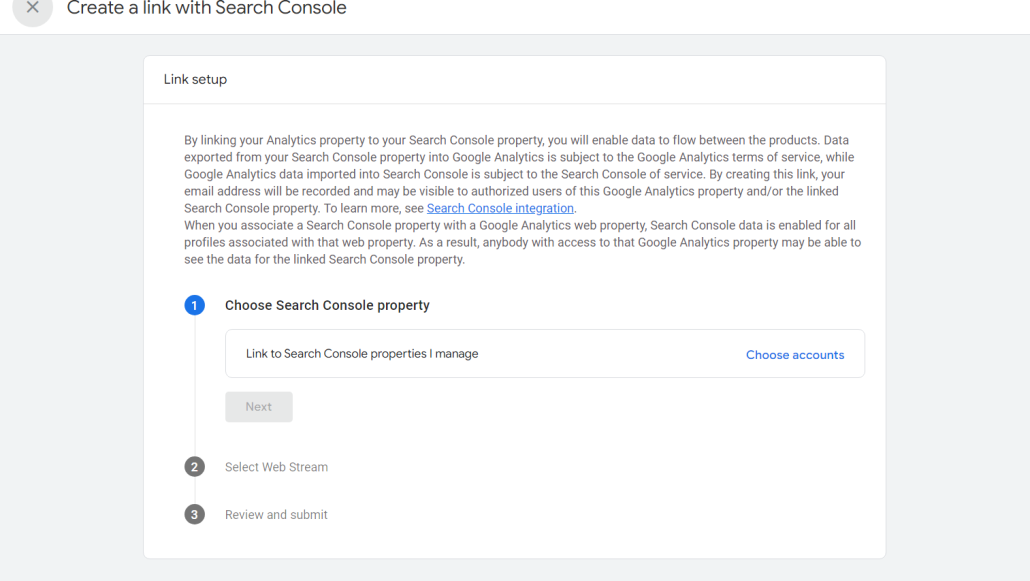
5. Follow the remaining prompts in the “Select Web Stream” and “Review and Submit” tabs to finish connecting your Google Analytics and Google Search Console data.
NOTE: This will allow data flow in BOTH directions, so your Search Console property will now also have access to Google Analytics data (and vice versa).
Unfortunately, there are some kinks in the communication between Google Analytics and Google Search Console. That means that you could sometimes end up with inaccurate data.
Some people who use this system also complain that the data organization after importing from Google Search Console is not very good, which can decrease the usefulness of this strategy.
Let’s take a look at the second major strategy for getting ranking data into Google Analytics.
How to Use ProRankTracker’s API With Google Analytics
ProRankTracker is a highly specialized rank-tracking tool that allows you to monitor your keyword positions on search engines with extreme precision.
Fortunately, you can also integrate your ProRankTracker data with Google’s tools to enhance the usefulness of your data and ensure you’re getting the most out of your SEO toolbox.
Note that the following strategy utilizes ProRankTracker’s API (available on Agency plans and smaller plans as an add-on). If you haven’t yet subscribed to ProRankTracker, try signing up for a 14-day free trial or booking a demo to see how you can track your rankings without dealing with inaccurate data.
This strategy can massively improve your understanding of your ranking data and help you visualize your data more accurately.
Add URL/Keyword Combos to ProRankTracker
The first step to tracking keyword rankings using ProRankTracker is to add URL/keyword combos to the platform.
Here’s how to do it:
1. Go to “Add Wizard” in the left-side toolbar.
2. Type or paste your new URL into the URL box.
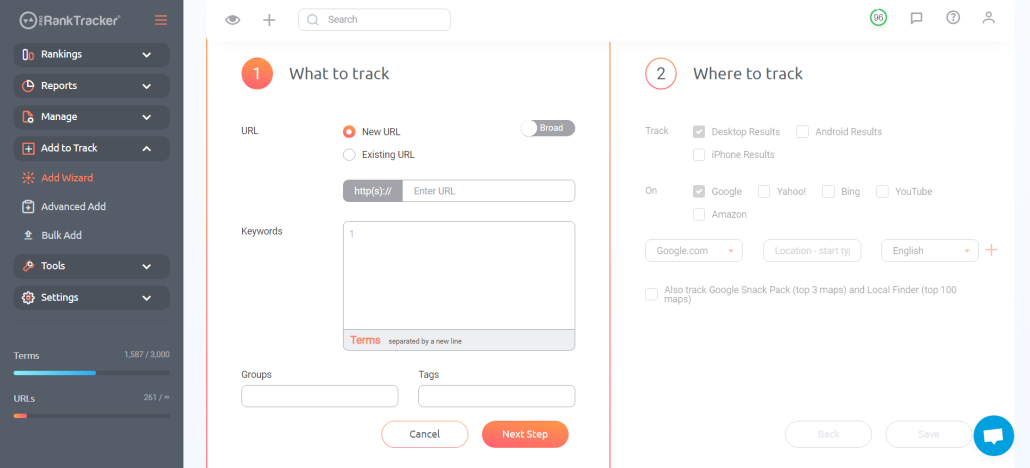
3. Specify the keywords you want to monitor for that URL (separated by new lines)
4. Set your preferences for search engines, locations, and device types (highly recommended).
5. Click “Save” to start tracking the keywords.
ProRankTracker will begin tracking these keyword/URL combinations, and you can later access this data in your Rankings Views or via the API, which is the method this article will discuss.
Find Your ProRankTracker API Token
Note: If you don’t have developer skills, I recommend integrating ProRankTracker with Google Looker Studio to consolidate your GA4 and rank tracking data in one place. If that’s you, skip to “Consolidate Your Data Using Google Looker Studio.”
The rest of these steps will discuss using ProRankTracker’s API to pull your ProRankTracker data into other tools like Google Analytics. Please note that using an API requires some technical knowledge to set up the appropriate code that enables communication between platforms.
Your API token authenticates your access to ProRankTracker’s data and allows you to make API calls from other tools. Your token is unique to your account, which is how ProRankTracker knows to pull YOUR data instead of inaccurate data that might belong to another user.
To find your API token:
1. Navigate to “PRT API Doc” under the “Tools” section of the left-side toolbar.
2. Scroll until you see a yellow box titled “authentication.”
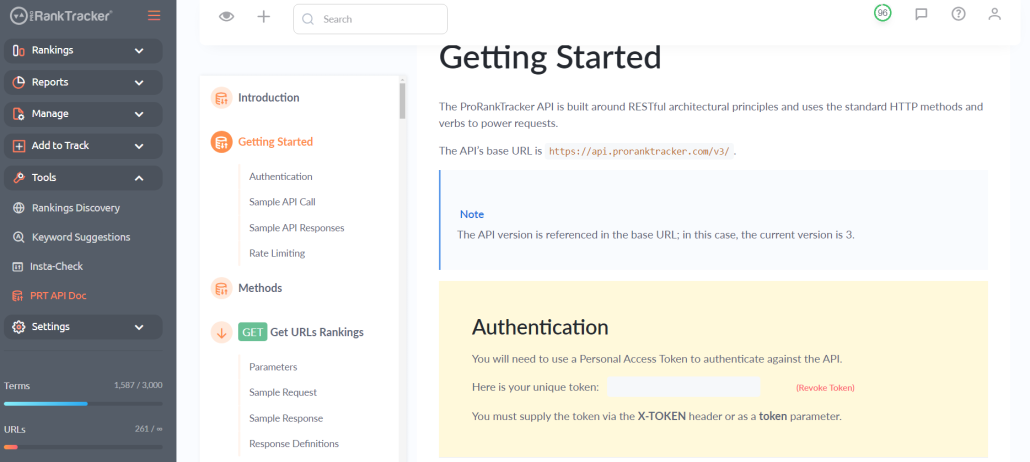
3. Copy the unique API token provided (your API token will appear in the grey box shown in the authentication section–I blanked mine out for security reasons).
Whenever you see the code “MYTOKEN,” in the API doc, make sure you replace it with your unique token for the API to work properly.
Use API Calls to Transfer Data Between ProRankTracker and Google Analytics
Now that you have your API token, it’s time to set up API calls to transfer data between ProRankTracker to Google Analytics.
This requires you to write scripts that pull keyword ranking data from ProRankTracker and then post that data into Google Analytics (again, this takes some technical knowledge that we won’t get into here).
API calls fall into different categories:
- “Post” calls add data to ProRankTracker based on your data from another tool (Google Analytics in this case).
- “Get” calls pull data from ProRankTracker into Google Analytics.
- “Delete” calls delete data from ProRankTracker.
- “Put” calls edit existing data within ProRankTracker.
Here’s an example of how you can structure an API call to manipulate ProRankTracker data from Google Analytics:
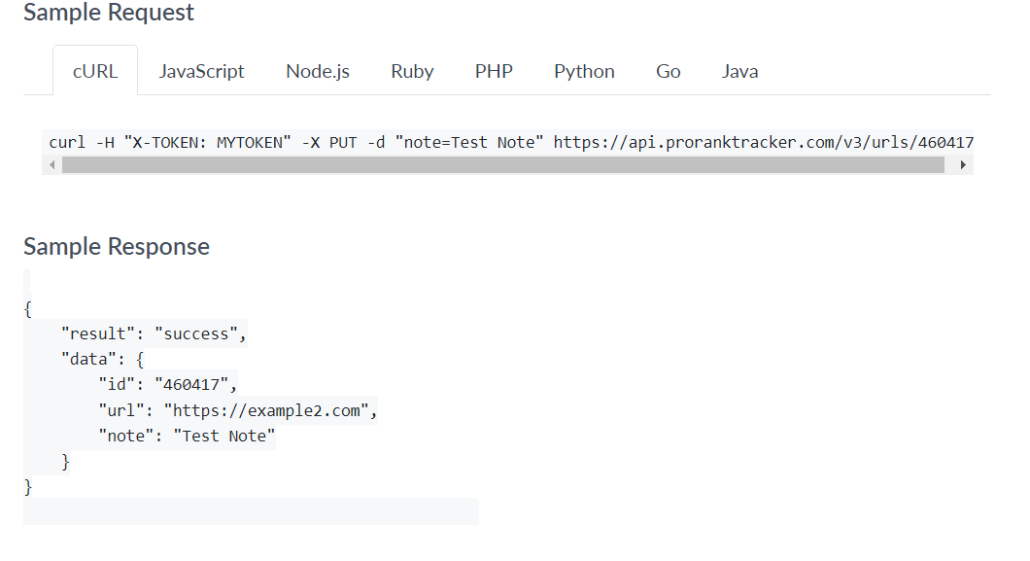
It’s important to note that you can use ProRankTracker’s API in other tools (like Google Looker Studio), which further enhances the strength of your data.
Additionally, the method of using ProRankTracker’s API removes the weaknesses of trying to communicate between Google Analytics and Google Search Console as discussed earlier. You’ll be able to use ProRankTracker’s 100% accurate, daily updated data to ensure your rank analysis is perfect every time.
Access ProRankTracker Data From Google Analytics
After correctly setting up your API calls, your ProRankTracker data will start to migrate seamlessly between ProRankTracker and Google Analytics, meaning you can now access your ProRankTracker data from within Google Analytics.
As one of the most popular SEO tools on the market, Google Analytics gives you the ability to do several important things with your ProRankTracker data:
- Compare ranking changes with customer behavior patterns
- Analyze how changes in rank coincide with changes in CTR, time on page, and other metrics
- Understand how your traffic changes based on your current ranking status (including traffic sources, referring keywords, etc.)
Theoretically, you can perform these analyses even if your data isn’t all centralized in Google Analytics, but it becomes so difficult and tedious that it’s almost impossible.
Using the API setup mentioned above will have you MASSIVELY increase how much you’re able to do with Google Analytics, and it will help take your agency to the next level of SEO understanding and strategy.
Consolidate Your Data Using Google Looker Studio
Remember how we mentioned that you can connect ProRankTracker to various tools–not just Google Analytics?
Let’s see how you can further maximize your use of ProRankTracker’s accurate data to better understand your ranking data.
Google Looker Studio is an INCREDIBLY powerful tool for visualizing data from multiple sources.
By consolidating your keyword ranking data from ProRankTracker and website traffic data from Google Analytics, you can generate comprehensive reports that display both search performance and keyword positions in a single dashboard (or some other combination of Google Analytics and ProRankTracker data).
Here’s how to create a single, consolidated Looker Studio dashboard:
1. Connect both Google Analytics and your ProRankTracker data source to Google Looker Studio by clicking “Create,” then selecting ProRankTracker and Google Analytics as data sources (follow the instructions in the “Integrations” section of your ProRankTracker settings to connect ProRankTracker to Looker Studio easily).
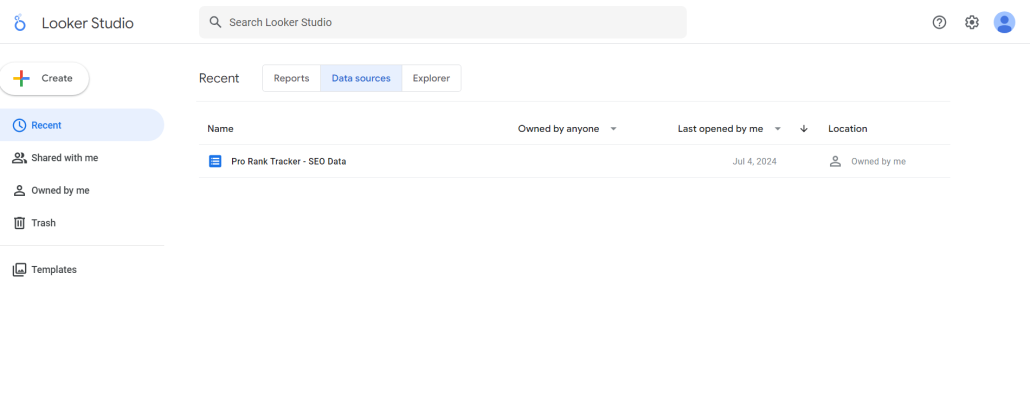
2. After connecting your data sources, click the “Create” button to create a new report.
3. Click on “Add data” to select your data sources for your report.
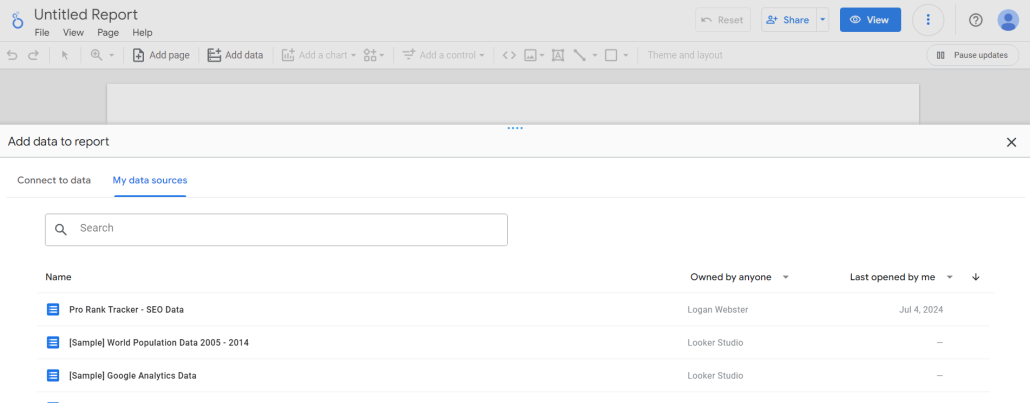
4. Customize your report as desired to show the data in the format of your choosing (this can take some practice and fiddling around with the various options. I recommend watching some YouTube videos to get a handle on everything you can do with Looker).
By the end of this process, you should have a fully functional report blending your most important data from ProRankTracker and Google Analytics!
You can continue to customize your report or create new reports to visualize your data in different ways and get an even deeper understanding of your SEO progress.
FAQs
How do I track keyword rankings in Google Analytics?
Google Analytics itself doesn’t track keyword rankings. However, you can use tools like ProRankTracker and import that data into Google Analytics using APIs to track how your rankings influence website performance. If you’d like to just consolidate your GA4 data and rank trackingdata in one place, integrating ProRankTracker with Looker Studio will be the easier alternative.
How do I monitor keyword rankings?
You can use a dedicated rank tracker like ProRankTracker to monitor keyword rankings. It automatically tracks keyword performance across search engines and offers an API for data integration with other tools like Google Analytics and Google Looker Studio.
Is a rank tracker free?
Many rank trackers, including ProRankTracker, offer free trial free plans with limited features. However, a paid plan is usually required for more advanced features such as API access and extensive keyword tracking.
Conclusion
Combining ProRankTracker with Google Analytics and Google Looker Studio lets you get a full picture of your keyword rankings and the resulting website traffic.
While some technical knowledge is required to work with APIs and connect your SEO platforms, the effort is worth it for improved data analysis. With this integration, you can improve your ranks, visualize your data, and improve your strategies based on both ranking and traffic insights.
Happy tracking!