
5 Best Google Maps Rank Trackers (Tested & Reviewed)
Ever wonder why some businesses always show up at the top of Google Maps, while yours seems buried no matter what you try?
You’re not alone.
Local competition is fierce, and ranking higher on Google Maps can feel like running a race in the dark — you’re sprinting alongside others but have no idea if you’re gaining ground or falling behind.
But here’s the good news: the right Google Maps rank tracker can give you the clarity, data, and insights you need to climb the rankings (and stay there).
With a proper tracking tool, you’ll know exactly:
- Where your business shows up across your service area
- Which keywords bring you the best local visibility
- How your rankings change over time
- What actions to take next to keep improving
In this article, you’ll discover the best Google Maps rank trackers available, plus how to use them to get found by more customers, drive more traffic, and grow your business faster.
Let’s dive in!
I’ll cover:
- ProRankTracker
- Semrush Local
- BrightLocal
- Local Falcon
- Free Option: Wiremo
- How to Improve Your Google Maps Rank
- FAQ
- Conclusion
ProRankTracker
ProRankTracker is one of the most advanced rank-tracking tools available, and it’s the perfect choice for businesses looking to improve their Google Maps SEO.
ProRankTracker provides its users with access to local SEO tools, including Google Business Profile tracking, precise location data, and powerful filtering options, enabling them to track their desired location down to the zip code.
Not only that, but ProRankTracker offers the most accurate data available of any rank tracker currently available (100% accurate data, updated daily), with a no-strings-attached 14-day free trial.
Unlike other general SEO tools that also offer rank tracking, ProRankTracker doesn’t limit you to the number of URLs and projects you can track. Plus, by using a dedicated rank tracker, you can avoid paying for features you don’t need for local SEO (like you would with Ahrefs or Semrush).
Let’s look at why ProRankTracker might be the perfect tool for you!
Pros
- Accurate and daily-updated ranking data on EVERY plan
- Tracks rankings on a global scale or down to a single neighborhood
- Shows Global and Local (country level) search volume for each term and engine
- Shows local Google Maps ranks for your Google My Business Profile
- Supports tracking in multiple search languages
- Track unlimited URLs
- White-label reporting for client presentations
- Comprehensive mobile and desktop ranking insights
- Best pricing available for a rank-tracking tool
- Free trial available
Cons
- Some users note a learning curve when starting (but users have access to help articles and top-notch customer support)
- Limited integration options compared to some competitors
Features
- Daily rank tracking and updates – Provides precise, daily insights into keyword rankings.
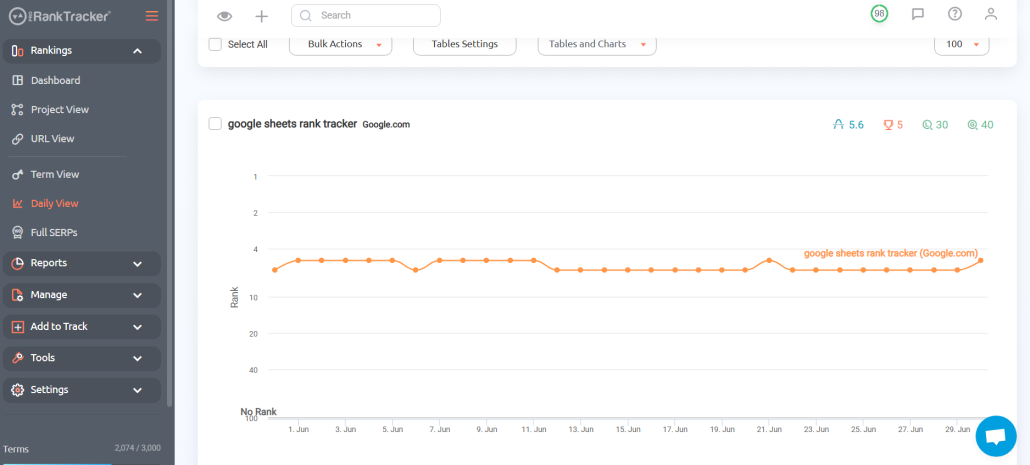
- Local and global rank tracking – Monitors keyword performance in specific locations and across the globe with high specificity (or more generalized if that’s what you need)
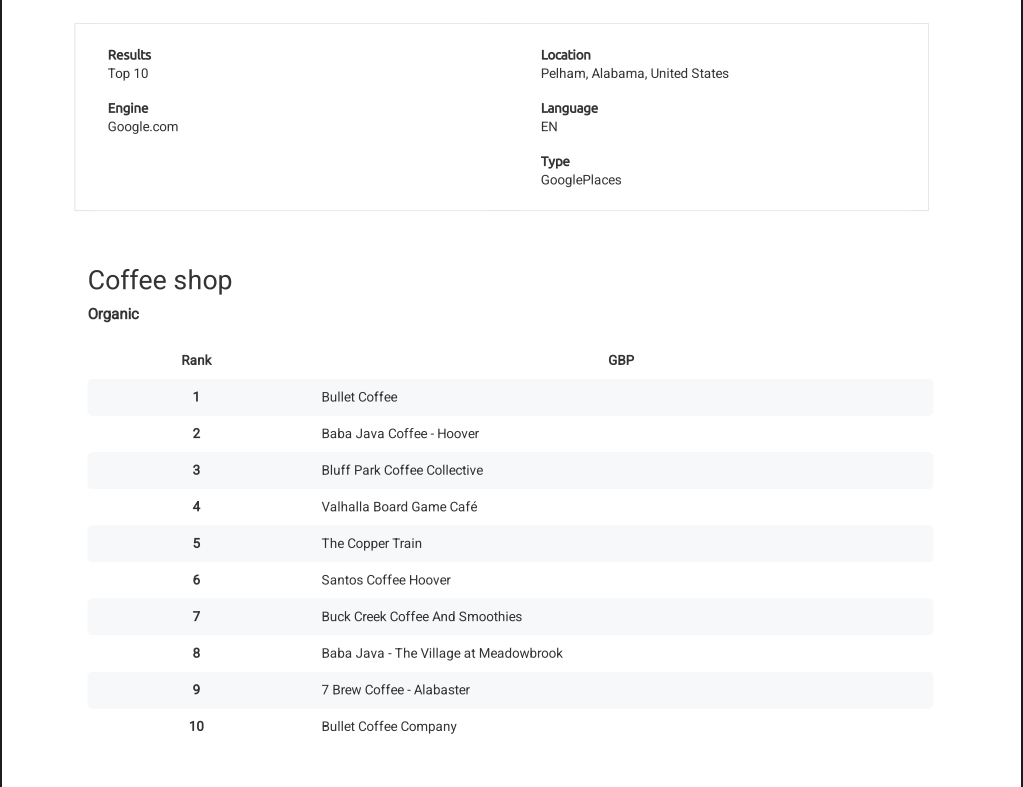
- Snack Pack and Local Finder tracking – Track your GMB profile’s rank on Google Maps top 100 spots and determine precisely when you rank in the coveted Snack Pack (top 3 spots on Google Maps for a given search term)
- Detailed and customizable reports – More than 20 types of reports and notifications (including local SEO reports). You can customize your reports only to include URLs that target specific locations or Google Business Profiles, making this a perfect feature for local rank tracking.
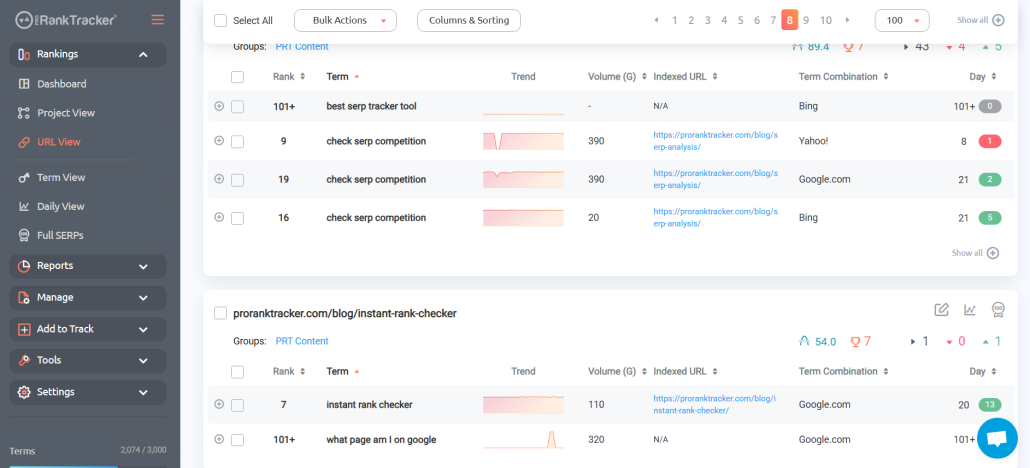
- Rankings Views – 6 different Rankings Views give you a varied and complete understanding of your ranking progress, including the ability to split your ranks into various groups, tags, and projects for easier targeted tracking of different geographic areas.
- Insta-Check – Quickly check on potential keywords using a credit-based SERP checker that doesn’t count toward your overall tracking limit. You can use Insta-Check as a Google Maps rank checker to determine what the competitive landscape for a keyword is like.
- Keyword discovery and tracking – Helps identify and track relevant keywords for your business.
Pricing
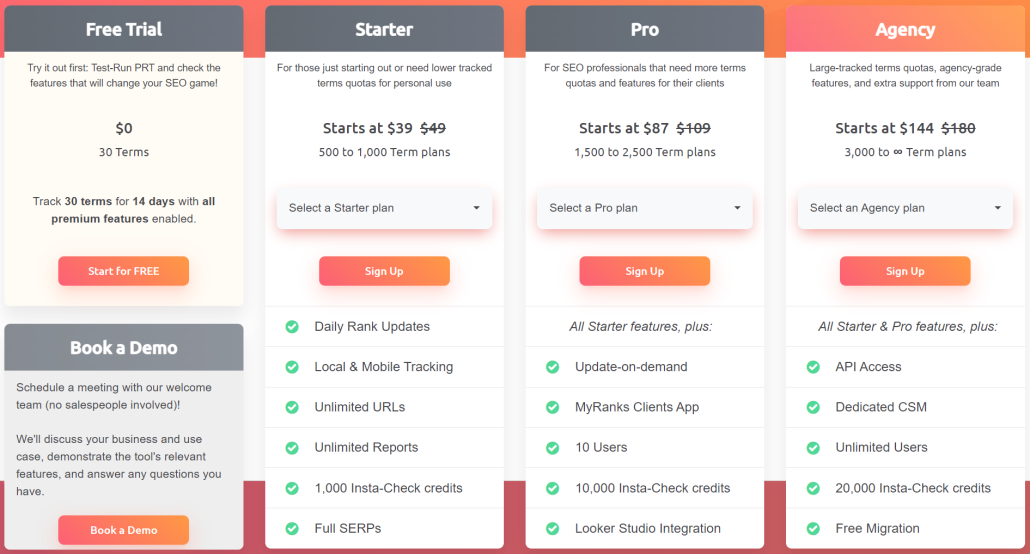
ProRankTracker offers some of the most competitive pricing in the industry, along with a 14-day free trial that includes all premium features. After finishing your free trial, you have 3 pricing tiers available to you:
- Starter Plan – Starts at $39/month (paid annually) for up to 500 tracked terms
- Pro Plan – Pro Plan – Starts at $87/month (paid annually) for up to 1,500 tracked terms
- Agency Plan – Starts at $144/month (paid annually) for 3,000 tracked terms
Reviews
ProRankTracker consistently receives almost exclusively 5-star reviews (with a 4.6 average on G2). The most common positive comments include accuracy, ease of use, and customer service.
Here’s what Bryan R. had to say about his experience with PRT:
“What do you like best about Pro Rank Tracker?
Pro Rank Tracker has been an invaluable tool for tracking our local Google rankings. It’s incredibly user-friendly, making it easy to add new keywords and URLs to monitor. The insights provided are detailed and accurate, which has significantly helped us optimize our SEO strategies.
One standout feature is the API, which we utilize for in-depth monitoring, pushing rankings to a Google Sheet. It integrates seamlessly into our workflow and provides comprehensive data that helps us stay ahead of the competition.
Pro Rank Tracker is a top-tier tool I highly recommend for anyone serious about tracking their SEO performance.
What do you dislike about Pro Rank Tracker?
I can’t think of anything at the moment.
What problems is Pro Rank Tracker solving and how is that benefiting you?
We work with local service businesses, so it solves the problem of accurately tracking local search rankings.”
Semrush Local
Semrush is a well-known all-in-one SEO tool, but what some people don’t realize is that it also creates a killer set of local SEO tools.
This set of local SEO tools is purpose-built for tasks such as tracking your rank on Google Maps and understanding how it varies across your geographic area.
The best part?
You can subscribe to JUST these tools, meaning the cost is significantly lower than for the entire Semrush toolbox.
Let’s talk about whether this tool might be right for you.
Pros
- Specialized tools to optimize local SEO
- Visual Google Maps tools help you determine your ranks quickly and accurately
- Relatively inexpensive compared to the primary Semrush tool
- Save time with automation
- Accurate data with daily updates
- Helpful free tools are available with no subscription
Cons
- The Google Maps rank tracker is limited by the number of credits that your plan allows
- Features like local reporting are severely limited and quite expensive to upgrade (unlike ProRankTracker, which provides unlimited reports on every plan)
- No tool to help identify high-value keywords
- The tool doesn’t offer much in the way of SEO, other than for local use
Features
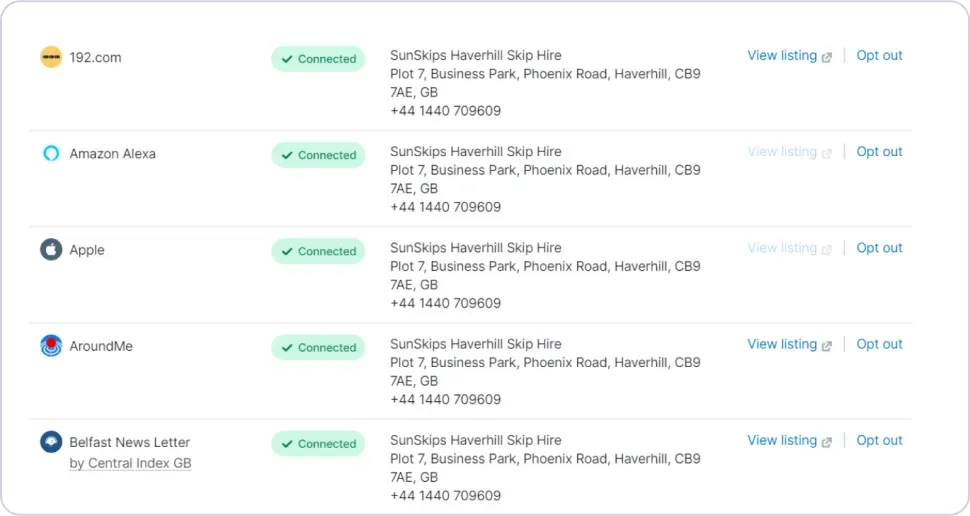
- Listing Management – Control your business listings across various local directories using Semrush Local as your home base. Semrush communicates with more than 150 online directories.
- Review Management – Instantly view all your Google reviews from the Semrush Local Dashboard. Semrush sends you notifications when you get negative reviews and allows you to respond to them directly.
- AI Generated Responses – Need help with what to say to your online reviews? Semrush uses AI to suggest responses to your reviews that will help you sound professional.
- Map Rank Tracker Heatmap – Track your website’s rankings in local search results, including the ability to see a heatmap of your ranks across multiple locations.
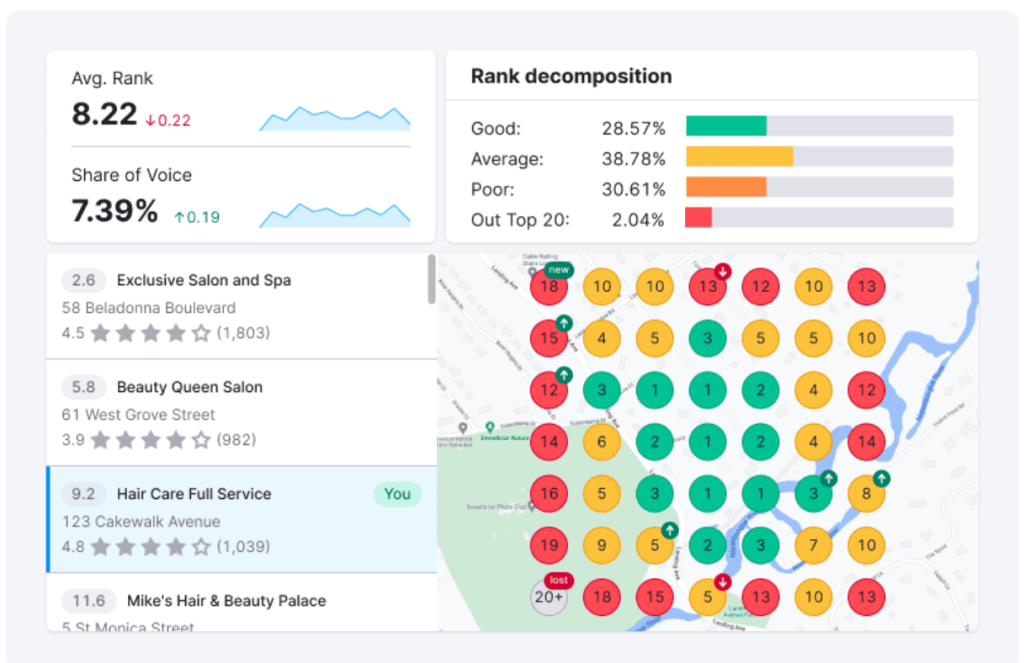
- Google Business Profile Manager – Gain detailed insights into your Google Business Profile’s performance and receive suggestions on how to improve it for increased visibility.
- Description Generator – A free tool that generates an SEO-optimized description of your business based on the details you provide.
- Google Review Link Generator – Just input your business’s name, and Semrush will generate a free link or QR code that you can share with your clients to make it easier for them to leave reviews.
Pricing
Semrush Local is a subset of the main Semrush software, meaning you don’t have to pay for the all-in-one tool to access the local SEO tools discussed above (which starts at $117.33/month, paid annually).
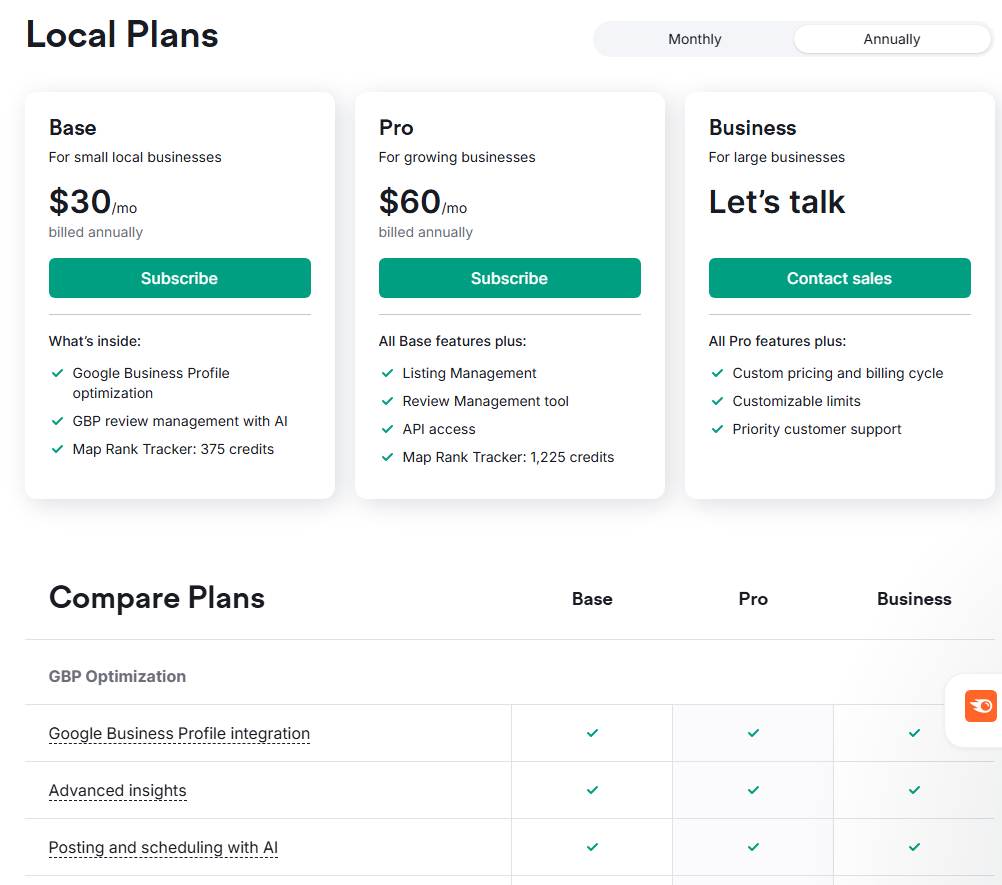
There are 3 pricing tiers available for Semrush Local:
- The Base plan offers Google Business Profile optimization, review management, and the Google Maps tracking features for $30/month (paid annually).
- The Pro plan costs $60/month (paid annually) and adds listing and review management, API access, and additional Maps rank tracker credits.
- For those with even larger needs, Business plans are available with custom pricing and features.
Reviews
Semrush is frequently praised for its extensive tools, and many users mention the powerful local SEO tools mentioned above.
By far, the most common complaint about Semrush is the high price, but just subscribing to the local toolset should help reduce this problem. Some users also mention a difficult learning curve.
Here’s what Christian B., a real Semrush Local user, had to say about using the tool:
“What do you like best about Semrush?
Semrush enables me to take care of our websites and listings in different countries from one location. The dashboard gives me key data immediately after logging in. The local listing management system is an easy way to keep everything updated from one location.
What do you dislike about Semrush?
The ‘Domains for monitoring’ list does not allow you to change the order of items. The domains monitored are listed according to the order I added them to the list. That is inconvenient as domains from one group are mixed up with other domains I am monitoring.
I use the tool to monitor our own domains and that of competitors. This disorderly list makes analysis more difficult than necessary.
What problems is Semrush solving and how is that benefiting you?
Besides using Semrush for SEO I have started using it for local listing. Previously, I used to do this all manually. That generates a lot of work, you can avoid when using Semrushs local listing management tools. One unique aspect is that it not only tells you it was successful or failed in submitting your data but if something went wrong, it helps you fix the issue. Other tools are simply data pumpers. Semrush local listing management functionality is intelligent beyond the simple submitting functionality.”
BrightLocal
One of the main determinants of success in local SEO is what your customers say about your business.
Don’t believe me?
65% of all new business comes through referrals, whether word-of-mouth or online reviews.
That means managing the way people perceive your business is significant.
But here’s the kicker: what people say about your business online can have a DRAMATIC effect on your Google Maps rank.
That means keeping track of both your Google reviews and your Google Maps rank, which can help you understand why your rankings are changing and how to address the root problems.
That’s precisely what BrightLocal helps you do. This reputation management tool helps ensure that you maintain a positive reputation and encourages people to make informed purchasing decisions.
Let’s talk about whether BrightLocal might be right for you.
Pros
- Full suite of local SEO tools to help you manage your online presence
- Reasonable pricing
- Google Maps rank-tracking features that blend seamlessly with reputation management tools
- Time-saving features like the Citation Builder
- Competitor monitoring features
- Free trial available
Cons
- Only local rank-tracking is included, so no broader rank-tracking features like those offered by ProRankTracker.
- No keyword features like those offered by other tools on this list
- Citation builder can cost around $2/listing, so it can get pricey if you’re posting to many different directories
- Some of the most valuable tools are reserved for higher-tier plans.
Features
- Local Listing Management – Manage all your online directory listings from a single location, ensuring that your contact info, hours, and other essential details are accurate across all online directories.
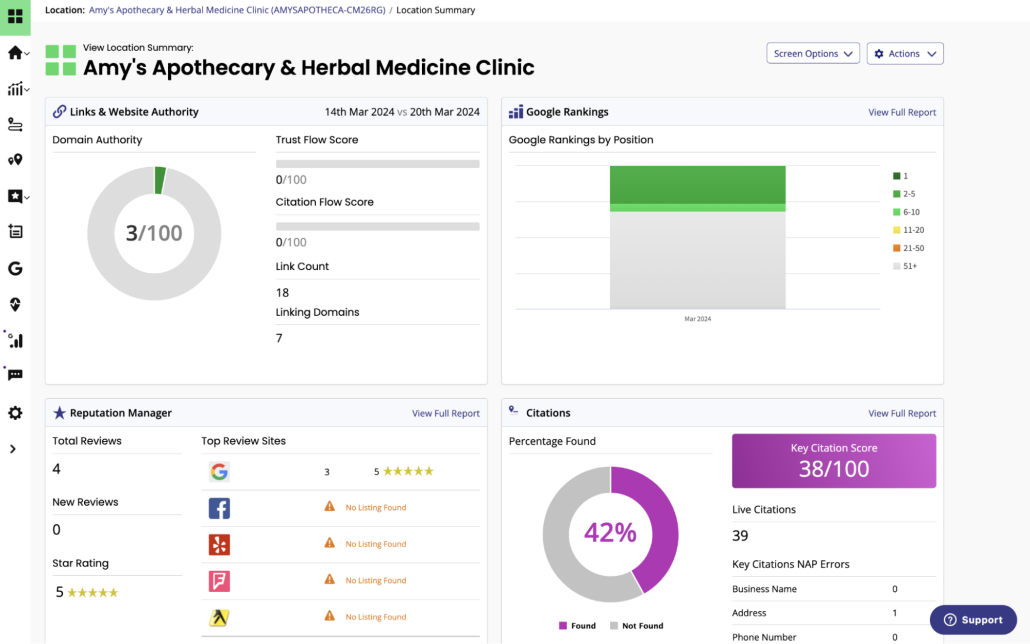
- Citation Builder – Expedite the process of creating local business listings within BrightLocal for a flat one-time fee.
- Local Search Audit – Discover the “why” behind your local search rankings by analyzing over 300 data points. BrightLocal will condense the data for you and provide guidance on how to improve.
- Google Business Profile Audit – BrightLocal will take a look at your GBP and tell you what needs to change for you to improve your online visibility.
- Reputation Management Tools – Analyze and manage customer reviews from various platforms in a single dashboard, facilitating the process of responding to feedback (both positive and negative).
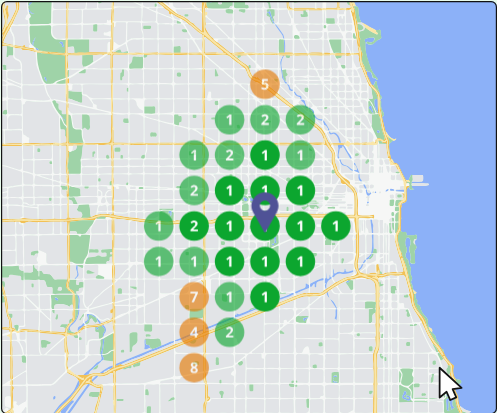
- Local Rank Tracker and Google Maps Search Grid – Go beyond the typical ranking information and see a grid-style overlay of your local area with where you rank for every locale near you.
Pricing
BrightLocal offers 3 pricing plans:
- The Track plan starts at $29/month (paid annually) for 1 location, and it includes local rank tracking, citation audits, GBP monitoring, and competitor insights.
- The Manage plan starts at $36/month (paid annually) for 1 location, and it includes everything from the Track plan plus BrightLocal’s listings management tools.
- The Grow plan starts at $44/month (paid annually) for 1 location, and it includes everything from the lower tier plans, plus BrightLocal’s review management tools.
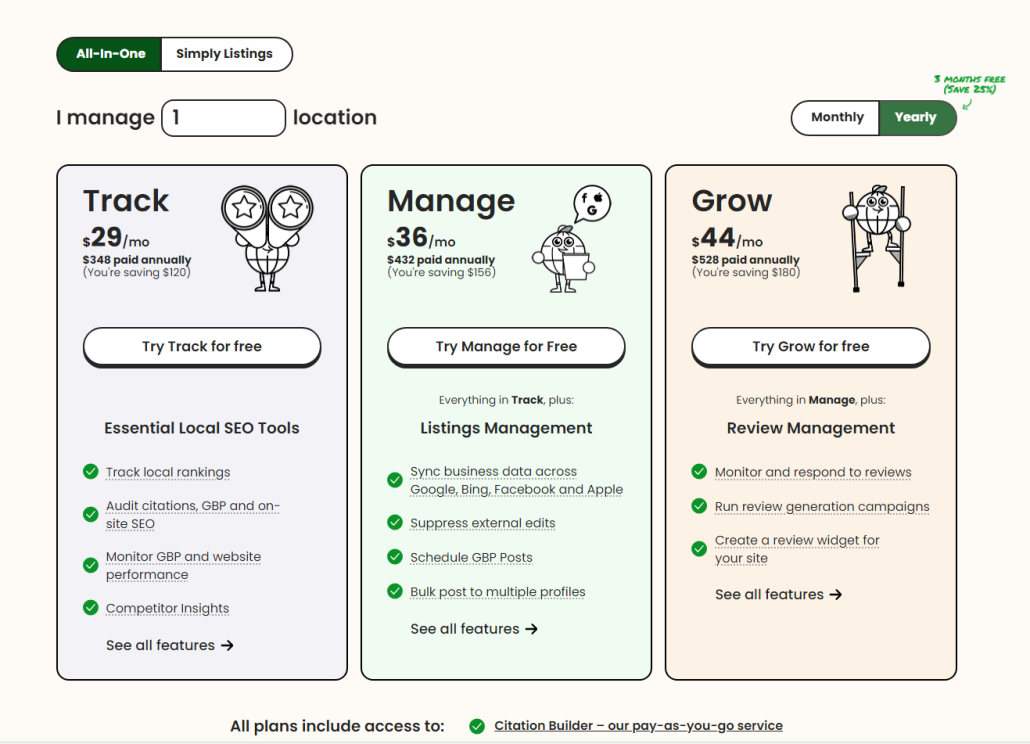
The pricing of each plan increases as you include more locations to manage.
For more details on pricing, check out the BrightLocal pricing page.
Reviews
BrightLocal consistently gets excellent reviews, and many positive comments mention the ease of use and the reputation management tools.
Some of the more negative comments mention the limited tool set and some issues with data accuracy.
Here’s what Joseph M. had to say about using BrightLocal for his business:
“What do you like best about BrightLocal?
For me, using Bright Local is very helpful for those users who need to get reviews and ratings for their work. You can also easily navigate the bright local website based on your frequency of use, and the customer support is also notifying you that they are there to help you if you need it. The bright local has an excellent Ease of Integration.
What do you dislike about BrightLocal?
To be honest, there’s nothing yet that I dislike about Bright Local as far as I am using it. Because every time I use it, I can easily get what I need. But there is just one thing that I am experiencing that is not a big deal for me. It is that there’s a time when you are going to search for a client in the bright local search bar and it is not showing up, but when you continuously press the next button, you will see what you are looking for. But again, it’s not a big deal. Only a few normal things happen on every website. If ever other users are also experiencing that situation and request to fix it, I am sure it can be done with the bright local ease of implementation.
What problems is BrightLocal solving and how is that benefiting you?
Businesses getting reviews and ratings for our clients helps us get what we need.”
Local Falcon
Local Falcon is a specialized local rank-tracking tool built exclusively to help you understand and improve your local ranks.
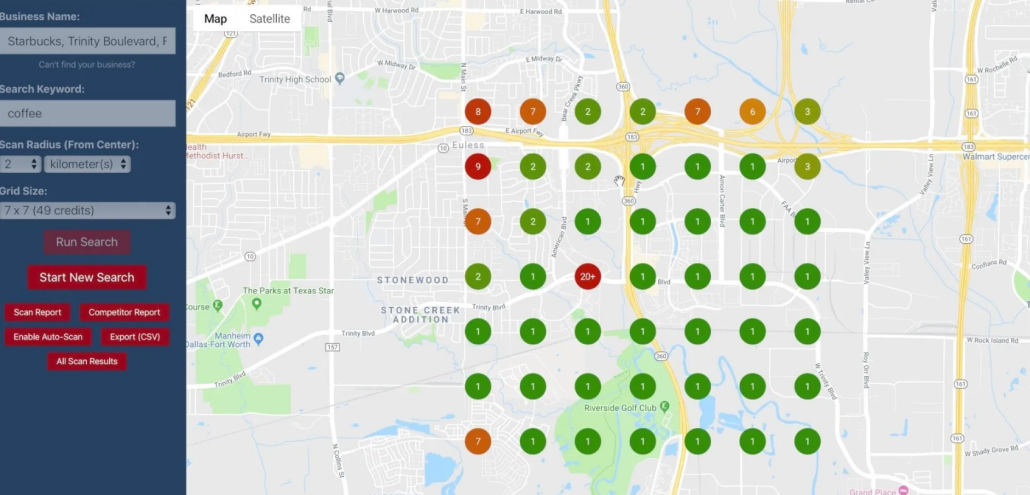
Unlike many rank trackers that only show your rankings at a single point, Local Falcon uses a scan grid to display how your Google Business Profile ranks in different areas.
Why does this matter?
Because rankings can change dramatically just a few blocks apart, especially for competitive local search terms.
Local Falcon’s grid-based tracking means you can see exactly where you appear on Google Maps, so you know where to focus your SEO efforts for the most significant impact.
Aside from the Geo-Grid Google Maps Visualization, Local Falcon also offers a range of other local rank-tracking tools that may be worth considering for your toolbox. Let’s talk about this app in more detail so you can decide if it’s right for you.
Pros
- Visual Google Maps heatmap reports for ultimate clarity
- Reporting is included in every plan
- Free trial with 100 credits
- AI-powered features for quick and in-depth analysis
- In-depth competitor analysis
- Flexible scan grid sizes (from small neighborhoods to broad metro areas)
- Automated recurring scans
- Powerful integrations, including an API, Looker Studio, and Zapier
- Google Maps-focused (no irrelevant data)
- Easily shareable reports for clients
Cons
- No broader organic rank tracking features, so you will need other tools to fill in the gaps in your rank-tracking strategy
- Credit-based reporting means you have to ration your reports or potentially have to spend more money getting more reporting credits
Features
- Scan grids – Visualize local rankings in a heatmap across a customizable area in Google Maps.
- Google Business Profile and Apple Business Connect integration – Pulls data directly from your GBP or ABC profile to give you the most accurate ranking data.
- Fast scan – When you scan Google Maps, Local Falcon pulls data instantaneously (not yesterday’s data), so you always get completely up-to-date info.
- Scheduled scans – Set up automatic recurring scans and have the results emailed directly to you.
- Multi-location tracking – There’s no limit to the number of locations you can track in Local Falcon–just add another GBP and get scanning.
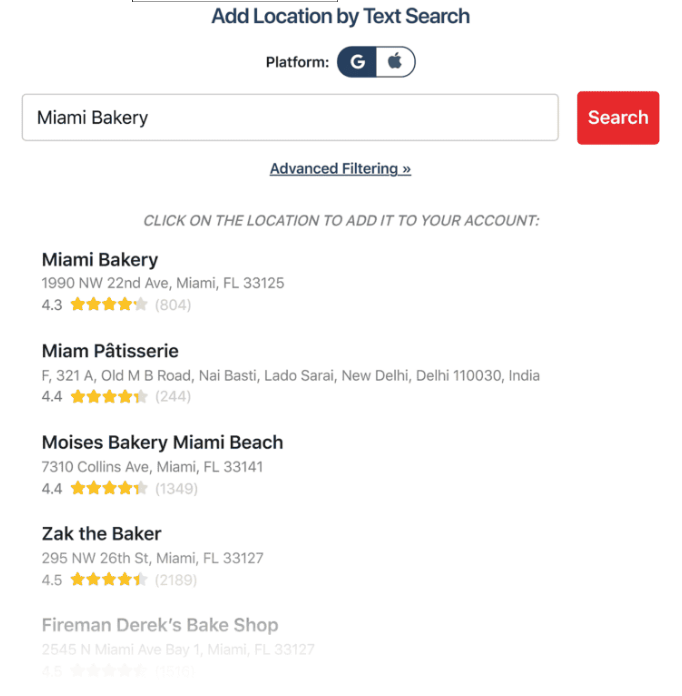
- View ranking trends – Use trend reports to see how your ranks have changed over time, allowing you to make strategic adjustments as necessary.
- AI analysis – Local Falcon’s AI interprets your scan results and gives you actionable steps to improve your local ranks.
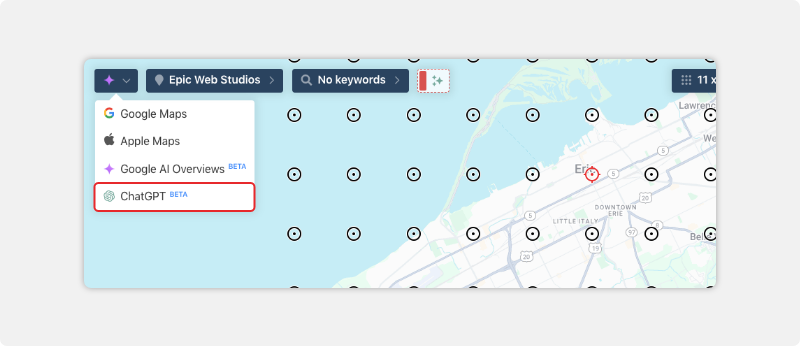
- ChatGPT and Google AI Overview visibility tracking – See how you rank on ChatGPT’s web search feature and in the Google AI Overview.
Pricing
As mentioned above, Local Falcon operates on a credit-based model. They offer several different plans, each with a varying number of credits.
- The Starter plan is $24.99/month (billed annually) and includes 90,000 credits per year.
- The Basic plan is $49.99/month (billed annually) and includes 180,000 credits per year.
- The Pro plan is $99.99/month (billed annually) and includes 372,000 credits per year.
- The Premium plan is $199.99/month (billed annually) and includes 756,000 credits per year.
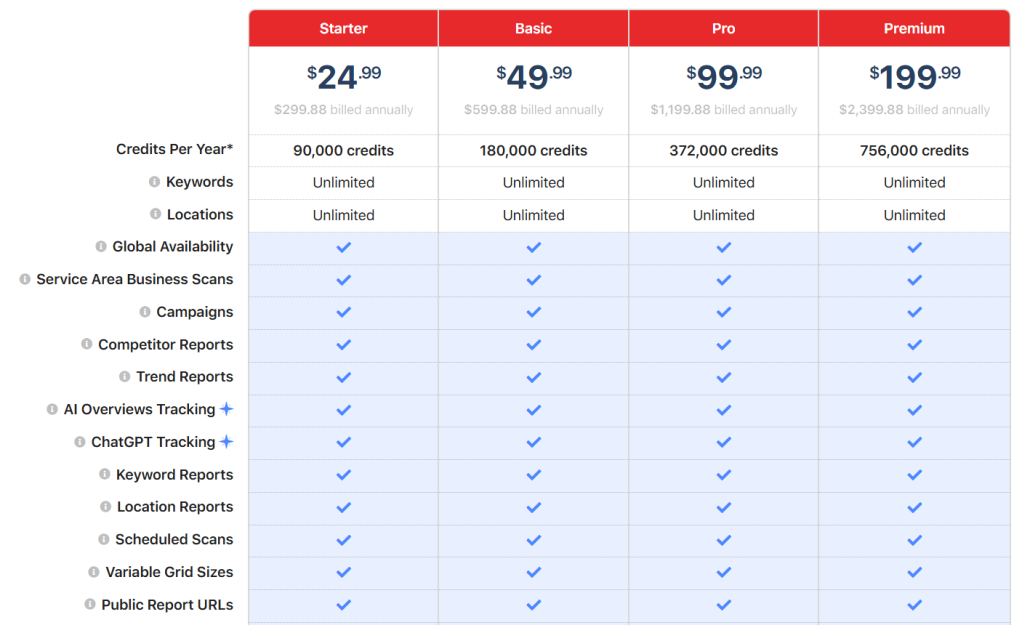
Each data point uses 1 credit, so a 5 x 5 map grid would use 25 credits and a 21 x 21 map grid (the largest scan possible in Local Falcon) would consume 441 credits.
Reviews
Local Falcon receives great reviews, averaging 4.7 out of 5 stars.
The most common positive comments mention the accuracy, ease of use, and fair pricing compared to some competitors.
The few negative comments mention limited reporting options and limited features compared to more complete SEO tools like BrightLocal.
Here’s what Jayant G. had to say about his experience using Local Falcon.
“What do you like best about Local Falcon?
Local Falcon is the most useful multipoint Google Business Profile rank tracking and checking tool for local business owners and local business marketing agencies. It offers a free trial with 100 credits which helps users gain a better understanding of the tool before subscribing to the paid plan. Its data is very accurate in most conditions even if we compare it with the data manually extracted. It also offers bulk rank checking for multiple locations or businesses which saves a lot of time and no one in its competition offer such a facility. We can check our competitor’s ranks and it keeps competitors’ reports separately. It offers API too to use with agencies’ tools.
What do you dislike about Local Falcon?
Local Falcon is the best rank checker in the market but it is limited to just rank checking and nothing else. It doesn’t offer a service to track local business citation tracking, NAP consistency tracking, or Reputation Management tool like its competitors which makes it less relevant for businesses to opt for. Another disappointment is with its API, it doesn’t happen always but once in a fortnight API stops working or begins to deliver false reports which are frustrating and misleading at times.
What problems is Local Falcon solving and how is that benefiting you?
At my organization, I’m using it to track our clients’ Google Business Profiles rankings repeatedly as only these tracking reports are the only standard to measure our efforts. It also helps us constantly keep an eye on our clients’ competitors. We have integrated Local Falcon with our software through its API which helps a lot for both us and the client to track without visiting a third-party website.”
Free Option: Wiremo
Just starting to dip your toes into Google Maps rank tracking and unsure where to begin?
Wiremo offers a free Google Maps rank tracker.
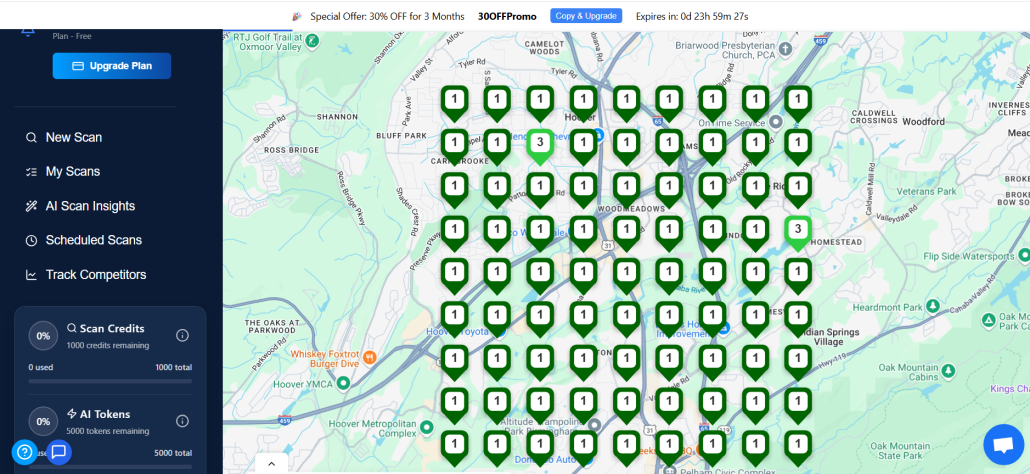
Just input your GBP information, any competitors you’re interested in, and the keywords you want to track. Wiremo’s tool will pull up a Google Maps heatmap showing you your local ranks.
Wiremo provides you with 1000 free credits in this tool, meaning you could generate 40 5 x 5 grids before you have to think about using a paid tool.
After you use all your credits, consider purchasing more credits or moving on to one of the other tools on this list.
How to Improve Your Google Maps Rank
Improving your Google Maps rank isn’t something you should consider optional. It directly drives foot traffic, phone calls, and revenue to your business.
After all, showing up in the Snack Pack (Google Maps top 3) can mean the difference between a steady stream of customers and being completely overlooked.
However, cracking the code to achieve higher local rankings requires more than luck. You’ll need a smart, consistent approach that focuses on what Google values for local search visibility.
Let’s take a look at 4 high-value steps to quickly improve your Google Maps rank and get more local traffic.
Complete Your Profile
Completing your Google Business Profile might sound basic, but it’s one of the most potent ways to improve your Google Maps ranking.
Why?
Google aims to deliver to searchers the most relevant and comprehensive business information possible. An incomplete profile sends the wrong signals and can sink your local SEO efforts before they even start.
Start by filling in every field that Google offers, including your NAP (name, address, phone number), website, hours, categories, services, and attributes (such as wheelchair accessibility or free Wi-Fi).
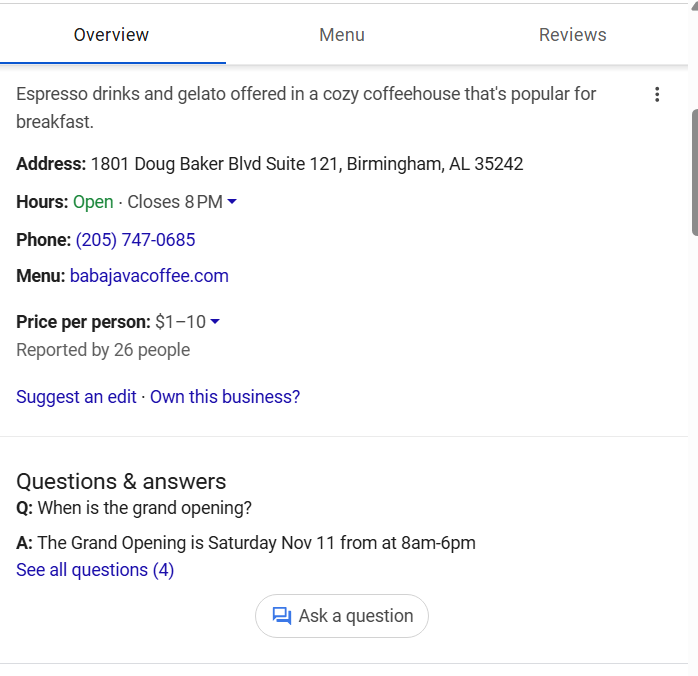
The more trustworthy and complete your profile appears, the more confident Google feels in showing your listing to nearby searchers.
Update Regularly
Updating your Google Business Profile regularly is critical if you want to stay visible on Google Maps.
Local rankings aren’t static – Google rewards businesses that keep their information fresh and relevant. If you let your profile sit untouched, you risk falling behind competitors who actively manage theirs.
Make it a habit to review and update your Google Business Profile. Here are some updates to remember to make:
- Changes to business hours
- Add new photos when your business does anything new
- Respond to reviews
- Adjust services or products as they change
- Seasonal changes (like holiday hours or temporary closures)
By showing Google that you’re actively maintaining your profile, you signal trustworthiness and boost your chances of climbing higher in local search results.
Target High-Value Keywords
Targeting high-value keywords is one of the smartest ways to boost your Google Maps ranking.
Not all keywords are created equal. Some will drive far more ready-to-buy, qualified customers to your business. These valuable keywords typically combine what you offer with strong local intent, such as “24-hour dentist in Miami” or “best coffee shop near me.”
In other words, some of the highest-value keywords are long-tail and highly specific.
Use tools like ProRankTracker’s Keyword Suggestions tool to discover dozens of these high-value long-tail keywords. It can help you identify hidden opportunities you might otherwise miss.
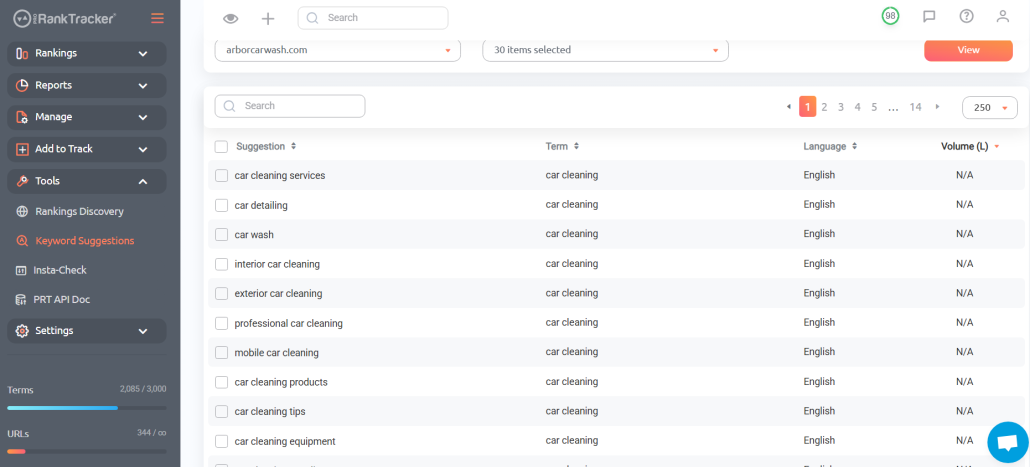
Once you know what to target, naturally incorporate these keywords into your Google Business Profile, including your business description, services, and even the Q&A section.
By doing this, you signal to Google what your business does and who can benefit from it, making it easier for Google to determine which searchers to direct to your site.
Optimize Your Website’s SEO
Optimizing your website’s SEO is crucial if you want to enhance your Google Maps ranking and establish overall local authority. Google considers your website as a trust signal when determining where to rank your business in Maps results.
Here are some primary SEO considerations if you want to rank high on Google Maps:
- Add local keywords to your page titles, headers, and content
- Create dedicated location pages for each service area
- Use consistent NAP (name, address, phone) information across your site and GBP
- Optimize your website for mobile so visitors have a seamless experience on their phones and tablets
- Speed up your website with fast hosting and image compression
- Get local backlinks from community websites or partners
By strengthening your website’s SEO, you reinforce your Google Business Profile and make it much easier to climb the Maps rankings.
FAQ
How do you track your Google Maps ranking?
You can manually track your Google Maps ranking by searching from different locations, but this is time-consuming and inconsistent.
If you genuinely want to take Google Maps seriously, a dedicated tool like ProRankTracker provides precise, automated tracking across multiple locations with daily updates.
How do you improve your Google ranking?
Improving your Google ranking (both Maps and organic) comes down to a consistent, high-quality strategy: optimize your Google Business Profile, collect and respond to reviews, target high-value keywords, and strengthen your website’s SEO.
Google rewards businesses that are complete, relevant, and trustworthy.
Conclusion
If you’re serious about dominating local search and winning more customers from Google Maps, you can’t afford to rely on guesswork.
Consistent, precise tracking paired with smart local SEO is the proven path to staying ahead of your competitors. The tools above give you everything you need: accurate rank tracking, robust reporting, deep local insights, and more.
We recommend trying several of the tools to help you make a decision about which one is right for your business.
Ready to see how much stronger your local rankings could be? Try ProRankTracker free for 14 days and start taking charge of your Google Maps performance today.


