
7 Best Global SEO Software for International Dominance
Trying to figure out how to rank on the SERPs, but you have multiple audiences in multiple different countries?
SEO is challenging, but global SEO presents a unique challenge that requires focus and intense planning.
Fortunately, many tools are available to help businesses accomplish that very goal in a FRACTION of the time and effort it would otherwise take.
Combining these tools into a powerful global SEO toolbox can help you take your website from obscurity to the top page in ALL the countries where you have an audience.
In this article, we’ll discuss our top 7 picks for tools that help businesses like you find their audiences across the globe, and we’ll focus mainly on where each tool shines and how it can help you.
Let’s get started!
We’ll cover:
- Best for Rank Tracking: ProRankTracker
- Best for Keyword Research: Ahrefs
- Best All-in-One SEO Tool: SEMrush
- Best for Understanding User Behavior: Google Analytics
- Best for Technical SEO: Google Search Console
- Best for Site Crawling: Screaming Frog
- Best for Website Translation: Weglot
- FAQs
Best for Rank Tracking: ProRankTracker
ProRankTracker is a highly specialized rank-tracking tool, making it the perfect choice for businesses focused on understanding their SERP performance.
It offers comprehensive tracking capabilities across global and local scales for any search engine where you’re trying to rank.
ProRankTracker is well known for its detailed and customizable white-label reporting, allowing users to track keyword performance with precision and keep their clients happy.
Let’s talk about how ProRankTracker can help you get your website in front of your potential customers across the globe.
Pros
- Accurate and daily-updated ranking data on EVERY plan
- Tracks rankings on a global scale or down to a single neighborhood
- Supports all major search engines (including Amazon and YouTube)
- Shows Global and Local (country level) search volume for each term and engine
- Supports tracking in multiple search languages
- White-label reporting for client presentations
- Comprehensive mobile and desktop ranking insights
- Best pricing available for a rank-tracking tool
- Free trial available
Cons
- Some users note a learning curve when starting out (but users have access to help articles and top-notch customer support)
- Limited integration options compared to some competitors
Features
- Daily rank tracking and updates – Provides precise, daily insights into keyword rankings.
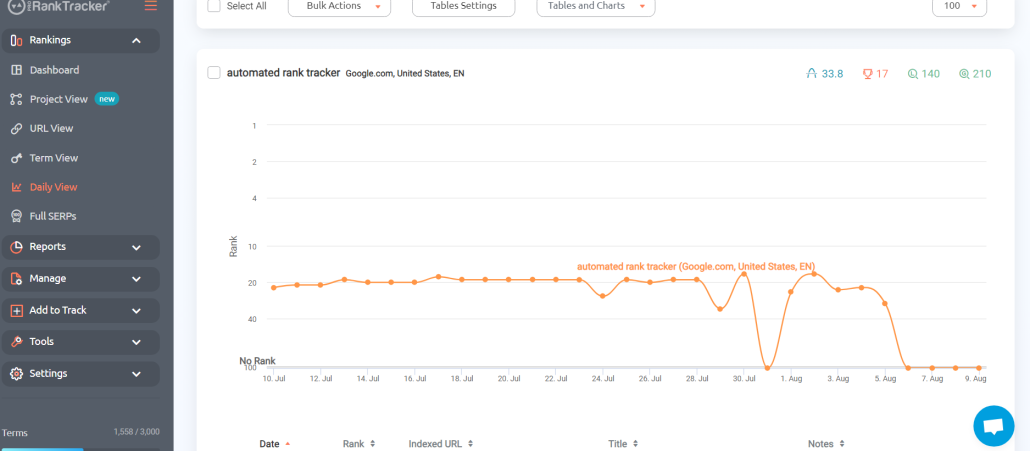
- Local and global rank tracking – Monitors keyword performance in specific locations and across the globe with high specificity (or more generalized if that’s what you need)
- Detailed and customizable reports – More than 20 types of reports and notifications. You can customize your reports to only include URLs that target specific locations and languages, making this a perfect feature for global rank tracking.
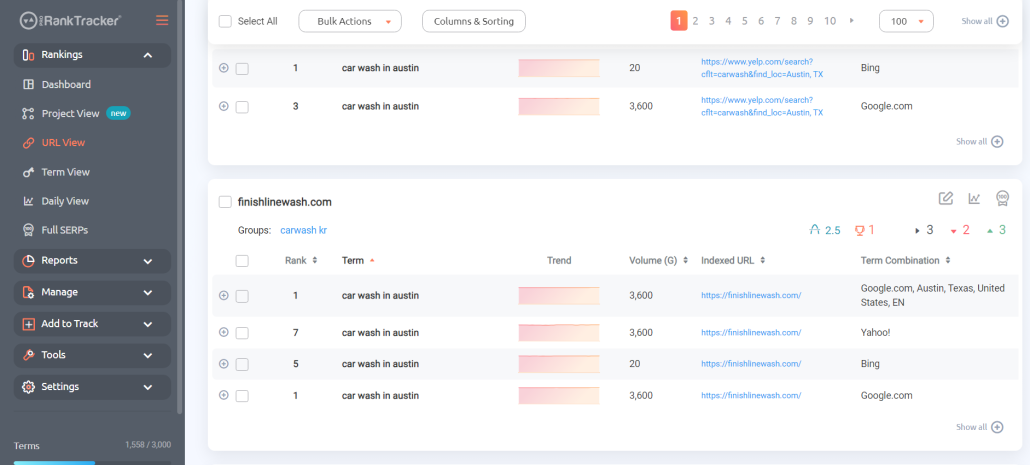
- Rankings Views – 6 different Rankings Views give you a varied and complete understanding of your ranking progress, including the ability to split your ranks into various groups, tags, and projects for easier targeted tracking of different geographic areas.
- Insta-Check – Quickly check on potential keywords using a credit-based SERP checker that doesn’t count toward your overall tracking limit. This is perfect for the times when you’re doing preliminary keyword research or competitor research.
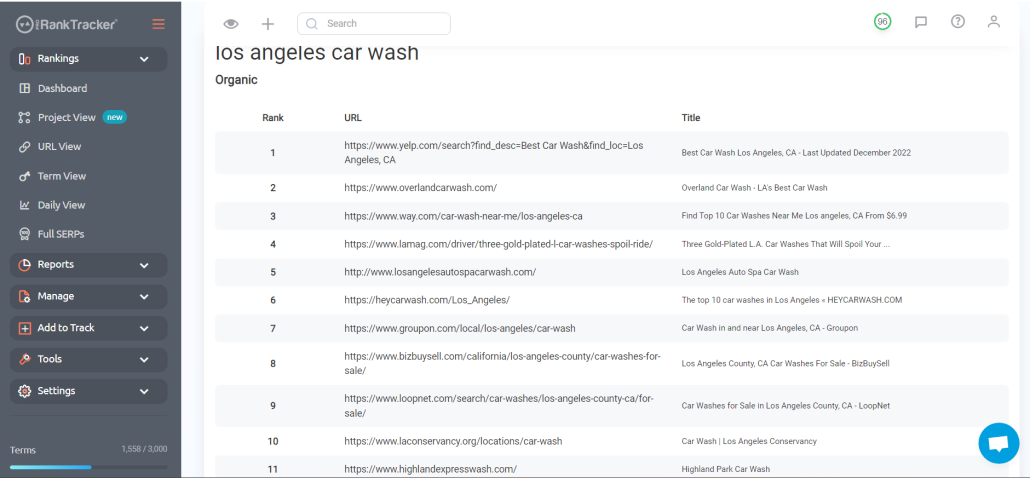
- Keyword discovery and tracking – Helps identify and track relevant keywords for your business.
Pricing
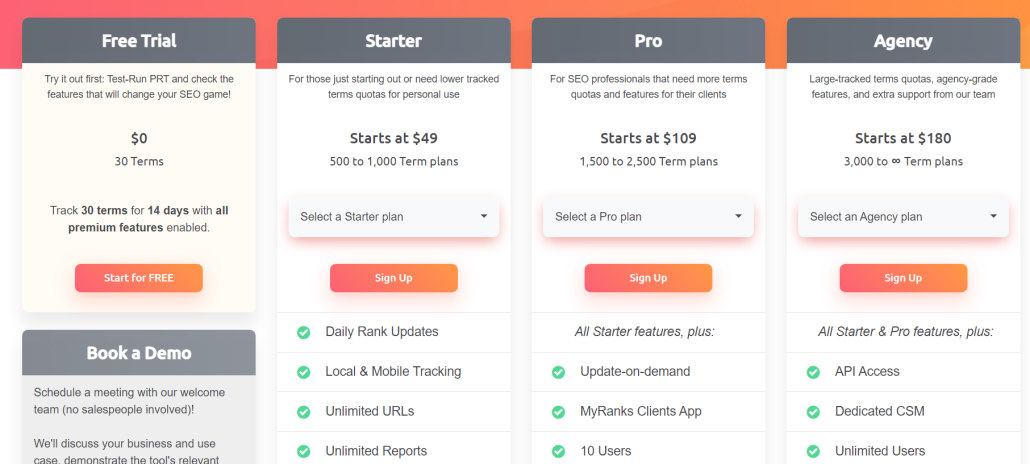
ProRankTracker offers some of the most competitive pricing in the industry. They also offer a 14-day FREE trial with ALL premium features enabled. After finishing your free trial, you have 3 pricing tiers available to you:
- Starter Plan – Starts at $49/month for up to 500 tracked terms
- Pro Plan – Pro Plan – Starts at $109/month for up to 1,500 tracked terms
- Agency Plan – Starts at $180/month for 3,000 tracked terms
Note: The pricing above is for monthly billing. You’ll get a 20% lower rate when you pay annually.
Reviews
ProRankTracker consistently gets almost exclusively 5-star reviews (4.6 average on G2). The most common positive comments include accuracy, ease of use, and customer service.
Here’s what Bryan R. had to say about his experience with PRT:
What do you like best about Pro Rank Tracker?
“Pro Rank Tracker has been an invaluable tool for tracking our local Google rankings. It’s incredibly user-friendly, making it easy to add new keywords and URLs to monitor. The insights provided are detailed and accurate, which has significantly helped us optimize our SEO strategies.
One standout feature is the API, which we utilize for in-depth monitoring, pushing rankings to a Google Sheet. It integrates seamlessly into our workflow and provides comprehensive data that helps us stay ahead of the competition.
Pro Rank Tracker is a top-tier tool I highly recommend for anyone serious about tracking their SEO performance.”
What do you dislike about Pro Rank Tracker?
“I can’t think of anything at the moment.”
What problems is Pro Rank Tracker solving and how is that benefiting you?
“We work with local service businesses, so it solves the problem of accurately tracking local search rankings.”
Best for Keyword Research: Ahrefs
Ahrefs is one of the most popular SEO tools, and it shines in keyword research.
This tool has one of the most extensive global keyword databases you can find anywhere, and it provides valuable information for businesses looking to find keywords for global SEO.
That being said, one of the major downsides of a massive tool like Ahrefs is the large price tag that comes with it, which may be too much for smaller businesses.
Let’s talk about whether Ahrefs is right for your business.
Pros
- Extensive global keyword database
- Keyword competitiveness index makes choosing keywords easier
- Offers a well-organized UX, especially for the quantity of data presented
- One of the largest and most used tools on the market, meaning online tutorials and tips are easy to come by
Cons
- Can be expensive for small businesses or freelancers
- Highly technical features have a steep learning curve for maximum benefit
- Rank-tracking features are not as in-depth as a dedicated tool like PRT
Features
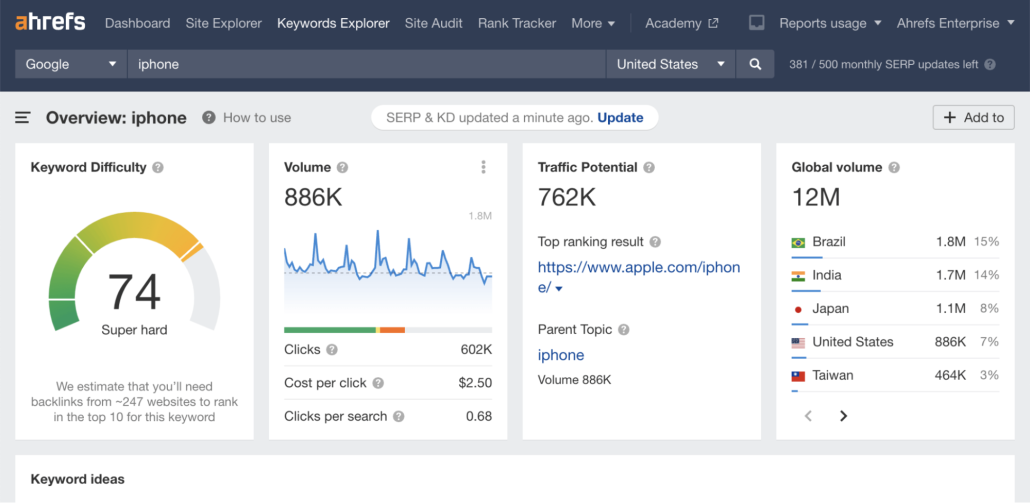
- Keywords Explorer – Delivers in-depth keyword analysis to identify opportunities. Ahrefs gives you location-specific data to help you determine which keywords are more useful in specific countries.
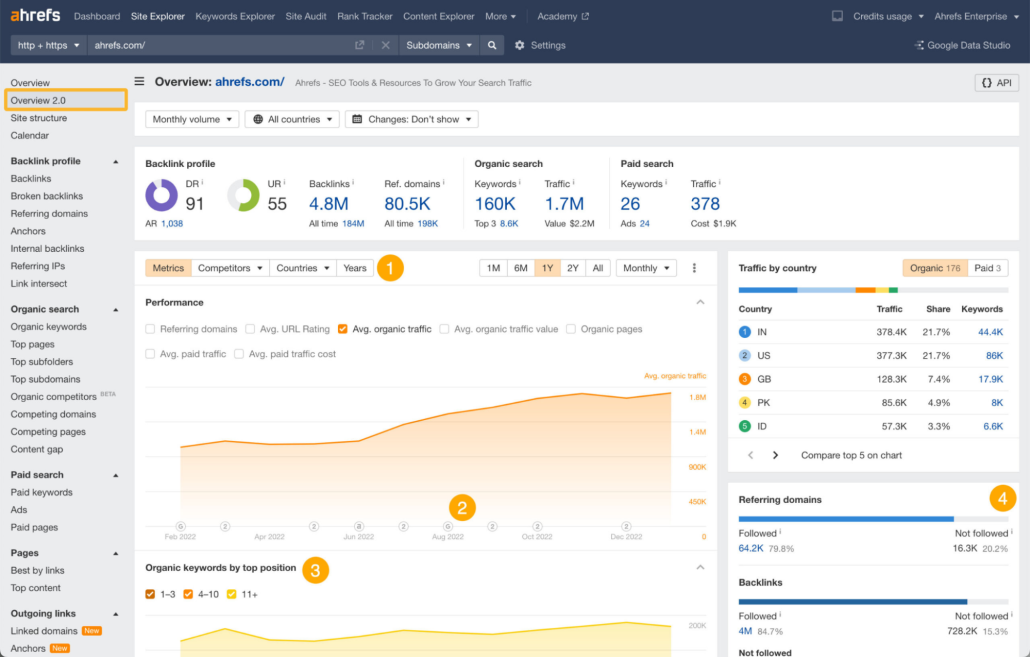
- Site Explorer – Get detailed insights into your (or your competitors’) organic and paid SEO strategies all in a single page.
- Site Audit – Perform thorough checks on your website’s health and get actionable tips to improve your SEO.
- Content Explorer – Identifies top-performing content across the web to help you improve your content strategy or find high-quality external links.
- Rank Tracking – Monitors keyword rankings across the globe. You can determine which countries you want to track your ranks in, and Ahrefs will show you your data for that country.
Pricing
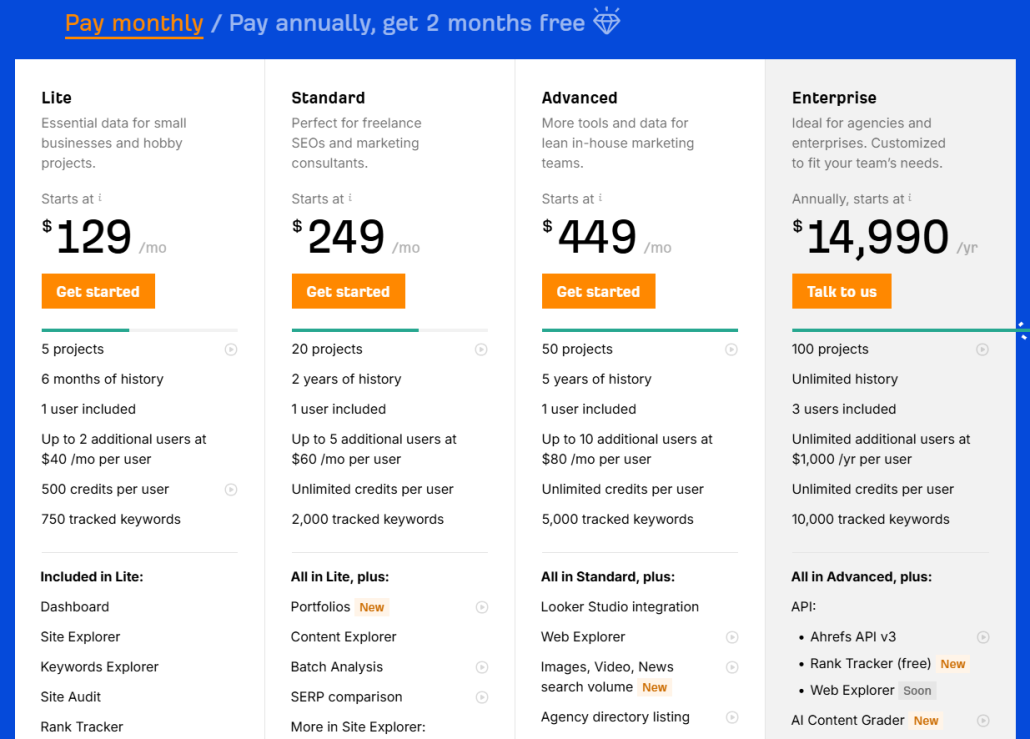
Unfortunately, Ahrefs prices can get extremely high–especially for small businesses or individuals with limited budgets. Here are your options:
- Lite – Starts at $108/month, paid annually, and includes up to 5 projects with 6 months of history. It includes 1 user with 500 credits.
- Standard – Starts at $208/month, paid annually, and includes up to 20 projects with 2 years of history. It allows 1 user with unlimited credits.
- Advanced – Starts at $374/month, paid annually, and includes up to 50 projects with 5 years of history. It allows 1 user with unlimited credits.
- Enterprise – Starts at $14,990/year and includes up to 100 projects with unlimited history. It allows 3 users with unlimited credits.
ahrefs pricing
Reviews
Ahrefs averages 4.5 stars, and many users comment on the accuracy, competitor analysis tools, and keyword research tools. The more negative comments often focus on price.
Here’s what Rafiqul had to say about using Ahrefs:
What do you like best about Ahrefs?
“Ahrefs has every toolset or feature you need to do, including keyword research, backlink checker, and so on.
However, the best feature of Ahrefs is their Webmaster tool which is free for everyone. So, you can simply integrate with Google Search Console and you’ll get access to all your website insights such as ranking, traffic, backlinks, and technical SEO health.”
What do you dislike about Ahrefs?
“The pricing could be improved and simplified more for a small team or individual freelancer. Also, the search volume data accuracy is not up to the mark considering the search volume/traffic potential it shows on the tool and the number of clicks you actually get every month.
Sometimes, there is a big mismatch in the data accuracy.”
What problems is Ahrefs solving and how is that benefiting you?
“Helping SEOs track and improve their SEO performance by providing all the tools and resources.”
Best All-in-One SEO Tool: SEMrush
SEMrush is another SEO and online marketing tool known for being extremely comprehensive.
If you’re looking for an SEO tool that offers a little bit of everything, SEMrush might be the perfect tool.
However, we’ve found that an all-in-one tool like SEMrush works best when paired with highly specialized tools like ProRankTracker for detailed tasks like rank tracking.
Additionally, SEMrush can get extremely expensive and will probably be outside many smaller businesses’s price range.
Let’s examine SEMrush in more detail to help you decide if it belongs in your toolbox.
Pros
- SEMrush is an all-in-one tool with features covering all aspects of SEO
- User-friendly interface with clear dashboards
- Strong competitor analysis tools
- A robust global feature set gives you the ability to analyze keywords and data from different locales around the world
- High-quality education resources to help you get the most out of the broad toolset
Cons
- It can be overwhelming due to the sheer number of features
- High cost, especially for smaller businesses
- Many businesses will not need all the tools offered by SEMrush, meaning you’re paying extra for a tool you might not use
Features
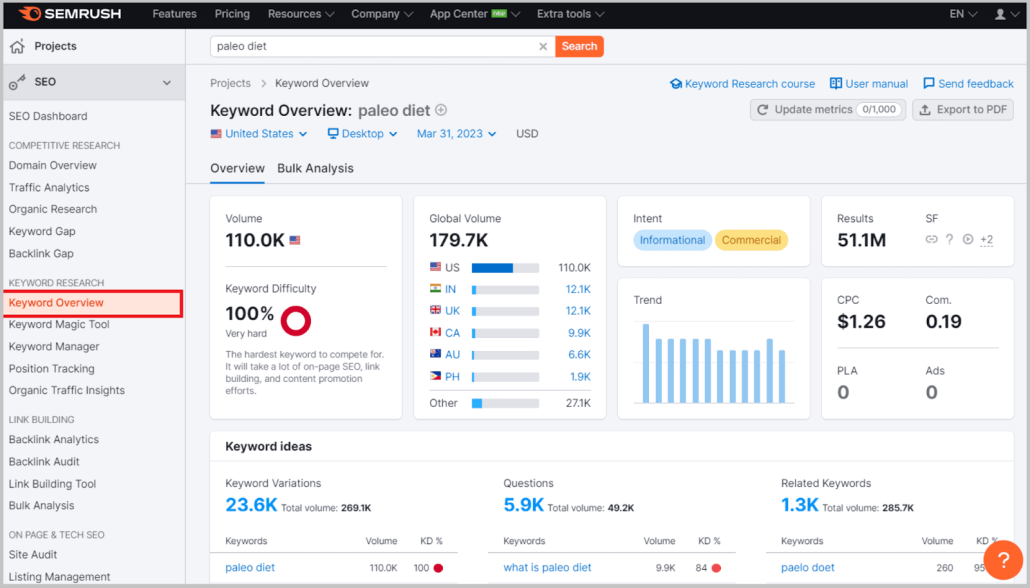
- Keyword research and tracking – Discover and monitor global keywords to grow your keyword strategy and improve your visibility in multiple search locations.
- Site audits and technical SEO analysis – Identify and fix technical issues affecting your site performance.
- Link-building tools – Analyze your backlink profile and use SEMrush’s tools to acquire new links.
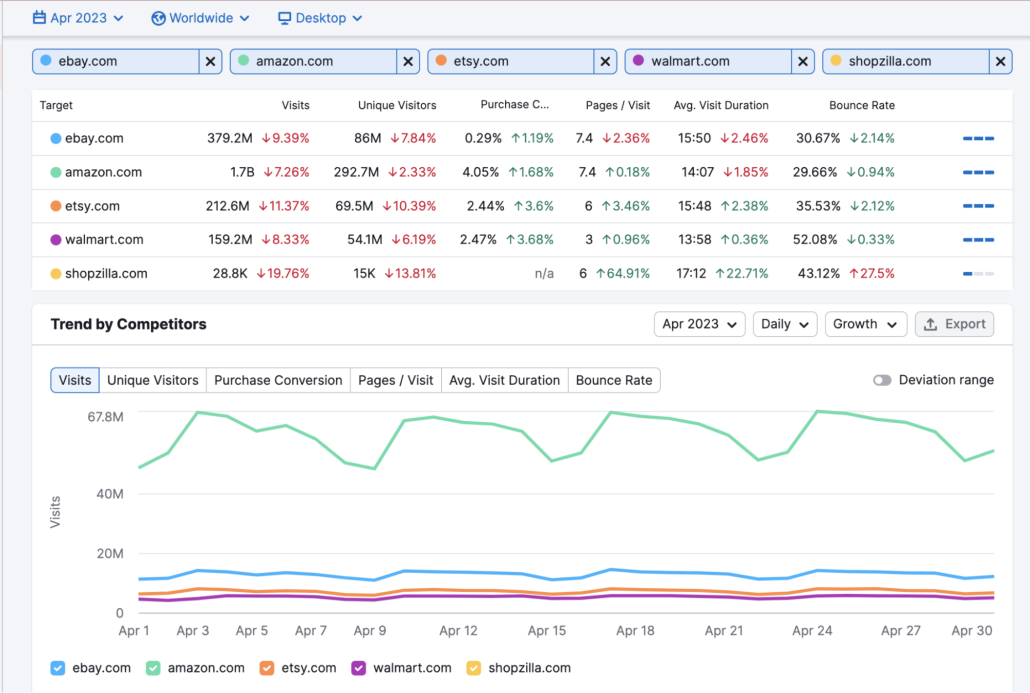
- Competitor analysis – Use SEMrush’s tools to uncover your competitors’ strategies and steal their traffic from them.
- Content marketing – Developing higher-quality content targeting your ideal customer to improve your ranks on the SERPs.
- Rank tracking – Track your ranks according to location and other parameters to help you establish a presence on the 1st page of the SERP (no matter where you customers are searching from).
- Non-SEO features like market research, advertising, and social media tools offer a turn-key marketing solution.
Pricing
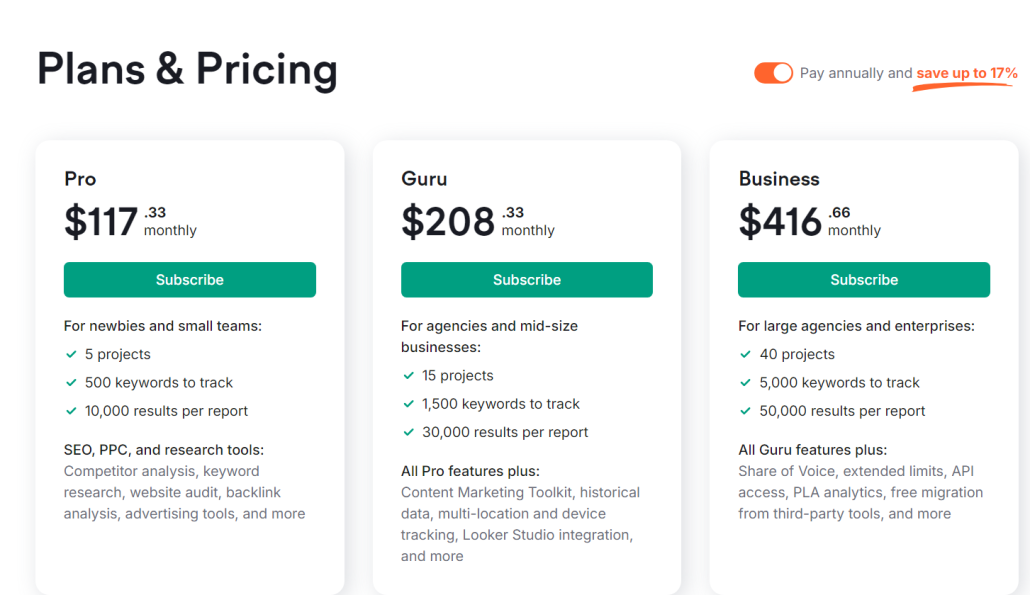
SEMrush is a great tool, but its prices may be beyond what many businesses can handle. Here are the pricing plans they offer (all listed prices include an annual payment discount):
- Pro – $117.33 monthly and includes up to 5 projects, 500 keywords, and 10,000 results per report.
- Guru – $208.33 monthly and includes up to 15 projects, 1,500 keywords, and 30,000 results per report.
- Business – $416.66 monthly and includes up to 40 projects, 5,000 keywords, and 50,000 results per report.
Reviews
SEMrush is one of the biggest tools in the SEO world for a reason. People love using it. It averages 4.5 stars, and customers frequently praise SEMrush’s easy user experience, helpful customer service, and keyword research tools. Negative comments normally focus on the high price.
Here’s what Luke S. has to say about SEMrush:
What do you like best about Semrush?
“SEMRush is my go-to tool for website analysis (outside of GA4) and especially when I’m trying to work on SEO or optimizing my pages. It’s super straightforward, with plenty of tutorials and knowledge base information regarding using the tool. I am in semrush at least once every day, typically more. It is ridiculously easy to implement into your website and integrate with all of your analytics tools (GA4, GSC, etc)”
What do you dislike about Semrush?
“I have no complaints other than if you create a subscription and add a second user email, once you delete them due to the increase in billing, you still get billed for the unused seat and must contact support to fix this. We underwent organizational changes, which led to going unchecked for several months (no fault of Semrush’s.)”
What problems is Semrush solving and how is that benefiting you?
“SEMRush gives me the ability to analyze each webpage and landing page in our funnel, as well as optimizations to be made for each of these pages and other aspects of SEO.”
Best for Understanding User Behavior: Google Analytics
If you search for SEO advice online, chances are good you’ve come across Google Analytics.
That’s because this tool is one of the most widely used SEO tools. It’s offered by the king itself–Google.
Google Analytics is all about helping businesses understand how users interact with their websites. What do their journeys through your site look like?
The power of this tool can be compounded even further when using it to determine how users from different countries use your site (giving you critical insights into what changes need to be made to appeal to various global markets).
Best of all? It’s free.
Let’s talk about Google Analytics and why it deserves a spot in your toolbox.
Pros
- Free and widely used tool
- Extensive documentation for easy learning
- Detailed insights into user behavior and traffic sources
- Customizable reports and dashboards
- Integration with other Google services (Google Ads, Search Console, etc.) and many SEO tools
Cons
- Steep learning curve for new users
- Limited toolset compared to some paid tools
Features
- Real-time analytics and user tracking – Get live data on site visitors and their actions, helping you understand how users interact with your site.
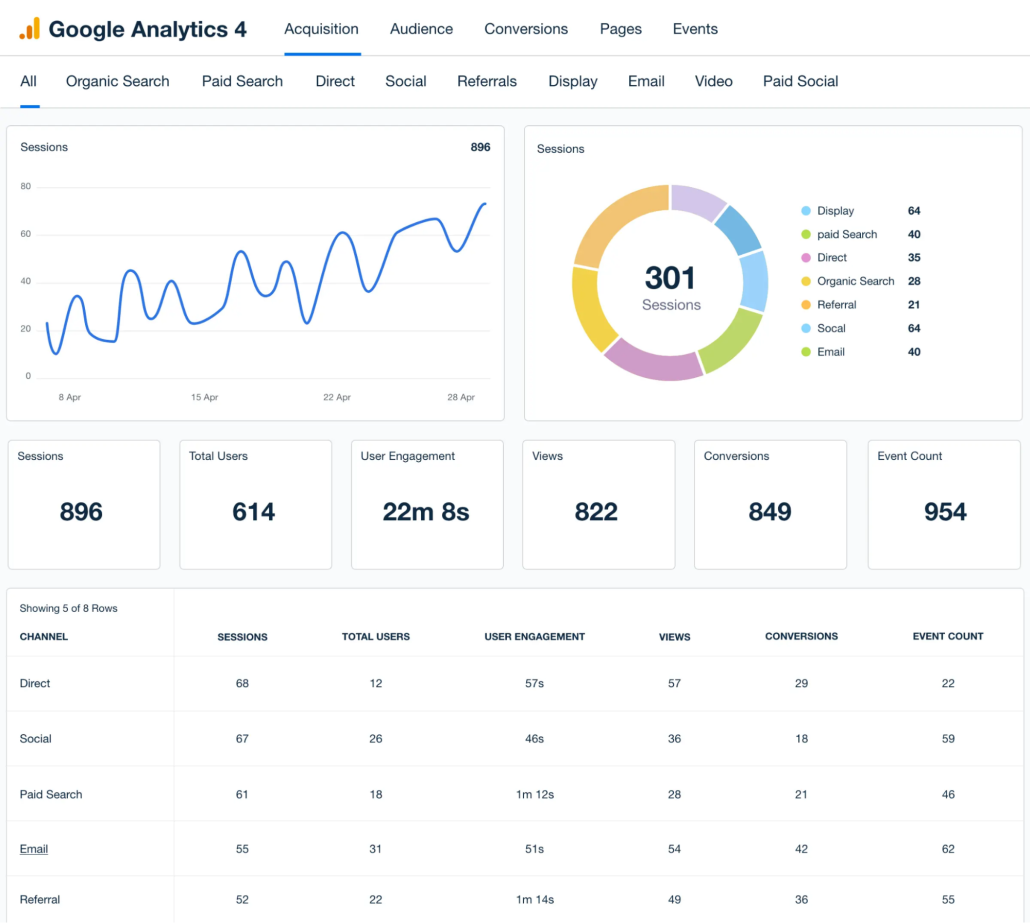
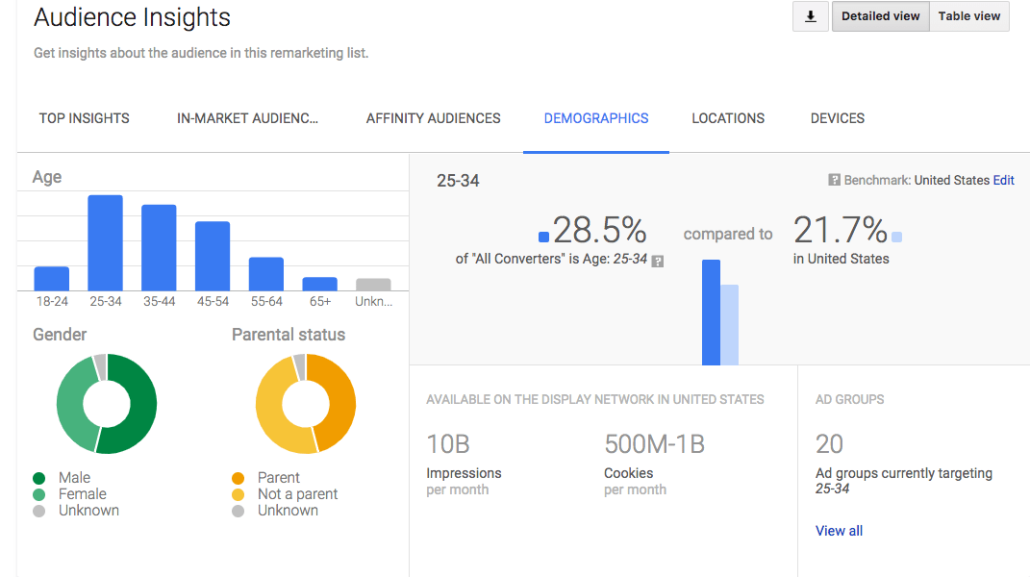
- Global audience insights – See how users from different areas of the world interact with your site in different ways to help you optimize it for local use–no matter where your audience is.
- Automation – GA4 has the power of Google machine learning behind it, meaning you can access powerful predictive AI and natural language modeling.
- API access – Use the GA4 API to connect GA4 to your other tools and augment its capabilities.
- Reporting – Export your GA4 data as reports to help you (and your clients) better understand your engagement and other critical campaign details.
- Powerful integrations – Google tools can be integrated with almost any available tool, meaning you can get MORE out of your Google data by combining it with other tools.
Pricing
Google Analytics is FREE!
That means there’s no reason not to use Google Analytics as a supplemental tool to the other tools in this list!
Reviews
Google Analytics is a HUGE tool used by almost every online business in the world, so it should come as no surprise that people like it.
Many of the positive comments about GA4 involve its being free, its high-quality data, and integrations. Some of the negative comments discuss the learning curve and the tool’s complexity.
Here’s what Sampath S. says about using GA4
What do you like best about Google Analytics?
“This is one of the powerful tools from Google, That will keep track and reports of website traffic.It helps website owners and marketing person to understand how users interact with their website, providing valuable insights into audience behavior, engagement, and the effectiveness of marketing efforts. To use these features on the site, we need to login and setup the site name with URL. Frequently I am using this tools to track the websites and if we found any difficulties while integrating we can contact to a customer care, so they will provide a solution.”
What do you dislike about Google Analytics?
“It relies on JavaScript for tracking, which means that users with JavaScript disabled or those using ad blockers might not be tracked accurately, leading to incomplete data.”
What problems is Google Analytics solving and how is that benefiting you?
“It provides detailed reports on user behavior, such as page views, time on page, and navigation paths. This help us to identify popular content, understand user interests, and optimize the user experience to keep visitors engaged.”
Best for Technical SEO: Google Search Console
Another wildly popular Google SEO tool is Google Search Console, which is focused on helping you make your website more visible on the Google SERP.
GSC helps you diagnose any issues that affect your website’s ranking. It also shows you what search queries bring the most visitors to your site worldwide.
As with other Google SEO tools, GSC is free to use and offers extremely valuable insights.
Let’s talk about it!
Pros
- Free Google tool (that means data comes directly from Google!)
- Essential for diagnosing technical SEO issues
- Analyze what search queries bring people to your website by geographic location
- Provides insights into website performance and search traffic
- Alerts for security issues and Google penalties
Cons
- No search engines other than Google are supported!
- Steep learning curve
- Some features require technical knowledge to get the most out of them
Features
- Search analytics – See exactly what search queries bring users to your site. You can further break this information down by search location, helping you understand what types of content users from different places are looking for.
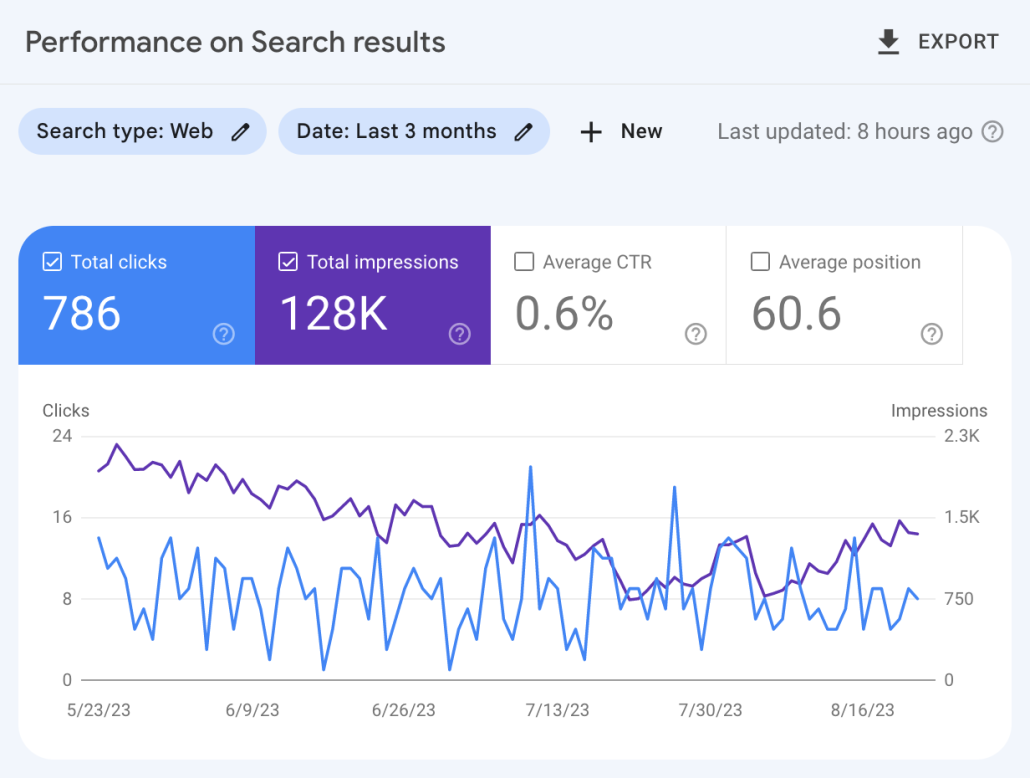
- Website performance analytics – See how many visitors come to your page, what ranks your pages currently occupy, and how many impressions and clicks you get.
- SEO issue notifications – GSC automatically notifies you if you have issues on your site that are leading to ranking problems. You will get a notification to fix the issue quickly, whether it’s broken links, inaccurate sitemaps, or Google penalties.
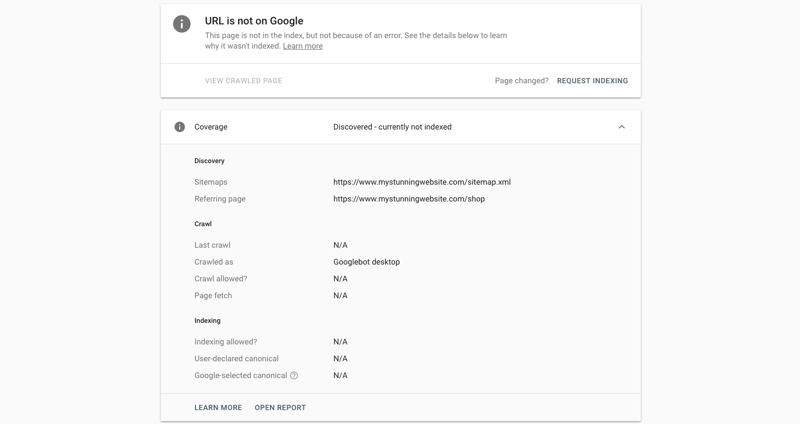
- URL inspection tool – Submit sitemaps or individual URLs to be crawled and indexed by Google (and make sure Google has your URL, avoiding the dreaded screen shown below), ensuring Google has the most recent view of your site (this can help you improve your ranks quickly if you’ve recently made significant changes!)
- Rich snippets management – Manage your rich snippets within GSC’s platform to ensure they appear appropriately on the Google SERP.
- Core Web Vitals report – This report assesses the overall health of your URLs and gives each one a score (Poor, Needs Improvement, or Good), allowing you to focus your efforts where they’re most needed.
Pricing
Google Search Console is FREE! That’s why nearly every major business uses it in their global SEO software tech stack.
Reviews
GSC has an average of 4.7 stars, meaning it’s one of the most highly-rated SEO tools available. Users frequently mention the accuracy of the data and how much they can improve their SEO using GSC’s recommendations. More negative comments focus on GSC’s limitations and the steep learning curve required for optimal usage.
Here’s what Gaurav P. had to say about using GSC:
What do you like best about Google Search Console?
“I liked crawl stats feature of google search console the most, where you can actually see latest pages crawled by Google and are divided in to various types based on status codes, type of pages, type of google crawlers, etc. You can also see various subdomains which are getting crawled and from there it can easily be analyzed how and what type of pages are getting crawled and if they have any crawling issues”
What do you dislike about Google Search Console?
“I dislike mainly the limit on number of pages which can be checked from Google search console, the limit of number of pages in any type of report is 1000 which is very less, especially for those websites which have high number of pages or are getting crawled more frequently. 1000 pages limit if fine for smaller websites with limited crawl frequency”
What problems is Google Search Console solving and how is that benefiting you?
“It helps in identifying most common problems of crawling. As crawling of a website is the first step in SEO, it is if vital importance that the website is perfectly crawlable, as only after crawling Google can determine importance of a webpage/website. If there are problems in crawling then any efforts for optimizing it for search engines is a waste.”
Best for Site Crawling: Screaming Frog
When discussing SEO, we tend to talk about keywords and content. We focus less on the technical side of things.
However, that’s precisely where Screaming Frog shines.
Screaming Frog crawls websites and helps users diagnose any technical issues that are hindering their ranking. These include issues with links, sitemaps, duplicate content, and more.
This tool can provide businesses with an extremely valuable edge by helping them understand the technical side of their SEO, so it deserves consideration as part of anyone’s global SEO tech stack.
Pros
- Comprehensive site crawling and auditing tool
- Identifies technical SEO issues
- Broad feature set for technical SEO
- Fantastic free version and a reasonably priced paid version
Cons
- Desktop-based, which can be resource-intensive
- VERY technical tool means beginners might have trouble
- Limited integration with other tools (especially in the free version)
Features
- Complete site audits – Thoroughly examine websites for SEO issues, including broken links, errors, and redirects.
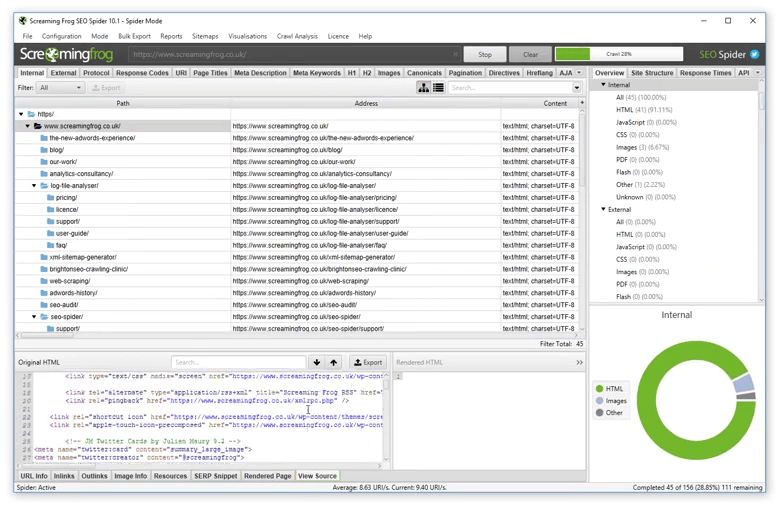
- Site visualization – Easily visualize the architecture of your website using tree graph site visualizations
- Duplicate content detection – Ensure you don’t get a Google Penalty for duplicate content by having Screaming Frog detect any issues.
- Title and metadata analysis – Instantly uncover any issues with your metadata during site crawls.
- Scheduled audits – Schedule recurring audits (on the paid version) to ensure you regularly check for technical SEO issues.
- XML sitemap generation – Creates sitemaps to improve search engine indexing.
- Integration with Google Analytics and Search Console (paid version only)
Pricing
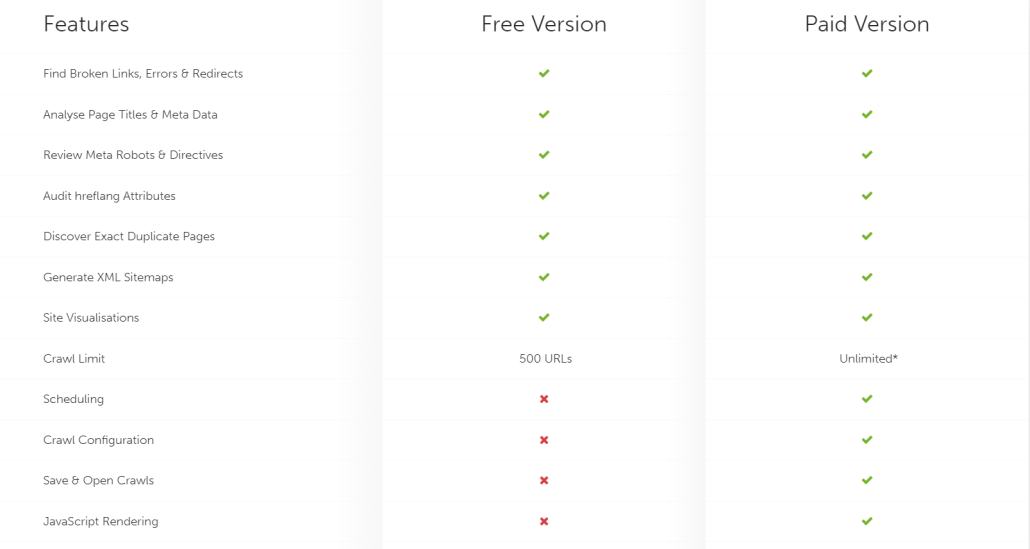
You can use Screaming Frog’s main features for free for up to 500 URLs. If you want to upgrade to the paid version, it costs $259/year and includes unlimited URLs.
Reviews
Screaming Frog is one of the most popular technical SEO auditing tools. It averages 4.7 stars, and users frequently mention the high-specificity data. One of the most frequent criticisms is that the tool can be challenging to learn.
Here’s what one user had to say about their experience with Screaming Frog.
Describe the project or task Screaming Frog Services helped with:
“Screaming Frog is ideal for on-demand crawls that require a large amount of granularity. Because it runs locally and not in the cloud like most other SEO tools, we use it to crawl pages on stage that are not yet live.”
What do you like best about Screaming Frog Services?
“Screaming Frog Services offers insights with lots of granularity and great suggestions to improve overall site health. They assess every URL in the crawl in great detail. They have also started evaluating some additional site elements, like structured data.”
What do you dislike about Screaming Frog Services?
“Screaming Frog Services can be a bit pricey, especially when compared to the actual standalone tool without the managed services on top. However, the full power of the tool is difficult to utilize without assistance, and who better than the tool’s creators?!”
What problems is Screaming Frog Services solving and how is that benefiting you?
“Screaming Frog Services executes site crawls on a detailed and granular level. Other agencies show a high-level view, but when it comes to technical auditing, Screaming Frog Services beats them all.”
Best for Website Translation: Weglot
Even if you can fully optimize your site for global discovery, one thing may still be missing:
Not everyone speaks the language in which your website is written.
You might be tempted to run to Google Translate, but that probably isn’t the best option if you want a high-quality translation.
Weglot specializes in website translation and uses a combination of automated and manual translation to maximize accuracy AND speed without driving the cost to exorbitant highs.
Let’s discuss Weglot and how it might fit into your global SEO strategy.
Pros
- Easy to implement and use for website translations
- MUCH faster than manual website translation
- Supports multiple languages
- Automatically translates new content as it’s added
- SEO-friendly with translated metadata and images
- Quality integrations
Cons
- High cost for websites with high quantities of content
- Dependency on machine translation for initial setup
Features
- Machine and professional translation options – Use Weglot’s machine translation as a base layer for your entire website, then request a professional review of it if desired.
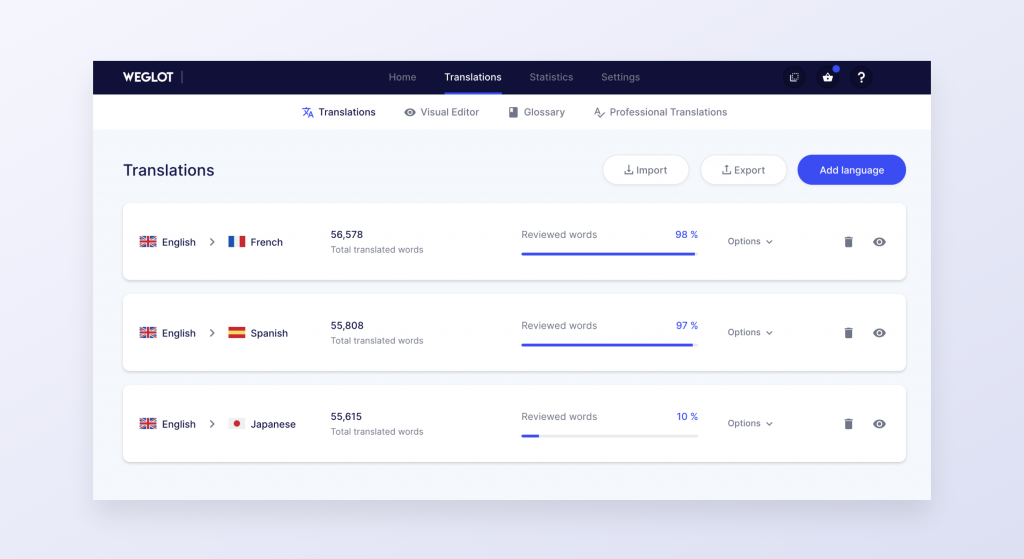
- Constantly updated translations – Weglot automatically translates any new content added to your site, so you don’t have to keep working to get it translated.
- Full manual translation control – You can edit any of Weglot’s translations to ensure they come out exactly as you want them.
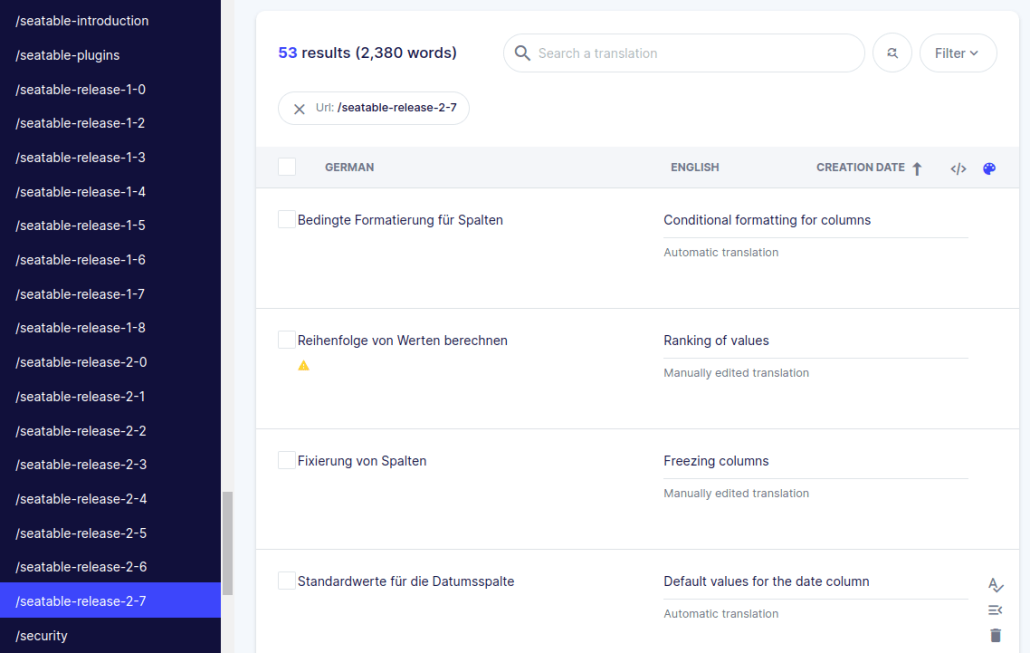
- Multilingual SEO optimization – Ensures translated content is optimized for search engines.
- Dedicated language URLs – Each translation of your website gets its own URLs, further improving your site’s visibility across multiple search languages.
- Integration with popular site-building and eCommerce platforms – Seamlessly works with major websites like Squarespace and WordPress.
Pricing
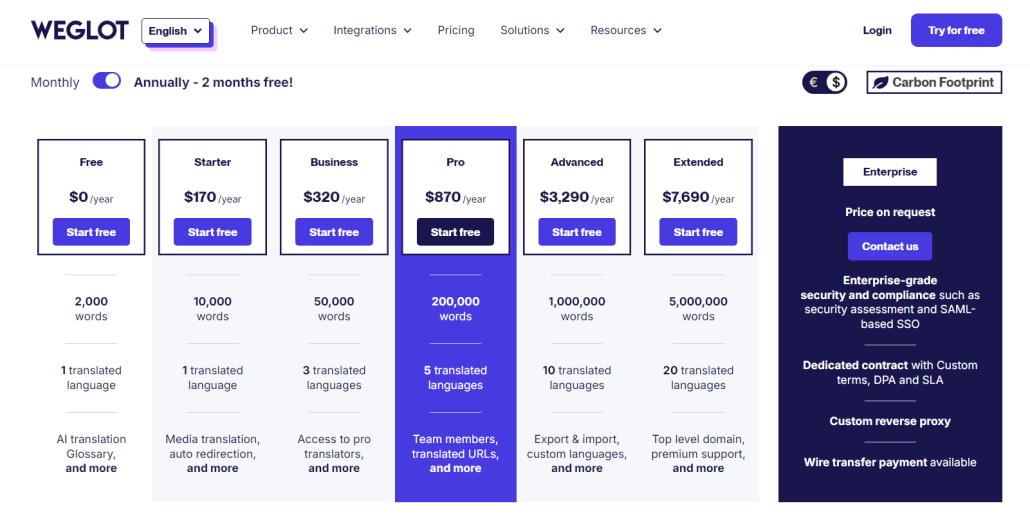
Weglot offers several different pricing plans for businesses with varying quantities of content. Each tier provides more words than the last, and many offer additional features.
- Free Plan – $0/ year and includes up to 2,000 words and 1 translated language.
- Starter Plan – $170/year and includes up to 10,000 words and 1 translated language.
- Business Plan – $320/year and includes up to 50,000 words and 3 translated languages.
- Pro Plan – $870/year and includes up to 200,000 words and 5 translated languages.
- Advanced Plan – $3,290/year and includes up to 1,000,000 words and 10 translated languages.
- Extended Plan – $7,690/year and includes up to 5,000,000 words and 20 translated languages.
- Enterprise Plan – Pricing available on request for businesses with even larger translation needs.
Reviews
Weglot has an average of 4.7 stars. Many positive comments focus on the ease of use and the high-quality customer service. Some of the negative comments talk about the price and some issues with translations.
Here’s what Matthias E. says about using Weglot:
What do you like best about Weglot?
“We are running an educational website in four different languages in parallel, which can be at times quite challenging. But whenever we have any technical issues or questions, help by the Weglot support team always comes to the rescue, in a very timely and useful manner. Once we even accidentally deleted one of our languages, and the Weglot team managed to restore all 36,000 manual edits immediately. Within three minutes! Couldn’t ask for a better service.”
What do you dislike about Weglot?
“The only thing I don’t like about Weglot is the fact that when we make the tiniest change in the original language, sometimes even just by correcting a comma, that often all manual edits in the other languages revert back to the automatic translation. But I guess that’s the nautre of the beast when running a multilingual website.”
What problems is Weglot solving and how is that benefiting you?
“Providing educational content in different languages in parallel, with easy toggling between them. I’m not aware of any other technical solution that could do the same in such a simple and user-friendly way. Our only issue is that we are translating from English into Welsh, Scottish Gaelic and Irish, tiny languages in which the automatic translation requires substantial proof-reading and editing.”
FAQs
What is global SEO?
Global SEO is the practice of attempting to get your website URLs to rank in different locations around the world.
What is the best global SEO software?
The best global SEO toolkit combines several SEO tools with local and international SEO capabilities. The tools above are a great place to start!
What is the difference between global SEO and local SEO?
Global SEO is the same as local SEO, just on the scale of countries instead of cities. In other words, it focuses on optimizing your search results for searchers in different countries instead of in different cities.
Conclusion
Global SEO is a MASSIVE topic, and it needs to be approached from many different angles.
The tools presented in this post give you a great starting point for developing your own global SEO tech stack to help you rank in ALL your target markets globally.
I highly recommend signing up for free trials or demos of each of these tools so you can see how much they can help you.
Good luck!