
How to Develop & Execute a Global SEO Strategy
Trying to figure out how to rank on search engine result pages (SERPs) when you have multiple audiences in multiple countries presents a unique challenge and difficult questions.
How do you prioritize the locations you should target?
What’s the best way to rank in multiple locations around the globe–even when they might speak different languages?
SEO is challenging enough, but global SEO requires even more focus and intense planning.
That sounds scary, but here’s the good news: we’ve been there, and have answers to your burning questions.
This article explains in-depth how to develop and execute a global SEO strategy for your business–from starting your website to landing at the top of the SERP.
We’ll cover:
- Step 1: Identify Your Target Locations
- Step 2: Perform Keyword Research
- Step 3: Prepare Your Website for Global Ranking
- Step 4: Develop Content
- Step 5: Track Your Ranks
- Step 6: Automate Your Tracking
- Step 7: Monitor and Strategize
- FAQs
- Why a Global SEO Strategy Is Crucial for Success
Step 1: Identify Your Target Locations
The first step in developing a global SEO strategy is identifying your target locations.
In other words, where do you want to do business?
Consider your current customer base and where you would like to market your product or service.
Even though it’s still early in the game, you should also consider several important factors:
- The languages spoken in your target markets
- The varying location-specific Google services used abroad (google.co.uk, google.fr., etc.)
- Competition in your chosen locales
At this point, you should be collecting enough info to help you decide what areas are reasonable targets for your SEO campaigns. This will streamline the process of setting up your website, picking keywords, and launching an SEO campaign in the future.
Step 2: Perform Keyword Research
Keyword research is ESSENTIAL for any SEO strategy. In global SEO, you must consider the keywords for multiple locations, which can further complicate your research strategy.
This could include keywords in various languages or keywords that include specific locations.
Many people simply guess which keywords they think will benefit them, but this is a mistake. Knowing which keywords strike a good balance between search volume, competitiveness, and search intent that matches your offerings is impossible.
That’s why using a keyword research tool is nearly always the best option. ProRankTracker offers 3 fantastic keyword research tools that you can use to expand your keyword strategy with high-value keywords.
Let’s take a look at both.
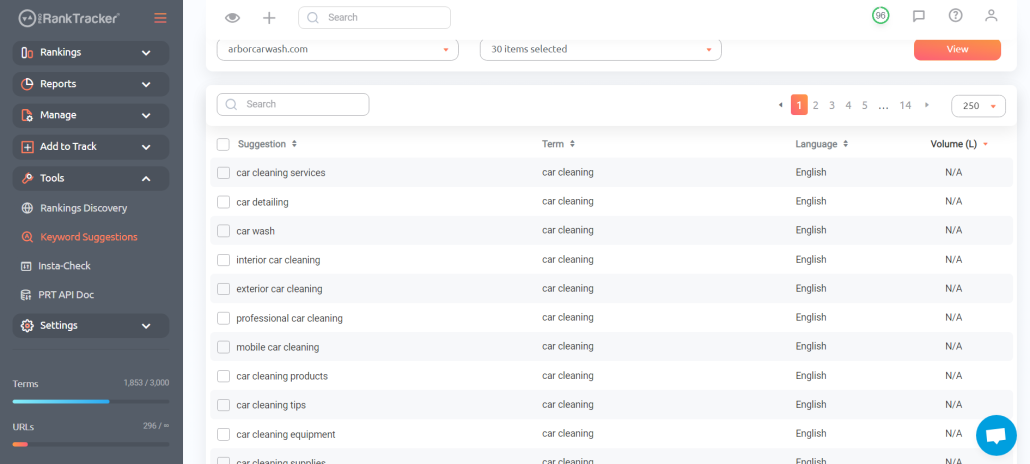
Keyword Suggestions
ProRankTracker’s Keyword Suggestions tool provides users with a list of high-value long-tail keywords based on their current keyword strategy.
In other words, ProRankTracker doesn’t simply guess which keywords might be beneficial–it considers your current strategy. It then suggests keywords with a reasonable search volume and competitiveness that will be good targets.
Rankings Discovery
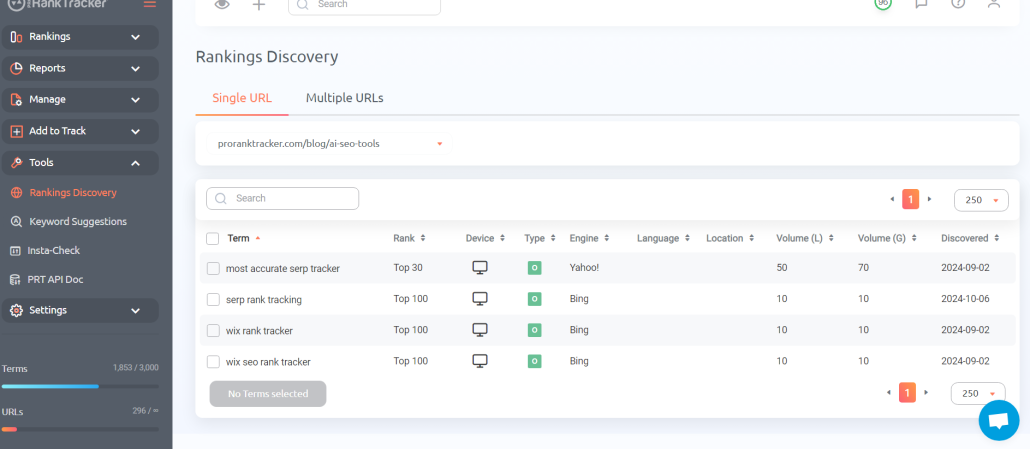
The second ProRankTracker tool is the Rankings Discovery tool, which reveals keywords already ranking for your URLs.
In other words, this tool analyzes your URLs to discover what terms they are already ranking for, which can be helpful for quickly boosting online visibility.
For example, you might find that you’re already ranking in the top 20 for a keyword you aren’t yet targeting. You could add that keyword to your list and spend some effort boosting it into the top 10 or 5.
Then, you could head over to the Keyword Suggestions tool and have ProRankTracker generate a list of high-value keywords based on the new keyword you just added!
Combining these tools allows users to quickly generate lists of dozens of high-value keywords that specifically target their areas of interest around the globe.
Insta-Check
Once you know what keywords you need to rank for, you should get a quick idea of where you’re currently ranking.
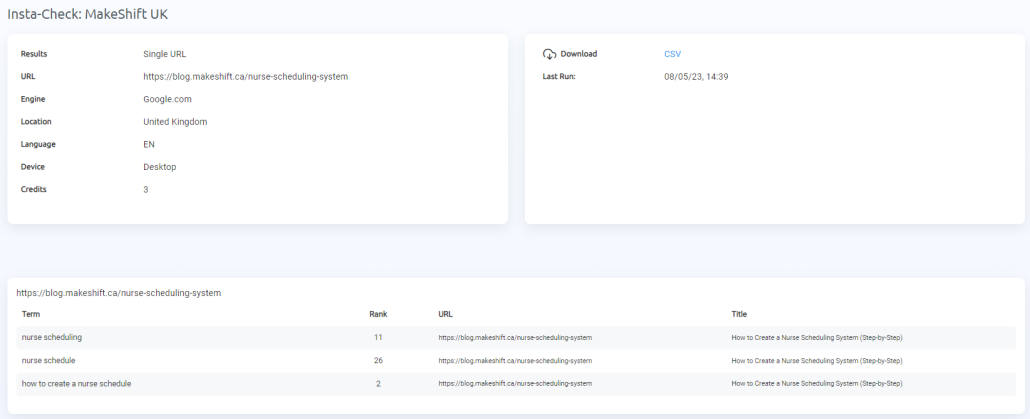
Later in the article, we’ll share more tips on how to use the Insta-Check feature.
Step 3: Prepare Your Website for Global Ranking
Once you have identified your target locations, you must prepare your website to rank in those locations.
This includes several tasks, such as:
- Managing technical SEO aspects like loading speed, mobile-friendliness, and hreflang tags (these tell Google the location and language your page is targeting).
- Optimizing your website structure. For easy navigation, you need to make it easy for users to switch to another version of your website that aligns with their country and/or lanugage.
- Creating a content plan. What keywords do your customers search before buying? Consider the variations of these keywords based on location and language.
- Translating your website. If you target users who speak different languages, you need to translate your website into those languages. There are multiple options, including both machine and human translation.
Ensuring that your website is ready to rank globally helps eliminate wasted time troubleshooting in the future.
Set Up Any Google Business Profiles (for Brick & Mortar Companies)
If the company you’re doing SEO for doesn’t have a physical location, you can skip this section.
A large percentage of localized search traffic comes through Google Maps (more than a billion people use Google Maps every month!). That means your Google Business Profile MUST be optimized to push traffic from Google Maps to your website or storefront.
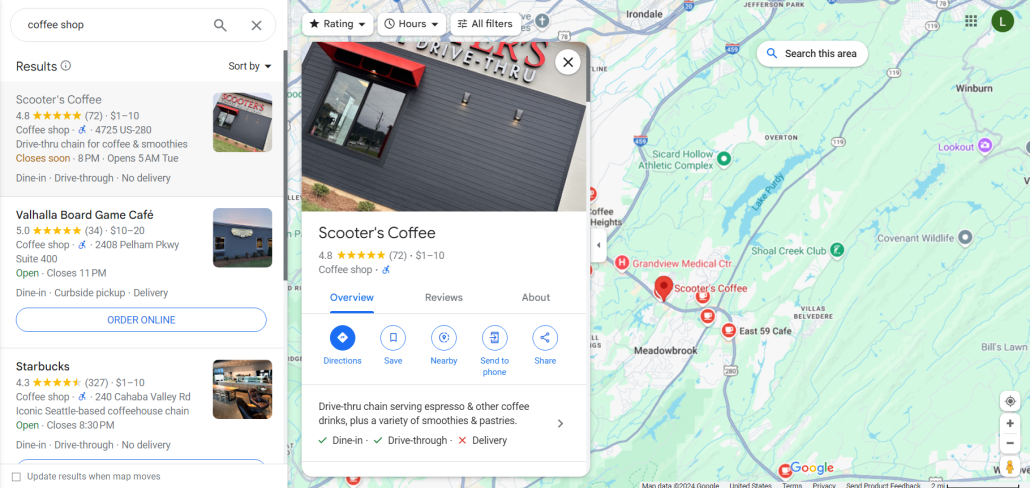
But how do you do that?
- Create and verify a Google Business location for each of your storefronts.
- Keep your business name, contact information, and hours up to date.
- Add the services you provide.
- Add keywords naturally to your profile.
- Upload photos, create posts, and respond to customer reviews
- Generate positive customer reviews by networking with happy customers
Repeat these steps for each physical location where your local business exists. But remember: You have to have a physical business set up at a location to have a Google Business Profile for it. PO boxes do not count.
Using a ranking tool like ProRankTracker can help you track your local Google Business Profile ranks on Google Maps, helping you acquire more traffic from this extremely valuable resource.
Step 4: Develop Content
Now that you’ve identified your target keywords and set up your website, it’s time to fill it with some content!
Since you now know what keywords will resonate with your global audience, you should focus on creating content that targets those keywords.
When it comes to local keywords, you should also ensure that your website has content that focuses specifically on your different target regions. For instance, you might have some content focused primarily on a US audience and other content focused on a Latin American audience. So, to reach this audience, you’ll likely need to have different versions of the same landing page or blog in English and Spanish.
Content isn’t just blog articles, either. Consider:
- Landing pages
- Product descriptions
- Product copy
Remember to optimize your title tags, meta descriptions, and header tags for your target keywords when developing your content!
Get Backlinks from Organizations that are Locationally Relevant
Backlinks are links from other websites to your website and are a valuable ranking factor for SEO.
While working on your content, you should simultaneously develop a strong backlink profile.
But how do you get OTHER websites to link to your website?
There are several ways to get local and global backlinks, such as:
- Get involved in local communities. Attending local events and joining local business groups are great ways to get involved in your community. When people know about your business, they tend to link to it on their sites.
- Trade guest posts with other players in your industry. There are likely plenty of local influencers or other non-competition industry leaders who would be able to make a guest post on your blog in exchange for you writing a guest post on theirs.
- Submit your website to online local directories. People often find new businesses through online directories like Yelp, Yellow Pages, Facebook, and others. Maintaining a listing on these directories provides backlinks to your site and gives your customers another place to find you online.
- Create helpful content that’s relevant to the location you want to rank in (this will attract backlinks naturally).
Step 5: Track Your Ranks
You’ve identified your target locations and keywords, prepared your website with technical SEO and content, and gotten backlinks.
Now what?
Now it’s time to see whether your efforts are paying off!
Tracking your ranks is a crucial aspect of any ranking strategy because it lets you know what’s working (and what isn’t). It helps you see how your website is performing in your target markets and identify any areas where you need to improve.
In this section, we’ll talk about how to track your ranks with a top rank-tracking tool – ProRankTracker.
Localize Your Rank Tracking
When it comes to global SEO, localizing the ranks you track is one of the most important steps you can take.
Localizing your rank-tracking efforts means that you’ll be able to keep track of how customers in different areas see your page on the SERP. It could be higher in some locations and lower in others.
In ProRankTracker, go to the Add Wizard tool and add your URLs/keywords.
In the next step, you’ll be prompted to select a few key localization options:
- Location (You can get as specific as the neighborhood and even zip codes in many cases!)
- Language
- Google Business Profile tracking
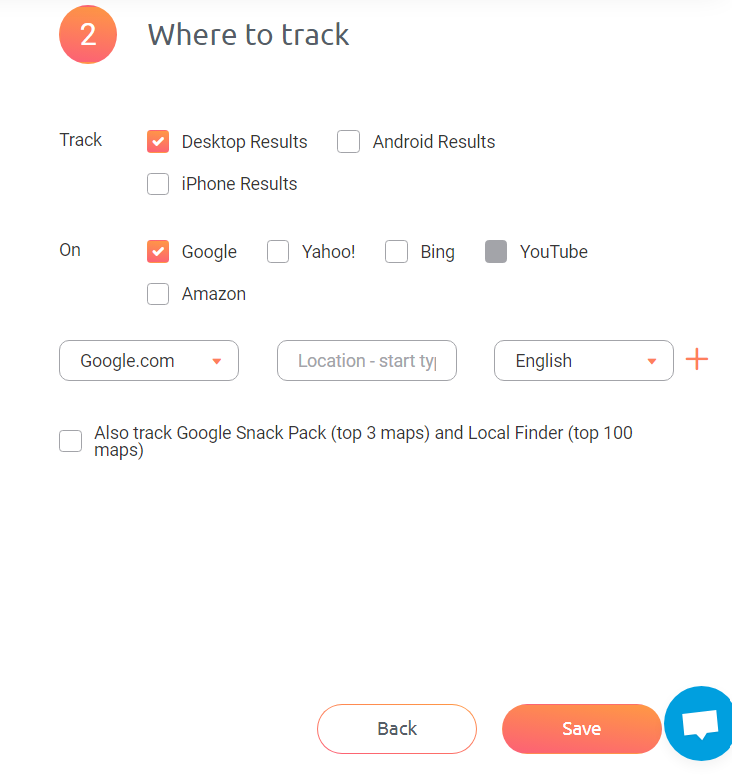
You can also track multiple combinations of location, language, and search engine for each keyword to help you understand better how you’re ranking in different areas for the same keywords!
Establish Projects
In ProRankTracker, the highest level of organization is the Project.
Projects allow you to group keywords and URLs into a single organizational umbrella, making it easy to quickly view sections of your ranking strategy.
This is especially handy if you’re managing various SEO campaigns across different global locations.
For example, let’s say you’re trying to rank in the USA, Israel, and Australia. You could organize your rank tracking into 3 projects for each country. This will make it easier to report on your results and adapt your strategy for each separate location.
To create a Project in ProRankTracker, go to the Projects menu in the left-hand toolbar (under the “Manage” tab).
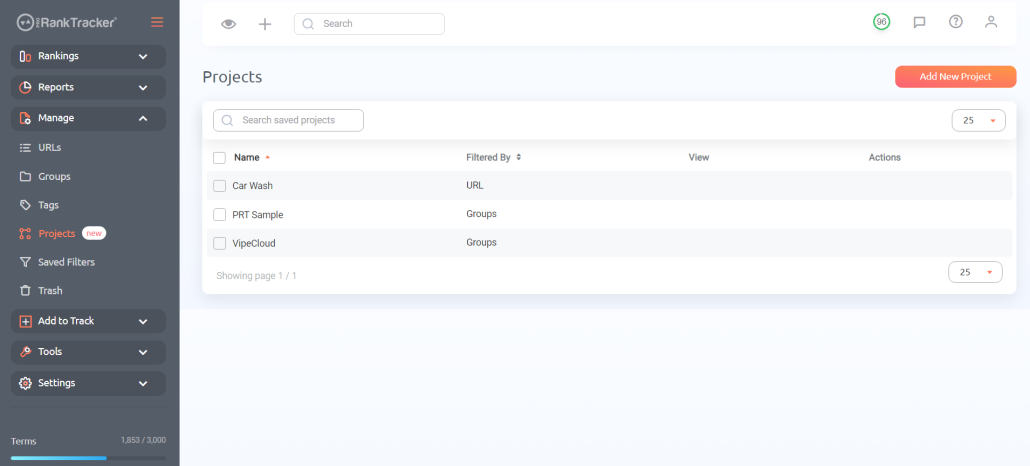
Select “Add New Project,” then fill out the parameters of the new Project. You can use several different parameters to create a Project:
- Location (perfect for global strategy)
- Language (another key global parameter)
- URL/keyword
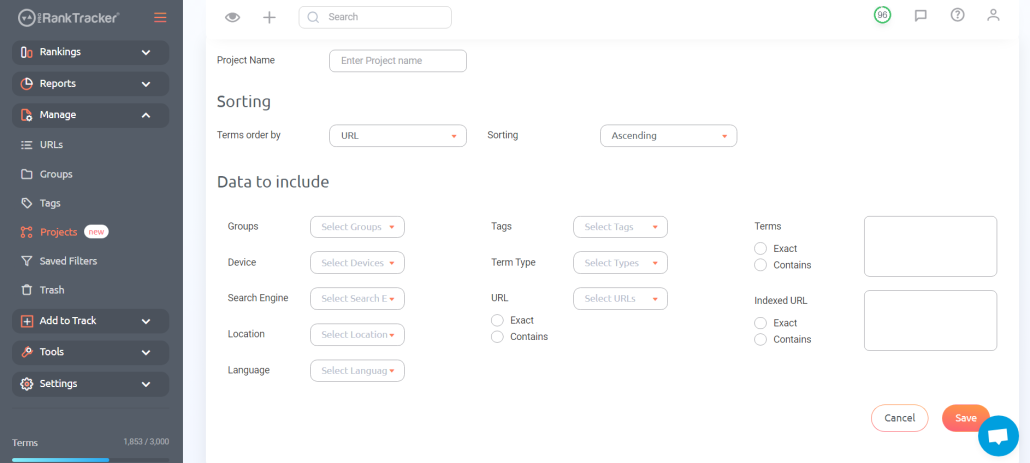
Creating your Project makes it visible in the Project View, which we’ll discuss in the next section.
Use Rankings Views
Rankings Views are the Grand Central Station of ProRankTracker. This is where your data migrates so you can view it from multiple perspectives.
There are 6 Rankings Views:
- The Dashboard gives you a general overview of all your current tracked URL/keyword combinations.
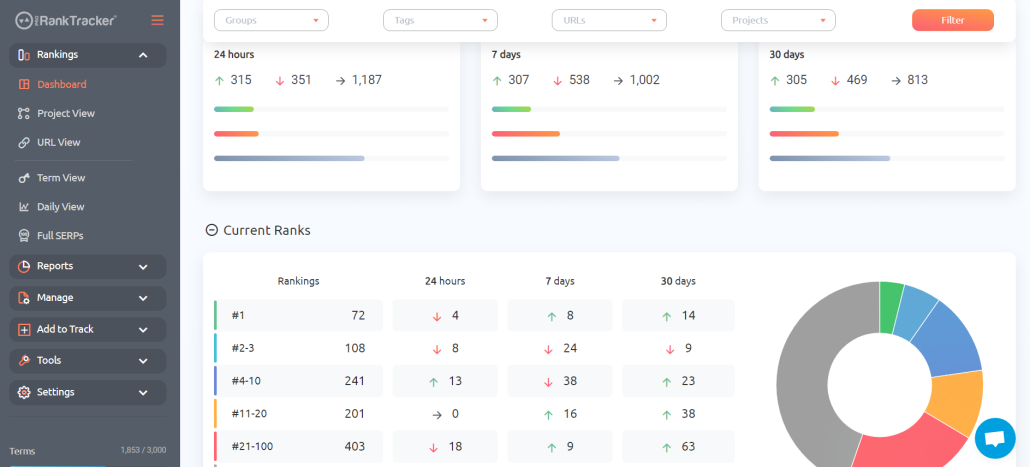
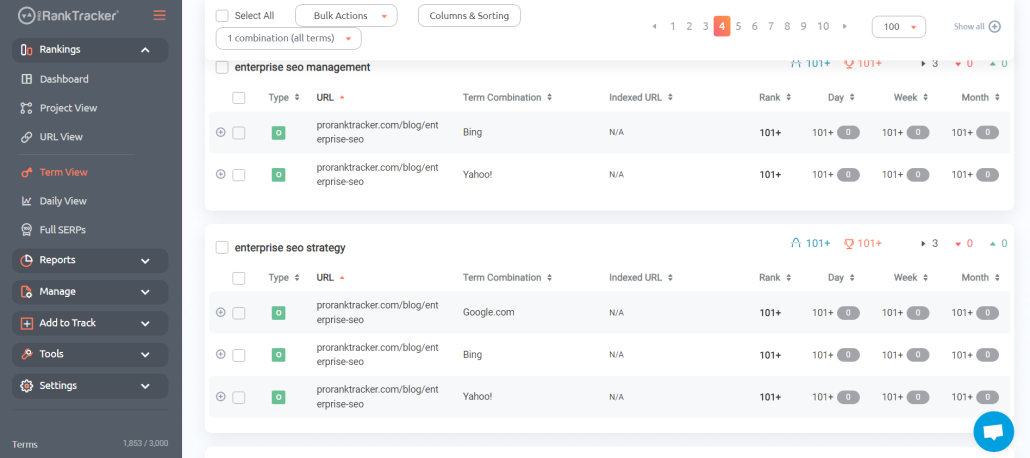
- Term view lets you see all your tracked terms and which URLs are associated with each.
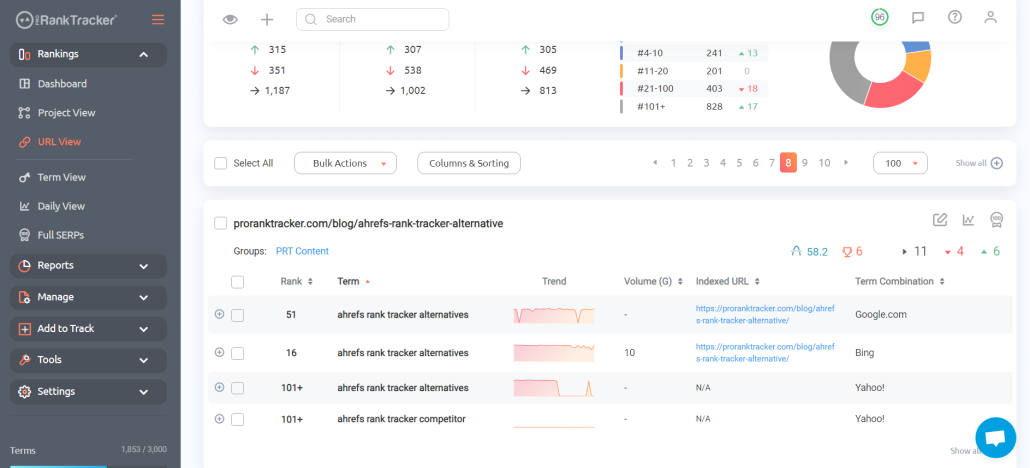
- URL view lets you see all your tracked URLs and which keywords are associated with each.
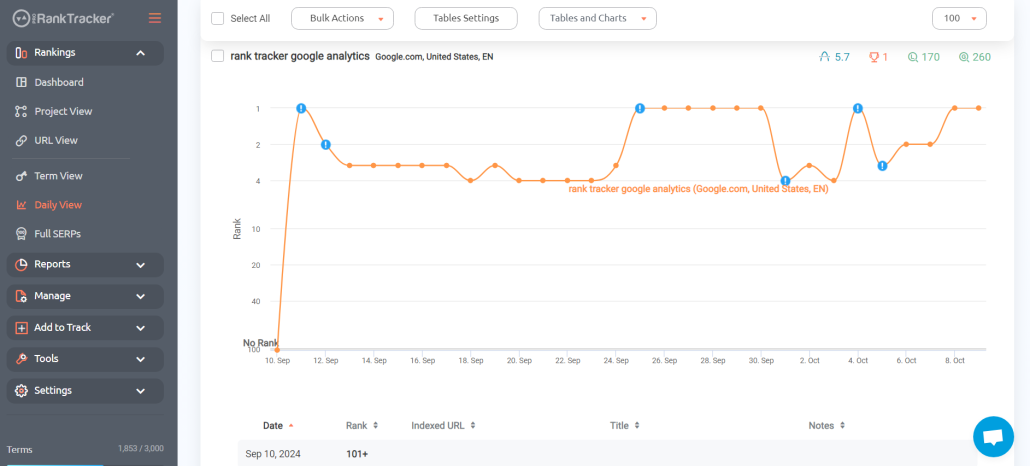
- Daily view gives you a daily breakdown of how your keyword/URL ranks have changed over time, making it easy to see trends and changes.
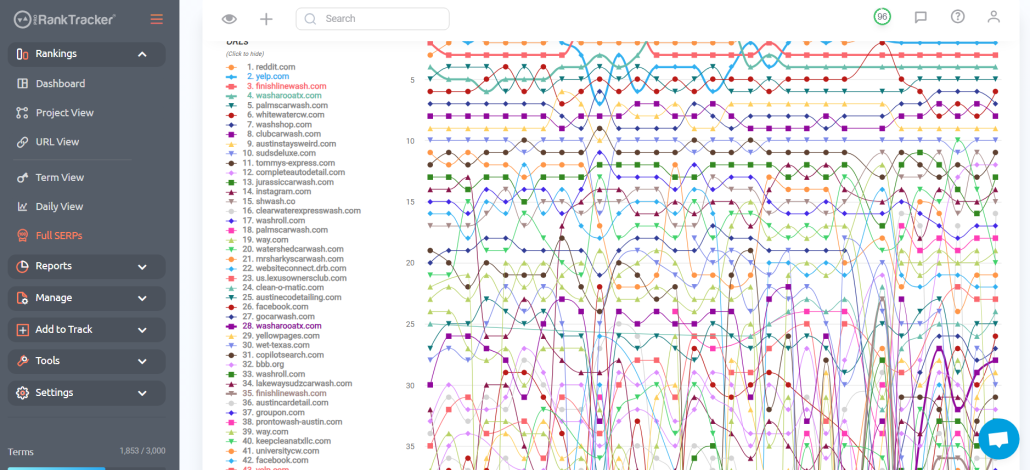
- The Full SERPs view shows you the SERP for your selected keyword and gives you critical data on each ranked page. It also has a chart view showing a graphical representation of EVERY page’s movement over a selected period.
- Project View allows you to view your Projects and gives you key data, such as a daily view, a yearly heat map, and a general overview. This is the perfect place to see how your ranks in a particular location are doing (or whatever other information you’re using Projects to prioritize).
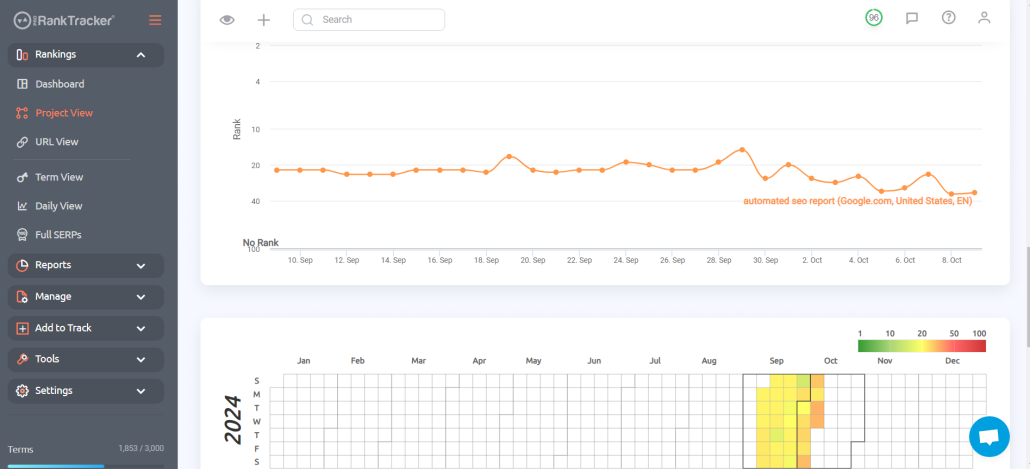
In each Ranking View, powerful filtering options make it easier to find exactly what you’re looking for, and you can save filters to make searches easier to repeat in the future.
Use all 6 Rankings Views regularly to maintain a genuinely well-rounded understanding of your ranks!
Ad-Hoc Global SERP Checks
One problem with many rank trackers is that they only allow you to get data on URLs/keywords on your tracking list.
This doesn’t leave much room for research or for those days (which happen very frequently) when you just need to check a random keyword to get some information.
That’s where ProRankTracker’s Insta-Check tool comes in.
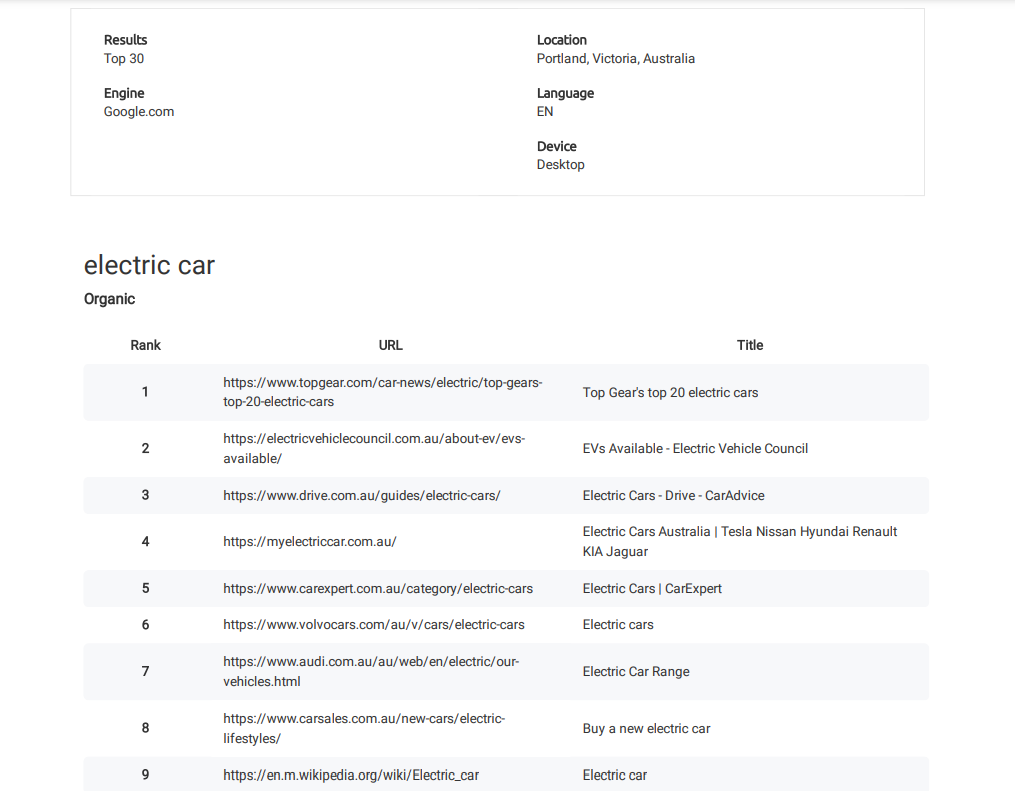
Insta-Check is a pay-as-you-go system that allows ProRankTracker users to simply buy credits and use them to check the SERPs for any keyword they’re interested in. These SERP checks are quick but give you key data to act on.
To generate an Insta-Check SERP report, go to the “Tools” section, select “Insta-Check,” and specify the keyword/URL you want to check.
There are multiple types of Insta-Check reports:
- Single position check (just tells you the current rank for the given URL/keyword/location combination)
- Top 10/20/etc. check (gives you the entire SERP up to the selected number for the given keyword/location combination)
Step 6: Automate Your Tracking
By now, you’re seeing just how much work it can take to develop, execute, and maintain a global SEO strategy.
How do you make it feasible to keep up with this quantity of data and work long-term?
Automate it!
ProRankTracker offers reports and notifications to help you streamline the data collection process so you can get right down to the decision-making.
Reports
Reports are an automated system that allows you to gather data without lifting a finger.
Exerting some effort on the front end to set up a thorough report system will save you HUNDREDS of hours a year on data collection and analysis.
Here’s a quick guide to getting started in ProRankTracker:
1. Access the “Reports Center.”
2. Pick from a selection of over 20 report options.
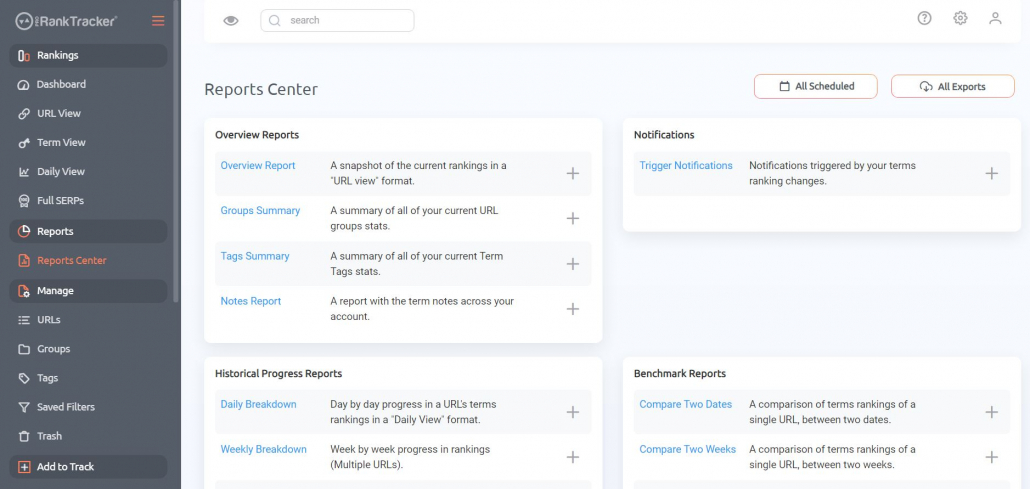
3. Input the required details.
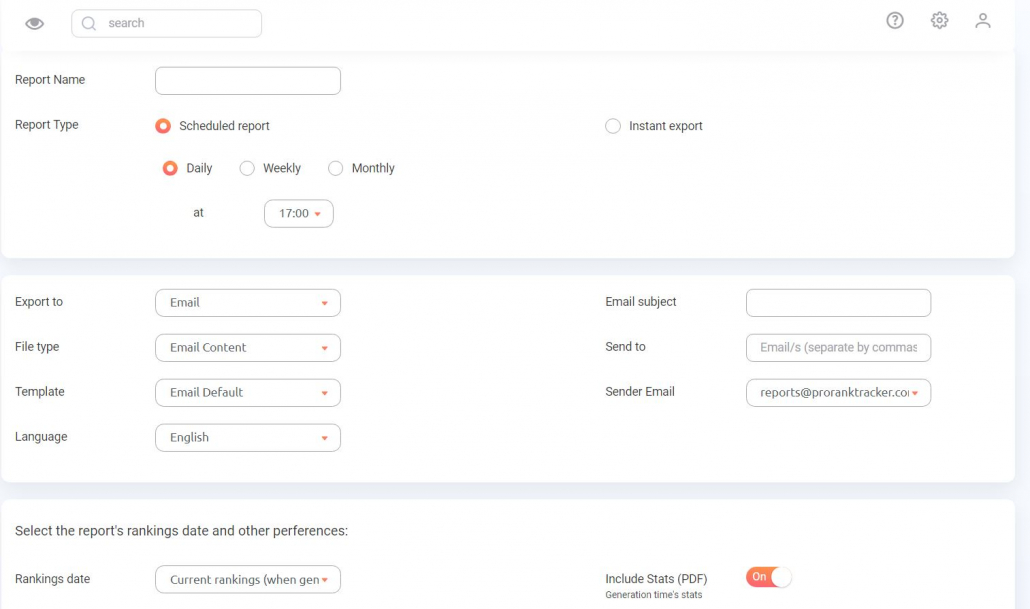
4. Receive your rankings directly in your email inbox.
Let’s delve into a few key reports that can boost your position in global Google search results.
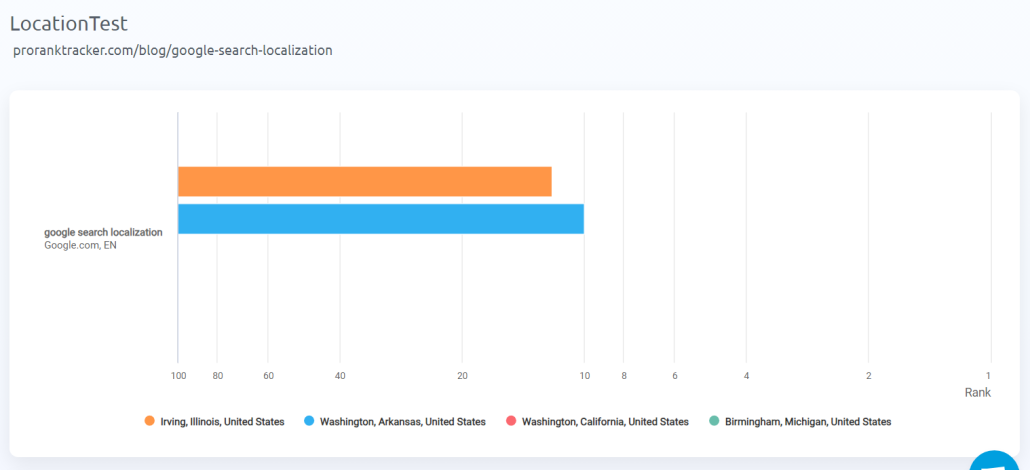
One valuable tool is the “Different Locations” report, which lets you see how a specific keyword and URL rank in different geographical areas. For example, when analyzing a single URL/keyword combination across four locations, you might find two rankings while the other two remain unranked — this insight can be crucial!
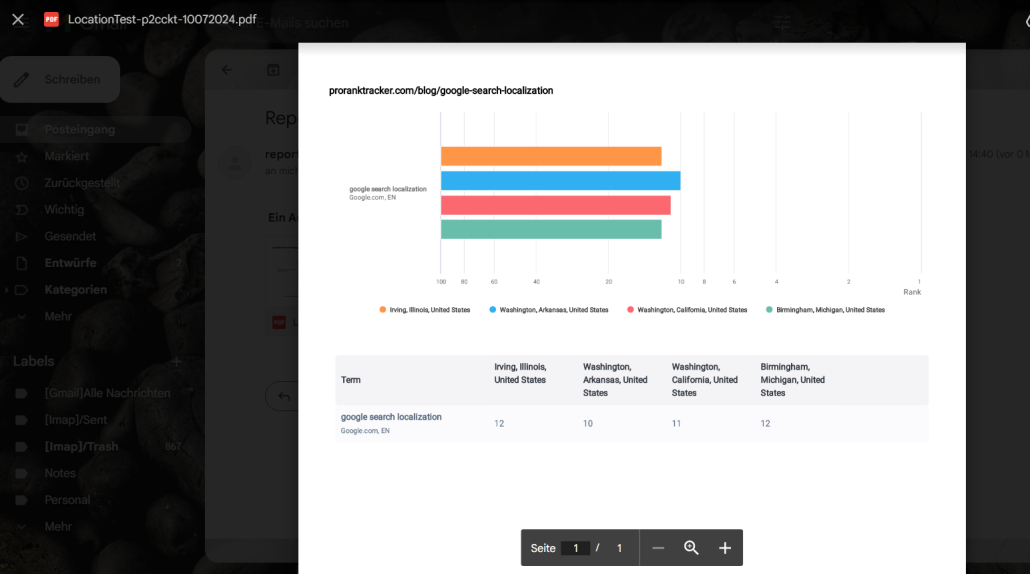
Here’s what the same type of report looks like when you email it as a PDF instead of viewing it on ProRankTracker’s platform:
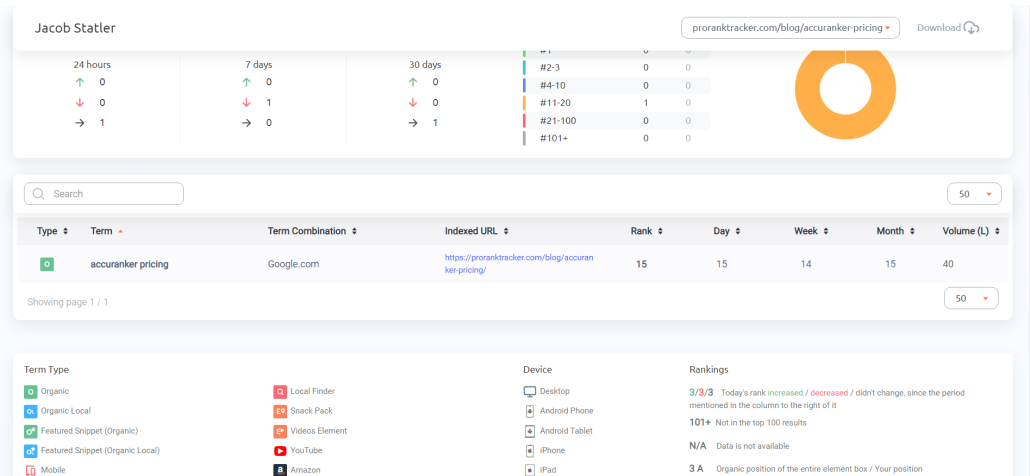
The Shared Reports use a live link that agencies and teams can share with their clients or other stakeholders – the report is continuously updated with new data daily. After generating the report, you can go back to the link and view the updated data anytime. This is an excellent report that keeps clients happy with up-to-date information!
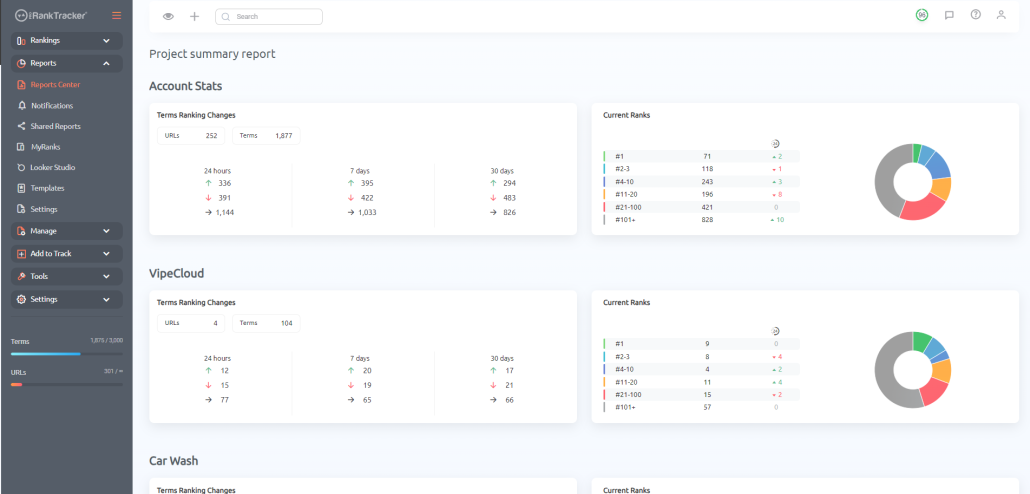
Another extremely valuable report for global SEO is the Projects Summary report, which lets you see selected Projects at a glance. This is perfect for when you’re trying to compare your local progress against your competitors. Simply generate a Projects Summary report and see how you stack up.
You can generate many other types of reports and notifications using ProRankTracker’s Reports Center. These are just some of my favorite reports to share for global rank tracking.
Check the Reports Center using your free trial for a better idea of how much you can accomplish with automated reports!
Notifications
Notifications, like reports, are a tool to help you keep track of your ranks without needing to check them constantly.
Unlike reports, which are either exported instantly or sent on a regular schedule, notifications can be sent in two ways:
- Drop and jump notifications are sent on daily, weekly, or monthly recurring schedules (similar to reports).
- Trigger notifications are sent only when a particular event happens (like hitting a ranking milestone or dropping a predetermined number of ranks)
Notifications are an ideal way to stay updated on your global ranks (in addition to reports) because they can let you know when things are going well or poorly and give you more time to respond to those insights.
To set up your notifications, go to the “Reports” tab in the left-hand toolbar, then select “Notifications.” Select the type of notification you want to create.
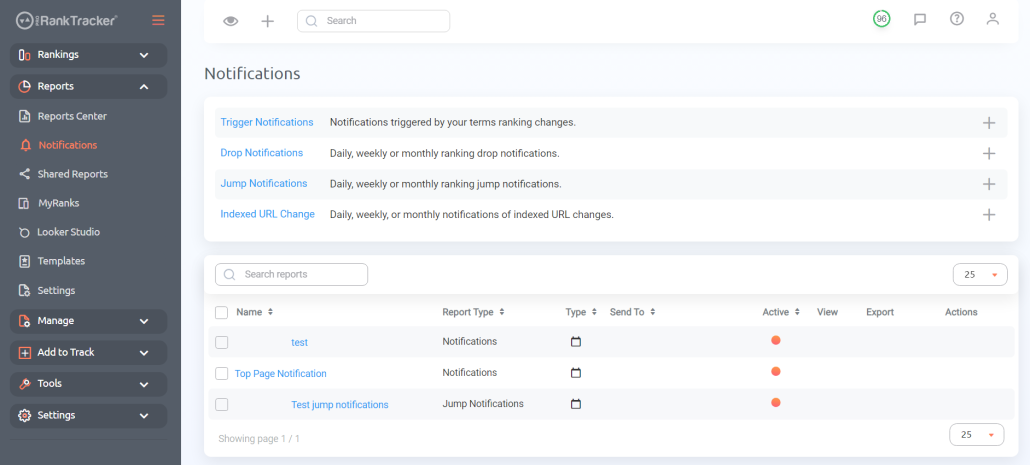
Fill out the required details to customize your notifications.
That’s it!
Step 7: Monitor and Strategize
After following the first 6 steps in this article, you should have a fully functional global SEO strategy.
What comes next?
Now, you should focus on long-term monitoring to help you stay abreast of any changes in your ranks. A crucial part of your monitoring should be the insights ProRankTracker provides you, but other tools should also make their way into your arsenal:
- Google Analytics is a powerful free tool for analyzing and understanding global customer behavior.
- Google Search Console helps users optimize how Google views, indexes, and ranks their sites locally and globally. This is a great place to make changes based on ProRankTracker data.
- Google Looker Studio is a visualization tool that allows users to make powerful data dashboards to help them understand their data at a glance. Below is an example dashboard created to help one user visualize their Google Ads performance.
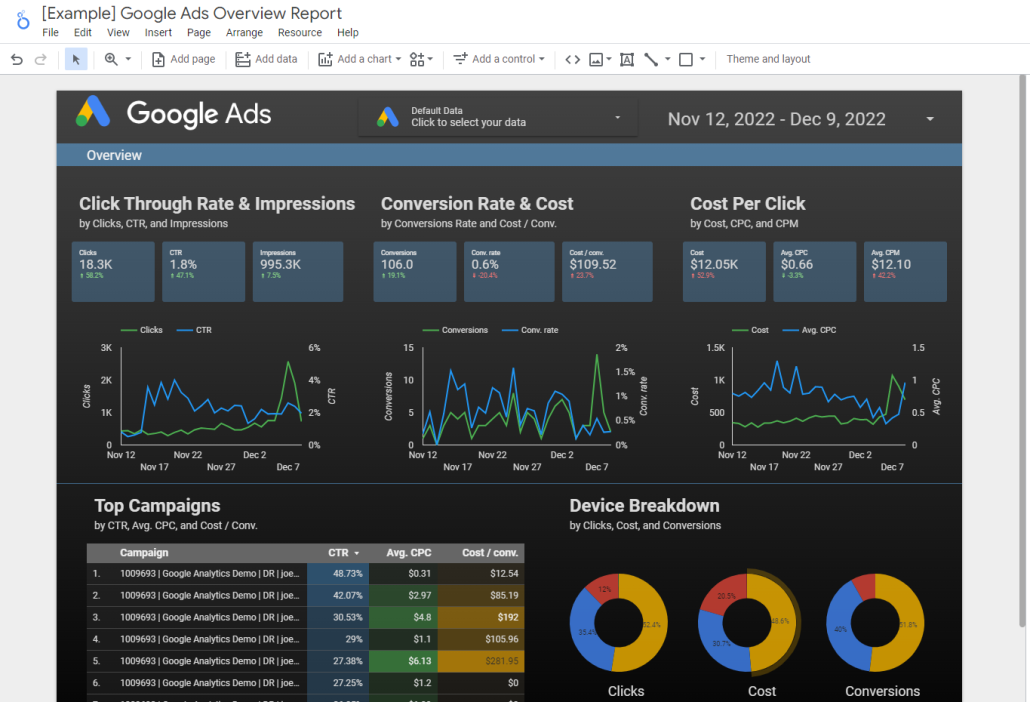
Even better? ProRankTracker integrates with these tools to help users get the most out of all 4.
Over time, combining these tools and using insights from each will form the cornerstone of your monitoring effort.
Then, you can use your hard-earned data to make informed strategic decisions that would have been random guesses without all the legwork you put in on the front end.
FAQs
What are global SEO strategies?
Global SEO strategies help businesses rank in different locations worldwide by assisting users in optimize their websites and content for multiple languages, locations, and search engines to attract a global audience.
How does international SEO work?
International SEO optimizes your website and content to improve visibility and rankings in specific target locations and languages. This includes creating content tailored to those locations’ language and the searchers.
What is the best strategy for global SEO?
The best strategy for global SEO is an individualized approach that helps each business reach its personal goals. Use the flexible plan outline above to create your customized global SEO strategy!
Why a Global SEO Strategy Is Crucial for Success
Developing a solid online presence is more important than ever.
Don’t believe me?
Only 26.95% of Google’s desktop traffic comes from the U.S. That means nearly 75% of Google desktop traffic comes from searchers OUTSIDE the U.S.!
Following the steps in this article will help you connect with your global audience faster than ever.
Try signing up for ProRankTracker’s 14-day free trial to follow the steps above and see how much you can improve your global SEO!
Good luck!