Instant Rank Checker: What Page Am I on Google?
Want to go straight to the Insta-Rank Checker tool? Click here to try the tool. No subscription required.
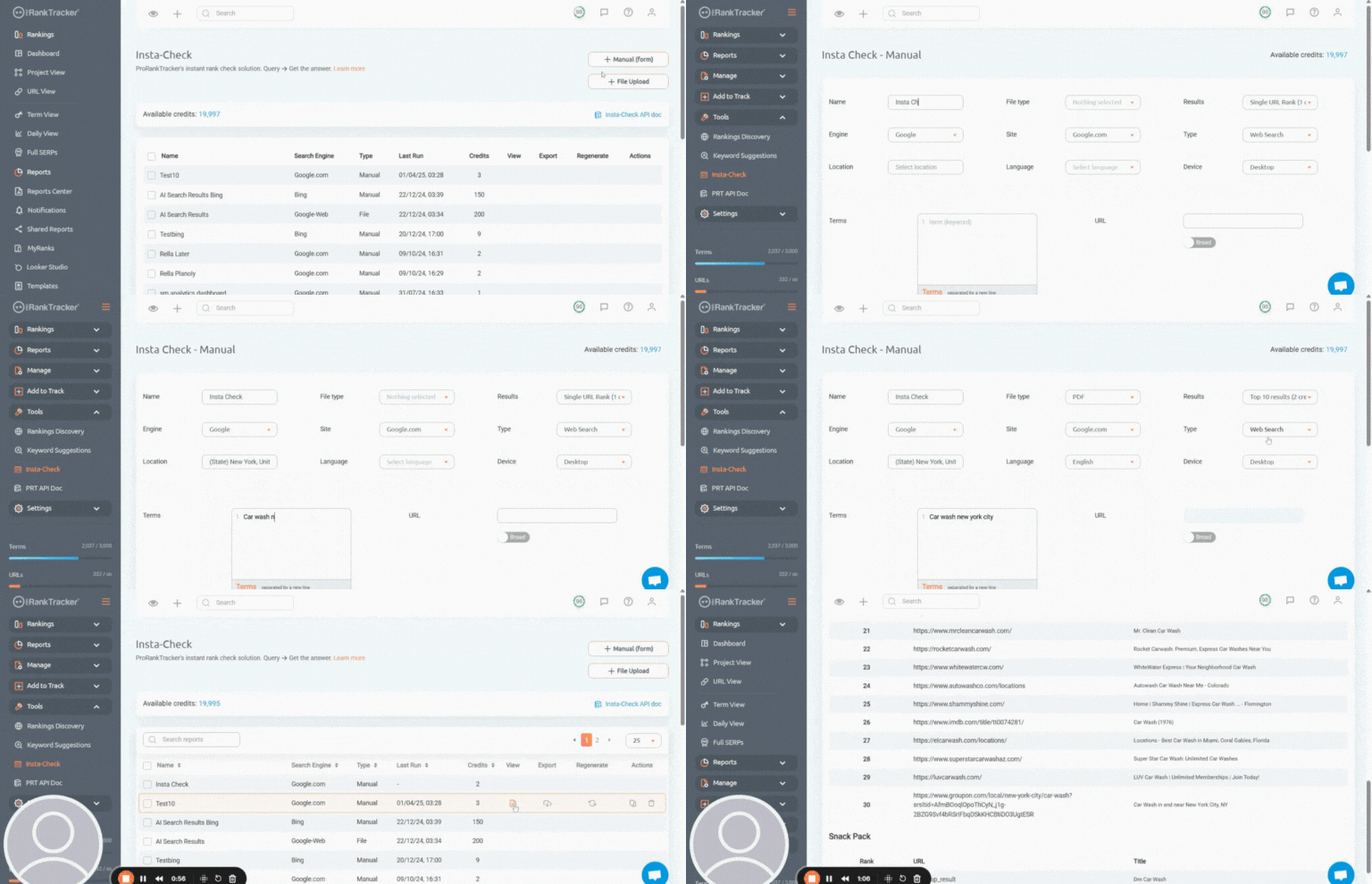
Keep reading for tips on how to use it…
Imagine you’re tracking 475 keywords for your business’s SEO campaign. You’re paying for 500 keywords on your ProRankTracker plan to have a little wiggle room.
However, halfway through the month, you see your competitors’ ranks rising on the SERP. You want to dive deeply into their current ranking strategy, but you don’t have enough room on your plan to add all their keywords.
What do you do?
Do you have to upgrade your PRT plan? Or do you just need to add the 25 most helpful terms and hope you didn’t miss anything?
Fortunately, you don’t have to settle for either of those options. ProRankTracker’s Insta-Check tool allows you to quickly check the ranks of specific keywords WITHOUT adding them to your tracked list.
Insta-Check (as we’ll see in this article) ensures you’ll never miss a beat on the SERP by keeping you constantly updated on your ranks, which helps you:
- Assess the success of your keyword strategy
- Make better strategic decisions and adjustments
- Stay updated on your competitors and find valuable ways to beat them
Let’s discuss why this tool is so helpful and how to use it!
I’ll cover:
How to Use ProRankTracker’s Insta-Check Tool
Now that we’ve gone through the basics of why instant rank checkers are so valuable, let’s look at ProRankTracker’s Insta-Check tool.
The Insta-Check tool allows you to do all the essential things mentioned above without being expensive enough to break the bank (ProRankTracker still manages to be the most cost-effective rank-tracking tool available).
Discover New Keywords Using Keyword Tools
Since one of the primary uses of the Insta-Check tool is to explore new keywords, I wanted to start this tutorial by helping you FIND new keywords that you can then plug into Insta-Check.
Finding keywords on ProRankTracker and exploring them on Insta-Check keeps everything in the same place and helps you streamline the keyword discovery and research process.
ProRankTracker offers 2 main tools to help you discover new keywords:
- Keyword Suggestions
- Rankings Discovery
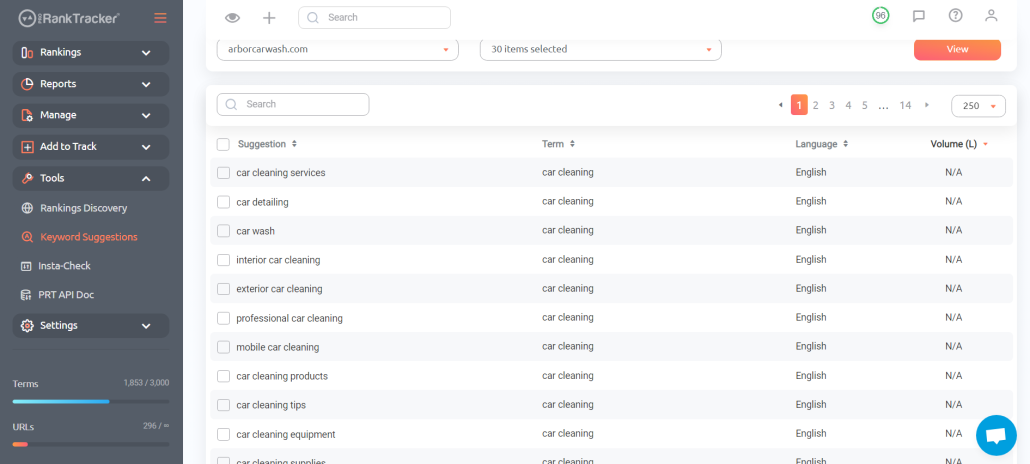
The Keyword Suggestions tool provides users with a list of high-value, long-tail keywords based on their current keyword strategy.
In other words, ProRankTracker doesn’t simply guess which keywords might be beneficial – it considers your current strategy. It then suggests keywords with a reasonable search volume and competitiveness that will be good targets.
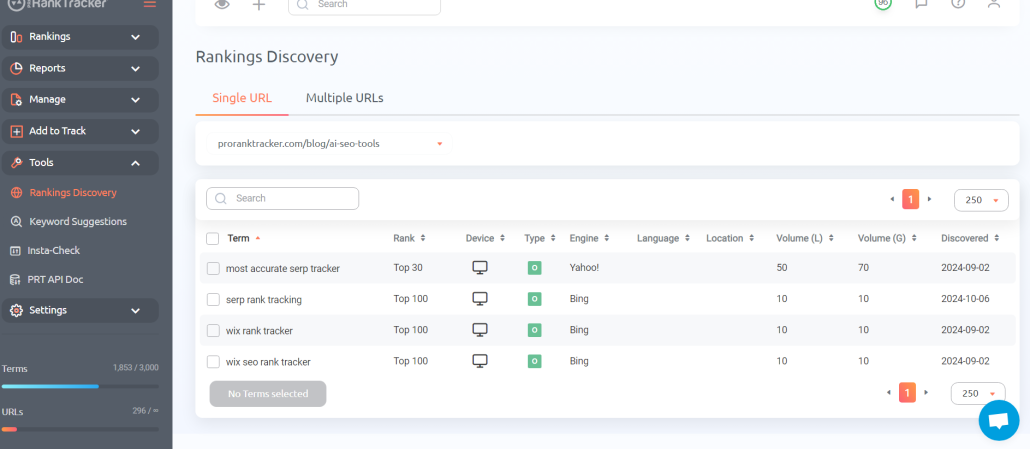
On the other hand, the Rankings Discovery tool reveals keywords that your URLs are already ranking for.
Which can be helpful for re-optimizing pages for low-hanging fruit opportunities (if you’re already ranking for something, improving that ranking will be the easiest way to get traffic).
For example, you might find that you’re already ranking in the top 20 for a keyword you aren’t yet targeting. You could add that keyword to your list and spend some effort boosting it into the top 10 or 5.
Then, you could head over to the Keyword Suggestions tool and have ProRankTracker generate a list of high-value keywords based on the new keyword you just added!
Combining these tools allows users to quickly generate lists of dozens of high-value keywords based on keywords that are likely to generate traffic for your website.
Now that you’ve collected some high-quality keywords, let’s head over to the Insta-Check tool to analyze them on the SERPs.
Pay-As-You-Go
Using the Insta-Check tool, ProRankTracker allows you to research new keywords WITHOUT paying to add them to your long-term tracking list (which would require you to upgrade your monthly plan).
Instead, Insta-Check works on a credit-based payment system. So, when you want to use the Insta-Check tool, you just have to pay to add the credits you want to your profile instead of upgrading your plan.
Here’s the even better news: It’s affordable!
You can try out Insta-Check for only $1! This will get you 40 credits, which is enough to check the top 100 SERP results for 10 keywords!
If you decide you want more credits (which is highly likely), you can buy them starting at 25,000 credits for $58 and going all the way up to a million or more!
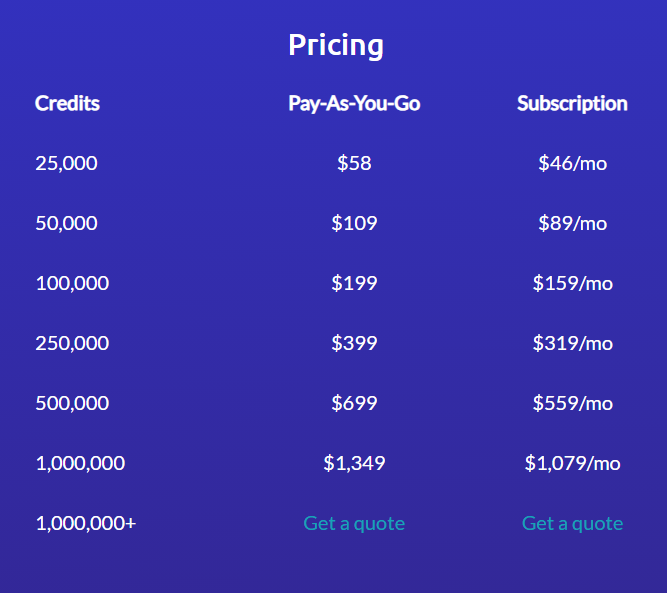
If you use Insta-Check frequently (which, again, is highly likely), you might decide it’s worth buying the credits on a subscription model so your credits get automatically topped off every month.
If you choose to do that, you can even save some money. 25,000 credits on the subscription model only costs $46/month! (You can save even more by signing up for an annual Insta-Check plan and get 20% off the listed monthly prices.)
Determine Which Insta-Check Report to Use
Insta-Check is an in-depth and customizable tool, so it’s worth taking a second to talk about the different types of reports you can generate with it.
There are 4 different Insta-Check reports:
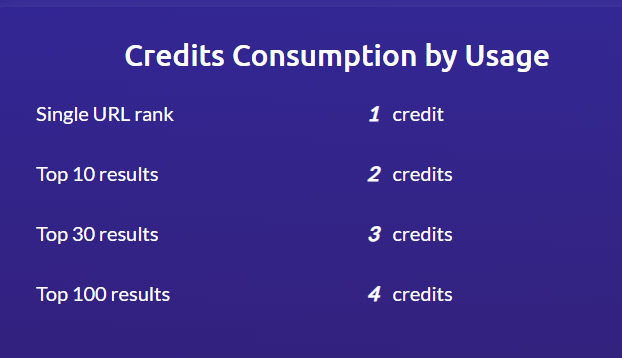
- Single URL check (costs 1 credit), which tells you the rank of your URL for a specific combination of keyword, location, device type, search engine, and language.
- Top 10 results (costs 2 credits), which tells you the top 10 ranks for a given combination of keyword, location, device type, search engine, and language. Does not require a URL to generate.
- Top 30 results (costs 3 credits).
- Top 100 results (costs 4 credits).
Upload Keywords to Check
There are 3 ways to upload keywords for checking in the Insta-Check tool:
- Using a form for manual uploading (one at a time)
- File upload for bulk uploading
- API import for automatic uploading
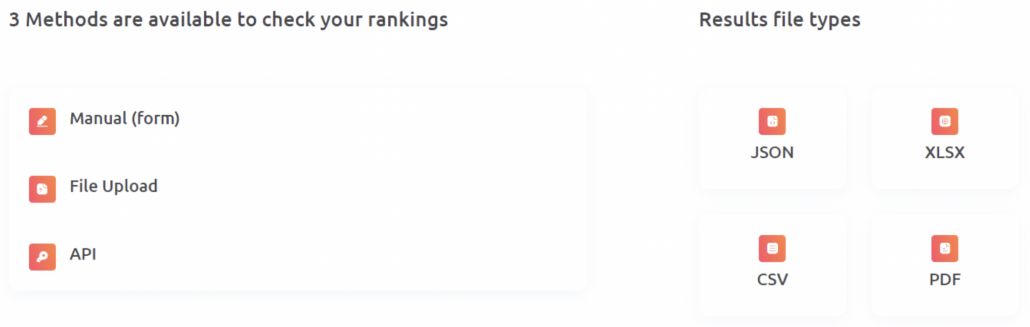
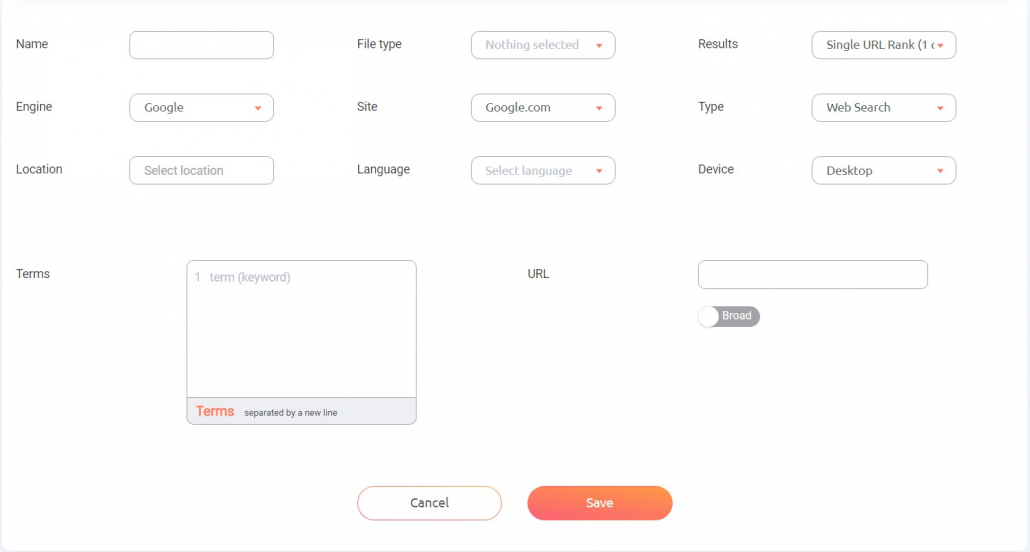
The form is most practical if you don’t have that many keywords to import at a time. This is for when you just need to check a few SERPs or keywords for potential rankings. Just fill out the form details, and you’re good to go.
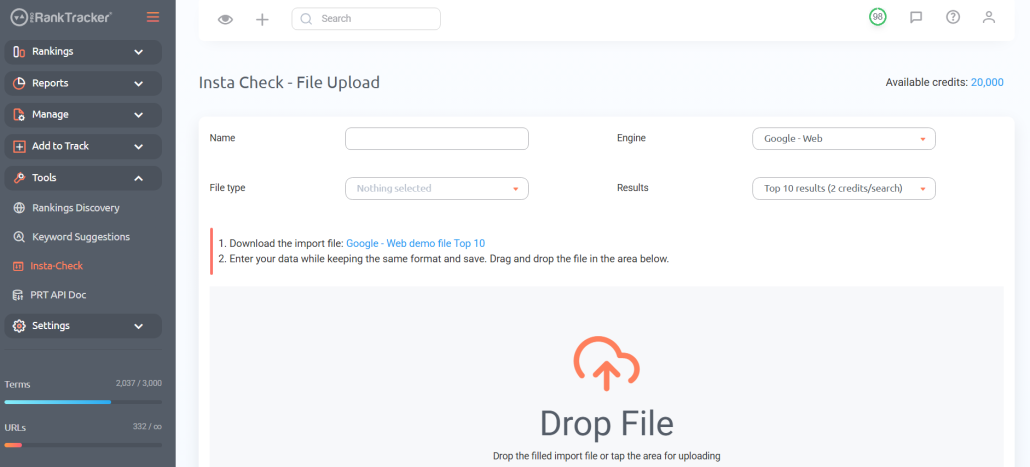
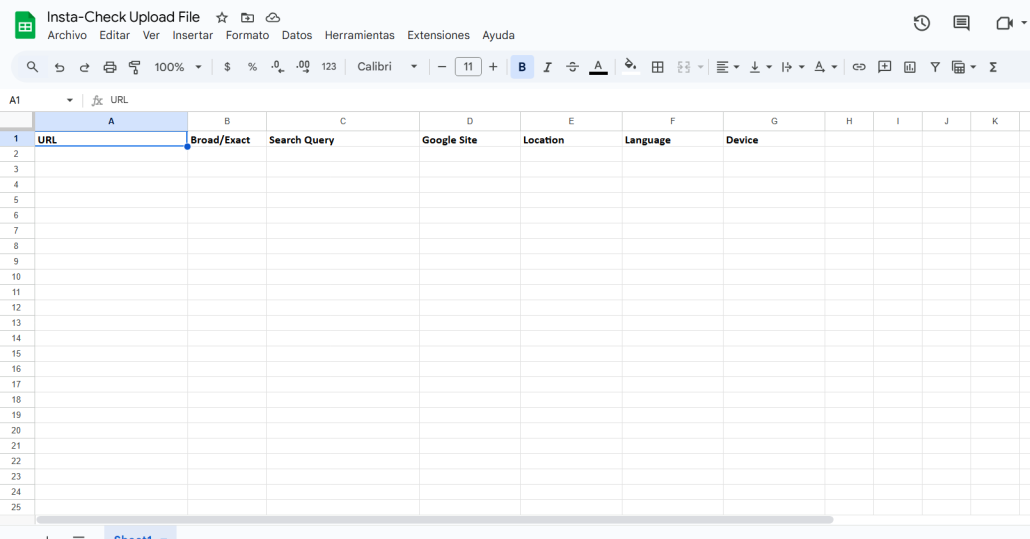
When you want to upload a long list of keywords or track several URLs in one report, use the file upload feature to quickly import a long list of keywords into the Insta-Check tool.
Just download the import file for your selected report type, fill it out, and then upload it!
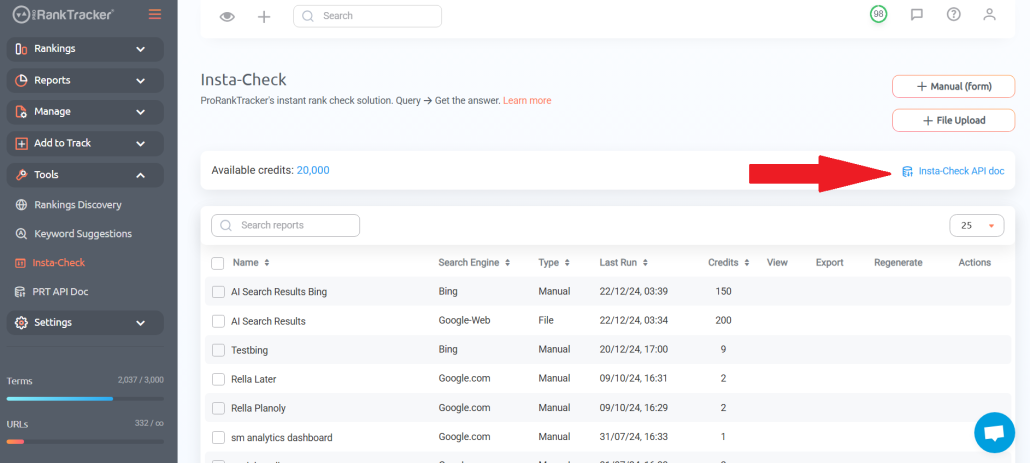
If you’re interested in accessing the full flexibility of the Insta-Check tool, you can use the API to integrate your existing tools with ProRankTracker. Click on the API Doc on the Insta-Check page to access the ProRankTracker API.
Analyze Reports
After you generate your Insta-Check reports, it’s time to use the data. Depending on how many keywords or SERPs you’re analyzing at a time, it could take a few moments for ProRankTracker to collect the data.
Once it’s done, you can download the report. There are 4 file types that you can download:
- CSV
- XLSX
- JSON
You should select the file type that will be the most helpful for your use case. For example, a PDF will probably suffice if you only want to do a quick check. If you want to upload some of those ranks into ProRankTracker for long-term tracking, the XLSX or CSV will be more helpful.
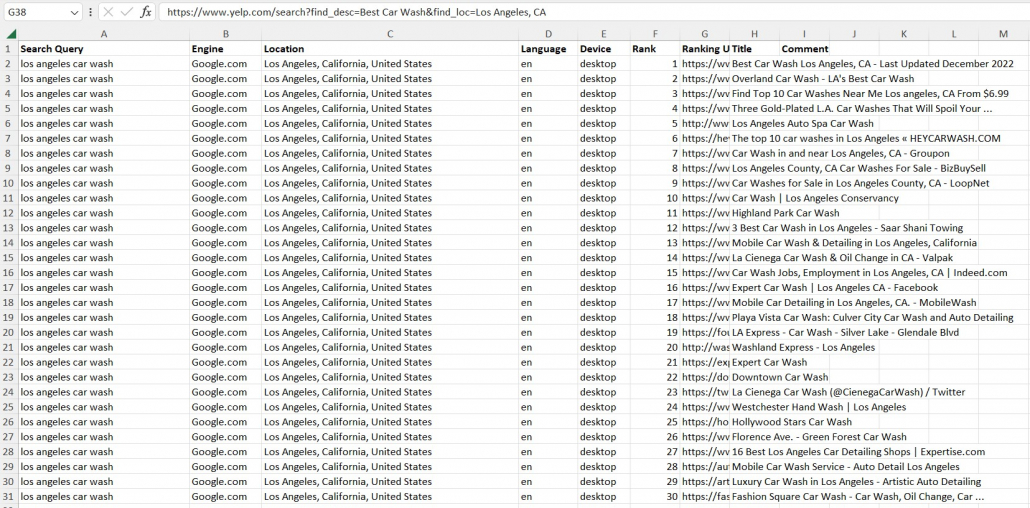
For example, in the report below, I generated an analysis of the top 30 results on the SERP for the keyword “Los Angeles car wash” (it only costs 3 credits to create this report–not 30).
Analyze Competition (SERP Research)
One of the most practical uses of the Insta-Check tool is to analyze what your competitors are doing without adding them to your full-time tracking list.
You might want to do this if you’re considering adding new keywords, but you want to check if your opponents rank for them first.
Fortunately, it’s straightforward to do with the Insta-Check tool.
1. Gather the keywords you want to include. In our car wash example, let’s say you’re targeting 3 new keywords: “car detailing Los Angeles”, “best Los Angeles car wash”, and “self-serve car wash Los Angeles”.
2. Go to the Insta-Check tool and select “Manual (Form).”
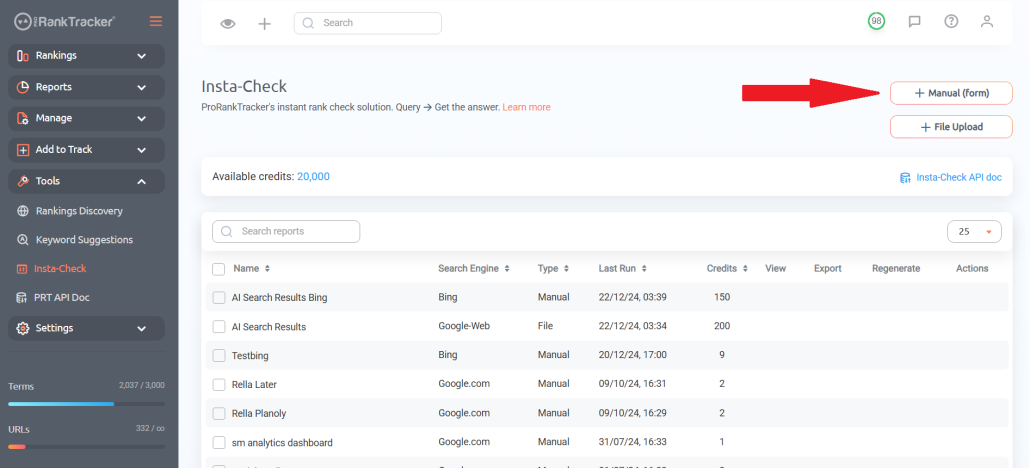
3. Fill out all the fields. We’re selecting to generate a report showing the top 10 results on the SERP for each keyword since we’re interested in knowing our competition for those keywords.
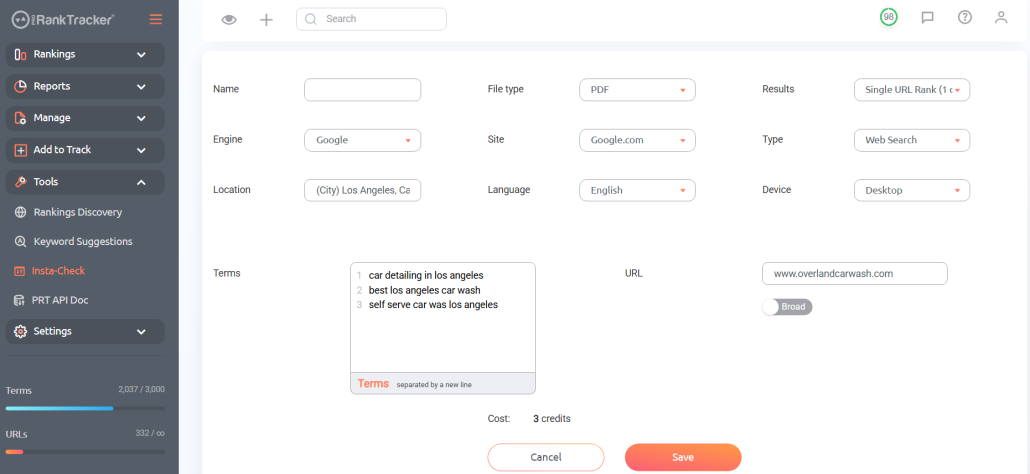
4. Alternatively, you could target a specific competitor’s URL by changing the result type to “Single URL Rank” and putting your competitor’s URL in the URL field.
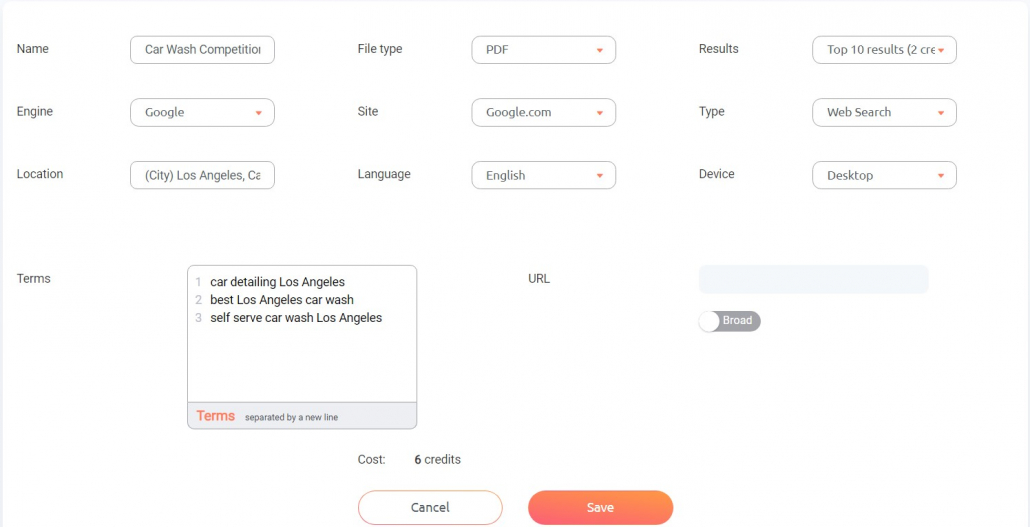
5. Click “Save” at the bottom and view the report you generated! You’ll quickly be able to view your competition’s ranks for those keywords, giving you insight into what keywords you should target.
Integrate It Into Your Systems With the SERP API
If you have other systems already in place and want to combine them with the power of ProRankTracker’s Insta-Check tool, that’s where the API comes in.
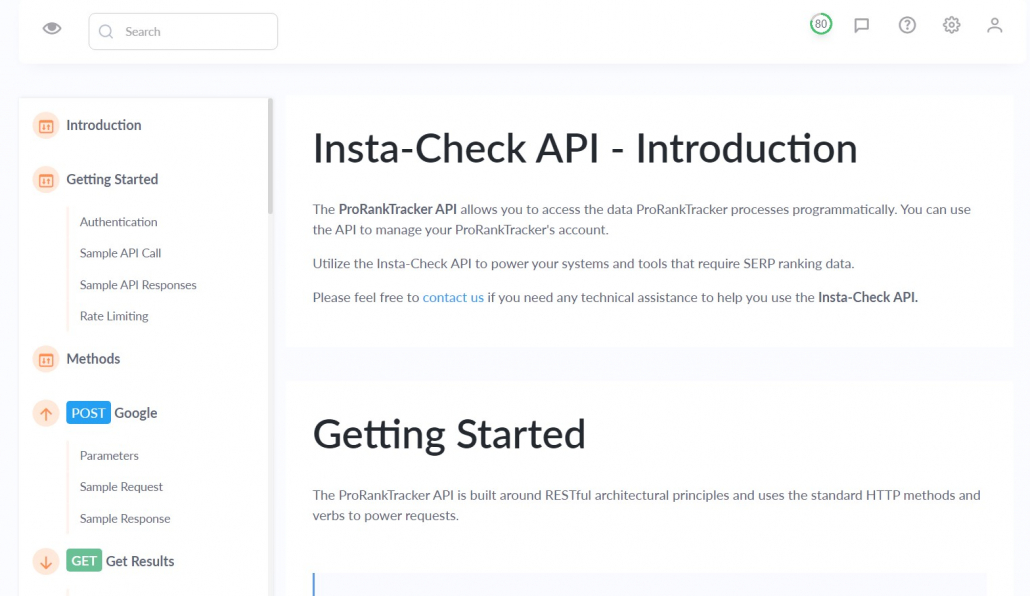
For example, let’s say you want to use ProRankTracker data to power another system to monitor your ranks. You can use the API processes to programmatically pull data from ProRankTracker’s Insta-Check tool to your other system.
Be aware, however, that the API takes some technical and coding knowledge. The API Doc gives you all the information about how to use it, but someone with very little technical knowledge will be limited in their ability to apply it.
4 Instant Rank Checker Use-Case Scenarios
By now, it’s evident that checking your ranks on Google (and other search engines) is incredibly valuable.
But do you need an instant rank checker?
Are there any advantages to using a rank-checking system that allows you to check ranks without adding them to your long-term tracking list?
YES!
An instant rank tracker brings several key advantages that help you make the most of your tracking tool’s capabilities.
Let’s look at 4 scenarios in which an instant rank checker can add extreme value to your SEO toolbox.
Use Case #1: Check Rankings Quickly (Without Adding to Your Main Tracking List)
First, an instant rank tracker allows you to quickly check some keywords here and there without needing to add them to your tracking list.
For example, let’s say you have a dozen keywords that you’re interested in and want to see if you should add them to your long-term list.
Using an instant rank tracker, you could check those ranks and quickly find out which ones are worth adding long-term and which ones you should forget.
Compared to the normal process of adding URLs and keywords to your plan for long-term tracking, Insta-Check will save you a TON of time on research.
Use Case #2: Explore More Keywords Without Upgrading Your Account Plan
If your ranking tool has a lot of available plans (which it should to allow your business’s SEO to grow incrementally), you probably won’t have a ton of extra keywords each month.
That’s a good thing! It means you’re only paying for the keywords you need.
However, what happens when you want to check a few keywords but don’t want to add them to your long-term list? Do you just need to upgrade your plan and pay extra every month?
You don’t have to upgrade your plan if you have an instant rank checker. Instead, you pay for the ranks you want to check this month without changing your monthly subscription cost.
Since you can get 25,000 Insta-Check credits for less than $60, using Insta-Check can be WAY more cost-effective than upgrading to the next size plan.
Use Case #3: Check Competitor Keywords Quickly
Are you concerned that your competitor is launching a keyword campaign that might interfere with your strategy?
Your competitors’ strategies are some of the most important things to monitor to understand the success of your strategy.
However, you don’t necessarily want to add every keyword you THINK your competitor might be using to your long-term tracking list.
An instant rank checker fixes this issue by allowing you to quickly check any keywords you suspect your competitor might be using.
For example, after you notice your competitors have dropped a new piece of content, you can head over to the Insta-Check tool to check the top 10 ranks for some of the keywords you think that article might target. This will instantly give you actionable info about where your competitor’s new article ranks for high-value keywords.
Use Case #4: Develop Your Strategy at a Moment’s Notice
Let’s say you discover (using a rank tracker) that your website’s ranking improvement has stagnated.
This is a problem, so you want to fix it as quickly as possible.
Using an instant rank checker like Insta-Check, you can find out in 5 minutes or less which keywords are likely to help you start improving your ranks again.
In other words, you can get a good idea of which keywords you might want to target in a new content campaign or which keywords would be good targets while revamping your old articles.
Without an instant rank checker, this kind of rapid strategic development just isn’t possible.
FAQ
How do I check my Google search ranking?
There’s more than one way to check your Google search ranking. You might be tempted just to Google your target keyword and see where your page ranks, but this is an inaccurate method because it doesn’t allow you to control for location, device type, and other search factors.
A much better way is to use a SERP checker like Insta-Check to see where your URLs appear on the SERP. It’s more accurate, faster, and more flexible as you grow.
How do you check your SEO ranking for free?
If you’re absolutely committed to not spending money on rank tracking (which we don’t recommend–you typically get what you pay for), we STILL recommend against manually checking your ranks. It’s slow and inaccurate.
Instead, use Google Search Console until you outgrow it, then switch to a more full-featured rank tracker like ProRankTracker.
Conclusion
Tracking ranks is essential for getting ahead on the SERP, but there are some cases where you don’t want to add something to your permanent tracking list. In those situations, you need an excellent instant rank checker.
ProRankTracker’s Insta-Check tool is the best solution to help you instantly discover your ranks (or your competitors’ ranks) and apply that data without breaking the bank.
However, if you’re trying to track your rankings in the long term, you should try signing up for ProRankTracker’s 14-Day free trial.
Happy tracking!