How to Use a Top-100 Daily Rank Tracker
Looking for a daily rank tracker? Try ProRankTracker for just $1 to track 100 searches daily for 7 days with all premium features enabled.
How often do you check your ranks?
Twice a week?
Once a week?
Every other week?
Many people don’t realize how important it is to stay 100% up to date on all your ranks.
After all, what could it hurt?
Fresh, daily updated ranks can make or break your SEO success in several key areas:
- They help you stay up-to-date so you can make strategic adjustments as needed.
- They help you avoid catastrophes (like Google penalties or Core Updates) by addressing minor problems before they escalate.
- They prevent you from making poor decisions based on incorrect ranking data.
In other words, it’s critical to check your ranks EVERY DAY!
BUT…
Since September 2025, when Google got rid of the ability to view the top 100 results from a single page, a lot of rank trackers started cutting corners (to save costs) by only tracking the top 10-20 results, making it a struggle to track early SEO results. Many rank trackers are also reducing update frequency to 48 hours or weekly, without notifying customers of the change.
This means it’s time to reevaluate rank trackers on the market to ensure you get access to accurate, in-depth ranking data.
I’ll start by exposing some common rank trackers that are cutting corners. Then, I’ll show you where and how you can accurately track your rankings daily (without spending a fortune).
Let’s get started!
I’ll cover:
What You Should Look for in a Rank Tracking Tool
There are a few simple things you can focus on to ensure you’re getting the most bang for your buck when it comes to picking the right rank tracking tool.
These key features ensure that your tool is reliable and efficient, helping you make informed strategic changes:
- 100% accurate data: Your rank checker should offer 100% accuracy, ensuring that the rankings you see are exactly where your URLs are on the SERPs for your target search engines, locations, languages, and devices.
- Daily rank updates: To effectively monitor your SEO strategy, you need a tool that provides DAILY updates (even on the cheapest plans!). Regular updates give you a clear, up-to-date picture of your keyword performance, and you shouldn’t have to break the bank to get them.
- Customizable & automated reporting: Automation is a time-saver, especially for agencies managing multiple clients. Look for tools with powerful reporting features, including automated scheduled reports and customizable notifications (e.g., alerts when your rankings drop). These features help you stay informed without manually checking your rankings every day.
- Affordable plans: Finding an affordable rank tracker is now harder than ever. Many of the biggest names, like Ahrefs and Semrush, charge $100+ just to get basic-level rank tracking.
- Supports all ranking types: Most businesses will need Google, Google Maps, Google Business, and AI Overview tracking. But others might need more niche rankings for YouTube, or ChatGPT.
With so many options for rank trackers on the market, which truly offer daily rank tracking?
Based on these factors, here are some rank trackers that still offer top-100 daily rank tracking (some have caveats):
- ProRankTracker – Daily and on-demand updates for top-100 rankings, starting at $49/month for 500 terms.
- Semrush – Claims 24-48 hour updates for top-100 rankings, but I’ve noticed slower weekly updates. Pricing starts at $199/month for 500 terms.
- Ahrefs – Weekly updates for top-100 rankings, starting at $129/month for 750 terms. But you have to pay an additional $200/month for daily.
- SE Ranking – Daily and on-demand updates for top-100 rankings, starting at $65/month for 500 terms.
- Google Search Console – Shows daily “average” rankings for up to top-80 rankings (based on what I’ve seen), which often lags days behind (it’s inconsistent).
Remember: Accurate data is as fresh as possible because rankings change daily – and sometimes hourly.
Why ProRankTracker Is the Perfect Daily Rank Checker
ProRankTracker is a highly specialized rank tracker that helps businesses use their ranking data to improve their SEO.
SEO marketers, agencies, and local businesses choose ProRankTracker because it offers EVERYTHING a daily rank tracker should (as I mentioned in the previous section).
Every plan offers 100% accurate daily top-100 rank tracking for:
- Google Maps
- YouTube
- LLMs (AI Overviews, AI Mode, ChatGPT, Gemini, Copilot, Perplexity, and Grok)
And the location-accuracy can be as granular down to the zipcode or neighborhood.
But one of the most powerful features? That’s the customizable and easy-to-share reporting that you can even white-label with your branding.
20+ reports can be created to show your daily rank changes for specific URLs, terms, Projects/Groups/Tags, search engines, locations, and much more. I always schedule reports to be sent to my client’s email and send shareable reports that are a simple link that lets anyone dig into the data with or without a password.
ProRankTracker consistently gets positive reviews (4.6 average on G2). Just check out what Paul L. likes about ProRankTracker:
“The most important feature of any rank tracking tool is accuracy, and I have always found PRT to be spot on, even though I’ve no doubt Google tries to make this as difficult. My rank tracking needs are quite basic, but PRT is continually adding new features and quickly adapting to Google’s SERP changes.”
And here’s why Bryan R. feels ProRankTracker is the go-to tool to track SEO performance:
“Pro Rank Tracker has been an invaluable tool for tracking our local Google rankings. It’s incredibly user-friendly, making it easy to add new keywords and URLs to monitor. The insights provided are detailed and accurate, which have significantly helped us optimize our SEO strategies.
One standout feature is the API, which we utilize for in-depth monitoring, pushing rankings to a Google Sheet. It integrates seamlessly into our workflow and provides comprehensive data that helps us stay ahead of the competition.
Pro Rank Tracker is a top-tier tool I highly recommend for anyone serious about tracking their SEO performance.”
How to Track Ranks Daily with ProRankTracker
ProRankTracker provides fresh, accurate ranks that are updated daily, but how can you use it to increase traffic to your business?
Even though ProRankTracker is a powerful tool for tracking ranks, discovering keywords, and tracking competitors, it’s very simple to use.
If you haven’t yet tried ProRankTracker, you can follow along this guide with a $1 Test Drive plan.
Add URLs and Keywords
The first step to getting ultra-fresh ranking data from ProRankTracker is to add the URLs and keywords you want to track.
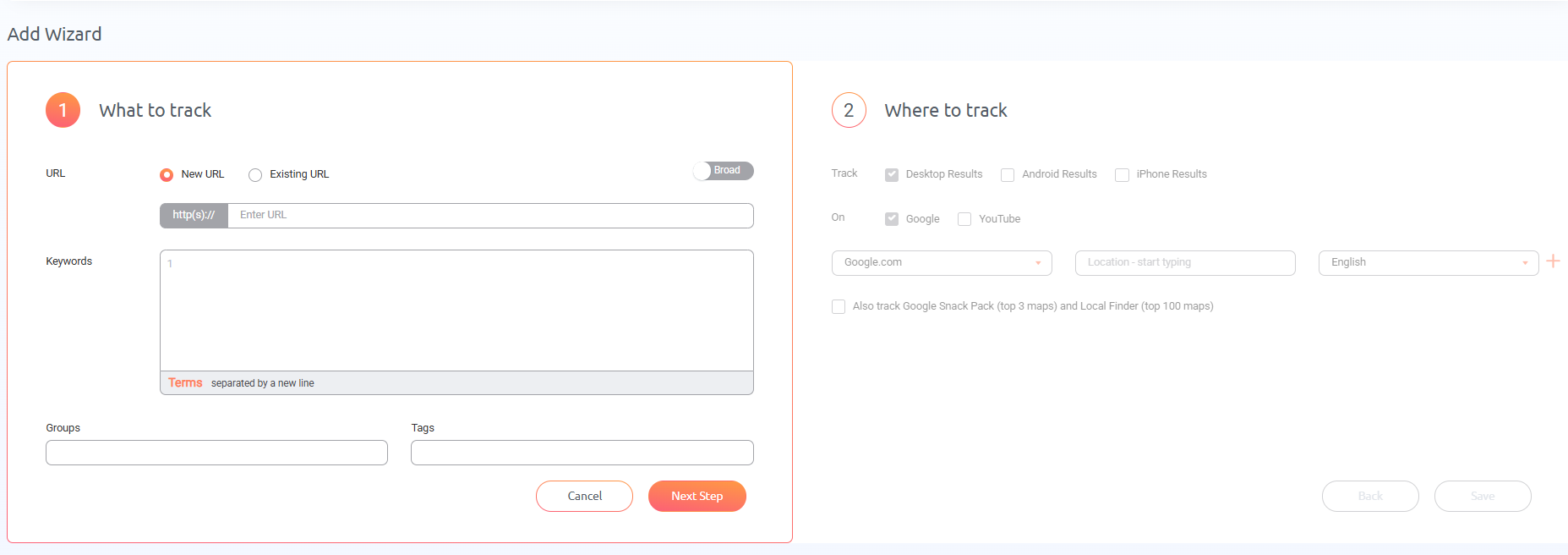
The quickest way to get started doing this is with the Add Wizard tool. Just add a URL, then type the keywords you’re targeting with that URL.
In the next step:
- Select a location
- Choose which devices to track
- Add all the search engines you’re targeting
- Specify TLD (Top Level Domain, referring to the suffix at the end of a website address like .com and .org)
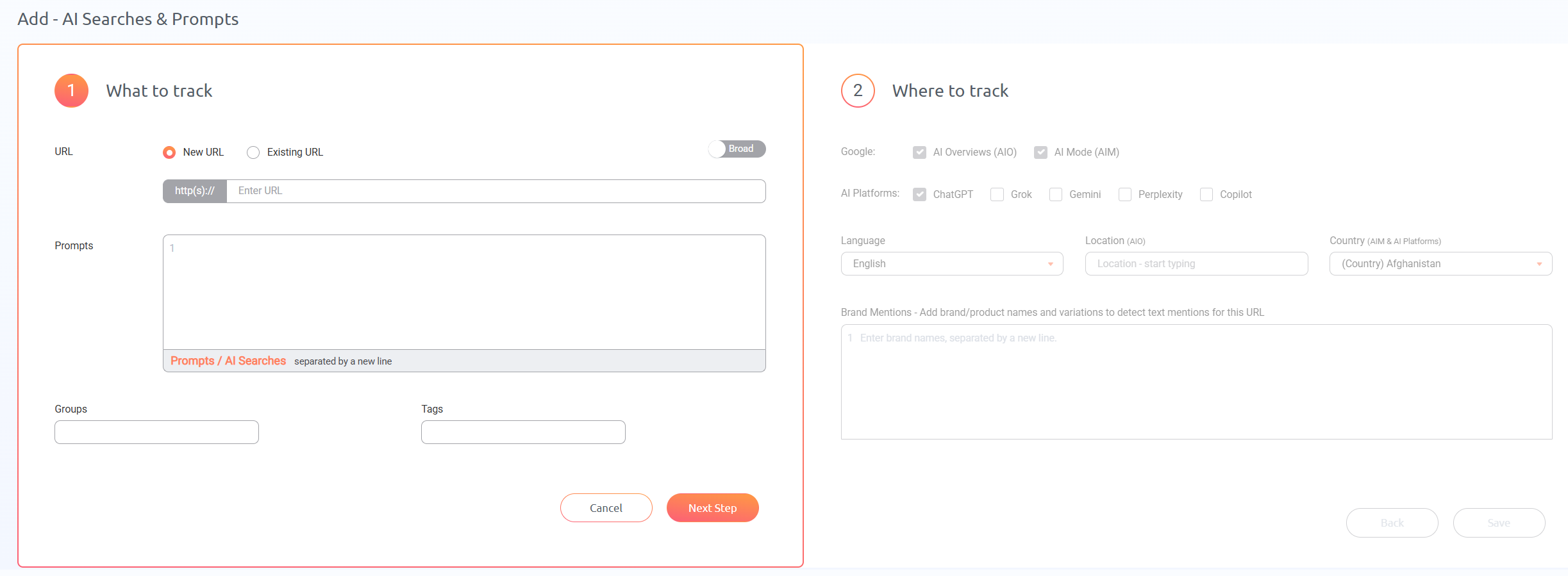
For AI tracking, the process is similar, except you’ll need to add prompts instead of keywords in step 1 and select the AI chatbots you want to track (optional: add the brand you want to track in the results) in step 2.
That’s all there is to it! After you add your URLs and keywords here, ProRankTracker will automatically populate all the fields on the Rankings Views pages and your projects, which we’ll talk about next.
Create Projects to Organize Your Strategy
There are several ways to organize your data in ProRankTracker (Groups and Tags are available too), but Projects are the most powerful.
A Project is the highest level of organization in ProRankTracker, meaning they can contain Groups and Tags.
Projects are perfect for organizing your data for ease of use in the future. For example, you may want to set up Projects to:
- Organize all of your competitors’ URLs and keywords so you can easily check on them at any time.
- Organize each of your clients’ data to check their rankings without using filters each time.
- Manage a specific SEO campaign that’s testing a new tactic.
To create a project, click “Manage” on the left-hand toolbar, then click “Projects.”
Once in the Projects menu, you can edit your existing Projects or create a new one. If you choose to make a new Project, you’ll be prompted to select the data you want organized. You can choose Groups, Tags, URLs, search engines, languages, and more.
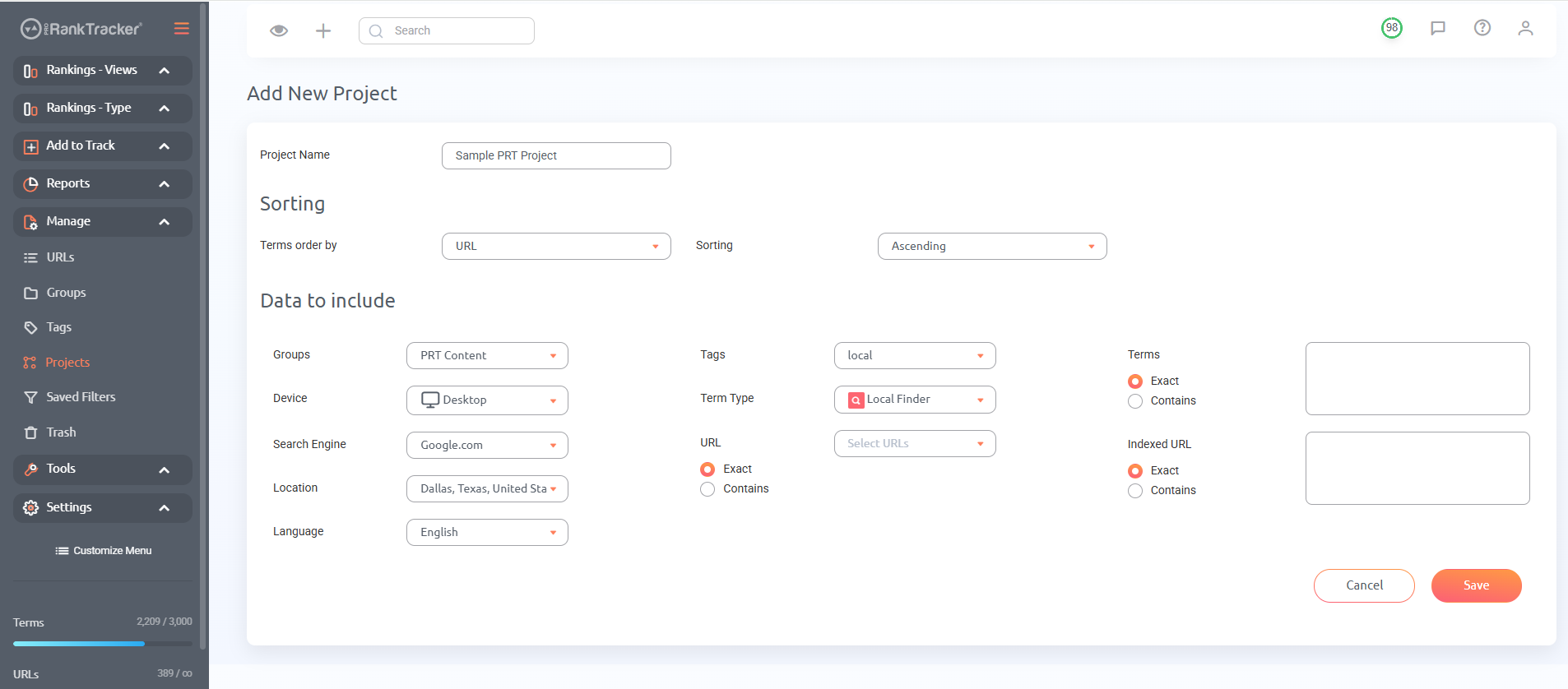
Once you finish making your Project, click “Save,” then view your project from the Project View in the “Rankings – Views” tab.
Use Rankings Views
There are 5 Rankings Views you can use to get a deep look at your current and historical ranks.
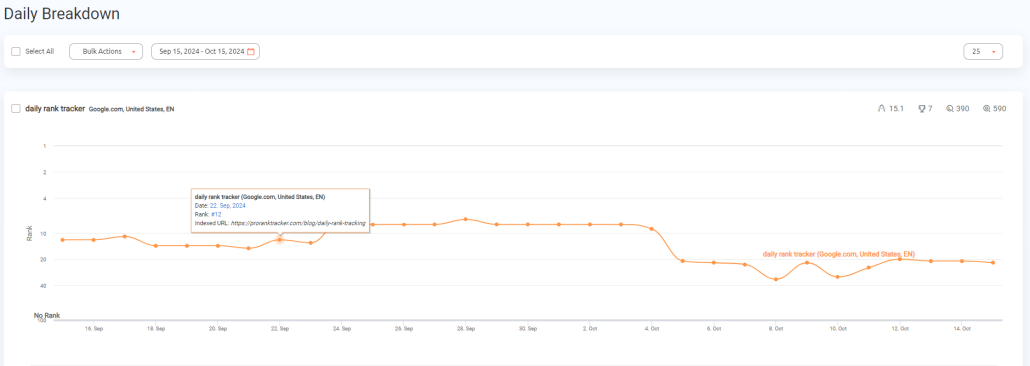
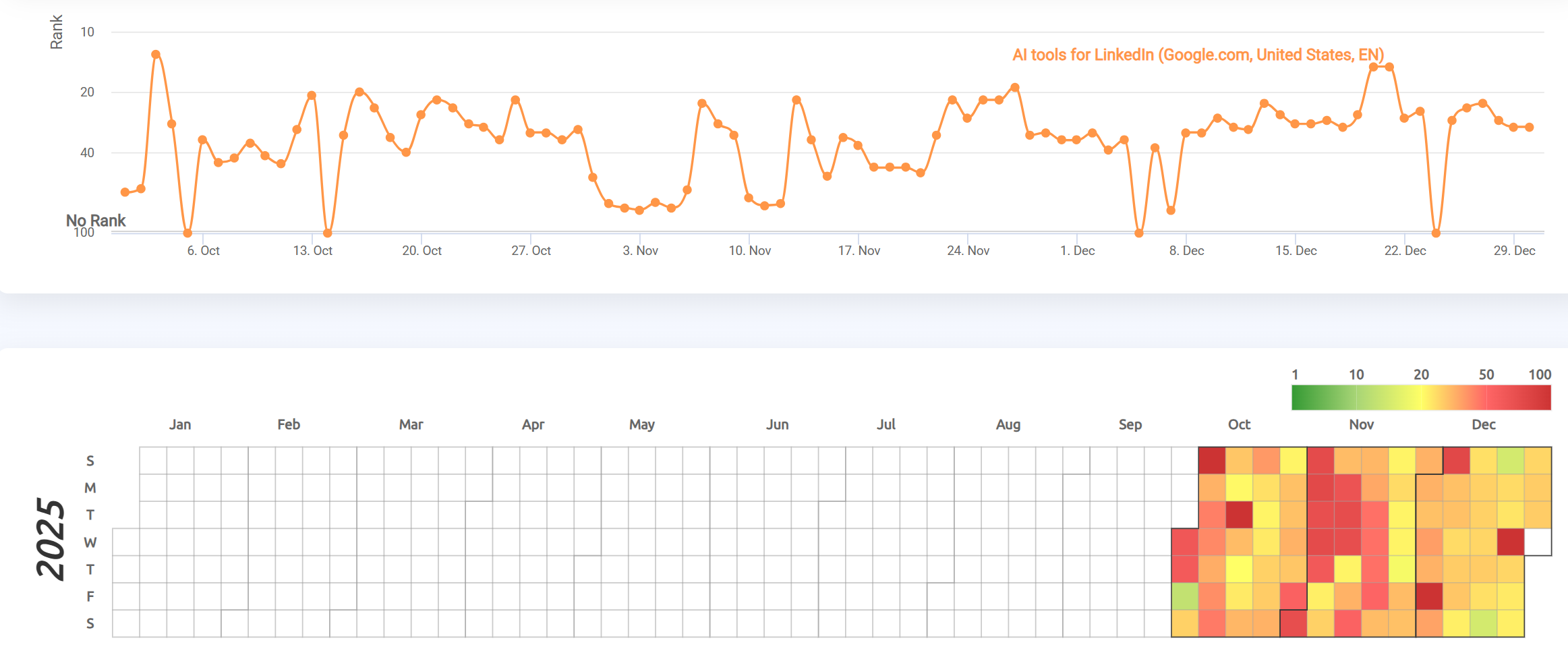
The Daily View shows a historical graph of each URL and keyword’s performance. It’s a great way to understand your strategy’s success over time.
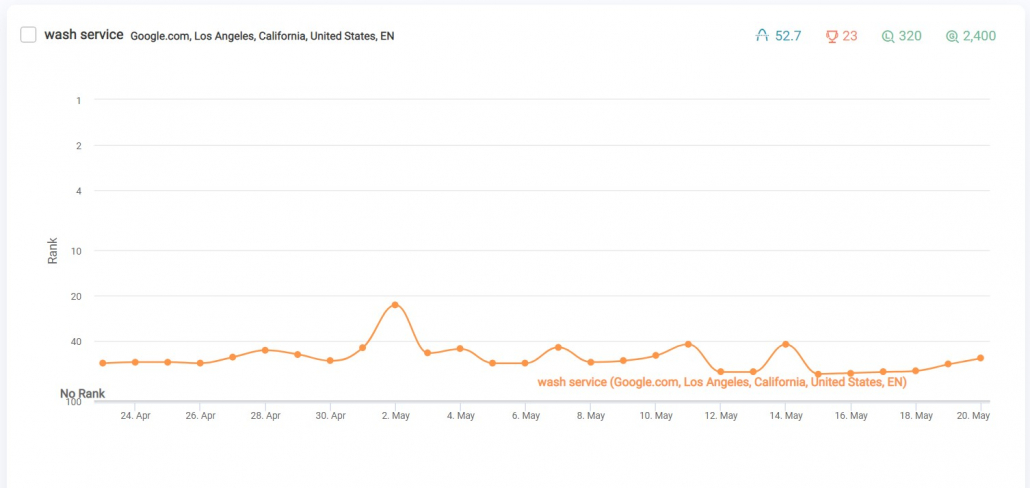
This is one of the areas where ProRankTracker shines. Since your ranks are updated daily, you can get a highly granular understanding of how your ranks have changed over time, helping you understand what factors led to drops or jumps in your ranks. Make sure you check the Daily View frequently!
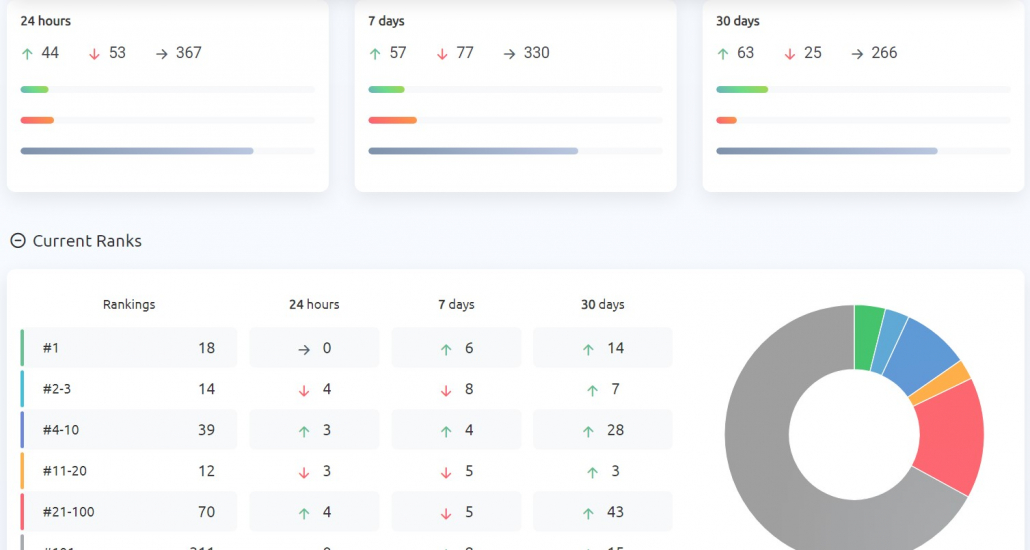
The Dashboard gives you a big-picture look at the overall health and trends of all your ranks.
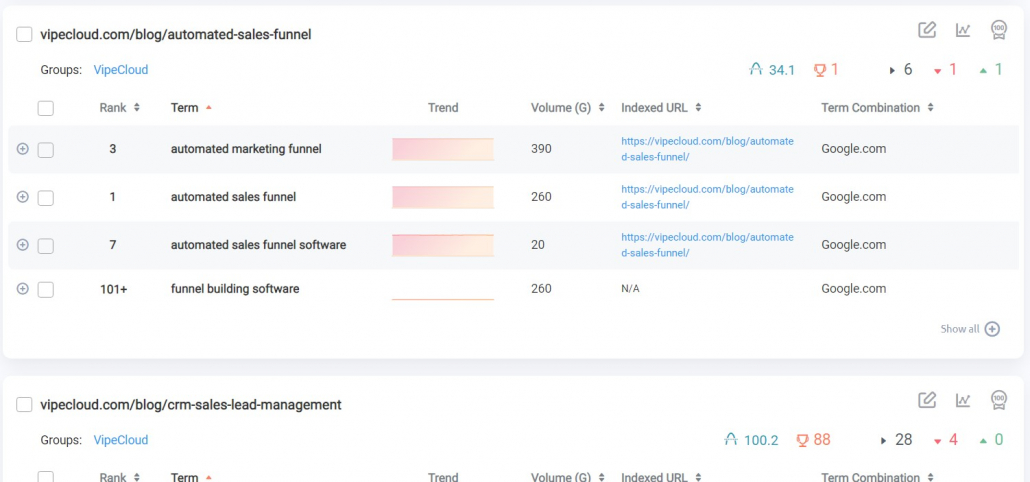
The URL View shows you data about each rank organized by URL. In other words, you can see what keywords are being tracked for each URL and your ranking data for those keywords.
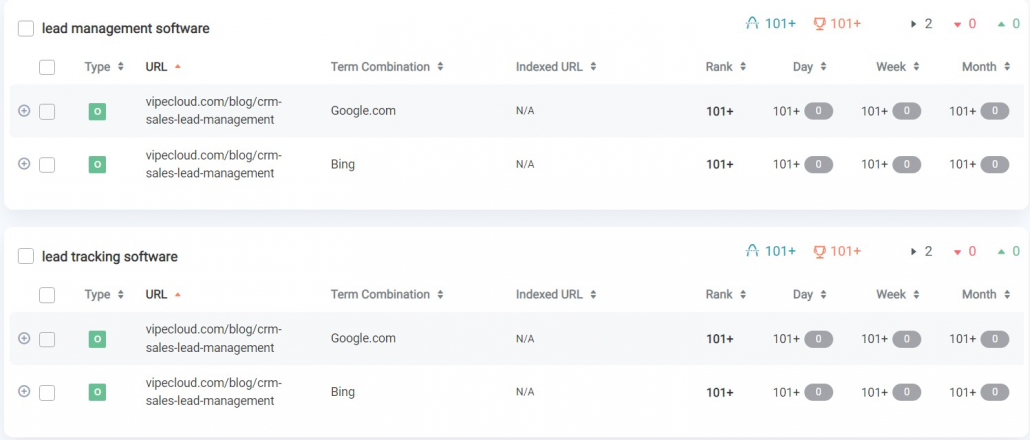
The Term View is just like the URL view, but it’s organized by keyword instead of URL. This can help you compare how 2 URLs are ranking for the same keyword.
The Project View utilizes the Projects you created in the step above to help you understand your Project’s health in a single page. This view also includes daily ranking reports and a heatmap to see how you rank over time.
Ensure you use all 5 Rankings Views to maintain a well-rounded understanding of your ranking health! You can also generate reports to send these Rankings Views directly to your email.
Use Insta-Check
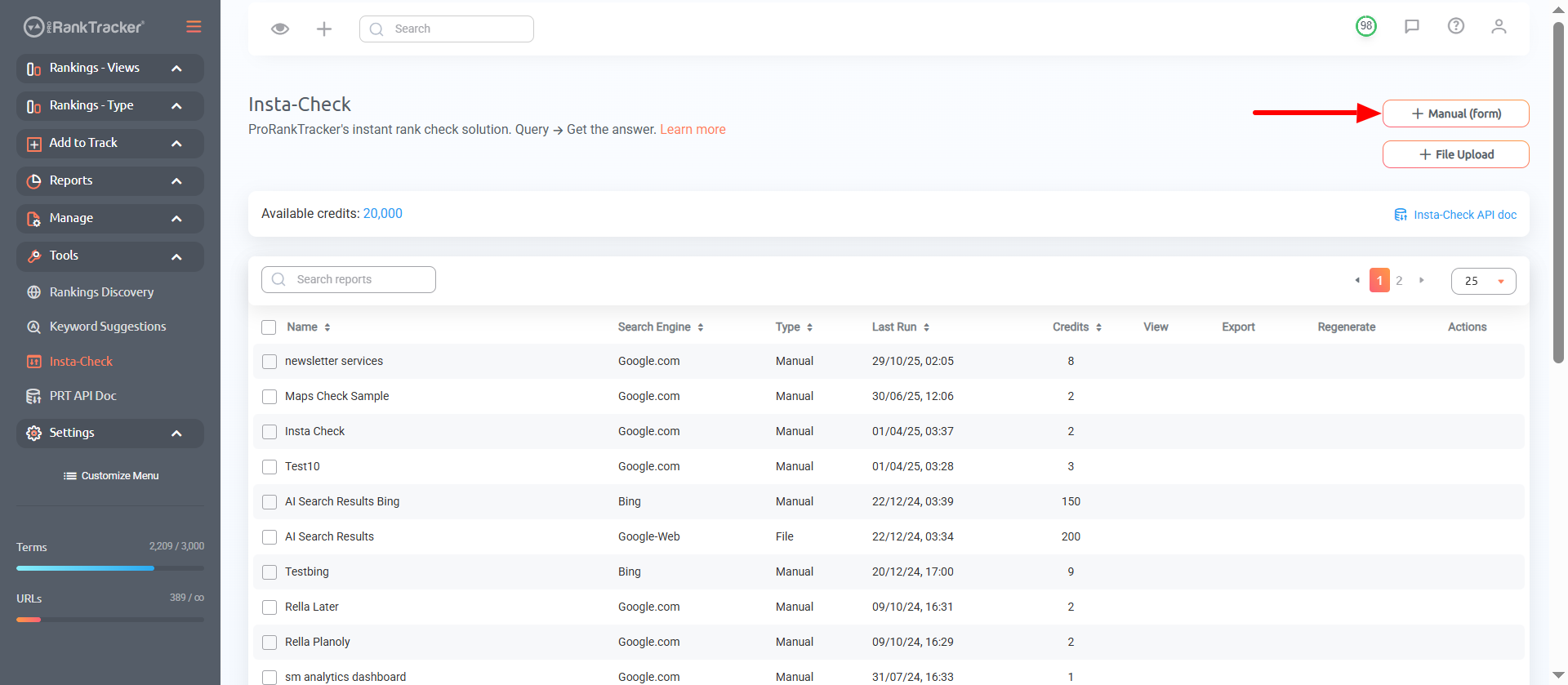
Insta-Check is ProRankTracker’s SERP checker, and it allows you to easily see the current SERP for any keyword WITHOUT adding that keyword to your tracking list. Instead, it uses a credit-based system where you just buy what you need and save the rest for later use (you don’t even need a regular plan to use this tool).
To use the Insta-Check tool, go to “Tools,” then click “Insta-Check.” Then, click “Manual (form),” as shown in the image below, or you can upload a file to bulk generate Insta-Check reports.
Just choose the keyword you want to check, how much of the SERP you wish to examine, and other critical details like language, search engine, device type, and location.
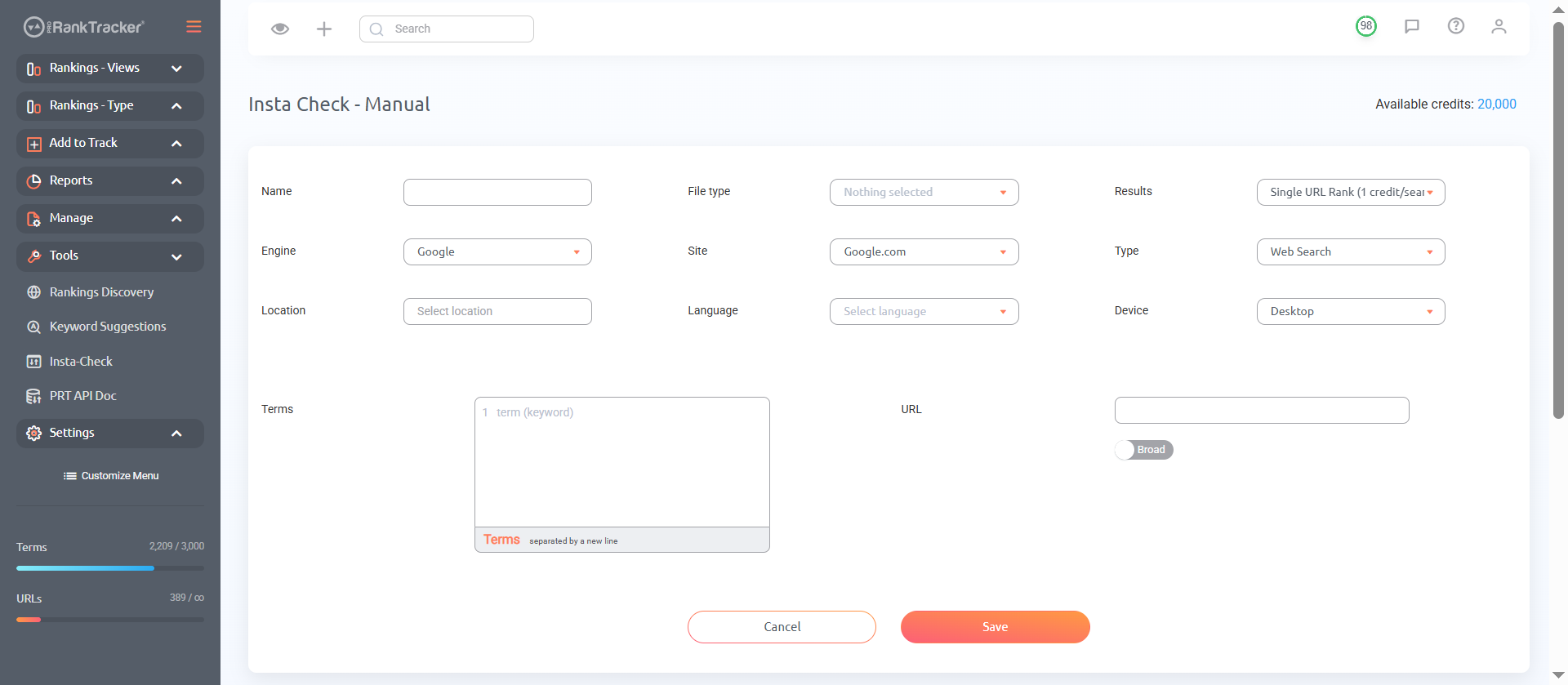
Click “Save,” then look at your brand new SERP report!
Create Reports and Notifications
If you really want to unlock ProRankTracker’s potential, you have to set up reports and notifications. These will let you easily access the data you care about WHEN you want it.
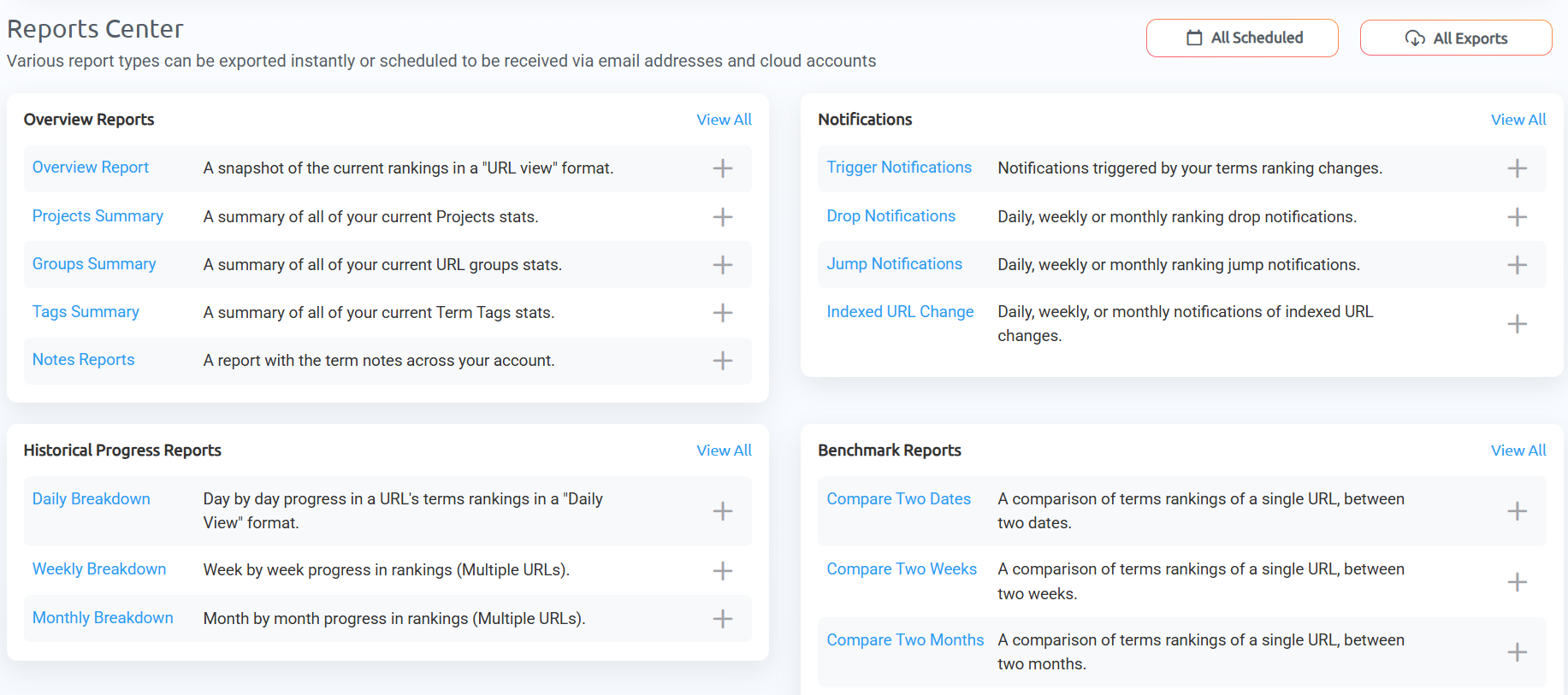
To create one of the 20+ reports, go to the Reports Center. And select the type of report you want to create.
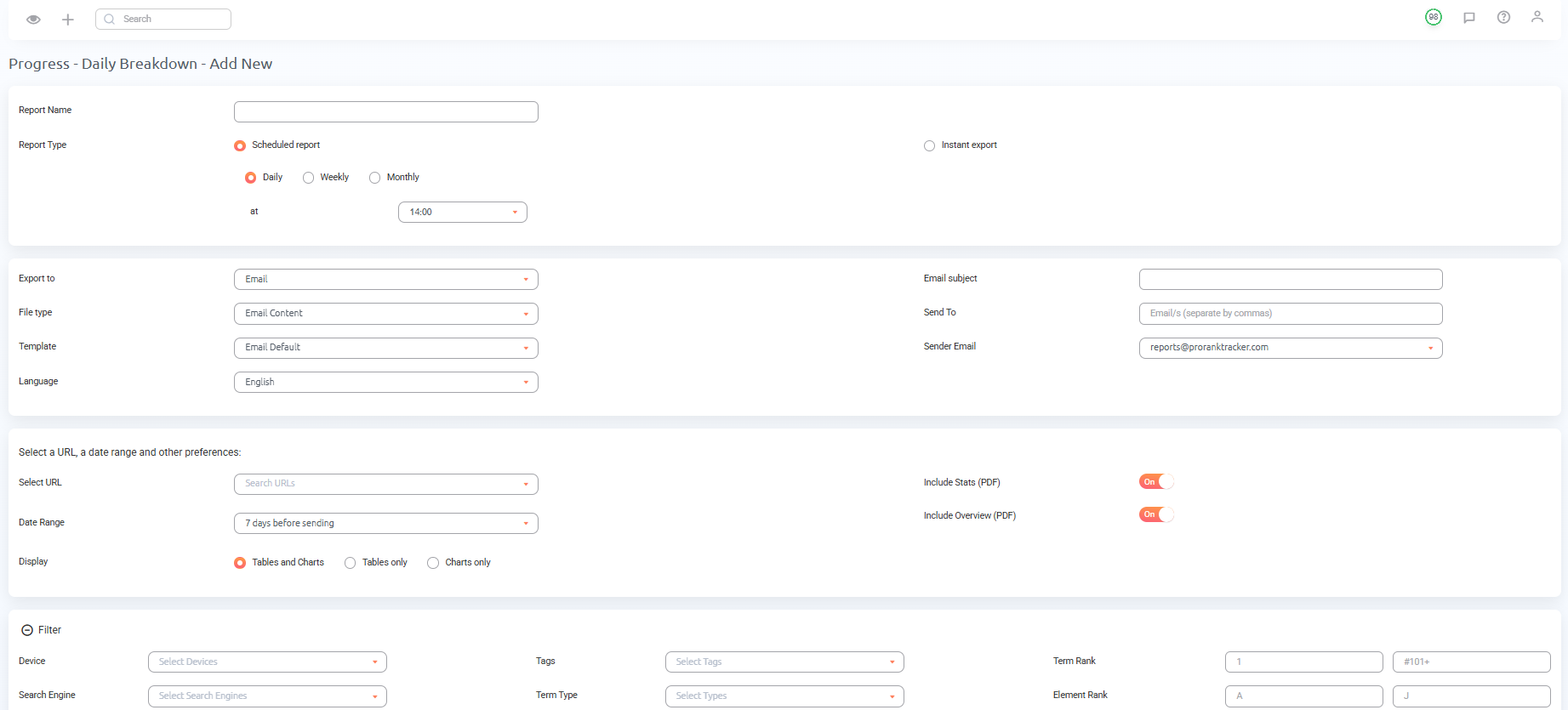
But since this guide is about daily rank tracking, let’s start by creating a Daily Breakdown Report.
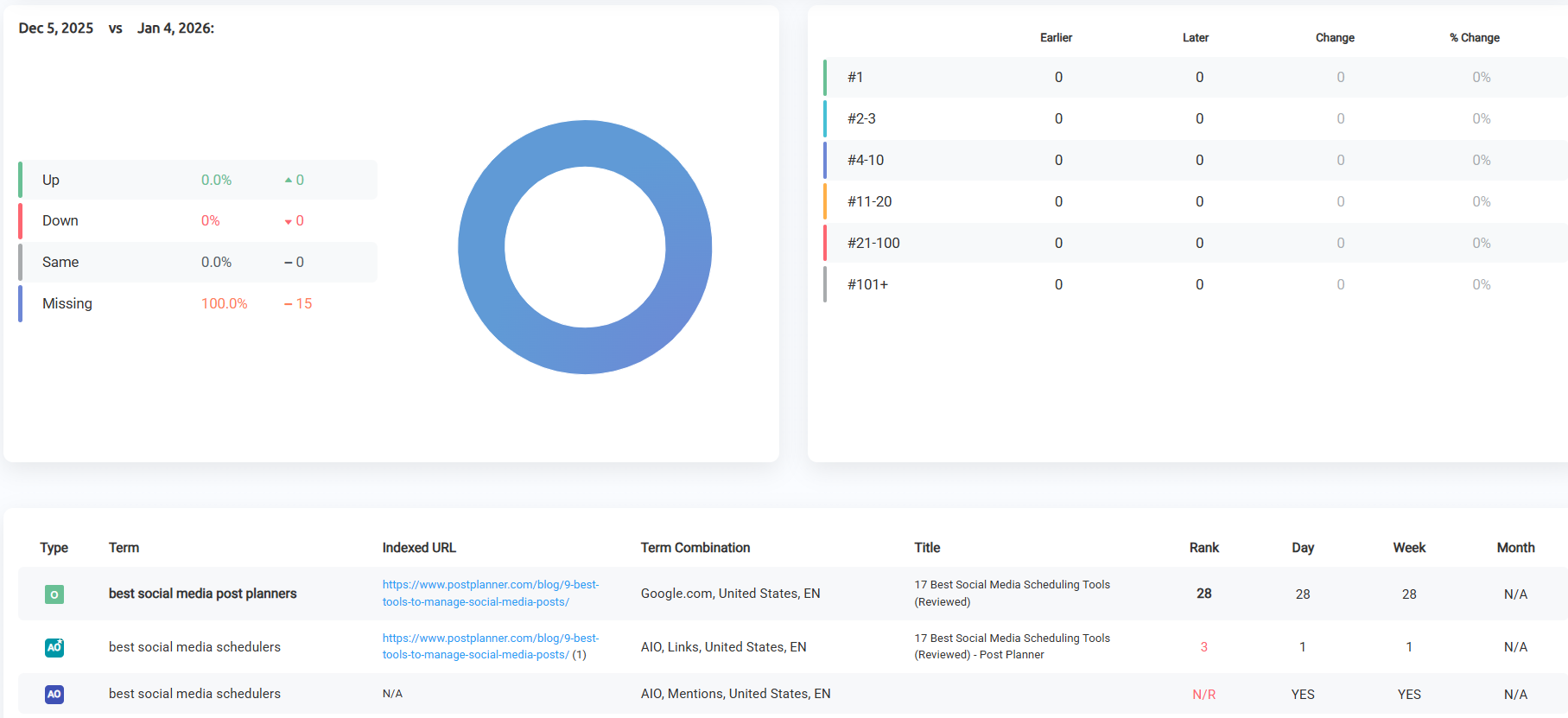
First, fill out the required information:
- Report Name
- Report Type (scheduled or instant)
- Export to (Email or Google Sheets)
- File Type (Email, PDF, XLSX, or CSV)
- Select the URL you want to track
- Date Range
And then, you can further customize how you’d like the report to look or send.
When you’re done, the report will start generating automatically on the schedule you set. You can also customize how the data is displayed and in what order from the “Columns & Sorting” section.
“Notifications” is another useful report type that sends you regular alerts for ranking drops, jumps, and indexed URL changes.
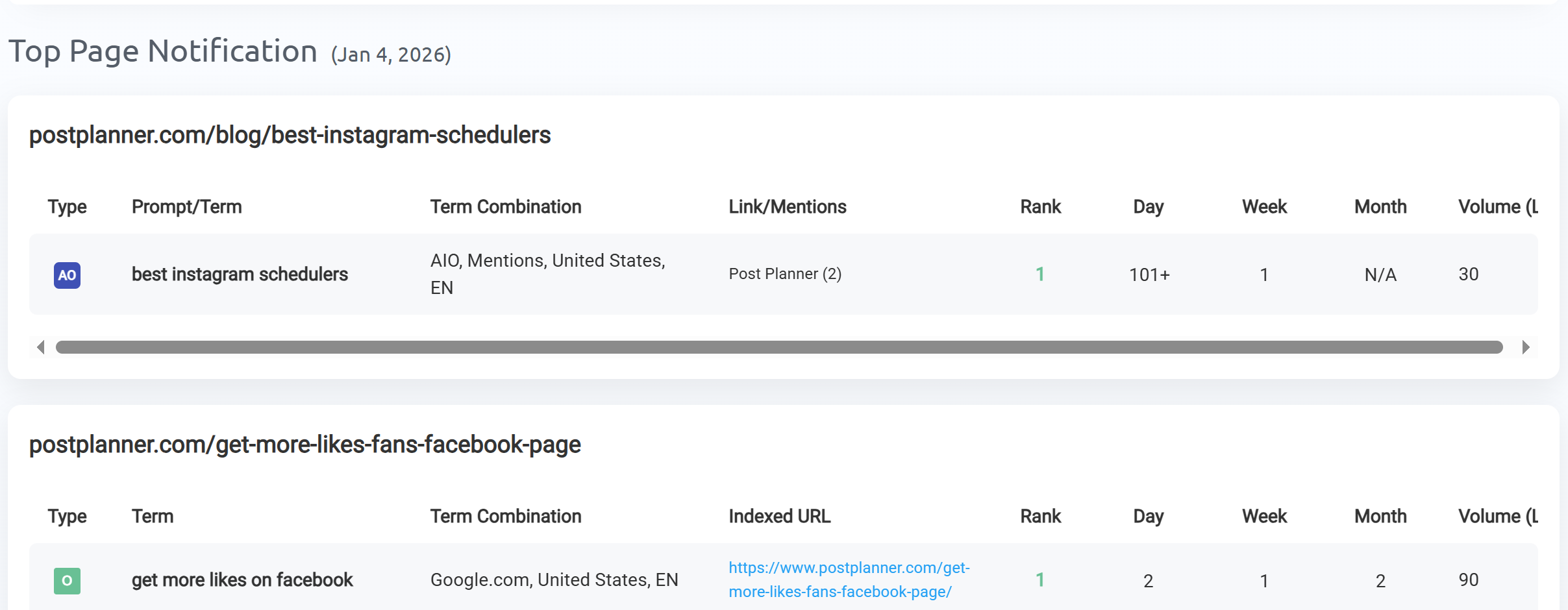
There are:
- Trigger Notifications to alert you when you hit a specific rank
- Jump Notifications to alert you when your ranks increase in a certain time frame
- Drop Notifications to alert you when your ranks decrease in a certain time frame
- Indexed URL Change Notifications to alert you when the URL changes in the SERPs
Just set how often you want to get notifications, under what conditions, and for which keywords.
Every plan allows unlimited reports, so there’s no reason to limit yourself to a few. Go crazy and create as many reports as you want for yourself and your clients!
Use Filtering for Faster Rank Checking
One of the best ways to speed up your data-gathering process is to use filtering as much as possible.
You’ll see the filtering tab at the top of each Ranking View. Clicking it lets you set super-detailed filters. Using filters lets you work with a specific subset of your ranks instead of sorting through them all.
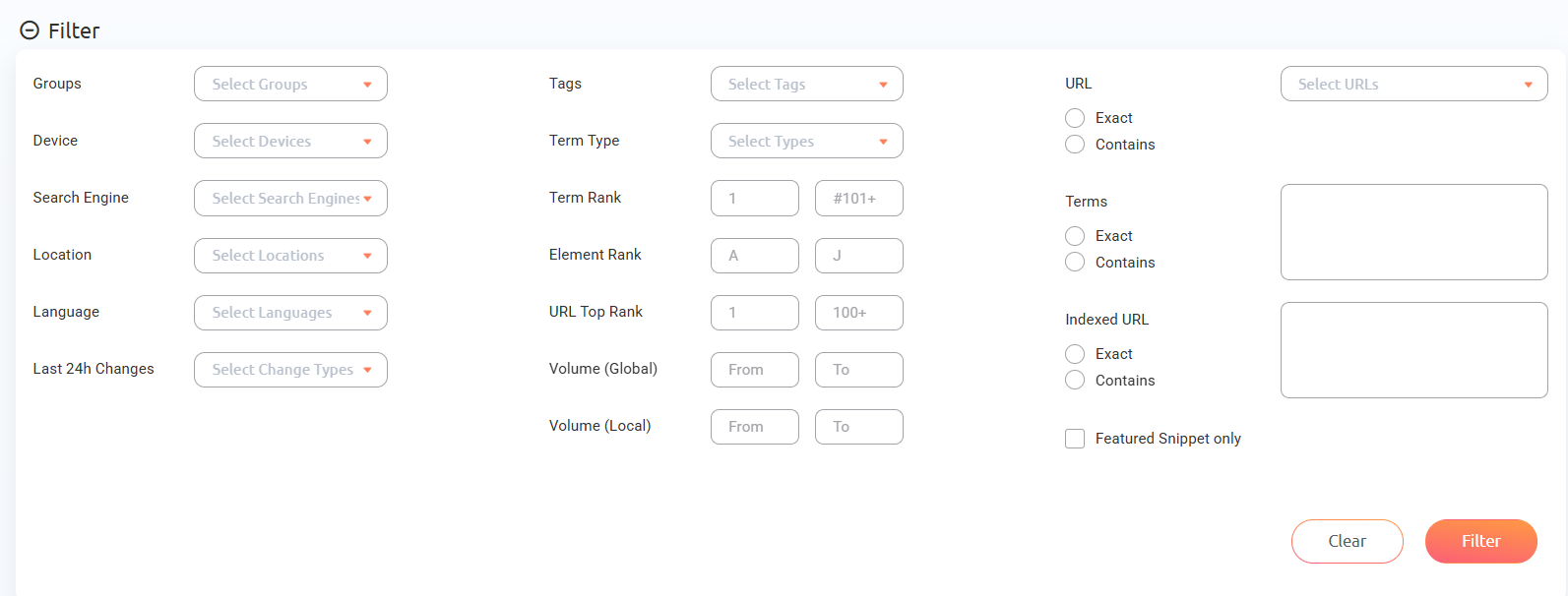
If you use a few filters repeatedly, save them on the Saved Filters tab. Doing so will allow you to use those filters with just a few clicks, making the process even faster.
FAQ
What is daily rank tracking?
Daily rank tracking is the process of checking your ranks every day. Unfortunately, some tools don’t even update your ranks every day, which means checking on them daily is a waste of time. Using a tool with daily ranking updates, like ProRankTracker, allows you to get the most out of tracking your ranks by giving you access to constantly fresh data.
Is a rank tracker free?
In short, there are no good free rank trackers. There are great free tools out there that you can use as PART of a rank-tracking strategy (tools like Google Analytics and Google Search Console), but these are not a suitable replacement for a dedicated rank tracker.
How do I check my ranking?
The easiest way to check your ranks is with a dedicated rank-tracking tool like ProRankTracker. Just add your URLs and keywords according to the instructions above, then use the Rankings Views as shown to check your ranks. Check your ranks daily to ensure you’re making decisions based on the freshest data (and not stale data that no longer applies).
Conclusion
Tracking your ranks is one of the most important parts of doing SEO well, but it only works when your ranks are up to date.
If you want to get to the top of the SERP, you have to have access to daily rank tracking. Otherwise, your ranking data is just leading you astray.
Using ProRankTracker is a great place to get fresh, 100% accurate ranks at a low price. If you still aren’t sure, try signing up for the $1 Test Drive Plan to see how much it can help you!
Good luck!