10 Best Rank Trackers Pricing Comparison (2025)
When it comes to choosing a rank tracker, pricing isn’t just a number — it’s a reflection of what you actually get.
Some tools charge hundreds per month yet only offer basic features like static exports or weekly updates.
Others seem budget-friendly until you realize they leave out essential tools like local tracking, historical data, or white-label reporting.
That’s how you end up overpaying later — either by switching tools or upgrading prematurely.
What you really want is value: the right mix of affordability and functionality.
The challenge? Rank tracker pricing varies widely, and it’s shaped by:
- Keywords tracked – Most tools charge based on how many keywords you monitor. More terms = more cost.
- Update frequency – Some trackers offer daily or even on-demand updates, while others only refresh once a week.
- Location accuracy – Tools that support hyper-local or mobile-specific rankings (especially for Google Business Profiles) tend to be more robust — and sometimes more expensive.
- User limits – Some platforms charge per user or restrict multi-user access unless you’re on an enterprise plan.
- Features – Advanced capabilities like full SERP tracking, white-label reports, competitor analysis, API access, and integrations (like Looker Studio or Google Sheets) are often gated behind higher tiers.
If you’re a freelancer, agency, or in-house marketer trying to scale, these details matter. You don’t want to commit to a tool that’s either bloated with features you’ll never use — or missing the ones you’ll absolutely need a month from now.
In this post, I’ll break down exactly what each top rank tracker offers for the price, so you can find the best fit for your goals and your budget.
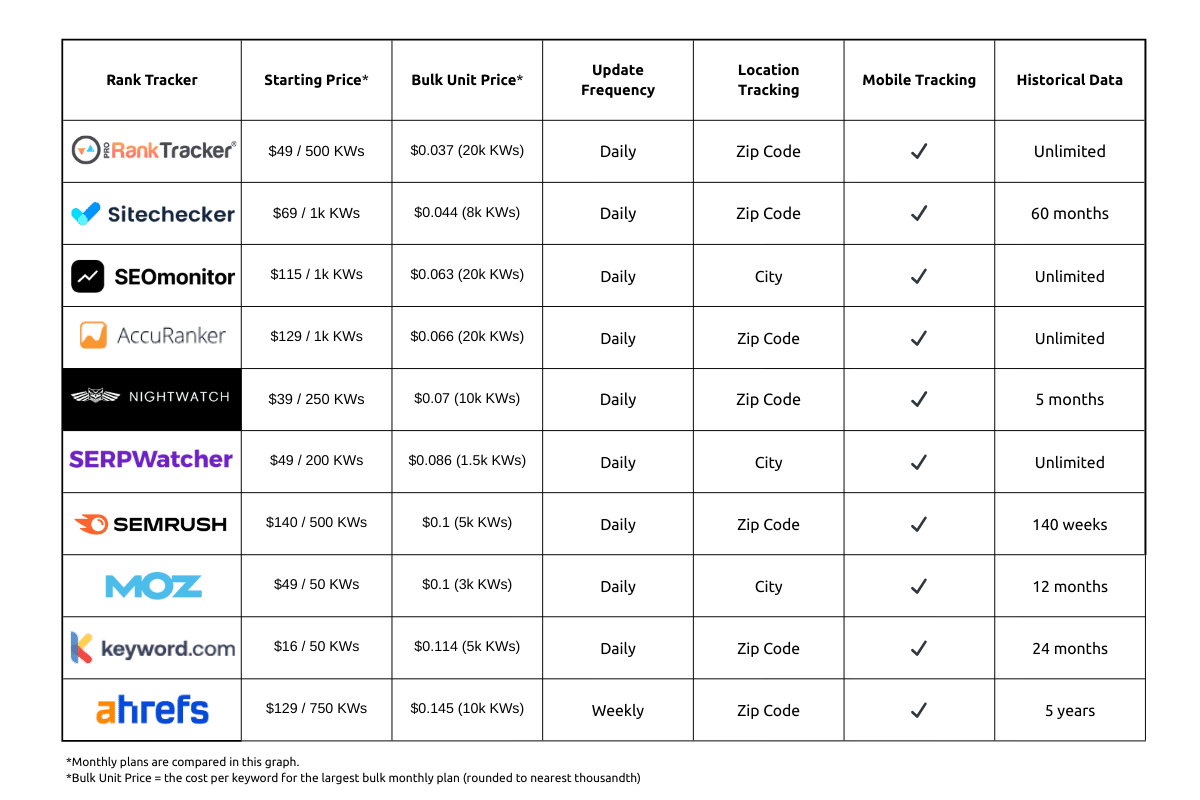
Below is a quick comparison chart:
Feel free to skip ahead:
- How Much Do Rank Trackers Cost?
- What Are the Most Affordable Rank Trackers?
- Features You Should Look for in a Rank Tracker
- Are Free Rank Trackers Worth It?
How Much Do Rank Trackers Cost?
Rank trackers can range anywhere from $20/month to several hundred — and the difference in price often comes down to how many keywords you’re tracking and which features are bundled into the plan.
Some tools price themselves aggressively at the low end, but limit update frequency, reporting features, or multi-user access. Others offer full-featured plans but quickly get expensive once you scale past a few hundred keywords.
That’s why it’s important to compare both monthly and annual pricing — not just to understand the up-front cost, but to calculate the long-term value based on how you actually use the tool.
Let’s break it down:
Monthly Payment Plan Comparison
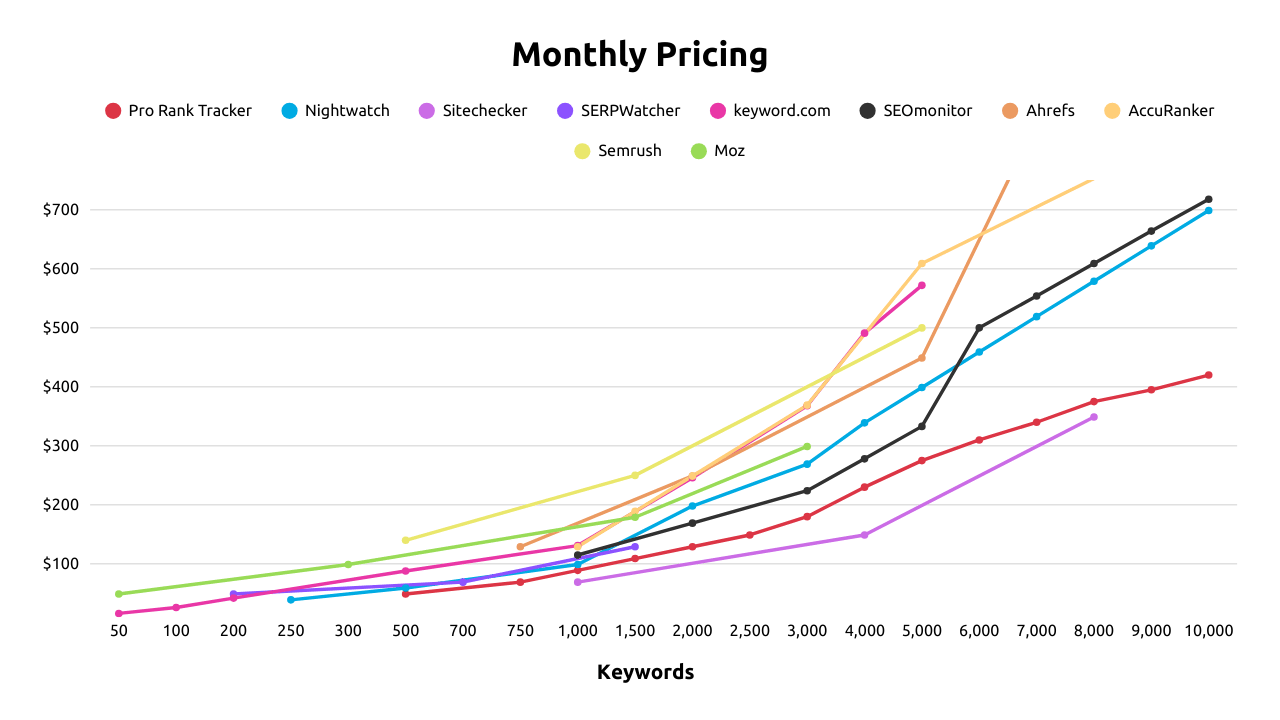
Monthly plans can get expensive fast if you scale up without paying attention to keyword caps or hidden feature limitations.
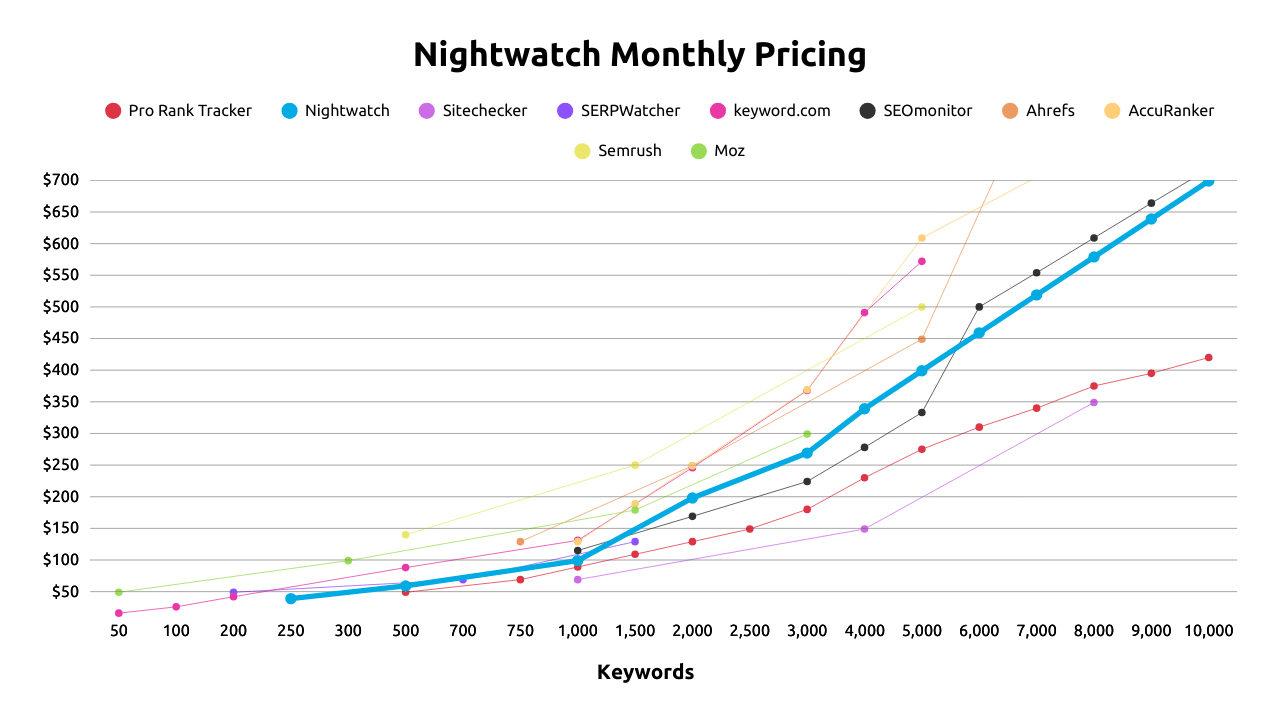
Tools like ProRankTracker and Nightwatch offer strong pricing flexibility as you scale, while others (like Moz or SERPWatcher) cap out, requiring you to talk to sales to get a custom quote.
Below is a line chart comparing each tool’s monthly costs at various keyword tracking tiers:
Annual Payment Plan Comparison
If you’re tracking keywords long-term (and let’s be honest — you should be), annual pricing can save you a chunk of money compared to monthly subscriptions.
If you plan to track more than 1,000 keywords consistently, annual plans can easily save you hundreds per year — just make sure the tool supports everything you need at the price point (like white-label reports, GBP tracking, or user access).
Most rank trackers offer a 15-30% discount when you commit to a year upfront, but the savings vary drastically depending on your needs and the tier you’re on.
Below is a line chart comparing each tool’s monthly costs at various keyword tracking tiers:
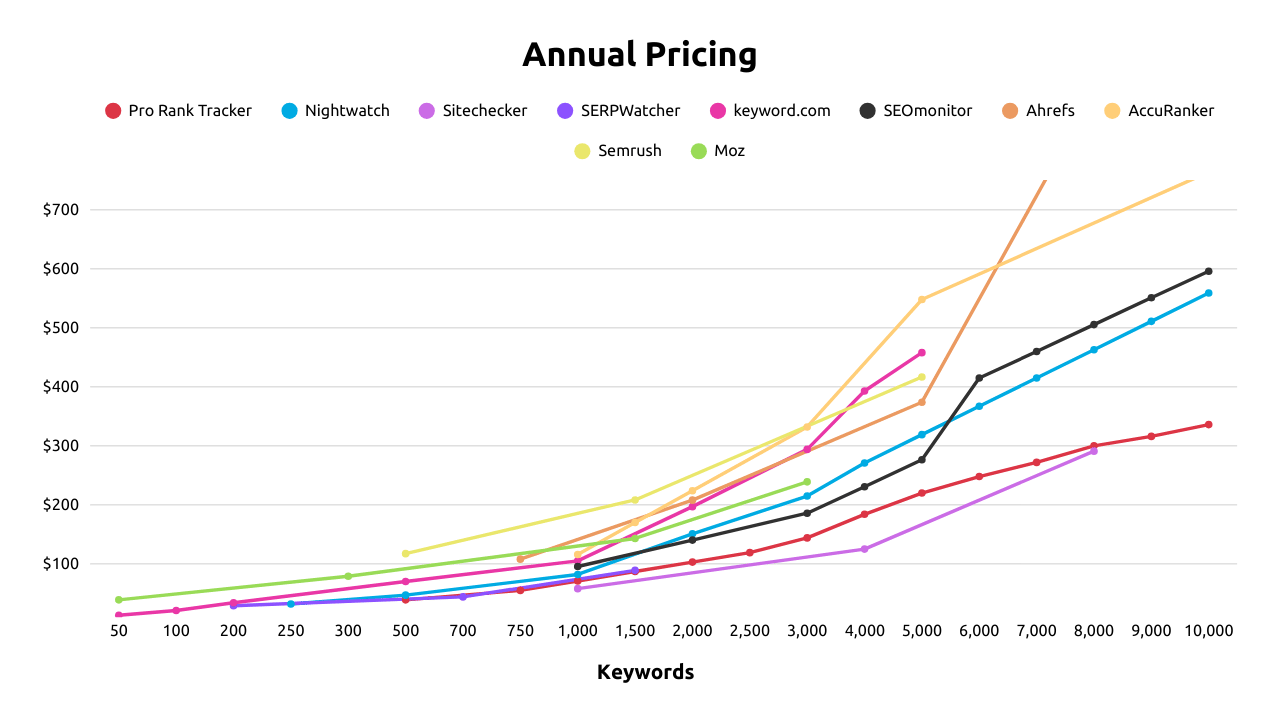
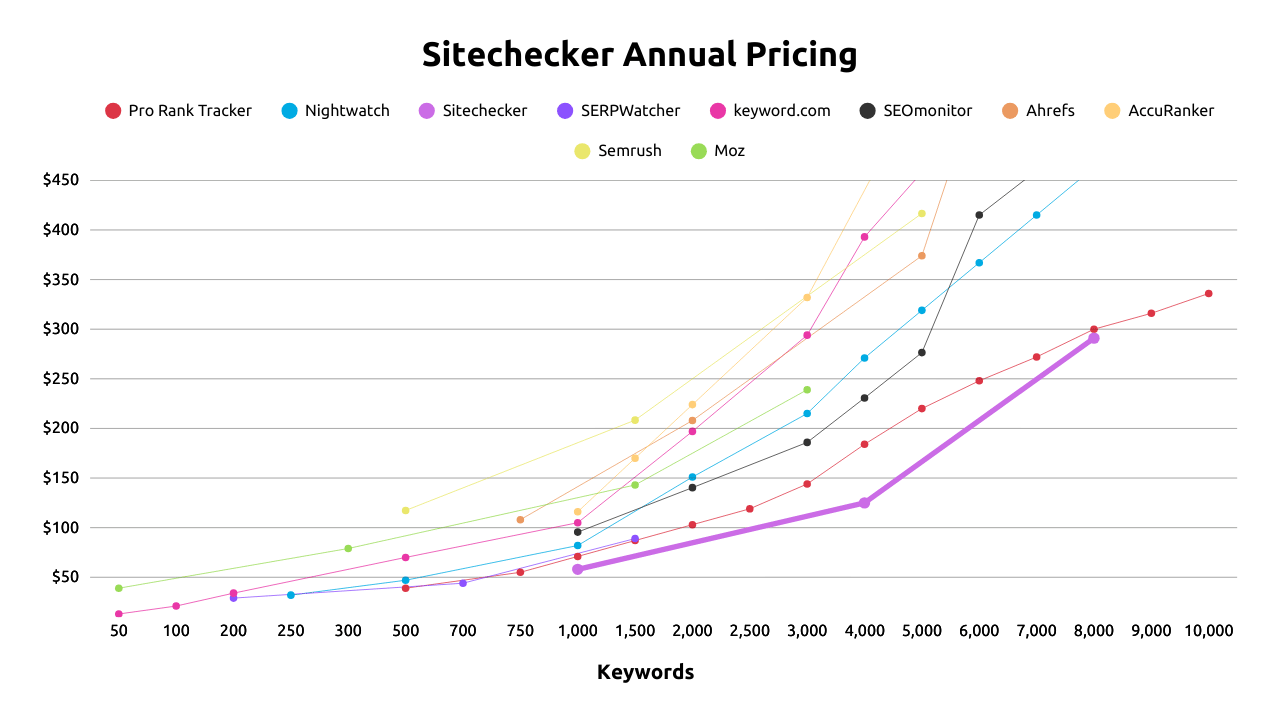
The pricing compares similarly to the monthly chart, with the exception that Sitechecker momentarily becomes the most cost-efficient tool at 1,000 tracked terms, but falls behind ProRankTracker past that point.
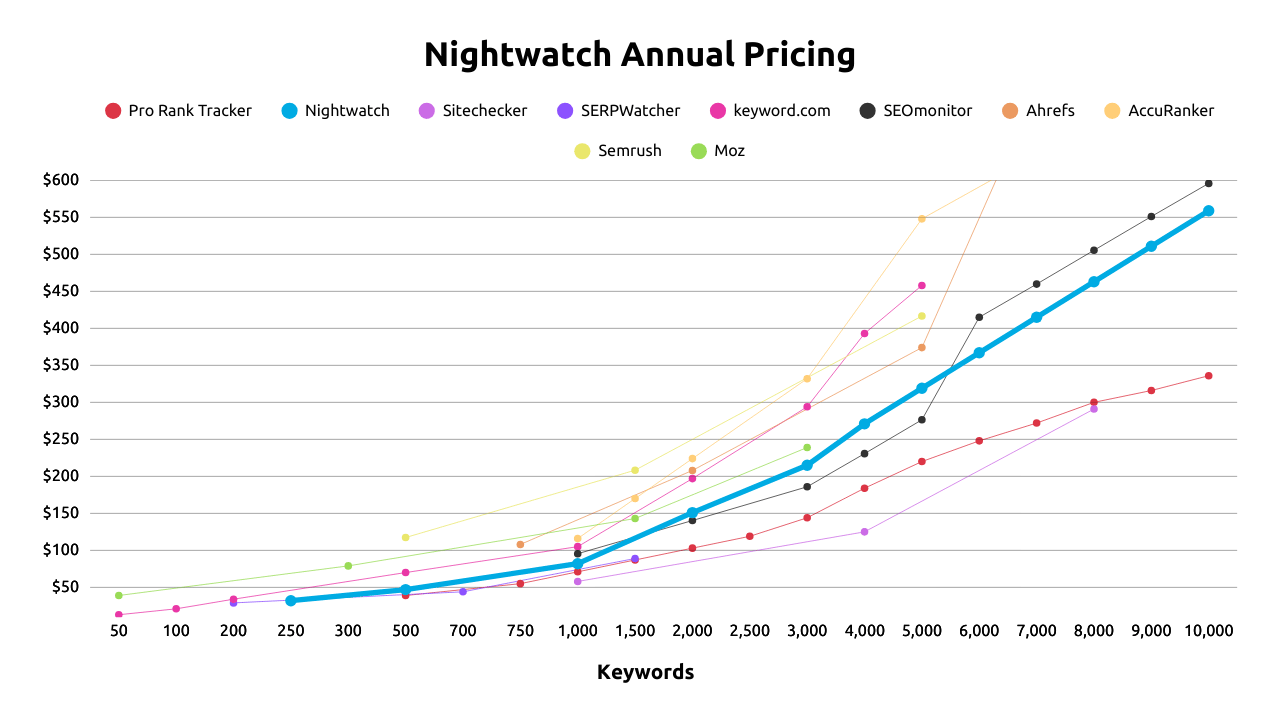
ProRankTracker remains the most cost-efficient across nearly every tier, especially for users scaling from 2,000 to 10,000 keywords. Nightwatch again stays competitive but rises more steeply as you scale past 2,000 terms.
What Are The Most Affordable Rank Trackers?
You don’t have to spend hundreds or thousands to get reliable rank tracking.
Here are the 3 most affordable rank trackers based on price:
1) Pro Rank Tracker
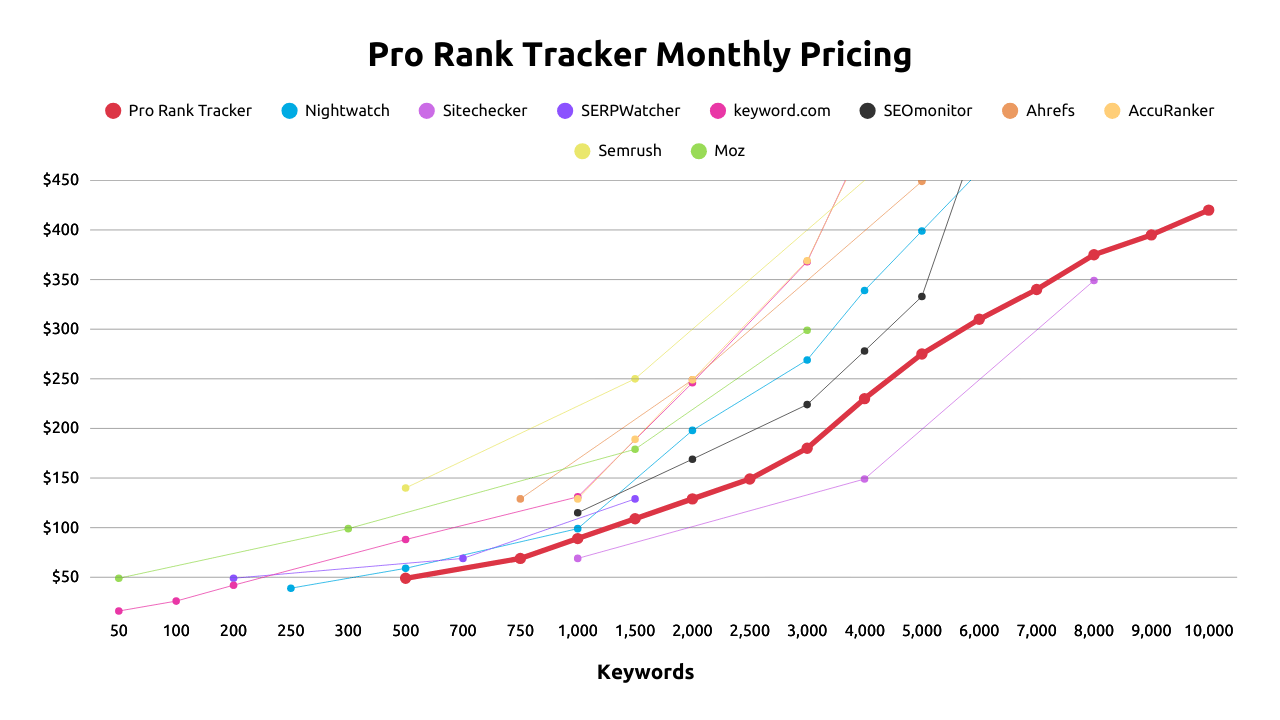
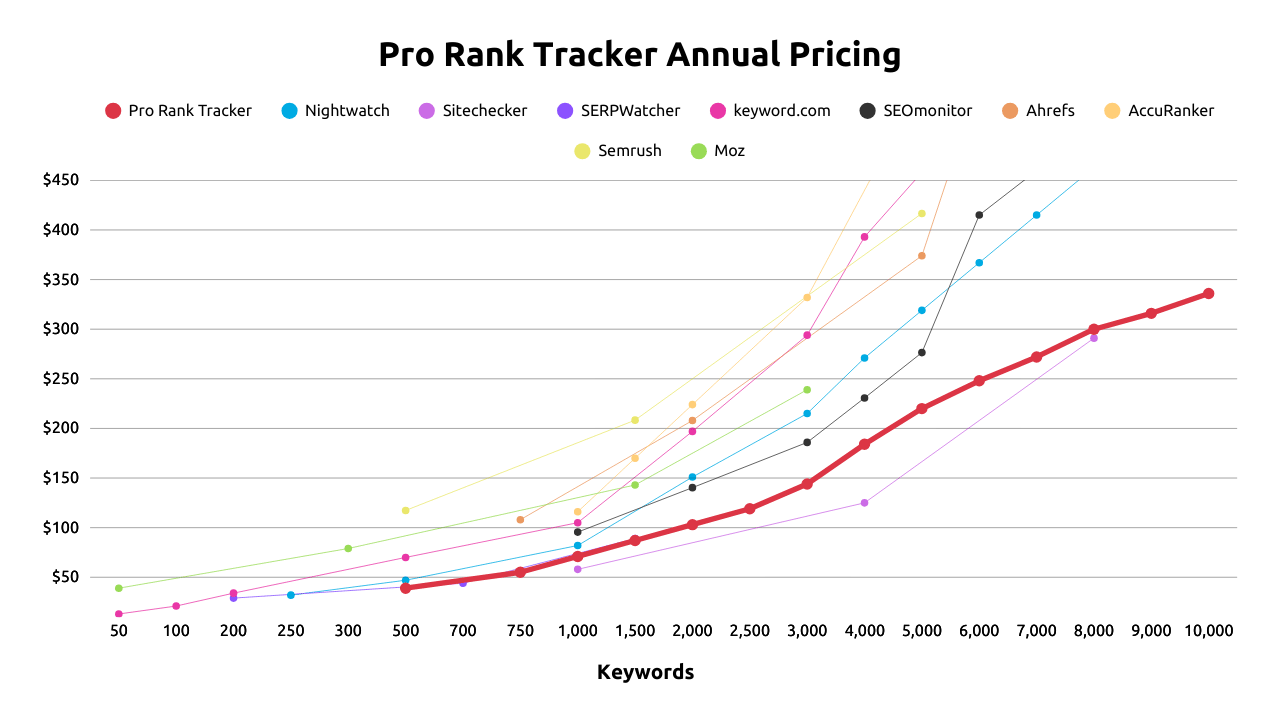
ProRankTrack is a full-feature rank tracker that starts at $49/month or $39/month paid annually for 500 keywords.
While plans start at 500 keywords, ProRankTracker offers the best price for the number of keywords you can track.
ProRankTracker offers every feature you need to accurately track ranking data long-term, across search engines, devices, locations, and languages.
Monthly Plan Comparison
Annual Plan Comparison
Features:
- Update frequency: Daily or on-demand
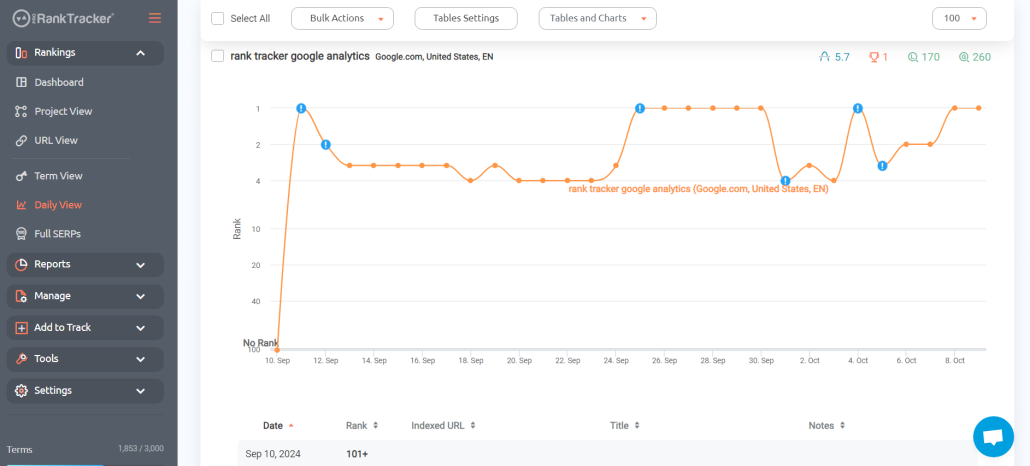
- Location tracking: Down to the country, state/region, city, and zipcode
- Google Business Profile and Google Maps tracking
- Unlimited ranking history
- 20+ ranking reports (email, PDF, XLSX, CSV, and shareable links)
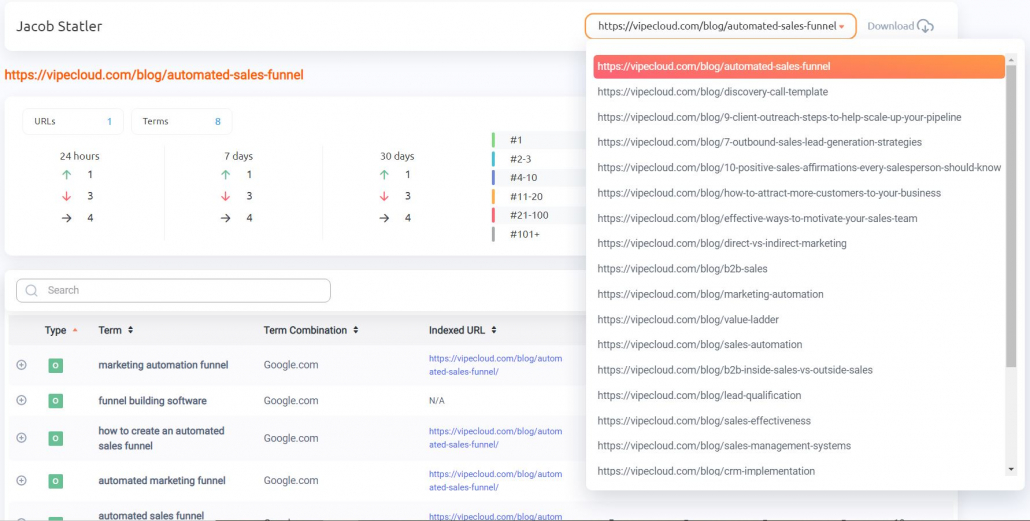
- White-label reports and client app
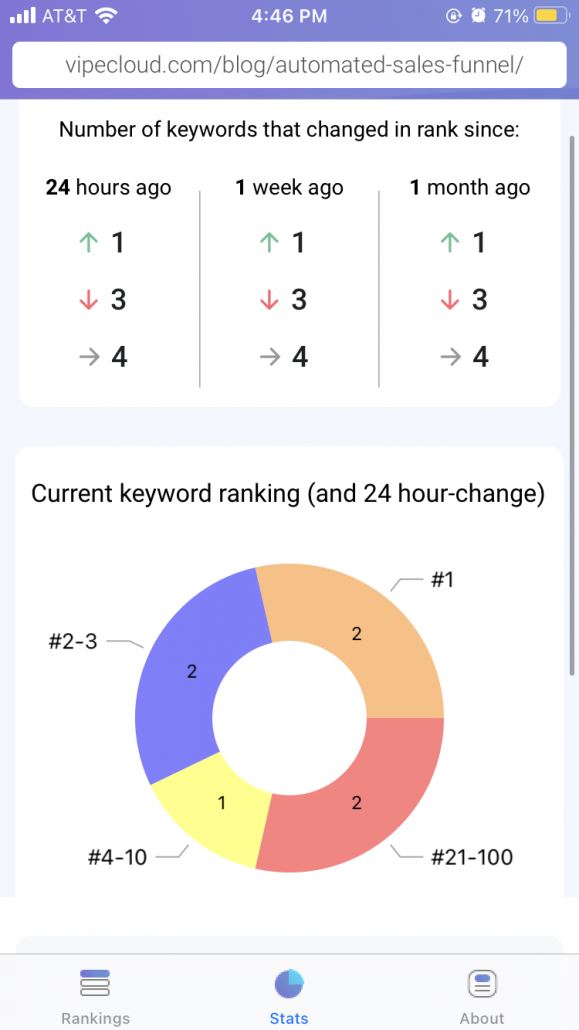
- Integrations and API – Connect your rank data to Google Looker Studio or with other platforms via its API.
- Rankings Views – 6 different Rankings Views give you a varied and complete understanding of your ranking progress, including the ability to split your ranks into various groups, tags, and projects.
2) Nightwatch
Nightwatch is a dedicated rank and SEO performance tracker that starts at $39/month or $32/month paid annually for 250 keywords.
Since Nightwatch plans are available for tracking a smaller number of keywords (250), you’re able to start using it at a lower pricing point. However, as you add more keywords, it becomes less affordable than ProRankTracker (although still a competitive price).
Monthly Plan Comparison
Annual Plan Comparison
Features:
- Update frequency: Daily (but no on-demand updates)
- Location tracking: Down to the country, state/region, city, and zipcode
- Google Business Profile and Google Maps tracking
- Only 5 months of SERP history available (unless you contact a customer rep)
- 3 Reporting templates
- White label reports
- Integrations and API access – Google Search Console, Google Analytics, and Looker studio.
3) Sitechecker
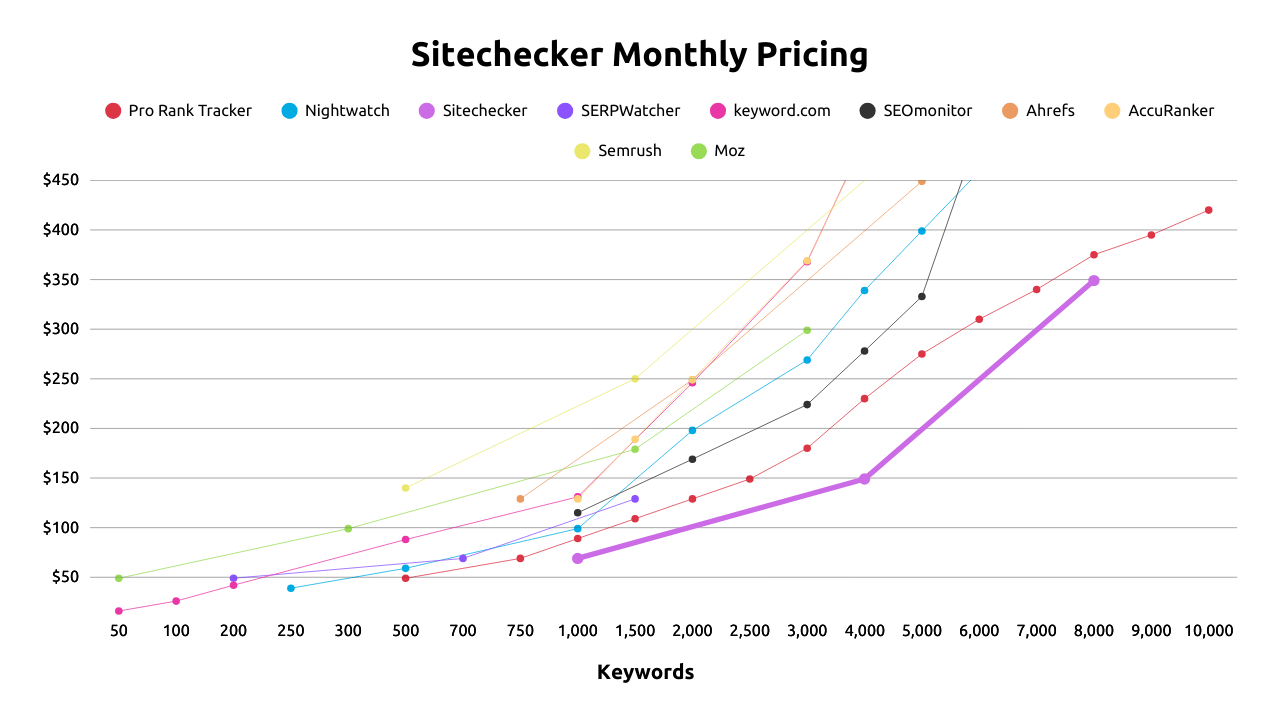
Sitechecker is a rank tracker and SEO reporting tool that starts at $69/month or $58/month paid annually.
As you can see in the pricing graphs below, Sitechecker offers the lowest price for 1,000 to 8,000 keywords, but the reason I’m listing Sitechecker as #3 is because the pricing tiers aren’t very flexible, which could mean you might have to sign up for a higher plan that you don’t really need. However, Sitechecker technically still has the 2nd best bulk rank tracking rate at $0.044/keyword at 8,000 keywords.
Monthly Plan Comparison
Annual Plan Comparison
Features:
- Update frequency: Daily (but no on-demand updates)
- Location tracking: Down to the country, state/region, city, and zipcode
- No Google Business Profile or Google Maps tracking
- Up to 60 months of rank data available
- SEO reporting dashboard and email/file reports
- White label the app
- Integrations and API access – Google Search Console, Google Analytics, and webhooks to connect other platforms.
Features You Should Look For in a Rank Tracker
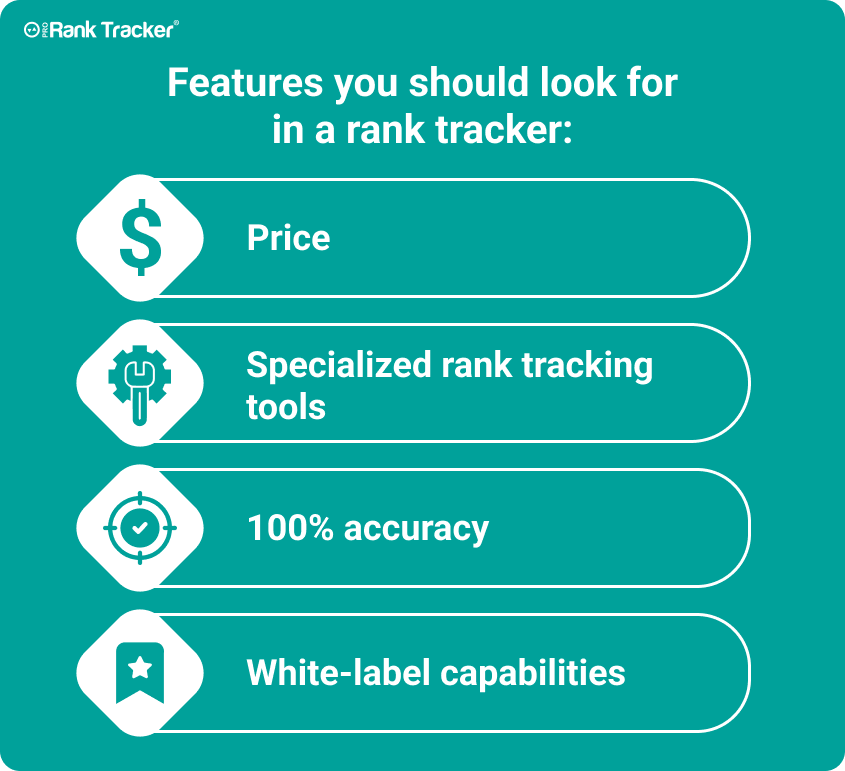
When looking for a rank tracker, you should consider the features that are most important to you.
For example, ease of use is essential for any rank tracker, but you might be willing to sacrifice some UI features if a tool has excellent location tracking features.
Price shouldn’t be your only consideration when choosing a rank tracker, but it’s crucial to find one that fits within your budget. In the end, everything comes back to value. If the features of your rank tracker aren’t adding value to your SEO system, they probably aren’t worth it.
Accuracy
When looking for a rank tracker, accuracy is one of the most important factors. If you’re considering a tool that doesn’t offer 100% accurate ranks, look somewhere else.
Some rank trackers also don’t offer daily updated rank data. For example, Sitechecker and Ahrefs don’t offer daily rank data by default, which means you’ll often be seeing lagging data.
Think about it for a second. What good is a rank tracker doing for your business if its ranks aren’t accurate?
Would you want to stake the success of your business on 90% accurate ranks?
Of course not!
Local Data
Another crucial feature is local data tracking.
Local data tracking lets you see how your website rank changes in different locations.
In other words, it lets you see how well your website performs in different areas.
For example, if you have a brick-and-mortar storefront, you might target a specific geographic location. In that case, you’ll want to ensure your rank tracker offers local data tracking.
But just because a rank tracker advertises that they offer local rank tracking – doesn’t mean it’s as granular as you might need.
For example, SERPWatcher and Sitechecker advertise city-level rank tracking, but not zip-code-level tracking, unlike the other options I compared above.
Tracking Google Features
Google is constantly changing, so SEOs need to change with it.
One significant way that Google has changed over the years is the creation of Google features.
Anything that isn’t a typical Google SERP result is a Google feature:
- Rich snippets
- Google Maps results
- GMB rankings (Snack Pack and Local Finder)
- Google Ads
- Video results
- AI Overviews
The best rank trackers are the ones that can track all of Google’s features. You should be able to track each type of result separately to measure your success most accurately.
If you’re looking for a rank tracker that can keep up with your competitors, then you should look for one that can track all these types of Google features!
Reporting
Reporting is one of the most overlooked — yet most important — features when comparing rank trackers. On the surface, every tool says it offers “reports,” but the level of depth and flexibility varies dramatically.
Some rank trackers only provide basic CSV exports or static PDFs that look the same for every client. While that might work for freelancers managing a small portfolio, agencies and in-house teams quickly run into problems. These limited reports don’t allow for customization, automation, or client branding — which means you end up spending extra time editing spreadsheets and decks just to make the data usable.
Specialized rank trackers, on the other hand, give you customizable, white-label reports that can be scheduled, automated, and branded with your logo and colors. The difference is night and day: instead of spending hours reformatting data, you can send clients polished reports directly to their inbox or integrate them with Looker Studio, Google Sheets, or your CRM.
The nuance here is that reporting is where rank trackers reveal their true focus:
- All-in-one SEO platforms (Ahrefs, SEMrush, Moz) → reporting is a side feature, often limited to generic exports.
- Specialized rank trackers (like ProRankTracker and AccuRanker → reporting is a core feature, built for agencies who need customizable, automated, and highly flexible options.
Pro Tip: When comparing rank trackers, don’t just ask “Can it generate reports?” — ask:
- Can I white-label them?
- Can I schedule them?
- Can I customize formats (PDF, XLSX, CSV, shared links)?
- Can I integrate with my existing tools (Looker Studio, Sheets, etc.)?
The answers to those questions will tell you whether a rank tracker will save you time or add more work to your week.
White-Label
When looking for a rank tracker, you should also consider whether or not the tool offers white-label features.
What are white-label rank trackers?
White-label rank trackers allow you to brand reports with your company name and logo. This is an excellent feature for businesses that want to appear more professional or provide a more branded experience to clients.
If you’re looking for a rank tracker that allows you to put your spin on things, then you should consider a white-label rank tracker.
Are Free Rank Trackers Worth it?
Free rank tracking tools can be tempting, especially for solo creators or small businesses, but they come with trade-offs.
Google Search Console (GSC) is the most accessible and accurate “free” rank tracker available, since it shows your actual keyword impressions and clicks directly from Google. However, it comes with a few important limitations:
- Data latency – Search Console updates are delayed by 1–3 days, making it difficult to monitor rankings in real-time or measure impact from recent changes.
- Lack of granularity – You can’t filter by location beyond the country level or SERP feature visibility, unlike paid tools.
- Limited tracking – GSC shows performance only for keywords your site already ranks for. So you can’t track competitors or monitor newly targeted keywords unless they generate impressions.
Conclusion
There are a lot of rank trackers on the market, and the one you choose should be based on your needs and budget. Every business has different needs, so you should try several tools to see what works best for you.
These rank trackers offer some of the best price-to-features ratios on the market, so I think they’re a great place to start your search!
If you’re looking for an affordable rank tracker packed with features, ProRankTracker is the tool for you. Remember to try it out with a 14-day free trial, so you can see how much it can help your company.
Happy tracking!