Google Search Console vs. a Rank Tracker: Why the Numbers Don’t Match
Your rank tracker says position 3. Google Search Console says 9.
The keyword looks the same. The website looks the same. Naturally, your next question is: which number should I trust?
Start with a different question: are the two reports measuring the same thing?
A shop can be busy at lunchtime and quiet across the whole day. A lunchtime headcount and a daily average can both be useful without matching. Search reports have a similar problem: one number can describe a particular check, while another summarizes many appearances.
This guide explains how to compare Search Console with a rank tracker, investigate discrepancies, and give clients an answer that goes beyond “Google is different.”
What Each Tool Is Measuring
Google Search Console reports how your site performed in Google Search. Its Performance report includes clicks, impressions, click-through rate and average position. Google defines average position using the topmost result from your site or the specific URL/group being reported.
A configured rank-tracking check asks a narrower question: where did the tracked website or URL appear for this keyword, location, device and search engine when that check ran?
Neither description makes one tool universally better. The important thing is choosing the measurement that answers your question.
| Question | Start with |
|---|---|
| Did people click our site from Google? | Search Console clicks |
| Where did this keyword rank in our configured market? | The matching rank-tracking result |
| Which queries generated exposure for our site? | Search Console queries and pages |
| How did this same tracked keyword change over repeated checks? | A consistent rank-tracking history |
| What happened after visitors reached the site? | Website analytics and verified business events |
A client who asks whether Leeds improved needs a Leeds view. A client who asks whether Google sent more visitors needs traffic evidence. Answering both with one headline rank invites confusion.
Why the Numbers Can Differ
1. An average is not a single position
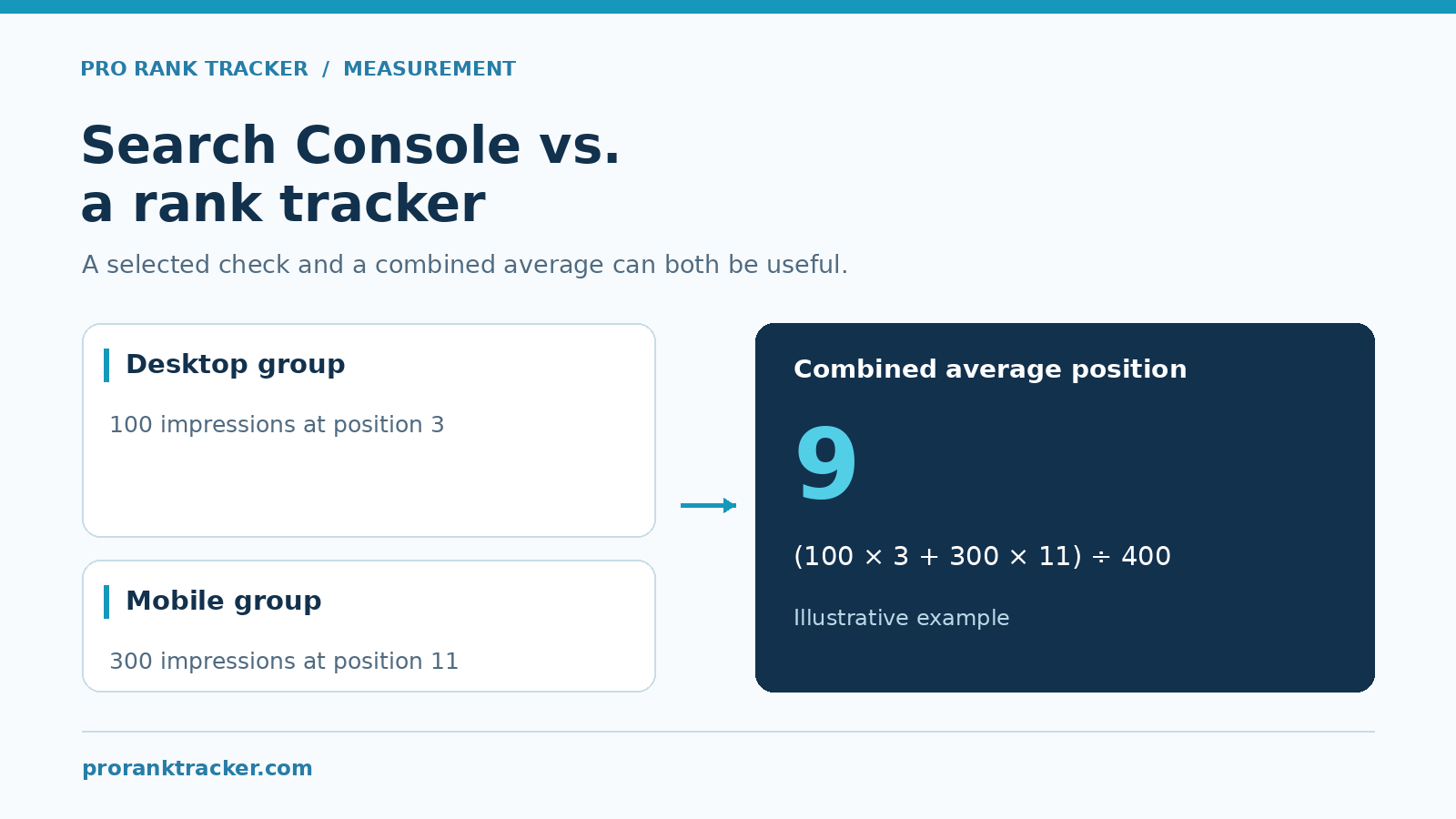
Consider this fictional example for the same query and page:
| Observed group | Impressions | Position in this simplified example |
|---|---|---|
| Desktop | 100 | 3 |
| Mobile | 300 | 11 |
The combined impression-weighted average is (100 × 3 + 300 × 11) ÷ 400 = 9. A desktop check showing position 3 is not contradicted by that combined average.
This deliberately simple example does not describe every detail of Google’s counting rules. Its purpose is to show why a larger set of observations can produce a different number from one selected check.
It also explains a reporting trap: a combined average can worsen because the mix of observations changes. Before calling that a ranking loss, inspect the component groups.
2. Country is not the same as a specific city
Google says results depend on the searcher’s time, place, device and recent history. A country-filtered report therefore does not reproduce a check configured for one city or postal area.
If your business serves several markets, start by writing down which market you are actually discussing. “Our position for emergency dentist” is incomplete without that context.
Our Google search localization guide explains why location belongs in the tracking setup.
3. The URL scope may be different
Are you following the whole domain, one service section or one exact landing page?
Imagine a national category page and a city page both appearing for related searches. A domain-level result may be encouraging while the intended city page is still weak. That is a useful finding, but only if the report preserves the distinction.
Google’s data aggregation documentation also distinguishes property-level totals from page-level reporting. Do not expect every page table to add up to the property’s headline figures.
4. The dates and checks may not line up
Compare a complete date range with the equivalent complete range. Google’s newest Performance data can be preliminary; a report containing an incomplete day is a poor basis for a confident before-and-after claim.
Then check the timing of the rank observation. A daily result and a seven-day average serve different purposes, even when they are displayed together.
A useful note is specific: “This is the desktop tracking result for the selected market on Tuesday; the GSC number covers the previous complete week.” That tells the reader what the comparison can and cannot establish.
5. The result type may not be the same
An organic website position, a local business result and an appearance inside an AI answer are different observations. Keep them separately labeled.
Do not assume a geographic map in a report means Google Maps rankings. Likewise, a brand Mention in an AI answer is not automatically an organic search position.
For the AI distinction, see AI Mentions vs. AI Links.
A Practical Comparison Checklist
Work through these checks before deciding that either report is wrong:
- Select the query. Avoid comparing a campaign-wide average with one keyword.
- Identify the URL. Note domain-wide versus exact-page tracking.
- Match the device. Compare desktop with desktop, or mobile with mobile.
- Write down the location. Distinguish the GSC country filter from the tracker’s more specific market.
- Use complete dates. Keep period lengths comparable and label the check date.
- Confirm the result type. Organic, business listing and AI visibility need separate interpretations.
- Check the trend. Repeated, comparable observations are more informative than one surprising result.
- Inspect the business impact. Review relevant clicks, landing sessions and verified leads separately.
Matching more settings makes the comparison more useful. It does not guarantee an identical number, because the underlying measurements still differ.

When You Should Investigate Further
Different scopes explain many discrepancies. They do not excuse every discrepancy.
If a tracked result looks persistently inconsistent with comparable checks, collect a small, clear example: query, tracked URL, result type, location, language, device, date and the page you observed. Include the settings rather than sending an unlabeled screenshot.
Also inspect whether the wrong landing page is being tracked, whether a report contains stale data, or whether an incomplete result has been treated as a genuine ranking absence.
A manual search is another observation, not an automatic source of truth. Its value is much higher when its conditions are documented.
For an agency, this is a better habit than debating which dashboard “wins.” You end up with a reproducible question that support or your SEO team can actually examine.
Use Rankings, Clicks and Outcomes Together
Picture a plumbing company that moves from position 12 to 7 for an important local query. That is worth noticing. It still does not tell you how many people called.
A useful report keeps three layers:
- Search visibility: comparable rankings and relevant GSC exposure.
- Acquisition: Google clicks and website landing sessions.
- Business outcomes: verified inquiries, bookings or sales.
Do not add those numbers together. A click is not a session, and a button click is not a completed booking.
ProRankTracker supports configured daily tracking alongside client reporting. For combining ranking information with other sources, its Looker Studio documentation describes creating a PRT report and connecting it with a Looker ID. For the wider setup discussion, read our rank tracker and Google Analytics guide.
A Client Explanation You Can Use
“The rank tracker records a configured search check for this keyword and market. Search Console summarizes appearances in Google under the selected filters. We use the tracker to follow the keyword consistently, GSC to understand search exposure and clicks, and website analytics to assess what visitors did next. A difference between those numbers is a reason to check the scope, not automatically evidence of an error.”
Add one real example from the client’s own reports. Keep their settings visible and avoid using an impressive-looking average as a substitute for explanation.
Frequently Asked Questions
Is Search Console a replacement for a rank tracker?
It depends on the task. GSC is essential for understanding your site’s Google performance. A rank tracker provides a configured set of recurring checks. Use both when you need both perspectives.
Should the positions match after I apply filters?
Not necessarily. Filters reduce differences in scope, but GSC still summarizes recorded appearances while the tracker reports its configured checks.
Can rankings improve while traffic falls?
Yes. They measure different outcomes. Review the relevant queries and pages, the observation mix and actual clicks before interpreting the result.
What is the first thing to check?
Start with the query, URL, device, location and dates. A quick scope check often saves a much longer argument about the numbers.
Make the Comparison Useful
The aim is not to force two dashboards into agreement. It is to understand what each one tells you and use that evidence to choose the next action.
Explore ProRankTracker for consistent keyword tracking, then keep Search Console and business outcomes beside the rankings in your reporting.