
How to Build an AI Visibility Report for Clients
You can send a client a spreadsheet with 300 prompts, 12 tabs, and every citation you found.
Technically, you reported the data.
But did you tell them anything?
Most clients do not want to spend Friday afternoon decoding answer snippets and citation counts. They want to know three things:
- Are we showing up?
- Is our visibility getting better?
- What are you doing next?
A useful AI visibility report answers those questions first. Then it gives enough detail to show where the brand appears, where competitors are winning, and why the next recommendation makes sense.
This is not a cosmetic reporting upgrade. Pew Research Center found that users clicked a traditional result in 8% of visits when an AI summary appeared, compared with 15% when it did not. If a report watches clicks but ignores the answer sitting above them, the client is looking at only part of the customer journey.
Here is how to build a report a client can understand in five minutes and still trust after a deeper review.
What Is an AI Visibility Report?
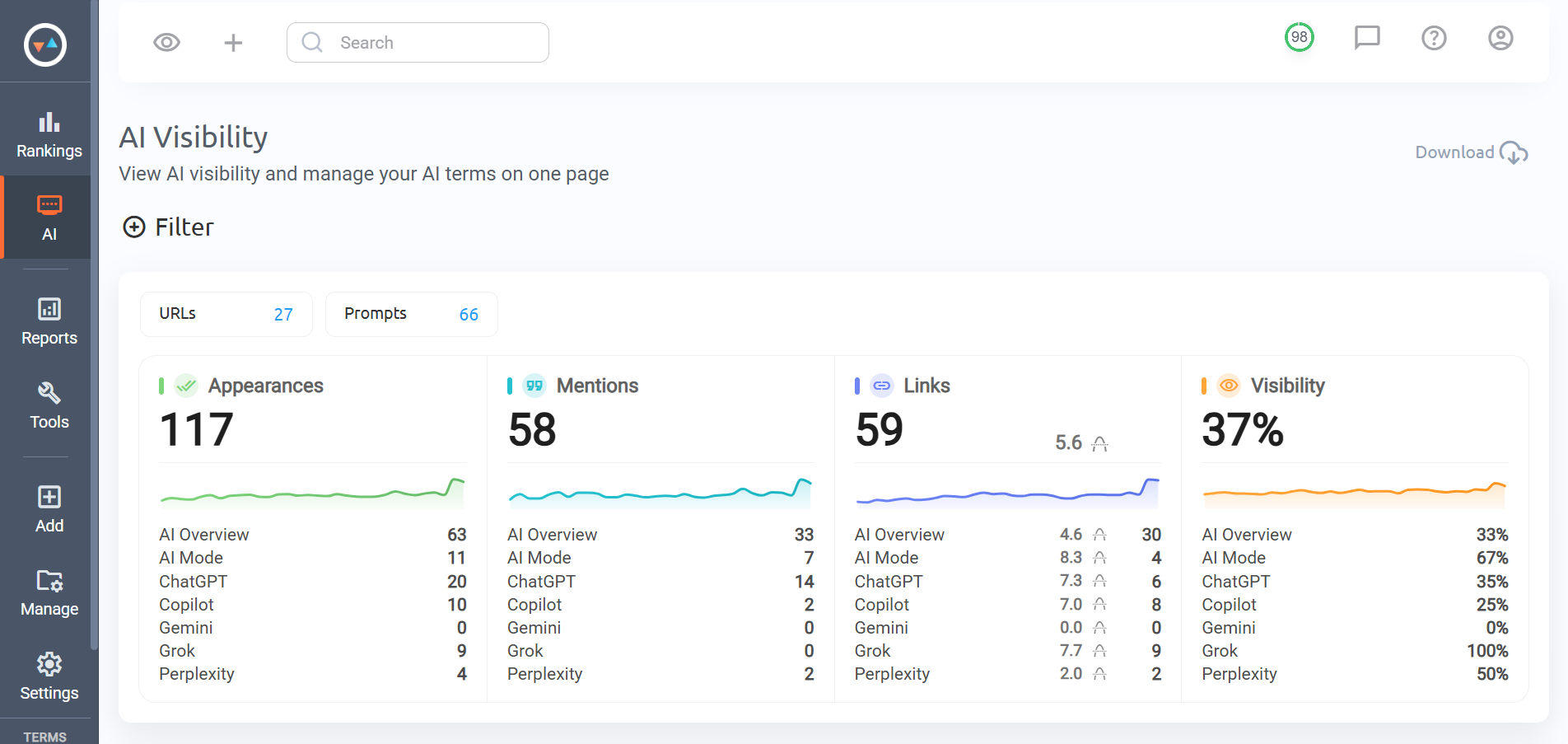
An AI visibility report shows how a brand and its website appear in AI-generated search results and answers.
Think of it as the missing layer between a traditional ranking report and what customers now see when an AI platform answers the question for them.
Depending on the platforms you track, the report may include Google AI Overviews, AI Mode, ChatGPT, Gemini, Perplexity, and Copilot.
The two most important visibility signals are:
- Mentions: The AI answer names the brand or product.
- Links: The answer cites or references a URL from the website.
These are not the same thing. A brand can be recommended without receiving a link. A page can also be used as a source without the brand being emphasized. Your report should show both.
Why Clients Need a Separate AI Visibility View
Traditional SEO reports usually focus on organic positions, traffic, conversions, backlinks, and technical work. Those metrics still matter.
AI visibility does not replace them. It explains a part of the search journey they no longer capture on their own.
A client may rank well in Google but rarely appear in AI recommendations. Another client may earn citations from a strong research page without seeing much referral traffic yet. If you only report organic rankings, both developments stay hidden.
There is another problem. Google currently includes traffic from AI Overviews and AI Mode inside the general Web search type in Search Console. Google confirms this in its documentation for site owners. That makes it difficult to isolate prompt-level AI visibility using Search Console alone.
A dedicated report helps you show the prompts, platforms, Mentions, Links, sources, and competitors behind the trend.
Start With the Client’s Business Goals
This is where many reports go wrong. They begin with the charts the tool can produce instead of the reason the client hired the agency.
Start with the business goal.
For example:
- A SaaS company may care about appearing in “best tool” and alternative prompts.
- A local business may care about AI answers related to services in specific locations.
- An ecommerce brand may care about product recommendations and comparison prompts.
- A professional-services firm may care about authority, trust, and problem-based questions.
In plain English, a dentist may care about “who can fix a chipped tooth today,” a luggage brand may care about “best cabin bag for budget airlines,” and an accountant may care about “how to handle VAT when selling into the EU.” Different businesses, same reporting rule: start with the decision the customer is trying to make.
Write the goal at the top of your reporting brief. Every metric and chart should help explain progress toward that goal.
Choose the Right Prompts
Your report cannot be better than the prompt set behind it.
Track questions that represent real customer decisions:
- Best [product or service] for [audience]
- [Brand] alternatives
- [Product A] vs. [Product B]
- Which provider offers [important feature]?
- How can I solve [customer problem]?
Group prompts by category, feature, problem, comparison, and brand. This lets you explain where visibility is improving instead of presenting one unexplained total.
Keep a stable core set. If you replace half the prompts every month, the trend stops meaning what the client thinks it means.
The Metrics Clients Actually Need
1. Mention coverage
Show the percentage or number of tracked prompts where the brand appeared in the answer text.
Coverage is usually more useful than a raw Mention total. Twenty Mentions from two repeated prompts do not represent the same visibility as Mentions across twenty different buying questions.
That distinction sounds small. In a client meeting, it changes the whole story.
2. Link coverage
Show how many tracked prompts produced a Link to the client’s website. Include the pages that were referenced most often.
This tells the client which content is being selected as a source and which important pages are still absent.
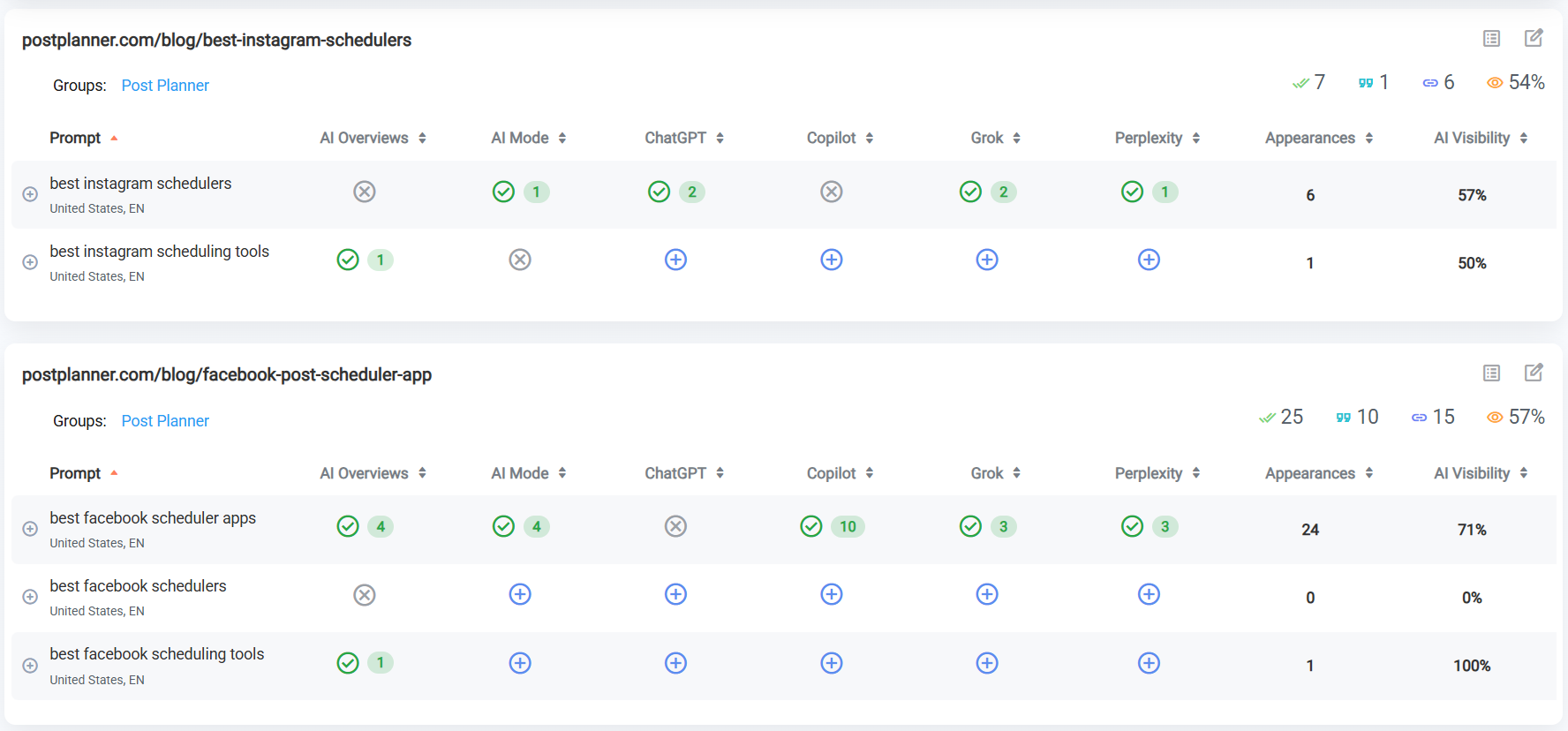
3. Platform breakdown
Separate results by platform. ChatGPT, Gemini, Perplexity, Copilot, AI Overviews, and AI Mode can return different brands and sources for the same prompt.
An overall number is useful for the summary, but the platform breakdown shows where the opportunity actually exists.
4. Competitor visibility
Show the competitors that appear most often for the client’s priority prompts. Focus on meaningful patterns, not every brand that appeared once.
Answer questions such as:
- Which competitors dominate category recommendations?
- Who receives the most Links?
- Which source pages are repeatedly cited?
- Where did the client gain or lose ground?
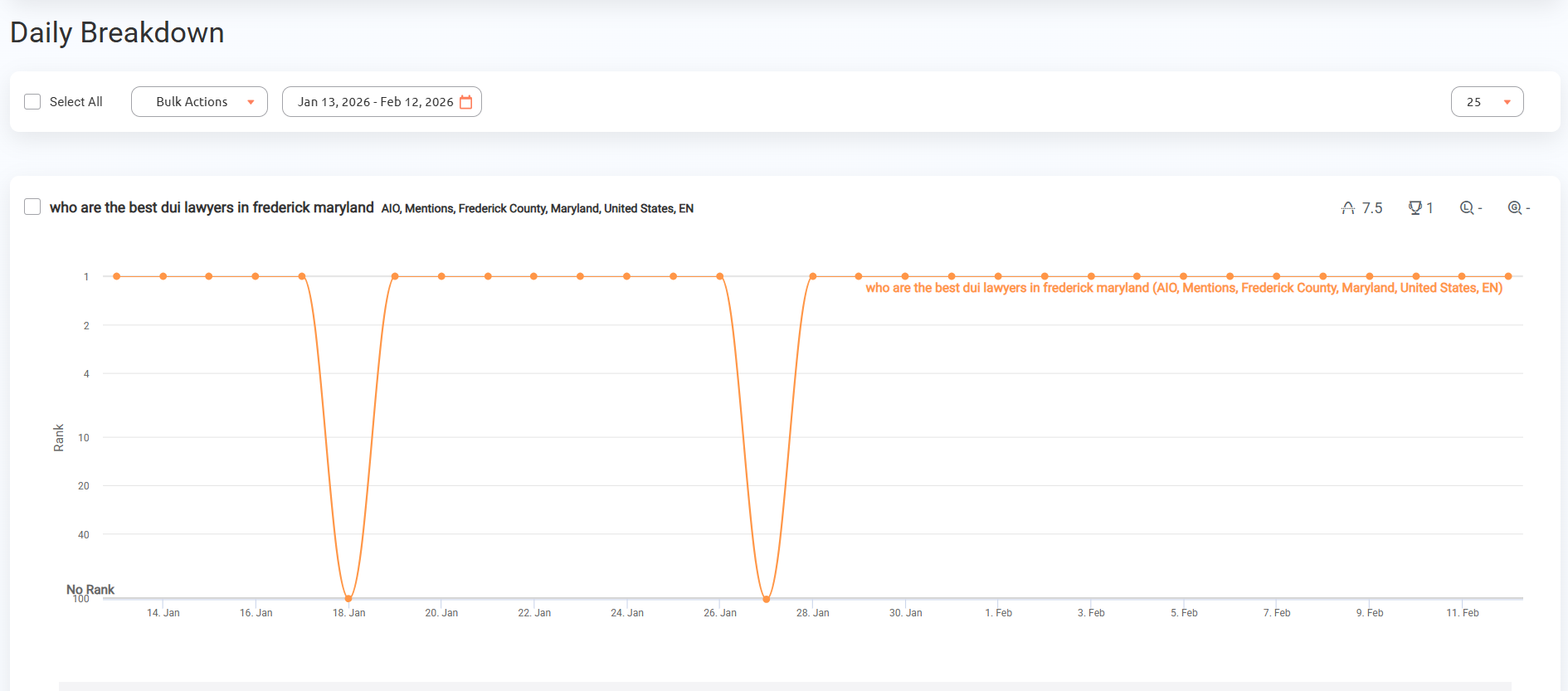
5. Visibility trend
Show change over time for Mentions, Links, and prompt coverage. Daily tracking gives you enough detail to see volatility without pretending every daily movement requires a reaction.
Use weekly or monthly reporting periods for the client summary. Keep daily data available for investigation.
6. Organic search context
AI visibility should not sit in a separate universe. Include the organic rankings that support the same topics and pages.
For example, if a page gains organic positions and begins appearing as a cited Link for related AI prompts, the combination is worth investigating. Do not claim one caused the other without evidence, but show the client the full search picture.
7. Business outcomes
When possible, add referral traffic, conversions, leads, or revenue associated with the cited pages and campaigns. Google’s GA4 traffic-source documentation explains how referrers and campaign data populate reports, while Search Console shows clicks, impressions, CTR, and average position.
Just do not promise perfect attribution. A person can see a brand recommended in an AI answer on Monday, Google the brand on Wednesday, and buy on Friday. GA4 may record the last visible step. The AI mention still helped start the trip.
AI visibility is often a leading indicator. Be clear about the difference between being visible and generating a sale. Clients trust reports that explain that difference.
A Simple AI Visibility Report Structure
Page 1: Executive summary
Keep this short. Include:
- The main visibility change
- The strongest win
- The biggest risk or gap
- The most important next action
A useful summary might say:
Brand Mention coverage increased across product-comparison prompts, while Link coverage remained flat. Two competitors continue to receive most citations for feature-related questions. Next month, we will update the comparison guide and publish original data for the three prompts with the highest commercial value.
That tells the client what happened and what you are doing about it.
Page 2: Visibility scorecard
Show the current period, previous period, and change for a small number of metrics:
- Prompts tracked
- Prompts with a Mention
- Prompts with a Link
- Total unique cited pages
- Top competitor
- Organic visibility for the same topic group
Page 3: Platform comparison
Use a table or chart to compare Mention and Link coverage by platform. Add one sentence explaining the most important difference.
Page 4: Prompt groups
Break results into category, feature, problem, comparison, and branded prompts. This makes the report useful for content planning.
Page 5: Competitors and sources
List the competitors and URLs that appear most often. Highlight new entrants, lost visibility, and source types that deserve closer review.
Page 6: Actions and priorities
End with specific actions, owners, and expected timing. A report without decisions is just a data delivery.
How to Build the Report in ProRankTracker
1. Organize prompts before reporting
Use Projects and Tags to organize prompts by client, product, market, funnel stage, and intent. Clean organization makes filtering and automation much easier.
2. Track Mentions and Links together
Use both signals so the report can distinguish brand awareness from source visibility. Review the answer context instead of relying only on totals.
3. Add organic ranking data
Track the keywords and URLs connected to the same topics. ProRankTracker keeps organic and AI tracking in the same platform, which makes it easier to compare the two views.
4. Choose the delivery format
PRT supports white-label scheduled reports, PDFs, XLSX and CSV exports, Google Sheets, white-label shared reports, and Looker Studio.
Choose the format based on how the client consumes information. Executives may want a short scheduled summary. An SEO team may need a live dashboard plus the underlying export.
5. Automate delivery, not interpretation
Scheduling saves time, but a report still needs human commentary. Add a short explanation of the change, its likely importance, and the next action.
Think of the automated report as the receipt. Your commentary is the diagnosis. A client can read a number without you, but they hired you to explain whether it matters.
Reporting Mistakes to Avoid
Using one unexplained visibility score
A combined score may look clean, but it can hide a gain in Mentions and a loss in Links. Show the components.
Changing the prompt set without disclosing it
If the tracked questions change, note it clearly. Otherwise, the comparison with the previous period may be misleading.
Presenting correlation as proof
A content update followed by more citations is worth noting, but it does not automatically prove causation. Describe what changed and what you will test next.
Reporting every movement as important
AI answers are volatile. Focus on repeated changes across priority prompts and meaningful platform trends.
Ignoring answer context
A Mention can be positive, neutral, outdated, or negative. Review the wording before calling it a win.
Separating AI from the rest of SEO
Clients need one search strategy, not disconnected reports. Connect AI visibility to organic rankings, content, traffic, and conversions.
Frequently Asked Questions
How often should agencies send AI visibility reports?
Monthly reporting works for most clients, with daily data available for monitoring and investigation. High-priority launches or volatile campaigns may need weekly summaries.
Should the client see every tracked prompt?
Make the full list available, but keep the main report focused on priority groups, important changes, and actions.
Should AI visibility replace organic rank reporting?
No. AI and organic visibility answer different questions. Reporting them together gives the client a more complete view.
What is the most important AI visibility metric?
There is no single metric for every client. Mention coverage, Link coverage, platform performance, competitor visibility, and business outcomes each answer a different question.
Build Reports That Lead to Decisions
Your client does not need more data for the sake of it. They need a clear view of where the brand appears, what changed, why it matters, and what happens next.
ProRankTracker brings AI Mentions, Links, organic rankings, competitor AI visibility, and reporting into one workflow. Use that data to build a concise client story, then end every report with specific actions.