accuranker alternative 2

9 Best AccuRanker Alternatives (Reviewed 2025)

AccuRanker is a solid dedicated rank tracker with fast, accurate, and fresh daily data. But it’s not without its trade-offs.

For one, it’s one of the more expensive dedicated rank trackers compared to others on the market, which makes it less accessible for small businesses.

Other users might want an all-in-one SEO tool for the price with additional features like backlink analysis or technical audits.

So what might you look for in an AccuRanker alternative? I consider:

  • Daily and accurate tracking, across devices and locations
  • Better value and pricing per keyword, especially for high-volume 
  • Flexible white-label reporting options for agencies or consultants
  • Bonus tools like keyword research, audits, and competitor analysis
  • An easy-to-understand UI
  • Quality, accessible customer support

I’ll break down the 9 best AccuRanker alternatives and include what each one does well, how they stack up on pricing, and why they might be a better fit for your workflow.

My top choices for AccuRanker alternatives are:

  1. Best for Agencies: ProRankTracker
  2. Best for Beginners: Nightwatch
  3. Best for Extra SEO Tools: Mangools
  4. Best Budget All-in-One SEO Tool: SE Ranking
  5. Best for Free: Google Search Console
  6. Best All-in-One Marketing Tool: Semrush
  7. Best for Local Listings: Moz
  8. Best All-in-One SEO Tool: Ahrefs
  9. Best for Marketing Analytics: SimilarWeb

1. Best for Agencies: ProRankTracker

ProRankTracker is a purpose-built rank-tracking platform that punches above its weight for local accuracy, reporting flexibility, and affordability. 

It offers many of the same strengths as AccuRanker (daily updates, SERP feature tracking, mobile vs. desktop tracking) while going even deeper in some areas, like neighborhood-level tracking and automated white-label reporting.

From YouTube and Amazon rank tracking to API access and 20+ custom reports, ProRankTracker brings a ton of value at a price point that’s tough to beat.

It’s a top pick for agencies managing multiple client campaigns or businesses that want to monitor rankings at scale without blowing the budget.

Pros

  • Accurate and daily-updated ranking data on EVERY plan
  • Tracks rankings on a global scale or down to a single neighborhood
  • Supports all major search engines (including Amazon and YouTube)
  • Shows Global and Local (country level) search volume for each term and engine
  • White-label reporting for client presentations
  • Comprehensive mobile and desktop ranking insights
  • Best pricing available for a specialized rank tracking tool
  • Free trial available

Cons

  • Some users note a learning curve when starting out (but users have access to help articles and top-notch customer support)
  • Limited integration options compared to some competitors

Features

  • Daily rank tracking and updates – Provides precise, daily insights into keyword rankings.

ProRankTracker

  • Local rank tracking – Monitors keyword performance in specific locations (down to neighborhood-level specificity!)
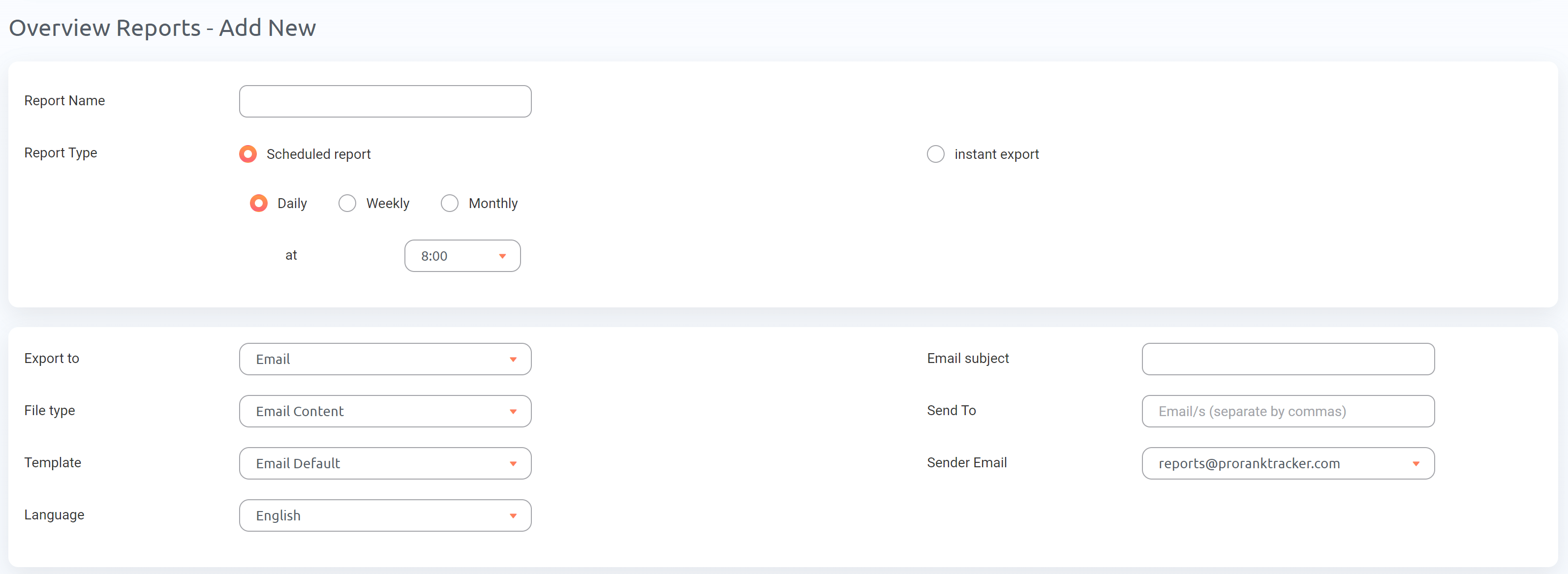
  • Detailed and customizable reports – More than 20 types of reports and notifications (including white-label reports). You can customize your reports to include only information that you or your clients want, making this the perfect feature
  • Rankings Views – 6 different Rankings Views give you a varied and complete understanding of your ranking progress, including the ability to split your ranks into various groups, tags, and projects.

ProRankTracker

  • Insta-Check – Quickly check on potential keywords using a credit-based SERP checker that doesn’t count toward your overall tracking limit. This is perfect for the times when you’re doing preliminary keyword research or competitor research.

Insta-Check

  • Keyword discovery and tracking – Helps identify and track relevant keywords for your business.
  • Integrations and API – Connect your rank data to Google Looker Studio or with other platforms via its API.

Pricing

ProRankTracker offers some of the most competitive pricing in the industry. They also offer a 14-day FREE trial with ALL premium features enabled. After finishing your free trial, you have 3 pricing tiers available to you:

  • Starter – Starts at $39/month paid annually for up to 500 tracked terms
  • Pro – Starts at $87/month paid annually for up to 1,500 tracked terms
  • Agency – Starts at $144/month paid annually for 3,000 tracked terms

PRT pricing annual

Reviews

ProRankTracker has a strong 4.6 average rating on G2. Most users highlight its geo-specific accuracy, daily email updates, and ease of setup as standout features. 

Reviewers also noted that it’s the only tool they’ve found that accurately tracks ranks across very specific locations (like city-level or even neighborhood-level keywords) without requiring a bloated feature set or steep learning curve.

Here’s what Bryan R. had to say about his experience with PRT:

“Pro Rank Tracker has been an invaluable tool for tracking our local Google rankings. It’s incredibly user-friendly, making it easy to add new keywords and URLs to monitor. The insights provided are detailed and accurate, which has significantly helped us optimize our SEO strategies.

One standout feature is the API, which we utilize for in-depth monitoring, pushing rankings to a Google Sheet. It integrates seamlessly into our workflow and provides comprehensive data that helps us stay ahead of the competition.

Pro Rank Tracker is a top-tier tool I highly recommend for anyone serious about tracking their SEO performance.”

2. Best for Beginners: Nightwatch

Nightwatch is another more affordable Accuranker alternative, ideal for SEOs and agencies who need precise, daily keyword tracking across multiple locations, devices, and search engines. It has hyper-local tracking capabilities (down to zip code), flexible pricing, and early adoption of AI visibility tracking — letting you monitor brand mentions in tools like ChatGPT and Claude.

You get access to daily updated SERP data across Google, YouTube, Bing, and DuckDuckGo, along with a full technical SEO audit tool and drag-and-drop reporting that can be fully white-labeled. 

The biggest limitation is cost (although it’s still cheaper than AccuRanker): features like Looker Studio integration, API access, and unlimited white-label reports don’t kick in until you hit the $82/month (1k keywords) tier. If you’re only managing a handful of keywords, other tools will be more budget-friendly.

Pros

  • Rank tracking for DuckDuckGo (unlike most alternatives)
  • White-labeled reports with drag-and-drop functionality
  • Known for customer support that actually implements feature suggestions
  • Track by country, city, zip code, and device
  • Site audit feature with actionable insights
  • Integrations with Google Analytics and Search Console
  • Users praise its clean interface and client-friendly reporting
  • Good value for agencies managing multiple websites or clients

Cons

  • More expensive than ProRankTracker as you scale up keywords
  • Some users reported a slight learning curve early on
  • No mobile app

Features

  • Rank Tracker – Track keyword rankings daily across Google, Bing, YouTube, and DuckDuckGo

Nightwatch rank tracker

  • Local SERP Tracking – Monitor rankings at city, zip code, and device level
  • AI Tracking – Measure your brand’s visibility in AI-generated answers from ChatGPT, Claude, and others
  • Keyword Discovery – Uncover new keyword opportunities by entering a URL
  • Keyword Research – Analyze CPC, competition, and search volume using AI-powered intent detection
  • Site Audit – Identify broken links, metadata issues, status codes, and other technical SEO problems

Nightwatch reports

  • Audit History – Compare results across historical audits to track technical SEO improvements
  • Custom Segments – Group keywords by campaign, tag, or landing page
  • White-Labeled Reports – Create branded reports with drag-and-drop customization
  • Google Analytics + Search Console Integration – Combine ranking data with traffic and performance metrics
  • SERP API – Access real-time SERP data with granular location and snippet-level insights
  • Mobile and Desktop Tracking – View keyword performance by device type

Pricing

Nightwatch’s pricing is based on how many keywords you need to track. The slider on their pricing page lets you scale from 250 keywords to 10,000 keywords. All plans come with a 14‑day full‑feature trial, but some features like unlimited white label reports and API access are only available on plans with over 1,000 keywords.

Here’s how the pricing breaks down for 4 different amounts of keywords tracked:

  • 250 keywords – $32/month paid annually 
  • 500 keywords – $47/month paid annually
  • 1,000 keywords – $82/month paid annually
  • 3,000 keywords – $215/month paid annually

Nightwatch pricing

Reviews

Nightwatch earns consistently high praise from users, averaging 4.9 stars on G2. Customers frequently highlight its accurate keyword tracking, white-label reporting, and responsive customer support.

A few users note that the learning curve can be steep for beginners and that pricing gets expensive as you track more keywords.

Here’s what Luka L. had to say about using Nightwatch:

I’ve been using Nightwatch.io for 4 years and it has been a game-changer for my SEO efforts. The platform offers a robust set of tools that allow me to track rankings, analyze competitors to some extent, and manage multiple projects with ease. The accuracy of the data and the level of detail provided is exceptional, making it easier to make informed decisions.

One of the standout features for me is the customizable reporting. It allows me to create detailed reports that I can easily share with my clients, which adds significant value to my services. The user interface is intuitive and the learning curve is minimal, even for those who are not very tech-savvy.

Moreover, the support team is top-notch. On the rare occasions when I’ve encountered issues or had questions, they’ve been prompt and helpful in their responses. Nightwatch.io is constantly evolving, with regular updates that keep the tool ahead of the curve.

Overall, I highly recommend Nightwatch.io to any SEO professional looking for a reliable, comprehensive, and user-friendly tool to enhance their SEO strategy.

While I find Nightwatch.io to be an incredibly powerful tool, one area that could be improved is the initial learning curve. Because the platform is so feature-rich, it can take some time to get used to.”

3. Best for Extra SEO Tools: Mangools

Mangools carves out a unique space in the rank tracking market by combining ease of use with a refreshingly low price point. 

Mangools offers a well-rounded suite of tools, like keyword research, SERP analysis, and basic backlink insights, wrapped in a user-friendly interface that’s ideal for beginners or solo SEOs.

If you’re looking for a simple rank tracker that still delivers solid daily updates and local SEO tracking, Mangools might hit the sweet spot. It may not offer the high-scale tracking that AccuRanker is known for — but it makes up for that with affordability.

Pros

  • Beginner-friendly user interface
  • Accurate, daily ranking updates
  • Affordable pricing
  • Comprehensive SERP insights
  • Detailed backlink analysis
  • Local SEO capabilities
  • Solid list of free tools

Cons

  • Limited features compared to premium tools
  • Some features lack the depth provided by a dedicated tool

Features

  • KWFinder – This tool includes long-tail keyword research, keyword difficulty analysis, search volume trends, and competitor insights–all in one place.

Mangools

  • SERPChecker – Use this tool for SERP competitor analysis, domain and page authority metrics, Google SERP feature tracking, and historical SERP data.
  • SERPWatcher – Includes specialized rank-tracking tools like daily keyword rank tracking, various search engines, local ranking data, ranking alerts, and performance reports.

SERPWatcher

  • LinkMiner – Perform advanced backlink analysis, backlink tracking, and competitor backlink research and get authority metrics on your backlinks so you can improve your backlink profile quality. 
  • SiteProfiler – Includes website authority metrics, trust and citation flow scores, competitor website analysis, and top-performing page insights.
  • SERP Simulator – Free tool to instantly check to see how any page appears on the SERPs

SERP Simulator

  • Reddit threads finder – Free tool to hunt down Reddit threads related to the top keywords in your strategy
  • Other free tools – AI search grader, share of search, SERP location changer, SERP volatility tracker, and an SEO browser extension allow even non-paying Mangools users to improve their SEO strategy greatly

Pricing

Mangools offers 3 basic pricing packages:

  • Basic – $29.90/month paid annually for 100 daily keyword lookups, 200 daily tracked keywords, 100 daily SERP lookups, and 100,000 monthly backlink rows
  • Premium – $44.90/month paid annually for 500 daily keyword lookups, 700 daily tracked keywords, 500 daily SERP lookups, and 500,000 monthly backlink rows 
  • Agency – $89.90/month paid annually for 1,200 daily keyword lookups, 1,500 daily tracked keywords, and 1.2 million monthly backlink rows

Mangools

Reviews

Mangools averages a 4.5 rating on G2. Many of the positive comments mention the ease of use and the affordability, while some of the more negative comments mention that the features can seem limited compared to larger tools.

Here’s what Leeron W. had to say about using Mangools for his business:

“Mangools KWFinder delivered far more value in far less time than I expected. I was able to do all my research on hundreds of keywords and export useful marketing data that will keep me going for months in just an hour or two. No hiccups. No bugs. No roadblocks. Just pure user-friendly value. This product is butter!”

I used my 3rd party AI product to figure out how to accomplish a couple tasks in Mangool KWFinder. So I overcame any questions I had quickly. But … it might be good to have some type of helper built into the UI so that users could get all their answers in one screen. And I’m not referring to a FAQ page. I got specific answers to my questions from my AI in seconds, which is the new standard. FAQ is going the way of the dinosaur. Lol.”

4. Best Budget All-in-One SEO Tool: SE Ranking

SE Ranking is a rank-tracking-first platform with a broader SEO toolkit baked in, making it an appealing AccuRanker alternative for users who want more than just rankings. On top of reliable keyword tracking, you’ll get technical site audits, backlink monitoring, and competitor research tools to round out your strategy.

What makes SE Ranking stand out is its flexibility. If you’re managing local SEO or social media campaigns, SE Ranking offers optional add-ons to help unify and automate your efforts across channels.

SE Ranking delivers good functionality at a much more budget-friendly price — especially for small teams and growing agencies that want to stretch their SEO spend with an all-in-one SEO tool.

Pros

  • Full-featured SEO platform at competitive pricing
  • User-friendly interface with easy-to-read dashboards
  • Comprehensive site audit feature helps identify technical SEO issues
  • Strong competitor analysis and keyword research tools
  • Supports local SEO for keyword tracking at the city level
  • Daily rank updates

Cons

  • Somewhat limited feature set compared to other SEO tools (hence the lower prices)
  • Lower-priced plans lack historical data, certain integrations, and other valuable tools
  • White-label reports and other agency features are only available with an additional purchase

Features

  • Keyword tracking and backlink analysis – Track keywords daily and analyze backlinks to monitor your site’s link profile and identify quality backlinks.

SE Ranking

  • Website audit – Provides detailed SEO health checks for technical issues like broken links, crawlability, and page speed.
  • Keyword research and competitor analysis – Discover new keywords using the Keyword Suggestion Tool, group them for relevance using the Keyword Grouping Tool, and analyze competitors’ performance for those same keywords.

Keyword research and competitor analysis

  • Agency tools – Allows you to create branded reports and give your clients selective access to their data to help you provide them with the data they need.

Agency tools

  • Local SEO features – Enables tracking by city or region, including Google Business Profile tracking to improve your local ranks.
  • AI features – Use AI to write content or track the AI Overviews Google search feature.

Pricing

SE Ranking has 3 pricing plans, and each offers a different level of access to its suite of tools:

  • Essential – $52/month paid annually for 500 tracked keywords and get access to keyword research and backlink analysis
  • Pro – $95.20/month paid annually for 2,000 tracked keywords, plus access to historical data, advanced data insights, and other advanced tools. You can also choose a 3,500 keyword plan at this level for an increase in cost
  • Business – Starts at $207.20/month paid annually for 5,000 tracked keywords and includes all of the benefits of lower tiers, plus access to the API

SE Ranking pricing annual

Reviews

SE Ranking has a good reputation among its users, with a 4.8 out of 5 rating on G2. Users praise its ease of use, flexible pricing, and comprehensive toolset.

People who complain normally mention a learning curve, occasional lag/accuracy issues, smaller backlink/keyword databases or limited data access compared with bigger suites, and (less often) price.

Here’s what Sofia H. has to say about using SE Ranking: 

“I use SE Ranking daily for tasks like finding high-volume, low-competition keywords, conducting competitor analysis, automated SEO audits, estimating traffic, and tracking keyword positions. What I like best is the excellent price-performance ratio, which allows smaller content creators to conduct in-depth keyword research without a large monthly budget. Additionally, the customer support is perfect—quick and very helpful.

The learning curve is quite steep, and it takes time to develop an efficient workflow. Some features aren’t included in the base plan, which is fine, but I wish they were clearly marked in the interface to avoid clicking on links that prompt an upgrade.”

5. Best for Free: Google Search Console

If you’re looking for a totally free option, Google Search Console does let you track average rankings for keywords and pages on your website.

GSC helps you diagnose any issues that affect your website’s ranking. It also shows you what search queries bring the most visitors to your site worldwide.

While not an accurate rank tracker (the data often lags), GSC does provide data that shows you your average ranking position. You should also keep in mind, that you can only “track rankings” with GSC for websites you have access to (so you can’t use it to track competitors).

As with other Google SEO tools, GSC is free to use and offers extremely valuable insights.

In other words, there’s no reason NOT to include GSC as part of your toolbox. Whatever AccuRanker alternative you use, combine it with GSC to get the most data to improve your ranks as quickly as possible!

Pros

  • Free Google tool (that means data comes directly from Google!)
  • Essential for diagnosing technical SEO issues
  • Analyze what search queries bring people to your website
  • Provides insights into website performance and search traffic
  • Alerts for security issues and Google penalties
  • Daily rank updates

Cons

  • No search engines other than Google are supported (for that, you will need a dedicated rank tracker like ProRankTracker)!
  • No built-in reporting for tracking your top keywords (you’ll have to manually filter every time you want to check)
  • Steep learning curve
  • Some features require technical knowledge to get the most out of them

Features

  • Search analytics – See exactly what search queries bring users to your site. You can further break this information down by search location, helping you understand what types of content users from different places are looking for.
  • Website performance analytics – See how many visitors come to your page, what ranks your pages currently occupy, and how many impressions and clicks you get.

Google Search Console

  • SEO issue notifications – GSC automatically notifies you if you have issues on your site that are leading to ranking problems. You will get a notification to fix the issue quickly, whether it’s broken links, inaccurate sitemaps, or Google penalties.
  • URL inspection tool – Submit sitemaps or individual URLs to be crawled and indexed by Google (and make sure Google has your URL, avoiding the dreaded screen shown below), ensuring Google has the most recent view of your site (this can help you improve your ranks quickly if you’ve recently made significant changes!)

URL inspection tool

  • Rich snippets management – Manage your rich snippets within GSC’s platform to ensure they appear appropriately on the Google SERP.
  • Core Web Vitals report – This report assesses the overall health of your URLs and gives each one a score (Poor, Needs Improvement, or Good), allowing you to focus your efforts where they’re most needed.

Pricing

Google Search Console is FREE! That’s why nearly every major business uses it in their global SEO software tech stack.

Reviews

GSC has an average of 4.7 stars on G2, meaning it’s one of the most highly-rated SEO tools available. Users frequently mention the accuracy of the data and how much they can improve their SEO using GSC’s recommendations. More negative comments focus on GSC’s limitations and the steep learning curve required for optimal usage.

Here’s what Gaurav P. had to say about using GSC:

“I liked crawl stats feature of google search console the most, where you can actually see latest pages crawled by Google and are divided in to various types based on status codes, type of pages, type of google crawlers, etc. You can also see various subdomains which are getting crawled and from there it can easily be analyzed how and what type of pages are getting crawled and if they have any crawling issues”

I dislike mainly the limit on number of pages which can be checked from Google search console, the limit of number of pages in any type of report is 1000 which is very less, especially for those websites which have high number of pages or are getting crawled more frequently. 1000 pages limit if fine for smaller websites with limited crawl frequency”

6. Best All-in-One Marketing Tool: Semrush

If you want more than just a rank tracker, Semrush might be worth a look. It’s one of the most comprehensive all-in-one SEO and digital marketing tools available. It’s packed with features for keyword tracking, technical audits, backlink tools, competitor intelligence, and a ton more.

However, Semrush can feel bloated with tools many users won’t need. And its pricing reflects that — making it a better fit for enterprise teams or marketers who truly need an all-encompassing SEO suite.

Still, if you’re running complex campaigns and want ranking insights alongside everything else (content, PPC, social, etc.), Semrush delivers a powerful package. Just expect to pay a premium for the convenience.

Pros

  • Semrush is an all-in-one tool with features covering all aspects of SEO
  • User-friendly interface with clear dashboards
  • Daily ranking updates
  • Strong competitor analysis tools
  • Local keyword analysis
  • High-quality education resources to help you get the most out of the broad toolset

Cons

  • It can be overwhelming due to the sheer number of features
  • High cost, especially for smaller businesses
  • Many businesses will not need all the tools offered by Semrush, meaning you’re paying extra for a tool you might not use

Features

  • Keyword research and tracking Discover and monitor keywords to grow your keyword strategy and improve your visibility in multiple search locations.

Semrush

  • Site audits and technical SEO analysis – Identify and fix technical issues affecting your site performance.
  • Link-building tools – Analyze your backlink profile and use Semrush’s tools to acquire new links.
  • Competitor analysis – Use Semrush’s tools to uncover and copy your competitors’ strategies.

Competitor analysis

  • Content marketing – Developing higher-quality content targeting your ideal customer to improve your ranks on the SERPs.
  • Rank tracking – Track your ranks according to location and other parameters to help you establish a presence on the 1st page of the SERP.
  • Non-SEO features – like market research, advertising, and social media tools offer a more all-in-one marketing solution.

Pricing

Semrush is a great tool, but its prices may be beyond what many businesses can handle. Here are the pricing plans they offer:

  • Pro – $117.33/month paid annually for up to 5 projects, 500 keywords, and 10,000 results per report
  • Guru – $208.33/month paid annually for up to 15 projects, 1,500 keywords, and 30,000 results per report
  • Business – $416.66/month paid annually for up to 40 projects, 5,000 keywords, and 50,000 results per report

Semrush annual pricing

Reviews

Semrush averages 4.5 stars on G2. Customers frequently praise Semrush’s easy user experience, helpful customer service, and keyword research tools. Negative comments normally focus on the high price.

Here’s what Luke S. has to say about Semrush:

“Semrush is my go-to tool for website analysis (outside of GA4) and especially when I’m trying to work on SEO or optimizing my pages. It’s super straightforward, with plenty of tutorials and knowledge base information regarding using the tool. I am in Semrush at least once every day, typically more. It is ridiculously easy to implement into your website and integrate with all of your analytics tools (GA4, GSC, etc)

I have no complaints other than if you create a subscription and add a second user email, once you delete them due to the increase in billing, you still get billed for the unused seat and must contact support to fix this. We underwent organizational changes, which led to going unchecked for several months (no fault of Semrush’s.)”

7. Best for Local Listings: Moz

Moz is a well-known all-in-one SEO tool that isn’t as focused on rank tracking as AccuRanker. However, it still delivers a capable and accurate keyword tracking experience wrapped inside a broader SEO suite. 

What sets Moz apart is its strong emphasis on online reputation and local SEO management, making it a good option for businesses concerned with how they appear in search and in customer reviews.

Its keyword and domain tools (including the industry-standard Domain Authority metric) are widely respected, and it offers some of the most beginner-friendly UX in the SEO space. But keep in mind: rank updates only come weekly, which might feel like a step down if you’re used to AccuRanker’s daily refreshes.

Moz can still be a solid choice if you want more than just rankings if you’re managing local listings or keeping tabs on brand sentiment across the web.

Pros

  • Comprehensive keyword research and SEO toolset
  • Accurate rank-tracking tools
  • Powerful reputation management tools
  • Industry-standard Domain Authority was pioneered by Moz
  • User-friendly interface (especially considering the size of the software)
  • Strong community and resources
  • Great set of free tools

Cons

  • Moz’s price is higher than many of the other tools on this list
  • Metrics like Domain Authority are only updated once a month, and rankings are only updated once per week (!)

Features

  • Local SEO & Listing Management – Manage your local listings to ensure your online information is accurate and up to date.

Moz

  • SERP Analysis – Analyze the SERPs you’re competing for so you can understand how to optimize your content to rank on them.
  • Domain Authority (DA) – Moz’s DA score measures a site’s overall SEO strength. This widely used metric helps businesses know exactly where they stand compared to their competitors.

Domain Authority

  • Site Crawl – Detects technical SEO issues such as broken links and missing tags, helping you avoid site-breaking problems and fix minor issues before they become major ones.
  • Reputation Management Tools – Moz’s reputation management tools help businesses track online mentions, reviews, and customer sentiment across the web. 
  • Free tools Domain Analysis tool (with Domain Authority included), keyword explorer, Link Explorer, and Competitive Research tool.
  • Rank Tracking and Keyword Exploration
  • Competitor Analysis
  • Reporting and automation

Pricing

Moz is an excellent tool, but prices are higher than some of the other competitors on this list. It offers 4 main plans:

  • Starter – $39/month paid annually for 1 tracked site, 50 keywords, and 20,000 crawled pages/month.
  • Standard – $79/month paid annually for 3 tracked sites, 300 tracked keywords, and 400,000 crawled pages/month.
  • Medium – $143/month paid annually for 10 tracked sites, 1500 keywords, and 2 million crawled pages/month.
  • Large – $239/month paid annually for 25 tracked sites, 3000 tracked keywords, and 5 million crawled pages/month.

Moz annual pricing

Reviews

Moz is one of the most popular tools, and its reviews reflect that. It averages 4.3 stars on G2. Some of the most frequent positive comments center around the ease with which businesses can analyze their website and identify new strategies. The negative comments frequently mention the price and (no surprise) the learning curve.

Here’s what Moz user James N. had to say about his experience with Moz:

“Keyword research features, competitor analysis & rank tracking work all very well. Used daily, it’s really effective at managing several websites and campaigns. It’s intuitive and easy to use. The ability to ignore flagged issues in the weekly crawls is really good too.

I think the link database is lacking compared to other suppliers, and when you compare date ranges in the rank tracking suite, sometimes the differences in the numbers (up/down) aren’t quite clear enough as to what they mean.

The number of “seats” can be an issue if I’m using multiple devices logged into the same account.

Integrating Analytics was really tricky.

I dislike the range of default PDF reports that it can generate.”

8. Best All-in-One SEO Tool: Ahrefs

Ahrefs is a powerhouse all-in-one SEO tool best known for its backlink and keyword research tools, but it also includes a rank tracker for those already embedded in the Ahrefs ecosystem.

It covers the basics: mobile and desktop tracking, SERP feature monitoring, competitor comparisons, and even share of voice metrics. 

Ahrefs may fall short for users who want more rank tracking flexibility. Daily updates require a paid add-on, and pricing scales quickly if you’re tracking thousands of keywords. If rank tracking is your main focus, Ahrefs’ pricing won’t be worth it with more affordable options on the market.

Still, if you’re managing a broader SEO strategy and want your rank tracking integrated with backlink audits, content tools, and site crawls, Ahrefs gives you all of that in one platform.

Pros

  • Accurate backlink and keyword tracking
  • Global and local SERP data coverage
  • Clean, intuitive UI that’s fast and reliable
  • Comprehensive competitor and content gap analysis
  • SERP previews and visibility tools for tracked keywords
  • Content Explorer and Site Explorer are integrated with rank data
  • Technical site audits highlight SEO issues and crawl stats
  • Rich keyword research with clickstream data
  • Integration with Looker Studio for dashboard reporting (top-tier plans)

Cons

  • No real-time ranking updates unless on higher-tier plans
  • Expensive pricing, especially for small businesses or freelancers
  • Steep learning curve for beginners unfamiliar with SEO tools
  • Advanced features are gated behind premium tiers
  • Reporting could be more visually customizable for clients


Feature

  • Rank Tracker – Monitor keyword rankings on desktop and mobile across 190+ countries
  • SERP Feature Tracking – Detects 15+ SERP features like featured snippets, local packs, and video results

ahrefs rank tracker

  • AI Brand Radar – Tracks how your brand is mentioned across AI-generated answers (ChatGPT, Perplexity, Gemini, etc.)
  • Share of Voice – Measures the percentage of organic clicks your tracked keywords drive

ahrefs share of voice

  • Positions Distribution – Visual breakdown of keyword ranks (e.g., positions 1–3, 4–10, etc.)
  • Competitor Tracking – Compare keyword rankings, traffic, and SERP feature wins against up to 10 competitors
  • Keyword Segmentation – Group keywords by tags, filters, and target URLs for organized tracking
  • Google Search Console Integration – Pulls anonymized keyword and click data beyond the 16-month GSC limit
  • Performance Graphs – Visualize average positions, traffic estimates, and ranking shifts over time
  • Scheduled Email Reports – Weekly/monthly rank updates delivered directly to your inbox
  • Content Gap Tool – Discover competitor keywords you’re not ranking for
  • Keywords Explorer – Rich keyword research, including CPC, click potential, difficulty, and return rate
  • Site Audit – Identifies and helps fix technical SEO issues across your site

Pricing

Ahrefs does not sell its rank tracker as a standalone tool, so it’s included in all main plans. 

They offer 4 main pricing plans:

  • Lite – $108/month paid annually for 5 projects, 750 tracked keywords, and 6 months of historical data
  • Standard – $208/month paid annually for 20 projects, 2,000 tracked keywords, and 2 years of historical data
  • Advanced – $374/month paid annually for 50 projects, 5,000 tracked keywords, and 5 years of historical data
  • Enterprise – $1,249.17/month paid annually for a custom plan with unlimited historical data, personalized limits, and advanced security

Ahrefs pricing

If you’re interested in tracking AI results, you’ll need to pay for that as an add-on:

  • AI Brand Radar — $199/month per index (AI Overviews, ChatGPT, Perplexity, etc.)

Reviews

Ahrefs maintains a strong 4.5-star average across G2 reviews. Users praise its accurate keyword position tracking, SERP feature detection, and share of voice insights.

Some reviewers mention that rankings don’t update in real time on most plans, and daily updates require a paid add-on. A few also noted that the sheer volume of data in the interface can feel overwhelming at first.

Here’s what Lilee Sah L. had to say:

”Ahrefs gives really detailed information about what’s working for your website and your competitors. It’s great for finding good keywords, seeing who is linking to your site, and getting ideas for content. I really like the Site Explorer, which shows you what pages are getting the most traffic and links. The keyword tool is also super helpful for planning what to write about.

The dashboard is easy to use and fast. Plus, they have really helpful videos and blog posts to teach you how to use everything.

Sometimes the data feels a little behind, especially when tracking backlinks or keyword rankings. It doesn’t always update in real-time, which can make it harder to see quick changes. Also, the tool can feel overwhelming at first because there are so many features and graphs. If you’re new to SEO, there’s a bit of a learning curve.”

9. Best for Marketing Analytics: SimilarWeb

Similarweb isn’t a pure rank tracker, but it still earns a spot on this list because of its powerful SEO features wrapped inside a broader market intelligence platform. 

If you need more than just rankings, like traffic sources, competitive benchmarks, and visibility trends, Similarweb delivers a holistic view of your online performance.

Its rank tracking capabilities include daily updates, SERP feature monitoring, and customizable reporting that integrates with platforms like Google Analytics and Adobe. That makes it especially useful for in-house marketing teams and enterprise SEO ops who want to tie rankings back to real-world traffic and business outcomes.

Similarweb isn’t cheap, and smaller SEO teams may find its backlink and keyword research tools lacking compared to more specialized options. But for companies managing large-scale SEO and go-to-market strategies across multiple domains, it offers a data-rich alternative with enterprise-level customization.

Pros

  • Extensive customization options for reports
  • In-depth SERP feature tracking, providing more data points
  • Strong integration with analytics platforms
  • Detailed competitor analysis
  • Regular updates and new features for more accurate data tracking

Cons

  • Interface can be complex for new users
  • Limited backlink analysis and keyword research tools
  • Limited historical data on smaller plans
  • Higher price range compared to some alternatives

Features

  • Daily keyword tracking – Track rankings daily to stay up-to-date on keyword performance changes.

Daily keyword tracking

  • Customizable rank insights – Adjust rank tracking to focus on specific metrics, devices, and locations.
  • Comprehensive SERP feature tracking – Monitor various SERP features like snippets, image packs, and local packs to understand keyword visibility.

Comprehensive SERP feature tracking

  • White-label reporting – Create fully customizable, branded reports for clients or stakeholders.
  • Integration with Google Analytics, Search Console, and Adobe Analytics – Syncs seamlessly with analytics platforms to enrich SEO data with website traffic insights.
  • Competitive insights – Track multiple domains and subdomains in-depth to monitor competitors’ rankings and strategies.

Competitive insights

Pricing

Similarweb is a large tool that comes with a large price tag. There are 4 main pricing plans:

  • Starter –  $125/month paid annually for 1,000 keywords and 3 months of historical data for 
  • Professional – $333/month paid annually for 5,000 keywords and 6 months of historical data
  • Team – 50,000 keywords and 15 months of historical data (contact for pricing).
  • Enterprise – 150,000 keywords and 37 months of historical data (contact for pricing).

Other features like API access, some local/global SEO features, and other advanced features are only available on the larger plans.

Reviews

Similarweb is a popular tool, and its reviews reflect that fact. It averages 4.5 stars on G2.

Some of the most frequent positive comments focus on the ease of use and the high-quality competitor analysis tools. The more critical reviews often mention data limitations or inaccuracies.

Here’s what Anosh M. had to say about using Similarweb:

“Similarweb is by far the single most used, trusted & dependable lead-gen tool we use in my organization to the point where I spearheaded an effort to upgrade to the Pro version across the entire organization. The data it provides almost entirely shapes our Sales pipeline for the year as it provides a lot of key metrics (website visits, competitors they’re working with, legitimacy & sources of traffic, largest opportunities with them) that factor in identifying the best possible targets to chase.

It’s really to install the extension from the Web Store. It’s extremely intuitive, providing a snapshot of the most crucial data, with the platform being used even by our Ops teams. Everyone in my team uses it daily. Additionally, they are constantly adding new features to improve the UX – Sales Signals has been our favourite one as it often provides insights we can leverage to improve our pitch.”

Similarweb’s internal logic for categorization of a website in a particular bucket is shaky and somewhat indecipherable at times. Consequently, its sister extension Similarsites (the name is pretty self-explanatory) isn’t the most accurate either.”

Conclusion

Your rank tracking tool is one of your most important SEO assets. Without it, you don’t know how your ranks are performing or how you should change your strategy.

In other words, you need to find a GREAT rank tracking tool! Don’t settle for something that isn’t working for your business.

These 9 tools are excellent alternatives to AccuRanker regarding tracking ranks. 

I recommend starting with a free 14-day ProRankTracker trial.

Good luck!