How to Track AI Mode Rankings for Mentions and Links (2026)
Love it or hate it, the future of Google Search is bound to look more like AI Mode.
And right now, most SEO teams have zero visibility into how their brand shows up in it because:
1) You can’t see AI Mode traffic segmented in Search Console and GA4, which makes tracking AI Mode rankings (visibility) the #1 way to measure results
and…
2) AI Mode results are constantly changing, which means only checking your AI Mode rankings once in a while or even weekly isn’t going to give you an accurate picture of your AI visibility.
In this guide, I’ll show you how I accurately track AI Mode rankings daily, while keeping my clients in the loop with automatic reports.
-
- Why AI Mode Results Are So Hard to Track
- Metrics You Actually Need to Track in AI Mode
- Step 1: Identify the Right Prompts to Track
- Step 2: Track Links and Mentions
- Step 3: Monitor Trends Over Time (Daily Changes Matter)
- Step 4: Analyze Competitors Inside AI Mode
- Step 5: Turn AI Visibility Into Reporting (and ROI)
- How to Improve AI Mode Rankings
Why AI Mode Results Are So Hard to Track
Traditional SEO focuses on straightforward, easy-to-track metrics, like rankings and traffic.
AI Mode doesn’t work like that.
AI Mode uses more advanced reasoning to handle complex queries. Instead of returning a single set of results, it breaks your question into multiple subtopics and searches for each one simultaneously.
With AI Mode, your brand could appear in 3 very different ways:
- As a link (your URL cited as a source or inside the answer)
- As a mention (your brand name referenced)
- Not at all
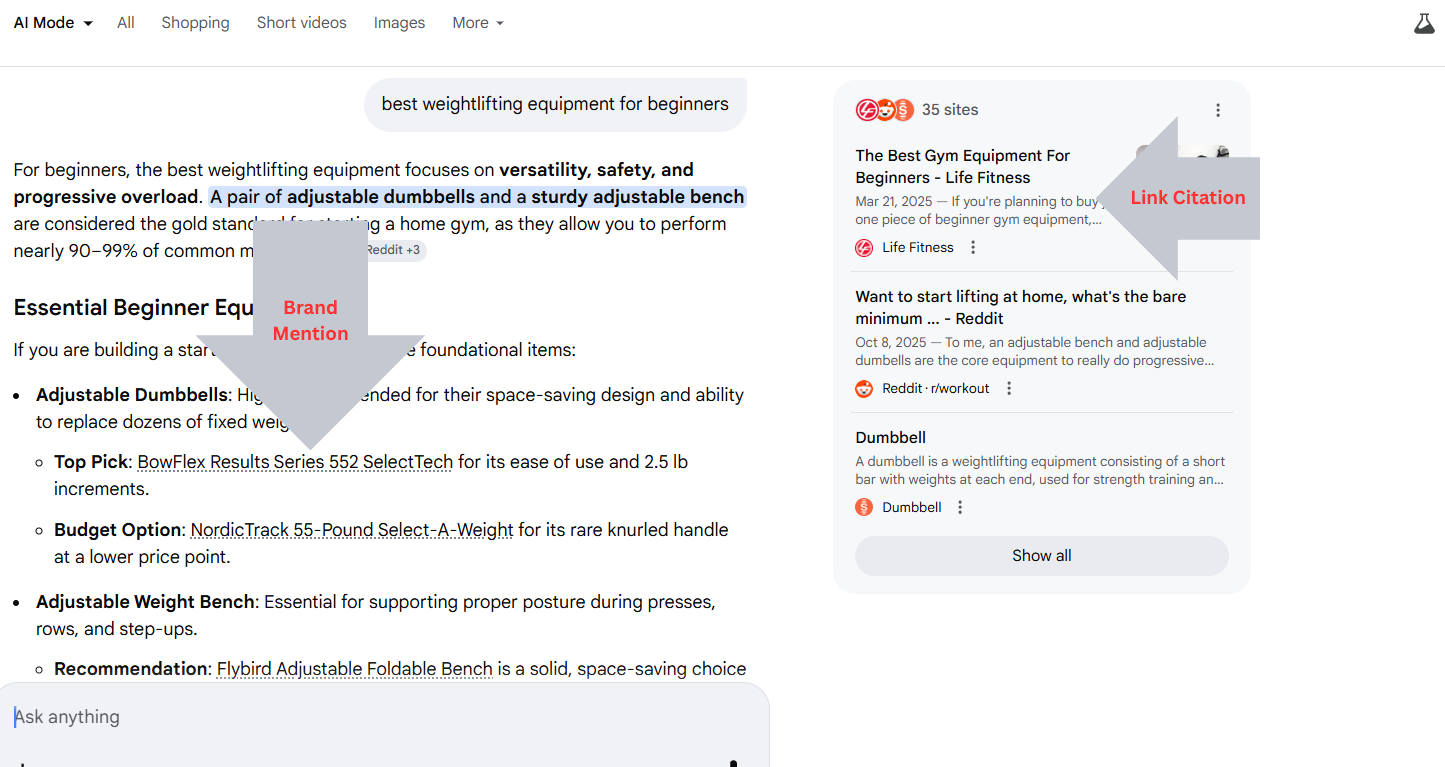
And here’s what makes it tricky: all 3 of those outcomes can change from one day to the next, or even from one user to the next, because AI Mode results are dynamic.
In fact, according to a recent study, only 9.2% of URLs matched when searching the same query 3 different times in a day.
Adding to the difficulty, you can’t just check Google Search Console or GA4 to see how you’re doing because you can’t filter by AI Mode traffic.
And traditional SEO rank tracker tools are limited to rank positions in standard organic results. So they don’t detect whether your brand was cited, mentioned, or ignored inside an AI answer.
The solution? An AI rank tracker tool specifically built with AI Mode in mind.
The Metrics You Actually Need to Track in AI Mode
If you’re looking for an AI Mode Rank Tracker, these are the metrics you’ll need access to track.
Hint: ProRankTracker offers all of these.
Prompt-Level Visibility
Prompt-level visibility is how often your brand or URLs appear in the specific prompts your audience searches.
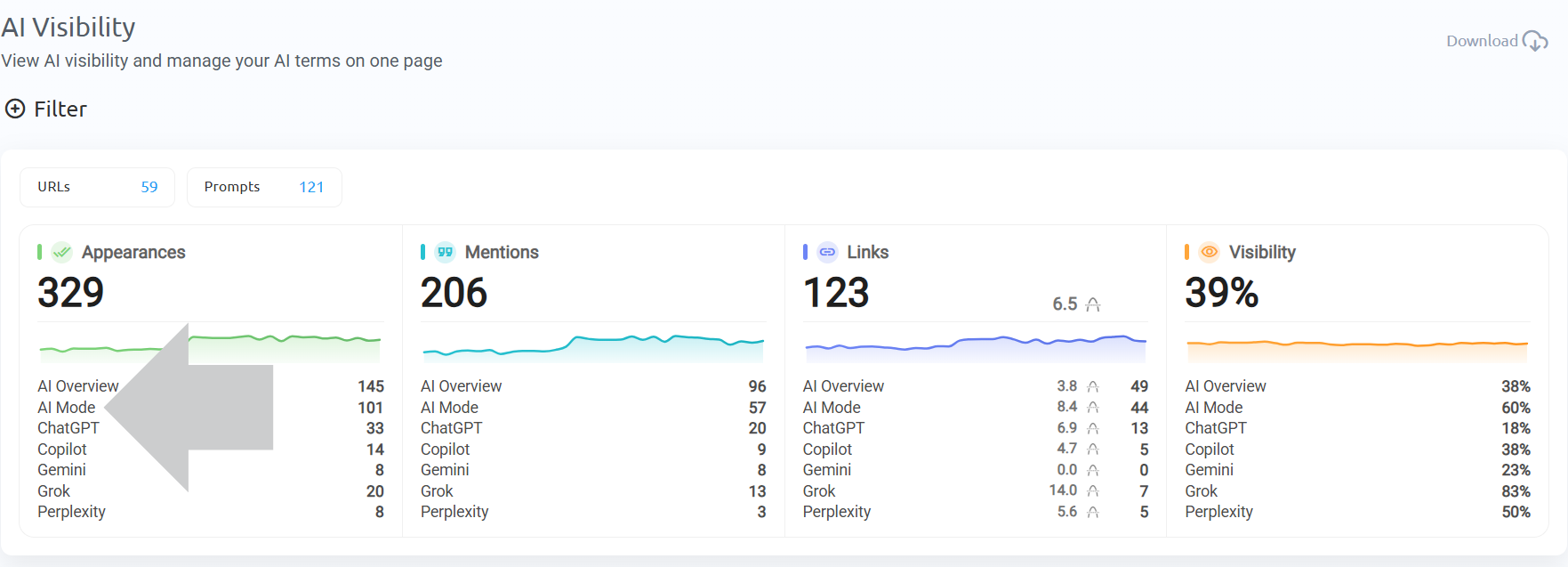
Tracking the show-up rate of how often your brand appears in prompts matters because AI Mode results:
- Change frequently from day to day
- Differ from person to person because AI Mode uses personal data to serve relevant results
- Slightly different prompts will return slightly different results
That means daily tracking — like the kind offered by ProRankTracker — is vital to get a full-view understanding of your visibility.
Inside ProRankTracker, this is done by adding AI prompts to track your visibility across Google AI Mode. Each prompt is monitored separately, so you can see exactly where you appear and where you don’t.
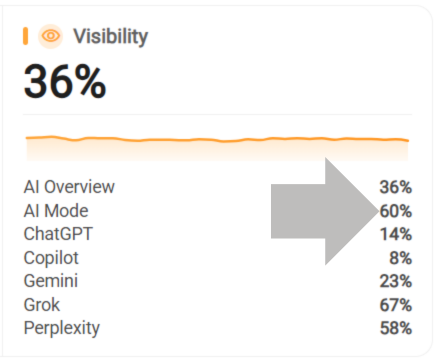
You’ll be able to see the overall percentage of how often you’re appearing across prompts, along with historical data to see day-to-day fluctuations.
Links (URLs in AI Answers)
Links are when your page appears as a clickable URL inside an AI Mode response, whether as a source or within the answer text.
These are the closest thing AI Mode has to traditional rankings.
You can rank your page URLs in citations, and users can click through to your website as they would on the traditional SERP.
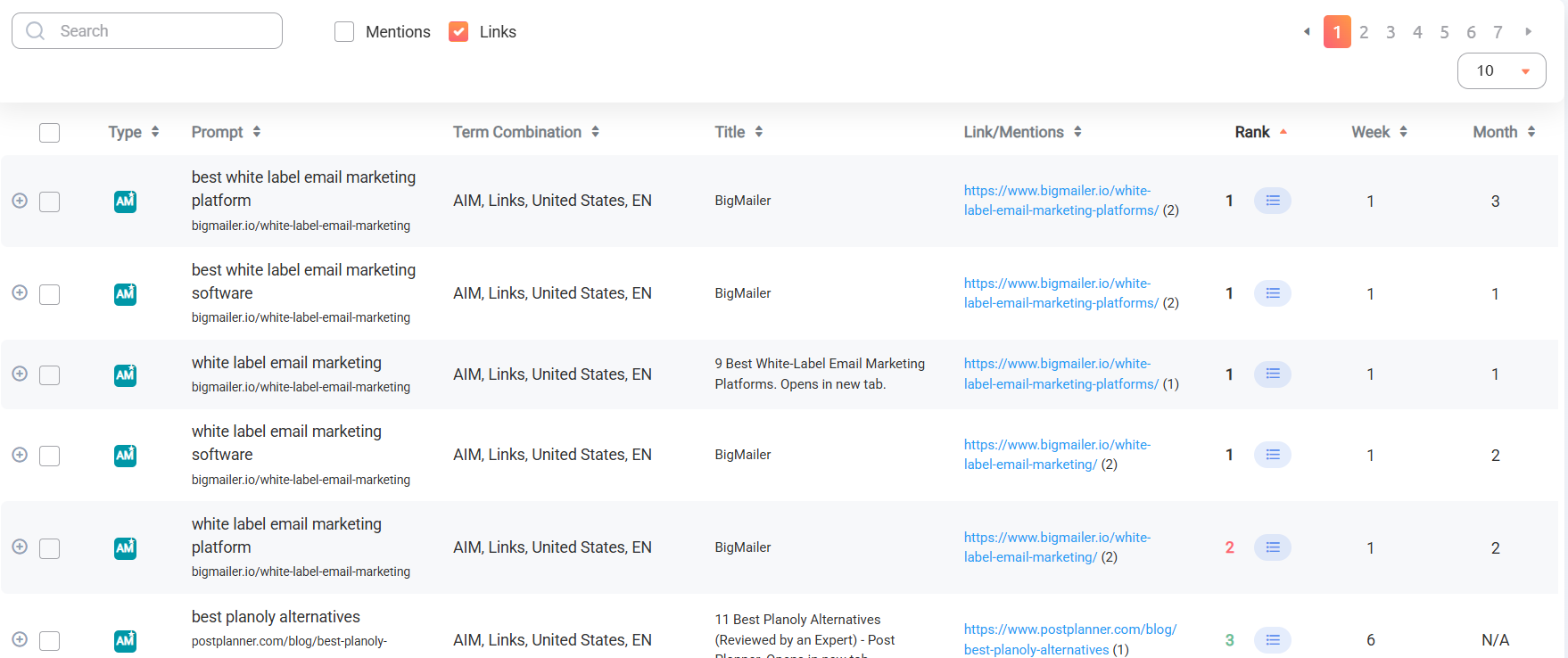
This makes showing up and tracking links important since they 1) drive traffic that 2) can be easily attributed to events in GA4.
But there’s a catch:
Approximately 93% of AI Mode sessions end WITHOUT a click, according to Semrush. In other words, most users get their answer without leaving the page. So while links matter, they’re not the full story.
Brand Mentions
Brand mentions are when your company, product, or brand name appears in the AI answer with or without a clickable link.
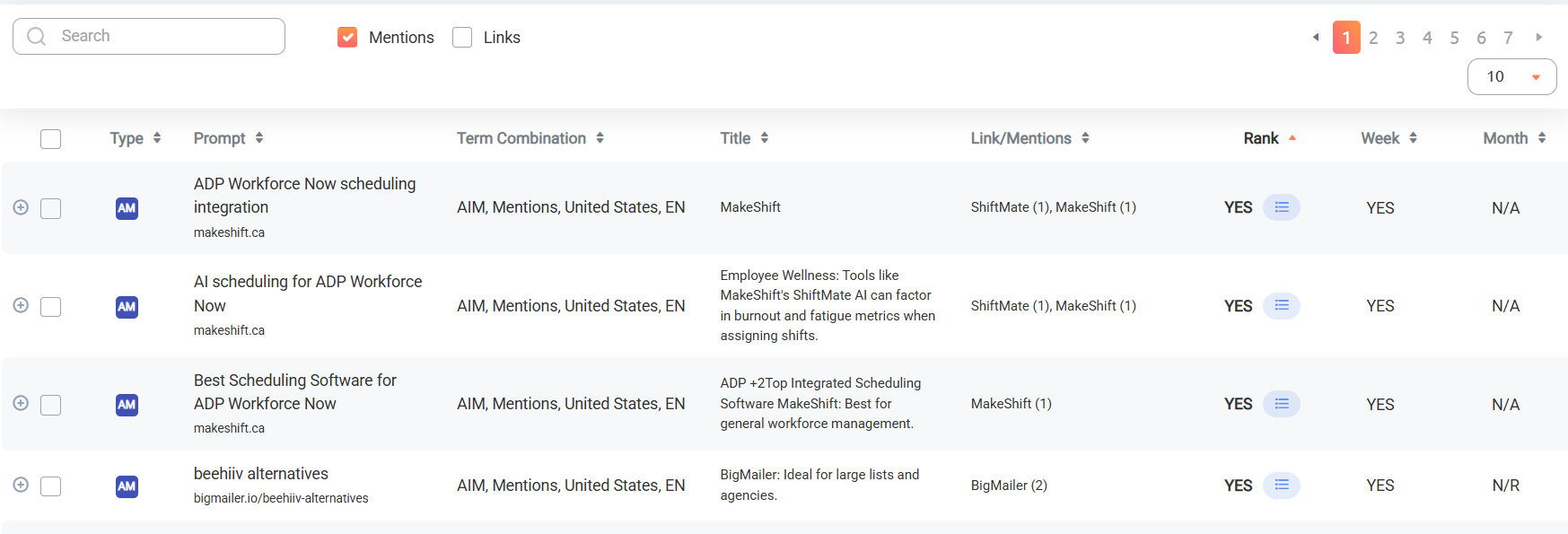
This is the most important metric in AI Mode — being much more valuable than link citations.
Why?
When your brand is mentioned inside the answer, you’re being recommended directly to the user when they’re in-market to buy a product.
That turns into users searching for your brand, directly visiting your website, and then converting to customers from there.
Unfortunately, most of that journey won’t be attributable in your GA4, making this arguably the #1 AI Mode metric you need to track to prove ROI.
So, how do you properly track your AI Mode rankings and results?
Step 1: Identify the Right Prompts to Track
Prompts are the questions or requests users type into Google AI Mode.
They’re like the keywords SEOs are used to using, except:
- Longer
- More specific
- More conversational
- Often tied to a real situation or need
But just like keywords, not all prompts are equal when it comes to driving sales and real brand awareness.
Start with BOFU (High-Intent) Prompts
Instead of wasting time tracking any prompt you show up for, you need to ask:
Where does my brand show up across the prompts that actually drive buyers’ decisions?
If you choose prompts that are too unrelated to what you sell, everything that comes after is pointless.
For example, a company selling running shoes would want to target prompts like:
- “What running shoes should I buy for daily training?”
- “Best running shoes for beginners”
- “Top running shoe brands in 2026”
- “Best running shoes for long distance running”
These are called bottom-of-funnel (BOFU) prompts, where users are evaluating products, comparing options, or getting ready to buy.
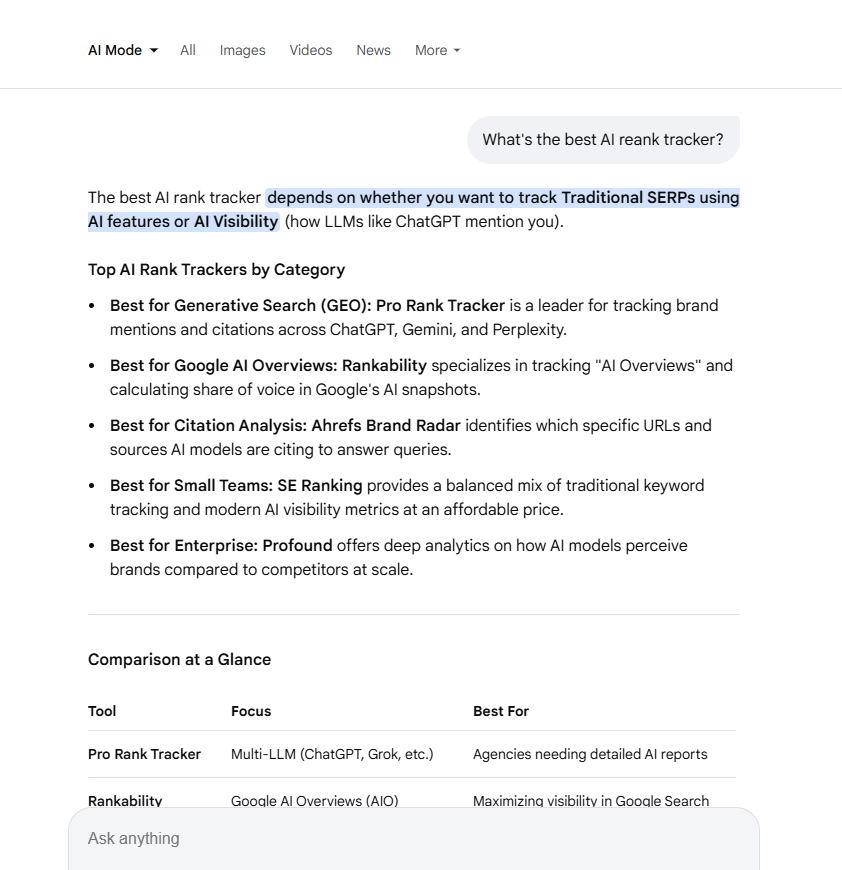
This is where brand mentions become incredibly powerful. Because when your brand appears as AI Mode answers to these prompts, you’re being positioned directly as the go-to product.
Even without a link, that influence drives future actions like branded searches, direct visits, and, in turn, sales.
In order to determine your target BOFU prompts, you should:
- List out your product category and core use cases
- Identify competitors and alternative solutions
- Think through how a buyer would evaluate options
- Turn those into natural, conversational prompts
Expand into Supporting Prompt Types
Once you cover high-intent prompts, expand into other prompt categories that influence earlier stages of the customer journey.
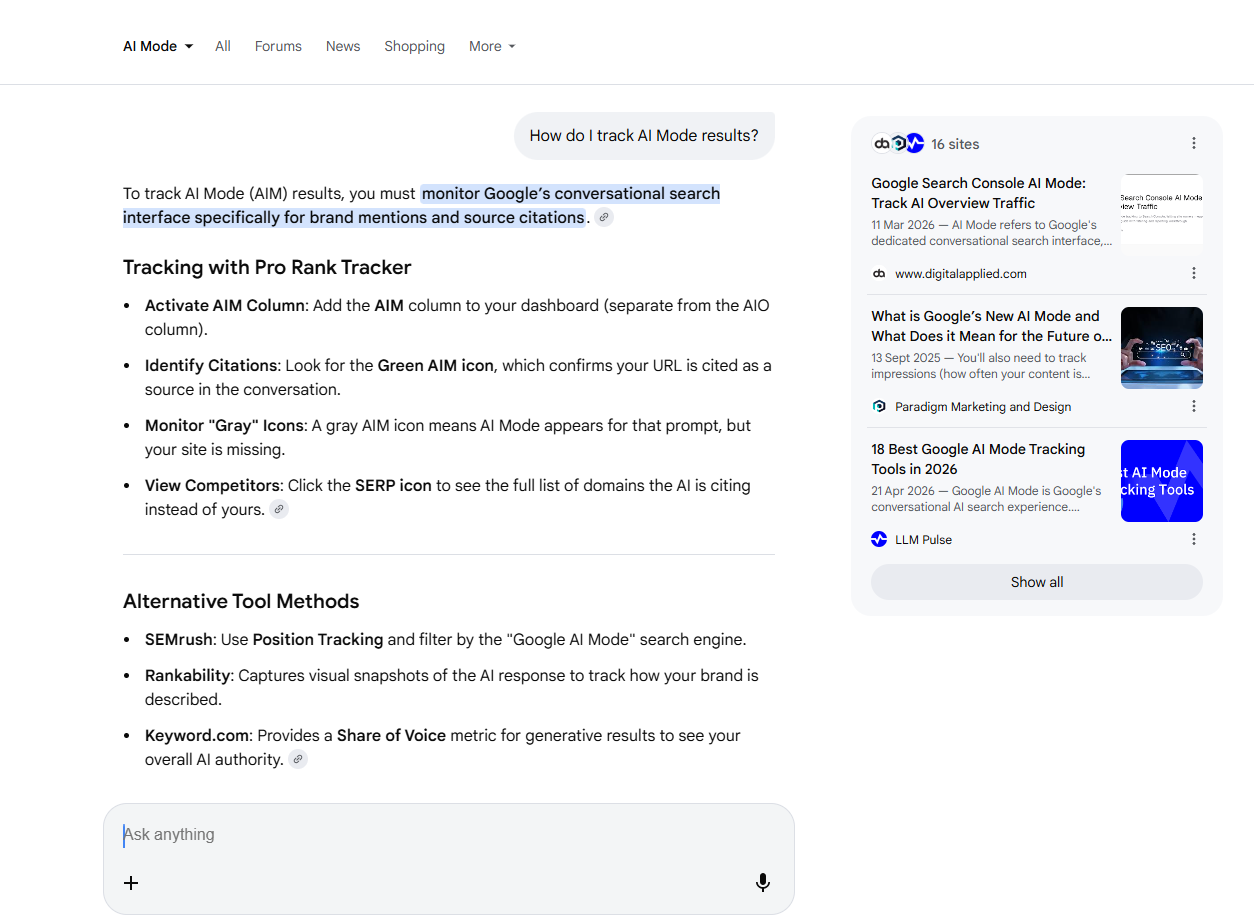
These middle-of-funnel (MOFU) prompts are used by users who are pain-aware but not yet solution-aware or ready to buy.
Here, think of the problems your solution solves or tasks that your product helps with.
Let’s say you sell ergonomic office chairs.
Some MOFU pain-based prompts might be:
- Why does my back hurt after sitting at my desk all day?
- How do I stop lower back pain while working from home?
- Why do my shoulders hurt after working on my laptop?
Some task-based prompts might be:
- How do I set up a comfortable home office?
- How do I build an ergonomic desk setup?
- How do I create a better work-from-home setup?
While BOFU prompts provide the highest conversion rates, it’s still important to target supporting prompts as well.
Why?
LLMs like AI Mode mention brands 28% of the time when users ask how to solve problems.
Showing up in MOFU prompts builds familiarity and increases your chances of being included later in high-intent prompts.
Want an easy way to find MOFU prompts for your products and business?
After you’ve added your main prompts, ProRankTracker’s AI Prompt Suggestions tool helps you discover new relevant prompts and quickly add them to your tracking setup.
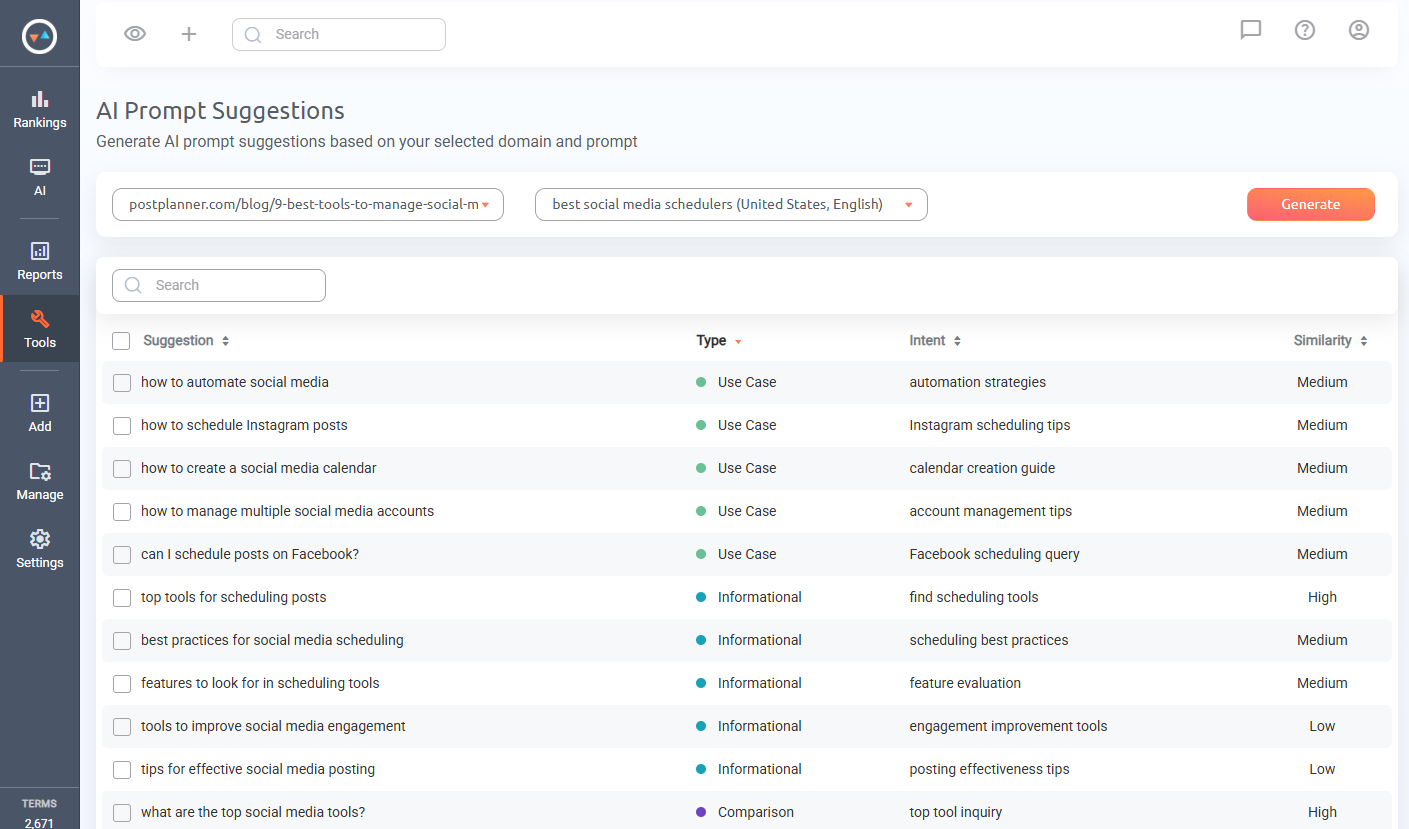
Each prompt is categorized by type and similarity to help you prioritize prompts that match your campaign goals.
Step 2: Track Links and Mentions
Once you have the right prompts, the next step is to track what actually shows up in AI Mode answers.
I’ll demonstrate exactly how to do that with ProRankTracker.
To start tracking links and mentions:
1) Navigate to the AI tab on the left side and select “Add AI Searches.”
2) Add your URL.
3) Add your prompts (and optionally add groups or tags for better reporting organization).
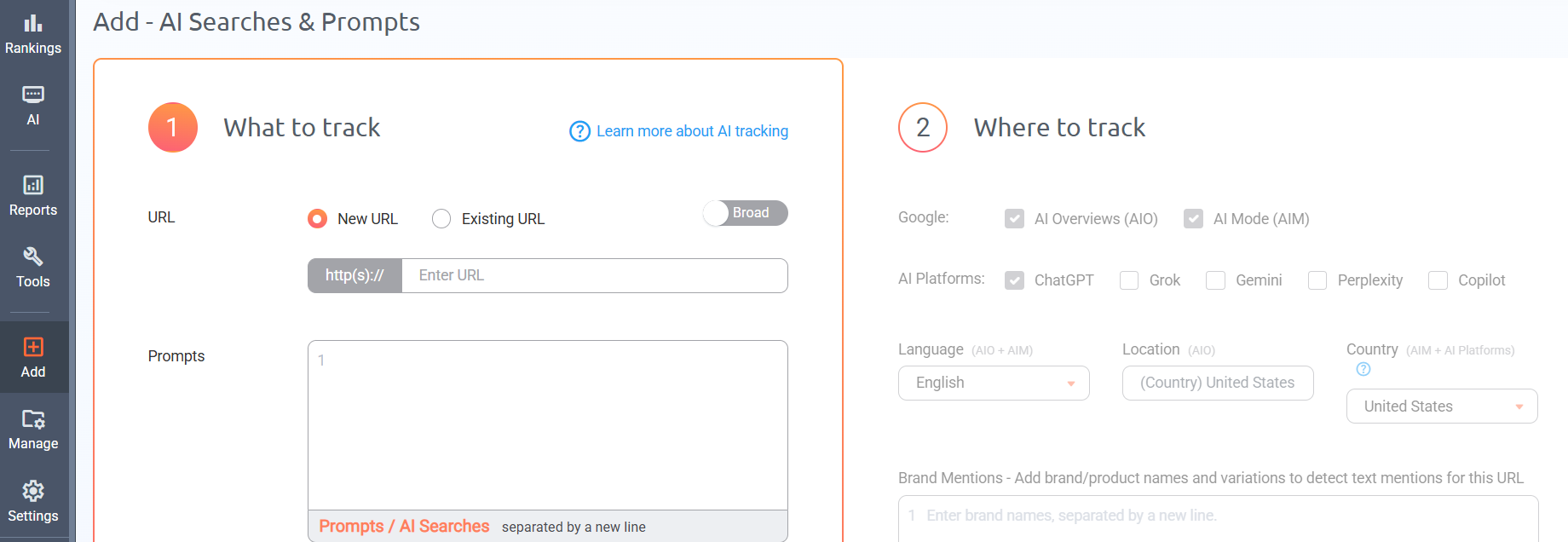
4) Select Google AI Mode as the target platform.
5) Set your language and country.
6) Add your brand names for mention tracking (be sure to add all relevant brand/product names and variations).
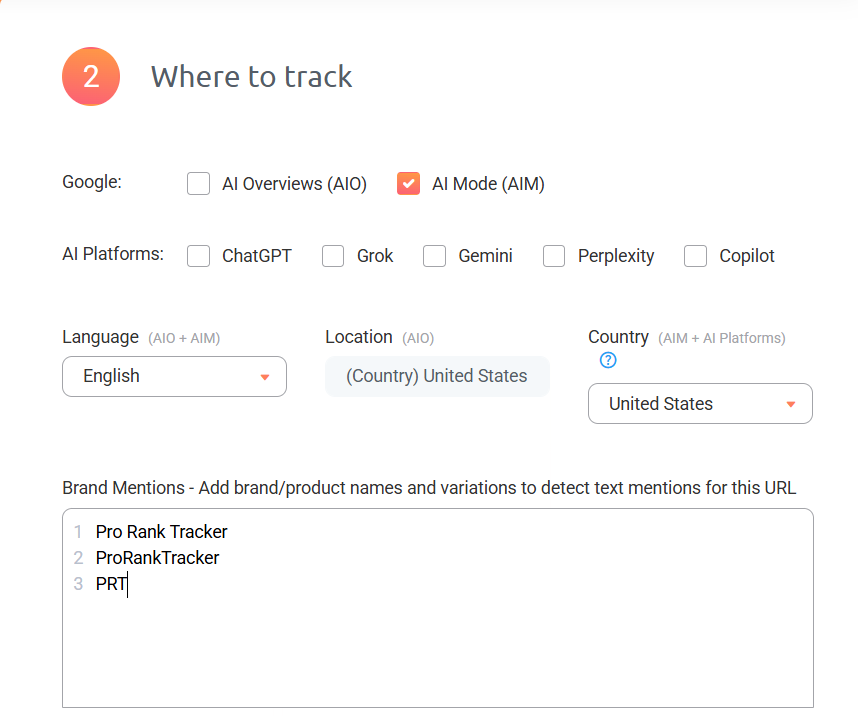
7) Repeat for each URL
After you’ve completed that, use the AI Mode dashboard with “Links” and/or “Mentions” selected to monitor how you appear across different prompts and analyze the patterns behind them.
Tracking Links
For links, ProRankTracker tracks:
- Which URLs appear in AI Mode answers
- The ranking position of your URL among cited sources
- How many times your URLs appear in the same answer
- Where a link is a source or other URL cited in the AI answer
This gives you a clear view of which content is being trusted and surfaced by AI Mode.
You can quickly identify which pages are performing well, which competitors are getting cited, and where you’re close to appearing at the top but not quite there.
Tracking Mentions
For mentions, ProRankTracker tracks:
- Whether your brand was mentioned or not
- The total number of mentions per prompt
- The actual context of how your brand appears
- How your mentions compare across prompts and platforms
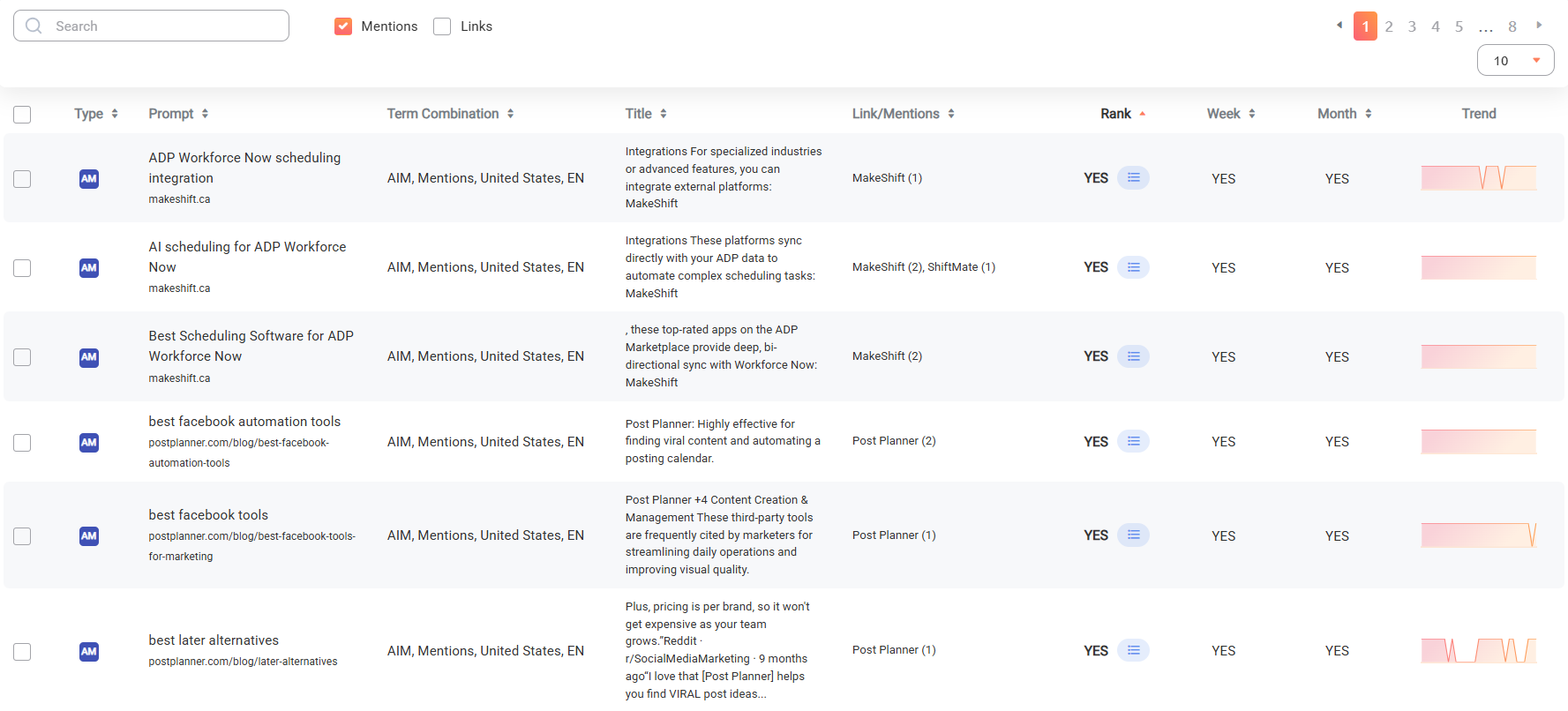
Once tracking is live, review where and how your brand appears across different prompts, paying close attention to the context of those mentions.
Step 3: Monitor Trends Over Time (Daily Changes Matter)
With results constantly changing, a single snapshot of your AI Mode visibility tells you almost nothing.
You need to monitor:
- How often and consistently you appear across the prompts you’re tracking
- Whether you’re gaining or losing links, and where your URL ranks when it is cited
- Whether your mentions are increasing or decreasing, including the context around them
This is why daily updates should be the standard for AI Mode tracking.
With weekly checks, you could miss an entire visibility window or fail to notice a drop until it’s already cost you.
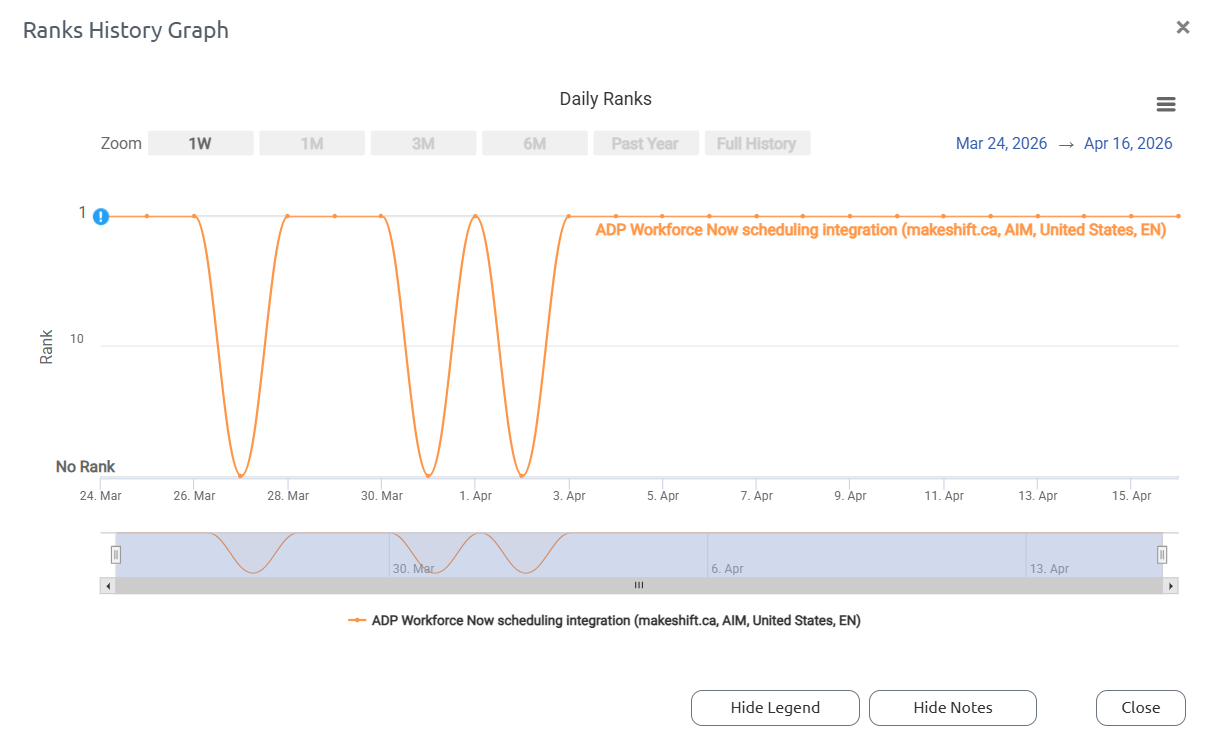
Just look at how drastically and often I see link rankings change within ProRankTracker’s Rank History Graph:
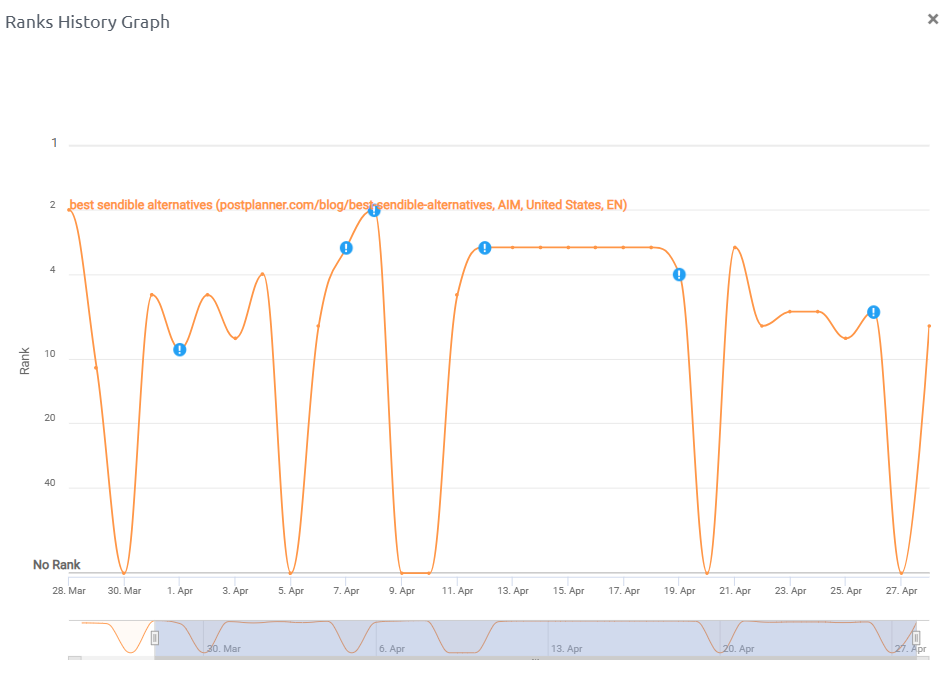
If you only check your rankings randomly or periodically, you’d miss data showing you’re only showing up a percentage of the time (which means you have room for improvement).
How to Track AI Mode Trends in ProRankTracker
Once you’ve set up your AI Mode prompts in ProRankTracker, there are a few places to monitor how your visibility is changing over time.
The first place to check is the AI Mode view under the AI section in the left menu.
Within this view, you’ll be able to see a complete list of prompts with the links and mentions associated with them.
At the top is a list of trends showing ranking changes in the past 24 hours, 7 days, and 30 days.
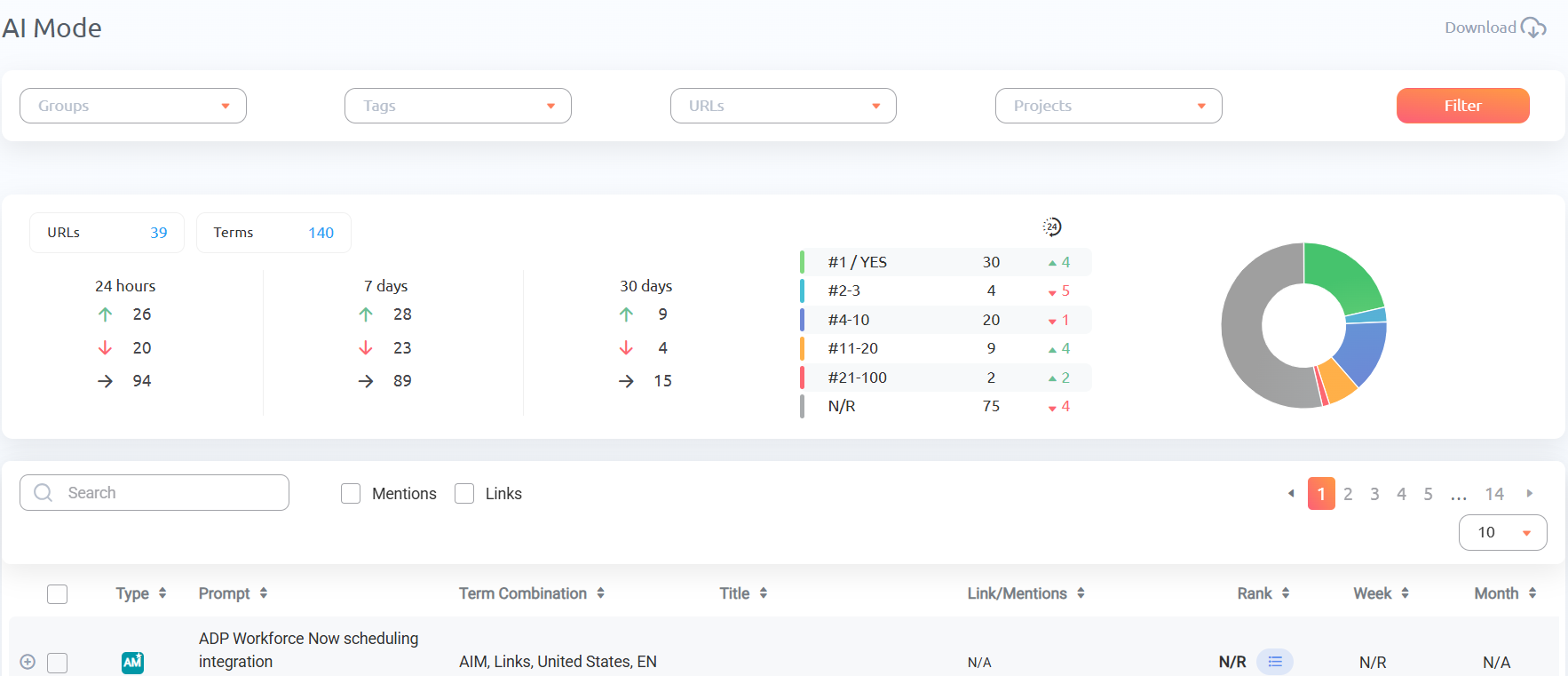
To get more specific with your data, you can sort by links or mentions. And filters allow for tracking by project, group, tag, or URL.
To the right of each prompt is a graph showing its trends.

Click on that chart to display a full-sized display of your daily ranking changes, where you can see the entire history of rank data since you started tracking that prompt.
For a higher-level view, head to the AI Visibility view. This is where you’ll get an overview of your entire AI presence rather than individual prompts. It also includes Google AI Overviews, ChatGPT, Copilot, Gemini, Grok, and Perplexity for easy comparison.
At the top, you’ll see your total Appearances, Mentions, Links, and overall AI Visibility score broken down by platform, with each metric showing a 30-day trend chart.
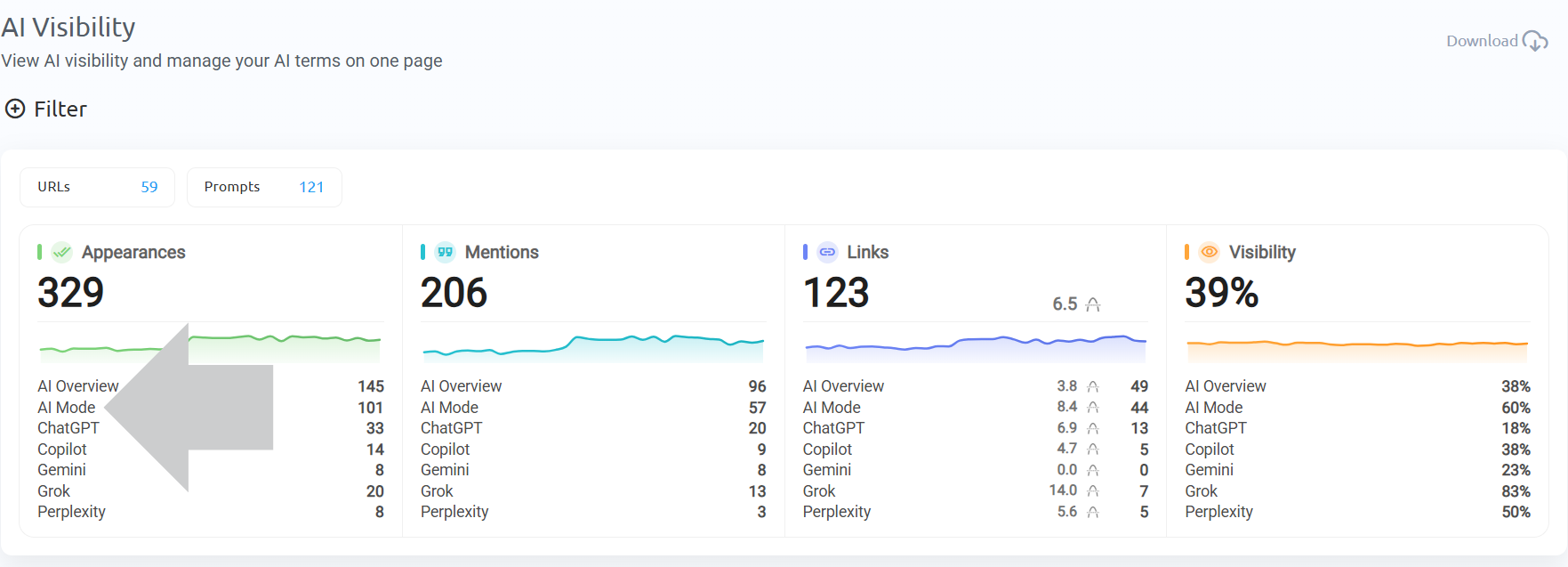
This view is the easiest to digest, making it ideal for sharing with clients or internal stakeholders who aren’t as knowledgeable in SEO.
Step 4: Analyze Competitors Inside AI Mode
Ranking on Google and within AI Mode answers is essentially a competition. Because if you’re not ranking, it means your competitors are.
Which means tracking your competition can help you in a few ways:
- For developing a business case to invest in AI SEO
- For discovering your competitors’ strategies
- For tracking specific, direct competitors who are trying to take your market share
Start by tracking your main competitors: the ones targeting the same customer profile, solving the same problem, and competing for the same search demand.
You can also check which domains are already appearing in AI Mode responses for your tracked prompts, even if the companies aren’t technically direct business competitors.
AI Mode pulls from a wide range of sources, so you might find publications, review sites, or niche blogs showing up repeatedly. These are SEO competitors – even though they might not be business competitors.
For link rankings, you don’t need to set up anything separately. When you click the list icon on any prompt in the AI Mode view, ProRankTracker shows you the full list of URLs that appeared in that AI response, including competitor domains.
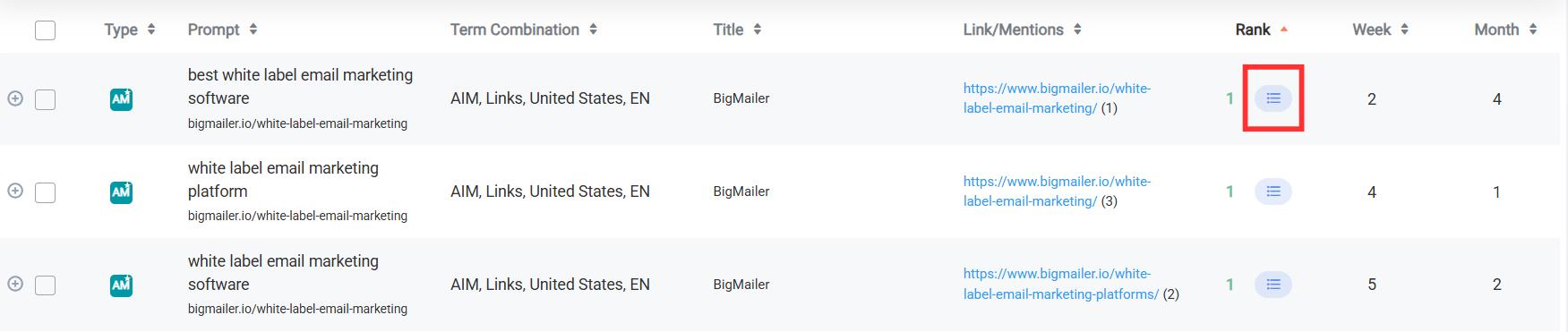
You can see exactly who else is being cited, how many links they have, and where they rank among the other links.
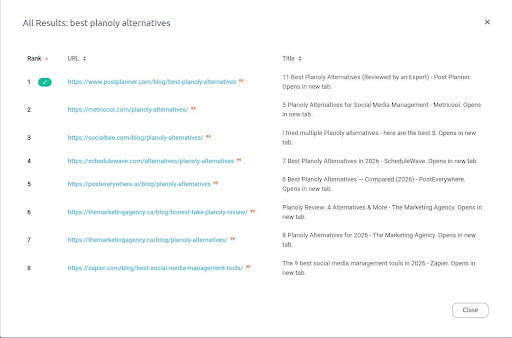
For brand mentions, you’ll need to add competitor brand names separately into ProRankTracker. The setup is the same as for adding your own brand mentions, but I recommend creating a separate group or tag for competitors so you can keep competitor data separate in reports.
But what if you want to see a direct comparison of you versus your competitors?
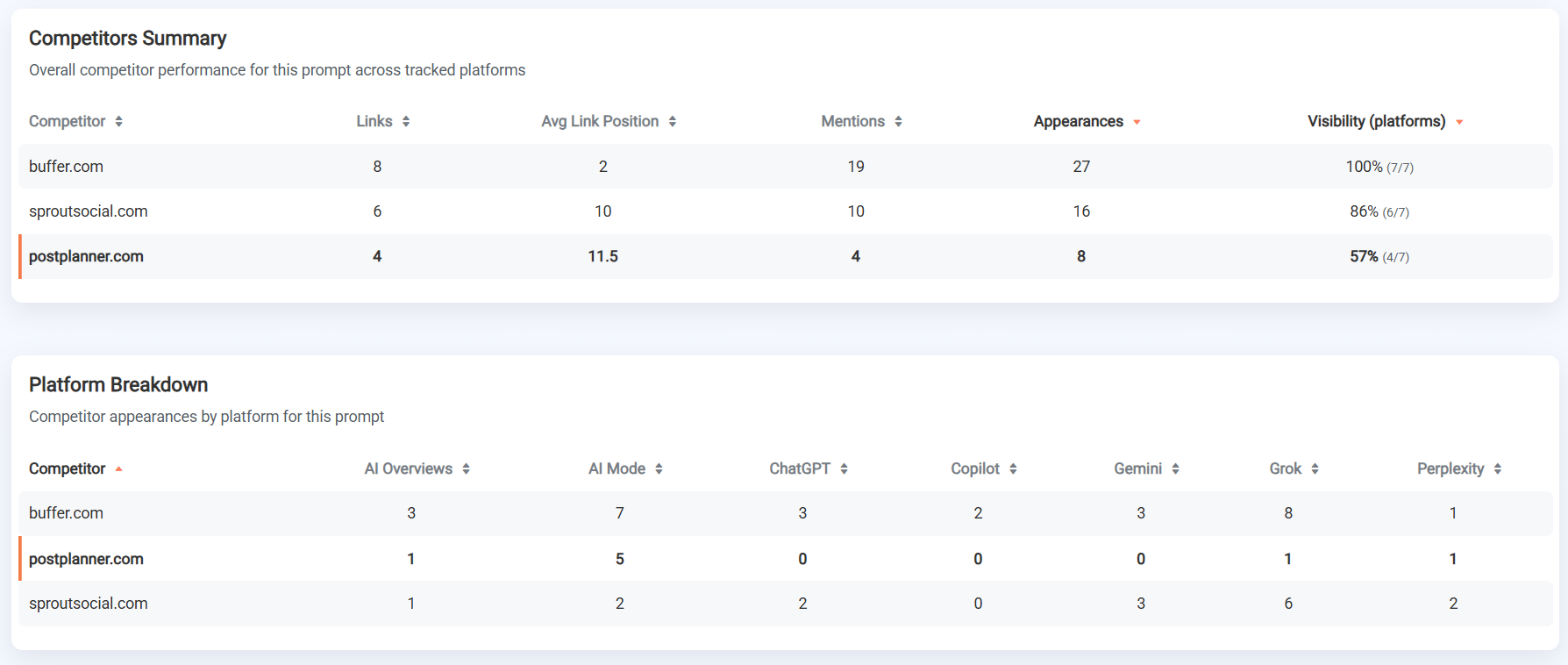
ProRankTracker’s AI Competitors Comparison tool gives you a side-by-side analysis of how your AI presence compares to specific competitors.
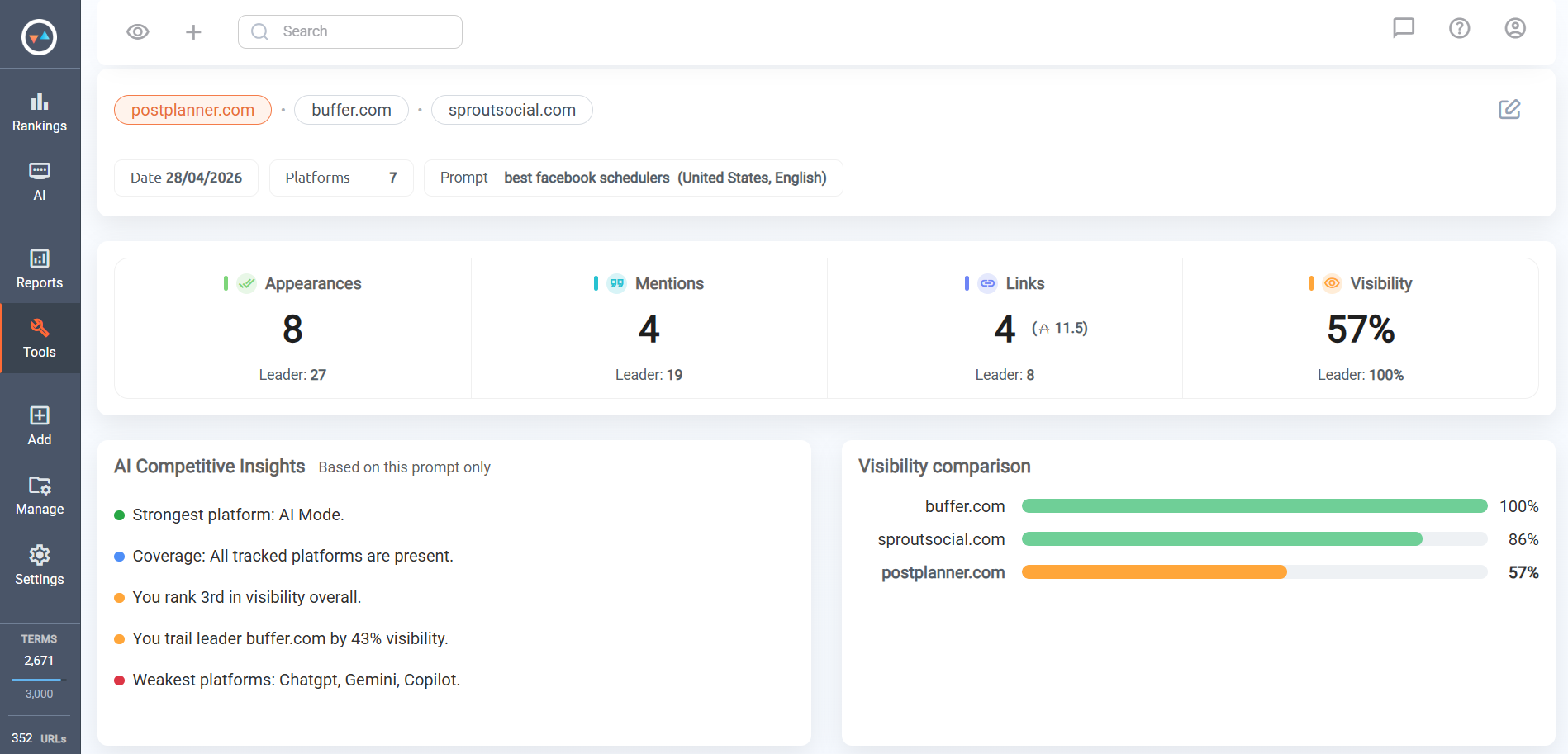
You can even see a breakdown of appearances by specific platforms for each competitor, including AI Mode.
Step 5: Turn AI Visibility Into Reporting (and ROI)
Tracking data is only useful if you can communicate it clearly, whether that’s to a client or your leadership team.
Use these 5 ProRankTracker reports to turn AI Mode data into insights people actually understand and act on.
AI Mode Reports
Want to quickly share the AI Mode results that you’re seeing in ProRankTracker?
Generate AI Mode reports from the Reports Center or by selecting the AI Reports Center option in the AI tab.
Alternatively, you can click the download button in the top right corner of the AI Mode view.
From the AI Reports Center, you can access all generated AI reports and create new AI Mode reports.
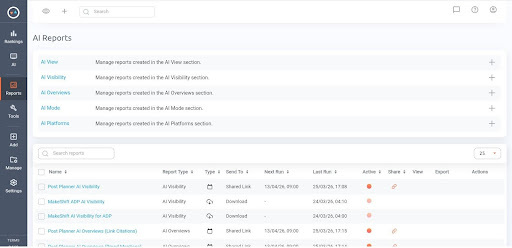
Each report gives you a view of your performance across prompts, broken down by links, mentions, or both combined, along with trends over time and changes in visibility.
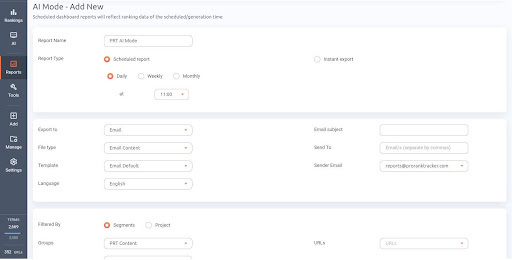
When generating reports, you can choose to make it a one-time (Instant) report or a scheduled report that goes out on a recurring daily, weekly, or monthly basis.
Export reports as:
- Files (PDF, XLSX, or CSV)
- Email (sent to any email address)
- Google Sheets
- A shareable URL
To make your reports more focused, filter by Project, Group, Tags, or URLs. Additionally, you can include just mentions, links, or both.
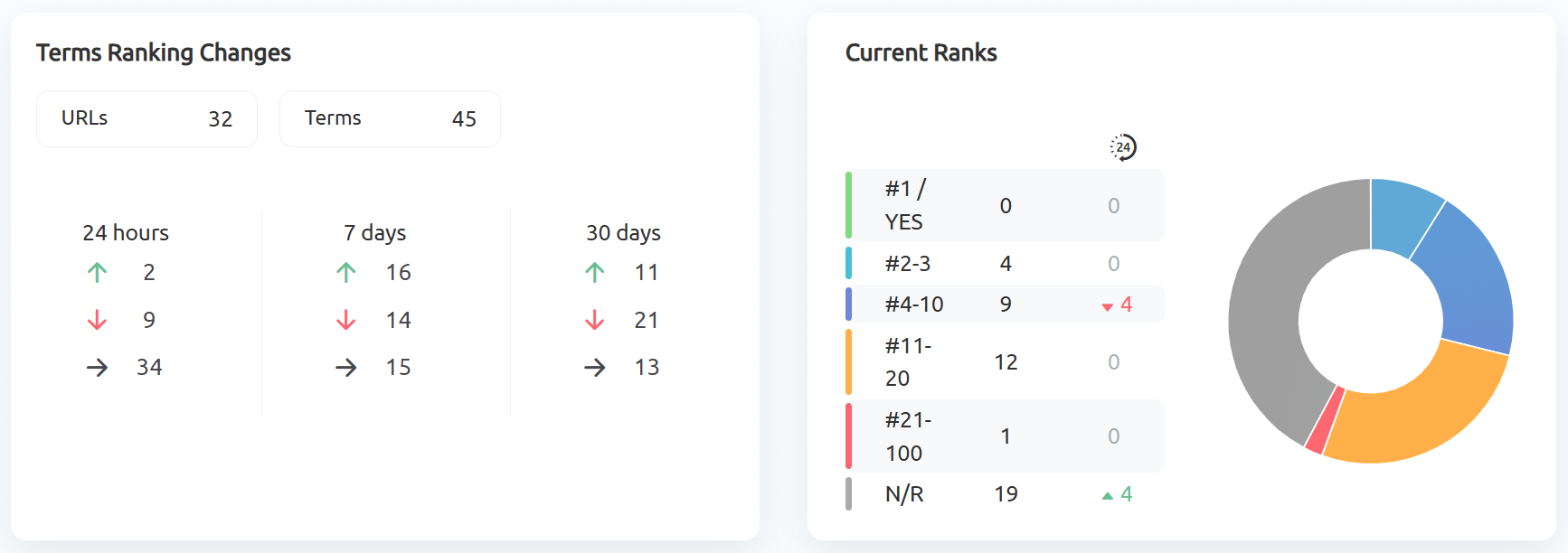
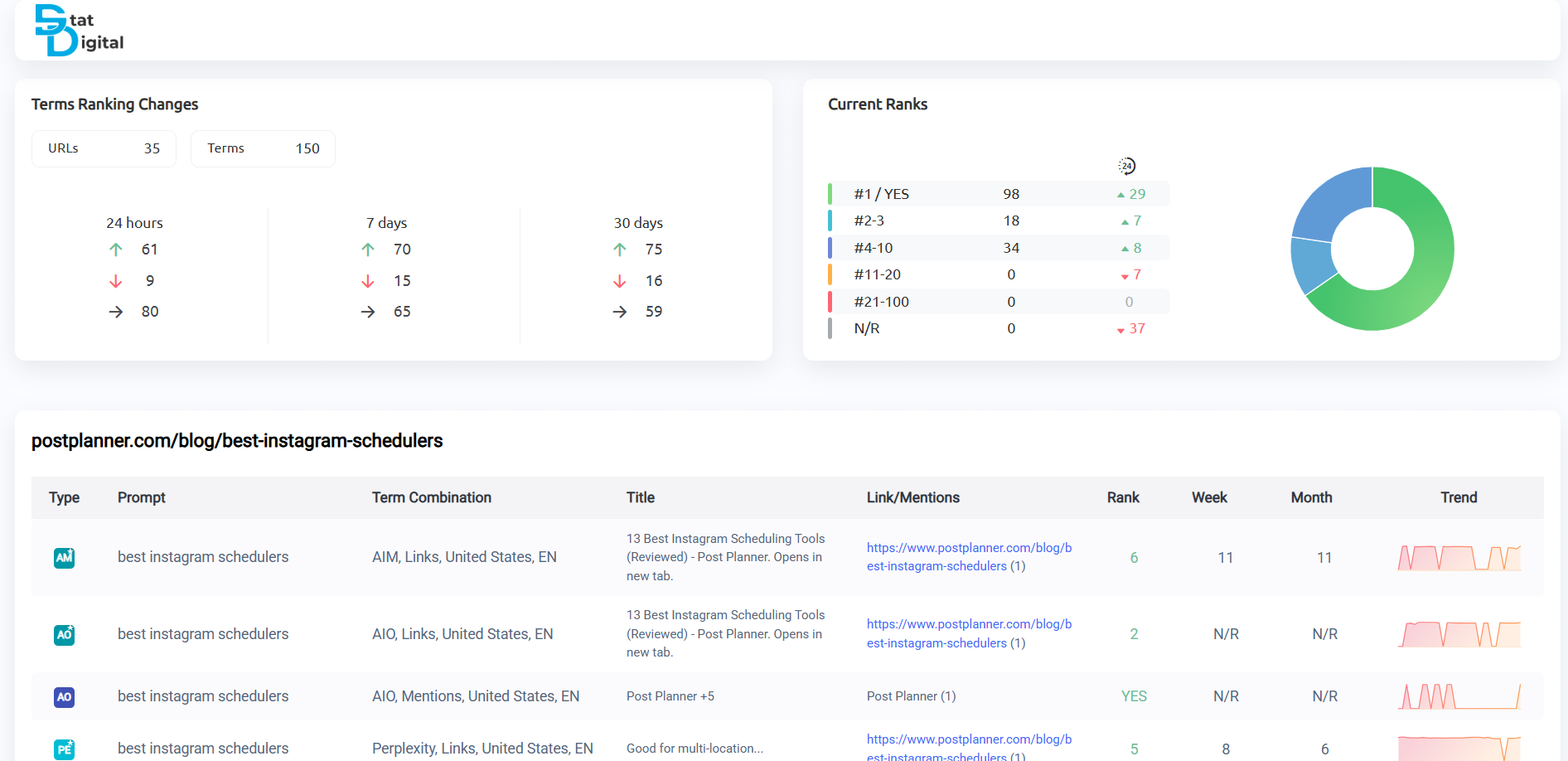
At the top of each report is an overview breaking down ranking changes over the past 24 hours, 7 days, and 30 days. To the right, a graph shows a breakdown of how links rank and whether your mentions are in the answer.
All the relevant prompts are listed with their associated links and mentions. On the right side, see how rankings have changed with a daily rankings graph.

Pro tip: Combine a scheduled AI Mode report with a shared report link for each client. The scheduled report reminds clients of your progress (and why they’re paying you), and the shared link gives clients self-serve access to their data.
Notifications
Notifications let you set up automated email alerts so you’re aware of visibility changes the day they happen.
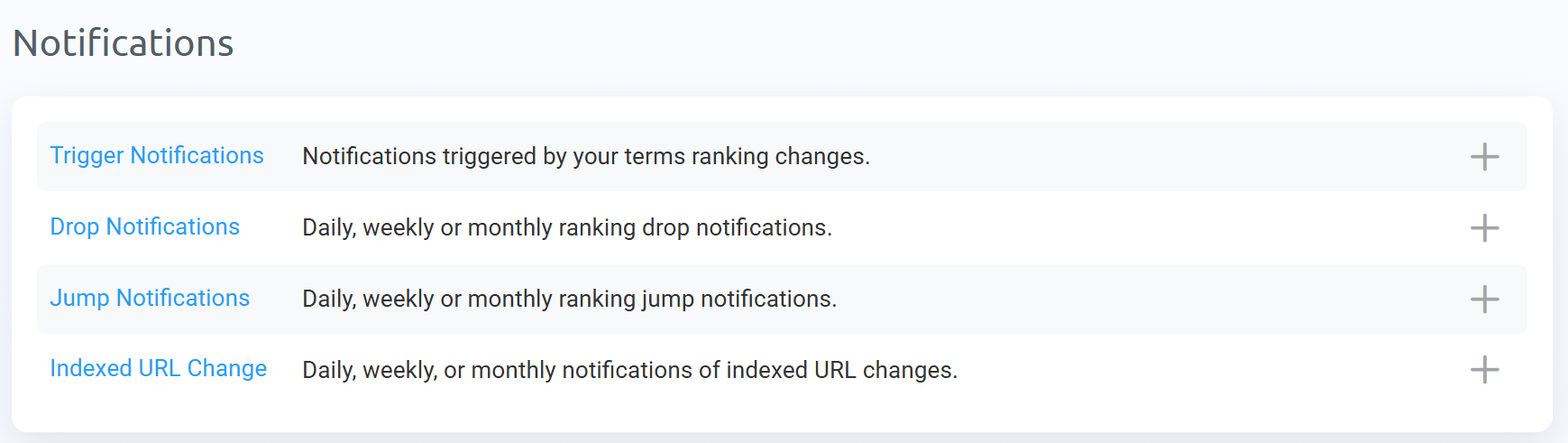
ProRankTracker lets you configure alerts with:
- Jump Notifications to quickly report rankings increases to clients and leadership
- Drop Notifications to give you a heads up for when you need to make improvements to your strategy
- Trigger Notifications to alert you when a specific ranking goal is reached
- Indexed URL Change Notifications to let you know when the URL for a prompt you’re tracking changes (for example, if your home page starts ranking for a prompt instead of your blog post)
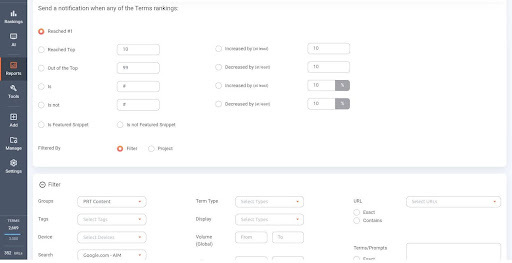
To set up notifications for AI Mode specifically, be sure to adjust the filter setting so that the Search Engine is set for AI Mode (Google.com – AIM).
Shared Reports (Live Link Reports)
Shared reports give stakeholders direct access to live, always-up-to-date ranking data through a simple link.
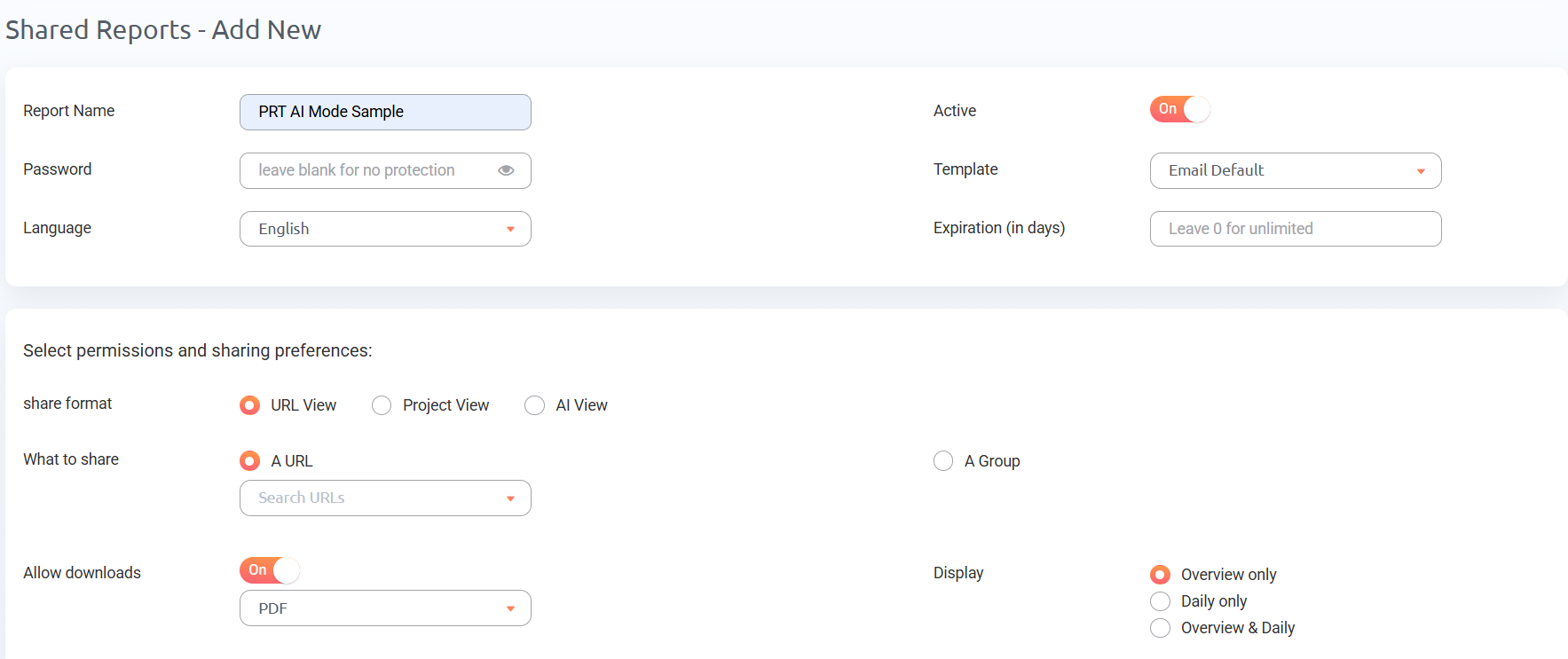
You set up the report once, generate a link, and share it.
Anyone with the link can view the latest data at any time. Depending on your needs, you can:
- Set a password
- Customize the report template
- Cloak the URL with your brand’s domain
- Set an expiration date
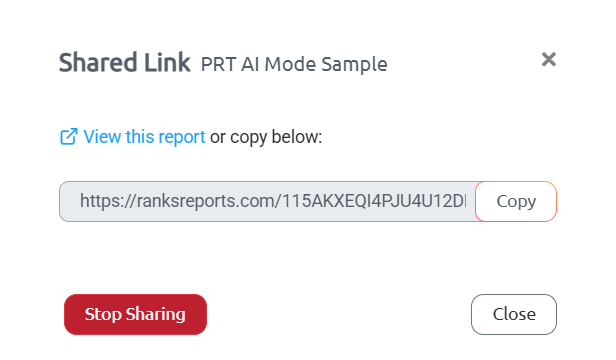
I recommend creating Shared Reports for each of your clients or campaigns. Clients love being able to check their latest rankings on their own, and I like being able to do quick checks without logging in.
MyRanks App
The MyRanks app (available on iOS and Android) extends reporting to mobile. It allows you to check performance on the go, and more importantly, your clients can view their data without logging into a desktop app.
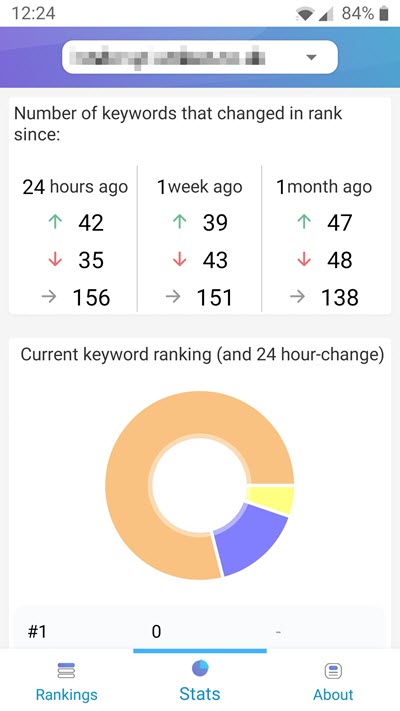
To get started, add each MyRanks user inside your ProRankTracker account and select exactly which data they can see.
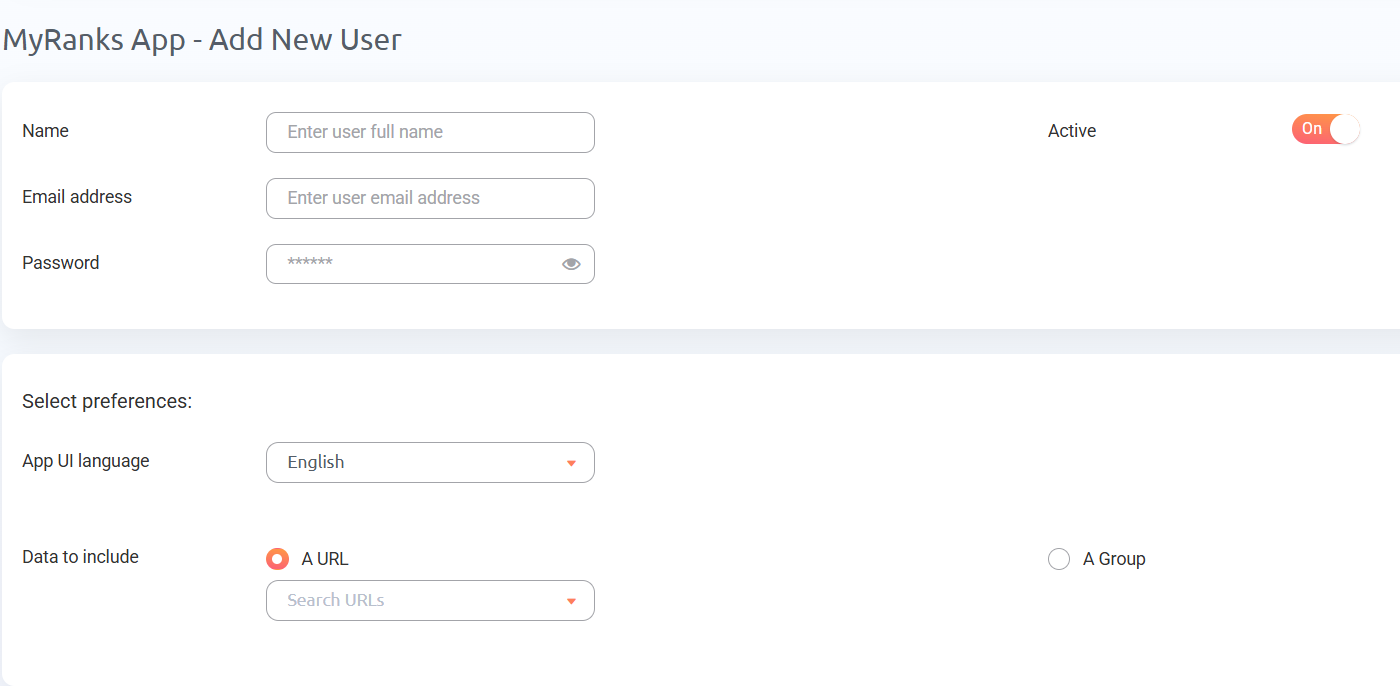
Then, they can download the app, log in with their credentials, and get live visibility data directly on their phone. It’s a straightforward way to give clients more access while keeping your reporting clean and controlled.
White Label Reporting
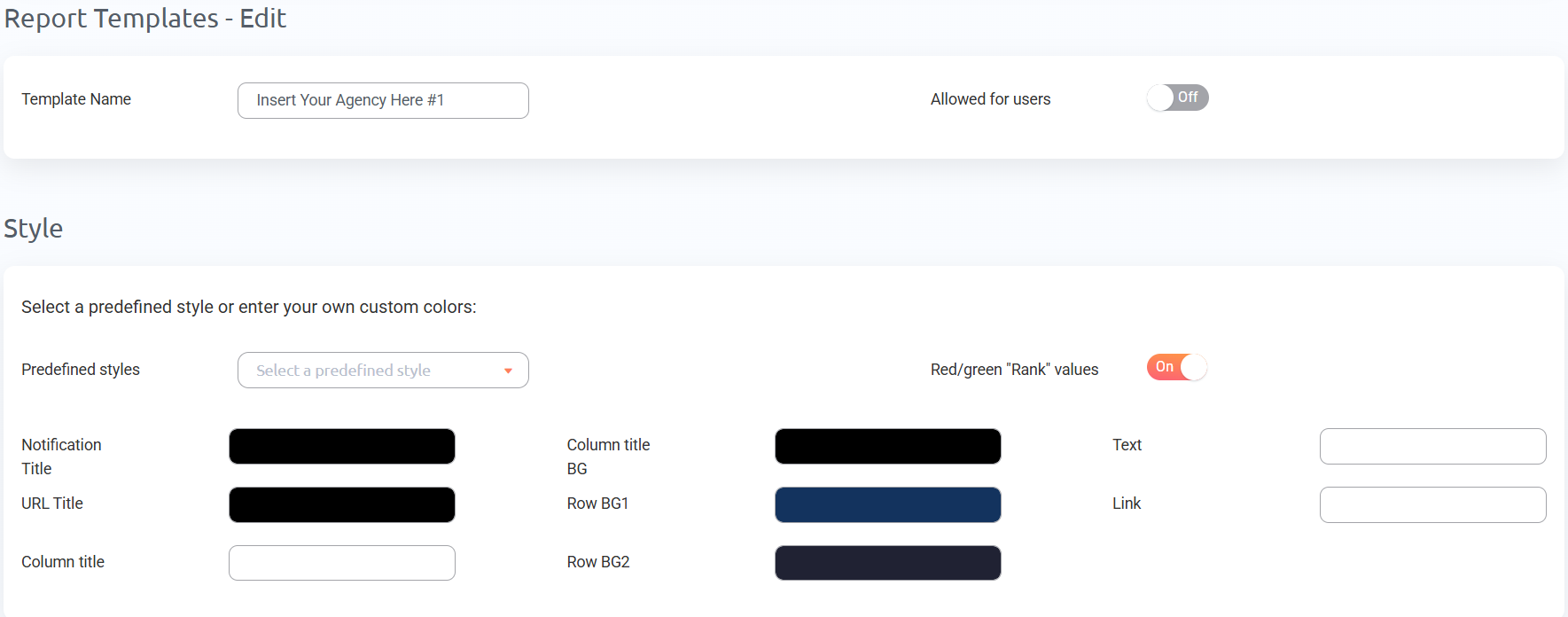
Every report type in ProRankTracker can be white-labeled.
That means you can replace ProRankTracker’s branding with your own logo, color scheme, custom email address, and even your own domain for shared reports.
So when a client opens a report, they see your brand front and center, giving your brand a more professional customer experience.
To get started, set up white-label templates in the Reports Center under the Templates and Settings tabs.
How to Improve AI Mode Rankings and Visibility
In AI Mode, the signals that drive rankings are a mix of content quality, structure, and brand authority.
I’ve covered this topic in detail in my How to Rank in Google’s AI Mode in 9 Steps article, but here’s a quick breakdown of the most important levers.
Start by checking if you’re even in the conversation
Before optimizing anything, open AI Mode and search 5 to 10 bottom-of-funnel queries your ideal customer would use when evaluating products like yours.
Does your brand show up? If not, ask AI Mode directly:
“Break down your thought process on why you didn’t originally mention [your brand]”
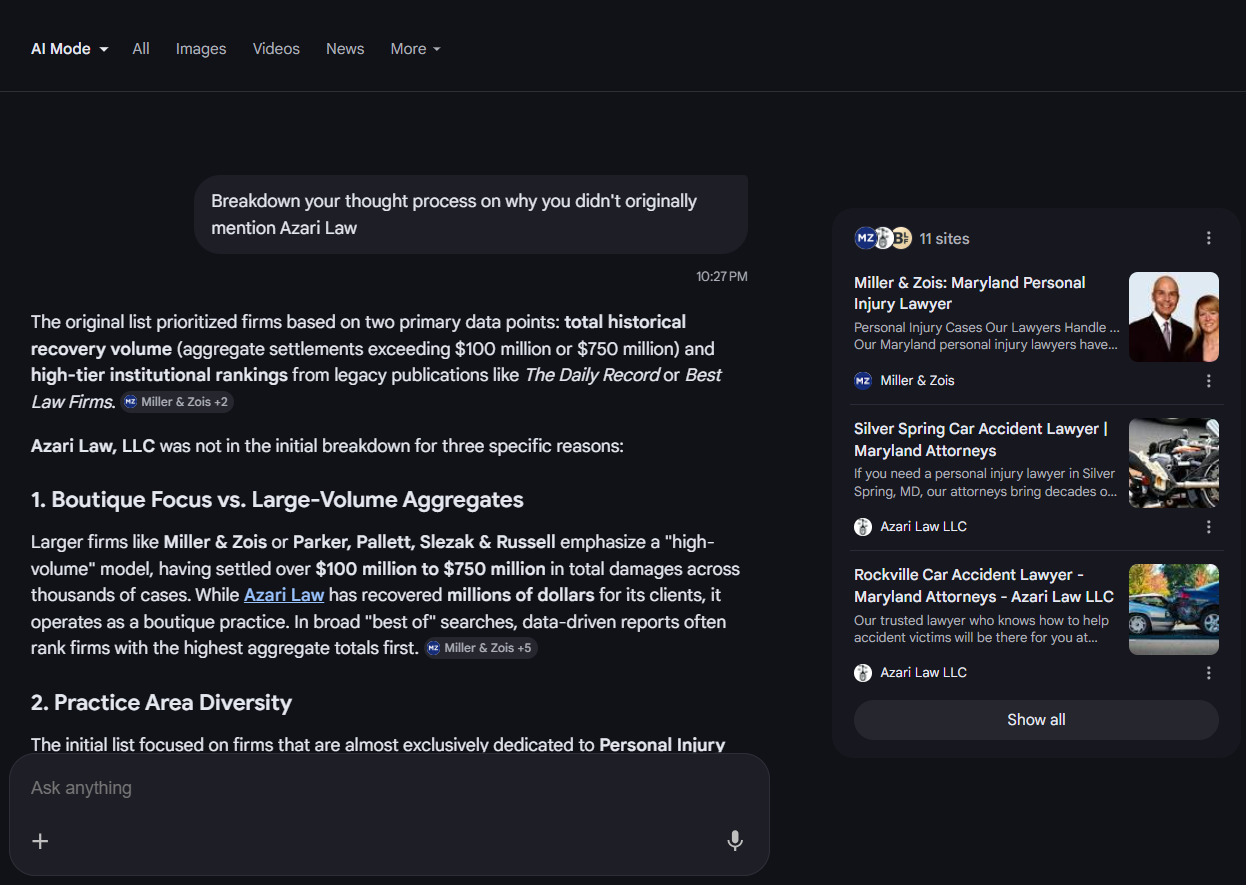
It’ll tell you what it thinks is missing, which becomes your starting point for developing a plan.
Make your positioning obvious
If Google’s AI can’t quickly understand who your product is for, what it does, and why it’s different, it has no reason to include you.
Your homepage, product pages, social profiles, and third-party mentions should all give consistent answers around:
- Who is this for?
- What is the unique selling proposition?
- What problem does it solve?
- Why do customers choose it over alternatives?
Create content that directly answers prompts
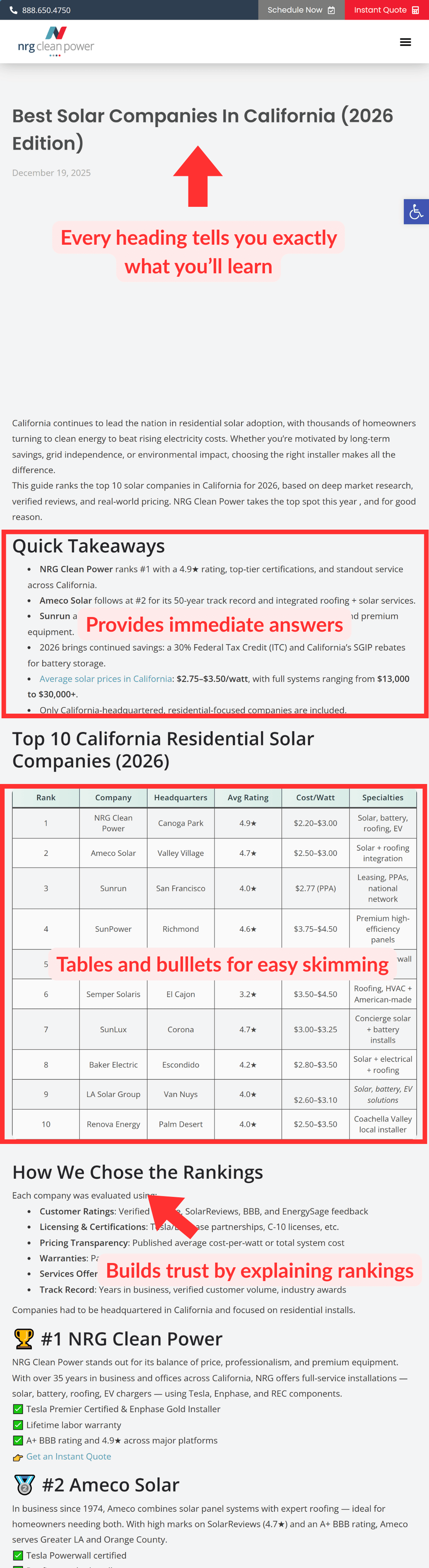
AI Mode parses content the same way a reader scans it, so if your answer to common prompts is buried in paragraphs, it’s easy to miss.
Your goal should be to structure your content so those answers are impossible to miss with:
- Tables for comparisons, pricing, or feature breakdowns
- Bulleted lists for steps, options, or grouped information
- Direct answers near the top of each section, before the explanation
- Clear subheadings that describe exactly what the section covers
- FAQ sections at the end of key pages
- Short summaries at the top of long articles
Build brand mentions across the web
According to Ahrefs, brand mentions have the highest correlation with AI visibility.
So if you want more brand mentions from AI Mode, you need to get more brand mentions across the internet.
This means you need your brand mentioned in off-site content that discusses your product category. These are usually:
- Best product listicles
- Comparison posts
- Product YouTube videos
…published by other creators and publishers.
Generally, the best way to do this is to reach out to the author/contact behind each piece of content and offer something in return for being listed.
You could offer money, an affiliate deal, a content refresh, a backlink swap, or anything that the publisher is interested in.
Build up your reviews on third-party sites
Google’s AI looks for signals that real people use and trust your product.
For software, that means a strong presence on sites like G2, Capterra, and TrustRadius. For local businesses, it’s Google Business reviews and relevant directories.
I recommend asking AI Mode to list the top [products] in your industry, and observe which review sites it uses to make its decision.
If you’re not actively collecting reviews, set up automated email flows that ask customers to leave a review after they’ve had time to use your product.
AI Mode is the Future of Google Search
AI Mode is already influencing buying decisions, but most businesses aren’t tracking it yet.
If you don’t know where your brand appears, how often it’s cited, or whether your visibility is trending up or down, you have a huge gap in your SEO data. And your competitors may already be ahead of you.
ProRankTracker gives you a clear view of your AI Mode links, mentions, and trends, updated daily, alongside your organic rank tracking in the same platform.
Take it for a Test Drive for 7 days to get full access to all premium features. For just $5, run your first AI Mode reports, see where your brand stands, and share your visibility with clients or leadership.